Você sabia que o All in One SEO pode gerar conteúdo de texto para você com apenas um prompt simples?
O Assistente de IA no All in One SEO é um bloco para o Editor de Blocos do WordPress que criará o conteúdo de texto que você precisar.
Neste artigo, veremos como usar este assistente versátil.
Neste Artigo
Primeiros Passos com a IA do AIOSEO
Os recursos de IA do All in One SEO dependem de um sistema de créditos. Você pode comprar blocos de créditos ou usar os créditos que recebe como parte de sua assinatura do All in One SEO Pro.
Para começar, você precisará verificar se tem créditos de IA. Para fazer isso, clique em Configurações Gerais no menu All in One SEO e role para baixo até a seção Créditos de IA na aba Licença.
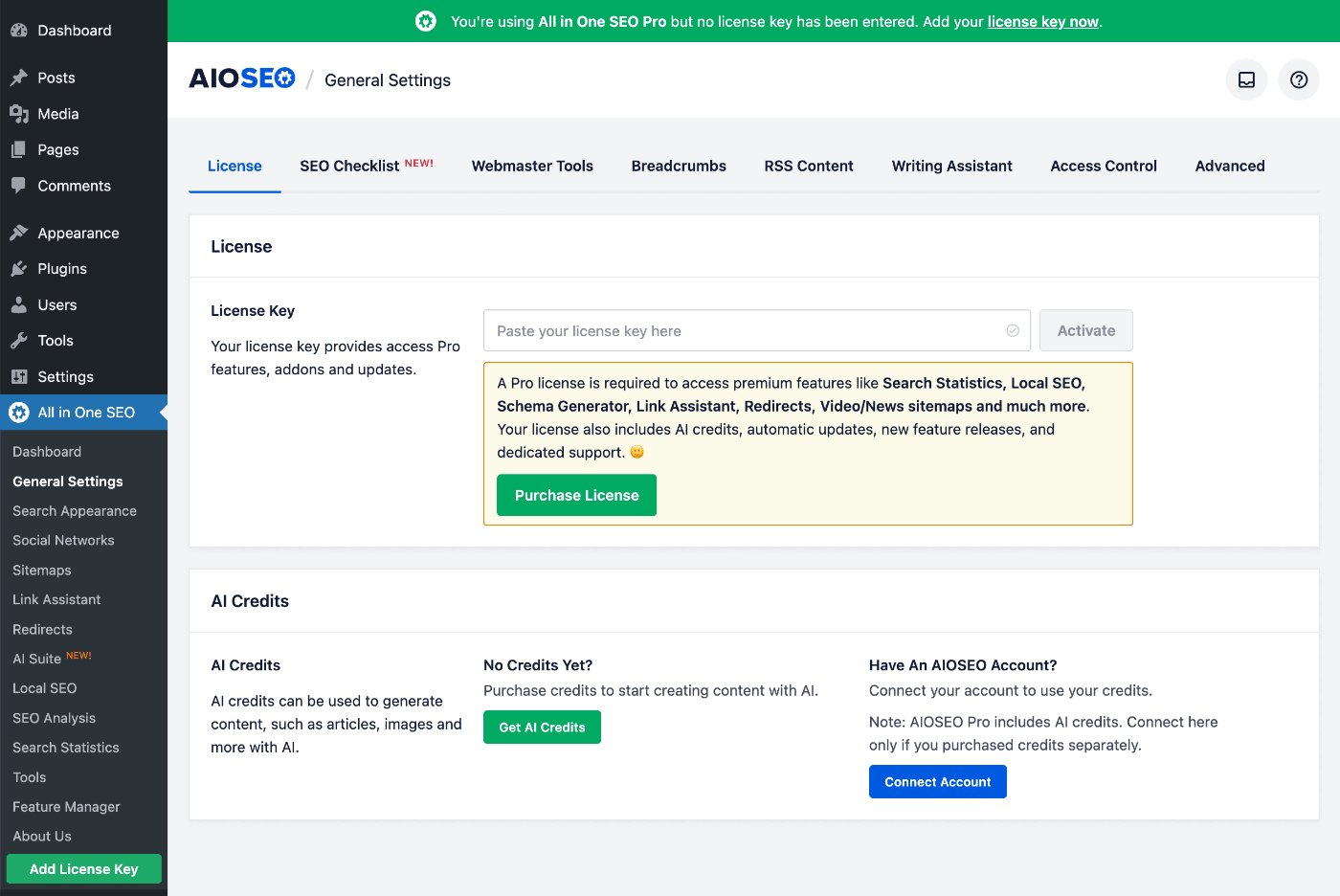
Você pode clicar no botão Obter Créditos de IA para comprar um bloco de créditos Pay-As-You-Go, ou pode clicar no botão Conectar Conta se já tiver uma conta para créditos de IA.
Se você ativar uma chave de licença para o All in One SEO Pro, verá que sua conta é conectada automaticamente e o número de créditos disponíveis para você.
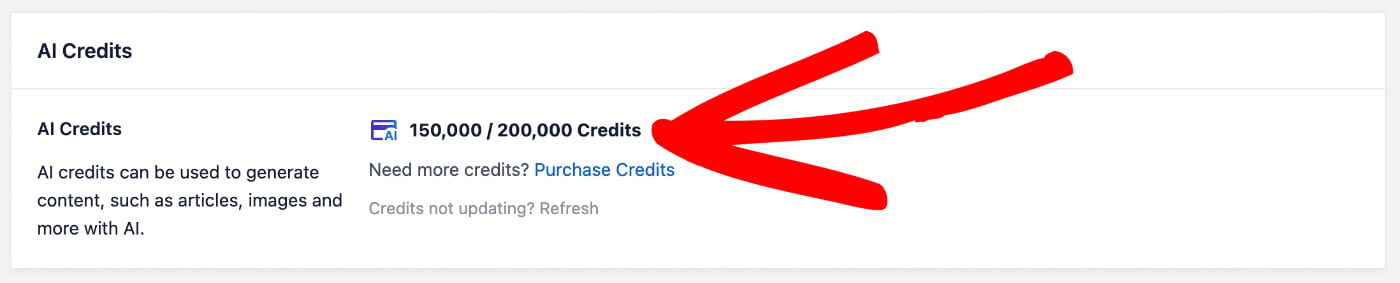
Na captura de tela acima, você pode ver que temos 150.000 créditos restantes de 200.000 créditos.
Para mais informações sobre o sistema de créditos de IA para o All in One SEO e como gerenciar sua conta, por favor, confira nosso artigo sobre Comprar e Gerenciar Créditos para os Recursos de IA do AIOSEO.
Agora que verificamos que temos alguns créditos de IA, vamos conferir o recurso Assistente de IA.
Criando Conteúdo Usando o Bloco Assistente de IA do AIOSEO
IMPORTANTE:
O Assistente de IA do AIOSEO é um Bloco do WordPress que funciona apenas com o Editor de Blocos padrão do WordPress.
O suporte para construtores de páginas será adicionado em futuras versões.
Para começar, edite ou crie uma nova postagem usando o Editor de Blocos padrão do WordPress e clique no ícone Adicionar Bloco.

Você pode pesquisar o bloco digitando AIOSEO no campo de pesquisa.
Você verá o bloco AIOSEO – Assistente de IA nos resultados da pesquisa. Clique nele para adicioná-lo à sua postagem.

Você verá o bloco Assistente de IA adicionado à área de conteúdo. Se você tiver outros blocos de conteúdo na área de conteúdo, poderá arrastar e soltar este novo bloco onde quiser adicionar este conteúdo.
Em seguida, digite seu prompt no bloco e clique no botão Gerar.

O Assistente de IA gerará conteúdo e o inserirá na área de conteúdo onde você colocou o bloco Assistente de IA.
Você verá ícones na parte superior do conteúdo gerado que pode usar para traduzir o conteúdo para vários idiomas, resumir o conteúdo e torná-lo mais longo ou mais curto.

Na barra lateral da tela Editar Postagem, você verá as configurações do bloco AIOSEO – Assistente de IA, onde pode definir o tom e o público para o conteúdo gerado. Você também pode ver quantos créditos são usados cada vez que usa o Assistente de IA, bem como quantos créditos você tem restantes do seu número total de créditos.

As configurações de Tom e Público aqui substituirão os padrões que podem ser definidos na guia Conteúdo de IA em All in One SEO > AI Suite.
Finalmente, na parte inferior do seu conteúdo, você verá o bloco Assistente de IA onde pode regenerar ou excluir o conteúdo que foi gerado.

É isso! Agora você usou a IA do AIOSEO para criar conteúdo de texto para sua postagem, proporcionando uma maneira fácil de gerar seu conteúdo.
Aviso Legal de Conteúdo Gerado por IA
O conteúdo gerado por ferramentas de inteligência artificial pode nem sempre ser totalmente preciso ou confiável. Embora esses sistemas sejam projetados para fornecer conteúdo útil e informativo, eles são baseados em padrões de dados e podem inadvertidamente produzir informações desatualizadas, incompletas ou incorretas. Recomendamos que você verifique detalhes críticos por meio de fontes confiáveis antes de publicar conteúdo gerado por IA.
Além disso, os modelos de IA às vezes podem refletir vieses presentes em seus dados de treinamento, o que pode levar a distorções não intencionais de informações ou perspectivas. É importante que os usuários abordem o conteúdo produzido por IA com uma mentalidade crítica e considerem múltiplos pontos de vista para garantir uma compreensão completa. Os desenvolvedores do All in One SEO não garantem a precisão ou imparcialidade absolutas do resultado gerado.
Leitura Adicional
Confira mais artigos sobre como usar os recursos de IA do AIOSEO aqui.