Meilleur plugin de flux RSS pour WordPress
Protégez votre contenu tout en maximisant sa valeur SEO
Les scrapeurs de contenu peuvent voler votre travail acharné et nuire à votre classement. Les outils RSS d'AIOSEO protègent votre contenu avec des pieds de page d'attribution et accélèrent l'indexation avec des sitemaps RSS.

Vol de contenu
Protection

Pieds de page
Crédit RSS

Attribution
Automatique

Indexation
Rapide

Sitemaps
RSS

Blocage
des Scrapeurs


Contrôle complet du contenu RSS sans les tracas
Prenez le contrôle total de vos flux RSS avec des options de personnalisation avancées qui protègent votre contenu et améliorent les performances SEO de votre site.

Protection Intelligente du Contenu
Ajoutez automatiquement du contenu personnalisé avant et après chaque publication dans votre flux RSS pour empêcher le vol de contenu et obtenir du crédit pour votre travail.

Options de Personnalisation du Flux
Personnalisez l'apparence de votre contenu dans les lecteurs RSS et lors de sa syndication sur d'autres plateformes.

Flux Optimisés pour le SEO
Ajoutez des liens personnalisés et des appels à l'action pour générer du trafic vers votre site Web et afficher la paternité.

Sitemaps RSS Sans Effort
Générez automatiquement des sitemaps RSS qui informent les moteurs de recherche lorsque vous mettez à jour ou publiez du nouveau contenu pour une indexation plus rapide.

Exclusion de Contenu Simple
Choisissez les publications et les pages qui ne sont pas soumises aux moteurs de recherche lors de leur mise à jour ou de leur publication grâce à des paramètres d'exclusion faciles.

Pieds de page de Contenu RSS
Incluez automatiquement des pieds de page RSS personnalisés à la fin de votre contenu avec des balises intelligentes dynamiques qui montrent que vous êtes le créateur original.
Le Plugin de Flux RSS WordPress le Plus Puissant
Arrêtez de perdre du trafic au profit des scrapeurs de contenu et commencez à optimiser vos flux pour un impact maximal.
Enfin, un plugin RSS qui protège votre contenu ❤
Voici quelques raisons pour lesquelles les créateurs de contenu et les professionnels du SEO utilisent AIOSEO pour se défendre contre le vol de contenu et accélérer l'indexation.
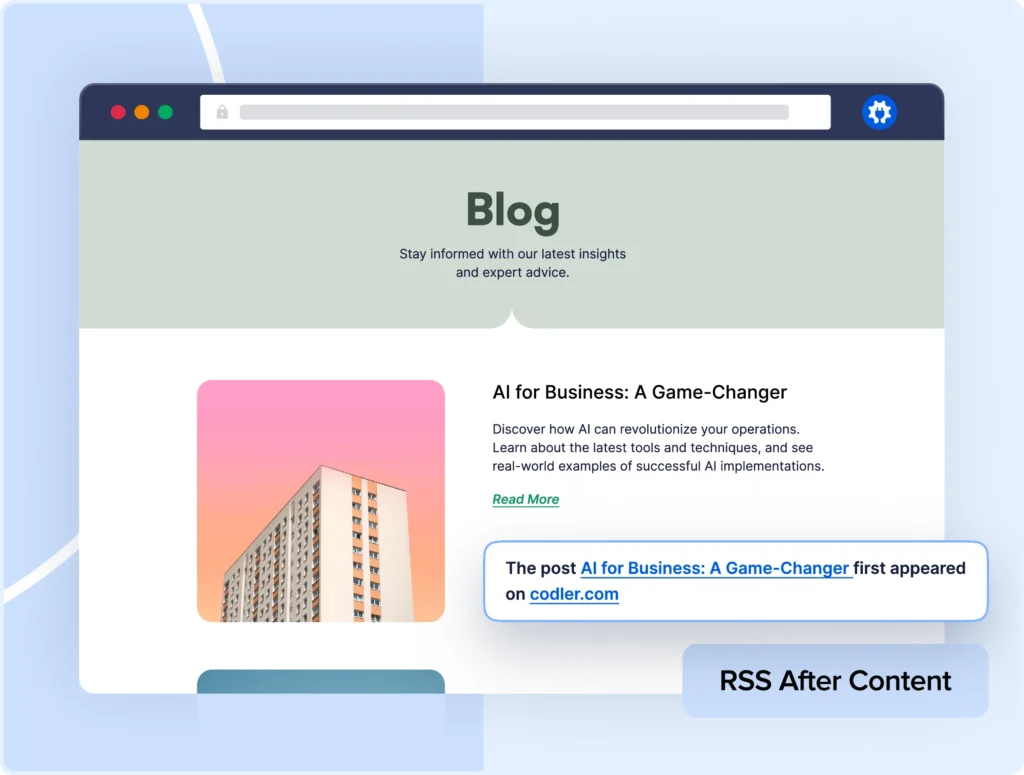
PROTECTION DU CONTENU
Arrêtez le vol de contenu dans son élan
Les robots d'aspiration de contenu vous font perdre du trafic et des classements en volant votre travail acharné. Notre plugin de pied de page RSS ajoute automatiquement des liens d'attribution et des avis de droit d'auteur à chaque entrée de flux.
Avec des modèles de pied de page personnalisables, vous vous assurez que le crédit approprié revient toujours à votre site.
MAÎTRISE DES MOTEURS DE RECHERCHE
Rationalisez votre gestion RSS
Les plans de site RSS traditionnels peuvent être compliqués à gérer et à maintenir. Notre générateur de plan de site RSS permet aux moteurs de recherche de trouver facilement votre dernier contenu dès que vous publiez.
Notre plan de site dynamique se met à jour chaque fois que vous publiez du nouveau contenu, garantissant aux moteurs de recherche un accès constant à vos derniers articles sans aucune maintenance manuelle.


DÉCOUVERTE DE CONTENU PLUS RAPIDE
Évitez le jeu d'attente d'indexation
Nos plans de site RSS et notre optimisation de ping garantissent que Google indexe votre nouveau contenu plus rapidement que les flux standard.
Notre système de soumission priorise votre contenu le plus récent, vous aidant à capturer le trafic sensible au temps et les opportunités de classement plus rapidement que vos concurrents.
OPTIMISATION DES RESSOURCES
Éliminez les goulots d'étranglement de performance
Contrairement à d'autres flux RSS qui peuvent épuiser les ressources du serveur, notre technologie utilise la mise en cache intelligente et la génération dynamique de plans de site pour maintenir des performances optimales.
Notre système crée des plans de site virtuels qui se mettent à jour automatiquement sans créer de fichiers physiques, garantissant un impact nul sur la vitesse de votre site tout en maximisant l'efficacité du parcours.

Et vous n’avez pas seulement à nous croire sur parole…
Voici ce que disent nos utilisateurs
Ce plugin SEO est fantastique ! Après l'avoir installé, le classement de mon site s'est amélioré et mes pages sont indexées beaucoup plus rapidement.
Que vous soyez débutant ou expert SEO, AIOSEO change la donne. Il maintient tous mes sites optimisés sans tracas.
Je suis satisfait du produit mais, encore plus, je suis satisfait de l'excellent et rapide support fourni par l'équipe !
La gestion du contenu RSS n'est qu'une composante de votre succès SEO. Découvrez votre boîte à outils SEO tout-en-un dès aujourd'hui !
Explorez les fonctionnalités supplémentaires d'AIOSEO conçues pour améliorer vos classements dans l'ensemble.
Le meilleur plugin SEO tout-en-un pour WordPress
Commencez à générer plus de trafic et à dominer les résultats de recherche dès aujourd'hui !
FAQ sur les flux RSS
Obtenez des réponses rapides sur la gestion de votre contenu RSS et l'utilisation de notre plugin de flux RSS WordPress. Si votre question n'est pas listée ici, veuillez nous contacter.
Le scraping de contenu se produit lorsque des robots « grattent » et copient le contenu de votre site Web pour le publier sur d'autres sites. Bien que vous ne puissiez pas empêcher complètement quelqu'un de copier votre contenu, AIOSEO vous permet d'ajouter du texte et des liens avant et après chaque article de blog dans votre flux RSS pour garantir une attribution appropriée.
Avec All in One SEO, il est facile d'ajouter du contenu avant ou après votre flux RSS par défaut.
Vous pouvez ajouter du texte brut, des liens et même des balises dynamiques pour ajouter automatiquement du contenu à vos flux. Nos balises dynamiques pour les flux RSS incluent :
- Informations sur le post : Le titre de votre post, le lien, la date de publication et même la catégorie principale
- Informations sur le site : Le titre de votre site et le lien principal du site web
- Informations sur l'auteur : Affiche le nom de l'auteur et un lien vers sa page d'archive
Avec All in One SEO, il est facile de personnaliser votre flux RSS WordPress comme vous le souhaitez.
Oui, AIOSEO vous permet d'exclure des posts, des pages et des termes spécifiques de votre sitemap RSS. Vous pouvez le faire en naviguant vers Sitemaps dans le menu All in One SEO. Ensuite, cliquez sur l'onglet Sitemap général. Vous pouvez taper le titre de tout contenu que vous souhaitez exclure ou utiliser la liste déroulante pour sélectionner les éléments à exclure.
Remarque : Lorsque vous excluez un terme (comme une catégorie), tout le contenu de ce terme sera également exclu du sitemap RSS. Vos sélections s'appliqueront également à tous les sitemaps. Pour en savoir plus, consultez : Comment exclure du contenu de votre sitemap RSS.
Non, AIOSEO ne crée pas de fichiers physiques pour votre sitemap. Nos sitemaps sont des pages web virtuelles qui sont générées dynamiquement chaque fois qu'un robot d'exploration visite l'URL du sitemap. Cela garantit qu'il est toujours à jour et élimine les problèmes de permissions de fichiers ou de suppressions accidentelles.
La désactivation du sitemap RSS entraînera une erreur 404 pour son URL. Les sitemaps RSS contribuant à une découverte plus rapide du contenu, leur désactivation pourrait entraîner un léger retard dans la rapidité avec laquelle votre contenu est trouvé et indexé par les moteurs de recherche. Nous recommandons de laisser cette option activée.
Non. All in One SEO est un plugin SEO pour WordPress, il ne fonctionnera donc pas sur les sites qui n'utilisent pas WordPress. De plus, All in One SEO n'est pas compatible avec la plateforme WordPress.com. Vous devez utiliser une version auto-hébergée de WordPress pour utiliser All in One SEO.