
Les outils d'IA d'entreprises comme Google et OpenAI apprennent constamment à partir de sites Web. Mais vous êtes-vous déjà demandé si vous pouviez contrôler la manière dont ils explorent votre contenu ?
La bonne nouvelle, c'est que vous le pouvez. LLMs-full.txt vous donne ce contrôle, vous permettant de définir des règles très spécifiques pour les robots d'exploration Web d'IA.
Dans ce guide, j'expliquerai ce qu'est llms-full.txt et pourquoi il est si important. Je vous montrerai également la manière la plus simple d'en créer un pour votre site WordPress à l'aide d'un générateur llms-full.txt.
Dans cet article
Tout d'abord, qu'est-ce que LLMs.txt ?
Pour comprendre l'ensemble, nous devons d'abord examiner une nouvelle norme proposée appelée llms.txt.
C'est un fichier texte que vous pouvez ajouter à votre site Web. Il est conçu pour donner des instructions spécifiques aux grands modèles linguistiques (LLMs), qui sont les moteurs qui alimentent les outils d'IA comme Gemini de Google et ChatGPT d'OpenAI.
Bien qu'il ressemble à un fichier robots.txt, son objectif est beaucoup plus stratégique. Un fichier llms.txt est conçu pour aider votre site à être découvert et compris correctement par l'IA.
Voici à quoi il ressemble :
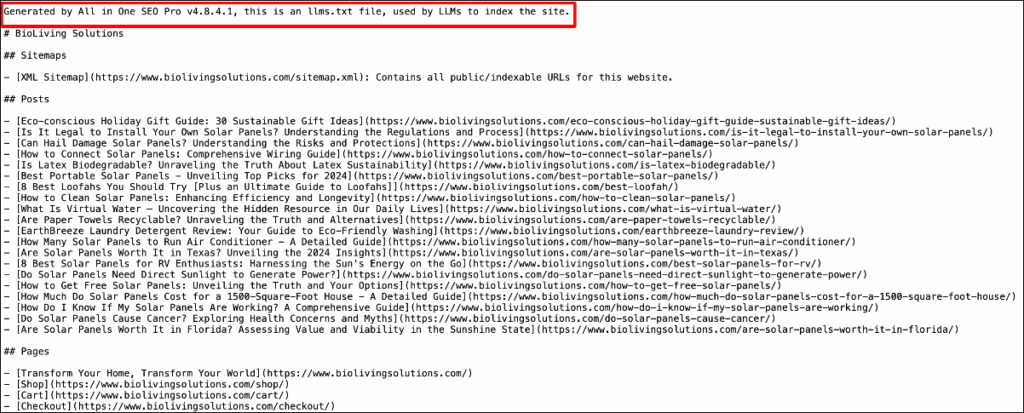
Considérez llms.txt comme un guide touristique spécial pour l'IA. Au lieu de laisser les robots d'exploration de l'IA errer sans but sur votre site, llms.txt leur montre exactement où aller et met en évidence vos informations les plus précieuses.
Vous pouvez l'utiliser pour :
- Guider l'IA vers votre meilleur contenu : Vous pouvez inclure un sitemap spécial dans votre fichier llms.txt. Cela dit à l'IA : « Hé, si tu veux apprendre de moi, commence par ces pages importantes. »
- Accorder une permission claire : Vous pouvez utiliser une règle "Autoriser" pour accorder explicitement aux robots d'exploration de l'IA la permission d'accéder à certaines parties de votre site et d'en apprendre davantage.
- Définir des limites claires : Vous pouvez toujours utiliser une règle "Interdire". Ceci est utile pour indiquer à l'IA d'ignorer les sections qui ne sont pas utiles pour l'entraînement, comme les pages d'administration, tout en gardant vos articles de blog de haute qualité ouverts à la découverte.
En bref, llms.txt est conçu pour vous aider à établir une relation productive avec l'IA, en veillant à ce que votre meilleur contenu soit découvert et utilisé correctement.
Pourquoi vous devriez me faire confiance
Au cours des 6 dernières années, j'ai aidé les propriétaires de sites à naviguer dans le monde souvent déroutant du SEO. Le dernier défi ? Décider quoi faire de l'IA. Lorsque j'ai entendu parler pour la première fois de fichiers comme llms.txt et llms-full.txt, je me suis plongé dedans pour comprendre exactement ce qu'ils signifient pour les créateurs comme vous. Je vais partager tout ce que j'ai appris afin que vous puissiez prendre les meilleures décisions pour votre site Web, sans tous les maux de tête techniques.
Alors, qu'est-ce que LLMs-full.txt ? La version plus détaillée
Maintenant que nous savons ce qu'est llms.txt, parlons de llms-full.txt.
LLMs-full.txt est un fichier plus volumineux et plus détaillé qui contient une version lisible par machine de tout le contenu de votre site Web.
Ce fichier est souvent formaté en utilisant Markdown, qui est une manière simple de formater du texte utilisant des caractères simples pour définir la structure. En d'autres termes, il est plus facile pour les agents d'IA d'explorer et de comprendre votre site.
C'est parfait pour l'IA car cela supprime tout le code HTML complexe, le style CSS et le JavaScript qui composent une page Web normale. Il ne reste que le contenu pur et sa structure de base (titres, listes, texte en gras, etc.).
Alors, pourquoi créeriez-vous un tel fichier ?
- C'est plus efficace : Il est beaucoup plus rapide pour un robot d'exploration d'IA de télécharger un seul fichier Markdown volumineux et propre que de visiter et de traiter des milliers de pages individuelles. Cela peut réduire la charge sur votre serveur.
- Il fournit un « flux propre » : En utilisant Markdown, le fichier llms-full.txt contient uniquement votre contenu pur, garantissant que l'IA apprend de vos informations de haute qualité sans distractions telles que les menus, les publicités ou les barres latérales.
- Vous contrôlez le récit : En fournissant ce fichier, vous donnez proactivement à l'IA le contenu exact que vous souhaitez qu'elle découvre, sous sa forme la plus propre et la plus complète.
En bref, llms-full.txt est une méthode avancée pour les propriétaires de sites qui souhaitent fournir efficacement une version complète et précise de leur contenu pour l'IA.
LLMs.txt vs LLMs-full.txt : Comment AIOSEO les gère
All in One SEO (AIOSEO) est un plugin SEO pour WordPress avec un générateur LLMs.txt intégré. Je vous en dirai plus dans la section suivante, mais je tiens à souligner rapidement comment il gère différemment les deux types de fichiers pour votre site WordPress.
Alerte spoiler : La principale différence réside dans la quantité de contenu que chaque fichier fournit à l'IA.
LLMs.txt : Le flux « Nouveautés et Notoriété »
Ce que c'est : Dans AIOSEO, ce fichier contient le contenu complet de vos articles les plus récents. Vous pouvez choisir exactement combien d'URL par type d'article inclure (par exemple, 500, 1 000 ou plus).
Pourquoi c'est utile : Cela crée un flux léger et rapide à mettre à jour. C'est parfait pour que les robots d'exploration d'IA voient rapidement votre dernier contenu et restent à jour, sans avoir besoin de traiter l'intégralité de votre site à chaque fois.
C'est comme l'étagère « Nouveautés » à l'avant de la librairie.
LLMs-full.txt : Le flux « Bibliothèque complète »
Ce que c'est : Ce fichier contient le contenu complet de tous vos articles publics.
Pourquoi c'est utile : C'est la version complète. Elle est conçue pour les modèles d'IA qui ont besoin d'une compréhension approfondie et complète de votre portefeuille de contenu entier.
C'est comme donner à l'IA l'accès à tous les livres de votre bibliothèque.
Le générateur d'AIOSEO crée les deux fichiers pour vous. Cela vous donne la flexibilité d'utiliser vos règles principales llms.txt pour diriger différents robots d'exploration d'IA vers le flux qui leur convient le mieux.
Lecture connexe : Découvrez notre sélection des meilleurs générateurs de llms.txt pour WordPress.
Comment créer un LLMs-full.txt dans WordPress (La méthode facile)
Si vous êtes un utilisateur de WordPress, vous serez heureux d'apprendre que All In One SEO (AIOSEO) génère pour vous les fichiers llms.txt et llms-full.txt. Cela signifie pas de codage ni de Markdown compliqué.

AIOSEO est le meilleur plugin SEO pour WordPress. Il simplifie les optimisations sur la page et techniques, afin que vous puissiez commencer à mieux vous classer dans les résultats de recherche.
L'une des façons dont il aide à l'ère de l'IA est grâce à son Générateur LLMs.txt, qui crée automatiquement des fichiers llms.txt et llms-full.txt pour votre site web.
Voici comment procéder :
Étape 1 : Accéder aux sitemaps All in One SEO
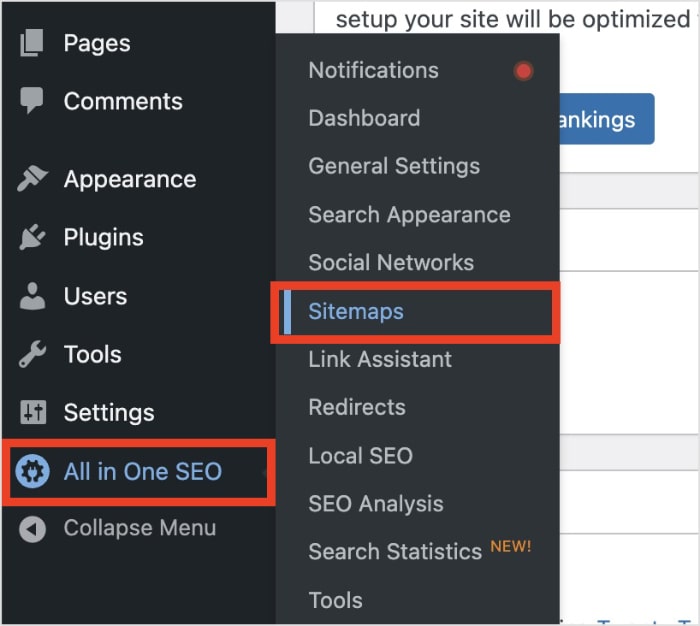
Lorsque vous êtes dans WordPress, sélectionnez All in One SEO dans le menu principal de gauche. Ensuite, cliquez sur Sitemaps.
Étape 2 : Ouvrir le générateur LLMs.txt
À partir d'ici, sélectionnez l'onglet LLMs.txt. Cela ouvrira l'éditeur où vous pourrez contrôler toutes vos règles et flux de contenu liés à l'IA.
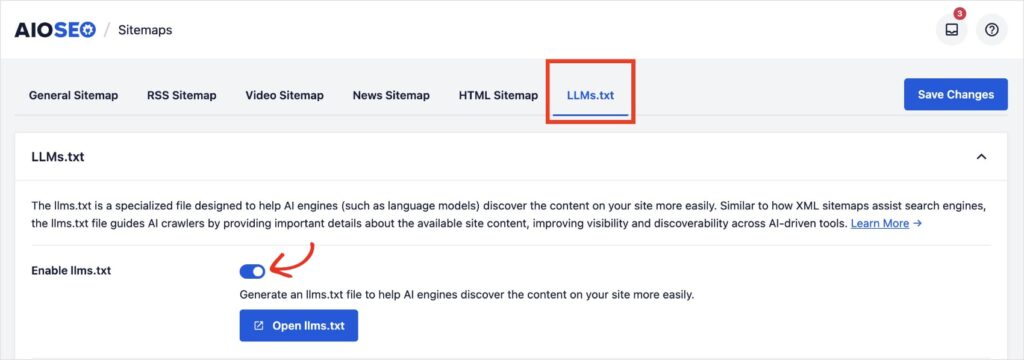
Vous remarquerez que la première chose que vous voyez est une brève explication de llms.txt et un bouton d'activation pour l'activer sur votre site. Le réglage par défaut est activé. Je recommande de le laisser tel quel.
Étape 3 : Localiser les paramètres LLMs-full.txt
Continuez à faire défiler la page jusqu'à ce que vous voyiez le bouton d'activation pour llms-full.txt.
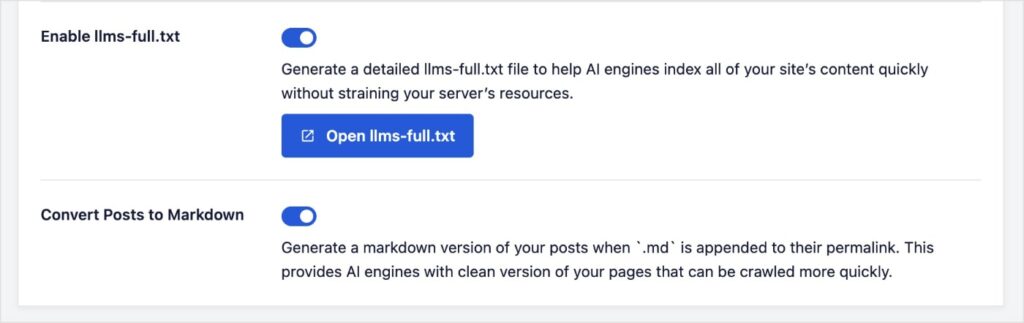
Comme llms.txt, ce réglage est également activé par défaut.
Étant donné que le réglage par défaut est activé pour la création des fichiers llms.txt et llms-full.txt, cela signifie que vous n'avez en fait rien à faire dans AIOSEO pour créer ces fichiers pour votre site WordPress. Néanmoins, je voulais vous guider à travers les étapes au cas où vous auriez besoin de les activer ou de les désactiver.
Dans la capture d'écran ci-dessus, vous verrez également un autre bouton d'activation pour « Convertir les articles en Markdown. ». C'est le langage de balisage dont nous avons parlé précédemment, qui permet aux LLM de parcourir et d'indexer votre site plus facilement.
Il est également activé automatiquement car il charge moins votre serveur.
Étape 4 : Ajuster vos paramètres
C'est ici que vous pouvez commencer à choisir ce que vous voulez montrer aux LLM et comment vous voulez qu'AIOSEO crée votre fichier llms-full.txt.
Tout d'abord, vous pouvez personnaliser le titre et la description de votre site web. Vous pouvez soit taper votre texte, soit laisser les balises intelligentes par défaut, qui extraient du texte prédéfini, tel que le titre ou le slogan de votre site.
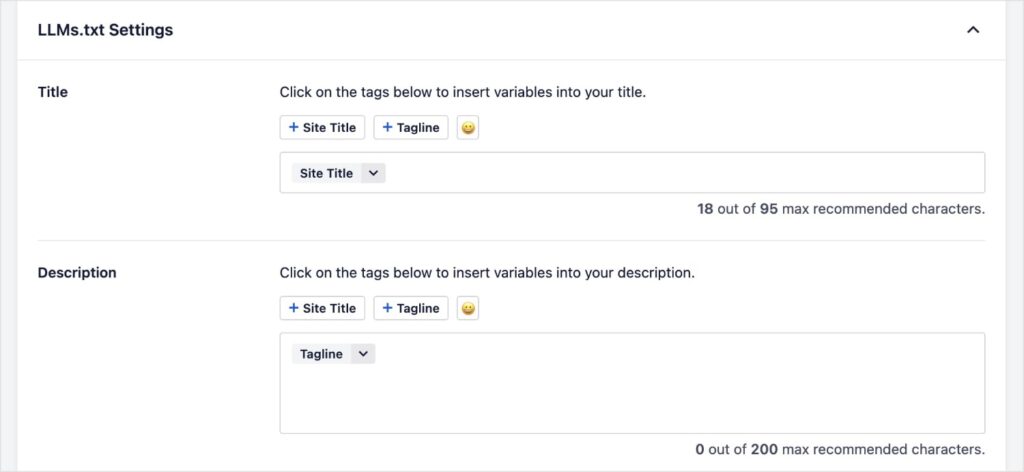
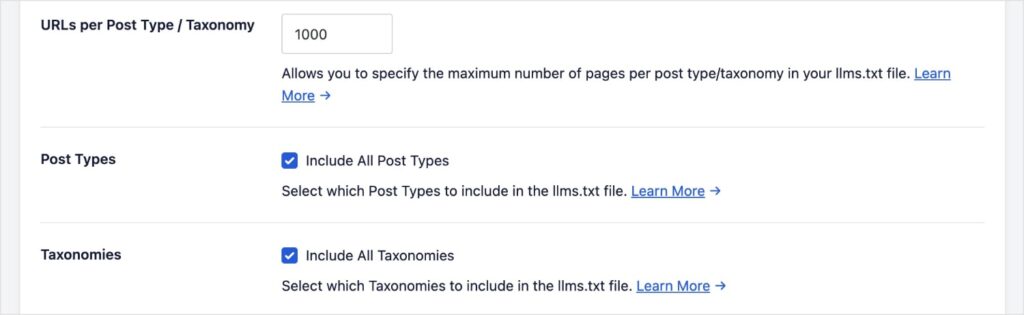
Ensuite, vous pouvez adapter les réglages suivants :
- URL par type d'article/taxonomie : Ce nombre représente le nombre d'URL par type d'article et par taxonomie à inclure dans les fichiers llms.txt et llms-full.txt.
- Types d'articles : Le réglage par défaut est d'inclure tous les types d'articles. Si vous décochez cette case, vous pouvez choisir uniquement les articles ou les pages.
- Taxonomies : Ce sont les groupes de contenu de WordPress, principalement vos catégories et vos étiquettes. Le réglage par défaut est de les inclure, mais vous pouvez les exclure en décochant la case.
Enfin, vous pouvez choisir ce que vous souhaitez exclure. Il peut s'agir de publications, de pages ou de termes spécifiques.
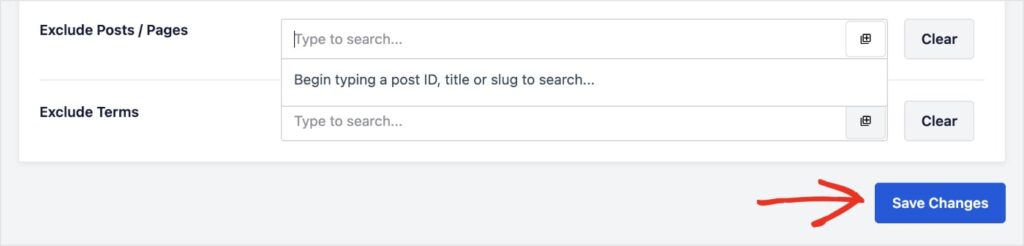
Une fois vos sélections effectuées, cliquez sur Enregistrer les modifications.
Et voilà !
AIOSEO générera et gérera automatiquement les fichiers llms.txt et llms-full.txt pour vous, aidant ainsi les agents IA à découvrir le contenu que vous souhaitez qu'ils voient.
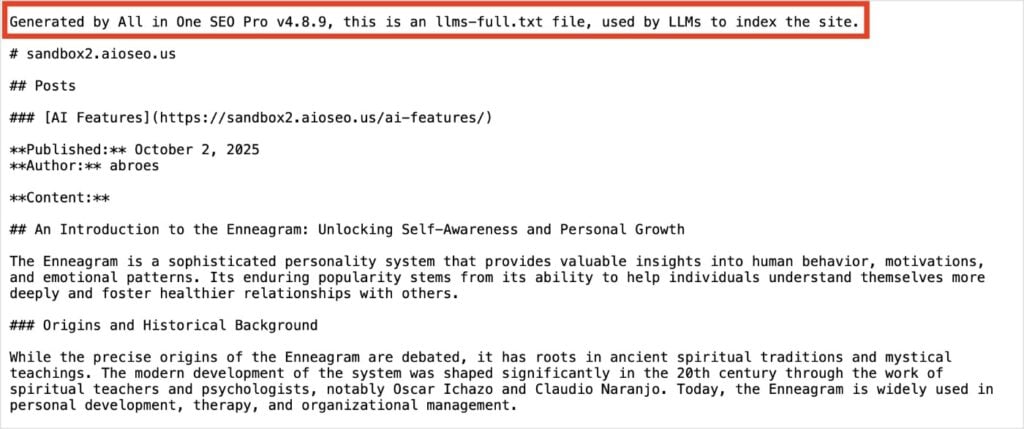
Vous voulez voir votre fichier llms-full.txt ?
Cliquez simplement sur Ouvrir llms-full.txt.

Cela ouvrira un nouvel onglet dans votre navigateur avec votre fichier.
LLMs-full.txt : Le fichier de l'avenir
Vous disposez désormais d'un moyen puissant pour guider la manière dont l'IA découvre et indexe votre site Web. Au lieu de simplement bloquer les robots d'exploration IA, vous pouvez proactivement lui montrer votre meilleur contenu, le plus précieux dans un format propre et facile à lire.
En utilisant le générateur LLMs-full.txt d'AIOSEO, vous pouvez créer à la fois un flux de « publications récentes » et un flux de « bibliothèque complète », transformant une tâche technique complexe en quelques clics simples.
Maintenant que vous avez pris le contrôle de la façon dont les robots d'exploration IA voient votre site, une excellente prochaine étape consiste à maîtriser votre fichier robots.txt pour guider les robots des moteurs de recherche traditionnels. Consultez notre Guide Ultime du Robots.txt WordPress pour en savoir plus.
Vous pouvez également explorer nos meilleurs choix pour les meilleurs outils SEO IA et apprendre comment vous classer dans les aperçus IA de Google.
Enfin, pour plus de tutoriels WordPress simples et de conseils SEO, abonnez-vous à notre chaîne YouTube. Vous pouvez également nous suivre sur X (Twitter), LinkedIn ou Facebook pour rester informé.
FAQ sur LLMs-full.txt
Quel est le but de llms-full.txt ?
L'objectif principal de llms-full.txt est de fournir une version complète et propre de tout le contenu de votre site Web dans un seul fichier lisible par machine. C'est plus efficace pour les robots d'exploration IA à traiter et garantit qu'ils apprennent à partir d'un flux pur et sans distraction de vos meilleures informations, formaté en texte simple ou Markdown.
En quoi llms-full.txt diffère-t-il de llms.txt ?
La principale différence réside dans leur rôle. Dans l'implémentation d'AIOSEO, le fichier llms.txt fournit un flux de vos publications les plus récentes, agissant comme une mise à jour rapide pour l'IA. Le fichier llms-full.txt fournit un flux de tout le contenu de vos publications, agissant comme une bibliothèque complète pour une exploration approfondie.
Ai-je besoin de llms.txt et llms-full.txt sur mon site ?
Vous n'êtes pas obligé d'utiliser les deux, mais ils sont conçus pour fonctionner ensemble afin de vous offrir le maximum de flexibilité. L'utilisation des deux vous permet d'offrir aux robots d'exploration IA soit un flux rapide « quoi de neuf », soit un flux complet de « bibliothèque complète ». Un outil comme le générateur LLMs.txt d'AIOSEO peut créer et gérer les deux pour vous.
Où se trouve le fichier llms-full.txt sur mon site Web ?
Le fichier llms-full.txt est situé dans le répertoire racine de votre site Web, qui est le dossier principal de niveau supérieur. Si vous utilisez le générateur LLMs-full.txt d'AIOSEO, le plugin crée et place ce fichier pour vous automatiquement.
Envie d'essayer AIOSEO gratuitement ?
Entrez l'URL de votre site Web WordPress pour installer AIOSEO Lite.

Divulgation : Notre contenu est financé par nos lecteurs. Cela signifie que si vous cliquez sur certains de nos liens, nous pouvons gagner une commission. Nous ne recommandons que les produits qui, selon nous, apporteront de la valeur à nos lecteurs.
