How to get recipe rich snippets for your WordPress site.

How to Get Recipe Rich Snippets in 3 Steps [WordPress Guide]

Have you ever noticed that when you search for a recipe on Google, some results look different from others?

Many are just plain blue links. But a few special ones, especially at the top of search results, will have extra details like photos, customer reviews, and star ratings.

These are called recipe rich snippets.

If you run a WordPress food blog, getting these rich results is key to growing your readership. They instantly make your content stand out and can drastically increase the number of people who visit your site.

ln this guide, I’ll show you exactly how to unlock rich snippet recipe results for your WordPress recipes using a simple tool that does all the heavy lifting for you.

What Are Recipe Rich Snippets?

Recipe rich snippets are a Google search results that have been enhanced with extra information.

Instead of just showing the title and a short description, Google pulls specific details from your page and displays them directly in the search engine results pages (SERPs).

Typically, a rich snippet recipe includes:

  • A thumbnail image of the dish
  • A star rating (e.g., 4.5 stars)
  • The total time it takes to make
  • Nutrition information (like calories)

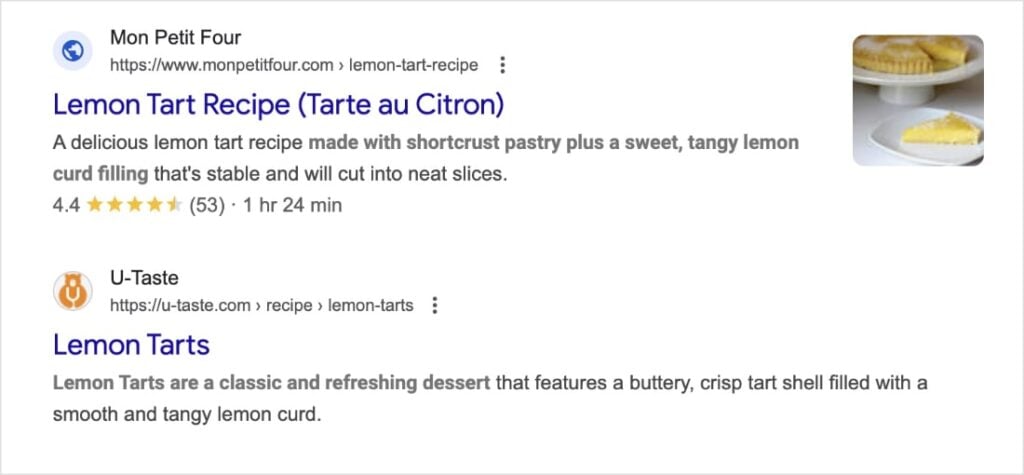
Let’s look at an example. Which of these two recipe search results would you click?

Google search results with a rich snippet recipe and a regular listing.

If you’re like most users, you would choose the first option. It has a picture, 53 positive reviews, and the cook time.

Why Do Recipe Snippets Matter?

It’s simple: Attention.

Human eyes are naturally drawn to images and things that look different. If your recipe has a rich snippet and your competitor's doesn't, users are much more likely to click on yours, even if you’re ranked slightly lower on the page.

This means rich snippets have significantly higher click-through rates (CTRs) than their standard blue link counterparts.

The Secret Ingredient: Recipe Schema

So, how does Google know which photo to use or how long your dish takes to cook?

It uses something called recipe schema.

Schema markup is a type of code that lives in the background of your website. It acts like a translator for search engines. Since Google can't actually read your blog post like a human, recipe schema tells it explicitly:

  • “This is a recipe.”
  • “This image is the final dish.”
  • “These are the instructions.”
  • “It takes 30 minutes to cook.”
  • “It has a 5-star rating.”

Without this schema code, Google does it best, but it doesn’t always get it right. With it, Google has everything it needs to build that eye-catching rich snippet recipe.

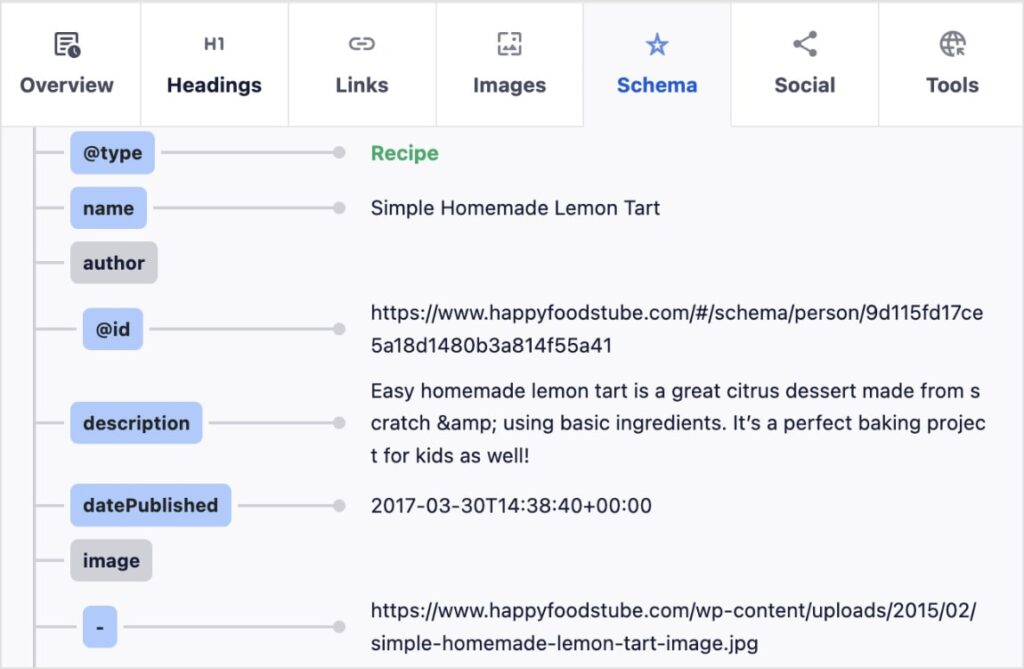
Curious what it looks like? Here’s an excerpt of recipe schema from a popular WordPress food blog:

Recipe schema shows recipe details about a lemon tart.

How to Add Recipe Schema in WordPress (3 Steps)

In the past, adding recipe schema meant hiring a developer or wrestling with JSON-LD code.

Today, you can do it automatically using All in One SEO (AIOSEO).

The best WordPress SEO plugin, All in One SEO

AIOSEO is the best SEO plugin for WordPress. It has over 3 million active users who trust it to improve their rankings and grow their organic traffic. Some of its most loved features include:

  • Schema Generator: Use a simple point-and-click catalog to add over 20 schema types to your website.
  • Smart XML Sitemaps: Tell search engines—automatically—the moment you add or update content for faster crawling.
  • Author SEO: Establish your authority with polished author bios and schema that earns trust in Google’s eyes.
  • Link Assistant: Create a strong internal linking structure that supports your SEO efforts across your entire site.
  • AI Assistant: Write entire blog posts, quick summaries, helpful FAQs, and more with AI.

One of my personal favorites is the new Recipe block for the WordPress editor. This block solves two problems at once:

  1. Design: It creates a beautiful, organized recipe card for your readers.
  2. SEO: It automatically adds all the correct recipe schema markup behind the scenes.

Here’s how to use it to get those rich snippet recipes in SERPs.

Step 1: Add the AIOSEO Recipe Block

Open the post where you’re writing your recipe.

In the WordPress editor, click the plus (+) button and search for “AIOSEO Recipe.” Click the block to add it to your content.

AIOSEO recipe block in WordPress.

Step 2: Write Your “Rich Snippet” Details

Now, fill in the form fields. The information you enter here is exactly what Google will use for your rich snippet.

  • Image: Upload a high-quality photo of the finished dish.
  • Description: Write a catchy summary of the dish.
  • Author: Credit who created the recipe.
  • Ingredients: List out the required ingredients.
WordPress recipe block from All in One SEO.

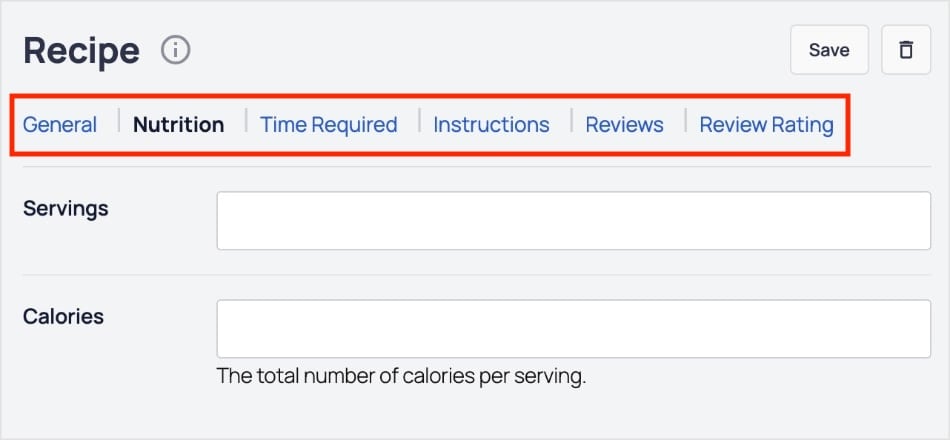
You’ll also want to click through the various tabs at the top of the block and fill out the appropriate fields.

The more information Google has about your recipe, the better.

Different tabs to get recipe rich snippets in Google.

Step 3: Include Customer Ratings & Reviews

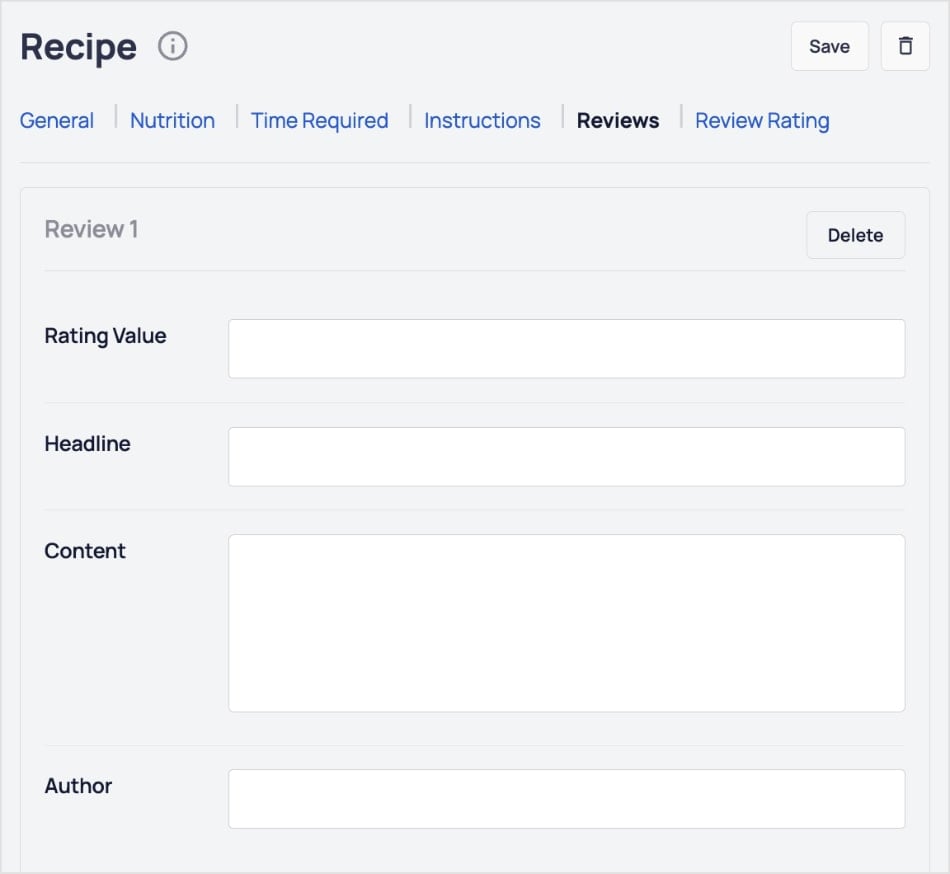
Finally, click on the Reviews tab.

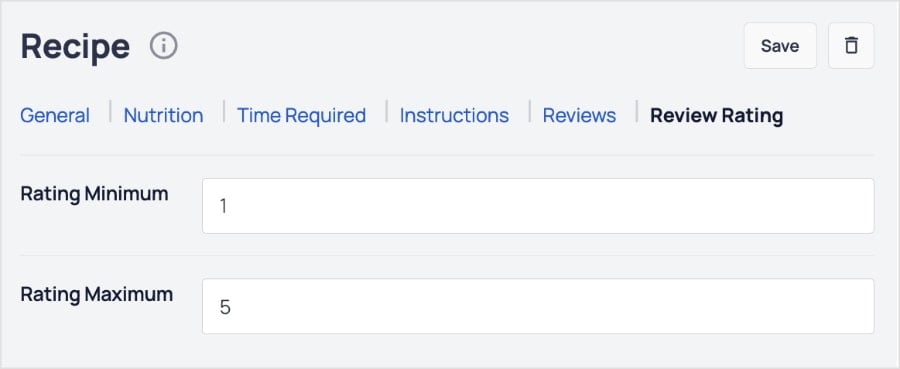
This is the most important step for social proof. Here, you can enter the Rating Value (1-5 stars) for your recipe.

Reviews tab in the recipe schema block.

By filling this out, you are adding the specific schema code that tells Google, “This recipe is rated 5 stars.” This is how you get those golden stars to appear next to your link.

Recipe rating tab in WordPress.

And that’s it! You’ve just given Google all the information it needs to create a rich snippet recipe listing in SERPs.

You’ve also created an organized, easy-to-follow recipe for your WordPress food blog.

Example of a WordPress recipe card in the editor.

Recipe Rich Snippets: The Key to More Clicks

You don't need to be a household name or tech wizard to compete with the big food sites.

By using a WordPress recipe block, you automatically add the professional recipe schema needed to win rich snippets.

It’s the easiest way to make your WordPress food blog stand out, attract more clicks, and look great doing it.

Now that your recipes are optimized, make sure your images are too. Check out our image SEO guide to rank in Google Images. We also have an on-page SEO checklist that will help you maximize your recipe’s reach.

And for even more WordPress tutorials and SEO tips, subscribe to our YouTube channel. You can also follow us on X (Twitter), LinkedIn, or Facebook to stay in the loop.

FAQs About Recipe Rich Snippets

How long does it take for recipe rich snippets to appear?

It depends on Google. After you add the recipe block, it can take anywhere from a few days to a few weeks for Google to crawl your site and update the search results.

Can I add recipe schema to old posts?

Yes! You can go back to your older WordPress recipes, delete the plain text instructions, and replace them with the AIOSEO Recipe Block. This is a great way to breathe new life into old content.

Do I need a separate recipe plugin for this?

No. If you have All in One SEO, you don't need a separate recipe plugin. The Recipe Block is built-in, saving you money and keeping your site fast.

Want to Try AIOSEO for Free?

Enter the URL of your WordPress website to install AIOSEO Lite.

Disclosure: Our content is reader-supported. This means if you click on some of our links, then we may earn a commission. We only recommend products that we believe will add value to our readers.

author avatar
Gabriela Jhean SEO Specialist
Gabriela is a creative and results-driven SEO specialist dedicated to helping small businesses stand out online. She contributes in-depth SEO case studies at AIOSEO Trends to reveal the winning strategies of top-ranking websites. In her downtime, Gabriela enjoys treasure hunting for antique jewelry.

Add a Comment

We're glad you have chosen to leave a comment. Please keep in mind that all comments are moderated according to our privacy policy, and all links are nofollow. Do NOT use keywords in the name field. Let's have a personal and meaningful conversation.