
Fühlen Sie sich wie ein kleiner Fisch in einem großen Teich, wenn es darum geht, Ihre Website bei Google zu ranken?
Es ist leicht, entmutigt zu sein, wenn Suchergebnisse Branchenriesen wie Amazon oder Walmart zeigen, die die Spitzenplätze dominieren. Wie soll ein kleines Unternehmen mit einem solchen Budget und einer solchen Autorität konkurrieren?
Hier ist das Geheimnis: Das tun Sie nicht. Sie ändern stattdessen Ihre Strategie und überlisten sie.
Große Marken malen mit einem breiten Pinsel und lassen viele Lücken, die Sie füllen können. Indem Sie spezifische Suchanfragen mit hoher Kaufabsicht anvisieren, die die Giganten ignorieren, können Sie hochqualifizierten Traffic auf Ihre Website lenken.
In diesem Leitfaden teile ich 5 umsetzbare Tipps zur Keyword-Recherche für kleine Unternehmen, die Ihnen helfen werden
- Finden Sie Ihre Nische
- Ziehen Sie die richtigen Kunden an
- Gewinnen Sie in den Suchergebnissen
Legen wir los.
In diesem Artikel
Warum kleine Unternehmen eine andere Strategie brauchen
Bevor wir zu den Tipps zur Keyword-Recherche für kleine Unternehmen kommen, ist es wichtig, Ihren Vorteil zu verstehen.
Wenn Sie Laufschuhe verkaufen, werden Sie niemals für das Keyword „Laufschuhe“ auf Platz 1 ranken. Nike und Amazon besitzen das. Aber ehrlich gesagt? Das wollen Sie gar nicht. Dieses Keyword ist zu breit.
Stattdessen sollte sich Ihre Keyword-Recherchestrategie auf Spezifität konzentrieren. Ein Nutzer, der nach „die besten Damen-Trailrunning-Schuhe für Plattfüße“ sucht, weiß genau, was er will, und ist bereit zu kaufen.
Dort gewinnen Sie.
Warum Sie mir vertrauen sollten
Ich habe mit einer Vielzahl von Kleinunternehmern zusammengearbeitet – von Vermögensberatern bis hin zu Boutique-Gesundheits-Einzelhändlern. Ich weiß, dass Sie nicht stundenlang Daten durchwühlen können und auch nicht das Budget für teure Enterprise-SEO-Software haben.
Ich werde Ihnen die schlanken, praktischen Strategien vorstellen, die meiner Erfahrung nach immer wieder für Unternehmen wie Ihres funktionieren.
5 umsetzbare Tipps zur Keyword-Recherche für kleine Unternehmen
Hier sind die spezifischen Strategien, die das Spielfeld ebnen, mit Details, wie Sie sie genau anwenden können.
1. Gehen Sie lang (Long Tail), um zu gewinnen
Wenn Sie sich nur eines aus diesem Artikel merken, dann lassen Sie es dies sein: Zielen Sie auf Long-Tail-Keywords.
Long-Tail-Keywords sind hochspezifische Phrasen (normalerweise 3-5+ Wörter). Sie haben im Allgemeinen ein geringeres Suchvolumen, was die großen Marken abschreckt, die sich nur für massive Zahlen interessieren.
Aber hier ist der Grund, warum sie für kleine Unternehmen großartig sind: Long-Tail-Keywords konvertieren besser.
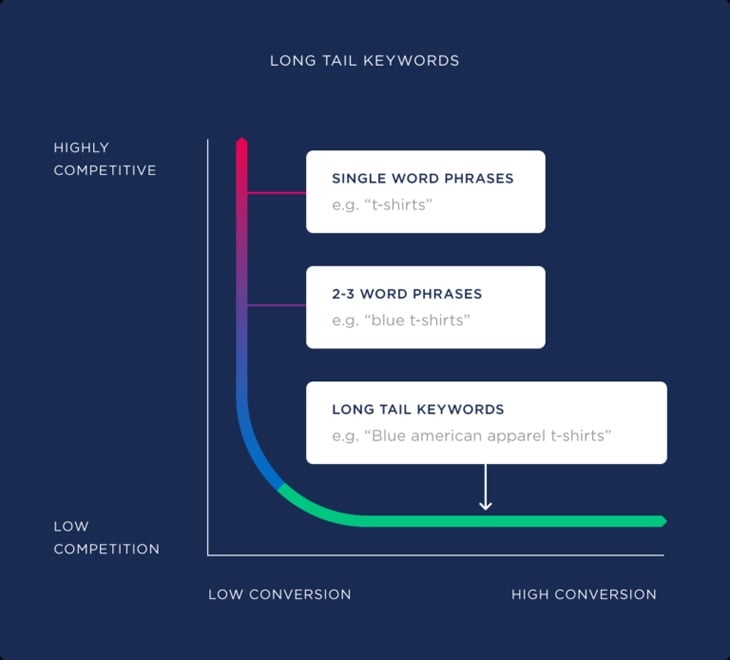
Denken Sie an die Denkweise des Nutzers:
- Stichwort: „Klempner“ (Nutzer sucht vielleicht nach einer Definition, einem Job oder einem Mario-Videospiel).
- Long-Tail-Keyword: „Notfall-Warmwasserbereiter-Reparatur Denver“ (Nutzer hat eine Kreditkarte in der Hand und braucht sofort Hilfe).
Profi-Tipp: Machen Sie sich keine Sorgen, wenn ein Keyword nur 50 Suchanfragen pro Monat erhält. Wenn diese 50 Personen genau das suchen, was Sie anbieten, ist das weitaus wertvoller als 1.000 Personen, die nach etwas Vagem suchen.
2. Denken Sie hyperlokal (mehr als nur Ihre Stadt)
Wenn Sie einen physischen Standort haben oder ein bestimmtes Gebiet bedienen, ist Local SEO ein Muss.
Nationale Marken haben Schwierigkeiten, lokal Kontakte zu knüpfen, da sie normalerweise nicht für jede einzelne Stadt in Amerika Inhalte erstellen. Sie können es.
Aber hören Sie nicht nur beim Stadtnamen auf. Gehen Sie tiefer.
- Stadtteile anvisieren: Anstatt nur „Kaffeehaus Chicago“, zielen Sie auf „Kaffeehaus Wicker Park“.
- Sehenswürdigkeiten anvisieren: „Italienisches Restaurant in der Nähe von Fenway Park.“
- Standortseiten erstellen: Wenn Sie mehrere Städte bedienen, erstellen Sie für jede eine eigene Seite (z. B. „Dachdecker-Services in Plano“, „Dachdecker-Services in Frisco“). Duplizieren Sie nicht einfach den Inhalt; machen Sie ihn spezifisch für diese Gemeinde.
Nun, warum sollten Sie das tun?
Local SEO hilft Ihnen, in den Geschäftsergebnissen ganz oben bei Google zu ranken. Ihr Eintrag kann in Google Maps und dem begehrten Local Pack (diese Box mit der Karte und den 3 Geschäftseinträgen, die über den Standard-Suchergebnissen erscheint) angezeigt werden.
Diese Plätze erhalten die Mehrheit der Klicks für lokale Suchanfragen, insbesondere auf Mobiltelefonen. Und mehr Klicks = mehr Geschäft.
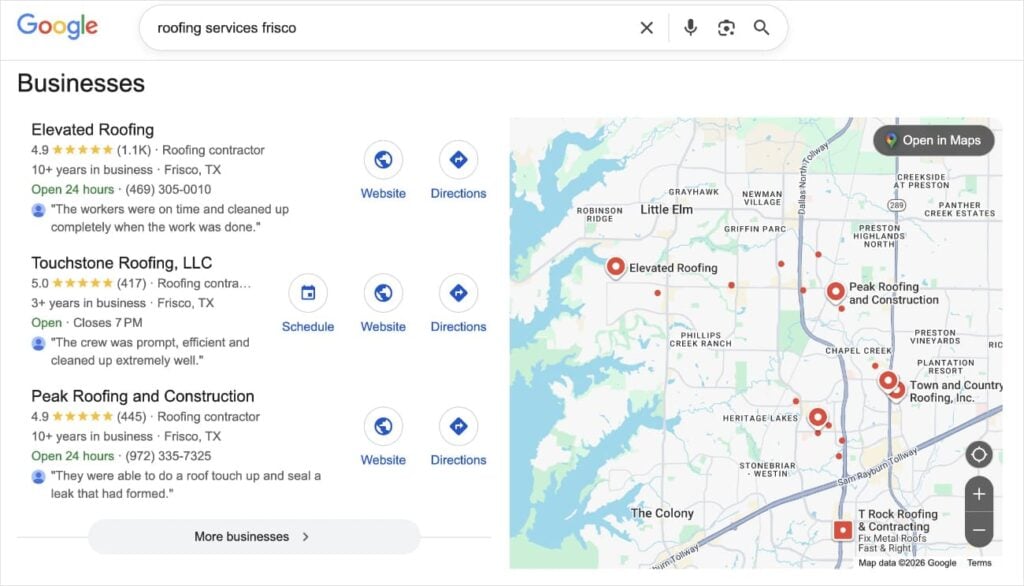
Aktionsschritt: Brainstormen Sie eine Liste jeder Stadt, jedes Vororts und jedes einzelnen Viertels, das Sie bedienen. Kombinieren Sie diese Standorte mit Ihren wichtigsten Service-Keywords, um eine Liste von lokalen Zielen mit hohem Wert zu erstellen.
Wenn Sie ein WordPress-Nutzer sind, haben Sie auch einen Vorteil, wenn es um Local SEO geht.
Wenn Sie SEO-Plugins wie All in One SEO (AIOSEO) verwenden, können Sie Google ganz einfach über Ihre spezifischen Servicebereiche informieren.
Das Local SEO-Modul ermöglicht es Ihnen, Local Business Schema zu Ihrer Website hinzuzufügen. Dies ist unsichtbarer Code, der Google explizit sagt: „Ich bediene diese spezielle Stadt und diese spezielle Postleitzahl“, was eine enorme Hilfe für das Ranking in Google Maps ist.
Um diese Einstellungen zu konfigurieren, gehen Sie einfach von Ihrem WordPress-Dashboard zu All in One SEO. Wählen Sie dann Local SEO und bleiben Sie auf dem Reiter Locations.
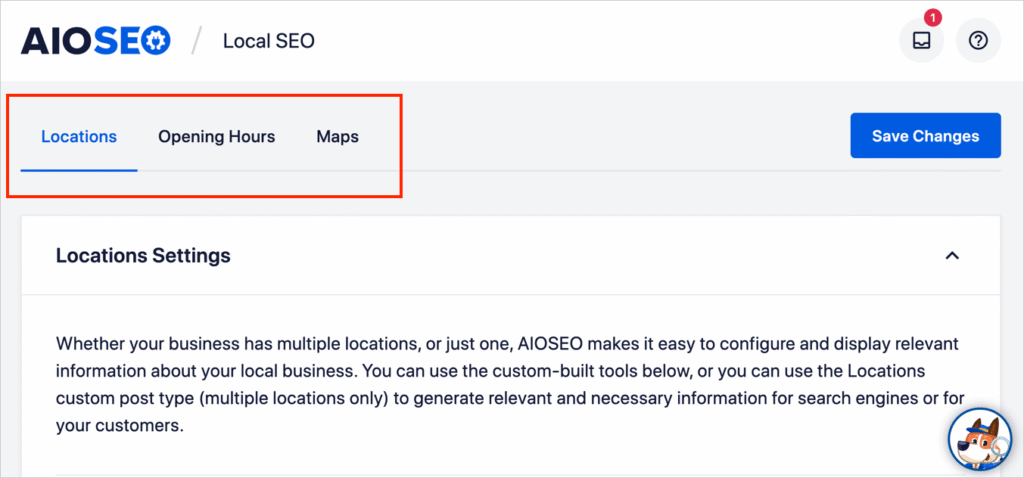
Sie können auch unterstützende Details in den anderen Reitern hinzufügen: Opening Hours und Maps.
3. Konzentrieren Sie sich auf „kommerzielle“ Absicht
Im SEO ist die Suchabsicht das Ziel hinter der Anfrage eines Nutzers. Für ein kleines Unternehmen mit begrenztem Budget müssen Sie sich auf kommerzielle oder transaktionale Absicht konzentrieren – Keywords, die Umsatz bringen.
Vermeiden Sie „informative“ Keywords, die Heimwerker anziehen.
- Schlechte Absicht (DIY): „Wie man ein tropfendes Waschbecken repariert“ (Diese Leute wollen eine Anleitung, keinen Klempner).
- Gute Absicht (Gewerblich): „Kosten für den Austausch einer Küchenspüle“ oder „Klempner für die Spüleninstallation“.
So erkennen Sie „Geld-Keywords“
Filtern Sie bei Ihrer Keyword-Recherche Ihre Liste nach Wörtern, die eine Kaufbereitschaft signalisieren. Achten Sie auf spezifische Modifikatoren:
- Dringlichkeit: „Notfall“, „Am selben Tag“, „24 Stunden“, „Schnell“
- Transaktion: „Kaufen“, „Bestellen“, „Buchen“, „Reservierung“
- Vergleich/Entscheidung: „Beste“, „Top-bewertet“, „Bewertungen“, „Vs“ (z. B. „Kosten Granit vs. Quarz Arbeitsplatte“)
- Spezifika: „Preis“, „Kosten“, „Angebot“, „Tarife“, „Pakete“
Aktionsschritt: Nehmen Sie Ihre Keyword-Liste und markieren Sie diejenigen, die diese Modifikatoren enthalten. Priorisieren Sie die Erstellung von Seiten für diese Keywords zuerst, da sie wahrscheinlich den schnellsten Return on Investment (ROI) bringen.
4. Spionieren Sie Ihre lokalen Konkurrenten aus (Gap-Analyse)
Sie müssen das Rad nicht neu erfinden. Ihre erfolgreichsten lokalen Wettbewerber haben die harte Arbeit bereits für Sie erledigt. Schauen Sie sich die Kleinunternehmen an, die für Ihre Zielbegriffe auf Seite 1 ranken.
Analysieren Sie deren Inhalte, um die „Lücke“ zu finden:
- Die Inhaltslücke: Ranken sie mit einem kurzen 300-Wörter-Blogbeitrag? Sie können sie schlagen, indem Sie einen detaillierten 1.000-Wörter-Leitfaden zum gleichen Thema schreiben.
- Die Formatlücke: Haben sie eine Textwand? Sie können sie schlagen, indem Sie ein Video oder eine Preistabelle hinzufügen.
- Das fehlende Stück: Lesen Sie deren Bewertungen. Beschweren sich Kunden, dass sie einen bestimmten Service nicht anbieten? Wenn Sie ihn anbieten, erstellen Sie eine Seite, die auf dieses Keyword abzielt!
Profi-Tipp: Wählen Sie Ihre Top 3 lokalen Wettbewerber aus. Besuchen Sie deren Websites und listen Sie die wichtigsten Dienstleistungen in deren Navigationsmenü auf. Dies sind wahrscheinlich ihre profitabelsten Keywords. (Siehe Beispiel unten.)

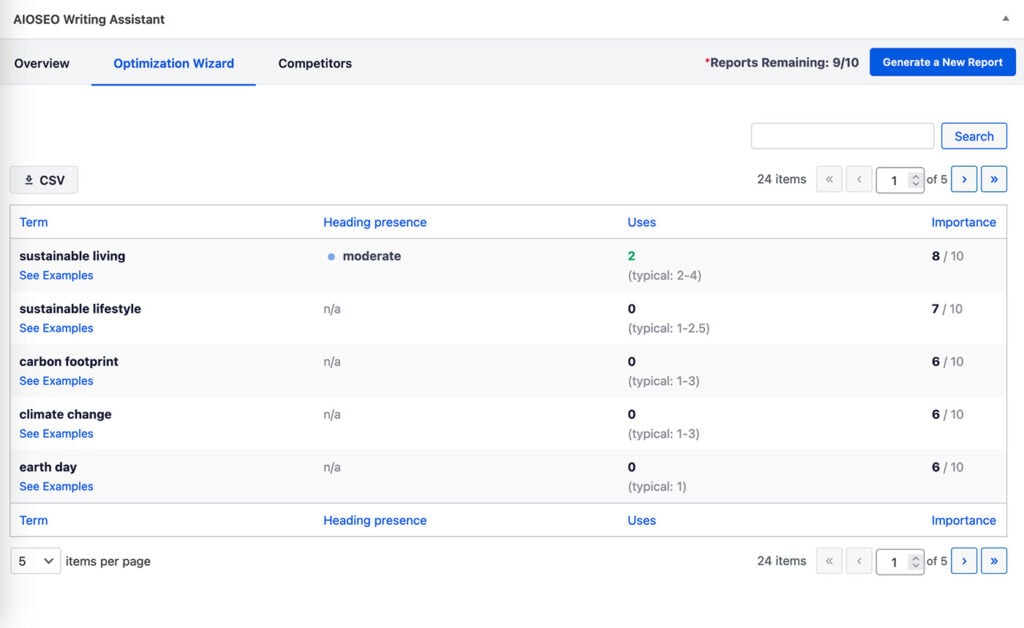
Für AIOSEO-Benutzer können Sie auch Wettbewerber-Einblicke direkt in WordPress erhalten.
Sein KI-Schreibassistent bietet die Keywords der Top-Wettbewerber und deren Häufigkeit auf den Ranking-Seiten. Es ist eine super einfache Möglichkeit zu sehen, wofür andere Branchenführer optimieren, und diese in Ihre eigenen Inhalte aufzunehmen.
5. Beantworten Sie spezifische Kundenfragen (Die PAA-Strategie)
Große Marken haben oft generische FAQs. Sie können gewinnen, indem Sie die spezifischen, kniffligen Fragen beantworten, die Ihre Kunden Ihnen jeden Tag stellen.
Nutzen Sie die Google-Box „Andere Fragen“ (PAA), um diese zu finden. Suchen Sie nach Ihrer Hauptdienstleistung und schauen Sie sich die Fragen an, die Google vorschlägt.
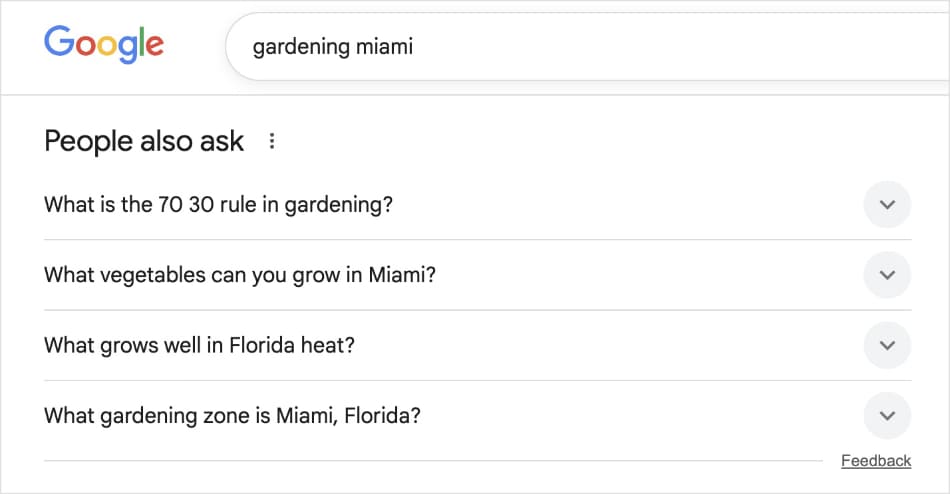
Das Schreiben eines Blogbeitrags, der genaue Fragen beantwortet, etabliert Sie als lokalen Experten.
Außerdem sind diese fragenbasierten Keywords perfekt für die Sprachsuche (z. B. „Hey Google, wann sollte ich Tulpen pflanzen?“).
Aktionsschritt: Schreiben Sie die 5 Fragen auf, die Ihnen am häufigsten am Telefon oder persönlich gestellt werden. Machen Sie aus jeder dieser Fragen einen Blogbeitrag. Wenn echte Leute Sie fragen, suchen sie definitiv danach bei Google.
Ich möchte auch eine Funktion erwähnen, die ich an AIOSEO liebe: den KI-Content-Generator.
Dieses Tool kann alles schreiben, einschließlich:
- Ganze Blogbeiträge
- Zusammenfassungen
- Wichtige Erkenntnisse
- FAQs
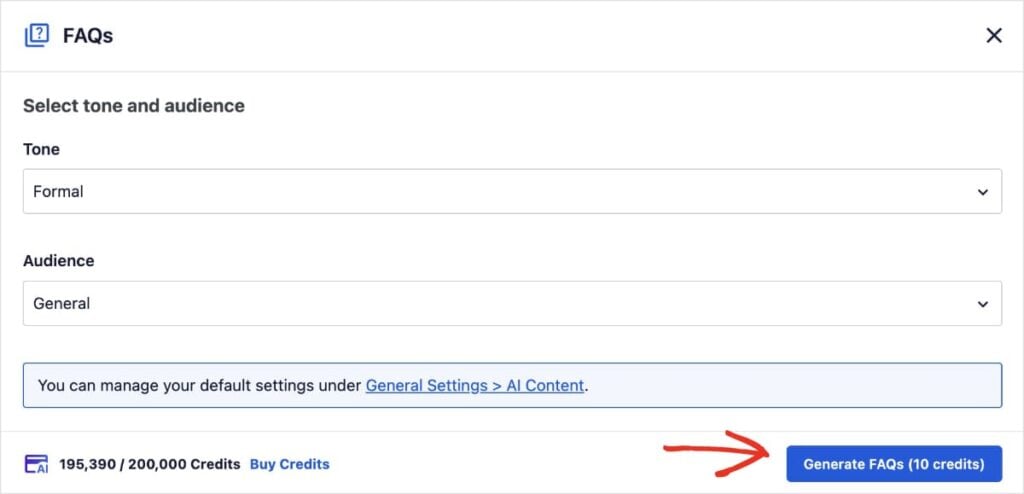
Um es zu verwenden, navigieren Sie einfach zu dem Beitrag oder der Seite, auf der Sie sie hinzufügen möchten, und scrollen Sie nach unten zu den AIOSEO-Einstellungen. Wählen Sie hier den Tab KI-Content und klicken Sie auf FAQs generieren.
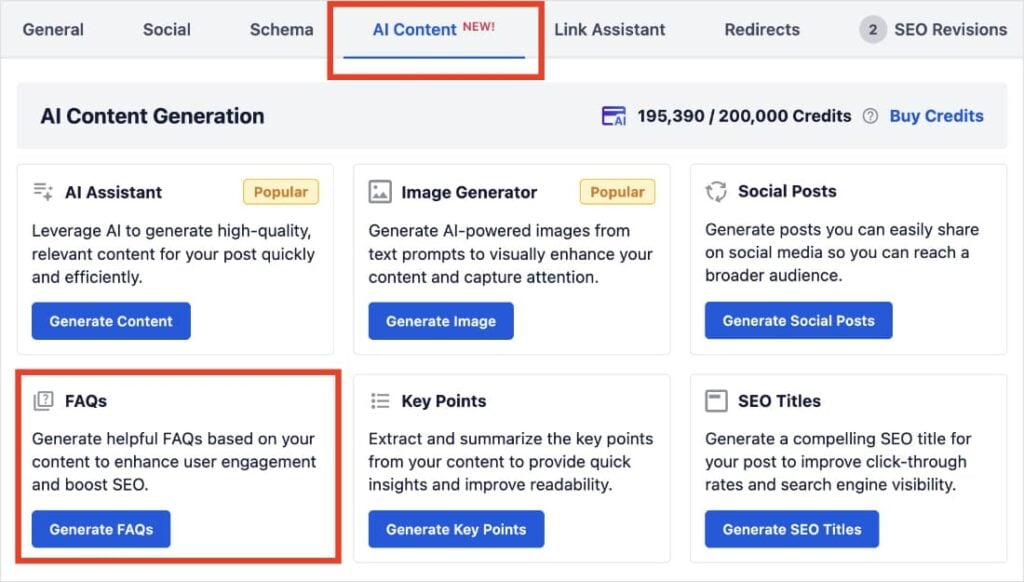
Ein Pop-up-Fenster wird angezeigt, in dem Sie den Ton und das Publikum Ihrer Fragen auswählen können.
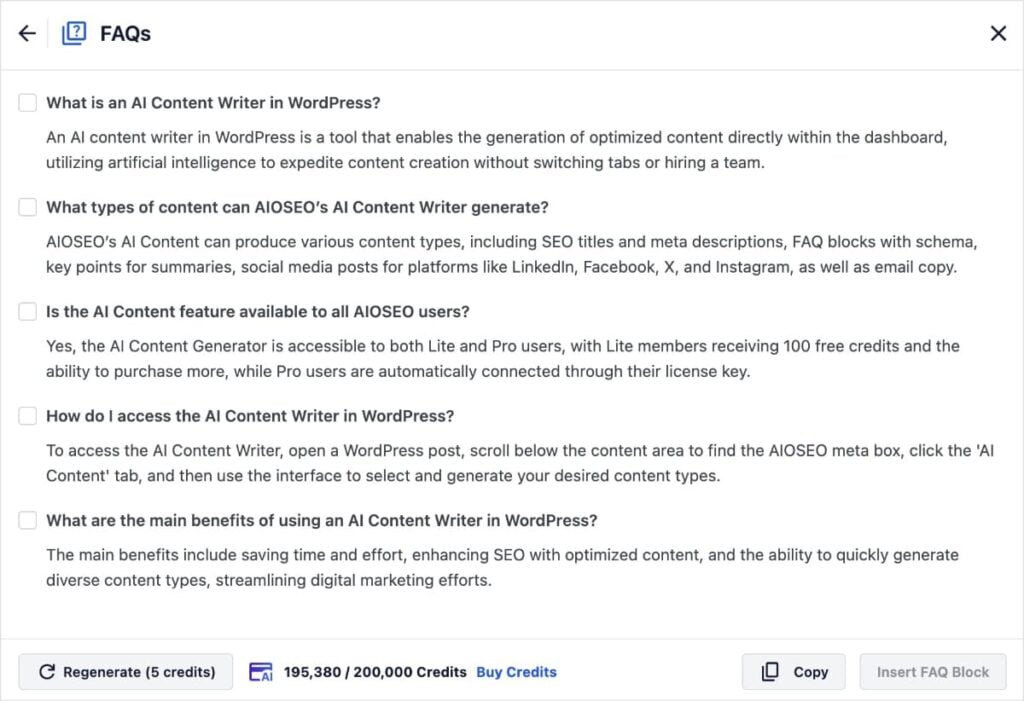
Nachdem Sie auf FAQs generieren geklickt haben, erhalten Sie 5 Optionen für FAQs, die sich auf Ihre Inhalte beziehen. Sie können das Kästchen links neben jedem Ergebnis auswählen, um sie Ihrem Beitrag oder Ihrer Seite hinzuzufügen.
Möchten Sie noch mehr?
Klicken Sie unten links auf die Schaltfläche Erneut generieren, um zusätzliche Ergebnisse zu erhalten.
Dies ist eine enorme Zeitersparnis bei der Erstellung von FAQs und hilft Ihnen, in den Google-„Nutzer fragen auch“-Ergebnissen (PAA) zu ranken.
Wie man Keywords in WordPress findet
Sie denken vielleicht: „Das klingt großartig, aber ich habe keine Zeit für Keyword-Recherche.“
Wenn Sie AIOSEO verwenden, haben Sie ein leistungsstarkes Keyword-Recherche-Tool, das direkt in Ihren WordPress-Editor integriert ist.
AIOSEO integriert sich mit Semrush, um Ihnen echte Daten direkt dort zu liefern, wo Sie Inhalte erstellen.
So verwenden Sie sie:
- Öffnen Sie Ihren Beitrag in WordPress.
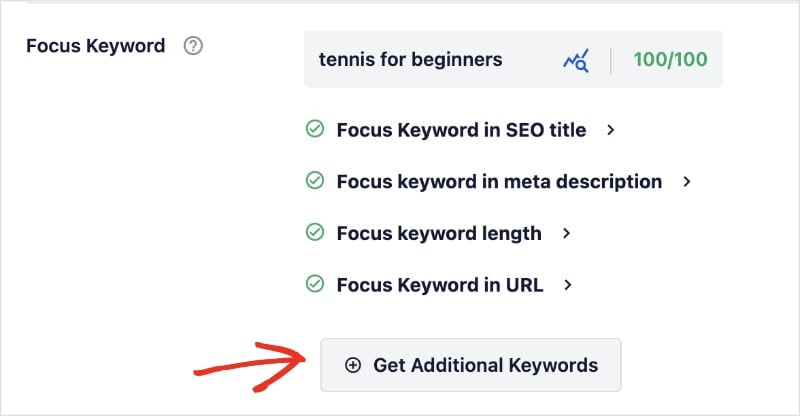
- Scrollen Sie nach unten zu den AIOSEO-Einstellungen und finden Sie das Feld Fokus-Keyword.
- Nachdem Sie ein Fokus-Keyword eingegeben haben, klicken Sie auf die Schaltfläche Zusätzliche Keyphrasen abrufen.
AIOSEO zeigt Ihnen eine Liste von verwandten Keywords zusammen mit ihrem Suchvolumen und Trends. Sie können genau sehen, wonach die Leute suchen, und diese Keywords zu Ihrem Beitrag hinzufügen.
Es ist der einfachste Weg, Keyword-Recherche für kleine Unternehmen durchzuführen, ohne Ihre Website zu verlassen.
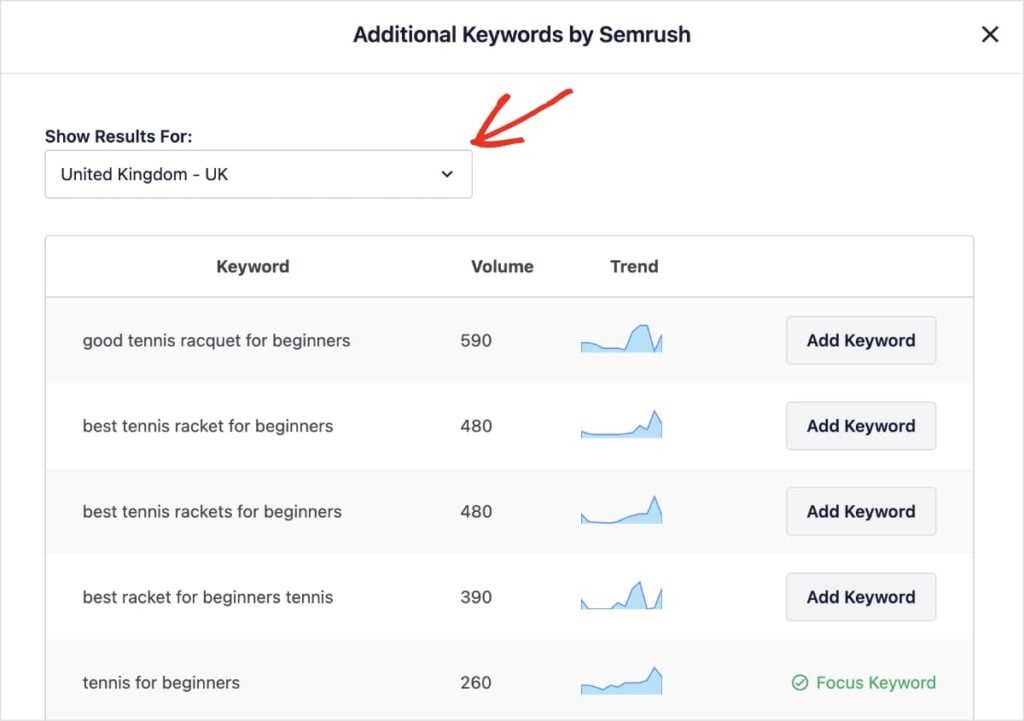
Profi-Tipp: Ändern Sie die Suchergebnisse, um lokale Daten anzuzeigen, indem Sie Ihr Land aus dem Dropdown-Menü oben links auswählen.
Arbeiten Sie intelligenter, nicht härter
Sie brauchen kein riesiges Budget, um mit SEO erfolgreich zu sein. Indem Sie sich auf Long-Tail-Keywords konzentrieren, Ihr lokales Gebiet beherrschen und spezifische Kundenfragen beantworten, können Sie die Giganten ausstechen und Ihr Geschäft ausbauen.
Jetzt, da Sie Ihre Keywords haben, stellen Sie sicher, dass Ihre Website so eingerichtet ist, dass sie lokalen Traffic erfasst. Hier sind einige meiner bevorzugten Schnellstartanleitungen:
- So erstellen Sie eine lokale SEO-Strategie, die wirklich funktioniert
- Eine vollständige Checkliste für lokales SEO zur Verbesserung der Rankings
- Die 7 besten Tools für lokales SEO
Für weitere einfache WordPress-Tutorials und Keyword-Recherche-Tipps für Kleinunternehmer abonnieren Sie unseren YouTube-Kanal. Sie können uns auch auf X (Twitter), LinkedIn oder Facebook folgen, um auf dem Laufenden zu bleiben.
FAQs: Tipps zur Keyword-Recherche für kleine Unternehmen
Was ist das beste kostenlose Keyword-Recherche-Tool für kleine Unternehmen?
Google selbst ist das beste kostenlose Tool. Nutzen Sie die Funktion „Autocomplete“ in der Suchleiste und den Abschnitt „Nutzer fragen auch“, um herauszufinden, wonach Nutzer suchen. Google Trends ist ebenfalls hervorragend geeignet, um lokales Interesse an Ihren Themen zu finden.
Wie viele Keywords sollte ein kleines Unternehmen anvisieren?
Fangen Sie klein an. Konzentrieren Sie sich auf 1 primäres Keyword pro Seite und 3-5 sekundäre (verwandte) Keywords. Es ist besser, 10 Seiten zu haben, die spezifische Begriffe perfekt ansprechen, als 1 Seite, die versucht, für 50 verschiedene Dinge zu ranken.
Lohnt sich SEO für kleine Unternehmen?
Absolut. SEO sorgt für langfristigen, nachhaltigen Traffic. Im Gegensatz zu bezahlten Anzeigen, die aufhören zu funktionieren, sobald Sie aufhören zu bezahlen, kann eine gut optimierte Website über Jahre hinweg neue Kunden bringen.
Möchten Sie AIOSEO kostenlos ausprobieren?
Geben Sie die URL Ihrer WordPress-Website ein, um AIOSEO Lite zu installieren.

Offenlegung: Unsere Inhalte werden von den Lesern unterstützt. Das bedeutet, wenn Sie auf einige unserer Links klicken, können wir eine Provision verdienen. Wir empfehlen nur Produkte, von denen wir glauben, dass sie unseren Lesern einen Mehrwert bieten.
