If you’ve ever watched a post’s SEO score sit at “N/A,” you’ve hit a real roadblock in how TruSEO used to work. Switch plugins, spin up a fresh install, or move fast through your editorial calendar, and the score stayed blank until you opened each post and saved it again. Across 20+ posts, that adds up fast.
That changes with AIOSEO 5.0.0. It’s the biggest rebuild TruSEO has gotten since we introduced it, and it touches almost everything: how your content gets scored, where you go to fix it, and what language it understands.
- A new post’s score is already there the moment you publish it, no re-saving required
- You write in English but your account is set to Spanish, and the post gets graded in the right language
- You open your editor and find one clear tab for optimization instead of a mixed pile of good and bad items
TruSEO 2.0 rewrites the scoring engine so it runs in real time, adds 10+ new supported languages with per-post control, and gives your score a redesigned home inside the editor.
And it’s available to all AIOSEO users, including Lite.
In This Article
- What's New in AIOSEO 5.0.0
- An SEO Score That Actually Shows Up
- Multilingual Sites Get Graded in the Right Language
- A New Home for Your TruSEO Score: Optimization Tab
- Smarter Fixes, Not Just Smarter Flags
- Your Headline and Spelling, Now Part of the Same Score
- Available on Every Plan, Starting Today
- Frequently Asked Questions
What’s New in AIOSEO 5.0.0
An SEO Score That Actually Shows Up
The old scoring system had a blind spot: it only calculated your TruSEO score when you were inside the post editor, actively saving. That meant fresh installs, imported content, and posts migrated from another SEO plugin would sit at “N/A” until someone manually opened each one and triggered a save. On a site with a few dozen posts, that’s an afternoon. On a site with a few hundred, it’s a project nobody wants to own.
With TruSEO 2.0, scoring happens automatically and instantly, outside the post editor. Your content gets scored as soon as AIOSEO can see it, not just when you happen to click into it. If you’re migrating from another plugin or importing content in bulk, you won’t see a wall of “N/A” waiting for you anymore.
Instead, you’ll have your SEO scores right there in your All Posts view.
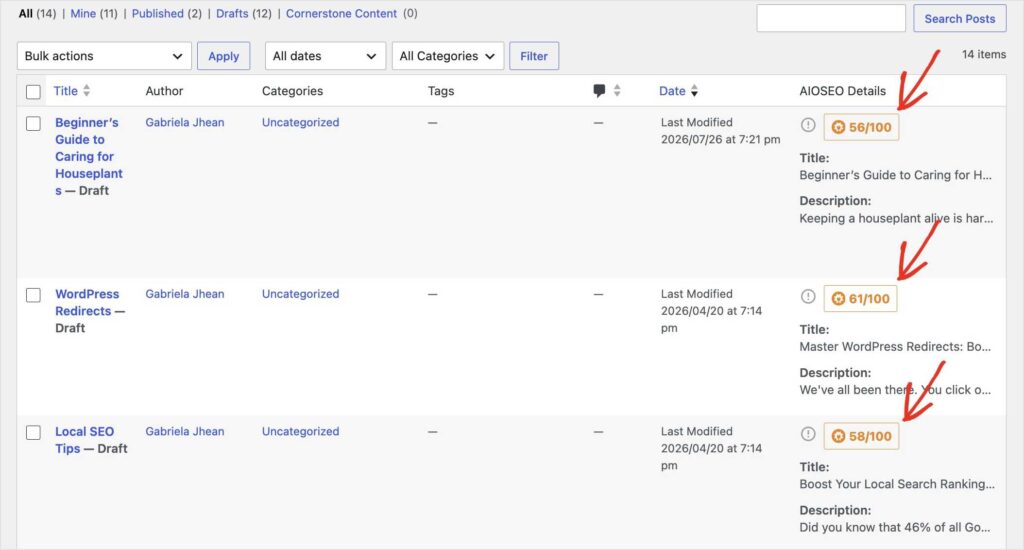
One thing worth knowing if you manage a lot of existing content: since the scoring engine itself changed, not just the checks running inside it, some of your current scores may shift slightly after you update. That’s expected, not a bug. It’s worth a quick glance across your key pages, not a full re-audit.
Multilingual Sites Get Graded in the Right Language
Here’s a problem that’s been quietly skewing scores for a long time: TruSEO used to grade every post in your account’s language setting, no matter what language the post was actually written in. If your account was set to Dutch but you wrote a post in English, TruSEO analyzed it as if it were Dutch content, and the score reflected that mismatch instead of your actual writing.
That’s especially painful if you manage client sites, write for an international audience, or just happen to run a bilingual blog.
TruSEO 2.0 fixes this in two ways:
- First, you can now set the analysis language per post or page, so a single site can have English, French, and German content all scored correctly.
- Second, autodetect is still the default, and it’s backed by 10+ additional languages now supported across the board.
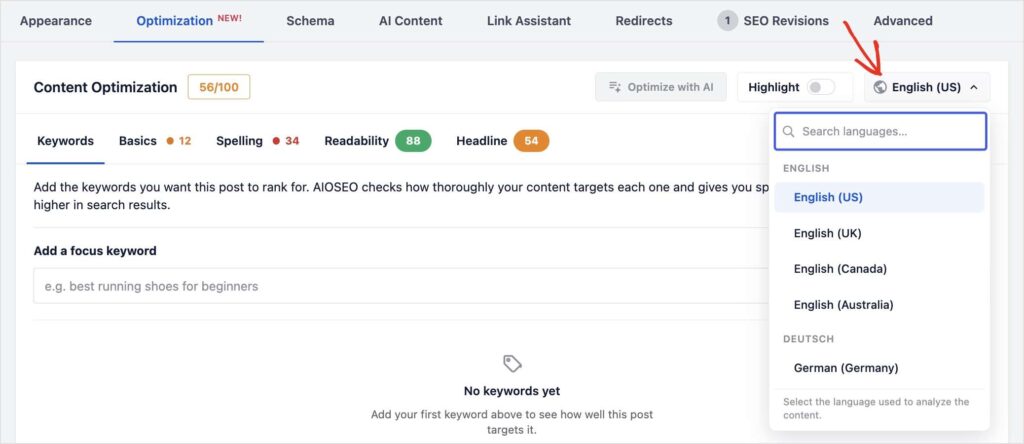
Note: This per-post language control and the expanded language list apply to your general TruSEO score. The Headline Analyzer, which now lives inside the same panel, is still English-only for the moment. More languages are on the roadmap there too.
If you’re an agency or freelancer managing sites for clients in different markets, this alone should make TruSEO feel a lot more trustworthy across your whole portfolio.
A New Home for Your TruSEO Score: Optimization Tab
The old sidebar, “Page Analysis,” tried to do too much in one place. Good checks and bad checks sat in the same long list, and Readability in particular tended to get buried underneath everything else. Finding the thing you actually needed to fix meant scrolling and squinting.
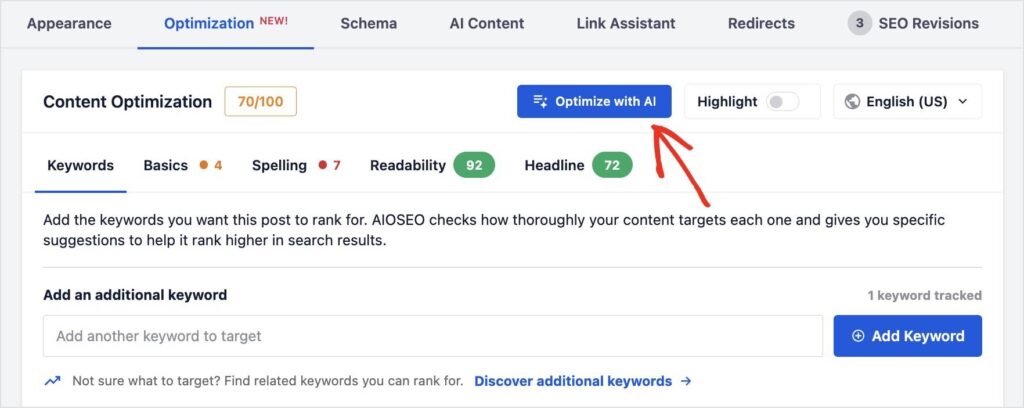
TruSEO 2.0 replaces that with a new top-level tab in the WordPress meta box, labeled Optimization. Open it and you’ll see one Content Optimization card with your overall score out of 100, right up top where you can’t miss it.
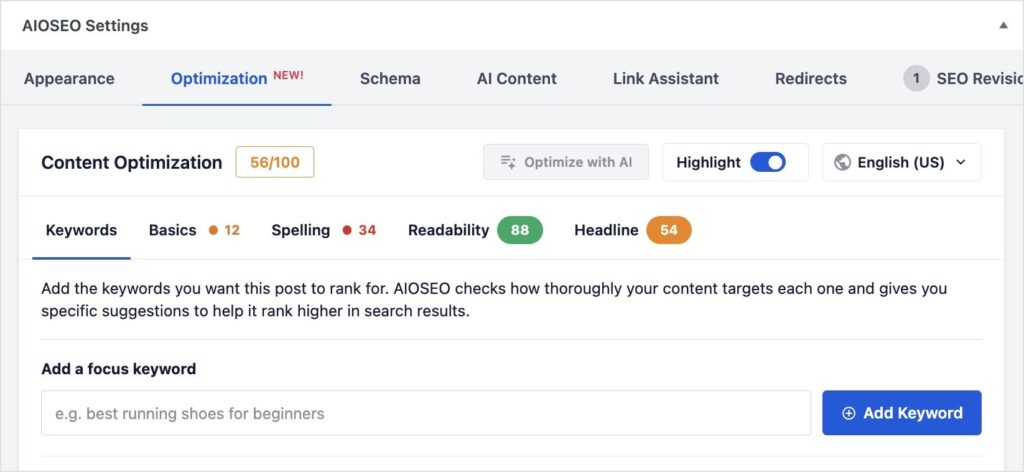
Below the score, everything is split into five organized sub-tabs:
- Keywords
- Basics
- Spelling
- Readability
- Headline
Each one comes with a plain-language description of what it’s actually checking and why it matters, instead of a cryptic label you have to guess at. Basics, for example, tells you up front that it’s checking the things that help your post get found: your title, meta description, links, and images.
It’s a small change on paper, but it’s the difference between opening your editor and immediately knowing what to fix versus digging through a wall of text to find it.
Smarter Fixes, Not Just Smarter Flags
TruSEO 2.0 doesn’t stop at telling you what’s wrong. The TruSEO Highlighter now suggests AI-powered fixes for issues it finds directly in your editor. Click the result to see the issue and apply a fix with one click instead of rewriting the sentence yourself.
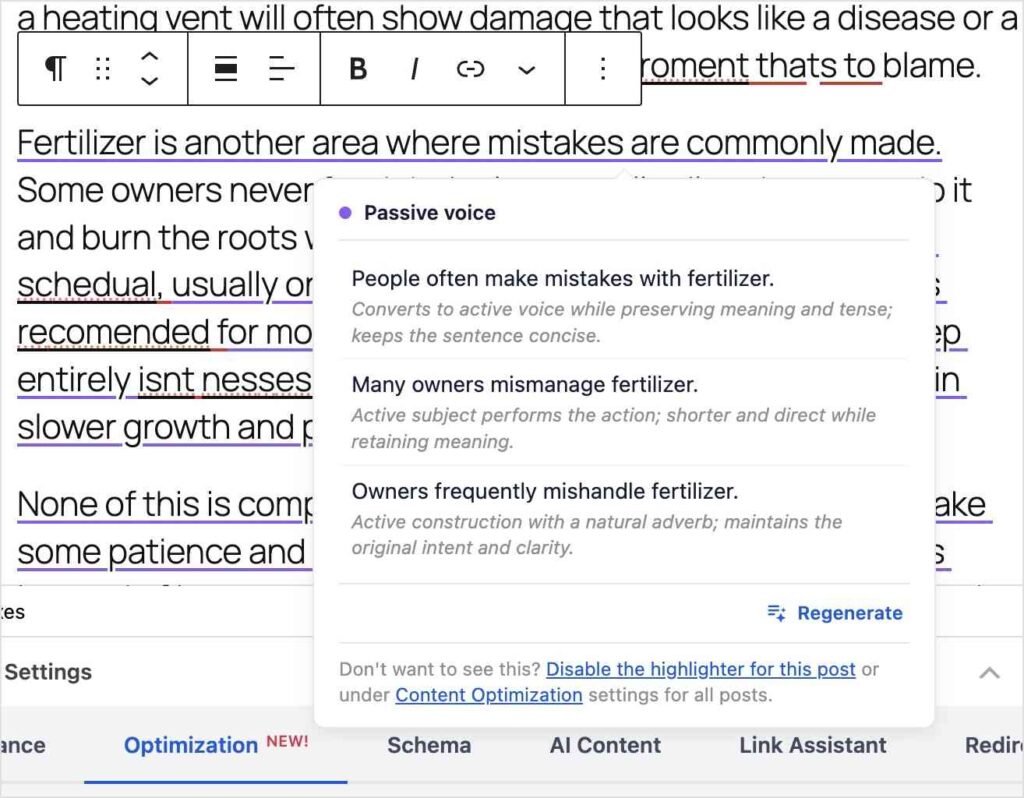
And if you’d rather fix everything at once, Optimize with AI rewrites your SEO title, meta description, headline, content, and fixes spelling, all in one click.
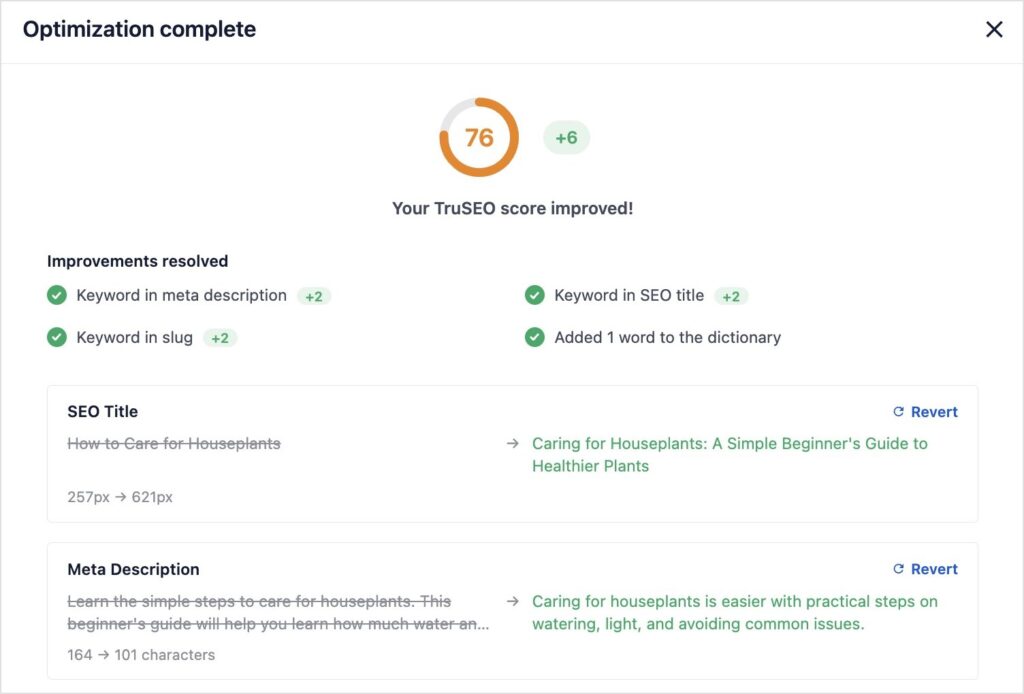
Once your post has been optimized, you’ll get a full report of all the changes. You can revert any of the edits to your original text or use the revision history in WordPress to retrieve any previous versions.
I like how it shows you exactly how each change affected the TruSEO score, too.
I’ve been using this feature on older posts that needed a refresh, and it turns a 20+ minute cleanup into something closer to 2 minutes. That’s a huge win for website owners with 30+ pages of content.
Your Headline and Spelling, Now Part of the Same Score
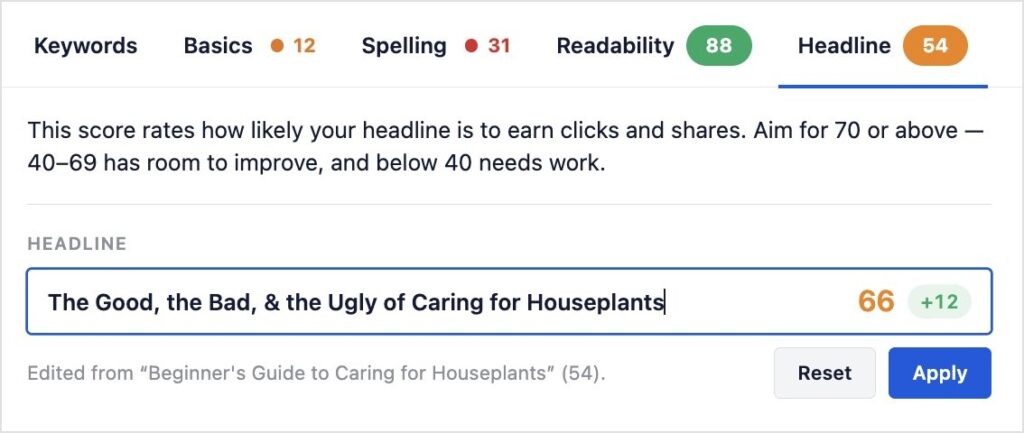
Two more things that used to live outside your SEO score now live right inside it. The Headline Analyzer you already know is now its own tab in the Optimization panel, right next to Readability, so you’re not bouncing between separate areas to see the full picture.
You can also type in headline variations to see which one scores better and apply it to your post with the click of a button.
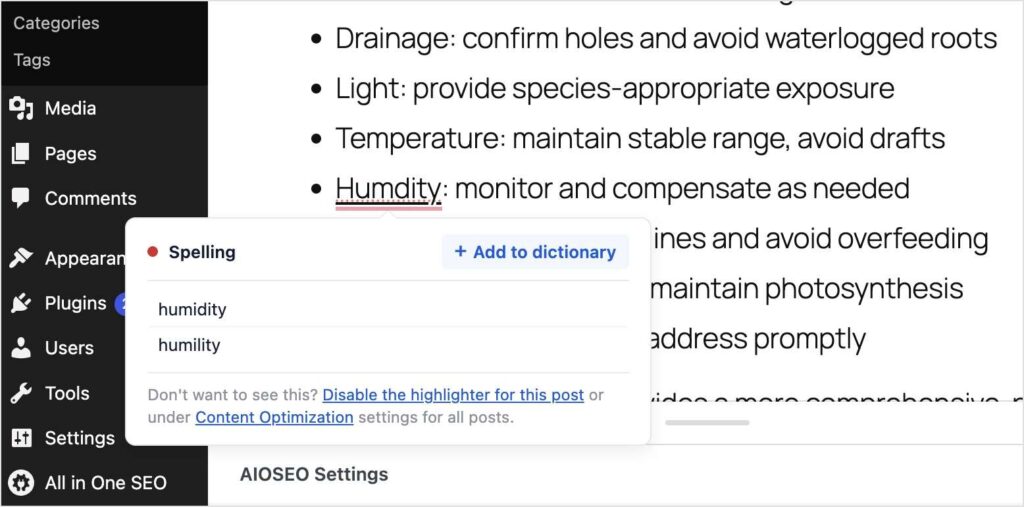
One of our most requested features is also making its debut. We’ve added a built-in Spell Checker with a custom dictionary where you can add your brand terms and keywords.
This feature helps you catch typos and misspellings before you hit publish instead of after a reader points them out in the comments.
Available on Every Plan, Starting Today
All of it, the rebuilt scoring engine, the new languages, the redesigned Optimization tab, the Highlighter fixes, Optimize with AI, and the relocated Headline Analyzer, is included on every AIOSEO plan, from Lite to Elite. Nothing in this release is locked behind a higher tier.
The AI-powered actions, like Optimize with AI and the Highlighter’s inline fixes, do use AI Credits, which scale with your plan. You can also buy AI credits when you run low or if you’re on the Lite version of AIOSEO. Everything else, including real-time scoring, the new languages, and the redesigned tab, doesn’t touch your credits at all.
TruSEO has always been about making SEO accessible without requiring an SEO background. This update is the biggest step toward that goal we’ve taken since we built it.
Update to 5.0.0 and open the Optimization tab on your next post to see it all in one place. If you want the details on any single piece, here’s where to go next:
- The TruSEO Highlighter Now Suggests (and Applies) AI-Powered Fixes
- Introducing AIOSEO’s Spell Checker: Catch Typos Before You Publish
- Introducing Optimize with AI: Rewrite Your Post for Search in One Click
- The Headline Analyzer Now Lives Inside Your SEO Score
Frequently Asked Questions
Do I need to do anything to get real-time scoring after I update?
No. Once you’re on 5.0.0, scoring happens automatically. You don’t need to open and re-save existing posts to get them scored.
Is the new Optimization tab available on every plan?
Yes. The redesigned tab, all five sub-tabs, and the overall score are available to all AIOSEO users, including Liite. No upgrade is required.
Which languages does TruSEO support now?
TruSEO 2.0 adds 10+ new supported languages on top of what it already covered, and you can set the analysis language per post or let autodetect handle it. The Headline Analyzer specifically remains English-only for now.
Do Optimize with AI and the Highlighter fixes cost anything extra?
They use AI Credits, which are already included in your plan, from 10,000 on Basic up to 200,000 on Elite. There’s no separate charge, but heavy use will draw down your credit balance. If you’re running low, you can always top off your account and buy more AI Credits.
Do I need to update WordPress or any other plugin for this?
No. TruSEO 2.0 is part of the AIOSEO 5.0.0 update itself. Just update the plugin when the new version is available.