Jedes Mal, wenn ich einen Entwurf fertigstelle, überprüfe ich meine SEO-Bewertung, bevor ich auf Veröffentlichen klicke. Leider bedeutete die Überprüfung meiner Überschrift zusätzliche Schritte: Dieses Fenster schließen, den Headline Analyzer öffnen, dessen Bewertung prüfen, überarbeiten. Zwei Tools, zwei Bereiche im Editor, ein Workflow, der sich nie ganz richtig anfühlte.
Das ändert sich mit AIOSEO 5.0.0.
Der Headline Analyzer befindet sich jetzt im selben Bereich wie Ihre TruSEO-Bewertung. Sie finden ihn in jedem Beitrag oder jeder Seite unter der Registerkarte „Optimierung“ des Meta-Box. Er hilft Ihnen bei:
- Entwerfen eines Titels und Prüfen, ob er zu allgemein ist, bevor Sie ihn veröffentlichen
- Das Umschreiben einer Überschrift und das Beobachten, wie sich die Bewertung ändert, anstatt zu raten, welche Version besser ist
- Das Überprüfen Ihrer Überschriftenbewertung an derselben Stelle, an der Sie Ihre Schlüsselwort- und Lesbarkeitsbewertungen überprüfen, ohne den Editor zu verlassen
Ein Panel, eine Bewertung, ein Ort, um Schwächen zu beheben, bevor es live geht.
Das ist der neue Tab „Überschrift“. Und wie der Rest von TruSEO ist er kostenlos für jeden Plan, einschließlich Basic.
In diesem Artikel
Wie der Headline Analyzer funktioniert
AIOSEO 5.0.0 baut TruSEO von Grund auf neu. Bewertungen werden jetzt automatisch und sofort generiert, auch außerhalb des Beitragseditors, sodass Sie nicht mehr auf einen Beitrag starren müssen, der auf „N/A“ feststeckt.
Als Teil dieses Umbaus finden Sie im Bereich des Meta-Box des Editors eine neue Registerkarte mit der Bezeichnung Optimierung.
Darin zeigt eine einzelne Karte zur Inhaltsoptimierung Ihre Gesamtbewertung von 100 sowie 5 Unterregisterkarten: Schlüsselwörter, Grundlagen, Rechtschreibung, Lesbarkeit und Überschrift.
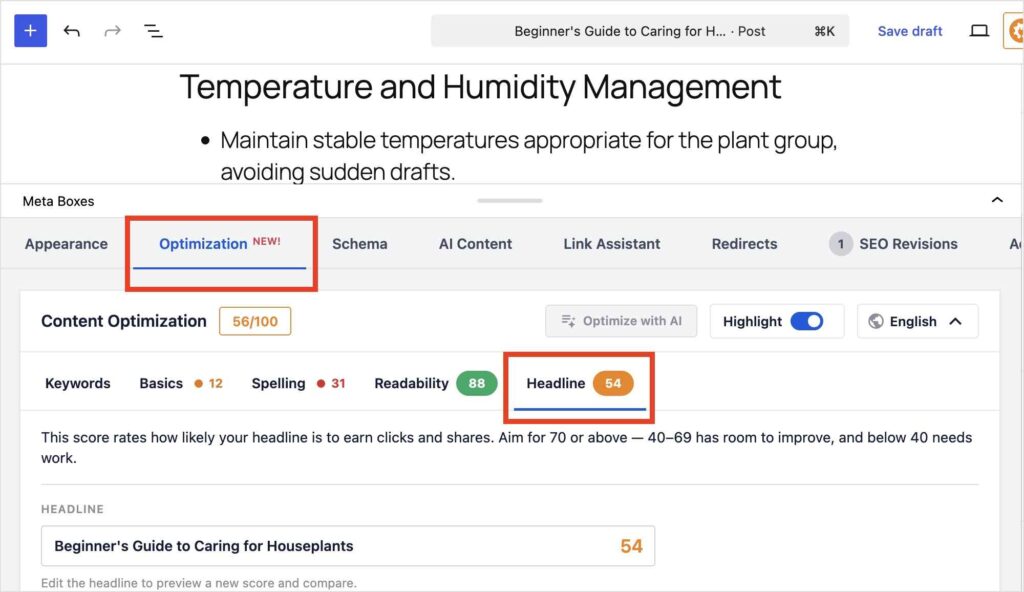
Der Tab „Überschrift“ ist der Ort, an dem sich jetzt Ihr Überschriften-Analysetool befindet. Das gleiche Bewertungsmodell, das Sie zuvor verwendet haben, nur ein neuer Speicherort im Plugin. (Sie finden es auch in der Seitenleiste rechts neben dem Editor.)
Warum dieser Schritt wirklich wichtig ist: er ist nicht nur aufgeräumter. Ihre Überschriftenbewertung wird jetzt automatisch aktualisiert, genauso wie der Rest Ihrer TruSEO-Bewertung. Sie müssen also kein separates Tool mehr erneut überprüfen, jedes Mal, wenn Sie einen Titel ändern.
Was Sie damit tun können
Hier sind einige der Funktionen, die den TruSEO Headline Analyzer von anderen online verfügbaren Tools unterscheiden:
- Öffnen Sie die Registerkarte „Überschrift“ und sehen Sie Ihren tatsächlichen Beitragstitel, bewertet von 100, ohne Ihre Überschrift in ein separates Tool kopieren zu müssen.
- Bearbeiten Sie Ihre Überschrift direkt im Feld und beobachten Sie, wie sich die Bewertung während der Eingabe ändert, sodass Sie mehrere Versionen vergleichen können, bevor Sie sich für eine entscheiden.
- Wechseln Sie zwischen Ihrer Überschriftenbewertung und Ihrer Schlüsselwort- oder Lesbarkeitsbewertung, ohne Ihren Platz im WordPress-Editor zu verlieren.
Und das ist erst der Anfang. Ich gehe unten auf alle Details ein.
Ihre Überschriftenbewertung verstehen
Ihre Überschriftenbewertung funktioniert auf einer einfachen Skala: Streben Sie 70 oder höher an, 40 bis 69 haben Verbesserungspotenzial, und alles unter 40 muss überarbeitet werden. Es ist der gleiche Rahmen, den das eigenständige Tool immer verwendet hat, nur einfacher zu überprüfen, da es jetzt neben allem anderen sitzt.
Unter Ihrer Bewertung finden Sie ein Dashboard mit zusätzlichen Einblicken:
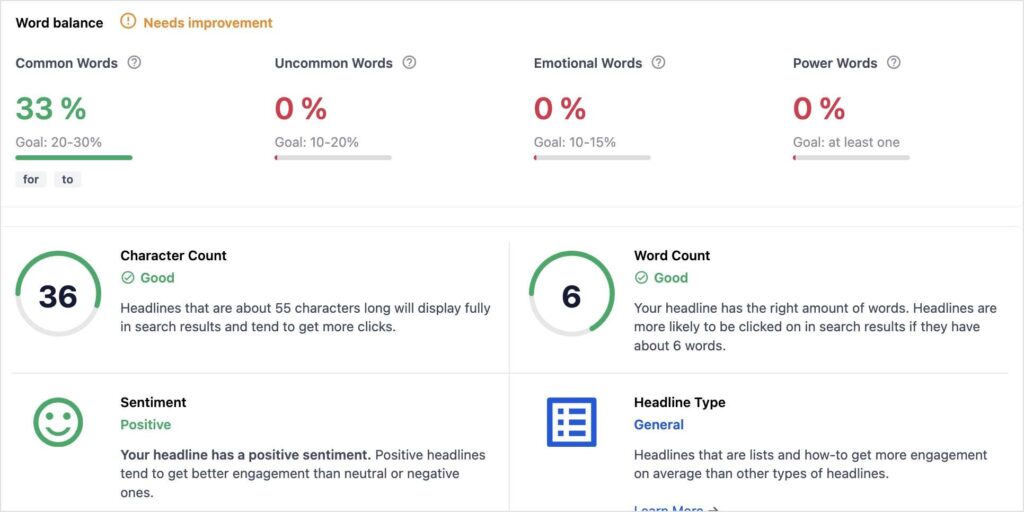
Wortbalance betrachtet 4 Kategorien, jede mit ihrem eigenen Zielbereich:
| Metrik | Ziel |
|---|---|
| Häufige Wörter | 20-30% |
| Ungewöhnliche Wörter | 10-20% |
| Emotionale Wörter | 10-15% |
| Kraftwörter | Mindestens 1 |
Darunter erhalten Zeichenanzahl und Wortanzahl jeweils eine eigene schnelle Bestanden/Nicht bestanden-Prüfung. (Eine zu kurze Überschrift bedeutet normalerweise weniger Platz für Schlüsselwörter und aussagekräftige Wörter, die sowohl für Rankings als auch für Klickraten hilfreich sind.) Sie erhalten eine einfache Erklärung anstelle einer vagen Antwort.
Zwei weitere Prüfungen runden dieses Raster ab:
- Stimmung zeigt an, ob Ihre Überschrift positiv, negativ oder neutral ist. (Überschriften mit einer stark positiven oder negativen Stimmung erzielen tendenziell mehr Interaktion als neutrale.)
- Überschriften-Typ identifiziert die Kategorie, in die Ihre Überschrift fällt, z. B. Liste oder Anleitung, da einige Typen durchweg besser abschneiden als andere.
Nichts davon erfordert, dass Sie aus dem Stegreif wissen, was ein „Powerwort“ ist. Das Tool sagt Ihnen genau, was überarbeitet werden muss und warum es wichtig ist.
Und das ist eigentlich der Punkt: Sie müssen kein professioneller Texter sein, um eine gute Bewertung zu erzielen, Sie müssen nur das beheben, was markiert ist.
Mein Lieblingsfeature: Überschriften vergleichen
Wenn Sie mich nach meinem Lieblingsteil des Überschriften-Analysetools fragen, dann ist es, dass Sie die Bewertungen verschiedener Überschriften vergleichen können, bevor Sie sich für eine entscheiden.
Schauen wir uns ein Beispiel an.
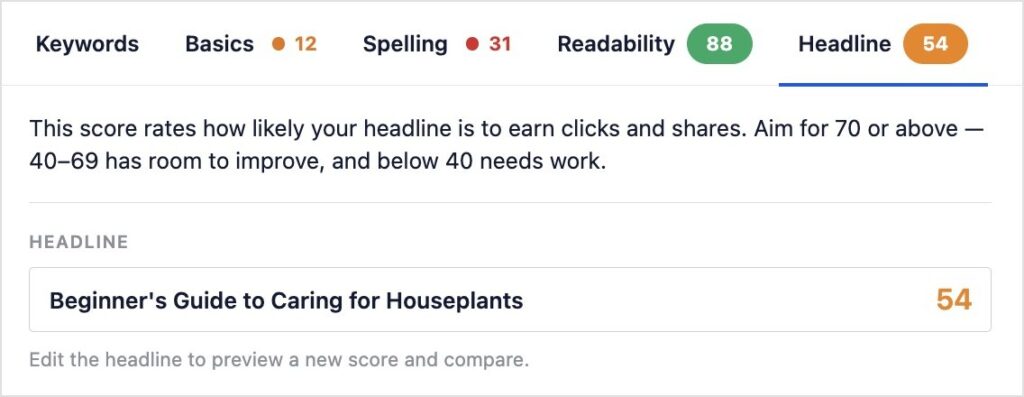
Im Screenshot unten erzielte „Anfängerleitfaden zur Pflege von Zimmerpflanzen“ eine Bewertung von 54.
Jetzt werden wir eine Variation ausprobieren.
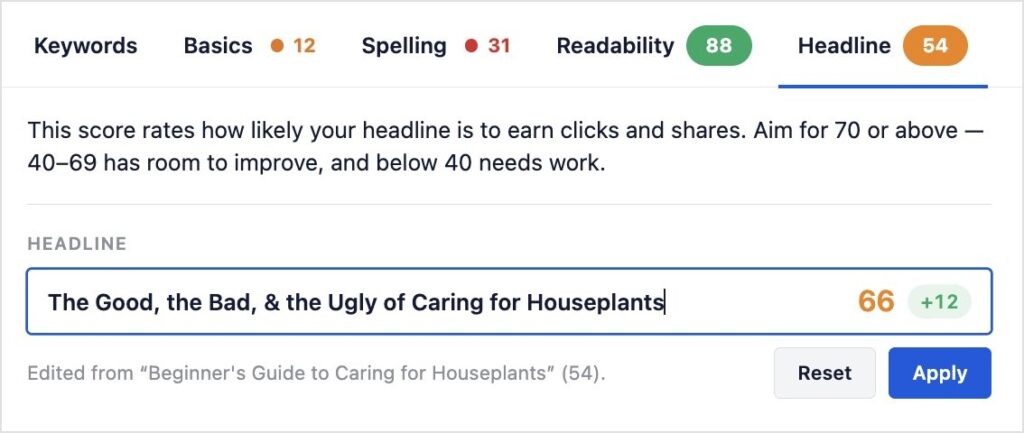
Dieser Titel erzielt 66 Punkte und zeigt eine „+12“-Plakette, um den Unterschied zur Bewertung der letzten Überschrift zu demonstrieren.
Gefällt Ihnen das Ergebnis? Klicken Sie auf Übernehmen, und es ersetzt den Titel Ihres Beitrags.
Möchten Sie weiter testen? Klicken Sie auf Zurücksetzen und probieren Sie eine andere Version aus. Nichts ist bindend, bis Sie es sagen.
Eine Sache, die Sie wissen sollten: Vorerst nur Englisch
Ich möchte hier offen sein, anstatt es zu beschönigen. Der Rest von TruSEO 2.0 unterstützt in dieser Version die Bewertung für 10 oder mehr zusätzliche Sprachen und ermöglicht die Festlegung der Analyseschriftsprache pro Beitrag, anstatt sie an Ihre Kontosprache zu binden. Der Tab „Überschrift“ hat das noch nicht. Er ist vorerst nur auf Englisch, weitere Sprachen folgen bald.
Hinweis: Wenn Sie Überschriften in einer anderen Sprache schreiben, wird der Rest Ihrer SEO-Bewertung in dieser Sprache bewertet. Ihre Überschriftenbewertung wird vorerst nicht.
Kostenlos für alle Pläne, einschließlich Lite
Der Überschriften-Analysator ist für alle AIOSEO-Benutzer verfügbar, einschließlich Lite. Keine zusätzlichen Kosten, keine Planänderung, kein separater Kauf und kein separates Tool, das zusätzlich zu AIOSEO installiert werden muss, wie es bei einem eigenständigen Überschriften-Checker der Fall wäre.
Dies ist ein Teil eines größeren Updates. AIOSEO 5.0.0 führt außerdem eine neu erstellte Rechtschreibprüfung ein, die Fehler beim Tippen erkennt, einen intelligenteren Hervorhebungsmodus, der Ihnen genau zeigt, wo Sie markierte Probleme in Ihrem Inhalt beheben müssen, und Optimieren mit KI für Ein-Klick-Korrekturen, die von Ihren KI-Guthaben angetrieben werden.
Und wenn Sie einen tieferen Einblick wünschen, was eine Überschrift überhaupt gut bewertet, ist unser Leitfaden zu den besten WordPress-Überschriften-Analyse-Tools immer noch eine gute Lektüre.
Aktualisieren Sie auf 5.0.0, öffnen Sie Ihren nächsten Entwurf und klicken Sie auf den Reiter „Überschrift“, bevor Sie veröffentlichen.
— Ben Rojas, Präsident von AIOSEO
Häufig gestellte Fragen
Ist der Überschriften-Analysator eine neue Funktion in AIOSEO 5.0.0?
Nein. Das Überschriften-Analysetool ist seit Jahren für jeden AIOSEO-Plan verfügbar. Neu in 5.0.0 ist der Speicherort: innerhalb desselben Content-Optimierungs-Panels wie der Rest Ihrer SEO-Bewertung, anstatt als separates, eigenständiges Tool.
Benötige ich einen kostenpflichtigen Plan, um den Headline Analyzer zu verwenden?
Nein. Der Headline-Tab ist in jedem AIOSEO-Plan kostenlos, einschließlich Lite.
Unterstützt der Headline Analyzer andere Sprachen als Englisch?
Noch nicht. Der Rest von TruSEO 2.0 fügt Grading-Unterstützung für 10 oder mehr zusätzliche Sprachen hinzu, aber der Headline-Tab bleibt vorerst nur auf Englisch, weitere Sprachen sind geplant.
Was ist eine gute Überschriftenbewertung?
Streben Sie 70 oder höher an. Ein Score zwischen 40 und 69 hat Verbesserungspotenzial, und alles unter 40 muss vor der Veröffentlichung überarbeitet werden.
Wohin ist das alte Seitenanalyse-Panel in der Seitenleiste verschwunden?
Es wurde durch einen neuen Tab „Optimierung“ im Meta-Box-Bereich des Block-Editors ersetzt, der Ihre Überschriftenbewertung neben Schlüsselwörtern, Grundlagen, Rechtschreibung und Lesbarkeit enthält.