
If you've been doing SEO for any amount of time, you've heard both terms: on-page SEO and off-page SEO. Usually mentioned together, like you should be doing equal amounts of each.
You shouldn't. At least not yet.
The difference between on-page vs. off-page SEO is worth understanding properly, because it changes how you prioritize your work. I'll walk you through both and tell you where I think most people should start.
In This Article
What Is On-Page SEO?
On-page SEO is everything you do directly on your website to help it rank higher in search results. It's the part of SEO you have full control over: the content you write, the titles you set, the structure of your pages, and how fast everything loads.
On-page SEO is basically presenting your website to Google and saying, “Here's what this page is about, here's why it's helpful, and here's why users will love it.”
The core components of on-page SEO include:
- Content quality: Is your content genuinely useful and relevant to what the user searched for? Google has gotten extremely good at recognizing content that actually answers a question versus content that just stuffs keywords.
- Title tags and meta descriptions: These are the first things users see in search results. A strong, well-written title tag tells both Google and the reader what the page is about.
- Headings (H1, H2, H3): Proper heading structure helps Google understand the hierarchy of your content. It also makes your content easier to read, which keeps users on your page longer.
- Keyword optimization: Naturally using your target keyword in the right places: your title, headings, URL, and throughout the content, without forcing it.
- Internal linking: Connecting your pages to each other so Google can crawl your site efficiently and users can find related content.
- Page speed and mobile-friendliness: Slow pages and bad mobile experiences are ranking penalties waiting to happen. Google uses page experience as a ranking factor.
- Image alt text: Search engines can't see images, so alt text tells them what's there. It also helps with accessibility.
On-page SEO is the foundation. Without it, nothing else works as well as it should.
What Is Off-Page SEO?
Off-page SEO is everything that happens outside your website that influences how Google perceives it. While on-page SEO is about relevance (making sure Google understands what your pages are about), off-page SEO is about authority, trust, and reputation.
The simplest way to think about it: off-page SEO is other people vouching for your website.
The biggest off-page SEO factor is backlinks: links from other websites pointing to yours. When a reputable site links to you, Google interprets that as a signal that your content is trustworthy and worth surfacing. The more quality backlinks you have, the more authority your site carries, and the better your chances of ranking for competitive keywords.
But off-page SEO goes beyond just backlinks. It also includes:
- Guest blogging: Writing content for other sites in your industry that links back to yours.
- Digital PR: Getting mentioned or featured in news articles, industry publications, or authoritative roundups.
- Brand mentions: Even unlinked mentions of your brand on reputable sites send trust signals to Google.
- Social media presence: While social shares aren't a direct ranking factor, they increase content visibility, which often leads to more backlinks naturally.
- Local SEO signals: For businesses with a physical location, Google Business Profile reviews, local citations (consistent NAP data across directories), and local backlinks all count as off-page factors.
Off-page SEO is harder to control than on-page. You can't force anyone to link to you. That's why building it takes time, consistent effort, and genuinely good content that other people want to reference.
Something to Know: Most of the off-page tactics you'll read about (digital PR, influencer outreach, link-building campaigns) are out of reach for a small business that's just getting started. And that's okay.
The most realistic starting point for most sites is simply publishing content that's specific and useful enough that people naturally want to share. A local business that consistently publishes helpful, locally relevant content will earn links without a formal strategy. Yes, it's slower, but it's what earns trust from Google and your audience.
What About Technical SEO?
You'll often see technical SEO listed as a third category alongside on-page and off-page. It's worth addressing, because it changes how you think about the whole picture.
Technical SEO refers to the behind-the-scenes elements that affect how search engines crawl, index, and render your site. This includes things like:
- Site speed
- Mobile-friendliness
- XML sitemaps
- Canonical tags
- Structured data (schema markup).
Technical SEO vs. On-Page SEO
There tends to be some confusion around technical and on-page SEO, but it's important to get them right. Technical SEO is best understood as a subcategory of on-page SEO, not a separate discipline. Both are things you control directly on your own site.
Here's why they differ:
- On-page SEO is mostly about your content and how it's structured for users.
- Technical SEO is about your site's infrastructure and how search engines crawl it.
In practice, this means technical SEO is part of the same “fix this first” priority. A site that loads slowly, isn't mobile-friendly, or has crawlability issues will struggle regardless of how good the content is.
If you're using WordPress, most of the technical fundamentals are handled by your theme and your SEO plugin. But it's worth running a quick audit to make sure nothing is broken underneath.
Pro Tip: AIOSEO's SEO Analysis tool checks your site for technical issues right inside WordPress. You'll get insights into missing sitemaps, crawl errors, and schema problems. Plus, it provides feedback on how to fix them.

On-Page vs. Off-Page SEO: The Key Differences
To see the contrast clearly, here's how they stack up:
| On-Page SEO | Off-Page SEO | |
|---|---|---|
| Where it happens | On your website | Outside your website |
| What it signals to Google | Relevance and quality | Authority and trust |
| How much control you have | Full control | Limited control |
| Examples | Title tags, content, site speed | Backlinks, brand mentions, digital PR |
| Time to see results | Faster (days to weeks) | Slower (weeks to months) |
One way to remember it: on-page SEO determines what you rank for. Off-page SEO determines how high you rank.
Both influence the other. Strong on-page SEO makes your content worth linking to. Strong off-page SEO gives your on-page content the authority boost it needs to outrank competitors who are doing similar things on their site.
Which One Should You Focus On First?
This is the question everyone actually wants answered, and most guides get it wrong by not answering it at all. They define both terms, list the tactics, say “you need both,” and leave you exactly where you started.
I'll be direct: start with on-page SEO.
Here's why.
If your content isn't well-optimized, backlinks won't save you. Google needs to understand what your page is about before it can decide whether to rank it. A page with 50 backlinks but a vague title, weak content, and no keyword focus will still struggle.
Fix the foundation first.
On-page SEO is also where you have complete control. You don't need anyone else's help to write a better title tag, improve your page structure, or fix a slow-loading page. You can do it today.
Off-page SEO is something you build in parallel over time, but it becomes more impactful once your on-page is solid. Think of it as building your reputation after you've already put your best work forward.
A Simple Rule of Thumb I Follow: If your site is new or your on-page fundamentals aren't squared away, every hour you spend chasing backlinks is an hour that would've had more impact on your own pages.
A Quick On-Page SEO Self-Assessment
Before you spend another hour on anything else, run through these questions. They're not meant to be comprehensive, but they'll tell you quickly whether your foundation is solid or whether you have work to do.
Content
- Does every page on your site target a specific keyword or topic, or are some pages vague about what they're for?
- Is the content on your most important pages genuinely more helpful than what's already ranking for those keywords?
Title Tags & Meta Descriptions
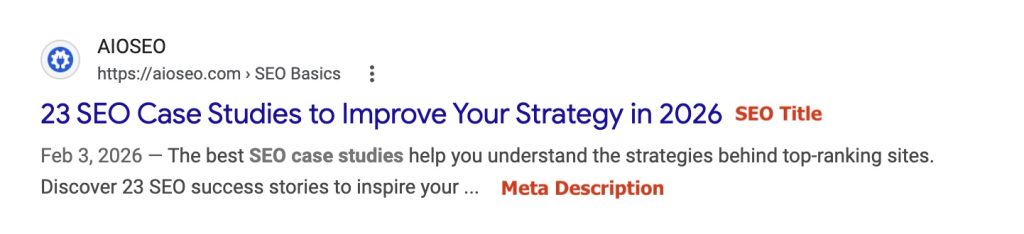
- Does every page have a unique title tag that includes its target keyword?
- Are any of your title tags getting cut off in search results (over 60 characters), or missing entirely?
- What about your meta descriptions? Are they optimized for keywords and clicks?
Headings & Structure
- Does each page have one H1 that clearly describes what the page is about?
- Are your subheadings (H2s, H3s) organized in a logical hierarchy, or are they scattered?
- Do you use related keywords in your header tags to boost visibility?
Internal Linking
- Do your most important pages have other pages on your site linking to them?
- Are there pages on your site that no other pages link to? (In SEO, we call these “orphan pages.”)
- Do you use topic clusters to distribute link equity (SEO value) across your site?
Page Speed
- Does your site load in under 3 seconds on mobile? (You can check this for free with Google's PageSpeed Insights. And if you're a WordPress user, you can use the AIOSEO SEO Analysis tool, which is shown below.)
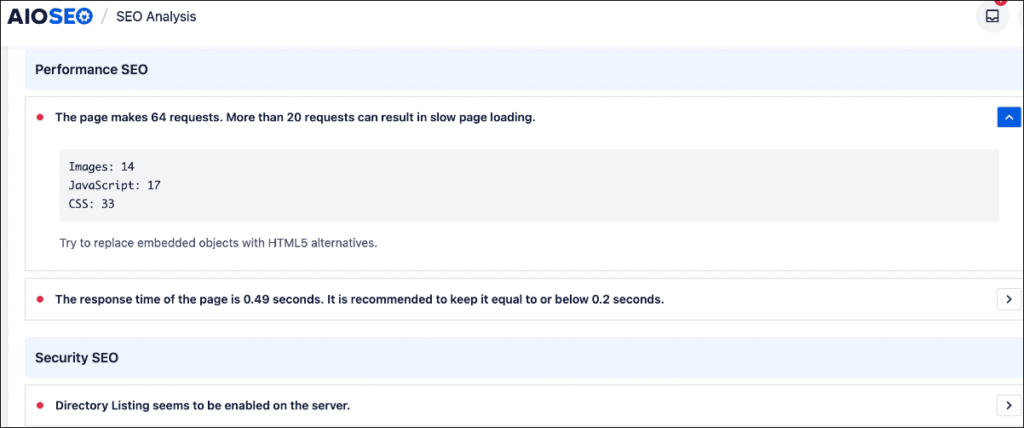
If you answered “no” or “I'm not sure” to more than three of items on this list, on-page SEO is where your time belongs right now. Not backlinks. Not social media. Here.
How AIOSEO Handles Both Sides of SEO
If you're running a WordPress site, All in One SEO (AIOSEO) takes a lot of the guesswork out of on-page optimization.
The TruSEO Analysis feature scores each page and post as you write, checking that your focus keyword is placed correctly: in your title, headings, meta description, URL, and content. It gives you a live checklist you can actually work through, rather than a vague “score” with no explanation.

AIOSEO also handles internal linking through the Link Assistant, which scans your site and suggests internal link opportunities you might have missed. It even picks the anchor text for you. (This is the blue, hyperlinked text.)
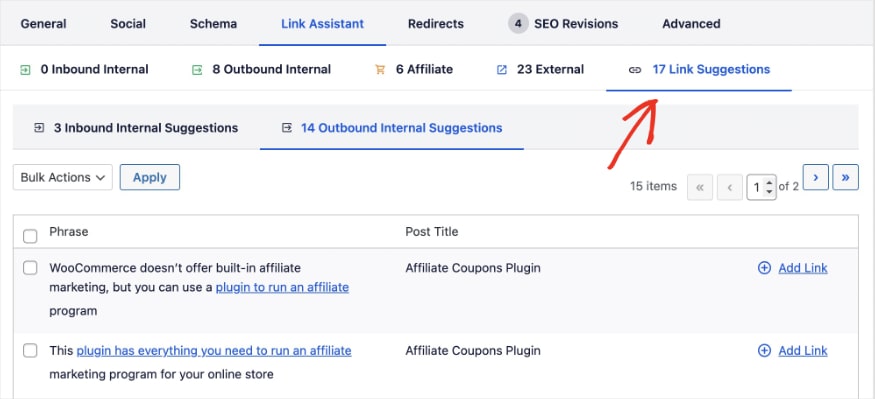
Internal linking is one of those on-page tasks that's easy to neglect because it requires knowing your whole site well. Link Assistant does that work automatically.
For off-page SEO, AIOSEO's Broken Link Checker helps you protect the backlinks you've already earned. If a page that others link to changes its URL or gets deleted, those incoming links break and you lose the SEO value.
Broken Link Checker surfaces those issues so you can fix them with a redirect before they cost you rankings. (WordPress redirects are what you use to make sure search engine crawlers and site visitors are going to the right page.)

Pro Tip: The fastest on-page win for most WordPress sites is often fixing title tags and meta descriptions, not rewriting content from scratch. In AIOSEO, you can do this directly from the post editor without touching any code.
The Real Goal: A Balanced SEO Strategy
On-page and off-page SEO aren't competitors. They work together.
You need on-page SEO to communicate relevance to Google and give users a reason to stay. You need off-page SEO to build the authority that helps you compete for terms where a lot of other sites are also well-optimized.
But most guides skip the part where they tell you that sequence matters. Get your on-page foundation solid first. Then build off-page authority over time. Trying to do both at full speed from day one usually means doing neither well.
Once your pages are solid, focus on creating content that earns links naturally: original research, in-depth guides, or genuinely useful tools and resources. That's the kind of content other site owners actually want to reference. No cold outreach required.
Ready to Get Your On-Page SEO Right?
If you're on WordPress, the fastest way to get started is to run your site through the AIOSEO SEO Analyzer. It checks your on-page fundamentals across your entire site and shows you exactly what needs fixing, without you having to audit every page manually.
For a deeper look at on-page best practices, this on-page SEO checklist for WordPress walks through every element worth optimizing.
And if you want to build your off-page presence, start with the link building guide. It covers the strategies that actually work without putting your site at risk.
Want to keep learning? Check out these related posts:
Follow us on X (Twitter), Facebook, or LinkedIn to stay up to date with more SEO tips.
FAQs About On-Page vs. Off-Page SEO
What is the main difference between on-page and off-page SEO?
On-page SEO refers to optimizations you make directly on your website, like content, title tags, headings, and site speed, to help search engines understand what your pages are about. Off-page SEO refers to actions taken outside your website, primarily earning backlinks from other sites, that signal authority and trustworthiness to Google.
Which is more important: on-page or off-page SEO?
Both matter, but on-page SEO is the foundation. Without it, your pages won't rank well regardless of how many backlinks you earn. Once your on-page SEO is solid, off-page efforts become significantly more effective. Most new sites and small businesses should prioritize on-page SEO first.
Can you do SEO without backlinks?
Yes, especially for local businesses and sites targeting lower-competition keywords. Strong on-page SEO, consistent content, and local citations can get you significant results without an aggressive link-building strategy. That said, for competitive topics, backlinks are often necessary to outrank established sites.
How long does off-page SEO take to show results?
Off-page SEO is slower than on-page. You can see on-page improvements reflected in rankings within days or weeks. Off-page efforts, particularly link building, typically take months to show meaningful impact, since Google needs time to discover, crawl, and weigh new backlinks.
Disclosure: Our content is reader-supported. This means if you click on some of our links, then we may earn a commission. We only recommend products that we believe will add value to our readers.
Want to Try AIOSEO for Free?
Enter the URL of your WordPress website to install AIOSEO Lite.

