
SEO é uma lista de tarefas interminável.
Você escreve conteúdo, cria links internos, rastreia palavras-chave, audita seu site e muito mais. Manualmente, essas tarefas podem facilmente somar mais de 20 horas por semana.
Mas quando você pesquisa "como automatizar SEO" online, a maioria dos guias dirá a mesma coisa: Compre 5 ferramentas caras diferentes, conecte-as com uma IA complexa e, em seguida, encontre tempo para fazer tudo.
Isso é um conselho terrível, especialmente se você é proprietário de uma pequena empresa ou trabalha com um orçamento apertado.
Você não precisa comprar todas as ferramentas de automação de SEO do mercado ou contratar um profissional para fazer seu site ranquear. Na verdade, você pode automatizar a maioria das tarefas de SEO diretamente no WordPress.
Neste guia, mostrarei exatamente como colocar o SEO do seu WordPress em piloto automático e a ferramenta que confio para executar essas automações.
Neste Artigo
- O que é Automação de SEO?
- A Melhor Ferramenta de Automação de SEO para WordPress
- Como Automatizar SEO no WordPress (10 Fluxos de Trabalho)
- 1. Otimize Seu Link Interno
- 2. Gere Títulos e Descrições de Meta Instantaneamente
- 3. Detecte Links Quebrados e Configure Redirecionamentos Automáticos
- 4. Coloque Seus Sitemaps XML em Piloto Automático
- 5. Rastreie Posições de Palavras-Chave Sem Sair do WordPress
- 6. Realize Verificações Instantâneas de Saúde de SEO
- 7. Otimize o SEO de Imagens em Segundo Plano
- 8. Receba Relatórios de SEO Automatizados por E-mail
- 9. Acelere a Criação de Conteúdo com o Assistente de IA
- 10. Gere Marcação de Schema Instantaneamente
- Quando NÃO Automatizar SEO
- Pare de Trabalhar Mais, Comece a Trabalhar de Forma Mais Inteligente
- Perguntas Frequentes Sobre Automação de SEO
O que é Automação de SEO?
Automação de SEO é o processo de usar software para lidar com tarefas repetitivas e demoradas de otimização para mecanismos de busca para você.
É importante entender que a automação não substitui a necessidade de criatividade humana. Um bot não pode compartilhar suas experiências pessoais únicas ou construir relacionamentos genuínos com seu público.
Em vez disso, a automação de otimização para mecanismos de busca faz o trabalho pesado nos bastidores. Ela lida com as auditorias técnicas, o rastreamento de dados e a geração de código.
Isso libera seu tempo para se concentrar no que realmente faz a diferença: criar conteúdo de alta qualidade e construir sua estratégia.
Por Que Você Deveria Confiar em Mim
Olá, eu sou Gabriela. Sou redatora da All in One SEO, o plugin original de SEO para WordPress, e especialista em SEO há mais de 6 anos.
Ajudo pequenas empresas a aumentar seu tráfego orgânico e competir com grandes marcas. Testei todas as estratégias de automação de SEO que compartilho abaixo para garantir que sejam práticas, realmente economizem seu tempo e sejam fáceis de executar.
Meu objetivo aqui é simples: Ajudá-lo a assumir o controle do seu SEO e a expandir seus negócios sem perder horas em trabalho manual ou estourar seu orçamento com ferramentas caras.
A Melhor Ferramenta de Automação de SEO para WordPress
Quando converso com proprietários de pequenas empresas, a maior frustração deles com SEO é o tempo e a “fadiga de ferramentas”. Eles estão cansados de pagar por uma ferramenta para pesquisa de palavras-chave, outra para auditorias de site e uma terceira para links quebrados.
É por isso que minha recomendação principal, e a ferramenta que uso para automatizar meus próprios fluxos de trabalho no WordPress, é a All in One SEO (AIOSEO).
AIOSEO é o plugin de SEO para WordPress original, confiável por mais de 3 milhões de proprietários de sites inteligentes.
Em vez de forçá-lo a fazer login em 5 plataformas caras diferentes, o AIOSEO traz automação de SEO de nível empresarial diretamente para o seu painel do WordPress. Ele consolida seu fluxo de trabalho, economiza dinheiro e lida com muitas tarefas de SEO técnico automaticamente.
Deixe-me mostrar como.
Como Automatizar SEO no WordPress (10 Fluxos de Trabalho)
Aqui estão 10 tarefas essenciais de SEO que você pode automatizar agora mesmo usando o AIOSEO, sem sair do WordPress.
1. Otimize Seu Link Interno
Links internos são hiperlinks que conectam diferentes páginas do seu site. Eles ajudam o Google a entender a estrutura do seu site e a passar autoridade para suas páginas mais importantes.
Eles também guiam os usuários mais fundo no seu site, o que os mantém lendo e reduz sua taxa de rejeição. (Este não é um fator de ranqueamento direto do Google, mas é importante para o engajamento do usuário, que influencia os ranqueamentos.)
- A Maneira Manual: Pesquisar em seu próprio site por frases relevantes, destacar o texto, encontrar o URL do post antigo e colar o link.
- A Maneira Automatizada: Usando o Assistente de Links do AIOSEO.
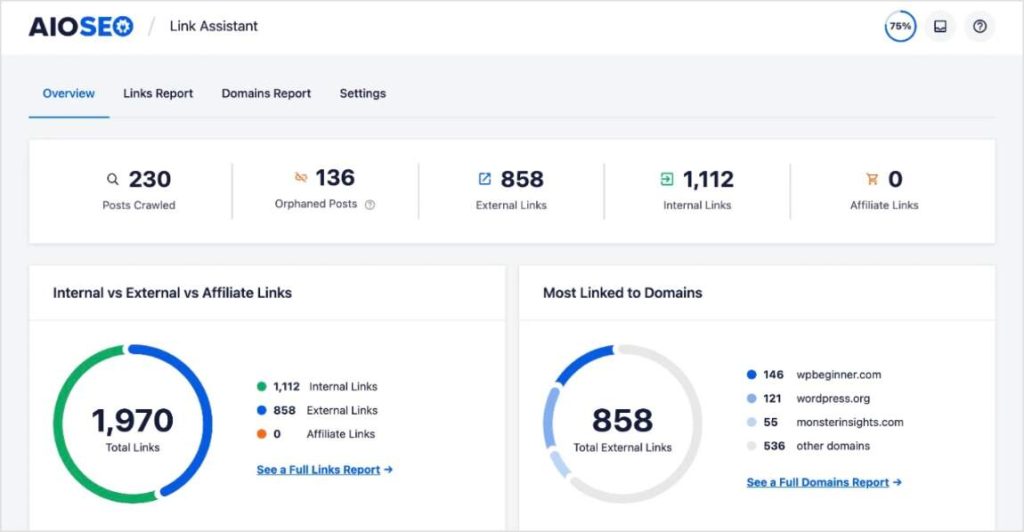
O Assistente de Links escaneia automaticamente todo o seu site e gera vários relatórios de seus links.
Ele ajuda você a descobrir oportunidades de linkagem, páginas órfãs (URLs sem links apontando para elas) e seus domínios de linkagem.
No entanto, meu recurso favorito do Assistente de Links são as Sugestões de Links.
Quando você está escrevendo um post ou página, o Assistente de Links fornece recomendações de links internos diretamente no editor do WordPress.
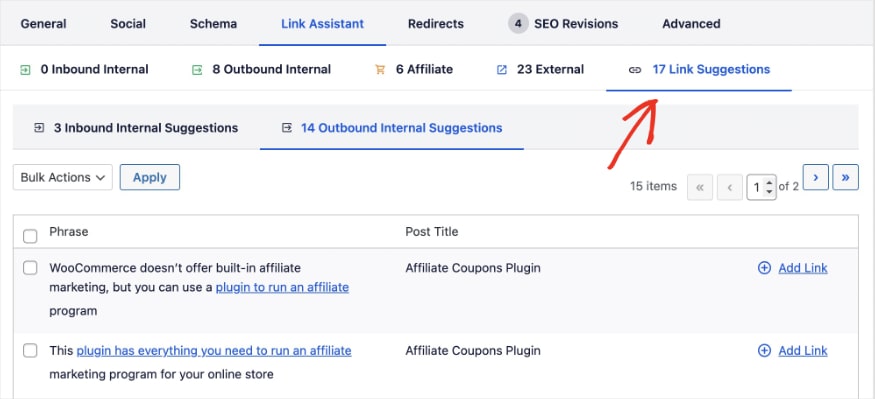
Você pode adicionar esses links internos com um único clique, diretamente do relatório. Nenhuma pesquisa ou cópia e cola é necessária. Ele até fornece texto âncora sugerido, mas você sempre pode alterá-lo.
2. Gere Títulos e Descrições de Meta Instantaneamente
Cada página indexável em seu site precisa de um título SEO e meta descrição exclusivos.
No Google, esses elementos aparecem nos resultados de pesquisa como um hiperlink azul (título SEO) e uma prévia ou resumo do conteúdo (meta descrição).
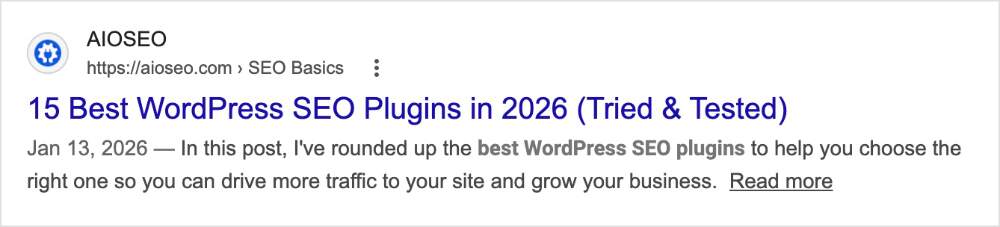
Este texto é extremamente importante para o seu tráfego orgânico. Um título e descrição fortes aumentam sua taxa de cliques orgânica (CTR), trazendo mais visitantes para o seu site.
- A Maneira Manual: Escrever esses elementos manualmente exige muita energia criativa, especialmente se você produz muito conteúdo.
- A Maneira Automatizada: Você pode usar o Gerador de Conteúdo com IA do AIOSEO para escrevê-los para você.

Ao clicar no ícone de IA nas configurações do AIOSEO abaixo do seu post, o plugin irá automaticamente gerar 5 títulos e descrições otimizados com base no seu conteúdo. Você apenas clica naquele que você mais gosta.

Dica Pro: Você também pode usar tags inteligentes para automatizar atualizações futuras. Por exemplo, se você usar a tag #ano_atual no seu título (ex: “Melhores Dicas de SEO em 2026”), o AIOSEO atualizará automaticamente o ano em 1º de janeiro. Você nunca mais precisará atualizar datas manualmente!
3. Detecte Links Quebrados e Configure Redirecionamentos Automáticos
Se você alterar o slug da URL de uma postagem publicada ou excluir uma página, criará um link quebrado (um erro 404). Isso frustra os usuários e prejudica suas classificações no Google.
- O Jeito Manual: Manter uma planilha de URLs excluídas, fazer login no seu servidor e escrever código manualmente no seu arquivo .htaccess.
- O Jeito Automatizado: O Gerenciador de Redirecionamentos do AIOSEO vigia seu site como um falcão.
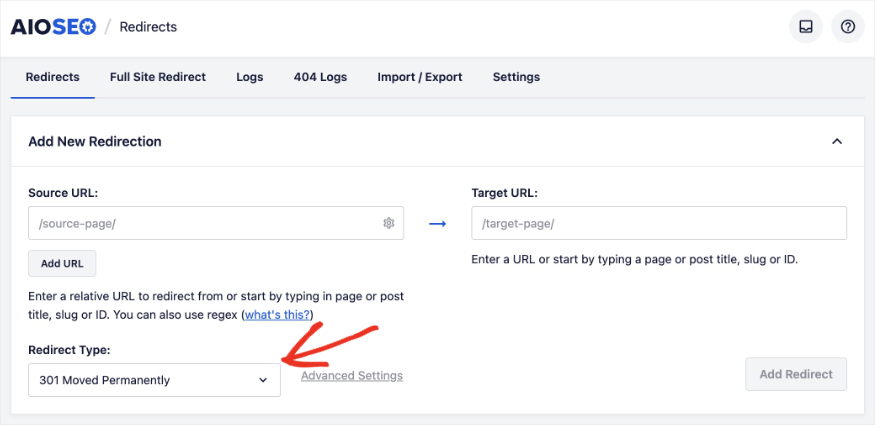
Se você alterar uma URL, o AIOSEO a detecta instantaneamente e exibe uma notificação perguntando se você deseja redirecionar a URL antiga para a nova.

Depois de clicar em “Adicionar Redirecionamento”, ele perguntará o tipo de redirecionamento que você deseja implementar. (Um redirecionamento 301 é o mais comum. Ele informa aos rastreadores dos mecanismos de pesquisa que você está movendo o conteúdo permanentemente.)
4. Coloque Seus Sitemaps XML em Piloto Automático
Um sitemap XML é um arquivo que lista todas as páginas importantes do seu site para que o Google possa encontrá-las e indexá-las rapidamente. Se você adicionar um novo produto ou publicar uma nova postagem no blog, o Google precisa saber disso. (Quanto mais cedo ele souber, mais cedo você poderá começar a ranquear.)
- O Jeito Manual: Gerar um arquivo XML usando um site externo, fazer login no seu servidor via FTP para fazer o upload do arquivo e, em seguida, fazer login manualmente no Google Search Console para enviá-lo. Você teria que fazer isso toda vez que publicar ou atualizar uma postagem.
- A Maneira Automatizada: Usando o módulo Sitemaps integrado do AIOSEO.

Com o AIOSEO, seus sitemaps são completamente automatizados.
No momento em que você clica em “Publicar” em uma nova postagem, o AIOSEO atualiza automaticamente seu sitemap XML e instantaneamente “pinga” o Google e o Bing para informá-los que há novo conteúdo disponível.
Você literalmente não precisa mover um dedo.
Dica Pro: Você também pode criar vários outros tipos de sitemaps usando o AIOSEO, incluindo:
5. Rastreie Posições de Palavras-Chave Sem Sair do WordPress
Você não pode melhorar o que não conhece. É por isso que é fundamental entender onde seu site se classifica no Google para palavras-chave específicas.
Infelizmente, digitar manualmente palavras-chave no Google e contar os resultados é uma perda de tempo enorme. (Eu nem tentaria esse método, a menos que você tenha certeza de que está ranqueando entre os 10 primeiros.)
- O Jeito Manual: Muitas empresas pagam mais de US$ 100 por mês por ferramentas de rastreamento de classificação externas para obter esses dados.
- O Jeito Automatizado: Use o módulo Estatísticas de Pesquisa do AIOSEO.
Estatísticas de Pesquisa é uma integração do WordPress Google Search Console. Ele puxa seus dados de classificação do GSC diretamente para o seu painel do WordPress.
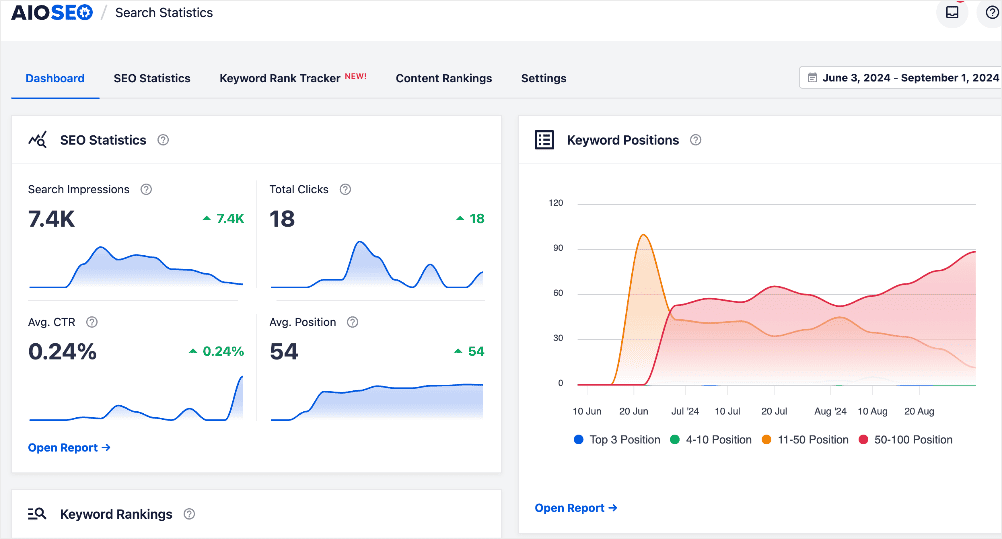
Você pode adicionar as palavras-chave específicas que deseja rastrear (ou importá-las), e o AIOSEO monitorará automaticamente sua posição, cliques e impressões.
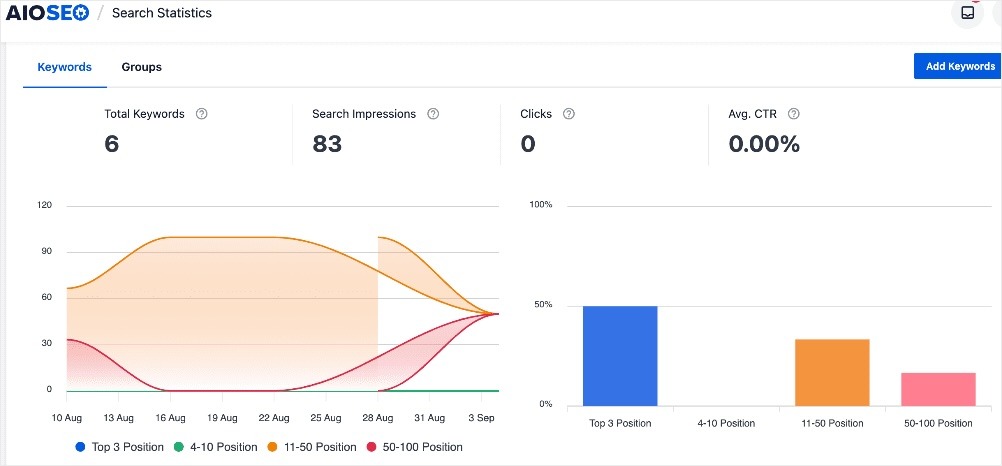
Você também pode analisar palavras-chave individuais e ver como seus rankings estão evoluindo ao longo do tempo com o gráfico “Histórico de Posição”.
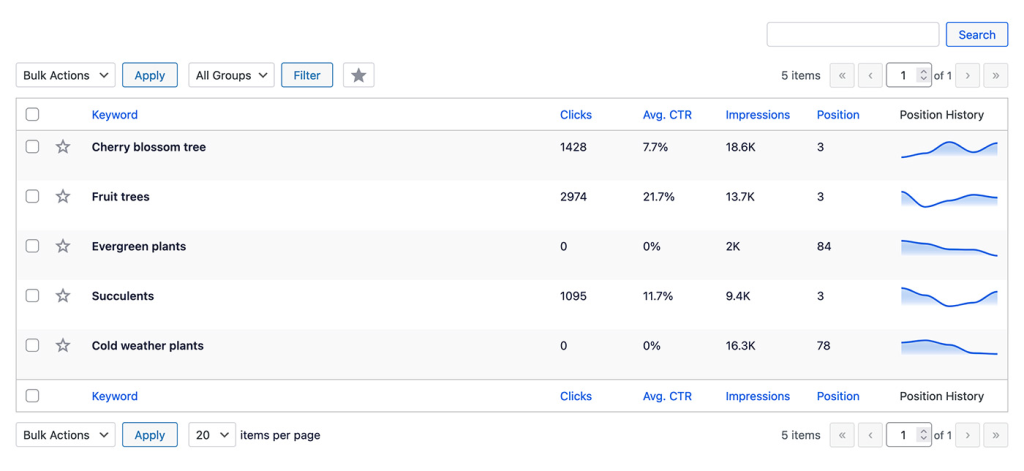
Essa integração com o GSC é mais um dos meus recursos favoritos do AIOSEO.
Qualquer ferramenta que me ajude a ficar na ferramenta em vez de ter que abrir outra aba ou plataforma, eu aprecio. Cada segundo conta, especialmente quando você está escrevendo muito conteúdo ou fazendo pesquisas intensivas de estratégia.
6. Realize Verificações Instantâneas de Saúde de SEO
Como você sabe se seu site tem erros técnicos, meta tags ausentes ou páginas de carregamento lento?
Uma auditoria de SEO analisa todas as facetas do desempenho e otimização do seu site. O objetivo é identificar oportunidades de melhoria da sua estratégia de SEO.
- O Jeito Manual: Clicar em cada página do seu site, inspecionar o código fonte, testar links um por um, ou pagar centenas de dólares por ano por uma ferramenta complexa de rastreamento de terceiros.
- O Jeito Automatizado: Usando a ferramenta integrada de Auditoria de SEO do AIOSEO.
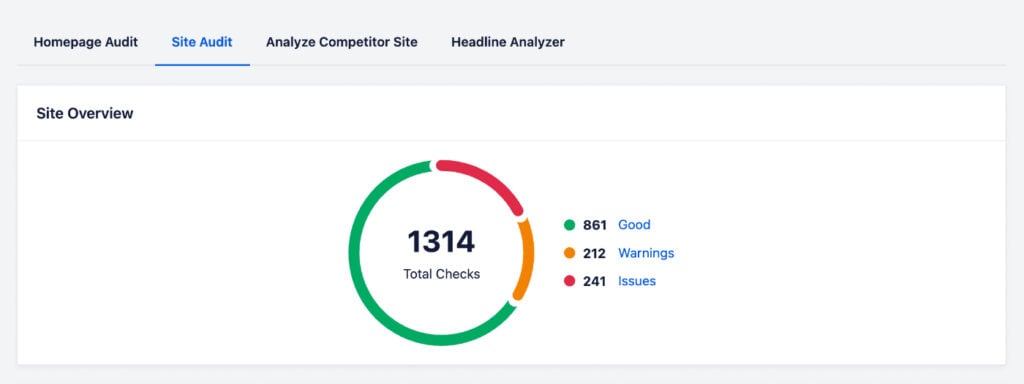
A ferramenta escaneia automaticamente todo o seu site e avalia sua saúde geral de SEO.
Você recebe uma lista de verificação de auditoria de SEO que destaca exatamente quais erros críticos precisam ser corrigidos (como texto alternativo ausente ou links quebrados). Ela também fornece feedback sobre como resolvê-los.
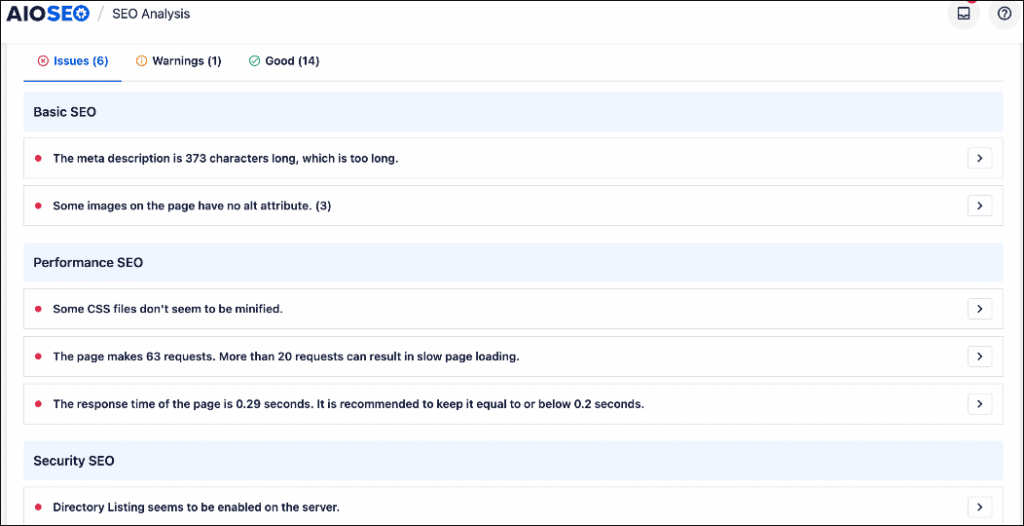
Para ver esse feedback, tudo o que você precisa fazer é expandir o problema específico que está tentando corrigir. Eu também gosto muito de como ele se vincula exatamente onde você precisa ir no WordPress para fazer a alteração.
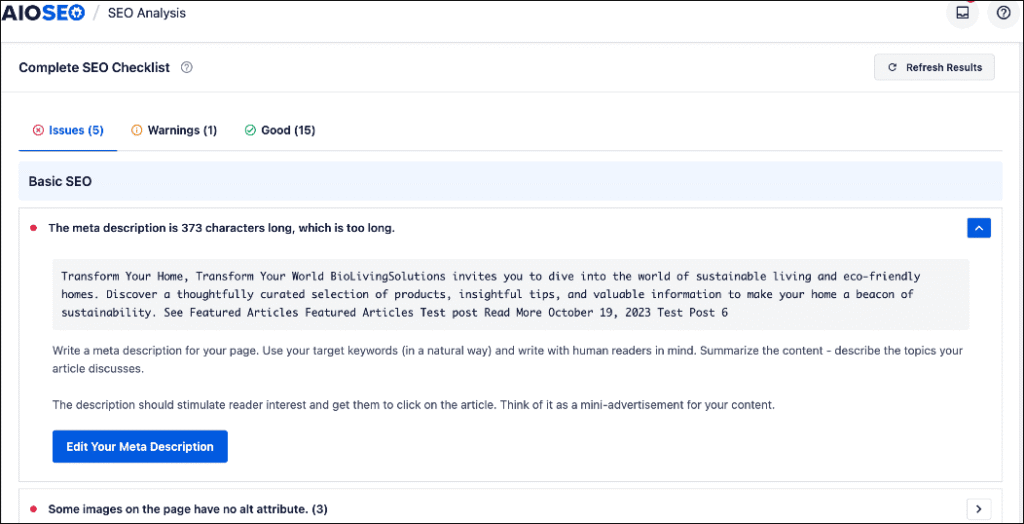
No final, é uma maneira super amigável para iniciantes de automatizar auditorias de site no WordPress sem ter que pagar por uma ferramenta de terceiros.
7. Otimize o SEO de Imagens em Segundo Plano
Os motores de busca não conseguem “ver” imagens. Eles dependem do texto alternativo da imagem e dos atributos de título para entender do que se trata a imagem. Adicionar esse texto a dezenas de imagens por postagem de blog é incrivelmente tedioso. (E uma das minhas coisas pessoais menos favoritas de fazer para SEO.)
- O Jeito Manual: Clicar em cada imagem na sua biblioteca de mídia e digitar manualmente o texto alternativo e os atributos de título um por um.
- O Jeito Automatizado: Usando o recurso de SEO de Imagem do AIOSEO para definir regras globais.
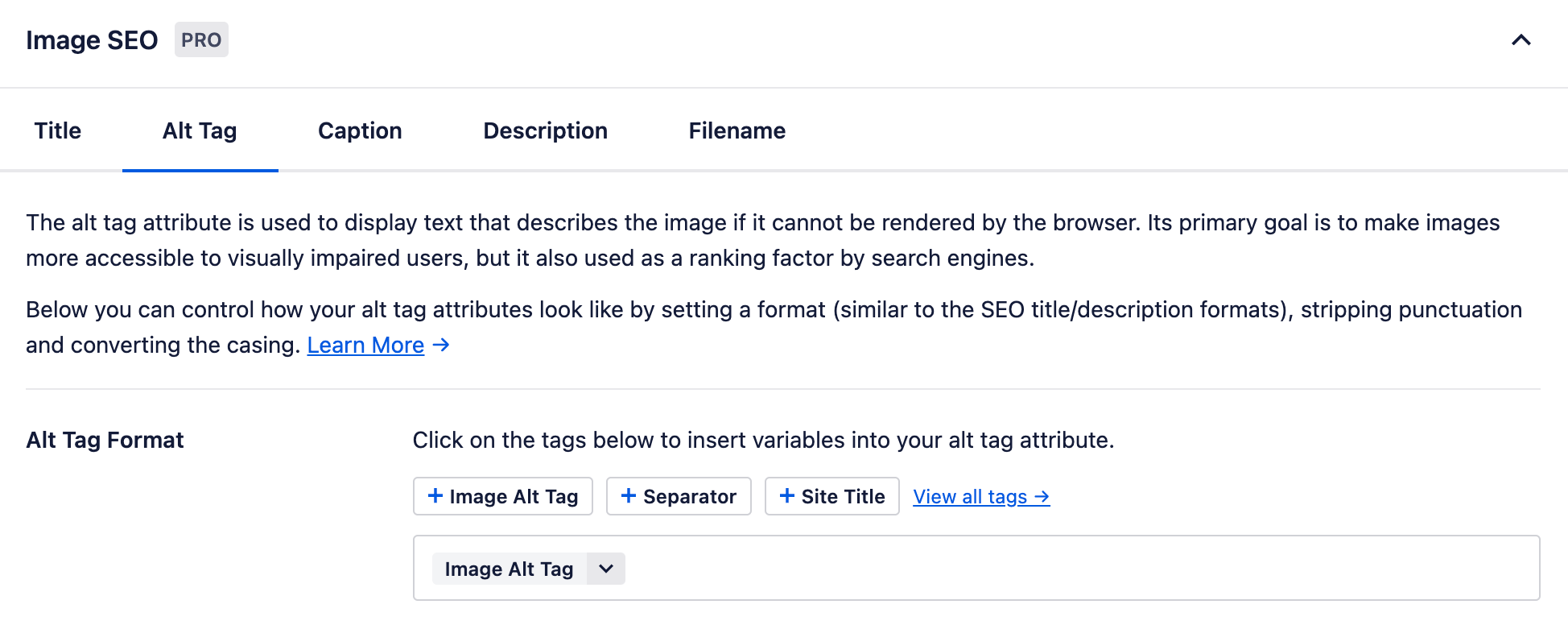
Lembra-se dessas tags inteligentes que mencionei anteriormente ao escrever títulos e meta descrições de SEO?
Bem, você pode usar essas tags dinâmicas para automatizar seu SEO de imagem também. Você pode personalizar suas tags inteligentes para:
- Títulos de imagem
- Texto alternativo
- Legendas
- Descrições
- Nomes de arquivo
Em seguida, quando você carrega uma imagem, os dados de SEO são preenchidos instantaneamente em segundo plano.
Exemplo: Você pode dizer ao AIOSEO para gerar automaticamente o texto alternativo com base no nome do arquivo original da imagem ou no título da postagem do blog. Ao fazer o upload da imagem, o plugin usará esse texto para preencher o texto alternativo da imagem.
Para saber mais, veja como usar os recursos de SEO de imagem no AIOSEO.
8. Receba Relatórios de SEO Automatizados por E-mail
O relatório de SEO é vital para ver se sua estratégia está realmente funcionando. Você precisa saber quais páginas estão ganhando tráfego e quais estão perdendo terreno.
- O Jeito Manual: Criar relatórios personalizados em ferramentas externas leva horas de configuração e análise manual.
- O Jeito Automatizado: Deixe o AIOSEO enviar relatórios de SEO por e-mail diretamente para sua caixa de entrada.

Em suas Configurações Gerais, você pode ativar os Relatórios por E-mail. O AIOSEO enviará automaticamente para você (e qualquer outra pessoa em sua equipe) um resumo do desempenho do seu site.
Você também pode personalizar a frequência com que cada usuário recebe seu relatório, o que é conveniente para equipes maiores.
Leitura Relacionada:Como Obter Relatórios de SEO Automatizados por E-mail
9. Acelere a Criação de Conteúdo com o Assistente de IA
Criar conteúdo de alta qualidade leva horas de pesquisa, formatação e redação. Embora você nunca deva deixar a IA escrever um post inteiramente sem revisão humana, você pode automatizar a maior parte do processo de escrita.
- O Jeito Manual: Ficar encarando uma tela em branco, escrever do zero, codificar tabelas HTML manualmente ou passar horas reescrevendo parágrafos desajeitados.
- O Jeito Automatizado: Usando o Assistente de IA do AIOSEO.

Integrado diretamente ao editor do WordPress, o Assistente de IA atua como seu copiloto pessoal de escrita. Você pode usá-lo para:
- Geração Instantânea de Posts: Gere um rascunho funcional com base no seu tópico.
- Prompts Personalizados: Peça à IA para gerar ideias ou escrever seções específicas.
- Reescritas sem Esforço: Destaque um parágrafo rígido e peça à IA para reescrevê-lo instantaneamente para que flua melhor.
- Criação de Tabelas: Gere automaticamente tabelas de dados (que o Google adora) em segundos.
- Traduções de Idiomas: Traduza sua cópia para alcançar um público mais amplo.
- E muito mais
Adoro poder usar a IA diretamente onde trabalho, em vez de ter que copiar e colar de outra janela.
Para usar este recurso, tudo o que você precisa fazer é adicionar o bloco AIOSEO – AI Assistant ao seu post ou página e inserir seu prompt. Os únicos limites são sua imaginação.

10. Gere Marcação de Schema Instantaneamente
A marcação de Schema é um código especial que ajuda os motores de busca a entenderem seu conteúdo. É o que lhe dá aqueles "rich snippets" atraentes no Google, como avaliações em estrelas, disponibilidade de produtos e FAQs expansíveis.
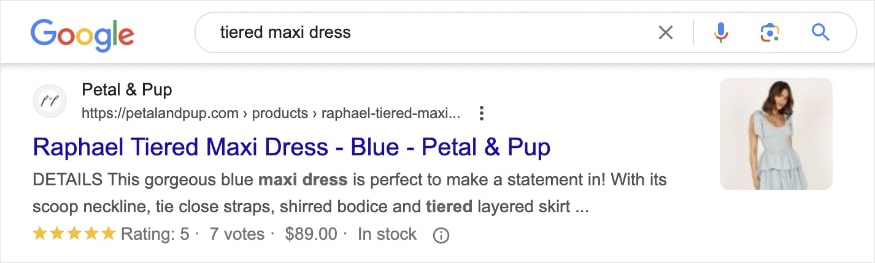
- A Maneira Manual: Escrever código JSON-LD complexo do zero e executá-lo em um validador, esperando não ter cometido um erro de sintaxe.
- O Jeito Automatizado: Usando o Gerador de Schema do AIOSEO.
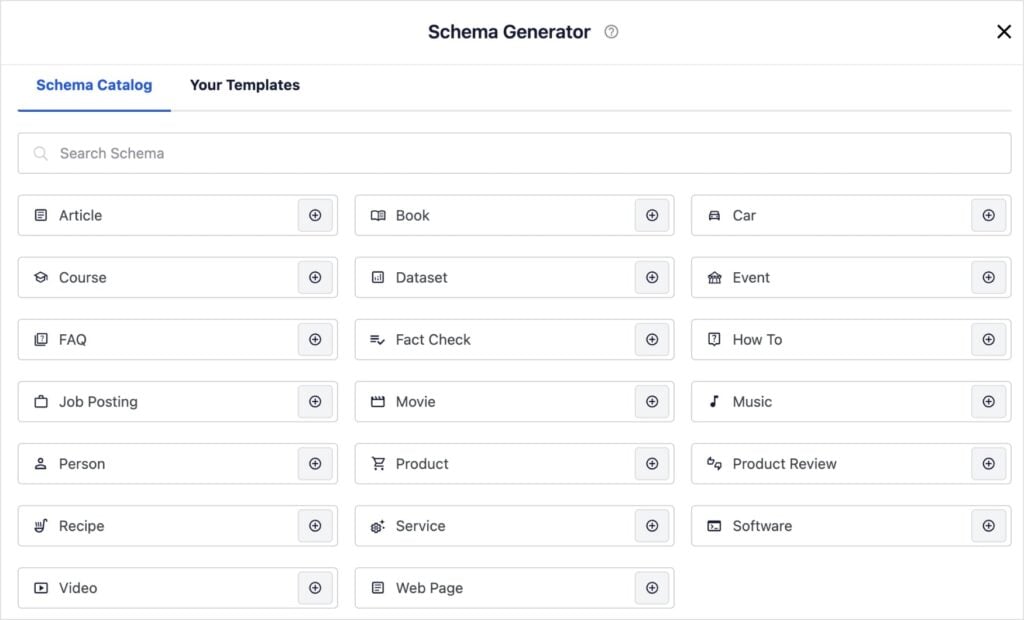
Você não precisa ser um desenvolvedor ou saber codificar para adicionar schema. O AIOSEO tem um enorme Catálogo de Schema para clicar.
Seja para publicar uma receita, análise de software, página de negócio local ou seção de Perguntas Frequentes, basta selecionar o modelo, preencher os campos e o AIOSEO escreve e implementa automaticamente o código perfeito para você.
Dica Pro: Mesmo após 6 anos em SEO, nunca precisei escrever schema do zero. Existem muitas ferramentas de automação de SEO disponíveis para tornar essa tarefa manual. Eu gosto do AIOSEO para WordPress, mas você também pode usar o Google’s Structured Data Markup Helper para escrevê-lo para seus sites que não são WordPress.
Quando NÃO Automatizar SEO
Embora a automação de SEO seja incrivelmente poderosa, e ferramentas como o AIOSEO AI Assistant possam gerar rascunhos completos em segundos, há uma regra de ouro que você deve sempre seguir:
Nunca publique conteúdo gerado por IA sem uma revisão humana.
O algoritmo do Google prioriza fortemente o E-E-A-T (Experiência, Especialidade, Autoridade e Confiabilidade).
A IA é um copiloto fantástico para superar o bloqueio criativo, traduzir textos e fazer a maior parte do trabalho. No entanto, a IA não pode compartilhar:
- Anedotas pessoais
- Sua experiência em primeira mão
- Informações que só você sabe
Use a automação para acelerar o processo de escrita e formatação, mas sempre injete seu toque humano, opiniões e expertise antes de clicar em "Publicar".
Seu público (e o Google) quer se conectar com uma pessoa real.
Pare de Trabalhar Mais, Comece a Trabalhar de Forma Mais Inteligente
E isso conclui a automação de otimização para mecanismos de busca! Como você viu, não é necessário um enorme conjunto de tecnologias para automatizar o SEO.
Ao alavancar as ferramentas do AIOSEO já disponíveis dentro do WordPress, você pode eliminar horas de trabalho manual, reduzir erros técnicos e receber melhores dados diretamente na sua caixa de entrada.
Pronto para colocar seu crescimento orgânico no piloto automático? Comece hoje mesmo com o All in One SEO.
Para mais maneiras de melhorar seu fluxo de trabalho no WordPress, confira estes recursos:
- SEO Automatizado vs. Manual: Qual é o Melhor para Pequenas Empresas?
- O Checklist Completo de SEO para WordPress
- Como Rastrear Classificações de Palavras-chave no WordPress
- Melhores Ferramentas de SEO com IA para WordPress
Se você achou este artigo útil, encontrará muitos outros tutoriais e dicas de automação de SEO em nosso Canal do YouTube. Você também pode nos seguir no X (Twitter), LinkedIn ou Facebook para ficar por dentro das novidades.
Perguntas Frequentes Sobre Automação de SEO
O que é automação de otimização para mecanismos de busca?
A automação de otimização para mecanismos de busca usa software e ferramentas para lidar com tarefas repetitivas de SEO para você. Isso inclui rastrear classificações de palavras-chave, gerar meta tags, encontrar links quebrados e criar sugestões de links internos, economizando horas de trabalho manual.
Posso automatizar o SEO no WordPress?
Sim! Você pode automatizar a maior parte do seu SEO diretamente no WordPress usando um plugin como o All in One SEO. Ele lida com tarefas técnicas como gerar sitemaps XML, aplicar marcação schema e adicionar redirecionamentos 301 automaticamente, sem a necessidade de software externo.
A IA é boa para SEO?
Sim, a IA é uma excelente ferramenta para SEO quando usada corretamente. A IA pode ajudá-lo a escrever meta descrições otimizadas, gerar esboços de conteúdo e ter ideias de tópicos rapidamente. No entanto, é importante incluir suas experiências em primeira mão, que a IA não pode replicar. O Google e os usuários preferem conteúdo que mostre experiência humana real e seja genuíno.
Ferramentas de automação de SEO valem a pena?
Se você está pagando centenas de dólares por mês por várias ferramentas corporativas que mal usa, as ferramentas de automação de SEO podem não valer a pena. No entanto, usar um plugin WordPress tudo-em-um como o AIOSEO é altamente econômico porque ele automatiza dezenas de tarefas em um único painel.
Aviso: Nosso conteúdo é apoiado pelo leitor. Isso significa que se você clicar em alguns de nossos links, poderemos ganhar uma comissão. Recomendamos apenas produtos que acreditamos que agregarão valor aos nossos leitores.
Quer Experimentar o AIOSEO Gratuitamente?
Digite o URL do seu site WordPress para instalar o AIOSEO Lite.

