¿Alguna vez has terminado de configurar un plugin y has pensado: "Vale, he terminado con el asistente… ¿y ahora qué?"
Conozco esa sensación. Quieres asegurarte de sacar el máximo partido a tu nueva herramienta, pero con tantas funciones, puede ser difícil saber por dónde empezar.
¡Por eso estoy emocionado de anunciar AIOSEO 4.9.4!
Esta actualización introduce una inteligente Lista de Tareas SEO diseñada para tender un puente entre nuestro Asistente de Configuración y la optimización avanzada. También hemos reorganizado nuestro menú con un nuevo Paquete de IA y simplificado tu configuración para que gestionar tu sitio sea más fácil que nunca.
Echemos un vistazo a lo que hay dentro.
En este artículo
[NUEVO] Lista de Tareas SEO: Tu Hoja de Ruta para Mejores Posicionamientos
El Asistente de Configuración es genial para hacer bien lo básico, pero el SEO es un proceso continuo. Para ayudarte a explorar todo lo que AIOSEO puede hacer (sin agobiarte), hemos creado la Lista de Tareas SEO.
Piensa en esto como tu hoja de ruta SEO personal.
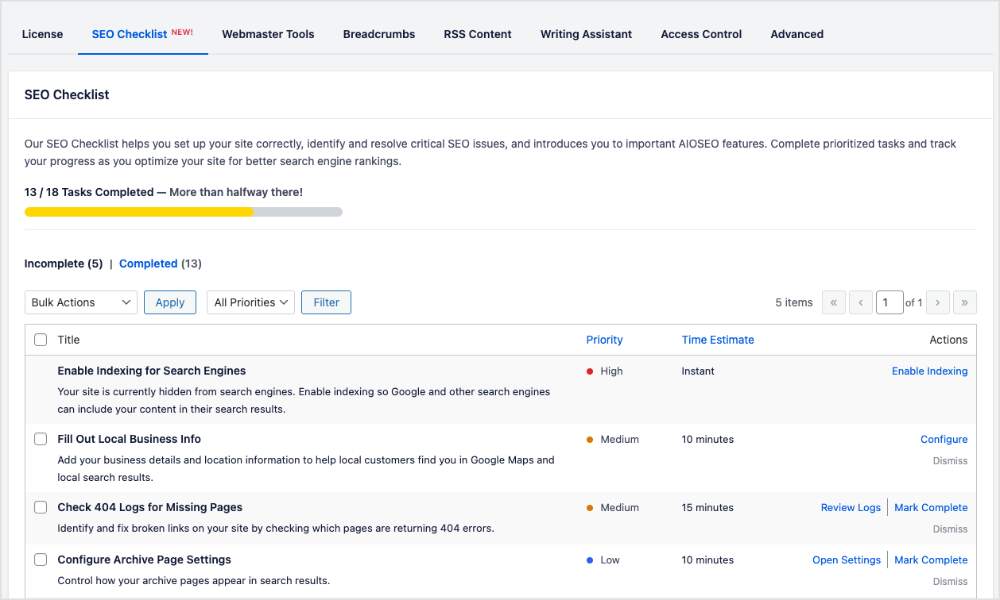
En lugar de adivinar qué ajustes configurar o qué funciones activar a continuación, la Lista de Tareas SEO te proporciona una lista clara de tareas accionables.
Cómo Funciona
La lista de tareas es inteligente. Detecta lo que ya has completado durante el proceso de configuración, para que no tengas que repetir trabajo.
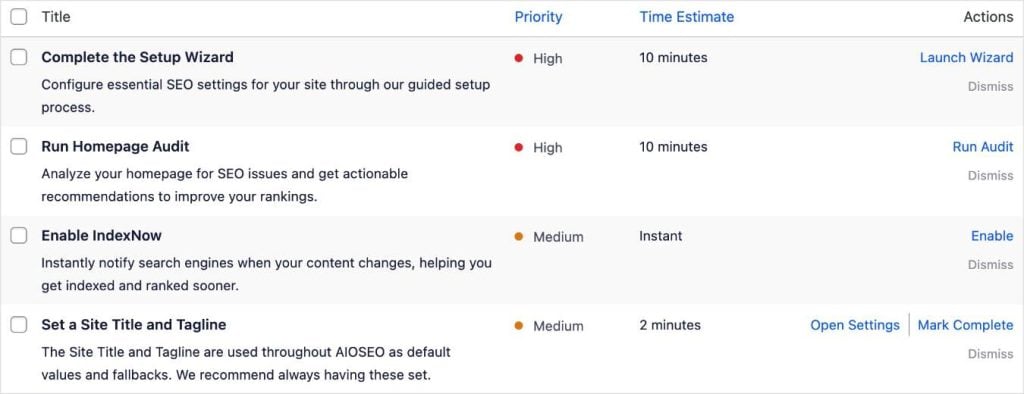
Para los elementos restantes, cada tarea ofrece acciones y perspectivas:
- Completar la Tarea: Un enlace directo en la columna Acción te lleva exactamente a donde necesitas ir.
- Descartar: Oculta las tareas que no son relevantes para tu flujo de trabajo específico para mantener tu vista despejada.
- Completar Manualmente: Para tareas que requieren un toque personal o una revisión manual, puedes marcarlas tú mismo.
- Explicación: Obtén un contexto rápido sobre por qué una tarea específica es importante y cómo afecta a tus objetivos.
- Nivel de Prioridad: Las tareas se clasifican por impacto Alto, Medio o Bajo, lo que te ayuda a centrarte primero en las optimizaciones más críticas.
- Estimación de Tiempo: Consulta cuánto tiempo llevará una tarea para que puedas conseguir "victorias rápidas de SEO" incluso cuando tengas poco tiempo.
Queríamos que la optimización se sintiera menos como una tarea y más como una victoria.
A medida que marques elementos, verás cómo sube tu barra de progreso. ¿Y cuando completes todas tus tareas?
¡Prepárate para una explosión de confeti de celebración en tu pantalla! 🎉
Dónde Encontrar la Lista de Tareas SEO
Puedes acceder a la Lista de Tareas SEO desde varias áreas convenientes de WordPress.
¿Eres nuevo en AIOSEO?
¡No te preocupes por localizar la Lista de Tareas SEO! Te llevaremos allí tan pronto como completes el sencillo Asistente de Configuración.
1. Ajustes Generales
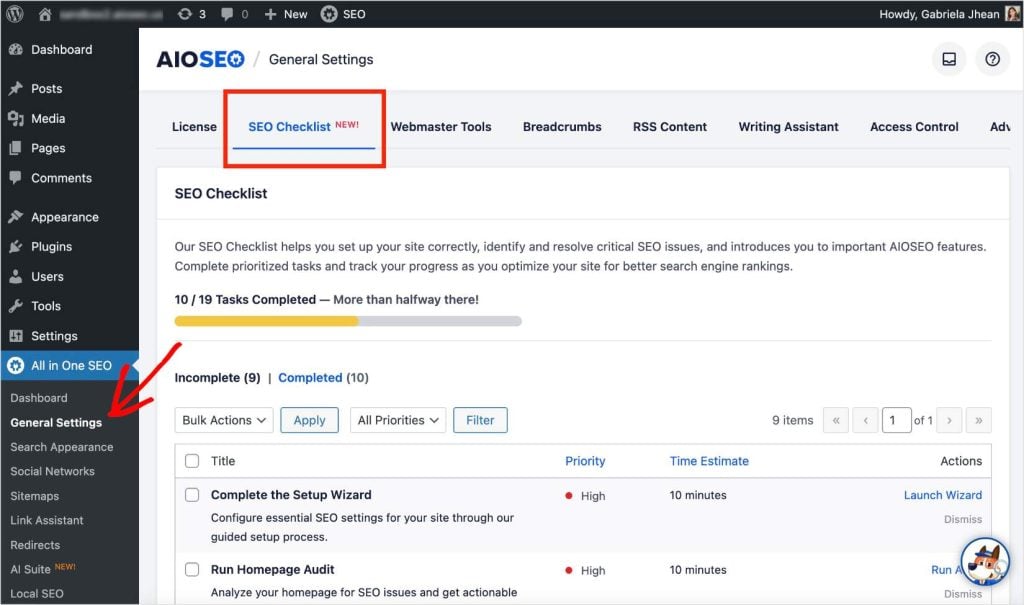
Después de abrir el menú de All in One SEO, selecciona Ajustes Generales. Luego, haz clic en la pestaña Lista de Tareas SEO y verás tus tareas organizadas por finalización.
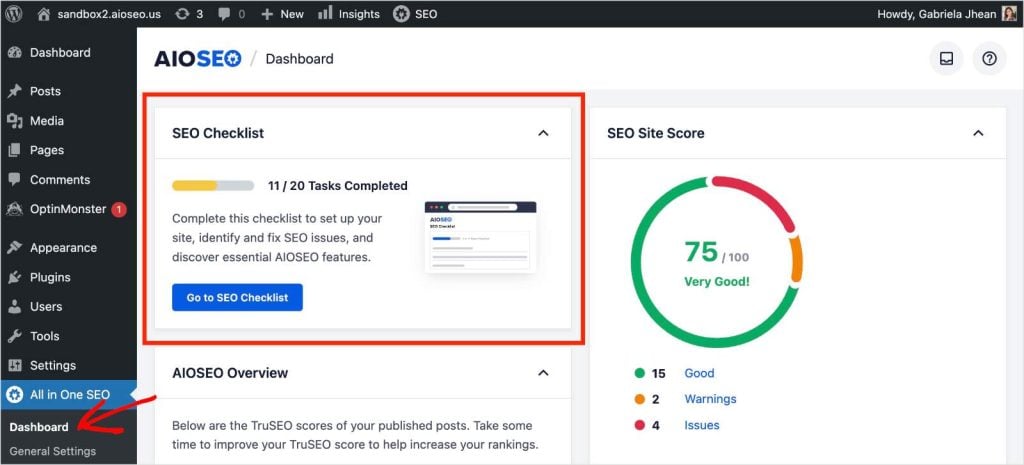
2. Panel de Control Todo en Uno SEO
Al ver tu Panel de Control de AIOSEO, tu Lista de Tareas SEO aparece como un widget. Puedes ver cuántas tareas se han completado a través de la barra de progreso y hacer clic en el botón para ir directamente a tu lista de tareas.
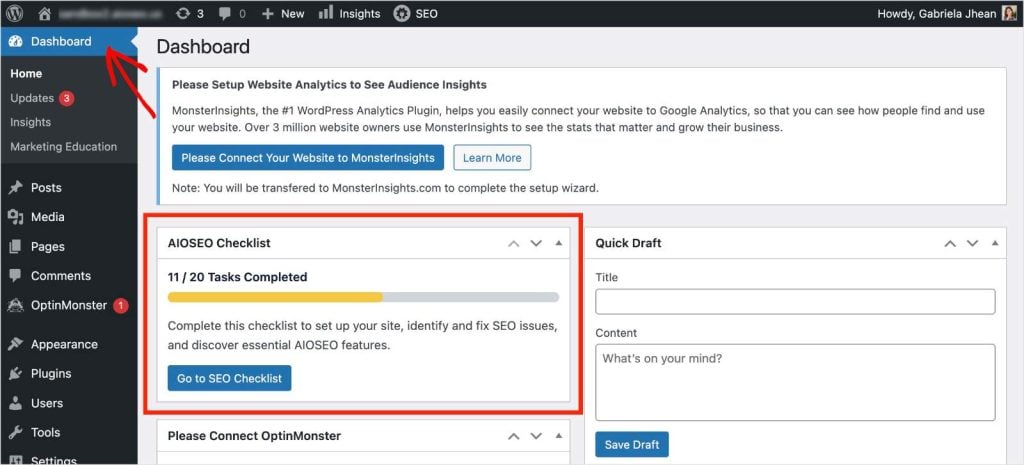
3. Panel de Control de WordPress
Un nuevo widget en tu Panel de Control de WordPress mantiene tus próximos pasos al frente y al centro.
[MEJORADO] Suite de IA y Reorganización del Menú
A medida que la IA continúa transformando la búsqueda, constantemente agregamos nuevas herramientas para ayudarte a mantenerte a la vanguardia.
Para mantener tu panel de control organizado y listo para futuras innovaciones, hemos cambiado el nombre del menú AI Insights a AI Suite.
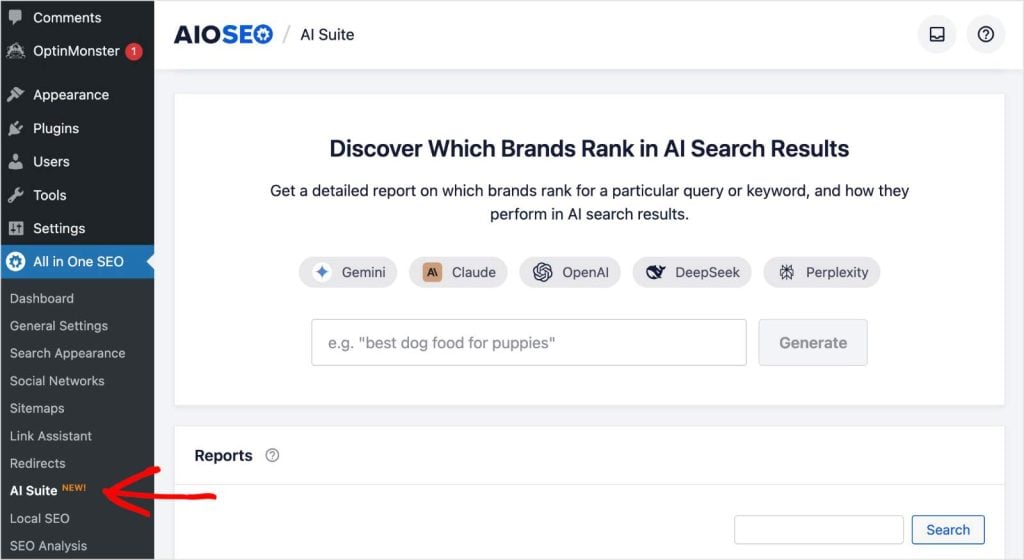
¿Qué Cambia?
- AI Suite: Este es tu nuevo hogar para todo lo relacionado con la IA. Hemos trasladado la Configuración de Contenido de IA aquí, centralizando tus controles para que puedas gestionar todo, desde la generación de contenido hasta las estadísticas de palabras clave en un solo lugar.
- Pestaña de Licencia: La pestaña "Ajustes Generales" (dentro de Ajustes Generales) ha sido renombrada a "Licencia". Hemos renovado la interfaz de usuario de esta área y agregado la configuración de conexión de Créditos de IA aquí, facilitando la gestión de la conexión de tu cuenta.
Una nota sobre el Asistente de Configuración
¿Necesitas ejecutar el Asistente de Configuración de nuevo? Hemos eliminado el antiguo botón para despejar la configuración. Ahora puedes acceder a la opción de volver a ejecutar el asistente directamente desde la tarea "Asistente de Configuración Completado" dentro de tu nueva Lista de Tareas SEO.
Actualiza a la 4.9.4 Hoy Mismo
AIOSEO 4.9.4 se trata de orientación y claridad. Queremos asegurarnos de que no solo instales un plugin, sino que realmente lo uses para aumentar tu tráfico.
Con la nueva Lista de Tareas SEO, siempre sabrás exactamente qué hacer a continuación.
¡Actualiza a AIOSEO 4.9.4 hoy mismo para empezar a marcar tus tareas y ver volar el confeti!
¿Aún no usas AIOSEO? Instala y activa el plugin para obtener tu hoja de ruta SEO personalizada.
¿Tienes preguntas o comentarios sobre la nueva lista de tareas? Deja un comentario abajo o contacta a nuestro equipo de soporte. ¡Estamos aquí para ayudarte!
– Benjamin Rojas (Presidente de AIOSEO)
Descargo de responsabilidad: Nuestro contenido es compatible con los lectores. Esto significa que si haces clic en algunos de nuestros enlaces, podemos ganar una comisión. Solo recomendamos productos que creemos que añadirán valor a nuestros lectores.


