There’s a category of broken content that link checkers have never been able to catch: the YouTube video that returns a healthy 200 status even though the video was deleted months ago. Standard link checkers read HTTP status codes, and YouTube always says the page is fine. What your visitors actually see is a black box where a tutorial or demo used to be.
I’ll be honest, I didn’t realize how common this problem was until I started looking into it. A YouTube URL shows successfully whether the video is active, deleted, or set to private. Most link checkers never know the difference.
Broken Link Checker 1.3.0 fixes that. The new video support feature goes beyond the HTTP status check and confirms whether the video itself is still live and accessible.
A few situations this catches that a standard link check never would:
- A plugin author recorded a setup tutorial, reuploaded an updated version, and deleted the original. Your how-to post still links to the old one.
- A recipe video you embedded was flagged for a copyright claim and removed. Readers now see an error screen where the cooking demo used to be.
- A vendor you wrote about made their product demo private when they relaunched their brand. The embed looks fine in your WordPress editor.
BLC catches all 3. YouTube, Vimeo, and 10+ other platforms are supported, and video links are scanned automatically as part of your existing check cycle.
Here’s how it works, and what you’re likely to find the first time you run a scan.
In This Article
How It Works
Standard link checking works by making an HTTP request to a URL and reading the response code. A 200 means the page loaded. A 404 means it’s gone. That’s how broken link checkers have always worked, and it’s reliable for most URLs.
Video platforms break that model. YouTube, Vimeo, and most other video hosts return a 200 status for deleted, private, and unavailable videos. The page loads — it just doesn’t have a video on it anymore.
BLC’s video support adds a platform-level check on top of the standard HTTP check. When BLC detects that a link points to a supported video platform, it makes a separate check to confirm the video is still accessible.
Not just that the URL exists. That the video itself does.
Supported platforms include:
- YouTube
- Vimeo
- TikTok
- Dailymotion
- TED
- VideoPress
- And more
The check runs automatically as part of your standard BLC scan cycle. No configuration required.
In summary: The standard HTTP check confirms the URL loads. Video support confirms the video is still there.
What You Can Catch Now
With video support in BLC 1.3.0, your scans now detect:
- YouTube videos that were deleted by the creator
- YouTube videos that were set to private or unlisted after you embedded them
- Vimeo videos that were removed or restricted
- Videos on 10+ other platforms that are no longer accessible
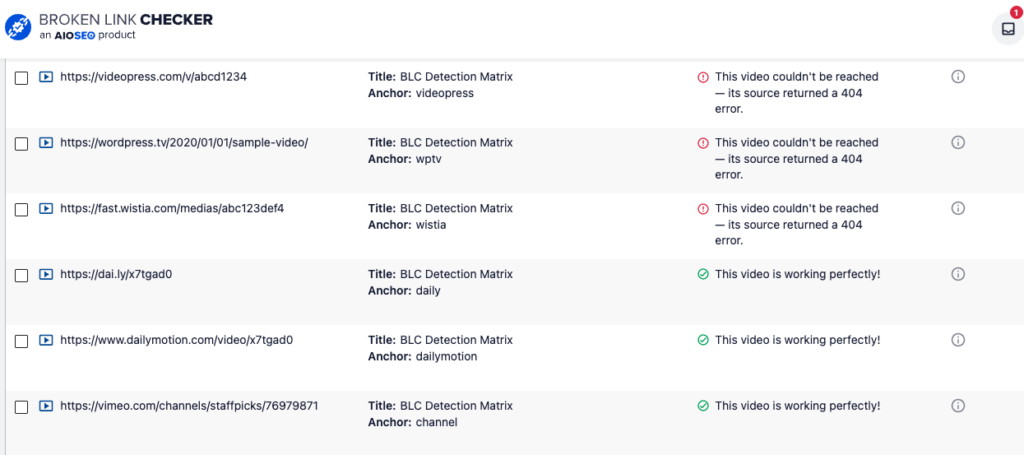
- Embeds that return a 200 status but no longer have a live video — the category that standard link checkers always miss
Flagged video links show up in the same BLC dashboard you already use. You can update the URL, replace the embed, or unlink it directly from there. No need to hunt through posts manually.
Available on All Paid Plans
Video support is included in all Broken Link Checker paid plans, starting at $4.99/mo.
To use it, update to Broken Link Checker 1.3.0 from Plugins >> Installed Plugins in your WordPress dashboard. Your next scheduled scan will include video links automatically.
BLC 1.3.0 also includes 2 other improvements:
- Fewer false-negatives: BLC now scans broken links a second time client-side, catching cases where a WAF block or timeout made a live link appear broken.
- More reliable link updates on WP 6.6+: BLC now uses the WordPress HTML API on WordPress 6.6 and above, making link edits and removals more consistent across sites.
You can see the full BLC changelog to learn more.
— Ben Rojas, President of AIOSEO
Pro Tip: If you have video embeds anywhere in your content, I’d run a scan right after updating. There’s a decent chance at least 1 has already gone dark without you knowing.
Frequently Asked Questions
Does video support need to be configured, or does it work automatically?
It works automatically. After updating to Broken Link Checker 1.3.0, video links are included in your next scheduled scan with no settings to change.
Which video platforms does BLC check?
YouTube and Vimeo are fully supported, along with 10+ additional video platforms. BLC checks whether the video itself is still accessible, not just whether the URL returns a successful HTTP response.
Why doesn’t a standard broken link check catch deleted YouTube videos?
YouTube returns a 200 HTTP status for deleted and private videos, so a standard link check sees no problem. BLC’s video support makes a platform-level check that goes beyond the status code and confirms whether the video is actually live.
Which BLC plans include video support?
All paid Broken Link Checker plans: Starter ($4.99/month), Plus ($9.99/month), Premium ($29.99/month), and Elite ($49.99/month).
When will my existing content be scanned for broken video links?
After updating to 1.3.0, video links are included in your next scheduled scan. You can also trigger a manual scan from the BLC dashboard if you want results right away.