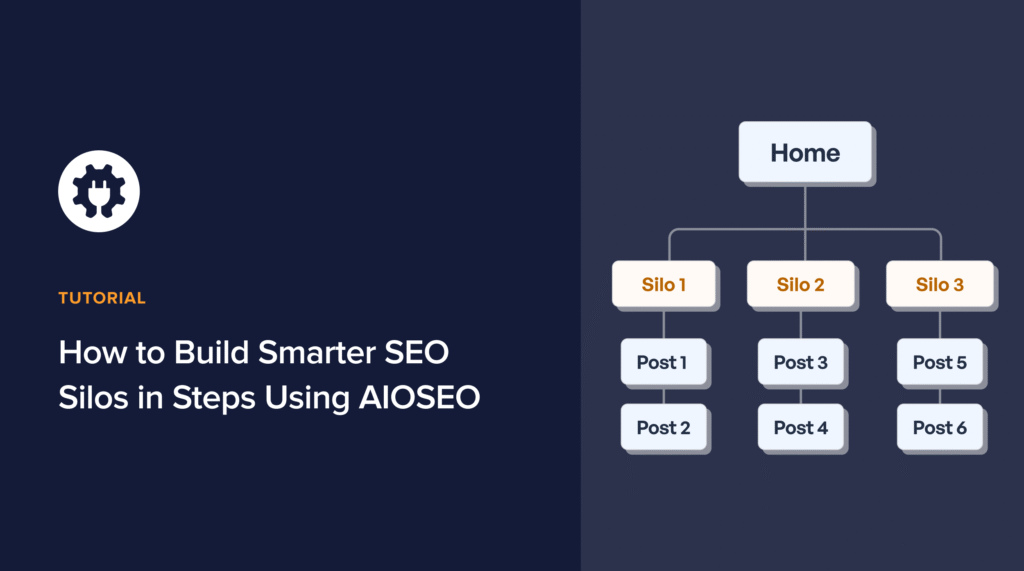

When I first started working on site structures, I didn’t fully understand how much they impacted SEO. Pages were published, blogs were scattered, and links were built randomly. The result? Some rankings, but no real authority. That’s when I learned the power of SEO silos and organizing content into structured, topical groups that both search engines and users can easily navigate.
In this guide, I’ll show you how to build smarter SEO silos in 6 steps using All In One SEO, a WordPress plugin that simplifies the process. From planning topics to automating internal links and schema, AIOSEO makes silo building scalable, something every agency or business needs in 2026.
Let's start with a quick definition.
In This Article
What Are SEO Silos?
An SEO silo is a way to structure your website so that related content is grouped in a hierarchy. Think of it as a library: each section (pillar) covers a broad topic, while the shelves (clusters) contain subtopics that support and expand on it.
There are two main types of silos:
- Physical silos: Created by URL structure. For example:
/blog/seo/seo-tools/ → where “SEO” is the category and “SEO tools” is the subtopic. - Virtual silos: Built through internal linking. Even if pages aren’t in the same folder, linking them strategically creates a silo effect.
For example, if you're building a travel blog, here's what SEO silos may look like for your website:
- Pillar page: Destinations → Europe
- Cluster pages: Italy, France, Spain
- Supporting content: Rome, Venice, Paris, Barcelona
This hierarchy tells Google, “This site covers Europe travel deeply,” which boosts your site's topical authority and helps push your content higher. Without SEO silos, you risk having your content look scattered.
Why SEO Silos Improve Rankings
I’ve seen firsthand how siloing transforms rankings. And one of the biggest reasons for that is that it boosts a stronger topical authority.
When related content links to your site, Google sees your site as an authority on that subject. For instance, a pillar on “Email Marketing” supported by several cluster posts signals depth and expertise on the topic.
To add to that, if you have an internal linking equity flow, it further strengthens your content. In a silo, your authority flows from the pillar page down to supporting pages, and back up again. This strengthens the entire cluster.
This also improves crawlability because search engine bots love clear paths. An SEO silo structure ensures they can crawl and index every relevant page without dead ends or confusion.
Visitors don’t have to guess where content lives. Siloed navigation makes it intuitive, leading to lower bounce rates and higher engagement.
And here's where AIOSEO helps:
- The Link Assistant feature automatically suggests internal links, making it easy to build virtual silos at scale.
- The XML Sitemap generator feature ensures silo structures are reflected in sitemaps, which helps crawlers understand the hierarchy.
- With the Breadcrumb Schema feature, AIOSEO reinforces the content hierarchy directly in search results, making silos visible to both Google and users.
SEO silos give you a double advantage of higher rankings from search engines and better navigation for users. With AIOSEO, what can take up to hours of manual planning is now built into your optimization workflow.
How to Build Smarter SEO Silos in 6 Steps
Building silos doesn’t have to be complicated, and with the right planning and tools, you can create a structure that strengthens topical authority, boosts rankings, and improves user navigation.
Now that we’ve covered what SEO silos are and why they’re so powerful, let’s break down the exact process.
Step 1: Plan Core Topics and Subtopics
The first step in building silos is deciding which pillar pages (broad topics) and cluster pages (supporting content) you will use.
I usually start by keyword clustering after identifying the focus keyword. That involves grouping related and semantically related terms to form a cluster of what can be covered. For example, “SEO tools,” “best SEO tools,” and “SEO software for beginners” all belong in one cluster.
Once you've done that, you can do content mapping. This would involve creating a pillar page that covers the cluster at a high level and linking out to in-depth posts on each related subtopic.
Make sure your topics align with your goals and search intent. Remember, a silo is only valuable if it connects to business outcomes.
If you're a WordPress user, you can use AIOSEO's TruSEO Score Analysis feature to check if your content is optimized for its primary target keyword.
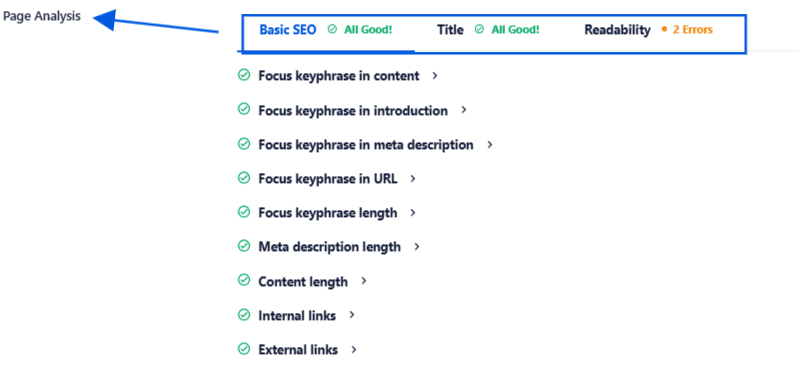
It also evaluates readability, structure, and keyword usage, helping you keep cluster content optimized without manual checks.
Step 2: Create Logical Site Architecture
Once your topics are mapped, it’s time to translate them into a clean, logical site structure. Think of this as laying the foundation of your silos.
Here’s what I recommend:
- URL structure: Keep it silo-friendly. For example: /blog/seo/seo-tools/ for a physical silo.
- Categories & tags: Use categories for pillars and tags for subtopics when it makes sense. Avoid “category soup” by sticking to a clear hierarchy.
- Navigation design: Ensure menus and breadcrumbs reflect silo logic so users can easily move from broad to specific.
AIOSEO helps to automate meta titles and descriptions at the category level. This ensures consistent optimization across silo sections.
You can also use the Breadcrumb Schema feature, which adds structured navigation signals to Google. Not only do users see breadcrumb trails, but search engines also understand the silo hierarchy better.
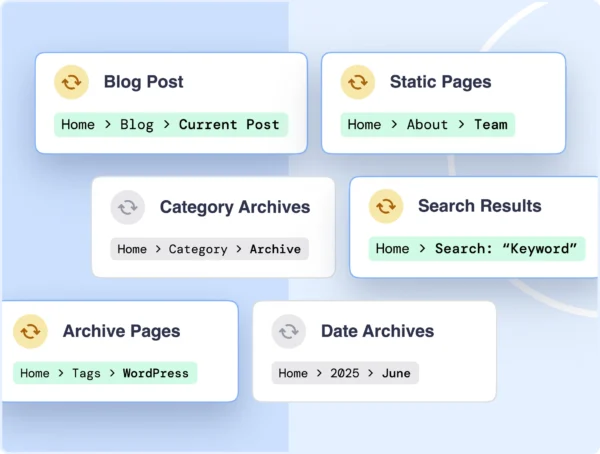
What I like the most about this feature is that it doesn't require coding and actually helps maintain a consistent formatting across several posts and articles. This contributes towards a solid site structure.
Step 3: Optimize On-Page Content for Silo Strength
Once your silos are planned and the architecture is in place, the next task is ensuring each page reinforces the structure. This is where on-page optimization becomes critical. I’ve often seen agencies publish content with the right topics but fail to connect them properly through keywords, headings, and schema. The result is a site that looks good to humans but doesn’t send strong enough signals to search engines.
With AIOSEO's TruSEO feature, on-page optimization feels less like guesswork and more like a guided process. I've mentioned this earlier as well, but this feature truly serves as a real-time benchmark for evaluating how well a page aligns with SEO best practices.
Instead of relying on generic checklists, TruSEO breaks down specific actions like:
- Is the focus keyword present in the right places?
- Are internal links used effectively?
- Does the content length support the target intent?
All of this matters in silos because every cluster page needs to reinforce its parent pillar, and TruSEO ensures nothing is left unoptimized.
Finally, schema plays a huge role here. With AIOSEO’s Schema Markup feature, I can easily assign structured data to each page type. A pillar page might use an Article schema, while a cluster post with FAQs gets the FAQPage schema.

Without writing any code, the plugin automatically generates the JSON-LD markup that Google uses to display rich snippets. You can also validate the schema right in WordPress.
In siloed content, this is invaluable as it tells Google exactly what each page is about and how it connects to the bigger picture.
Step 4: Build Internal Linking Structures
If silos are the backbone of topical authority, internal linking is the nervous system that connects everything. Without the right links, your silo is just a static collection of pages. With strategic linking, you create a living ecosystem where authority flows between pillar and cluster pages.
Traditionally, building internal links at scale was one of the most time-consuming tasks in SEO. I’d manually review each post, decide which anchor text to use, and add links to the relevant pillar or cluster pages. That process simply doesn’t scale when you’re working across multiple clients or large content libraries.
This is why AIOSEO’s Link Assistant has become one of my favorite features. It automatically scans the site and suggests internal links based on content relevance, making it easy to build and maintain silos without hours of manual work.
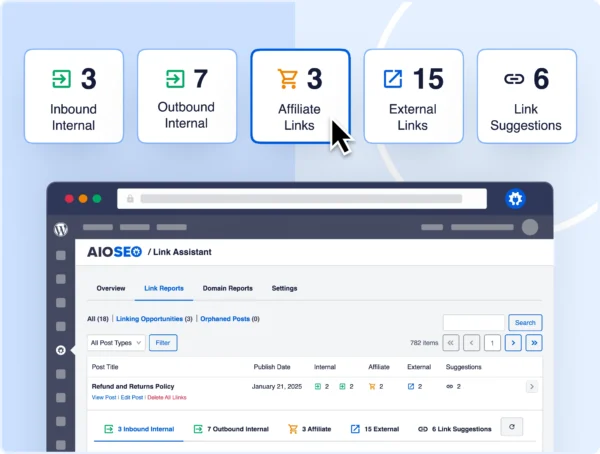
The feature also identifies orphaned pages, which are pieces of content that aren’t linked to from anywhere else. Orphaned pages are a silent killer of silos because they exist outside the network and fail to pass or receive authority. With Link Assistant, I can quickly identify these and bring them into the silo, thereby strengthening the overall structure.
On top of that, AIOSEO supports bulk link editing, which is a lifesaver when scaling. If I restructure a silo or update pillar content, I don’t have to manually chase down every old link. Instead, I can review and update multiple links at once, keeping silos consistent and future-proof.
Step 5: Automate SEO Maintenance Across Silos
Building silos is an ongoing process. As you add new content, update old posts, or expand into new topics, your silos need regular maintenance. This is where I used to struggle. Manually auditing hundreds of pages for broken links, outdated schema, or missing meta descriptions took weeks. That’s simply not sustainable when you’re scaling across multiple clients.
This is exactly why AIOSEO’s Search Statistics Dashboard is a game-changer. It pulls in data from Google Search Console. Using this, you can easily monitor impressions, clicks, keyword rankings, and engagement metrics, all organized to make it easy to spot trends.
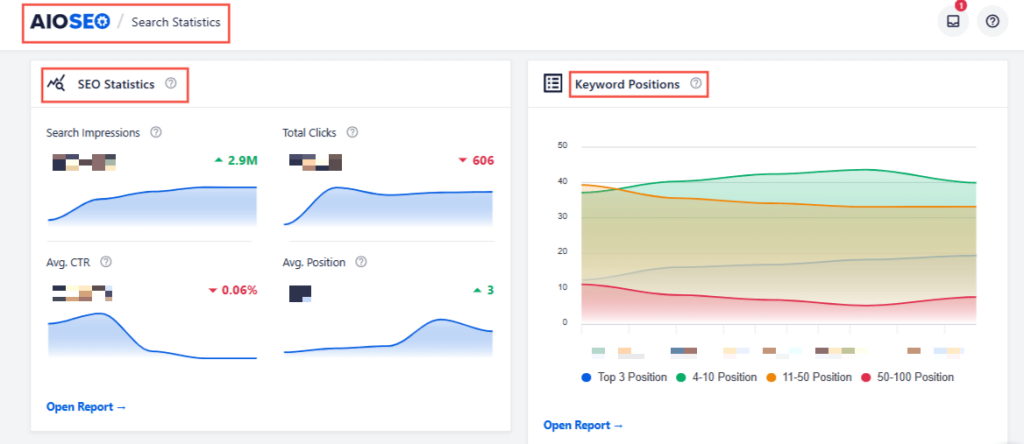
The real win here is automation. Because AIOSEO constantly updates these dashboards, you don’t have to check every page manually.
Step 6: Apply Silos to Local SEO & eCommerce Sites
Not all silos look the same. While the classic example is a blog or knowledge hub, I’ve found silos especially powerful in two contexts: local SEO and eCommerce.
For local businesses, silos help organize content by service area. Imagine an agency working with a law firm. The firm might have a pillar page for “Personal Injury Law,” with clusters for “Car Accidents,” “Workplace Injuries,” and “Medical Malpractice.” If that same firm operates in multiple cities, silos can extend into location-based structures, such as “Personal Injury Law in Dallas” and “Personal Injury Law in Austin.”
Here, AIOSEO’s Local SEO feature is a lifesaver. It lets you add business information, such as addresses, phone numbers, opening hours, and even geo-coordinates, directly to the site and the schema.
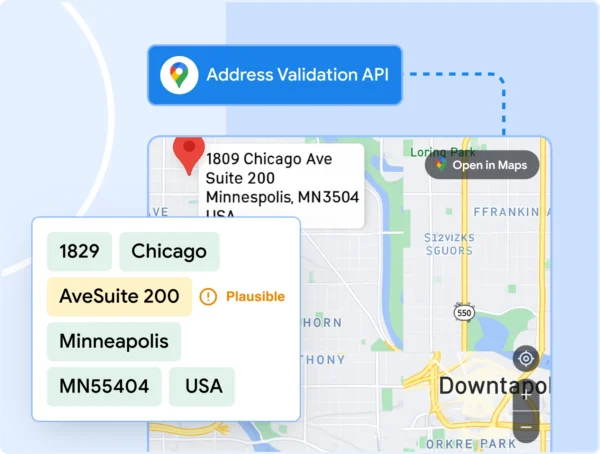
That structured data makes it easier for Google to connect each location with its siloed content, boosting rankings in the local pack.
For e-commerce, silos often take the form of product categories. Let’s say you’re running a furniture store. A pillar might be “Living Room Furniture,” with cluster pages for “Sofas,” “Coffee Tables,” and “TV Stands.” Supporting content, such as “How to Choose the Right Sofa for Small Spaces,” can then feed into those product pages.
This is where AIOSEO’s WooCommerce SEO integration comes in. It automatically optimizes product titles, descriptions, and schema while letting you customize breadcrumbs and category structures.
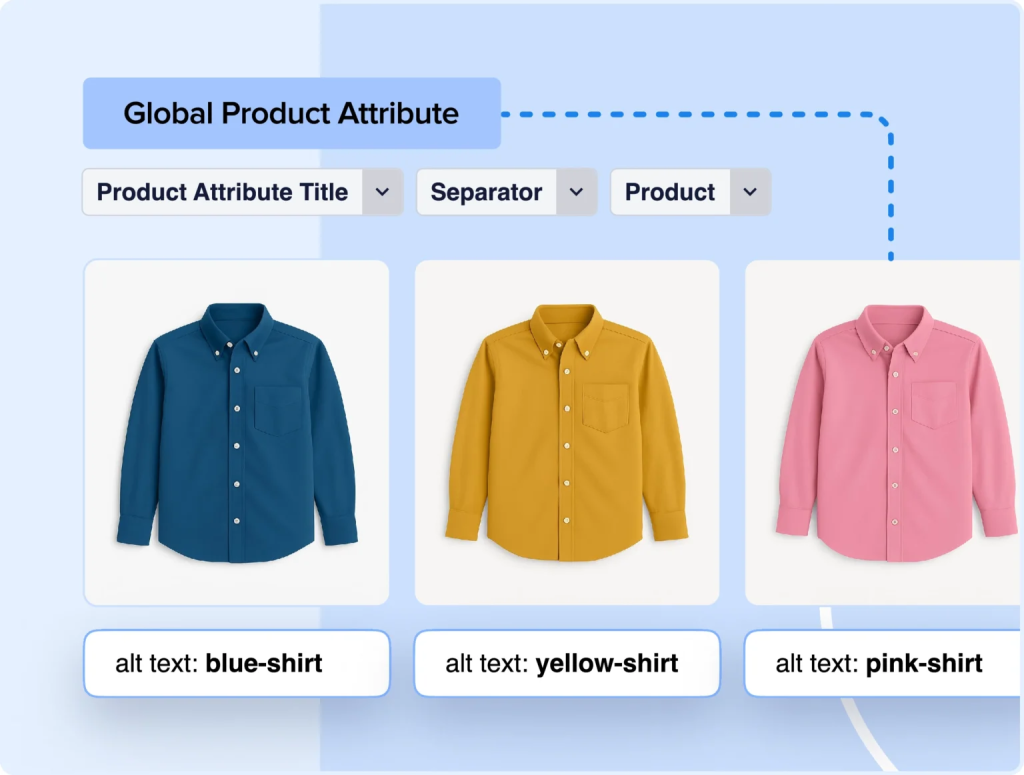
So, instead of manually managing thousands of product pages, you can apply SEO rules at the silo level and trust that they cascade down.
Final Thoughts
When I first started experimenting with SEO silos, I thought it would be overly complex and hard to maintain. But once I adopted a step-by-step approach and started using All In One SEO to handle optimization, internal linking, and schema, building silos became pretty manageable.
The truth is, silos are one of the smartest ways to show both search engines and users that your site is an authority in its niche. They improve your rankings, enhance user navigation, and lay the foundation for long-term SEO growth.
If you’re serious about scaling content and strengthening topical authority, don’t just think about publishing more pages; organize them into silos. And if you want to simplify the process, All In One SEO gives you the exact features to do it smarter, faster, and at scale.
FAQs About SEO Silos
What are SEO silos?
An SEO silo is a way to structure your website so that related content is grouped around a central theme. Imagine it like a library: you have a main section (the pillar page) and shelves with specific books (the cluster pages). Together, they signal to Google that your site covers the topic in depth. With tools like AIOSEO’s Link Assistant and Breadcrumb Schema, building and maintaining these silos is far easier, as internal linking and hierarchy are handled systematically rather than manually.
What are the 4 pillars of SEO?
The four pillars of SEO are:
- On-Page SEO: Optimizes content, keywords, titles, and meta descriptions.
- Off-Page SEO: Building authority through backlinks and mentions.
- Technical SEO: Ensuring crawlability, site speed, and indexation.
- Content: Creating high-quality, relevant, and structured material.
Want to Try AIOSEO for Free?
Enter the URL of your WordPress website to install AIOSEO Lite.

Disclosure: Our content is reader-supported. This means if you click on some of our links, then we may earn a commission. We only recommend products that we believe will add value to our readers.