
Would you like to know what the score on your posts actually measures?
TruSEO is All in One SEO’s content analysis feature that scores every post and page out of 100 and gives you recommendations on what to improve.
In this guide, we’ll walk you through what TruSEO measures, how to read its recommendations, and where it runs.
Before you get started, make sure All in One SEO is installed and activated on your WordPress site.
In This Article
Tutorial Video
What TruSEO Measures
When you edit a post, TruSEO sits below your post content, on the Optimization tab in the AIOSEO Settings section. On a longer post, that means scrolling past the editor to reach it.
IMPORTANT:
The TruSEO Highlighter feature only works with the WordPress Block Editor (also known as Gutenberg) and the WordPress Classic Editor.
Support for page builders will be added in future releases.
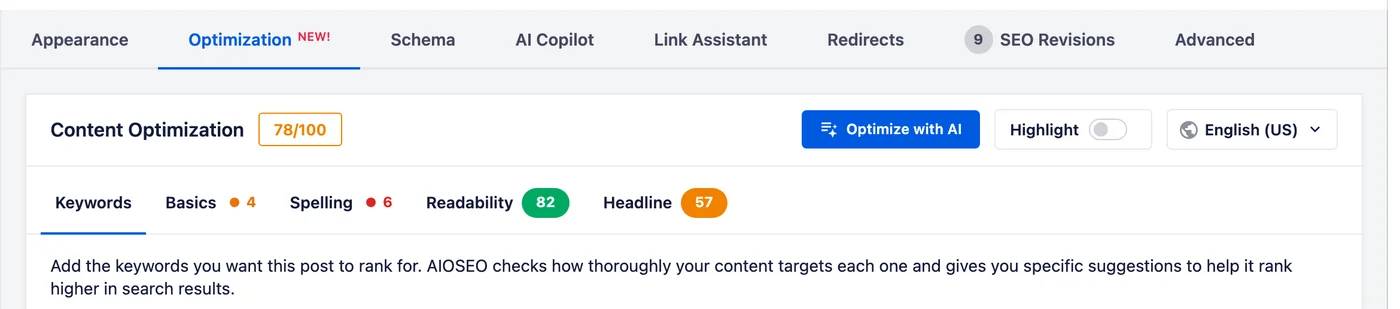
At the top is your overall score out of 100, sitting beside the Content Optimization heading. Below it are the five areas TruSEO checks, each on its own tab. These are:
- Keywords: how thoroughly your content targets the keywords you add for the post.
- Basics: the essential checks, covering your title, meta description, links, and images.
- Spelling: misspelled words in your content.
- Readability: how easy it is to read your content.
- Headline: how likely your post title is to get visitors to click.
Four of the tabs carry a badge. The badges don’t all mean the same thing.
Readability and Headline show a score out of 100. Basics and Spelling show how many items need your attention.
Keywords scores each of your keywords separately. Its results appear inside the tab rather than as a single badge.
The badge colors show you where to look first. Green means that area is in good shape, while orange and red mean it has something worth fixing.
AIOSEO rates the overall score in three bands. A score of 80 or above counts as good, 50 to 79 counts as okay, and anything below 50 needs improvement.
Reading the Recommendations
Each of the five areas has its own tab. Selecting one shows that area’s checks below, sorted into two groups.
The Improvements group lists the checks worth your attention. The Good group lists the checks that have already passed and are good.
Each item names the check and explains what to do about it. That means you can act on it without leaving the editor.
The Good group stays collapsed, which keeps the checks you still need to act on at the top. Selecting its heading opens it.
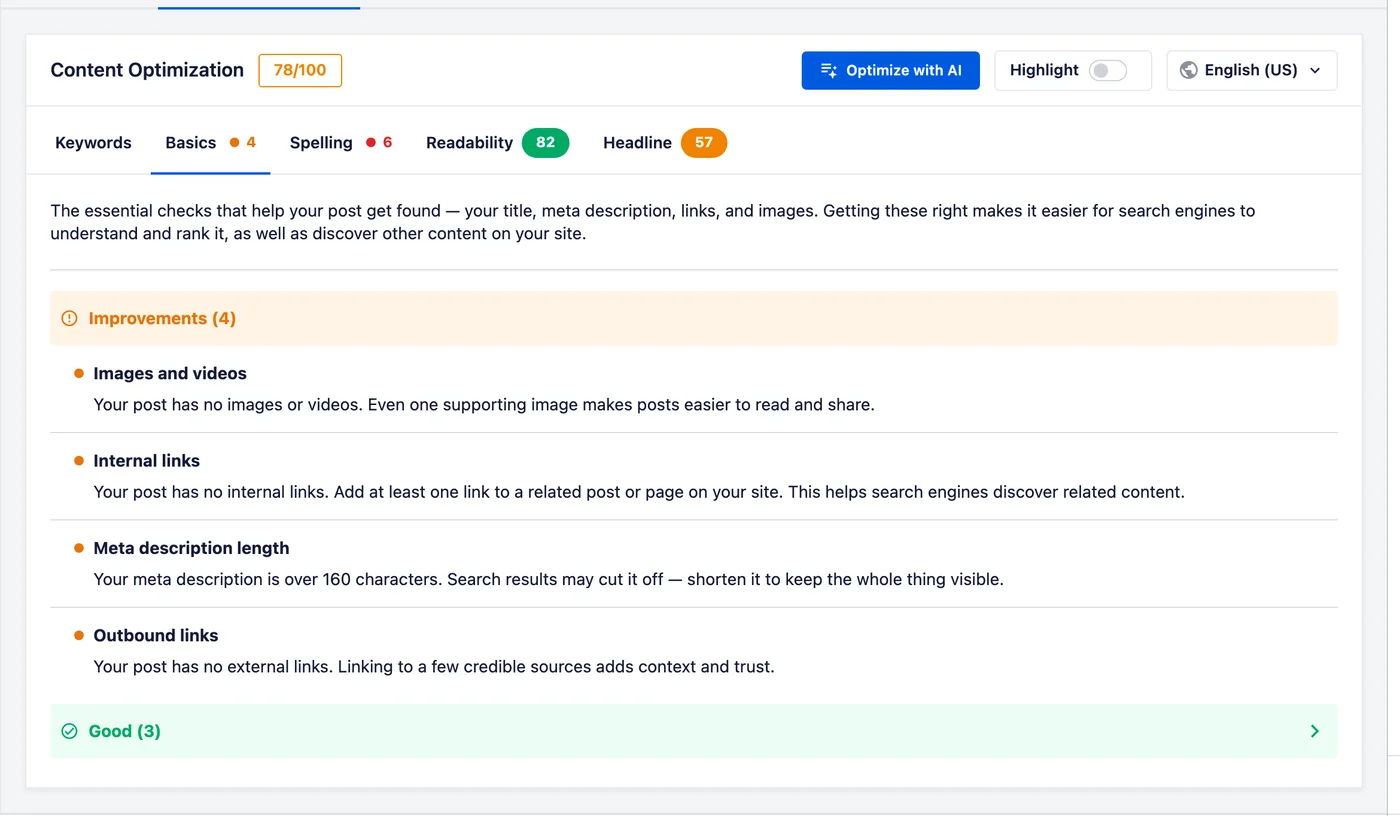
The area scores update as you edit. You don’t have to save the post to see the effect of a change.
The score and its recommendations are there to show you where you might want to improve. They’re based on our best practices. You don’t have to follow every one if doing so costs you writing quality. You know your audience best, so only follow the recommendations if you think they’ll add value and help your visitors.
NOTE:
Following these recommendations doesn’t guarantee you’ll rank for your keywords. Search engines rank results on many factors, and these are a well-established handful of them.
Where TruSEO Runs
TruSEO lives in the AIOSEO Settings section below your post content. That means it works in both the WordPress block editor and the Classic Editor. It also works with our supported page builders.
TruSEO reads your content from the visual editor. If you switch the block editor over to the Code Editor, your results are replaced by a note asking you to switch back.
IMPORTANT:
The TruSEO features are disabled on the following pages because they don’t have static content:
- WordPress Static Posts page
- WordPress Privacy Policy page
- WooCommerce Cart page
- WooCommerce Checkout page
- WooCommerce My Account page
That’s it! You now know what TruSEO measures and how to read the recommendations it gives you.
Further Reading / Next Steps
To put this into practice, browse all of our TruSEO content analysis documentation. Our guide on using the Headline Analyzer covers the Headline area in depth.
Frequently Asked Questions
Below, we’ve answered some of the most common questions about TruSEO:
What is a good TruSEO score?
Aim for 80 or above, which AIOSEO counts as good. A score of 50 to 79 is okay, and below 50 needs improvement.
Even so, treat the score as a guide rather than a target. Work through the Improvements group in each area and stop when the remaining suggestions start to cost you writing quality.
See Reading the Recommendations above.
Why do some areas show a score and others a count?
It depends on what the area measures. Readability and Headline produce a score out of 100, so that’s what their badges show. Basics and Spelling are lists of specific items, so their badges show how many are waiting for you.
Does TruSEO work in the Classic Editor?
Yes. TruSEO is part of the AIOSEO Settings section below your content, which appears in both the Classic Editor and the block editor.
See Where TruSEO Runs above.
Why don’t I see a score on some pages?
Those pages build their content dynamically instead of storing it, so TruSEO has no text to analyze. Your Posts page, your Privacy Policy page, any BuddyPress pages, and the WooCommerce Cart, Checkout, and My Account pages all work this way.
See Where TruSEO Runs above. For the other reasons a score might not appear, see why N/A is displayed instead of a score.
Can I turn TruSEO off?
Yes. TruSEO has its own setting under All in One SEO » General Settings on the Content Optimization tab.
See how to disable TruSEO content analysis for the steps.