
Think only big companies with massive marketing budgets can win at SEO?
Think again.
Google doesn't care how big your office or payroll is; it cares about answering the user's question. For many searches—especially local ones—a small, dedicated business often has the best answer.
In this guide, I’ll share 10 actionable SEO tips for small businesses. These aren't complicated theories. They're simple, practical steps you can take today to attract local customers and grow your revenue, without hiring an expensive agency.
In This Article
10 SEO Tips for Small Businesses
To make this easy to tackle, I've organized these SEO tips for small business owners into 4 logical phases. We’ll start with the “low-hanging fruit” you can fix quickly and move toward long-term growth strategies.
Let's get started.
Why You Should Trust Me
I help small business owners navigate the confusing world of Google. I know you don't have time to become an SEO expert; you have a business to run.
These tips are the exact, proven strategies I use to help local and small businesses get found, build trust, and drive revenue. They're designed to be manageable for busy owners who need results, not just more homework.
Phase 1: Owning Your Local Area
For a small business, your biggest advantage is your location. Here's how to use it to beat the big guys.
1. Claim Your Google Business Profile (The #1 Priority)
If you only do 1 thing on this list, do this.
Your Google Business Profile (formerly Google My Business) is the engine that powers your listing in Google Maps and the “Local Pack” (that section of 3 businesses that appears at the top of search results).
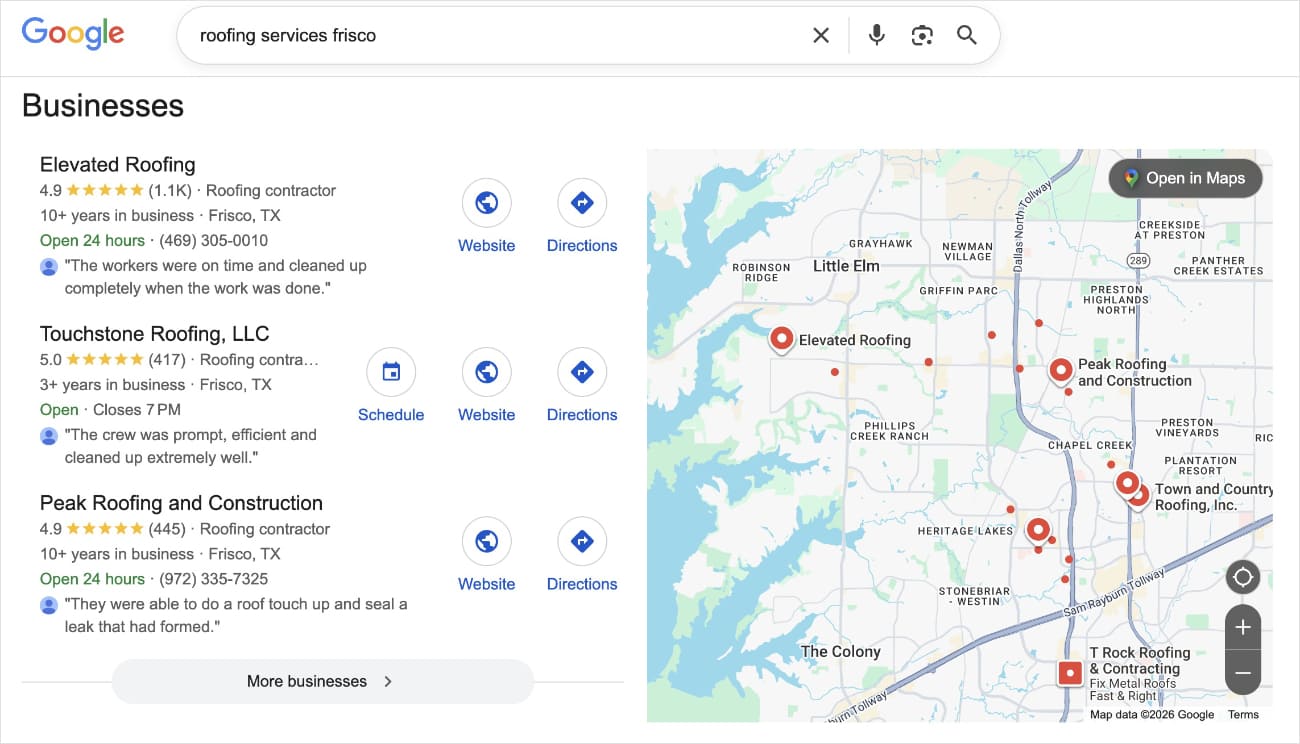
It’s free, and it’s critical. When someone searches for a service “near me,” these profiles are often the first thing they see.
Action: Claim your profile, verify your address, and fill out every field. Add photos of your work, your hours, and a link to your website.
Resource: How to Use a Google Business Profile to Boost Local SEO
2. Master “Hyper-Local” Keywords
Don't just target “plumber.” Target “plumber in [your city]” or even “[your neighborhood].” (Better yet, target both, but on different localized landing pages.)
This way, you can rank for all the local searches in your area.
Big brands target broad terms because they have to appeal to everyone. But you don’t.
You can win by targeting the specific terms your neighbors are searching for.
Not sure which local terms are best?
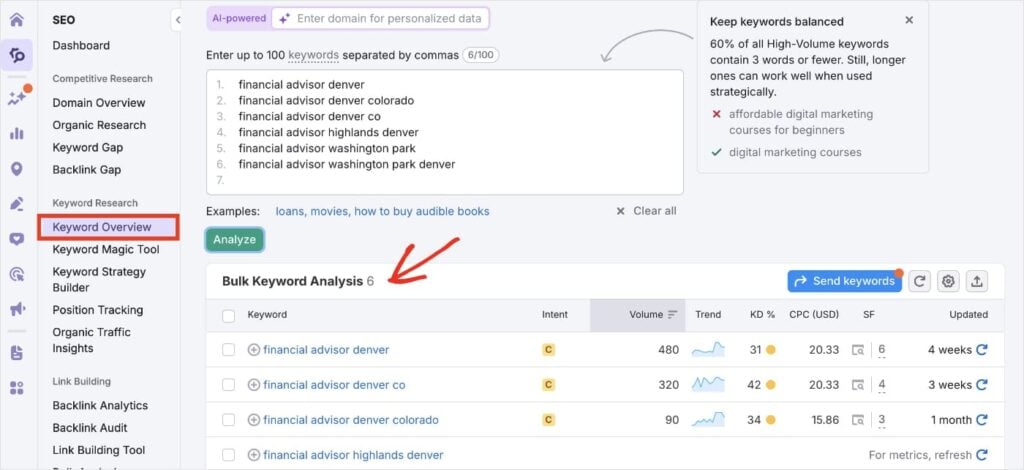
Use a keyword research tool like Semrush to investigate search volumes and difficulty levels.
I like to enter the local terms I’m considering into the Keyword Overview. Then, I prioritize based on high volume and low difficulty scores.
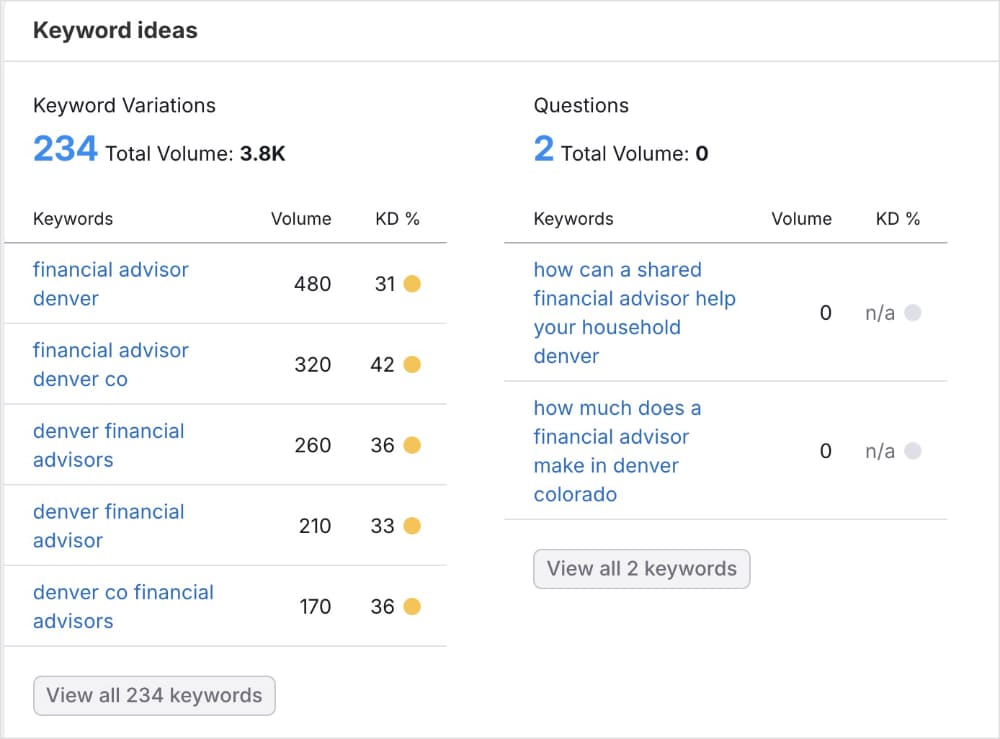
You can also get additional keyword ideas by clicking on any of the results.
WordPress Tip: Did you know you can get Semrush keyword insights right inside WordPress? The All in One SEO (AIOSEO) plugin AIOSEO integrates with Semrush to show you exactly what people in your area are searching for, so you don't have to guess.
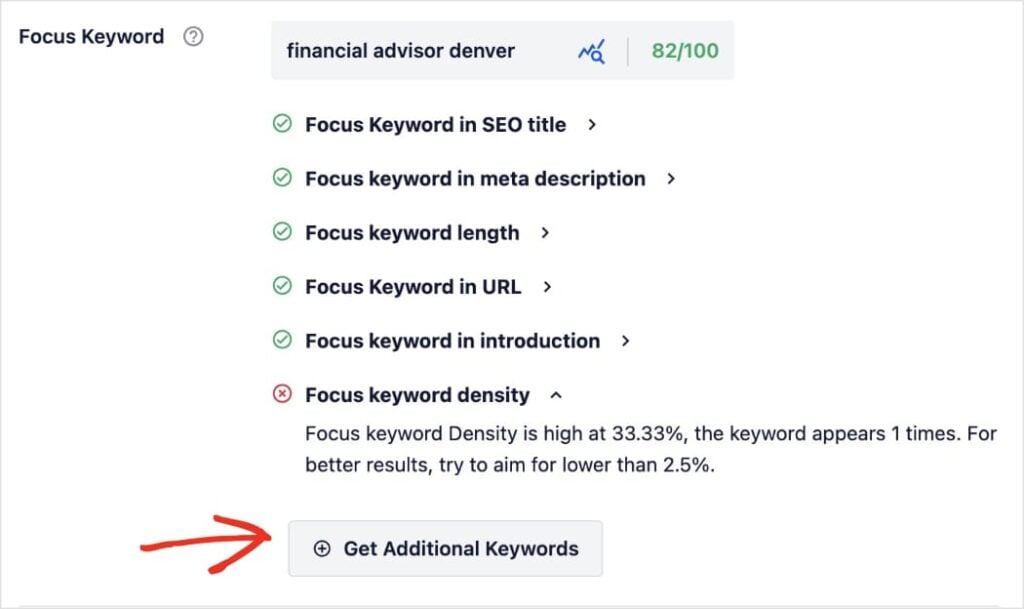
To use this feature, scroll down to the AIOSEO settings of your post or page.
Then, enter a focus keyword (the main term you want to rank for) and click Get Additional Keywords.
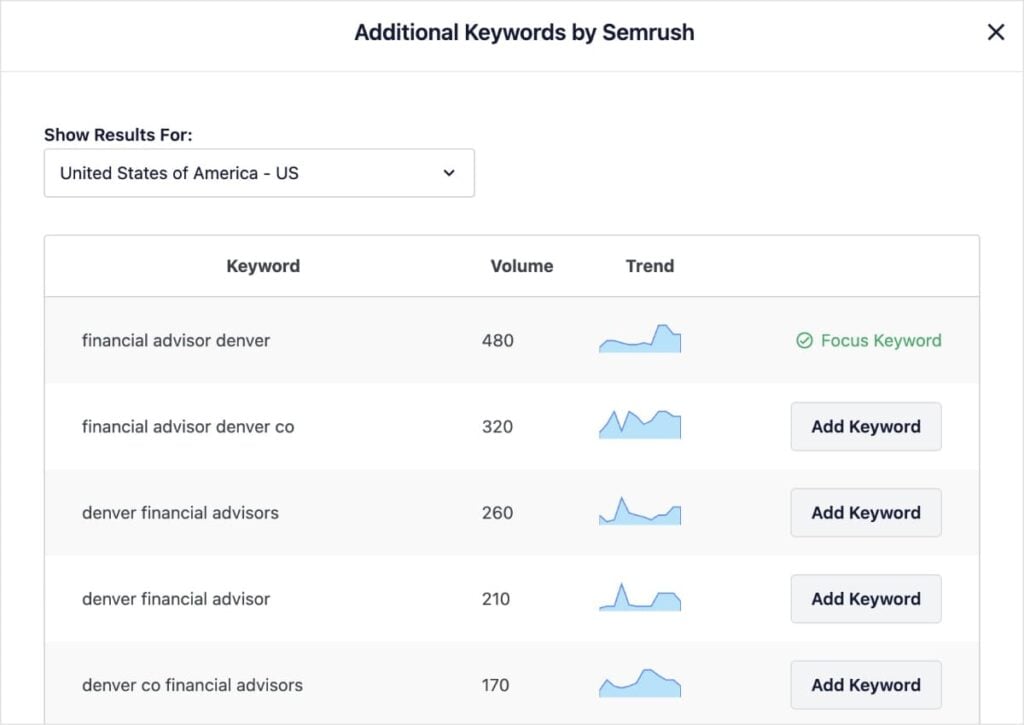
AIOSEO will fetch related keywords from Semrush and show them to you in the editor. You can click Add Keyword next to any term, optimize for it, and increase the reach of your page. It’s easy!
Helpful Resources:
3. Optimize for “Near Me” Searches
When someone searches for “coffee shop near me,” Google looks for businesses that have consistent contact info across the web.
This is called NAP (Name, Address, Phone).
NAP SEO is the practice of using the same details across all online listings, pages, and platforms.
If your address is different on Facebook than it is on your website, Google gets confused and won't show you.
WordPress Tip: The Local SEO module in AIOSEO handles this for you. It adds local business schema code to your site, telling Google explicitly, “This is my address, and these are my hours.” It’s a huge signal of trust that helps you rank locally.
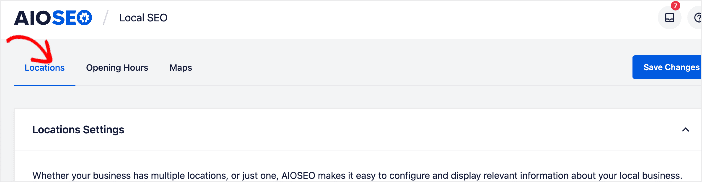
To get started, open the Local SEO tool in WordPress, located under AIOSEO. By default, it will open to the Locations tab, where you can add your details.
I recommend filling out as many of the fields as you can.
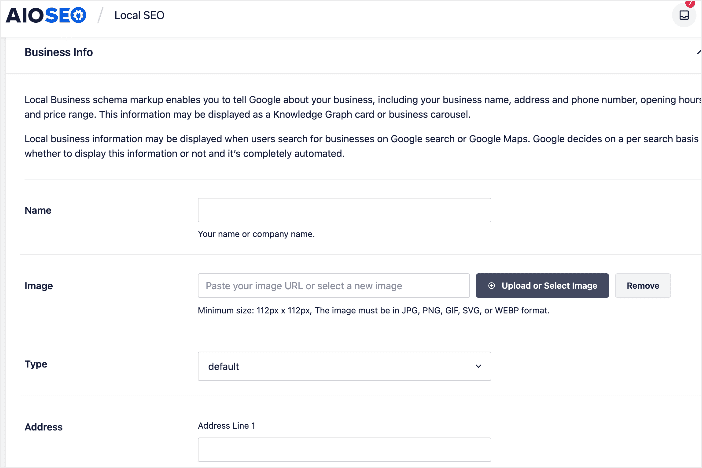
Once complete, click Save Changes, and AIOSEO will implement your local schema behind the scenes. This increases your chances of ranking in Google Maps and the Local Pack.
Phase 2: Making Your Website Google-Friendly
You don't need to be a developer to optimize your site. You just need to be organized.
Here are some simple SEO tips for small businesses that make a big difference.
4. Write Click-Worthy Titles & Descriptions
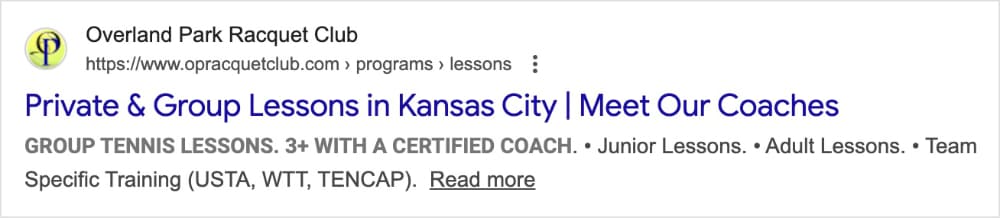
Your SEO title and meta description are your “ad” in the search results. If they're boring, no one will click, even if you rank #1.
- Bad Title: Home – Joe's Bakery
- Good Title: Joe's Bakery | Best Custom Wedding Cakes in Austin, TX
And here’s an example of strong, clear organic search listing in Google:
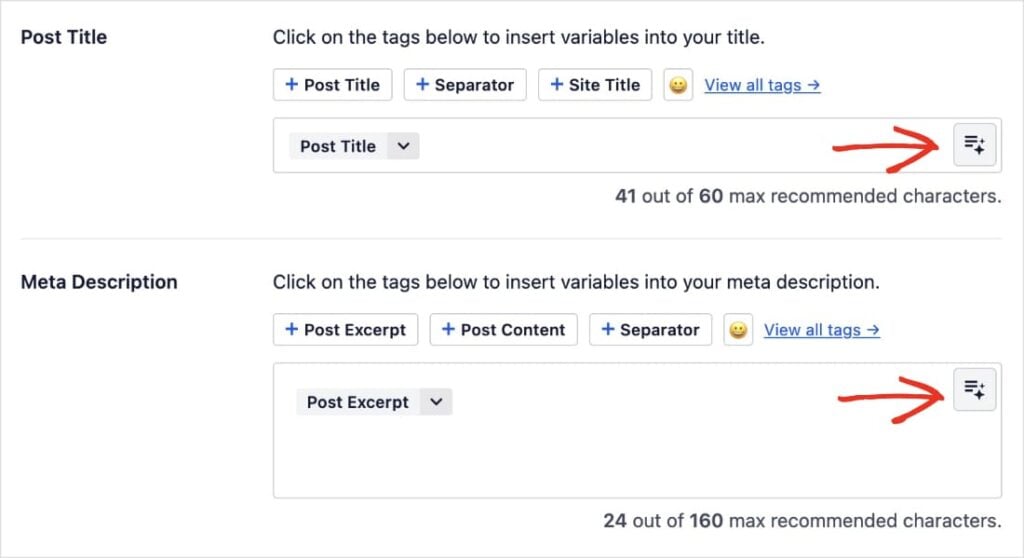
WordPress Tip: Stuck on what to write? Use the AIOSEO AI Content Generator to create catchy, high-converting titles and descriptions. Just click the AI button next to the appropriate field and get a list of options in seconds.
5. Use Headings Correctly (Structure Matters)
Header tags help Google understand what your content is about.
They also guide users through your page, dividing your content up into organized sections.
Now, something I’ve seen a lot, is how website owners think they can just bold the text and make it big. This doesn’t work for Google.
Search engines can’t “see” these stylistic choices like users. It understands that it’s bold and big, but it doesn’t know it’s a subheading.
That’s why you need to use the appropriate header tags, like H1, H2, H3, and so on.
Think of your website like a book.
- H1: The Title of the book (You should only have one per page).
- H2: The Chapters (Main points).
- H3: Sub-sections.
This simple structure helps search engines crawl your site faster and easily understand its content.
Pro Tip: Use your focus keyword in your headings to increase the likelihood of ranking for that term. AIOSEO’s TruSEO feature checks this automatically and lets you know when you should add it tomore subheadings.

6. Optimize Your Images
Big, heavy images are the #1 reason small business websites are slow. And slow websites lose customers faster than anything else.
This translates to high bounce rates and low conversions.
To avoid this, always compress your images (make the file size smaller) before uploading them. Tools like TinyPNG and CompressJPEG are great for this.
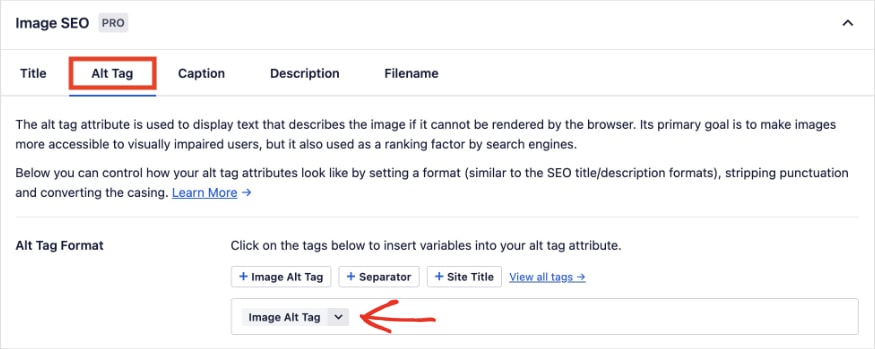
You should also optimize your image filenames and alt text (an HTML tag that describes your image). That’s because search engines can't “see” images. They read the text attached to them.
Let’s look at an example.

Imagine we have a food blog, and we’re posting a recipe for a mixed berry pie. “Mixed berry pie” is our primary keyword. Here are some optimizations we could make:
- Bad Image Filename: image0192834.jpg
- Good Image Filename: mixed-berry-pie.jpg
- Bad Alt Text: Pie
- Good Alt Text: A fresh mixed berry pie with a woven crust and powdered sugar on top.
WordPress Tip: AIOSEO's Image SEO module can automatically generate image filenames, alt tags, captions, and more, helping you rank in Google Images search without lifting a finger.
Phase 3: Building Authority
Google wants to rank businesses that customers trust. Here’s how to prove you're the real deal.
7. Get More Customer Reviews
Reviews aren't just for vanity. They're a direct ranking factor for local SEO. A steady stream of fresh, positive reviews tells Google that your business is active and trusted by the community.
Social proof also has a powerful influence over potential customers. The more positive reviews you have, the more customers you’ll bring to your business.
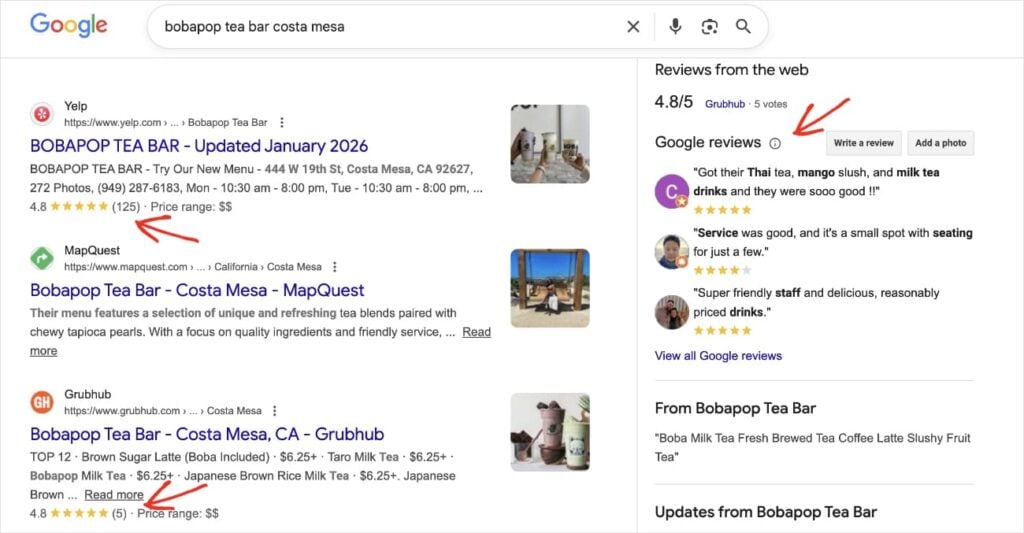
Action: Don't just hope for reviews—ask for them. Send every happy customer a direct link to your Google Business Profile and favorite review platform, like Yelp.
8. Create Helpful Content (Be the Expert)
Don't just use your website to sell; use it to educate.
Write blog posts that answer the specific questions your customers ask you every day.
If you're a mechanic, write a post about “5 signs your brakes need replacing.” Or, if you’re a florist, write a guide on “How to keep your Valentine's roses fresh for longer.”
This positions you as the local expert. When people trust your advice, they'll trust your service.
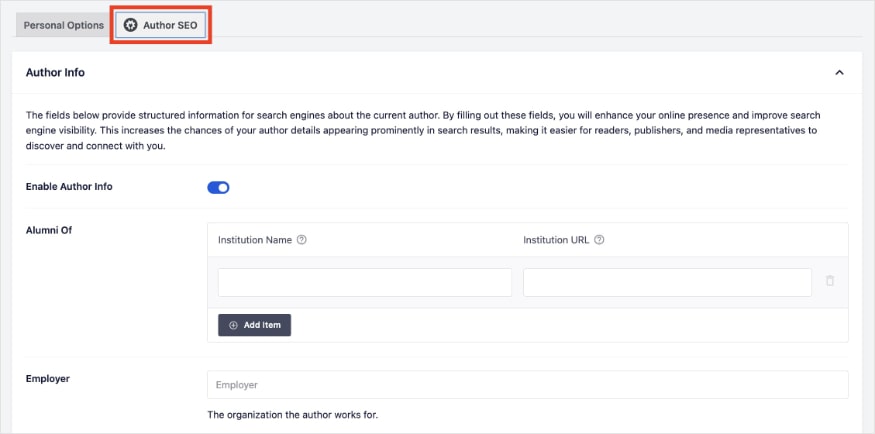
WordPress Tip: To truly own that expertise, use the Author SEO feature in AIOSEO. It allows you to add extended bio information, expertise, and social links to your author profile. This helps Google connect your content to you, signaling that a real person with real experience is behind the advice.
Phase 4: The Technical Stuff (Made Easy)
You don't have to be a developer to get the technical basics right. These final tips ensure Google can actually crawl and index your site.
9. Speed Up Your Website
Google has officially stated that speed is a ranking factor. Why? Because users hate waiting. If your site takes 5 seconds to load, potential customers will hit the “back” button and go to your competitor.
Pro Tip: Use a fast hosting provider and a lightweight WordPress SEO theme. Installing a caching plugin is also a quick win that can make your site load instantly.
10. Submit a Sitemap
An XML sitemap is a list of all the pages on your site. It’s basically a map you give to Google to say, “Here is everything I have, please index it.”
Without one, Google has to blindly stumble around your site to find new pages.
AIOSEO Tip: You don't need to do anything here! AIOSEO automatically generates and updates your WordPress sitemap for you. It even notifies Google instantly whenever you publish new content so your business gets found faster.
Grow Your Small Business Starting Today
SEO isn't magic, and it's not just for the big guys. By following these 10 simple SEO tips for small businesses, you can build a website that Google loves and customers trust.
My recommendation?
Start small. Pick just 1 or 2 tips from this list to tackle this week—maybe claim your Google Business Profile or optimize your homepage title. Consistency wins the race.
Now that you have the basics down, dive deeper into finding the perfect words to target with our guide on keyword research tips for small businesses. You can also check out our picks for the best AI writing assistants, which can put your content creation on the fast track.
For more simple WordPress tutorials and keyword research tips for small business owners, subscribe to our YouTube Channel. You can also follow us on X (Twitter), LinkedIn, or Facebook to stay in the loop.
FAQs About Small Business SEO
Can I do small business SEO myself?
Yes! Most of the foundational work—like claiming your Google Business Profile, writing helpful content, and optimizing page titles—can be done by you without hiring an agency. Tools like All in One SEO make the technical parts automatic, so you don't need coding skills to get started.
How long does it take to see SEO results?
SEO is a marathon, not a sprint. For a local business, you can often see initial movement in 3–6 months, but it depends heavily on your competition. The key is consistency; regularly publishing content and getting reviews will build momentum over time.
Do I need a blog for my small business?
While not strictly required, a blog is highly recommended. It’s the best way to target more keywords and answer customer questions, which builds trust and brings in more local traffic. Without a blog, you are limited to ranking only for your main service pages.
What’s the most important SEO factor for small businesses?
For small businesses, local SEO is the most critical factor. This means claiming and optimizing your Google Business Profile, getting positive customer reviews, and ensuring your Name, Address, and Phone number (NAP) are consistent across the web. This helps you show up in the “Local Pack” map results where most customers look first.
Want to Try AIOSEO for Free?
Enter the URL of your WordPress website to install AIOSEO Lite.

Disclosure: Our content is reader-supported. This means if you click on some of our links, then we may earn a commission. We only recommend products that we believe will add value to our readers.
