

The search for the perfect blog post image is over. A new wave of AI image generator plugins lets you create exactly what you need, when you need it, directly in WordPress.
But which AI image generator WordPress plugin is the best for you?
I’ve reviewed the top 7 contenders, comparing their features, ease of use, and overall value to help you make the right choice.
In This Article
How I Tested & What to Look For
As a content creator, I know that the hunt for the right image can be a major bottleneck in the publishing process. My goal with this review was to find the plugins that solve this problem with a smooth, practical workflow.
To keep things fair and focused on what really matters, I judged each AI image generator plugin on the following criteria:
- WordPress Integration: How seamlessly does the tool fit into the standard WordPress editor? A great plugin should feel like a natural part of your workflow, not a clunky, separate interface that you have to fight with.
- Ease of Use: How intuitive is it for a complete beginner? You shouldn’t need to read a long manual to get started. The best tools let you go from prompt to image in just a few clicks.
- Image Quality & Style Options: How good are the final results? I looked at the overall quality of the images and the variety of creative styles offered, from photo-realistic to illustrations.
- Overall Value: Is the plugin a one-trick pony, or is it part of a more valuable toolkit? I considered the price in relation to the features and benefits it provides for your entire website.
Quick Comparison: The Best AI Image Generator Plugins
Here’s a quick look at how my top recommendations stack up against each other based on the criteria above.
| Plugin | WordPress Integration | Ease of Use | Image Quality & Styles | Overall Value |
|---|---|---|---|---|
| All in One SEO | Universal: Works in the standard WordPress Image block, compatible with any theme or builder. | Beginner-Friendly: A simple, text prompt process that feels like a natural part of WordPress. | High-Quality: Produces excellent creative images suitable for any blog post. | Best Value: Included in a complete SEO toolkit that also optimizes your images’ alt text, titles, etc. |
| SeedProd | Builder-Specific: Only inside the SeedProd page builder. | Easy: Very intuitive if you’re already familiar with the SeedProd interface. | Good: Best for creating website assets like backgrounds and hero images. | Add-on Value: A useful extra for those already invested in the SeedProd ecosystem. |
| Divi AI | Builder-Specific: Only works inside the Divi theme and builder. | Easy: A seamless experience for anyone who builds their site with Divi. | Good: Great for generating images that fit the context of your Divi design modules. | Add-on Value: A powerful extra for dedicated Divi users. |
| Elementor AI | Builder-Specific: Only works inside the Elementor page builder. | Easy: Very convenient if you’re already building with Elementor. | Good: Strong at creating web graphics that complement your page layout. | Add-on Value: A time-saving feature for those committed to the Elementor platform. |
| Imajinn | Separate Interface: Works via a custom dashboard, not the standard Image block. | Advanced: Many settings and options that can be complex for beginners. | Excellent & Artistic: Offers the most creative control and unique styles. | Specialized Tool: Great value for artists or those who need maximum creative flexibility. |
| AI Power | Separate Interface: Uses its own custom interface with many different tools. | Complex: Can be overwhelming due to the sheer number of features and settings. | Good: Offers a choice of different AI models, but quality can vary. | All-in-One Suite: Value comes from the huge number of AI tools included, not just the image generator. |
| GetGenie AI | Separate Interface: Integrated into its own writing-focused dashboard. | Good: The process is smooth if you’re already using it to write your content. | Good: A solid tool for creating standard blog post images. | Feature in a Writer’s Tool: Good value for those who need a primary AI writing assistant with image capabilities. |
The 7 Best AI Image Generator Plugins for WordPress
Now, let’s dive into the reviews. I’ve ranked these plugins based on the criteria we just discussed, starting with my top pick.
1. All in One SEO
Best for: The overall best choice for seamless integration and image SEO.
Pricing: Free Lite version comes with 100 AI credits to try the AI Image Generator. Paid plans start at $49.50 and come with 10,000 AI credits.
All in One SEO (AIOSEO) is the best SEO plugin for WordPress, and its integrated AI Image Generator is a standout feature. Unlike standalone tools, AIOSEO’s generator is built directly into the standard WordPress Image block, making for the smoothest workflow of any plugin on this list.
You don’t have to navigate to a separate dashboard or use a custom block. You just add an image block like you normally would and click “Generate with AI.”

From here, you enter your prompt, making it as detailed as you want. I’ve tested super short prompts and longer, more descriptive prompts, and find that they both work well. However, I find the accuracy of images generated for longer descriptions the most impressive.
The WordPress image generator does a really good job capturing all the details.

I also like that you have a few different settings to choose from, such as quality, which is tied to the amount of AI credits it costs to generate the image.
My absolute favorite feature, though, is style. You can choose from several different styles, including:
- Cinematic
- Creative
- Minimalist
- Vibrant
- And more
I’ve made images with various styles, and it’s always fun to see what the AI comes up with. (Illustration is one of my favorites.)
Pros:
- Works inside the standard WordPress Image block for a flawless workflow
- Part of a full SEO suite, including AI tools for alt text and titles
- Produces high-quality images in a variety of creative styles
- Adds huge value to the essential SEO tools you already need
Cons:
- It’s not a standalone tool, so it requires an AIOSEO plan to use.
2. SeedProd
Best for: Building websites and landing pages
Pricing: Plans start at $39.50 per year.
SeedProd is a powerful and popular theme and page builder for WordPress. It’s known for its drag-and-drop interface that makes it easy to create custom designs. Recently, they’ve integrated AI tools, including an image generator, directly into their builder.
This is convenient if you’re already using SeedProd to build your site, as you can create background images, hero shots, and other design assets right where you’re working.
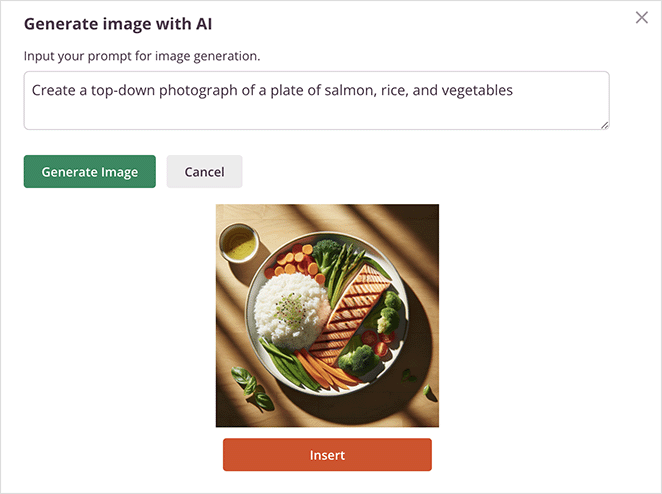
For example, you can click on a hero section, launch the AI, and generate a custom background image that perfectly fits the space. This is very different from creating an image separately and then uploading it.
Overall, I’ve really enjoyed using it to create designs that perfectly match my layouts.
Pros:
- Seamlessly integrated into the SeedProd page builder
- Ideal for creating site design assets, not just blog post images
- Includes an AI text generator for writing headlines and copy
Cons:
- It’s locked into the SeedProd ecosystem.
- Only paid users can access AI features.
3. Divi AI

Best for: Divi theme users
Pricing: Divi Pro starts at $23.08/month and comes with unlimited AI usage.
Divi, by Elegant Themes, is one of the most widely used WordPress themes and visual page builders on the market. Divi AI is a powerful suite of artificial intelligence tools that integrates directly into the Divi Builder, allowing you to generate and refine images right inside the design modules.
Similar to SeedProd, Divi AI’s strength is its integration with its own ecosystem. If you’re building a page with Divi, you can generate an image for a specific module and then use the AI to refine it, asking it to change the style or even reimagine the image.
I’ve also noticed that Divi AI is one of the more intelligent WordPress image generators, picking up contextual clues from the surrounding content. This means you get unique images that are relevant to your page.
Pros:
- Flawless integration with the popular Divi Visual Builder
- Can generate and then refine images with further AI prompts
- Part of a larger AI toolkit that also writes and refines text content
Cons:
- It only works if you use the Divi theme and builder.
4. Elementor AI
Best for: Elementor users
Pricing: Elementor AI is a subscription-based add-on and starts at $3.99/mo.
Elementor is another popular drag-and-drop page builder for WordPress. Like its competitors, Elementor has also launched its own integrated AI toolkit, Elementor AI.
I was really impressed with how smoothly Elementor AI works right inside the editor I’m already familiar with. When you’re in an image widget, you can launch the AI, generate a visual, and then use the powerful built-in editing features to edit it. It responds well to prompts and does a good job matching the colors and overall style to the rest of your page.
I also found the ability to apply masks or filters seamless. Ultimately, it’s a very convenient option for the millions of users who build their sites with Elementor.
Pros:
- Convenient for existing Elementor users
- Part of a larger AI suite that can also write text and code
- Offers powerful built-in editing features to refine AI images
Cons:
- Only works within the Elementor page builder
- Requires an Elementor Pro plan and a separate Elementor AI subscription
5. Imajinn

Best for: Artistic styles and advanced customization
Pricing: Starts at $24.99/mo.
Unlike the page builder tools, Imajinn is a dedicated AI image generator plugin, and you can feel that focus when you use it. It’s built on the powerful Stable Diffusion model, and it gives you a level of control that the others on this list don’t.
When I first opened Imajinn, the sheer number of options was what stood out. This isn’t a simple “type and generate” tool. You can choose from dozens of different art styles, pick specific AI models, and fine-tune advanced settings like the “CFG Scale.”
For someone who really wants to tinker and create a truly unique, artistic image, this feels like a creative workshop. The results can be stunningly unique and far from the typical “corporate stock photo” look.
Pros:
- Huge variety of artistic styles and models to choose from
- Lots of advanced settings for fine-tuning your results
- Generates unique, non-corporate-looking images
Cons:
- The interface can be complex and intimidating for beginners.
- High resolution images are only available on higher-end plans.
6. AI Power
Best for: Users who want an all-in-one AI toolkit.
Pricing: Offers a free version with limits; paid plan is $9.99/mo.
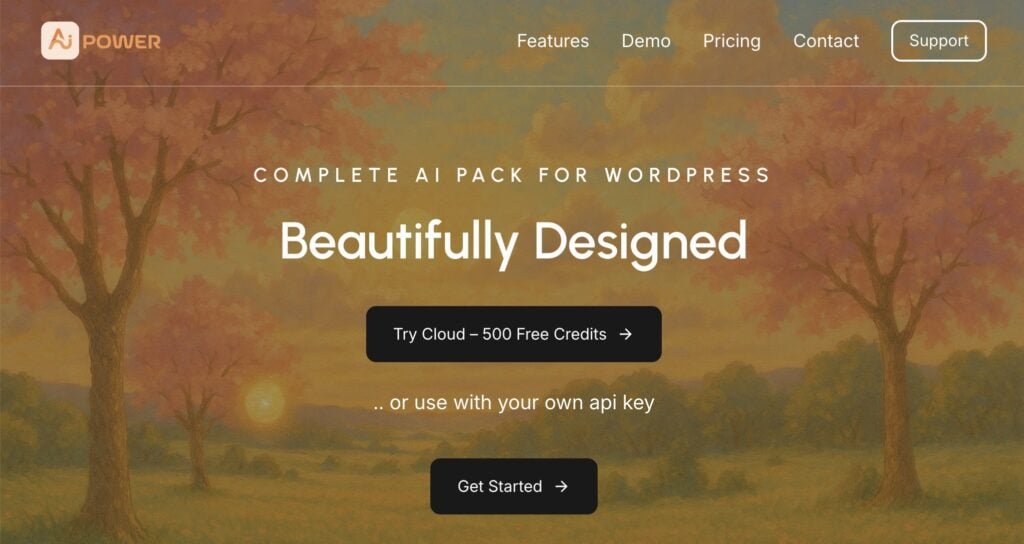
AI Power is less of a single tool and more of a complete AI toolkit packed into one plugin. My first impression upon activating it was the sheer scope of everything it offers.
The dashboard is filled with dozens of tools for everything from content writing and forms to an AI-powered chatbot and, of course, an image generator.
The main advantage here is that you get a ton of functionality in one place. The downside is that finding the specific tool you need can sometimes feel like a bit of a treasure hunt through all the menus.
If you’re someone who wants one plugin to handle all your AI needs, and you don’t mind a more complex interface, this is a very powerful option.
Pros:
- Offers a huge number of AI features in one plugin
- Connects to different AI models, giving you choices for your output
- Includes a freemium model, so you can test it out before committing
Cons:
- The interface can feel cluttered and overwhelming for new users.
- The jack-of-all-trades approach means the image tool isn’t as focused as dedicated plugins.
7. GetGenie

Best for: Users who want a content-focused AI assistant.
Pricing: Offers a free plan but it doesn’t include the Genie Image generator. Paid plans start at $6/mo.
GetGenie is primarily known as an AI writing assistant, and that’s where I found it really shines. It has a ton of templates and workflows designed to help you create blog posts, landing pages, and other marketing copy. The AI Image Generator is included as part of this larger content suite.
When I was testing it, the workflow felt very natural for someone writing a blog post. You can generate your text content and then, create an image to go with it.
While the image tool itself isn’t as feature-rich as a dedicated generator like Imajinn, the convenience of having it right next to the content writing tools is a big plus. It’s a great choice if your primary need is an AI writer, but you also want a solid image generator included.
Pros:
- Great if you’re already using it for its writing features
- Smooth workflow as part of the content writing process
- Offers a “Genie Mode” that acts like a conversational chatbot within your editor
Cons:
- The image generator is more of a secondary feature and isn’t as advanced as others on this list.
- The user interface has a lot of options, which can take some time to get used to.
My Verdict: Which WordPress Image Generator Is Best?
After testing all these plugins, it’s clear there are a lot of great options, but they often serve very different purposes.
While page builder AIs are perfect for their own ecosystems and dedicated tools like Imajinn offer incredible artistic control, All in One SEO is the clear winner for the best overall AI image generator plugin for WordPress.
Its biggest advantage is its integration into the standard WordPress workflow. It doesn’t matter what theme or page builder you use; AIOSEO works seamlessly inside the default Image block that everyone has.
Furthermore, its inclusion in a complete SEO toolkit provides unmatched value. You’re not just creating an image; you’re creating an image that you can immediately optimize for search engines with the same set of tools.
For anyone serious about both content creation and SEO, AIOSEO is the smartest choice.
Get the AIOSEO AI Image Generator here.
Boost Engagement With an AI Image Generator WordPress Plugin
An AI image generator plugin is an essential tool for any modern content creator, saving you time and helping you reduce bounce rates.
Now that you’ve seen how to create your visuals, the next step is to optimize them for search engines. Check out our image SEO guide and get tips for optimizing images in WordPress. We also have tutorials on how to improve your image filename SEO and how to write alt text.
For even more WordPress tutorials and SEO tips, subscribe to our YouTube Channel. You can also follow us on X (Twitter), LinkedIn, or Facebook to stay in the loop.
FAQs About AI Image Generator Plugins
What is an AI image generator plugin?
An AI image generator plugin is a tool you install on your WordPress site that lets you create original images from text descriptions, which are called prompts. Instead of searching stock photo sites, you simply describe the image you want, and the AI creates it for you directly within your WordPress dashboard.
What is the best AI image generator plugin for WordPress?
For most bloggers and content creators, the best AI image generator plugin is one that integrates seamlessly into the standard WordPress editor. All in One SEO (AIOSEO) is the top choice because its WordPress image generator works inside the default Image block, providing a smooth workflow for any theme and including essential SEO features.
Why use an AI image generator WordPress plugin instead of an external website?
The main advantage of using an AI image generator WordPress plugin is workflow efficiency. Instead of using a separate AI image generator website, downloading the image, and then uploading it to WordPress, a plugin lets you create and insert the image directly into your content, saving you several steps.
Are AI images from WordPress plugins free to use?
Yes, the images you create with these plugins are royalty-free and can be used for commercial purposes on your blog. This is a major advantage over stock photos, which often have complex licensing restrictions.
Disclosure: Our content is reader-supported. This means if you click on some of our links, then we may earn a commission. We only recommend products that we believe will add value to our readers.
Want to Try AIOSEO for Free?
Enter the URL of your WordPress website to install AIOSEO Lite.

