
Chez AIOSEO, on nous demande souvent : « Quel est le meilleur vérificateur de densité de mots-clés ? »
Et je comprends pourquoi. Pendant des années, le monde du SEO a été obsédé par l'atteinte d'un pourcentage de densité spécifique pour se classer.
Mais en tant que professionnels du SEO qui vivent et respirent cela chaque jour, notre conseil est maintenant très différent : arrêtez de courir après un score de densité parfait. Google est beaucoup plus sophistiqué maintenant. Il se soucie davantage de la pertinence thématique globale et du langage naturel que de la simple répétition de mots-clés.
Donc, dans ce guide, nous allons faire deux choses :
- Premièrement, nous allons présenter les meilleurs vérificateurs de densité de mots-clés pour une analyse rapide (car il est toujours bon de le savoir).
- Plus important encore, je vais vous montrer l'approche moderne que nous utilisons nous-mêmes, en nous concentrant sur le SEO on-page holistique qui donne réellement des résultats aujourd'hui.
De cette façon, vous pourrez vérifier la densité des mots-clés et optimiser votre contenu plus efficacement.
Dans cet article
- What Is Keyword Density?
- Why Should You Trust This Review
- Les meilleurs vérificateurs de densité de mots-clés en un coup d'œil
- Best Keyword Density Checkers (Free & Paid)
- Meilleur vérificateur de densité de mots-clés (Notre choix n°1)
- Beyond Density: The On-Page SEO Checklist We Use
- Prochaines étapes : Votre parcours SEO moderne
- FAQ sur les outils de vérification de densité de mots-clés
Qu'est-ce que la densité de mots-clés ?
La densité de mots-clés est le pourcentage de fois où un mot-clé ou une phrase spécifique apparaît dans votre texte, par rapport au nombre total de mots.
Voici la formule :
Keyword Density = (Number of times keyword appears / Total number of words) x 100Par exemple, vous avez écrit un article de blog de 1000 mots, et le mot-clé principal « meilleur vérificateur de densité de mots-clés » apparaît 15 fois. Voici comment vous calculeriez la densité des mots-clés :
(15 / 1000) x 100 = 1.5%Donc, la densité de mots-clés de votre article pour « meilleur vérificateur de densité de mots-clés » est de 1,5 %.
La densité des mots-clés est-elle encore importante aujourd'hui ?
Aux débuts des moteurs de recherche, la densité des mots-clés était très importante.
Plus vous utilisiez un mot-clé, plus Google pensait que votre page était « pertinente ». Cela a conduit à une ère de « bourrage de mots-clés », où les gens inséraient leurs mots-clés de manière non naturelle dans les pages juste pour atteindre un pourcentage spécifique.
Aujourd'hui, cette époque est révolue.
Sur la base de mes plus de 6 années d'expérience en SEO, je peux vous dire que les moteurs de recherche modernes comme Google s'intéressent beaucoup plus à l'autorité thématique et au langage naturel.
Ils utilisent des systèmes sophistiqués pour comprendre ce qu'est votre page dans son ensemble, et pas seulement combien de fois vous répétez une seule phrase.
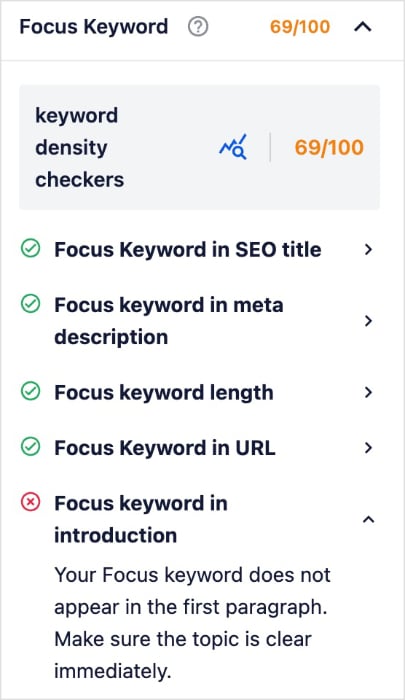
C'est pourquoi chez AIOSEO, notre Score TruSEO ne vous donne pas seulement un simple score de densité. Au lieu de cela, notre analyse sur la page examine la situation dans son ensemble pour vous donner une liste de contrôle plus holistique et exploitable, en se concentrant sur des éléments tels que :
- Placement de la phrase clé : Votre mot-clé principal se trouve-t-il dans des endroits importants comme votre titre SEO, votre introduction et vos sous-titres ?
- Mots-clés associés : Incluez-vous des termes sémantiquement liés (mots-clés LSI) pour renforcer la pertinence thématique ?
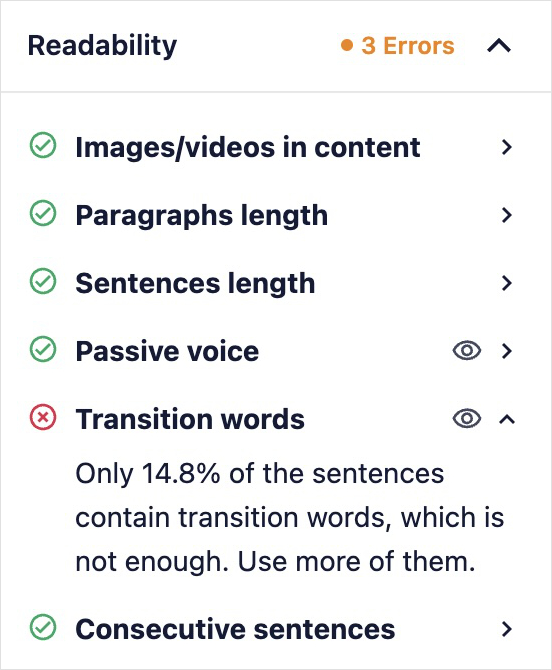
- Lisibilité : Votre contenu est-il facile à lire et à comprendre pour les utilisateurs ?
Vous obtenez votre score et vos commentaires SEO directement dans l'éditeur WordPress sous la forme d'une liste de contrôle exploitable :
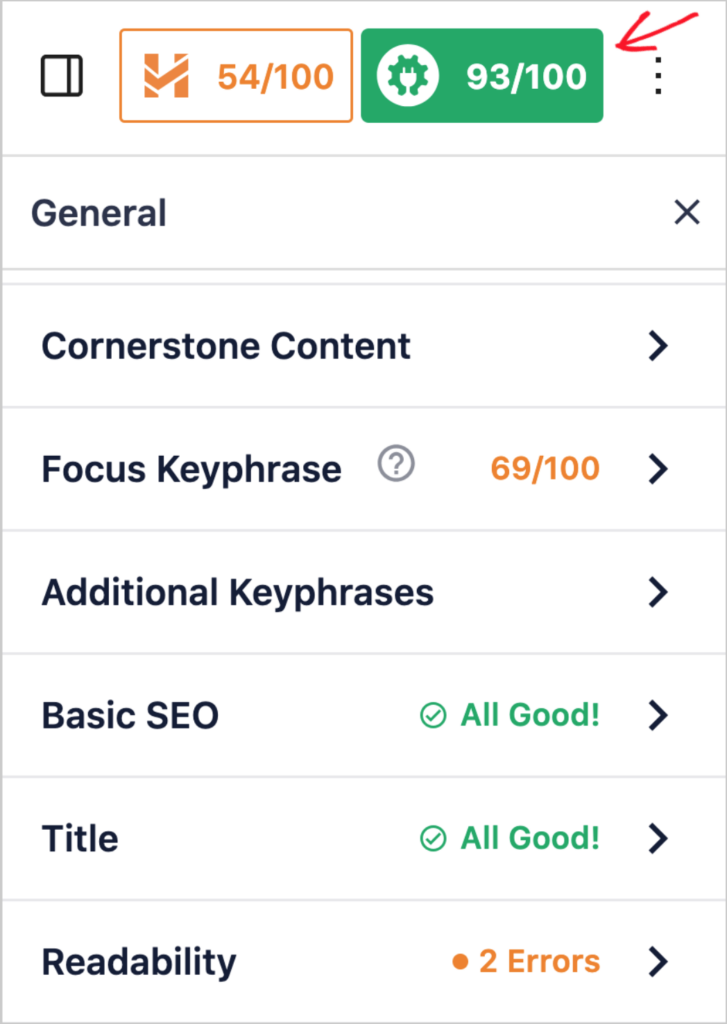
En fin de compte, les meilleurs vérificateurs de densité de mots-clés vous aideront à comprendre l'utilisation de vos mots-clés et à vous concentrer sur la situation dans son ensemble.
Pressé ? Accédez directement à notre sélection des meilleurs vérificateurs de densité de mots-clés.
Pourquoi devrais-je encore vérifier la densité des mots-clés ?
Si les moteurs de recherche s'intéressent davantage à la compréhension du point principal de votre article, vous pouvez certainement oublier les outils de vérification de densité de mots-clés, n'est-ce pas ?
Faux.
Il existe toujours des arguments solides pour voir à quelle fréquence vous utilisez votre mot-clé dans un texte. Voici quelques-uns des plus grands avantages de l'utilisation d'outils de vérification de densité de mots-clés :
Avantage 1 : Aide les moteurs de recherche à comprendre votre contenu
Les moteurs de recherche comme Google utilisent des mots-clés pour déterminer le sujet de votre page. En incluant des mots-clés pertinents, vous leur dites essentiellement : « Hé, cette page parle de ce sujet ! »
Et, comme nous l'avons vu, c'est le but principal du SEO moderne.
Avantage 2 : Évite le bourrage de mots-clés
Autrefois, certaines personnes essayaient de manipuler le classement des moteurs de recherche en bourrant leur contenu de mots-clés.
Cette tactique de SEO black hat est connue sous le nom de bourrage de mots-clés, et aujourd'hui, c'est un grand non-non. Les moteurs de recherche modernes sont suffisamment intelligents pour le reconnaître et vous pénaliseront pour cela.
Vous pouvez éviter ce problème en utilisant des mots-clés associés et des synonymes.
Avantage 3 : Équilibre l'optimisation avec l'expérience utilisateur
L'objectif est d'utiliser les mots-clés naturellement afin que votre contenu ne sonne pas étrange ou répétitif. Vous voulez écrire pour les gens, pas seulement pour les moteurs de recherche.
La densité des mots-clés vous aide à optimiser votre contenu pour les moteurs de recherche tout en créant une expérience positive pour vos lecteurs.
Pourquoi devriez-vous faire confiance à cette évaluation
En tant que personne qui écrit et optimise du contenu quotidiennement, je sais par expérience que la vérification précise de la densité des mots-clés est essentielle. C'est pourquoi j'ai soumis chaque outil à des tests réels en utilisant mon propre contenu et mes propres sites Web.
Mon processus de test
J'ai testé chaque vérificateur de densité de mots-clés en utilisant trois types de contenu différents :
- Un article de blog de 2 000 mots sur les plugins WordPress
- Une description de produit de 500 mots
- Un guide détaillé sur le SEO (plus de 5 000 mots)
Pour chaque contenu, j'ai analysé la performance des outils dans ces domaines clés :
Exactitude et fiabilité
J'ai comparé les résultats de densité de mots-clés sur plusieurs outils pour vérifier leur exactitude. J'ai également vérifié si les outils pouvaient identifier les variations de mots-clés et les termes associés. Cela m'a aidé à comprendre quels outils fournissent les données les plus fiables.
Facilité d'utilisation
Ayant testé ces outils auprès de créateurs de contenu débutants et expérimentés, je me suis concentré sur :
- La rapidité d'obtention des résultats
- La clarté et l'intuitivité de l'interface
- Si l'outil fournit des suggestions utiles
- La facilité de compréhension des rapports
Fonctionnalités avancées
J'ai examiné au-delà de la simple vérification de la densité des mots-clés pour voir la valeur ajoutée de chaque outil :
- Suivi de plusieurs mots-clés
- Capacités de traitement du langage naturel
- Suggestions d'optimisation de contenu
- Intégration avec d'autres outils SEO
Passons maintenant aux outils de vérification de la densité des mots-clés.
Les meilleurs vérificateurs de densité de mots-clés en un coup d'œil
Si vous manquez de temps, ce tableau compare tous les outils de notre sélection :
| Nom de l'outil | Ce qu'il mesure | Idéal pour | Type |
|---|---|---|---|
| All in One SEO (AIOSEO) | SEO on-page holistique (au-delà de la densité) | Utilisateurs de WordPress souhaitant une analyse SEO complète et moderne dans leur éditeur | Version gratuite disponible, plans payants à partir de 49,50 $/mois |
| Vérificateur de densité de mots-clés WPBeginner | Densité de mots-clés de base par URL ou texte | Une vérification de densité rapide, gratuite et simple sans configuration complexe | Gratuit |
| Semrush | Densité de mots-clés, lisibilité, score SEO | Marketeurs ayant besoin d'une boîte à outils tout-en-un pour la recherche, la rédaction et l'analyse approfondie | À partir de 119,95 $/mois |
| Yoast SEO | Densité de mots-clés et signaux SEO on-page | Utilisateurs de WordPress souhaitant une fonctionnalité standard de densité de mots-clés | Version gratuite disponible, plans payants à partir de 99 $/an |
| Petits outils SEO | Densité de mots-clés de 1, 2 et 3 mots | Obtenir un pourcentage de densité rapide et sans fioritures pour un texte | Gratuit |
| Rank Math | Densité de mots-clés et score SEO on-page | Utilisateurs de WordPress qui souhaitent un plugin SEO riche en fonctionnalités avec un vérificateur de densité. | À partir de 6,99 $/mois |
| Outils d'examen SEO | Densité et fréquence des mots-clés | Une analyse gratuite et détaillée de la fréquence et de la distribution des mots-clés dans votre texte. | Gratuit |
Meilleurs vérificateurs de densité de mots-clés (gratuits et payants)
Maintenant que vous avez eu un aperçu de nos meilleurs choix, plongeons dans les meilleurs vérificateurs de densité de mots-clés.
1. All In One SEO (AIOSEO)

AIOSEO est le meilleur vérificateur de densité de mots-clés pour les utilisateurs de WordPress. C'est un plugin SEO puissant mais facile à utiliser qui compte plus de 3 millions d'utilisateurs actifs.
De nombreux propriétaires d'entreprises et blogueurs avisés utilisent AIOSEO pour améliorer leur classement dans les moteurs de recherche et générer du trafic qualifié vers leurs sites. En effet, le plugin dispose de fonctionnalités conçues spécifiquement pour le SEO WordPress, vous permettant d'optimiser vos articles et pages pour une meilleure visibilité sur les moteurs de recherche.
Pour des instructions étape par étape sur la façon d'installer AIOSEO, consultez notre guide d'installation.
Concernant la densité des mots-clés, AIOSEO facilite la vérification de cet élément dans votre éditeur WordPress.
Pour vérifier la densité des mots-clés, accédez simplement au menu AIOSEO sur n'importe quelle page WordPress.
Ensuite, cliquez sur l'onglet Général et ajoutez votre mot-clé cible dans la section Phrase clé cible. AIOSEO analysera alors votre page, vérifiant la présence du mot-clé dans certains des domaines les plus importants de votre article.

Vous verrez ce qui fonctionne bien et ce qui nécessite une amélioration.
Au bas de la section Phrase clé cible, vous trouverez votre rapport de densité de mots-clés, indiquant si vous devez ajouter plus d'instances de votre mot-clé pour un meilleur SEO.
J'adore qu'AIOSEO me donne un pourcentage ET le nombre de fois où mon mot-clé apparaît dans le texte. Cela permet d'accélérer le processus d'ajout de mots-clés ou de leur suppression, en fonction de la recommandation.

Pour aider à réduire le bourrage de mots-clés, vous pouvez obtenir des mots-clés LSI en cliquant sur le bouton Obtenir des phrases clés supplémentaires. Actuellement, cela ne fonctionne que si vous avez connecté Semrush à votre compte AIOSEO.
C'est un excellent moyen pour les débutants d'améliorer leurs optimisations de contenu. Au lieu de deviner le placement des mots-clés, vous pouvez obtenir des données précises indiquant exactement où vous devez apporter des modifications.
En fin de compte, j'ai trouvé qu'AIOSEO est le vérificateur de densité de mots-clés le plus fiable et le plus convivial pour WordPress. Il est précis, facile à utiliser et dispose de fonctionnalités complètes qui peuvent augmenter la visibilité globale de votre site dans les pages de résultats des moteurs de recherche (SERP).
Tarification : Les plans payants commencent à 49,60 $/mois. Version gratuite également disponible.
Le Verdict : AIOSEO est plus qu'un simple vérificateur de densité ; c'est la meilleure solution SEO on-page complète pour les utilisateurs de WordPress. Si vous souhaitez une analyse moderne et holistique qui va au-delà des métriques obsolètes et vous donne un plan d'action pour mieux vous classer, c'est l'outil qu'il vous faut.
2. Vérificateur de densité de mots-clés de WPBeginner

Le Vérificateur de densité de mots-clés de WPBeginner est le meilleur outil autonome pour vérifier votre densité de mots-clés. Une chose que j'aime à son sujet, c'est qu'il est super facile à utiliser. Vous pouvez soit entrer une URL, soit coller votre texte, et l'outil vous donnera plusieurs listes organisées par le nombre de mots dans le mot-clé.

Cela permet de localiser facilement votre mot-clé cible et d'avoir une idée de votre utilisation globale des mots-clés.
J'aime aussi le fait que vous puissiez utiliser ce vérificateur de densité de mots-clés pour analyser le contenu de vos concurrents afin de voir pour quels mots-clés ils optimisent.
C'est idéal pour les débutants qui apprennent encore la densité des mots-clés et comment l'exploiter pour le SEO.
Tarification : Gratuit.
Le Verdict : C'est l'outil parfait pour une vérification de densité rapide et sans fioritures. Si vous êtes un débutant qui souhaite simplement un pourcentage rapide, gratuit et simple sans fonctionnalités complexes, ce vérificateur fait exactement ce qu'il promet.
3. Semrush

Semrush est un outil de marketing numérique de référence pour des millions de spécialistes du marketing. Bien qu'il soit célèbre pour la recherche de mots-clés et l'analyse de la concurrence, il dispose également d'un puissant vérificateur de densité de mots-clés. Celui-ci se trouve sous l'onglet On Page SEO Checker.
Ce qui m'a le plus impressionné lors des tests, c'est la façon dont Semrush analyse votre contenu par rapport aux concurrents les mieux classés.

Cela vous indique à quelle fréquence vos rivaux utilisent votre mot-clé cible dans leur contenu, leurs titres, leurs en-têtes et leurs descriptions.
Vous pouvez voir votre propre densité de mots-clés comparée à leur moyenne, et même combien de fois chaque mot d'une phrase de mots-clés plus longue apparaît. Il utilise même quelque chose appelé Term Frequency–Inverse Document Frequency (TF-IDF) pour montrer l'importance de votre mot-clé par rapport au sujet général de la page, vous permettant de comparer votre score à celui de vos rivaux.
L'un des inconvénients de Semrush est que l'utilisation du vérificateur de densité de mots-clés est un peu compliquée. Les rapports peuvent également être écrasants pour les débutants.
Tarifs : Les plans payants de Semrush commencent à 119,95 $/mois.
Le Verdict : L'outil Semrush Keyword Usage fait partie de sa suite marketing professionnelle beaucoup plus large. C'est un bon choix pour les spécialistes du marketing sérieux et les entreprises qui souhaitent intégrer leur processus d'écriture à des données SEO approfondies.
4. Yoast SEO
Yoast SEO est un autre plugin WordPress qui dispose d'un vérificateur de densité de mots-clés. J'apprécie particulièrement la façon dont il rend la vérification de la densité des mots-clés accessible aux utilisateurs de WordPress de tous niveaux.
Le vérificateur de densité de mots-clés de Yoast fonctionne en temps réel pendant que vous écrivez votre contenu dans l'éditeur WordPress. Vous obtenez un retour immédiat sur l'utilisation des mots-clés sans avoir à basculer entre différents outils ou navigateurs.
Bien que basique, l'outil est utile pour vous assurer de ne pas sur-optimiser votre contenu.
Tarifs : 99 $/an. Plan gratuit disponible.
Le Verdict : Si vous êtes déjà un utilisateur dévoué de Yoast SEO, sa vérification intégrée de la densité des mots-clés est une fonctionnalité pratique pour un aperçu rapide de la distribution de vos phrases clés. C'est une partie solide de leur boîte à outils sur la page pour ceux qui sont engagés dans leur écosystème.
Consultez notre avis approfondi sur Yoast SEO, ou comparez notre comparatif AIOSEO vs. Yoast SEO.
5. Vérificateur de densité de mots-clés de Small SEO Tools

Le vérificateur de densité de mots-clés de Small SEO Tools fonctionne de la même manière que WPBeginner, en ce sens qu'il possède les mêmes capacités d'entrée (URL ou texte). Cependant, vous obtenez des informations supplémentaires sur les optimisations de votre contenu. L'une des plus notables est la façon dont il affiche également une liste de vos mots-clés principaux dans le rapport.
J'aime aussi la façon dont Small SEO Tools met en évidence lorsque vous avez inclus un mot-clé spécifique dans une section importante de votre contenu, telle que le titre, la description ou la balise d'en-tête.

Small SEO Tools brille vraiment par rapport aux autres vérificateurs de densité de mots-clés en raison de ses éléments visuels uniques. Cependant, contrairement aux vérificateurs de densité de mots-clés comme AIOSEO, vous devrez passer d'un onglet à l'autre pour effectuer vos vérifications.
Tarification : Gratuit.
Le Verdict : C'est un outil classique et simple basé sur le web. Il est idéal pour les utilisateurs qui ont besoin d'une ventilation rapide, gratuite et détaillée de la densité de phrases de 1, 2 et 3 mots sans avoir à s'inscrire. C'est un bon point de données, mais pas une plateforme d'optimisation complète.
6. Rank Math
Rank Math est un plugin SEO WordPress populaire qui se distingue par ses fonctionnalités d'optimisation de contenu intégrées, y compris un vérificateur de densité de mots-clés robuste.
Pendant que vous écrivez ou modifiez un article, Rank Math analyse votre utilisation des mots-clés principaux et secondaires, fournissant un retour en temps réel sur votre densité de mots-clés directement dans l'éditeur WordPress. L'outil recommande de maintenir votre densité de mots-clés entre 1 % et 1,5 % pour des résultats optimaux, vous aidant à éviter à la fois la sous- et la sur-optimisation.
L'interface de Rank Math est entièrement intégrée aux éditeurs classique et de blocs dans WordPress. Vous pouvez afficher votre score SEO et toutes les suggestions d'optimisation en un seul endroit, ce qui facilite l'ajustement de votre contenu au fur et à mesure.
Tarifs : Les forfaits payants commencent à 6,99 $/mois.
Le Verdict : Pour les utilisateurs qui ont choisi Rank Math comme plugin SEO principal, le vérificateur de densité de mots-clés intégré est une partie utile de leur module d'analyse sur la page. C'est une fonctionnalité pratique au sein de leur environnement SEO.
Consultez notre avis approfondi sur Rank Math. Ou, mieux encore, consultez notre comparatif AIOSEO et Rank Math.
7. Vérificateur de densité de mots-clés de SEO Review Tools

SEO Review Tools Keyword Density Checker fonctionne de la même manière que le vérificateur de densité de mots-clés de WPBeginner. Il génère des listes de mots-clés par nombre de mots. Et comme Small SEO Tools, il inclut également des aides visuelles pour attirer votre attention sur des éléments spécifiques.
Un élément que j'ai apprécié dans cet outil est qu'il vous donne plus d'options pour analyser les mots-clés qu'il vérifie. Par exemple, en plus d'obtenir la densité des mots-clés, vous pouvez également :
- Effectuez une recherche de mots-clés.
- Obtenir des suggestions de snippets enrichis.
- Vérifier le volume des mots-clés.
Vous pouvez également obtenir l'extension Chrome de l'outil pour réduire les sauts entre les onglets du navigateur lors de la vérification de la densité des mots-clés.
Tarification : Gratuit.
Le Verdict : Cet outil gratuit offre un peu plus de détails que les autres vérificateurs de densité simples, en vous montrant la fréquence des mots-clés et où vos phrases apparaissent dans le texte. C'est un excellent choix si vous souhaitez une analyse légèrement plus approfondie et gratuite de la distribution de vos mots-clés.
Meilleur vérificateur de densité de mots-clés (Notre choix n°1)
Notre meilleur choix pour le meilleur vérificateur de densité de mots-clés pour WordPress est All In One SEO (AIOSEO). Ce puissant plugin fournit des données fiables sur l'utilisation des mots-clés et des recommandations faciles à suivre sur la façon d'améliorer votre contenu.
J'adore aussi que ce soit un guichet unique pour la plupart des besoins en SEO. Que vous essayiez d'améliorer la vitesse de votre site ou d'ajouter un balisage de schéma sans code, AIOSEO le rend facile.
Au-delà de la densité : la checklist SEO on-page que nous utilisons
J'ai promis de vous montrer l'approche moderne que notre équipe chez AIOSEO utilise pour classer le contenu. C'est un processus simple et répétable qui va au-delà d'un simple score de densité de mots-clés et se concentre sur ce qui intéresse *réellement* les moteurs de recherche.
Voici notre checklist en 3 étapes pour optimiser chaque contenu.
Étape 1 : Placement stratégique de la phrase clé
Au lieu de nous soucier du nombre de fois où vous avez utilisé un mot-clé, nous nous concentrons sur son placement dans quelques endroits à fort impact où il est le plus important pour les utilisateurs et les moteurs de recherche.
Pour chaque article, nous nous assurons que notre phrase clé principale apparaît dans les zones suivantes :
- Titre SEO et méta-description
- Premier paragraphe de l'introduction
- Sous-titres H2 et H3
- Corps du texte (naturellement, là où cela a du sens)
- Conclusion
C'est la toute première chose que notre analyse TruSEO vérifie, car elle envoie le signal le plus clair possible à Google concernant le sujet principal de votre contenu.
Étape 2 : Développer l'autorité thématique avec des mots-clés connexes
Le SEO moderne consiste à prouver votre expertise sur un sujet dans son ensemble. La meilleure façon d'y parvenir est d'inclure des mots-clés et des concepts sémantiquement liés (souvent appelés mots-clés LSI) tout au long de votre texte.
Par exemple, dans cet article sur les « vérificateurs de densité de mots-clés », nous avons également inclus des termes tels que « pertinence thématique », « SEO on-page », « langage naturel » et « score TruSEO ». Cela montre à Google que nous avons une compréhension approfondie de l'ensemble du sujet.
Étape 3 : Optimiser pour la lisibilité et les signaux utilisateurs
Enfin, nous optimisons pour le facteur de classement le plus important de tous : le lecteur. Si les utilisateurs trouvent votre contenu difficile à lire, ils partiront, envoyant des signaux négatifs à Google.
Nous nous concentrons sur :
- Des phrases claires et concises
- La division des longs paragraphes
- Utilisation de liens internes et externes pour fournir plus de contexte et de valeur
C'est pourquoi l'analyse de lisibilité d'All in One SEO est si cruciale. Elle vous donne des commentaires directs et exploitables pour améliorer l'expérience utilisateur, ce qui conduit à de meilleurs classements.
Cette checklist en 3 étapes est une méthode de classement plus fiable et durable que de courir après une seule métrique ou un seul score. C'est aussi la méthodologie exacte que nous avons intégrée au plugin AIOSEO pour vous aider à faire de même.
Prochaines étapes : Votre parcours SEO moderne
Bien qu'il puisse être tentant de se concentrer sur une seule métrique de densité de mots-clés, la principale leçon que je peux vous offrir est la suivante : le bon SEO concerne la vue d'ensemble. Ne vous laissez pas trop distraire par les scores SEO individuels. Pensez plutôt à votre public et créez du contenu qu'il veut lire.
Alors, quelle est votre prochaine étape ?
Voici quelques conseils pour passer à un flux de travail plus moderne et efficace :
- Écrivez d'abord pour vos lecteurs. Créez du contenu utile et engageant qui répond à leurs questions.
- Placez votre expression clé naturellement dans quelques endroits importants comme votre titre, votre méta-description, votre introduction et le corps du texte.
- Utilisez un outil moderne de vérification de la densité des mots-clés pour guider votre utilisation des mots-clés et l'ensemble du SEO on-page.
J'espère que cet article vous a aidé à découvrir les meilleurs outils de vérification de la densité des mots-clés et à trouver celui qui convient à vos besoins. Vous voudrez peut-être également consulter d'autres articles de notre blog, comme notre aide-mémoire SEO WordPress pour débutants et notre liste des meilleurs outils d'optimisation de contenu pour le SEO.
Si vous avez trouvé cet article utile, alors abonnez-vous à notre chaîne YouTube. Vous y trouverez de nombreux autres tutoriels utiles. Vous pouvez également nous suivre sur X (Twitter), LinkedIn ou Facebook pour rester informé.
FAQ sur les outils de vérification de densité de mots-clés
Quelle est une bonne densité de mots-clés pour le SEO ?
Dans le SEO moderne, il n'y a pas de pourcentage idéal de densité de mots-clés. Alors que les anciens conseils SEO suggéraient souvent 1 à 2 %, les moteurs de recherche d'aujourd'hui sont beaucoup trop avancés pour une règle aussi simple. Se concentrer sur un nombre spécifique conduit souvent à une écriture non naturelle. Au lieu de cela, vous devriez vous concentrer sur le placement naturel de votre expression clé principale dans des endroits critiques comme votre titre, votre introduction et quelques sous-titres.
Est-il mauvais d'utiliser mon mot-clé trop souvent ?
Oui. Répéter votre mot-clé de manière non naturelle est connu sous le nom de « bourrage de mots-clés », et cela peut nuire à votre classement. Cela crée une mauvaise expérience de lecture pour vos visiteurs, et les moteurs de recherche comme Google sont suffisamment intelligents pour le reconnaître. Écrivez toujours d'abord pour les humains, pas pour les robots des moteurs de recherche.
Comment puis-je vérifier ma densité de mots-clés gratuitement ?
Pour une vérification rapide et basique, vous pouvez utiliser un outil gratuit en ligne comme le WPBeginner Keyword Density Checker ou Small SEO Tools. Cependant, pour une analyse plus précieuse et moderne, nous recommandons d'utiliser la version gratuite d'All in One SEO. Il fournit un score TruSEO complet qui examine la vue d'ensemble du SEO on-page, ce qui est beaucoup plus utile qu'un simple pourcentage de densité.
Comment les vérificateurs de densité de mots-clés m'aident-ils à optimiser mon contenu ?
Ces outils analysent votre contenu en temps réel, vous montrant où et à quelle fréquence vos mots-clés apparaissent. Cela vous aide à garantir une utilisation naturelle et équilibrée des mots-clés, améliorant ainsi la visibilité auprès des moteurs de recherche et l'expérience utilisateur.
Envie d'essayer AIOSEO gratuitement ?
Entrez l'URL de votre site Web WordPress pour installer AIOSEO Lite.

Divulgation : Notre contenu est financé par nos lecteurs. Cela signifie que si vous cliquez sur certains de nos liens, nous pouvons gagner une commission. Nous ne recommandons que les produits qui, selon nous, apporteront de la valeur à nos lecteurs.
