
Su Internet, la chiarezza è fondamentale.
Se gli utenti non riescono a scorrere i tuoi contenuti e a capirli all'istante, se ne vanno (escono). E quando lo fanno, il tuo posizionamento SEO crolla.
Migliorare il tuo punteggio di leggibilità non significa "semplificare" i tuoi contenuti. Significa rispettare il tempo del tuo lettore e assicurarsi che il tuo messaggio arrivi effettivamente.
In questa guida, ti mostrerò come migliorare la leggibilità su WordPress usando la stessa checklist che uso quando scrivo per l'AIOSEO Blog.
In questo articolo
- What Is Readability & Why Does It Matter for SEO?
- Come Controllare il Tuo Punteggio di Leggibilità
- 9 Ways to Improve Your Readability Score (My Checklist)
- 1. Il "Test del Respiro" (Accorcia le Tue Frasi)
- 2. Sostituisci le Parole "Universitarie" con Parole "Conversazionali"
- 3. Spezza i Blocchi di Testo
- 4. Usa "Catene di Trasporto" (Parole di Transizione)
- 5. Aggiungi Contesto Visivo (Immagini e Video)
- 6. Il "Test dello Zombie" (Correggi la Voce Passiva)
- 7. Usa Sottotitoli Descrittivi
- 8. Usa un Tono Conversazionale
- 9. Controlla il Punteggio Flesch Reading Ease
- How to Increase Readability Score in WordPress
- Conclusione: La Leggibilità è Rispetto
- Readability Score FAQs
Cos'è la Leggibilità e Perché è Importante per la SEO?
La leggibilità misura quanto sia facile per un essere umano comprendere la tua scrittura. Viene calcolata utilizzando algoritmi (come i test Flesch-Kincaid) che esaminano la lunghezza delle frasi, il conteggio delle sillabe e la struttura dei paragrafi.
Ma la leggibilità influisce sulla SEO?
Sì e no.
- Direttamente: Google ha affermato che la leggibilità non è un fattore di ranking *diretto* (come i backlink).
- Indirettamente: La leggibilità è importante. Se i tuoi contenuti sono un muro di testo, gli utenti se ne andranno (alto tasso di rimbalzo). Se sono facili da leggere, rimangono più a lungo (alto tempo di permanenza).
I segnali degli utenti sono una parte enorme della SEO moderna. Quando mi concentro su una migliore leggibilità, vedo aumentare le mie metriche di tempo sulla pagina, il che segnala a Google che i miei contenuti sono preziosi.
Come Funziona il Punteggio di Leggibilità
Ognuno ha il proprio stile di scrittura e la propria conoscenza del vocabolario. Quindi, come fai a sapere se i tuoi contenuti sono leggibili o meno?
È qui che il punteggio di leggibilità torna utile.
Un punteggio di leggibilità ti aiuta a tenere traccia dei problemi e degli errori di leggibilità nella tua scrittura. Analizzando il punteggio, saprai quanto è difficile o facile leggere i tuoi contenuti.
Come Controllare il Tuo Punteggio di Leggibilità
Prima di poter migliorare la leggibilità, devi misurarla.
Ma sarò onesto, calcolare manualmente il tuo punteggio di leggibilità è praticamente impossibile. La buona notizia è che ci sono molti strumenti SEO on-page che analizzano i tuoi contenuti e ti danno un punteggio automaticamente.
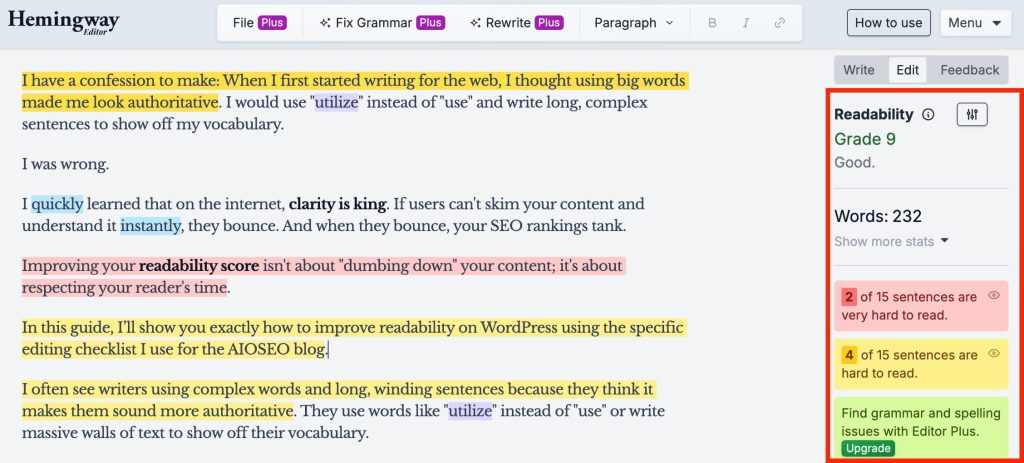
Quando non lavoro su WordPress, mi piace usare Hemingway Editor. Fornisce un punteggio di leggibilità come voto scolastico. Evidenzia anche frasi specifiche che potrebbero essere migliorate.
Ora, il più delle volte, lavoro su siti web WordPress. E quando riesco a far funzionare gli strumenti direttamente nell'editor di WordPress, preferisco farlo invece di passare da uno strumento all'altro e da una scheda all'altra. (Ogni secondo risparmiato conta!)
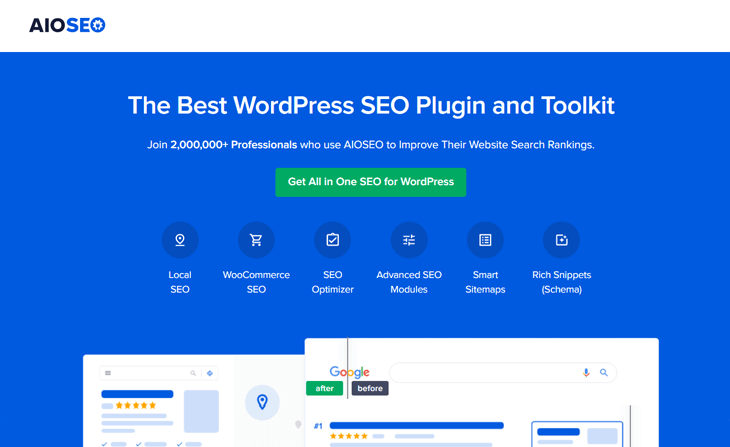
Quindi, per WordPress, uso All in One SEO (AIOSEO). Ha uno strumento di analisi dei contenuti integrato chiamato TruSEO che scansiona i miei contenuti in tempo reale all'interno dell'editor di WordPress.
TruSEO fornisce una checklist di leggibilità direttamente nell'editor di WordPress. Ciò significa che puoi vedere il tuo punteggio di leggibilità mentre scrivi e ricevere raccomandazioni per migliorarlo.
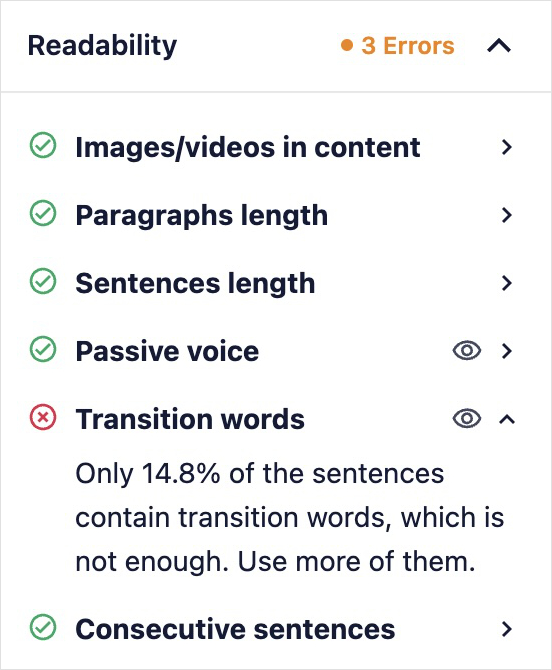
Inoltre, adoro come TruSEO ti porta esattamente dove puoi apportare modifiche per migliorare la leggibilità. Facendo clic sull'icona dell'occhio accanto alla voce della checklist, sarai indirizzato alla frase che potrebbe necessitare di qualche intervento.
Questo è simile all'evidenziatore in Hemingway Editor, ma è integrato direttamente nell'editor di WordPress.
Nel complesso, è un must per gli utenti WordPress che cercano di aumentare i loro punteggi di leggibilità.
9 modi per migliorare il tuo punteggio di leggibilità (la mia checklist)
Quando i miei contenuti vengono contrassegnati come "Difficili da leggere", eseguo questa checklist in 9 passaggi per correggerli.
1. Il "Test del respiro" (Accorcia le tue frasi)
Le frasi lunghe sono il nemico della lettura online. Se una frase è di circa 20 parole o più, gli strumenti di leggibilità la segnaleranno.
Il mio trucco: leggo la frase ad alta voce. Se non riesco a finire la frase in un solo respiro, la taglio a metà.
- Male: "La leggibilità è importante perché aiuta gli utenti a comprendere i contenuti, il che porta a migliori classifiche SEO e tassi di conversione più elevati."
- Bene: "La leggibilità aiuta gli utenti a comprendere i contenuti. Questo porta a migliori classifiche SEO e tassi di conversione più elevati."
2. Sostituisci le parole "universitarie" con parole "da conversazione"
Punto a un livello di lettura di 8a elementare. Non si tratta di intelligenza; si tratta di velocità di elaborazione. Sostituisco attivamente parole complesse con sinonimi più semplici. Ad esempio:
- Invece di "utilizzare", scrivo "usare".
- Dico "aiutare" invece di "facilitare".
- Invece di "dimostrare", uso "mostrare".
3. Spezza i Blocchi di Testo
Niente spaventa di più un utente mobile di un paragrafo che occupa l'intero schermo del telefono.
Seguo una regola ferrea: nessun paragrafo più lungo di 3 righe.
Se un paragrafo diventa troppo lungo, trovo un punto di interruzione naturale e premo "Invio". Questo crea spazio bianco, che funge da respiro visivo per il lettore.
Inoltre, rende i tuoi contenuti facili da scansionare, il che aumenta i tempi di permanenza.
4. Usa le "catene di parole" (parole di transizione)
Le parole di transizione sono il lubrificante che fa scivolare i lettori lungo la pagina. Collegano le idee in modo che il lettore non si blocchi. Le categorie comuni di parole di transizione includono:
- Tempo: poi, dopo, infine, nel frattempo
- Aggiunta: inoltre, per di più, anche
- Contrasto: tuttavia, nondimeno, sebbene
- Causa/Effetto: pertanto, di conseguenza, così
- Confronto: similmente, allo stesso modo, in confronto
- Sequenza: primo, secondo, per ultimo Esempio: per esempio, specificamente, cioè
Cerco di assicurarmi che almeno il 30% delle mie frasi contenga una parola di transizione. (Bonus: AIOSEO le controlla automaticamente.)

5. Aggiungi Contesto Visivo (Immagini e Video)
A volte, le parole non bastano. Se sto spiegando un concetto tecnico (come "come abilitare le sitemap HTML"), smetto di scrivere e faccio uno screenshot. Le immagini possono aiutare i lettori a capire dove andare e cosa fare più facilmente di lunghe spiegazioni.
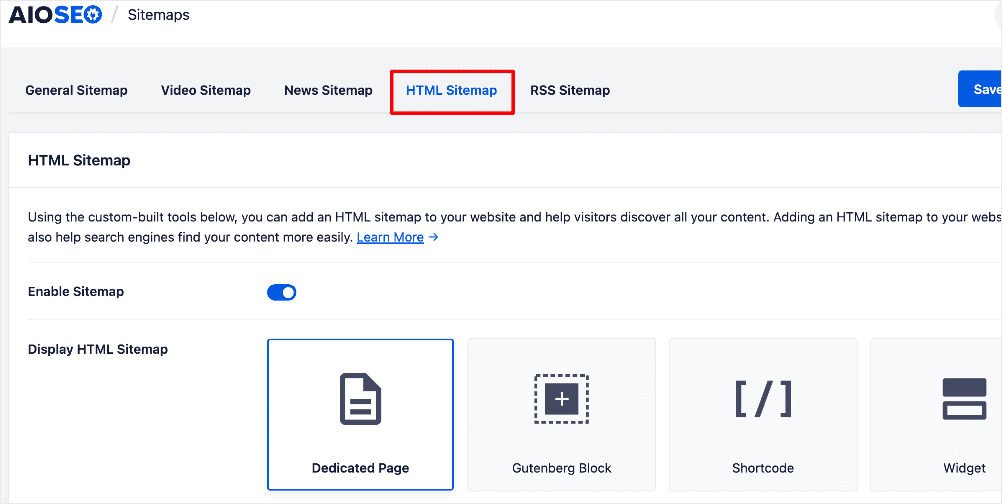
Interrompere il testo con contenuti multimediali (immagini, video, GIF) ripristina anche l'attenzione del lettore. Inoltre, l'IA di Google ama i diversi formati di contenuto.
Dai un'occhiata alla nostra Guida SEO per le immagini per i dettagli su come assicurarti che le tue immagini supportino i tuoi sforzi SEO.
6. Il "Test dello Zombie" (Correggi la voce passiva)
La voce passiva rende la tua scrittura distante e debole. La voce attiva è incisiva e autorevole.
Come individuarla: Il "Test dello Zombie". Se puoi aggiungere "dagli zombie" dopo il verbo, è passiva.
- Passiva: "Il post del blog è stato scritto [dagli zombie]." (Debole)
- Attiva: "Ho scritto il post del blog." (Forte)
È sciocco, lo so, ma funziona. Cerco di mantenere la voce passiva al di sotto del 10% del mio conteggio totale di parole.
7. Usa Sottotitoli Descrittivi
I tag di intestazione suddividono il tuo contenuto in sezioni facilmente scorribili e guidano i lettori attraverso il tuo contenuto. Perché, la realtà è questa:
La maggior parte degli utenti non legge; scansiona.
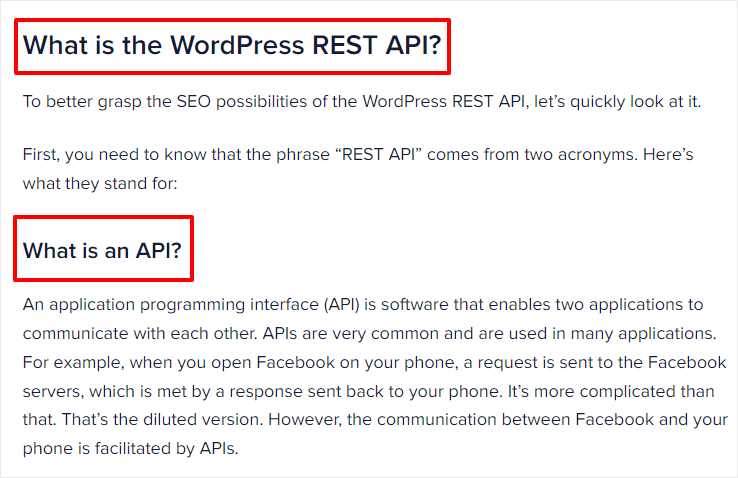
Se i lettori scorrono la pagina, le tue intestazioni dovrebbero raccontare l'intera storia. Invece di un'intestazione come "Strategia", scrivo "La mia strategia per migliorare la leggibilità".
Ecco un altro esempio:
8. Usa un Tono Conversazionale
Scrivo come parlo. Uso "io", "tu" e "noi".
Creare una connessione con il lettore lo mantiene sulla pagina. Se il tuo contenuto suona come un elaborato scolastico, lo perderai. Non aver paura di usare le contrazioni (ad esempio, usa "non" invece di "non fare") per suonare più naturale.
L'obiettivo è far sentire ai lettori che stanno avendo una conversazione amichevole piuttosto che leggere un documento formale. È particolarmente efficace in blog, email, social media e contenuti di marketing dove costruire un rapporto è importante.
9. Controlla il Punteggio Flesch Reading Ease
Infine, uso il test Flesch Reading Ease. Questo è uno strumento popolare per gli scrittori per analizzare la leggibilità dei loro contenuti.
Il punteggio Flesch Reading Ease utilizza una formula che misura quanto sia facile leggere un testo in base alla lunghezza della frase e alla complessità delle parole (conteggio delle sillabe). Il punteggio varia da 0 a 100.
- 0-30: Molto difficile (Compreso al meglio da laureati universitari)
- 30-50: Difficile (Livello universitario)
- 50-60: Abbastanza difficile (Scuola superiore/alcuni corsi universitari)
- 60-70: Standard (8a/9a elementare)
- 70-80: Abbastanza facile (7a elementare)
- 80-90: Facile (6a elementare)
- 90-100: Molto facile (5a elementare)
Non vuoi affrontare la fatica di controllare tu stesso ogni fattore di leggibilità?
Nemmeno io, ecco perché uso All in One SEO.
Come aumentare il punteggio di leggibilità in WordPress
Hai già avuto un'anteprima di come uso All in One SEO per migliorare la leggibilità, ma ecco una spiegazione completa del mio processo in WordPress:
Passaggio 1: Installa il Plugin All in One SEO
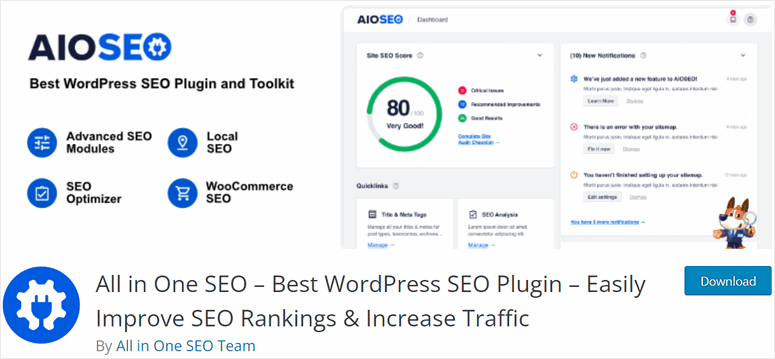
Innanzitutto, installa e attiva il plugin. Puoi scaricare la versione gratuita dal repository di WordPress o la versione Pro per funzionalità avanzate.
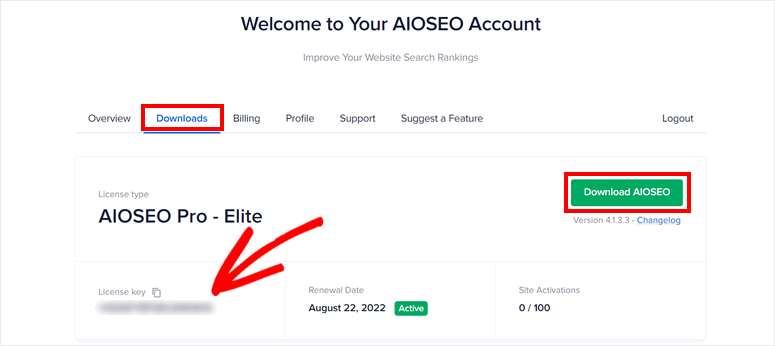
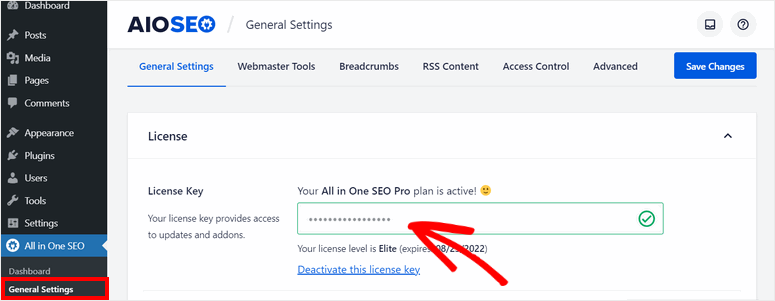
Una volta registrato per un account AIOSEO, puoi trovare il tuo file del plugin e la chiave di licenza nella scheda Download.
Successivamente, caricherai il file sulla tua bacheca di WordPress e installerai il plugin.
Per maggiori dettagli, consulta la guida di WPBeginner su come installare e configurare correttamente un plugin di WordPress.
Una volta installato AIOSEO, naviga nella scheda Impostazioni. Qui puoi inserire la tua chiave di licenza per attivare il plugin.
Passaggio 2: Scrivi la Tua Bozza
Scrivo i miei contenuti direttamente in WordPress. Mentre digito, AIOSEO funziona in background.
Ricordi la checklist di leggibilità che abbiamo visto prima?
È qui che presto molta attenzione al suo feedback. Questa funzionalità è integrata a destra dell'editor di WordPress. Un segno di spunta verde significa che va bene, e un segno di spunta rosso significa che c'è spazio per miglioramenti.
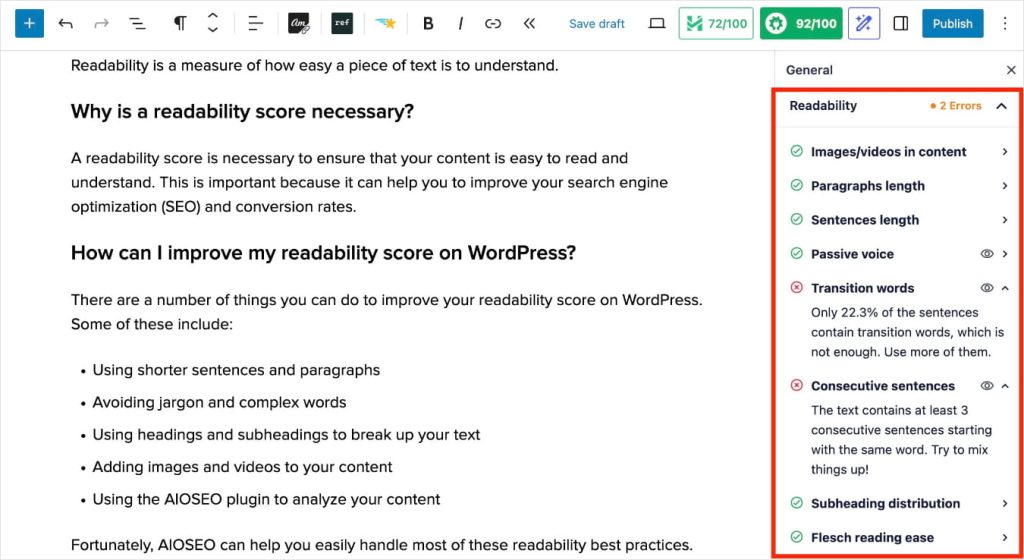
Suggerimento Pro: Non dimenticare di fare clic sull'icona dell'occhio per andare esattamente dove puoi apportare la modifica nel tuo post o pagina! Questo fa risparmiare un sacco di tempo invece di dover scansionare manualmente il tuo contenuto per la correzione.
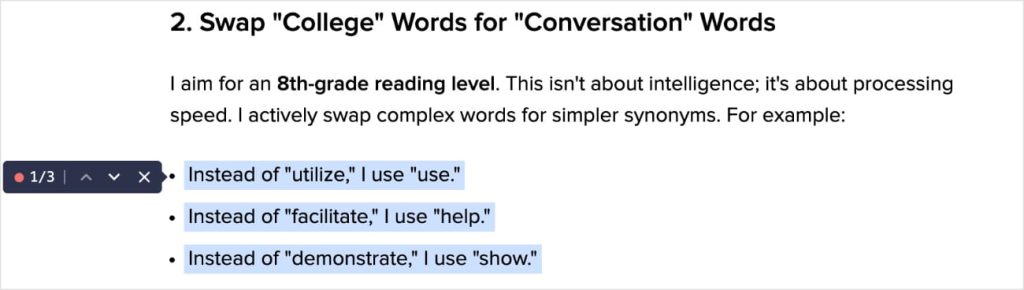
(Dai un'occhiata all'immagine qui sotto per vedere cosa è successo quando ho fatto clic sull'icona per "frasi consecutive". Questo mi mostra esattamente dove ho 3 frasi consecutive che iniziano con la stessa parola.)
Passaggio 3: Sfrutta l'IA per Migliorare la Leggibilità
Hai un segno di spunta rosso che non riesci a capire?
Chiedi aiuto all'IA.
AIOSEO ha un Assistente AI integrato che può aiutarti a fare qualsiasi cosa, dalla scrittura di interi post del blog, alla creazione di FAQ e al miglioramento della leggibilità. Ecco come l'ho usato per risolvere il mio problema sulle frasi consecutive che iniziano con la stessa parola.
Innanzitutto, ho aggiunto l'Assistente AI di AIOSEO al mio post.

Poi, gli ho chiesto di cambiare la formulazione delle mie frasi "problematiche".
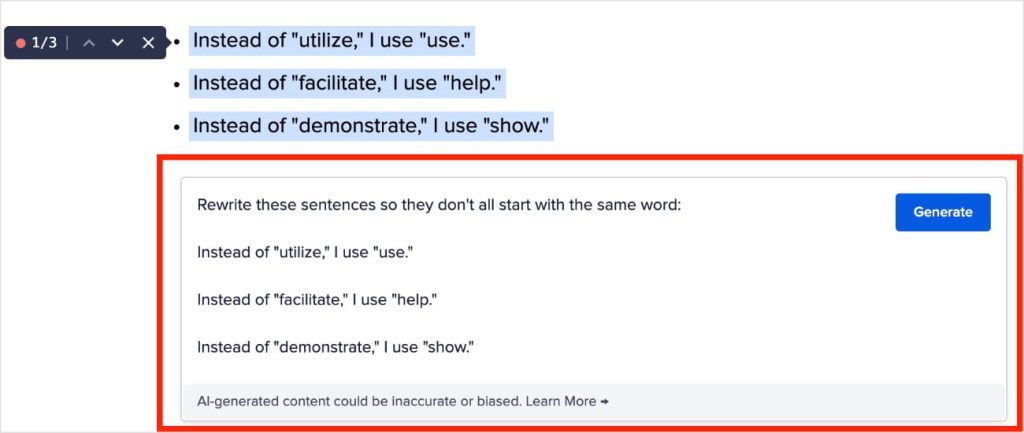
Dopo aver fatto clic su "Genera", l'IA ha prodotto il seguente risultato:
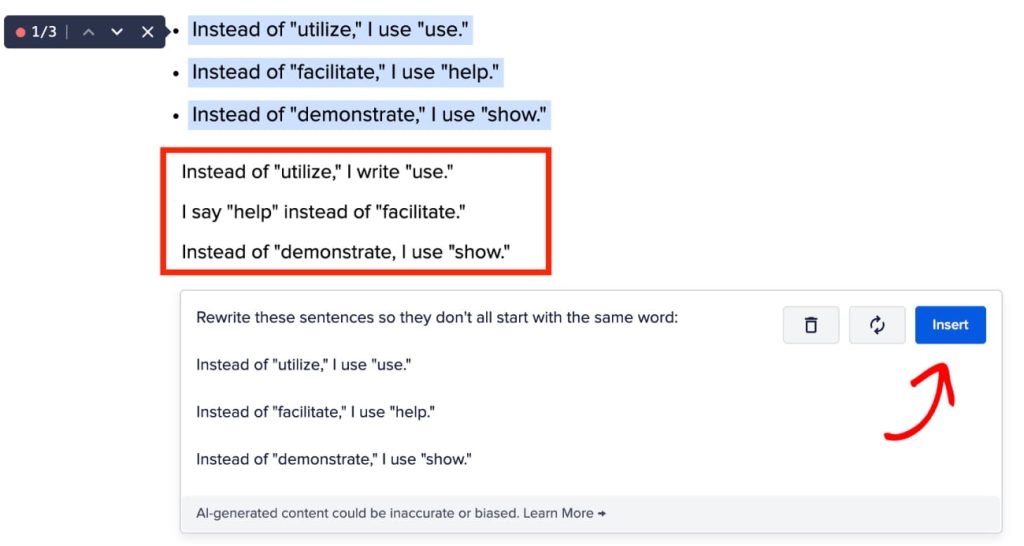
Una volta soddisfatto del risultato, puoi fare clic su "Inserisci", e inserirà il testo (o l'immagine, perché può crearli anche quelli) come un nuovo blocco nel tuo post.
In definitiva, è un modo rapido e semplice per correggere i problemi di leggibilità e migliorare il tuo punteggio.
Vuoi riprovare? Fai clic sul pulsante rigenera (appena a sinistra di "Inserisci"), e l'IA produrrà un altro risultato.
Conclusione: La Leggibilità è Rispetto
Migliorare il tuo punteggio di leggibilità non significa solo inseguire una luce verde in un plugin. Si tratta di empatia.
Quando scrivi in modo chiaro, rispetti il tempo del tuo lettore. Rendi il più facile possibile per loro risolvere il loro problema. E quando i lettori si sentono rispettati, rimangono più a lungo sulla pagina, leggono più contenuti e hanno maggiori probabilità di convertire.
Questa è la vittoria SEO definitiva.
Vuoi approfondire l'ottimizzazione SEO di WordPress? Potresti trovare utile leggere il nostro tutorial su come avviare un blog per piccole imprese o le nostre scelte per i migliori strumenti SEO gratuiti.
Ti invito anche ad iscriverti al nostro Canale YouTube. Troverai molti altri tutorial utili lì. Puoi anche seguirci su X (Twitter), LinkedIn o Facebook per rimanere aggiornato.
Domande frequenti sul punteggio di leggibilità
Cos'è la leggibilità?
La leggibilità misura quanto sia facile per le persone leggere e comprendere i tuoi contenuti. Esamina fattori come la lunghezza delle frasi, il numero di sillabe e la complessità delle parole per determinare un "livello di grado" per la tua scrittura.
Qual è un buon punteggio di leggibilità?
Per i contenuti web generali, dovresti puntare a un punteggio Flesch Reading Ease tra 60 e 70. Questo corrisponde approssimativamente a un livello di lettura di 8a elementare, che è lo standard per il pubblico di massa.
La leggibilità influisce sulla SEO?
Indirettamente, sì. Una scarsa leggibilità porta ad alti tassi di rimbalzo e a un basso tempo sulla pagina, che sono segnali utente negativi che dicono a Google che il tuo contenuto non è prezioso. Migliorare la leggibilità mantiene gli utenti più a lungo sul tuo sito, il che può migliorare il posizionamento.
Cos'è il test Flesch-Kincaid?
Il test Flesch-Kincaid è una formula utilizzata per calcolare la difficoltà di un testo. Utilizza il numero totale di parole, frasi e sillabe per determinare un "Livello di Grado" per la scrittura.
Vuoi Provare AIOSEO Gratuitamente?
Inserisci l'URL del tuo sito web WordPress per installare AIOSEO Lite.

Divulgazione: I nostri contenuti sono supportati dai lettori. Ciò significa che se fai clic su alcuni dei nostri link, potremmo guadagnare una commissione. Raccomandiamo solo prodotti che crediamo aggiungeranno valore ai nostri lettori.
