
Fissi uno schermo vuoto, chiedendoti come troverai il tempo di scrivere tutti i post del blog di cui la tua azienda ha bisogno? E se avessi un partner creativo che potesse aiutarti a strutturare e scrivere il tuo articolo in pochi secondi?
Questo è esattamente ciò che un generatore di post per blog basato sull'IA può fare, e i migliori funzionano direttamente all'interno del tuo editor di WordPress.
In questa guida, ti mostrerò come utilizzare un generatore di post per blog basato sull'IA per semplificare la creazione di contenuti e pubblicare di più, più velocemente.
In questo articolo
- Cos'è un generatore di post per blog basato sull'IA?
- Cosa rende un buon generatore di post per blog basato sull'IA per WordPress?
- La mia raccomandazione per il miglior generatore di post per blog IA per WordPress
- How to Use AI Assistant to Write Blogs in WordPress
- Troubleshooting Common AI Issues
- Domande frequenti sui generatori di post per blog IA
Cos'è un generatore di post per blog basato sull'IA?
Un generatore di post per blog IA è uno strumento che utilizza l'intelligenza artificiale (IA) per aiutarti a creare contenuti.
Fornisci un prompt e l'IA genera testo simile a quello umano basandosi su ciò che ha appreso analizzando miliardi di pagine di contenuti online.
Potresti già avere familiarità con chatbot IA popolari, come ChatGPT, Google Gemini e Open AI. Questi strumenti utilizzano l'IA generativa per produrre testo unico e originale. E mentre possono essere utilizzati per generare post per blog, possono anche fare molto di più.
L'utilizzo di un generatore di post per blog IA presenta enormi vantaggi:
- Ti fa risparmiare tempo: riduce drasticamente il tempo necessario per passare da un'idea a un articolo pubblicato.
- Ti aiuta a superare il blocco dello scrittore: basta fissare una pagina bianca. L'IA ti fornisce un solido punto di partenza su cui lavorare.
- Genera idee e schemi: è perfetto per fare brainstorming su diversi angoli di un argomento o per creare una struttura logica per il tuo post.
- Fornisce una bozza iniziale solida: fornisce una bozza completa che puoi quindi modificare, personalizzare e ottimizzare.
Cosa rende un buon generatore di post per blog basato sull'IA per WordPress?
Non tutti gli strumenti di scrittura IA sono creati uguali, specialmente quando il tuo obiettivo è pubblicare contenuti direttamente dal tuo sito WordPress.
Ecco cosa dovresti cercare nei generatori di post per blog IA per WordPress:
- Funziona direttamente all'interno di WordPress: l'ultima cosa che vuoi è un'altra scheda del browser da gestire. Copiare e incollare continuamente da uno strumento IA separato all'editor di WordPress è macchinoso e uccide il tuo flusso creativo. Lo strumento migliore è integrato direttamente nella schermata di modifica.
- È ottimizzato per la SEO: generare contenuti è solo metà della battaglia. Hai bisogno che quei contenuti si posizionino. Un generatore IA di alto livello dovrebbe far parte di un set di strumenti SEO più ampio, aiutandoti a creare contenuti strutturati per i motori di ricerca fin dall'inizio.
- È facile da usare: non dovresti aver bisogno di un corso speciale per capirlo. Gli strumenti migliori sono intuitivi e ti consentono di generare titoli, schemi e paragrafi con pochi clic, senza una ripida curva di apprendimento.
- Produce Contenuti di Alta Qualità: Questo è un punto non negoziabile. Il testo generato dall'IA deve essere coerente, pertinente e suonare naturale. Dovrebbe fornirti una prima bozza di ottima qualità che puoi facilmente modificare, non un pasticcio robotico che necessita di una riscrittura completa.
La mia raccomandazione per il miglior generatore di post per blog IA per WordPress
Dopo aver testato numerosi strumenti, la mia raccomandazione principale per un generatore di blog AI che funziona perfettamente con WordPress è l'AI Assistant di All in One SEO (AIOSEO).

Perché?
Perché soddisfa tutti i criteri di cui abbiamo appena discusso: è perfettamente integrato, facile da usare e ti aiuta a creare contenuti strutturati per posizionarsi fin dall'inizio.
È anche il primo assistente di scrittura AI che mi aiuta a creare contenuti che effettivamente voglio usare, direttamente nell'editor di WordPress. (Sono rimasto deluso dalla qualità di altri plugin e ho dovuto fare molta modifica manuale.)
Ora, tuffiamoci nella parte divertente. Ti mostrerò esattamente come usare l'AI Assistant per passare da una pagina bianca a un articolo pronto per la pubblicazione in pochi minuti.
Perché dovresti fidarti di me
Come persona che vive e respira SEO e creazione di contenuti, ho testato dozzine di strumenti di scrittura AI da quando sono apparsi per la prima volta sul mercato.
So cosa distingue un assistente veramente utile da una macchina che gira contenuti e crea articoli generici e di bassa qualità. Non si tratta solo di generare testo più velocemente; si tratta di creare contenuti che offrono valore reale e sono ottimizzati per posizionarsi.
In questa guida, ti mostrerò un flusso di lavoro che bilancia l'incredibile velocità dell'IA con il tocco umano essenziale necessario per creare contenuti che piaceranno sia a Google che ai tuoi lettori.
Come Usare AI Assistant per Scrivere Blog in WordPress
Pronto a vedere come funziona? Ti guiderò attraverso i semplici passaggi per creare il tuo primo post del blog generato dall'IA direttamente all'interno dell'editor di WordPress.
Passaggio 1: individua il blocco Assistente IA di AIOSEO
Per prima cosa, apri un nuovo post o una nuova pagina in WordPress.
Una volta all'interno dell'editor, fai clic sul pulsante più (+) per aggiungere un nuovo blocco. Apparirà una barra di ricerca.

Nella barra di ricerca, inizia a digitare "AI Assistant" o "AIOSEO". Vedrai apparire il blocco AIOSEO – AI Assistant. Fai clic su di esso.

Questo aggiunge un nuovo blocco al tuo post con un campo aperto, pronto per inserire il tuo comando.

Ora, vediamo come scrivere un prompt che ti dia il tipo di post del blog che desideri.
Passaggio 2: Scrivi un Prompt Chiaro
L'AI Assistant è potente, ma la qualità del post del blog che genera dipende interamente dalla qualità del tuo prompt.
Questa è la tua occasione per dire all'IA esattamente cosa vuoi.
Un prompt generico ti darà un articolo generico. Un prompt dettagliato ti darà un punto di partenza molto migliore.
Suggerimenti per i Prompt per Ottenere i Migliori Risultati
1. Sii specifico e chiaro. Più dettagli fornisci all'IA, migliore e più pertinente sarà il risultato.
- Prompt vago: Scrivi sulla ricerca delle parole chiave.
- Prompt migliore: Scrivi una guida per principianti sulla ricerca delle parole chiave, spiegando cos'è e perché è importante per la SEO.
2. Definisci il tuo pubblico. Indica all'AI per chi stai scrivendo. Questo lo aiuterà a scegliere la lingua e il livello di dettaglio appropriati.
- Prompt vago: Scrivi sui vantaggi dell'email marketing.
- Prompt migliore: Scrivi un post per un blog rivolto ai proprietari di piccole imprese sui vantaggi dell'email marketing per la fidelizzazione dei clienti.
3. Imposta il tono. Vuoi che il tuo post sia amichevole, professionale, divertente o altro? Specificare il tono aiuta l'AI a corrispondere alla voce del tuo brand.
- Prompt vago: Spiega cos'è un backlink.
- Prompt migliore: Scrivi una spiegazione amichevole e semplice di cos'è un backlink per qualcuno che è completamente nuovo alla SEO.
4. Includi le tue parole chiave di destinazione. Se vuoi ottimizzare per una parola chiave focus specifica, includila nel tuo prompt. Questo dice all'AI di concentrarsi su quel termine.
- Prompt vago: Scrivi un post sulle piante da interno.
- Prompt migliore: Scrivi un post sulle migliori piante da interno a bassa manutenzione per principianti. Includi la parola chiave “piante da interno facili”.
Mettiamo tutto insieme
Ecco un esempio di un ottimo prompt che utilizza tutti questi suggerimenti:
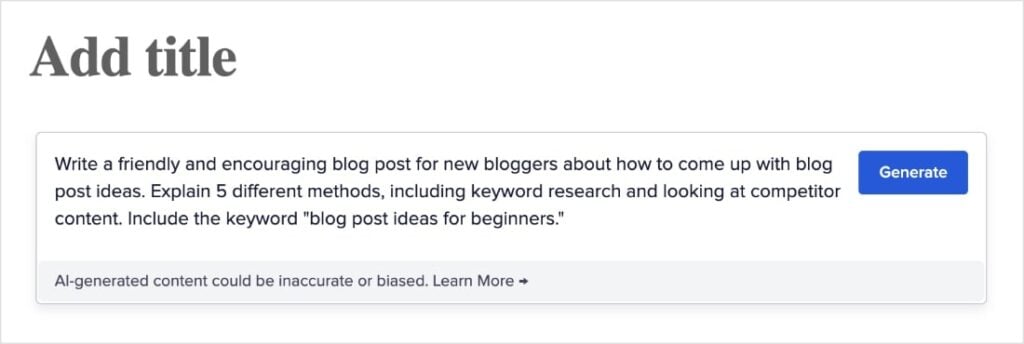
Passaggio 3: genera e rivedi il tuo post
Una volta che il tuo prompt è pronto, sei a un solo clic da una prima bozza completa.
Vai avanti e fai clic sul pulsante Genera all'interno del blocco AI Assistant.
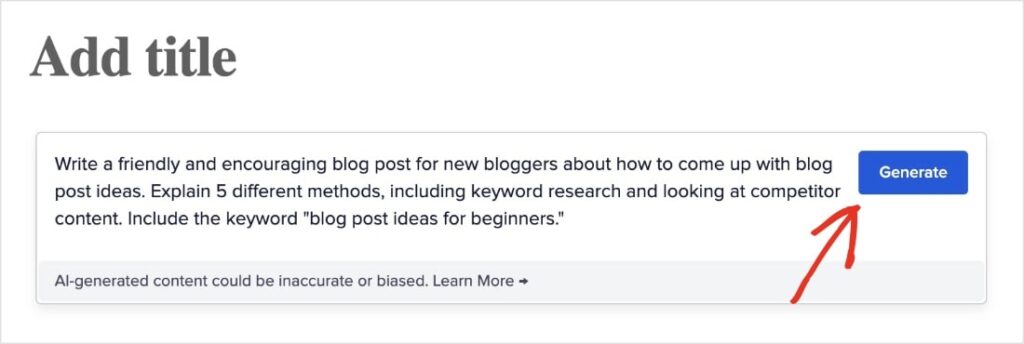
Ho utilizzato il prompt nello screenshot sopra e ho ottenuto il seguente post del blog in circa 3 secondi:
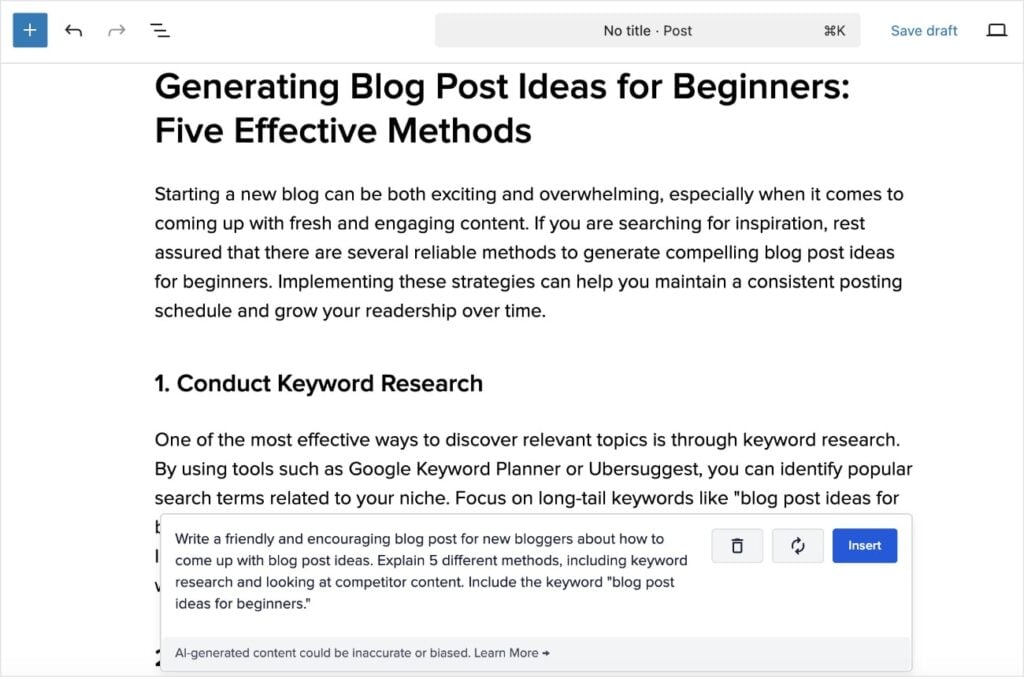
Prenditi un minuto per leggere il post del blog generato dall'AI.
Copre gli argomenti che hai richiesto? Il tono ti sembra giusto?
Questa è la tua occasione per assicurarti che l'AI sia sulla strada giusta.
Se sei soddisfatto della bozza, fai clic sul pulsante blu Inserisci in fondo al blocco.
Questo trasferirà automaticamente l'intero articolo nel tuo editor WordPress principale. Il titolo sarà formattato come un tag H1 e il resto del contenuto verrà aggiunto come blocchi individuali, pronti per iniziare la modifica.
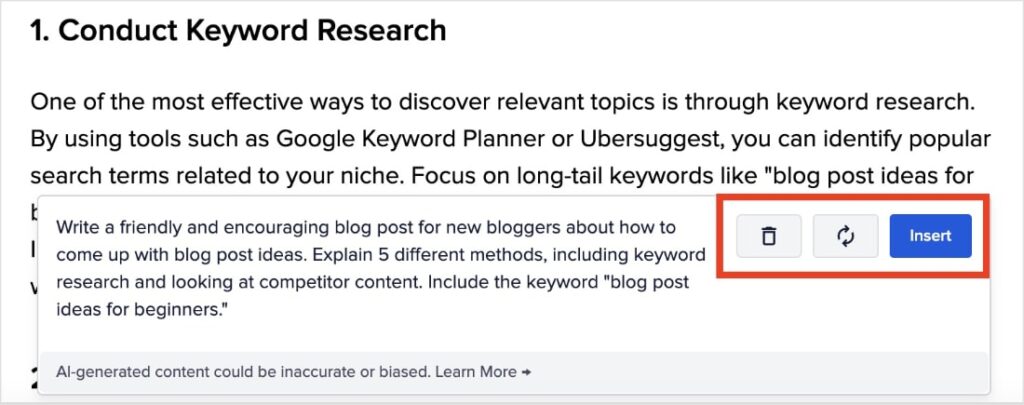
Altrimenti, puoi:
- Eliminare il post del blog generato dall'AI facendo clic sull'icona del cestino.
- Rigenerare il post facendo clic sull'icona del cerchio al centro.
Passaggio 4: Espandi e migliora il tuo articolo
La tua prima bozza è pronta, ma non devi fermarti qui. Il vero potere dell'AI Assistant risiede nella sua capacità di aiutarti ad espandere e perfezionare i tuoi contenuti, rendendoli ancora più preziosi per i tuoi lettori.
Il processo è esattamente lo stesso di prima. Aggiungi semplicemente un nuovo blocco AI Assistant ovunque tu voglia aggiungere una nuova sezione al tuo articolo.
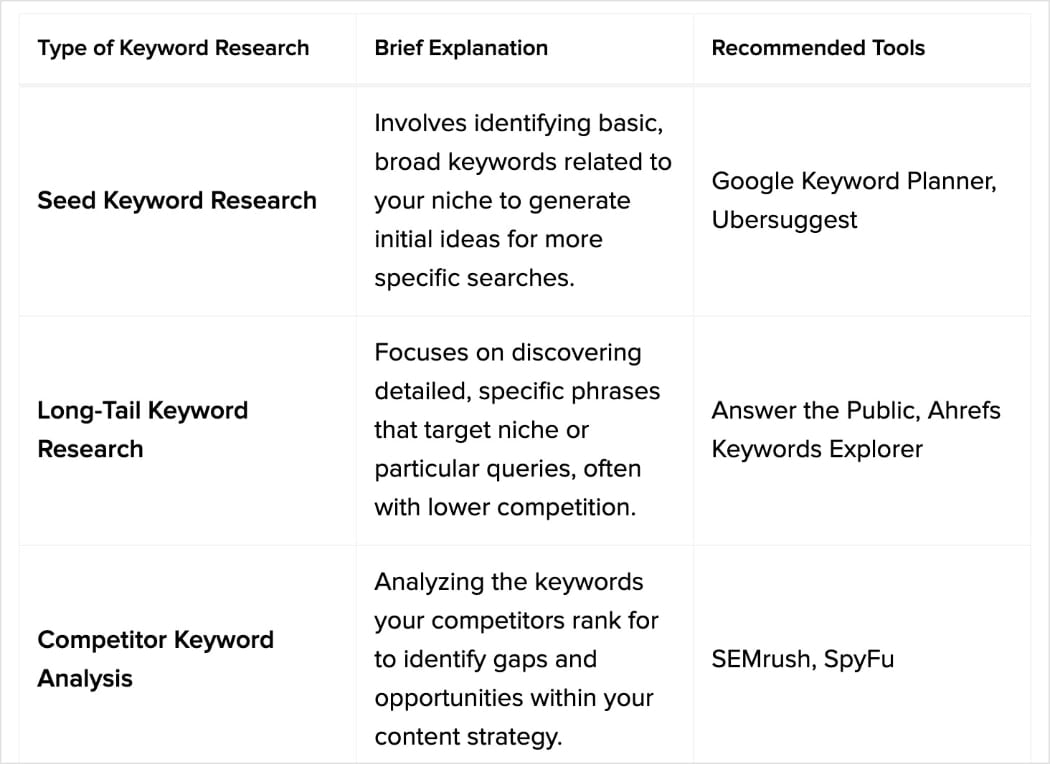
Ecco un esempio di confronto di tabelle che ho aggiunto con l'AI al nostro post del blog sulla ricerca delle parole chiave:
Idee e prompt per sezioni generate dall'AI
In questa sezione, ti darò idee per nuove sezioni da aggiungere al tuo post del blog, oltre ai prompt da utilizzare con l'AI. Includerò anche screenshot dell'output dell'AI Assistant nel post del blog che abbiamo utilizzato per questo tutorial, in modo che tu possa vedere i risultati.
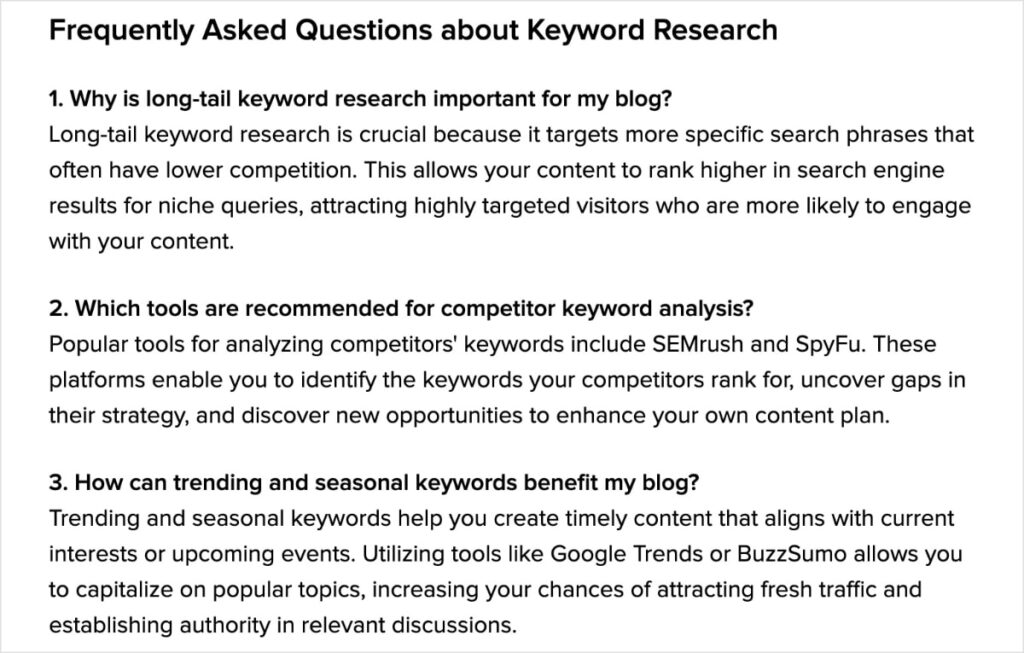
Le sezioni FAQ sono un ottimo modo per rispondere a domande comuni e catturare le funzionalità “Le persone hanno chiesto anche” su Google.
- Prompt: Genera un elenco di 3 domande frequenti e le loro risposte basate su questo articolo su [Il tuo argomento].
Le tabelle di confronto sono perfette per rendere le informazioni complesse facili da capire a colpo d'occhio.
- Prompt: Crea una semplice tabella di confronto tra [Elemento 1] e [Elemento 2], confrontandoli su [Caratteristica A], [Caratteristica B] e [Caratteristica C].
Odio dover formattare le tabelle in WordPress. Dopo oltre 6 anni di lavoro in WordPress, è ancora qualcosa che temo. Sono così felice di non dover più farlo con AI Assistant, che si occupa della formattazione delle tabelle per te.
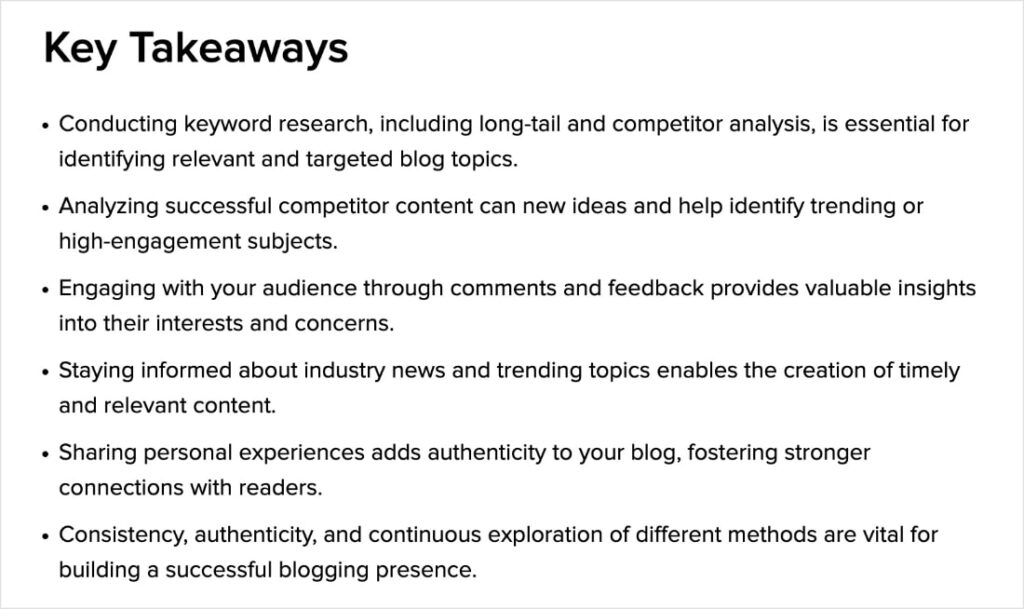
I punti chiave sono riassunti in punti elenco che puoi includere in post più lunghi. Sono incredibilmente utili per digerire molte informazioni e migliorare la leggibilità.
- Prompt: Scrivi una sezione "Punti chiave" in punti elenco che riassuma i punti principali di questo articolo.
Puoi anche approfondire un punto specifico. Google favorisce la copertura approfondita degli argomenti, quindi non essere timido nel chiedere all'Assistente AI di approfondire una particolare sezione del tuo post. Potresti persino chiedergli di scrivere un'intera sezione al riguardo.
- Prompt: Scrivi una sezione dettagliata sull'importanza di [Punto specifico] per i principianti.
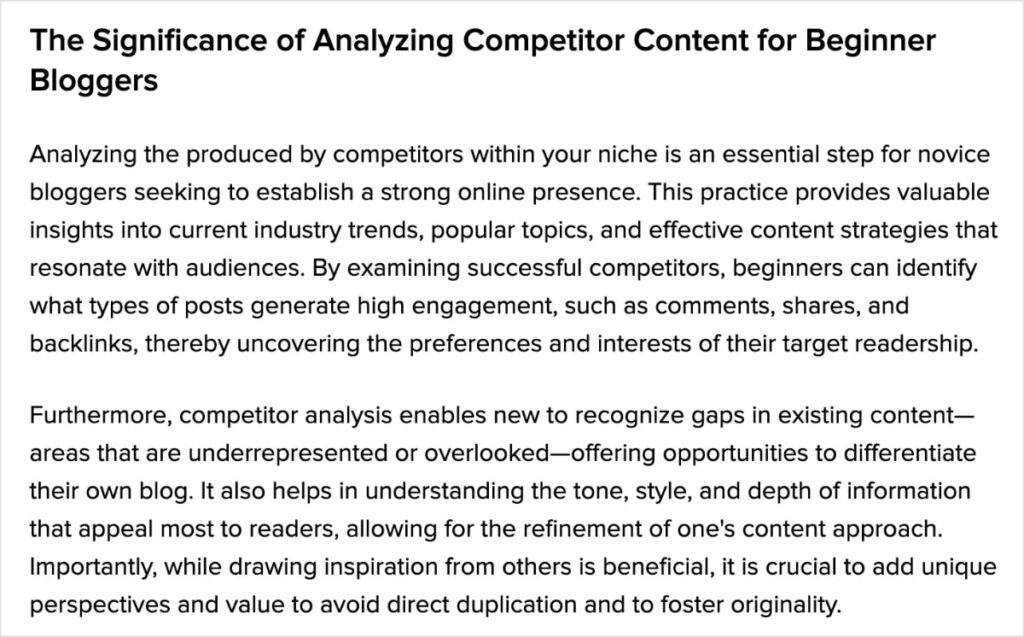
Puoi ripetere questo processo tutte le volte che ne hai bisogno, costruendo un articolo completo e di valore pezzo per pezzo.
Questo è come passare da una semplice bozza a una risorsa approfondita che il tuo pubblico (e i motori di ricerca) adoreranno.
Passaggio 5: modifica e personalizza
Ora hai una fantastica prima bozza, ma il lavoro non è *ancora* del tutto finito. (Ci sei quasi, però, te lo prometto!)
Trattare i post del blog generati dall'IA come prodotto finale è un errore comune. La vera magia avviene quando combini la velocità dell'IA con la tua esperienza e voce umana.
Questo passaggio finale è ciò che farà risaltare i tuoi contenuti e costruirà una vera connessione con il tuo pubblico.
Ecco la tua semplice checklist per perfezionare la tua bozza generata dall'IA:
- Verifica dei fatti: L'IA è incredibilmente competente, ma non è infallibile e a volte può commettere errori. Prenditi sempre un momento per verificare statistiche, date, nomi o affermazioni specifiche che fa. Ciò garantisce che i tuoi contenuti siano accurati e affidabili.
- Inietta la tua voce e la tua esperienza: Qui è dove trasformi una buona bozza in un ottimo articolo. Rileggi il testo e modificalo in modo che suoni come te. Puoi aggiungere storie personali e condividere le tue opinioni uniche.
- Leggilo ad alta voce: Leggi l'intero post ad alta voce dall'inizio alla fine. Questo è il modo migliore per individuare qualsiasi frase goffa o frasi che non scorrono naturalmente. Se suona robotico quando lo dici tu, suonerà robotico quando il tuo pubblico lo leggerà.
- Ottimizza per la SEO: Infine, non dimenticare la SEO on-page. Ora che hai i tuoi contenuti, è il momento di assicurarti che siano ottimizzati per posizionarsi per la tua parola chiave di destinazione. È qui che AIOSEO eccelle davvero.
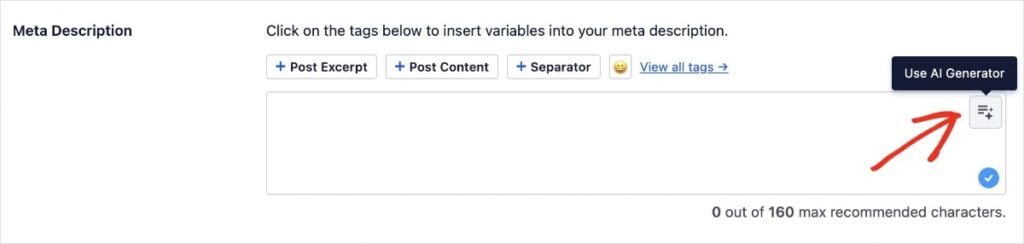
Usa il Generatore di Contenuti AI per scrivere titoli SEO e meta descrizioni ottimizzati cliccando sul pulsante AI nel campo appropriato.
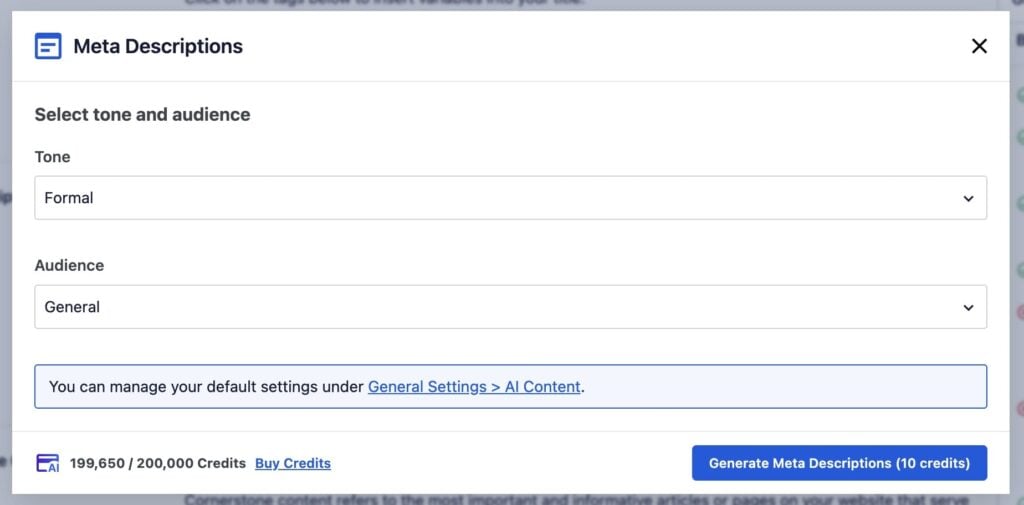
Adoro come puoi scegliere il tono e il pubblico per i tuoi meta tag, il che può aumentare i tuoi tassi di click (CTR).
Una volta che hai un titolo e una descrizione che attirano il click, puoi usare lo strumento Analisi On-Page TruSEO per vedere come il tuo post del blog si confronta con i controlli SEO critici.
TruSEO ti fornisce un punteggio SEO generale, che puoi vedere in cima all'editor. Ottieni anche una checklist attuabile a destra del tuo post, che ti dice dove migliorare la tua SEO.
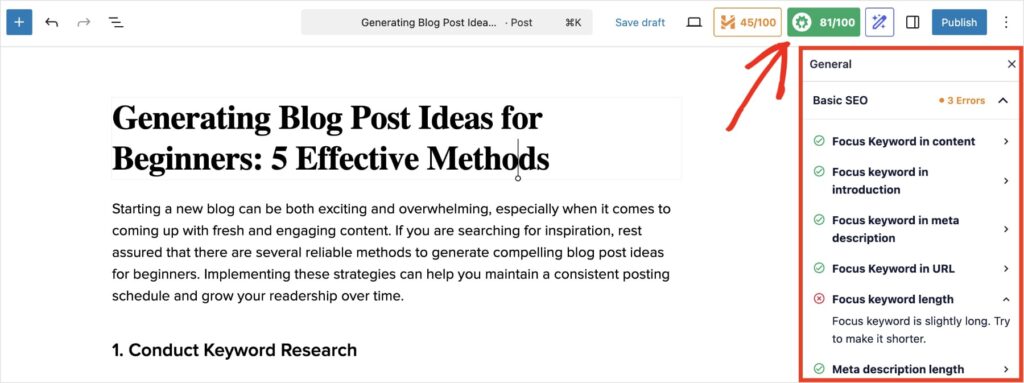
Anche se faccio SEO da molto tempo, apprezzo ancora come questa checklist mi aiuti a individuare qualsiasi cosa potrei aver trascurato.
È ottimo anche per i principianti e per i SEO fai-da-te che hanno bisogno di un piccolo promemoria su cosa cercare.
In definitiva, AIOSEO è ricco di funzionalità user-friendly che rendono la scrittura e l'ottimizzazione dei contenuti un gioco da ragazzi. Lo uso da oltre 2 anni e non riesco più a immaginare di usare nessun altro plugin SEO.
Passaggio bonus: crea immagini generate dall'IA
Amo sinceramente scrivere. Quello che *non* amo è il processo di trovare immagini da abbinare ai miei contenuti.
Può volerci un'eternità per trovare la foto giusta sui siti stock, e spesso devi pagare per quelle migliori.
Ecco perché AIOSEO ha un Generatore di Immagini AI integrato direttamente nell'editor di WordPress.
Ecco come usarla:
Inizia aprendo il blocco Immagine e cliccando su Genera con AI.

Il Generatore di Immagini aprirà un campo prompt. Proprio come con il generatore di testo, un prompt più dettagliato ti darà un'immagine migliore.
Puoi anche scegliere tra diverse impostazioni come la qualità dell'immagine e lo stile creativo (come cinematico, illustrazione o minimalista) e selezionare il tuo rapporto d'aspetto preferito.
Una volta pronto, clicca su Genera.
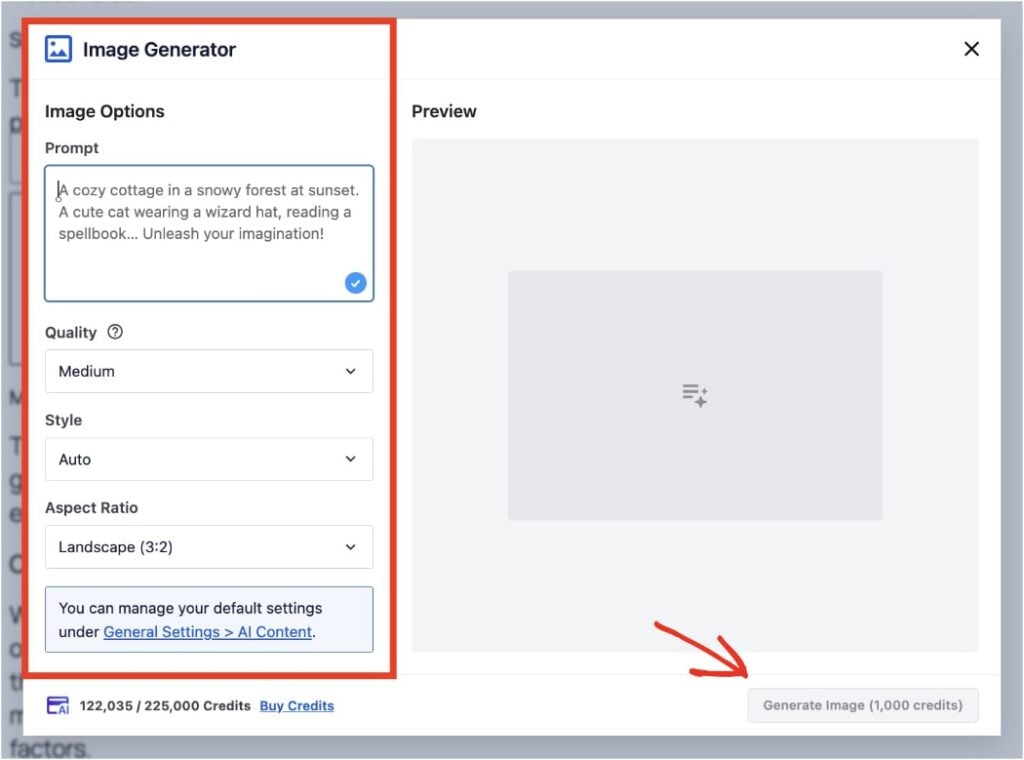
In meno di un minuto, avrai un'immagine unica generata dall'AI. Puoi aggiungerla direttamente al tuo post o persino perfezionarla ulteriormente cambiando il tuo prompt e cliccando su Rigenera.

È un modo incredibilmente semplice per creare immagini accattivanti che aiutano a rendere i tuoi post del blog più interessanti e possono persino aiutare a ridurre i tassi di rimbalzo.
Suggerimento Pro: Non limitarti a creare immagini per il corpo del testo! Avevo bisogno di un'immagine banner da usare per il nostro post del blog generato dall'AI sulle idee per blog (quello che ho usato per il tutorial di oggi) e ho usato lo stile "illustrazione" per ottenere un risultato fantastico! Dagli un'occhiata qui sotto.
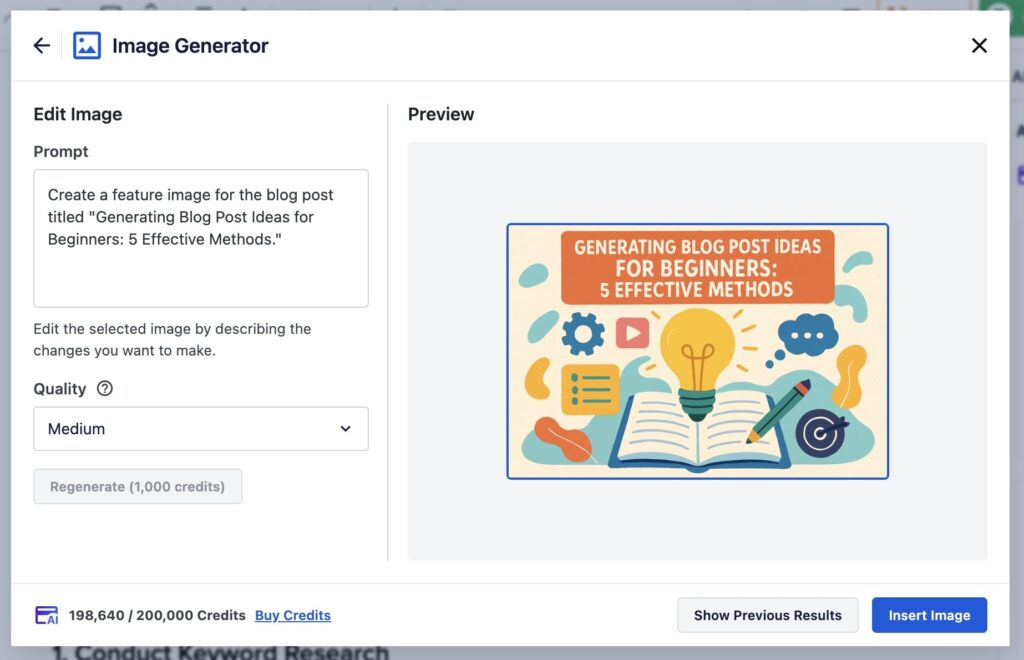
Il Generatore di Immagini carica automaticamente tutte le sue creazioni nella tua Libreria Multimediale in modo da poter utilizzare le tue immagini AI ovunque desideri.
Risoluzione dei problemi comuni relativi all'IA
Anche i migliori strumenti SEO AI a volte possono mancare il bersaglio. Se ottieni un risultato che non è esattamente quello che speravi, non preoccuparti! Di solito è una rapida soluzione.
Ecco cosa fare:
Gestione di output irrilevanti o di bassa qualità
Se l'IA genera qualcosa che sembra generico, irrilevante o semplicemente di bassa qualità, la ragione principale è solitamente il prompt.
La cosa migliore da fare è semplicemente non utilizzare quell'output. Invece di cercare di correggere una bozza scadente, è molto più veloce perfezionare il tuo prompt e generarne uno nuovo.
Torna ai suggerimenti per la scrittura dei prompt nel Passo 2 e chiediti:
- Il mio prompt potrebbe essere più specifico?
- Ho detto all'IA chi è il pubblico?
- Ho definito il tono che volevo?
Un piccolo cambiamento, come passare da "Scrivi sulla SEO" a "Scrivi una guida semplice alla SEO on-page per nuovi blogger", può fare una grande differenza nella qualità dell'output.
Regolazioni per risultati migliori
L'Assistente AI è progettato per la semplicità, quindi non ci sono molte impostazioni complicate da regolare.
Il tuo pannello di controllo principale è il prompt stesso. Pensa alle tue parole come alle impostazioni.
Ecco come puoi "regolare" il tuo prompt per ottimizzare i risultati:
- Per regolare la lunghezza: Aggiungi parole come "Scrivi un breve paragrafo..." o "Scrivi una sezione dettagliata di 300 parole..."
- Per regolare il tono: Dillo esplicitamente. "Scrivi con un tono professionale..." o "Scrivi con un tono divertente e informale..."
- Per regolare il formato: Chiedilo e basta. "Scrivi questo come un elenco puntato" o "Crea una semplice tabella che confronti questi elementi."
Più specifiche sono le tue istruzioni, meglio l'IA potrà fornire ciò che hai in mente.
Richiedere supporto da AIOSEO
Se continui a riscontrare problemi o hai una domanda tecnica, All in One SEO ha uno dei migliori team di supporto del settore.
Hanno una serie di istruzioni e guide dettagliate nel loro centro risorse. Puoi anche contattare il team per un supporto personalizzato.
Inizia oggi stesso a creare contenuti migliori e più veloci
Un generatore di post per blog AI è uno strumento potente per superare il blocco dello scrittore e creare contenuti più velocemente che mai.
Utilizzando l'Assistente AI di AIOSEO, puoi passare da una pagina bianca a una prima bozza ben strutturata in pochi secondi, direttamente all'interno di WordPress.
Ricorda, i migliori post del blog generati dall'IA sono quelli che perfezioni con la tua esperienza e la tua voce.
Ora che sai come creare contenuti velocemente, il passo successivo è assicurarsi che siano completamente ottimizzati per posizionarsi. Per aiutarti in questo, consulta la nostra checklist SEO completa per WordPress.
Pronto a smettere di fissare una pagina bianca e iniziare a pubblicare ottimi contenuti più velocemente che mai?
Inizia con AIOSEO e il suo potente Assistente AI oggi stesso!
Per tutorial WordPress più semplici e consigli SEO, iscriviti al nostro Canale YouTube. Puoi anche seguirci su X (Twitter), LinkedIn o Facebook per rimanere aggiornato.
Domande frequenti sui generatori di post per blog IA
Cos'è un generatore di post per blog AI?
Un generatore di post per blog AI è uno strumento software che utilizza l'intelligenza artificiale per creare contenuti scritti basati su un prompt fornito dall'utente. Agisce come un assistente creativo, aiutandoti a redigere articoli, schemi e titoli per accelerare il tuo processo di creazione di contenuti e superare il blocco dello scrittore.
I contenuti di un generatore di post per blog AI sono validi per la SEO?
Sì, i contenuti creati con un generatore di post per blog AI possono essere eccellenti per la SEO, ma solo se vengono modificati e revisionati da un essere umano. L'obiettivo di Google sono contenuti di alta qualità e utili che soddisfino l'intento dell'utente. L'IA è uno strumento per creare una solida prima bozza, ma devi aggiungere la tua esperienza, la tua voce e la verifica dei fatti per garantire che il pezzo finale sia prezioso per i lettori.
Google può rilevare post per blog generati dall'IA?
Sebbene esistano strumenti di rilevamento dell'IA, la posizione ufficiale di Google è che si concentrano sulla qualità dei contenuti, non su come sono stati creati. Finché il tuo articolo finale è utile, accurato e offre una buona esperienza utente, non importa se hai utilizzato l'IA per aiutarti a scrivere la bozza.
Qual è il miglior generatore di post per blog AI per WordPress?
Il miglior generatore di post per blog AI per WordPress è l'Assistente AI di AIOSEO. Elimina la necessità di copiare e incollare da altri strumenti e integra potenti funzionalità SEO, rendendo facile creare e ottimizzare i contenuti in un unico posto.
Vuoi Provare AIOSEO Gratuitamente?
Inserisci l'URL del tuo sito web WordPress per installare AIOSEO Lite.

Divulgazione: I nostri contenuti sono supportati dai lettori. Ciò significa che se fai clic su alcuni dei nostri link, potremmo guadagnare una commissione. Raccomandiamo solo prodotti che crediamo aggiungeranno valore ai nostri lettori.
