
Restaurant SEO is one of the most effective ways to attract more customers without constantly increasing your advertising budget.
But the challenge is that local search has become more competitive than ever. Between Google Maps, local packs, AI-powered search results, review platforms, and traditional organic listings, restaurant owners need a restaurant SEO strategy that goes beyond simply having a website.
The good news is that restaurant SEO doesn't have to be complicated. By optimizing your Google Business Profile, improving your website's local signals, creating the right content, and implementing local SEO best practices, you can increase your visibility in local search and drive more reservations, orders, and foot traffic.
In this guide, I'll walk you through the exact restaurant SEO strategies that can help you rank higher in local search, stand out from competitors, and get more customers in 2026.
In This Article
- What Is Restaurant SEO?
- How to Optimize Your Google Business Profile
- 8 Steps to Build the Best Restaurant SEO Strategy
- 1. Find the Right Keywords for Your Restaurant
- 2. Build NAP Consistency Across the Web
- 3. Use Reviews to Boost Your Restaurant's Rankings
- 4. Add Schema Markup to Your Restaurant Website
- 5. Optimize Your Restaurant Website for Local Search
- 6. On-Page SEO with AIOSEO
- 7. Create Local Content That Attracts Nearby Customers
- 8. Prepare Your Restaurant for AI Search Visibility
- 1. Find the Right Keywords for Your Restaurant
- Restaurant SEO Checklist: What to Tackle First
- FAQs About Restaurant SEO
- Next Steps
What Is Restaurant SEO?
Restaurant SEO is the process of improving your restaurant's visibility in local search results so nearby customers can find you on Google, Google Maps, and other search platforms.
It involves optimizing your Google Business Profile (GBP), building consistent business listings, collecting reviews, and ensuring your website sends Google the right signals to rank you for searches like “restaurants near me” or “best [cuisine type] in [city].”
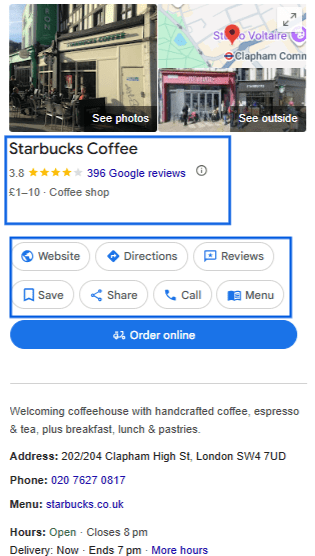
Unlike traditional SEO, which targets a national or global audience, local SEO focuses on people near you who are ready to make a decision.
One reason is also how much consumers rely on online search results when looking for a restaurant. In fact, 97% of consumers search online before choosing a local business, including restaurants.
This makes local seo a premium real estate, and showing up there means you're the first thing a hungry diner sees. If you're not in those top 3, someone else is.
How to Optimize Your Google Business Profile
Your GBP is the single most important piece of your restaurant SEO strategy. It powers your appearance in Google Maps, the Local Pack, and the Knowledge Panel.
And the best part is that it's free.
Here's how you can optimize it in 3 simple steps.
Step 1: Claim and Verify Your Listing
Go to Google Business Profile and search for your restaurant. If a listing already exists, claim it. If not, create one from scratch. Google will walk you through a verification process, usually by postcard, phone call, or video.
Verification gives you full control. Without it, you can't update your hours, respond to reviews, or add photos, and this step has to come first.
Step 2: Fill in Every Field Completely
Once verified, fill in every section. Remember, Google rewards completeness. So, here's what to focus on:
- Business name: Use your real-world name exactly as it appears on your signage. No keyword stuffing.
- Category: Choose a precise primary category (“Pizza Restaurant,” “Mexican Restaurant”) and add relevant secondary categories (“Pizza Delivery,” “Catering Service”).
- Description: You have 750 characters. Use them to describe your cuisine, atmosphere, location, and what makes you different. Include your primary keyword and city name near the beginning to strengthen your restaurant SEO strategy.
- Hours: Fill in regular hours and update special hours for holidays. Outdated hours are one of the most common reasons restaurants lose rankings and customers.
- Attributes: Add relevant attributes like “Outdoor seating,” “Takeout available,” “Family-friendly,” or “Wheelchair accessible.” Customers filter searches by these features, and Google uses them to match your listing to the right queries.
- Menu: Upload your menu directly. Google can surface specific dishes in search results when your menu is available, including in AI-generated recommendations. This is one of the most underused fields in restaurant GBPs.
- Photos: Upload high-quality photos regularly. Aim for 20-30 images of your food, interior, exterior, and staff. Listings with photos get more direction requests and clicks.
- Online ordering and reservations: Add action buttons for ordering or booking directly. These convert searchers into customers faster than any third-party platform link.
Step 3: Keep Your Profile Active with Posts and Updates
Google uses activity as a ranking signal. A profile that never changes sends a weak signal. Here's how to stay active without spending hours on it each week:
- Post weekly updates about specials, events, new menu items, or seasonal offerings. GBP Posts show up directly in your listing and give searchers a reason to click.
- Respond to every review. Engagement with reviews is a confirmed ranking signal, not just a trust signal. More on this in the reviews section.
- Update your hours whenever they change, including holidays. Google may suppress your rankings if your hours are inaccurate.
- Add new photos at least once a month.
Pro tip: Think of your GBP like a social media feed, not a yellow pages listing. The restaurants that update it regularly show Google they're active and engaged, and that behavior is rewarded with better visibility.
Step 4: Connect Your GBP with AIOSEO to Manage Everything from WordPress
Once your GBP is verified and completed, the next step is to connect it to AIOSEO so your website sends Google the exact same business signals your GBP does. This is what generates the Restaurant schema markup on your site and keeps your NAP data consistent at the source.
Here's how to set it up:
1. Install and activate AIOSEO (Plus plan or above): The Local SEO module is available on the Plus plan. If you haven't installed AIOSEO yet, download it from your account at aioseo.com, upload it to your WordPress site via Plugins > Add New > Upload Plugin, and activate it. Run the Setup Wizard when prompted.
2. Enable the Local SEO module: In your WordPress dashboard, go to All in One SEO > SEO > Local SEO. If the module isn't active yet, you'll see a prompt to enable it. Toggle it on. The Local SEO menu will expand to show 4 tabs: Locations, Opening Hours, Maps, and Import.

3. Enter your business information: Use these tabs to fill in every field to match your GBP exactly. For the Business Type field, select Restaurant from the dropdown. This tells AIOSEO to generate the Restaurant schema rather than the generic LocalBusiness type.
4. Set up your Google Maps embed: You'll need a Google Maps API key to activate this feature. AIOSEO links to step-by-step instructions for creating one inside the settings panel. Once you paste in your API key, drag the map marker to your exact restaurant location and save. From here, you can embed the map anywhere on your site using the AIOSEO Local SEO Gutenberg block, a shortcode, or a widget.
5. Verify your schema is live: Once you've saved everything, open your homepage in a new browser tab and scroll to the bottom of the page source (View Page Source in your browser, then search for @type). You should see a Restaurant JSON-LD block with your name, address, hours, and coordinates correctly formatted. You can also paste your homepage URL into Google's Rich Results Test to confirm everything validates without errors.
8 Steps to Build the Best Restaurant SEO Strategy
1. Find the Right Keywords for Your Restaurant
Choosing the right keywords and placing them on your website and GBP is how you tell Google exactly what you offer and who to show it to.
To find the right keywords, you have to think like a hungry diner.
Most restaurant searches combine 3 elements: what someone wants to eat, where they are, and sometimes an occasion.
Here's an effective keyword strategy reflects all 3:
| Keyword Type | Examples |
|---|---|
| Cuisine + city | “Italian restaurant Austin” / “Thai food Brooklyn” |
| Dish + neighborhood | “carne asada tacos Williamsburg” / “wood-fired pizza Midtown” |
| Occasion + location | “romantic dinner downtown Denver” / “birthday brunch Chicago” |
| Modifier + near me | “vegan restaurant near me” / “gluten-free pizza near me” |
| Landmark + restaurants | “restaurants near Wembley Stadium” / “dinner near Times Square” |
One of the most overlooked opportunities is dish-level and neighborhood-level keywords. “Best sushi downtown Austin” is competitive. “Omakase dinner Hyde Park Chicago” probably has almost no competition, and the person searching for it knows exactly what they want. Target the specific, and you'll often rank faster.
Tools to Find Your Restaurant's Best Keywords
You don't need an expensive keyword research tool to get started. Here are some good free options that work well:
- Google Autocomplete: Type your cuisine type or dish into Google and write down the bold suggestions. Those are real searches people are making in real time.
- Google Keyword Planner: Free with a Google account. Shows monthly search volume for keyword combinations you're considering.
- Google Maps: Search for your cuisine type in your city, then write down the categories and attributes Google shows for the top-ranking listings. Those are ranking hints.
But if you really want a good keyword strategy that targets low hanging fruits, use LowFruits.
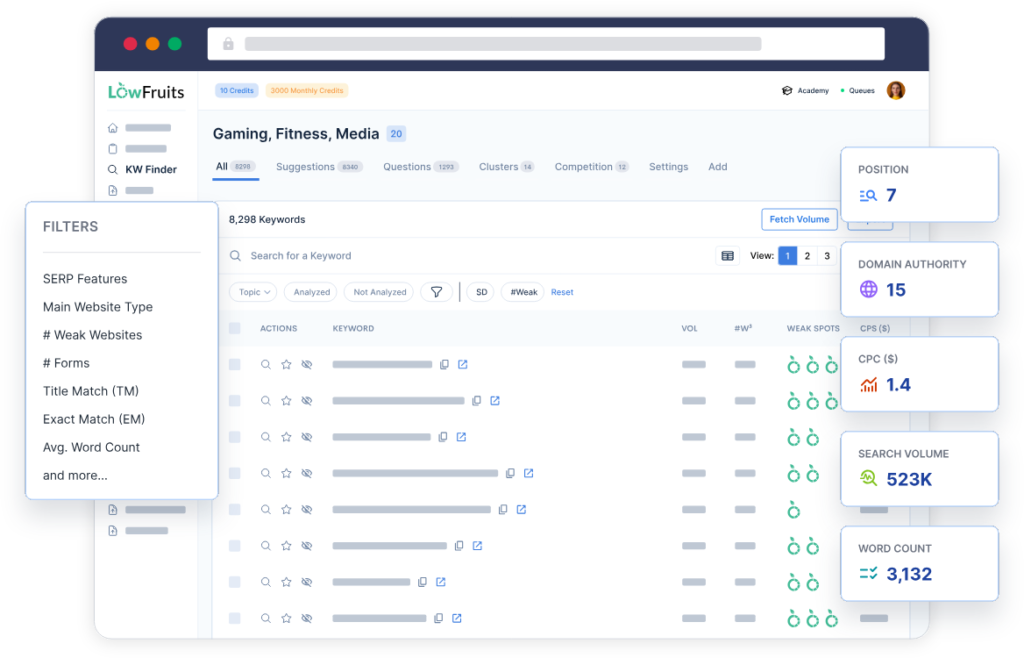
It is one of the best keyword research tools, built specifically to find low-competition keywords you can realistically rank for. You enter your cuisine type, dish names, or location-based phrases, and LowFruits scans the search results to identify queries where weak or thin pages are currently ranking. Those weak spots are your opportunities.
Where to Use Keywords on Your Restaurant Website
Once you have your keyword list, place them in these key spots:
- Homepage title tag and meta description
- H1 and H2 headings on your homepage and location pages
- Menu page descriptions (don't just list dish names, describe them with ingredients and context)
- Image alt text for food and interior photos
- Your GBP business description and individual post updates
- Any blog content you publish (neighborhood guides, event posts, dish stories)
2. Build NAP Consistency Across the Web
NAP stands for Name, Address, and Phone Number. It's the foundation of local SEO trust. Google cross-references your business information across the web to verify your location and legitimacy. When your NAP is inconsistent across listings, Google loses confidence in your location data, and your rankings suffer.
Small differences matter more than you'd expect. “123 Main Street” vs. “123 Main St” is technically the same address, but inconsistencies like these across dozens of directories add up into a fuzzy trust signal that suppresses rankings.
Key Directories for Restaurant Listings
Beyond your GBP, make sure your restaurant is listed and consistent on:
- Yelp: Still one of the most-visited restaurant discovery platforms and a high-authority citation source. Yelp results frequently rank in the top 5 for restaurant queries.
- TripAdvisor: Essential for tourist-heavy markets and urban areas.
- Bing Places: Powers Bing Maps results. Easy to claim and often overlooked by competitors.
- Apple Maps: Used by every iPhone and Siri voice search. Claim your listing through Apple Business Connect.
- Facebook Business: A high-authority citation source that also doubles as a social channel.
- OpenTable and Resy: If you take reservations, these platforms rank prominently in local searches and provide strong citation signals.
Check every listing carefully: your business name, address, phone number, website URL, and hours should be identical across all platforms.
You can also use AIOSEO's local SEO feature to handle the on-site side of NAP. When you configure your business info in All in One SEO > Local SEO > Business Info, AIOSEO formats that data as LocalBusiness schema markup and outputs it in your homepage source code. This is the structured data Google reads when it crawls your site, and it's what ensures your website's NAP signal is clean and machine-readable.
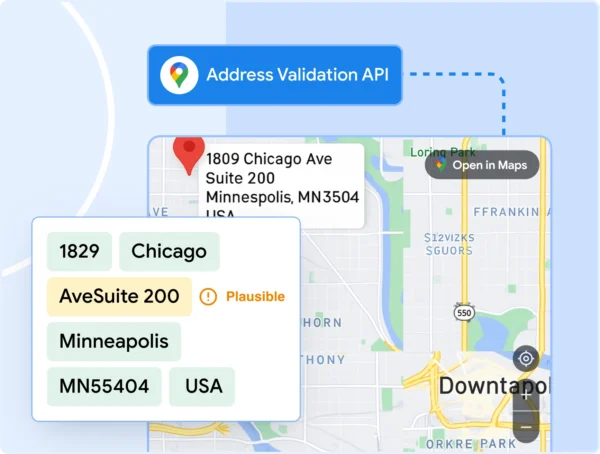
You can also get alerts about inconsistent NAP data, missing required fields, or other issues that could affect your local search performance.
3. Use Reviews to Boost Your Restaurant's Rankings
Reviews are one of the strongest ranking factors in local SEO. Google prioritizes restaurants with frequent, recent, high-quality reviews because they signal trust, quality, and an active business.
Responding to reviews is not just good customer service; it's a way to build trust. It's now a confirmed ranking signal. A profile that engages with its reviews consistently ranks higher than one that goes silent, even with similar review counts.
And the best part is that Google lets you ask customers for reviews.
How to Ask for Reviews Without Getting Penalized
Here are some of the most effective and compliant ways to build your review count consistently:
- Place a QR code on menus, receipts, and table cards that links directly to your Google review page. One tap is all it takes.
- Ask verbally at the right moment when a guest compliments the food, says they'll be back, or looks happy as they're leaving.
- Add a review request to your email follow-ups if you collect customer emails for reservations or loyalty programs.
- For takeout, print a short review request on the bag or receipt.
Review Language Matters for AI Search in 2026
Here's something most restaurant owners haven't caught up to yet. Google's AI-powered Ask Maps feature, which gives a single restaurant recommendation in response to conversational searches like “a cozy Italian spot for date night tonight,” now heavily weights review language. It scans for descriptive terms about occasion, atmosphere, and specific dishes, not just star ratings.
A review that says “great pasta” is far less useful to the algorithm than one that says “the handmade tagliatelle was incredible for our anniversary dinner.” Encourage guests to be specific when leaving a review: what they ordered, the occasion, and what made the experience memorable. That language feeds directly into how AI recommends your restaurant over competitors.
4. Add Schema Markup to Your Restaurant Website
Schema markup is structured data code you add to your website that acts like a data sheet for Google. Instead of asking Google to guess what your restaurant serves, when you're open, and where you're located, schema markup tells Google explicitly in a format it reads directly.
When the schema is in place, Google can display your hours, menu, cuisine type, price range, and star ratings right in search results before anyone even clicks on your listing.
5 Schema Types Every Restaurant Needs
There are 5 schema types that matter most for restaurant websites:
| Schema Type | What It Does |
|---|---|
| Restaurant (LocalBusiness subtype) | Core identity: name, address, cuisine type, hours, price range, geo coordinates. This is the foundation on which everything else builds. |
| Menu / MenuItem | Itemized dishes with descriptions and dietary flags (vegan, gluten-free, etc.). Helps Google surface your dishes in food-specific searches and AI recommendations. |
| FAQPage | Answers to common diner questions. One of the most frequently cited schema types in Google AI Overviews and AI-generated answers. |
| BreadcrumbList | Site structure that helps Google index your pages correctly and improves click-through rate by showing your navigation path in search results. |
| AggregateRating | Displays your star rating directly in search results. Requires first-party reviews collected on your own site, not pulled from Google or Yelp. |
This full schema stack is what separates restaurants that show up in AI search recommendations from those that don't. Google's AI Overviews, Ask Maps, ChatGPT, and Gemini all use structured data as a primary input when recommending restaurants.
Use AIOSEO's Local SEO Feature for Restaurant SEO Schema Markup
When you fill in your business details at All in One SEO > Local SEO > Business Info, AIOSEO generates a Restaurant schema block (a subtype of LocalBusiness) and outputs it as JSON-LD in the source code of your homepage. This covers your restaurant name, address, phone, website URL, geo coordinates, cuisine type, price range, and opening hours, all formatted to schema.org standards. The schema lives in the homepage <head> only, as per schema.org requirements for LocalBusiness, not on every page of your site.
The opening hours schema is configured separately at All in One SEO > Local SEO Opening Hours. You can set per-day hours, mark days as closed, toggle 24-hour format, and handle special “Open 24/7” settings. AIOSEO then outputs those hours correctly formatted for Google in the same homepage schema block.
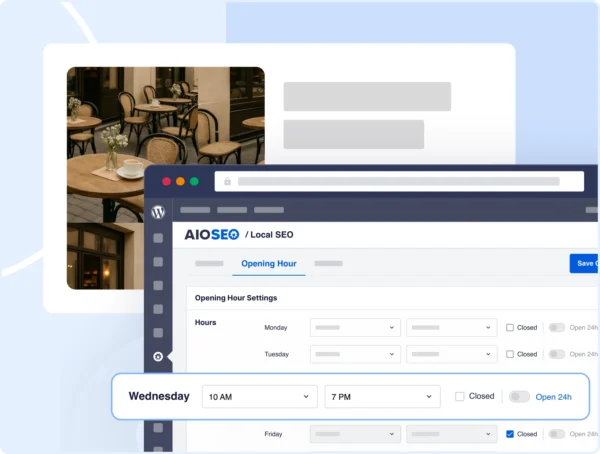
You can also use the Maps tab to configure multi-location support settings. Each location gets its own set of business info, opening hours, and map settings, all managed from a single dashboard. AIOSEO generates separate schema blocks for each location and can create individual location pages with location-specific SEO settings.
While the menu and MenuItem schemas are not directly included in the Local SEO feature, you can use AIOSEO's Schema Generator feature to build a Menu schema block and add it to your menu page.
Adding FAQPage Schema for AI Visibility
The FAQ page schema is particularly valuable in 2026 because it's one of the most frequently cited schema types in Google AI Overviews and AI-generated answers. When someone asks ChatGPT or Gemini, “Does [your restaurant] have vegan options?” or “Does [your restaurant] take reservations?,” your FAQPage schema is part of what helps those systems answer confidently.
Open any page in the WordPress editor and navigate to the AIOSEO panel below the content. Click Schema, then Generate Schema. From the Schema Catalog, select FAQ.
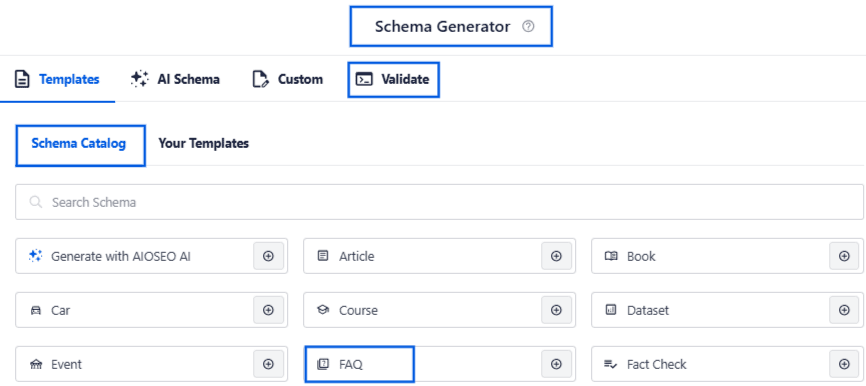
AIOSEO presents a form where you can enter each question-answer pair. When you save, AIOSEO injects the FAQPage JSON-LD block into that page's source code.
I would suggest doing this especially for your homepage, menu page, and each location page.
5. Optimize Your Restaurant Website for Local Search
Your GBP gets your restaurant found. Your website converts that interest into a reservation or order. Both need to work together.
Make Your Menu an SEO Asset
If your menu exists only as a PDF, you're leaving SEO on the table. Search engines can't read text inside PDFs. Create an HTML menu page with your actual dishes written as text, including descriptions that use relevant keywords such as cuisine type, ingredients, and dietary labels.
Compare these 2 approaches. A PDF labeled “Download Menu” contains nothing for Google to read. A page with “Slow-braised short rib with roasted garlic mash and seasonal greens” not only describes a dish, but it also ranks for searches like “comfort food [city]” and attracts diners who are searching at the dish level.
Restaurants that build keyword-rich menu pages see measurable organic traffic from dish-specific searches that their competitors don't show up for.
Build Location Pages If You Have Multiple Restaurants
If you operate more than 1 location, each one needs its own dedicated page on your website with unique content, its own address and phone number, and its own schema markup. A single generic page listing all your locations doesn't give Google enough signals to rank you for location-specific searches.
And as I mentioned above, you can just as easily manage all the locations' SEO with AIOSEO's local SEO feature.
Mobile Speed and Usability
Most restaurant searches happen on mobile. If your site takes more than 3 seconds to load, you're losing customers before they even see your menu. Google also uses mobile-first indexing, meaning it evaluates the mobile version of your site first when ranking your site.
Key things to check if your:
- Site loads in under 3 seconds on mobile (test with Google PageSpeed Insights)
- The menu is readable on a small screen without zooming
- Phone number is a clickable link
tel:link so people can call directly - The reservation or ordering button is visible without scrolling
6. On-Page SEO with AIOSEO
For every page on your WordPress restaurant website, AIOSEO's TruSEO Score gives you a real-time checklist as you write. It scores your page out of 100 on both SEO and readability factors and tells you exactly what to fix. The checks include the presence of the focus keyword in your title, headings, URL slug, meta description, and first paragraph, as well as content length, internal and external link usage, image alt text, and readability grade.
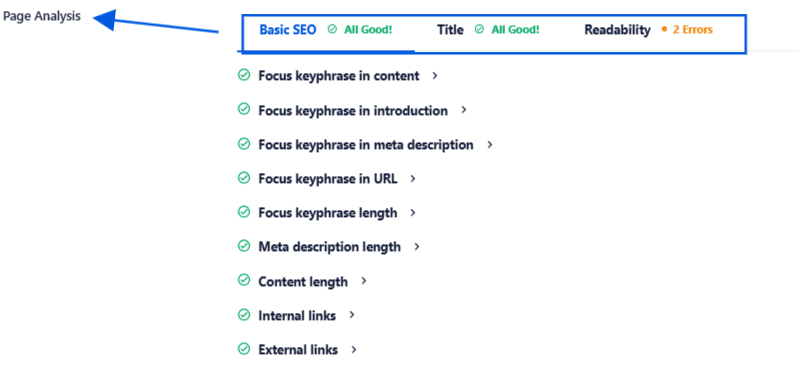
You can also use AIOSEO's AI Content Generator feature to draft SEO-optimized title tags, meta descriptions, and FAQ sections with one click. The AI generates suggestions based on your existing page content, so the output is contextually relevant and helps you ensure your content is optimized for local SEO.
7. Create Local Content That Attracts Nearby Customers
Talking about optimizing content, a restaurant website that only has a menu and a contact page is leaving organic search traffic behind. Publishing local content gives you more opportunities to rank for searches your competitors aren't targeting, and it builds the kind of topical authority that helps your core pages rank higher.
Content Ideas That Actually Get Found
As a restaurant owner, especially if you have a small business, you don't necessarily need a full-time blogger. Here are a few well-chosen pieces of content that make a measurable difference:
- Neighborhood guides: “Best Things to Do Near [Your Restaurant]” or “Where to Go Before a [Local Venue] Show.” These rank well for location-specific searches and attract potential customers already nearby.
- Local event posts: Are you participating in Restaurant Week? Hosting a wine dinner? Write a page about it. Event organizers often link back to participating restaurants, giving you valuable local backlinks.
- Behind-the-scenes stories: Where do your ingredients come from? Who is your head chef? These build trust, demonstrate quality, and give search engines fresh, original content to index.
- Blog posts about signature dishes: “The Story Behind Our Famous Birria Tacos” target dish-level keywords while showing your experience and culinary expertise.
- Seasonal menu announcements: Publishing a page each time you update your menu creates fresh content signals and ranks for searches around new or seasonal dishes.
Internal Linking for Content
For a restaurant site that adds new content regularly (menu pages, blog posts, event pages), internal linking becomes super important to give search engines contextual clues about how the content is connected.
I'd suggest using AIOSEO's Link Assistant feature to handle it automatically. You review suggestions in a centralized dashboard at All in One SEO > Link Assistant and add approved links without opening each post individually.
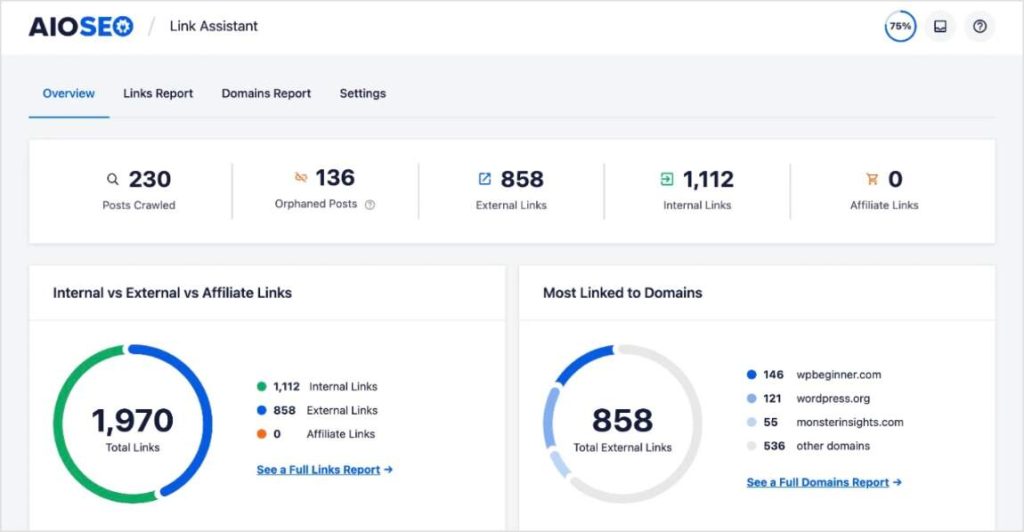
The feature helps you scan your entire WordPress site and maps every internal link relationship. It surfaces 2 types of opportunities.
First, it shows you which existing pages could link to each other but don't yet, with suggested anchor text you can approve and add with one click.
Second, it flags orphaned content, posts, and pages on your site that lack internal links, making them invisible to search engines and difficult for users to find.
Using this, you can automate the internal linking process, which can otherwise become a maintenance task that requires manual audits.
For a restaurant site adding new content regularly (menu pages, blog posts, event pages), this becomes a maintenance task that would otherwise require manual audits. Link Assistant handles it automatically. You review suggestions in a centralized dashboard at All in One SEO » Link Assistant and add approved links without opening each post individually.
8. Prepare Your Restaurant for AI Search Visibility
In 2026, ranking in the traditional 10 blue links is no longer the whole game.
Google's Ask Maps, AI Overviews, ChatGPT, and Gemini are increasingly the first place people look for restaurant recommendations.
Someone can now type “a cozy Italian restaurant with outdoor seating for a birthday dinner tonight” and receive a single AI recommendation rather than a list. Getting that single recommendation requires your restaurant to be clearly machine-readable across every signal Google and AI systems use.
The LLMs.txt File: Tell AI Crawlers Exactly What to Index
AIOSEO includes a built-in LLMs.txt Generator that sits in your website's root directory and tells AI crawlers, including those used by ChatGPT, Gemini, and Perplexity, which pages on your site contain your best and most accurate content. Think of it as a table of contents written specifically for AI systems rather than for human visitors or standard search crawlers.
Here's the difference between the 2 file types AIOSEO generates:
- llms.txt: A list of your site's important URLs with brief descriptions. Tells AI crawlers where to find your key pages.
- llms-full.txt: Converts your page content into clean Markdown format. This gives AI systems the actual text of your pages in a format they can read and process much more accurately than raw HTML. This directly increases the likelihood that your restaurant will be cited in AI-generated answers.
To set it up, go to All in One SEO > Sitemaps > LLMs.txt in your WordPress dashboard. Toggle the feature on, select which post types and pages to include (your menu page, location pages, and blog posts are the priority), and AIOSEO generates both files automatically. You can verify they're live by visiting yourdomain.com/llms.txt in your browser.
Search Statistics: Track Your Rankings Inside WordPress
AIOSEO's Search Statistics module connects directly to Google Search Console and pulls your performance data into your WordPress dashboard. This is particularly useful for restaurant sites managing multiple pages, because it surfaces performance data at the post and page level without having to navigate GSC's interface.
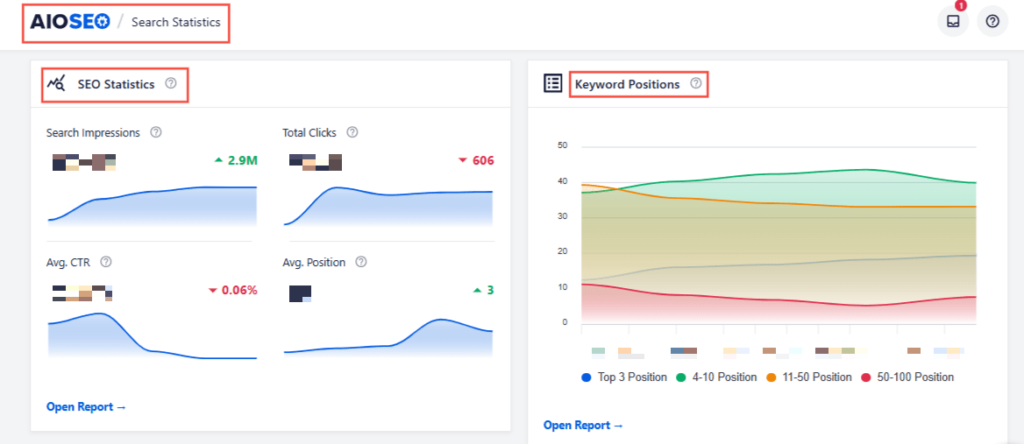
For a restaurant website, here's what the module gives you specifically:
- Keyword Rank Tracking: See which searches are bringing people to your menu pages, location pages, and blog posts, and whether your position is improving or declining over time.
- Content Decay Alerts: At All in One SEO > Search Statistics > Content Rankings, AIOSEO flags pages that are losing traffic month over month.
- Click-Through Rate Analysis: Compare CTR across your pages to identify which title tags and meta descriptions are underperforming and need testing.
- Page 2 Keyword Opportunities: Filter your keyword data to show only keywords where you're ranking in positions 11 to 20. These are your quickest wins: small on-page improvements can move them to page 1.
Restaurant SEO Checklist: What to Tackle First
If you're starting from scratch, work through these in order. Each one builds on the previous, and the AIOSEO plan column tells you exactly what you need before you start.
| # | Action | Which AIOSEO Feature To Use? | Plan Required |
|---|---|---|---|
| 1 | Claim and fully optimize your GBP (all fields, photos, menu, weekly posts) | Not an AIOSEO feature. Do this directly in Google Business Profile. | Free (Google) |
| 2 | Install AIOSEO and run the Setup Wizard | SEO Setup Wizard (configures your site's SEO settings in under 10 minutes) | Free (Lite) |
| 3 | Add the Restaurant schema to your homepage | Local SEO module > Business Info tab | Plus |
| 4 | Configure opening hours schema | Local SEO module > Opening Hours tab | Plus |
| 5 | Embed Google Maps on your contact and location pages | Local SEO module > Maps tab | Plus |
| 6 | Optimize every page's title tag, meta description, and headings | TruSEO Score (in-editor checklist, 70+ factors) | Free (Lite) for basic checks. |
| 7 | Add FAQPage schema to homepage, menu page, and location pages | Schema Generator > FAQ type | Plus |
| 8 | Set up multi-location pages if you have more than 1 restaurant | Local SEO module > Locations tab | Plus |
| 9 | Generate your LLMs.txt and LLMs-full.txt files for AI visibility | Sitemaps > LLMs.txt | Basic and above |
| 10 | Build and repair internal links across your content pages | Link Assistant (with orphaned content report) | Pro |
| 11 | Track keywords, CTR, and content decay | Search Statistics > Content Rankings and Keyword Rank Tracker | Elite |
FAQs About Restaurant SEO
How long does restaurant SEO take to work?
Most restaurants start to see improvements in local rankings within 4 to 8 weeks of optimizing their GBP and publishing consistent content. In more competitive markets, it may take 3 to 6 months to show strong results. The most important factor is consistency: weekly GBP updates, regular review responses, and ongoing content creation signal to Google that your business is active. Results compound over time, so the earlier you start, the better your baseline becomes.
Can a small restaurant compete with large chains in local search?
Yes, and this is one of local SEO's biggest advantages for independent restaurants. Large chains often run national SEO strategies that aren't optimized for individual neighborhoods. A well-optimized local profile, a consistent review stream, dish-level keyword content, and location-specific pages can absolutely outrank a chain that isn't paying attention at the local level. We see this happen regularly with independent restaurant clients.
How do I rank my restaurant in Google Maps?
Google's Local Pack rankings are based on 3 factors: relevance (how well your profile matches the search), distance (how close you are to the searcher), and prominence (how well-known and trusted your business appears). You can directly influence all 3 by optimizing your GBP, building citations, earning reviews, and adding Restaurant schema markup to your website.
What is NAP in SEO and why does it matter for restaurants?
NAP stands for Name, Address, and Phone Number. When this information is inconsistent across your website, GBP, Yelp, TripAdvisor, and other directories, Google loses confidence in your location data and may rank you lower. Keeping your NAP identical everywhere, down to whether you abbreviate “Street” or “St.,” sends a strong trust signal.
Is social media important for restaurant SEO?
Social media doesn't directly influence Google's local rankings the way reviews and schema do. But an active presence on Instagram and TikTok can drive brand searches, generate backlinks from food bloggers who discover you there, and build community engagement that often results in more reviews. Since July 2025, Google has also been indexing public Instagram content from professional accounts, which means your food photos and Reels can appear directly in Google search results alongside your website and GBP.
Next Steps
Restaurant SEO comes down to one core idea: make it as easy as possible for Google, Maps, and AI tools to understand who you are, where you are, what you serve, and why diners love you. Do that consistently, and the rankings follow.
Everything I've covered in this guide adds up to one thing: giving Google and AI tools enough clear, consistent, confident information about your restaurant that choosing you becomes the obvious answer.
And remember, you don't have to do it all at once. Start with your GBP, set up your schema with AIOSEO, and build from there.
For more on building a complete local SEO strategy for your WordPress site, read our full local SEO guide for WordPress users.
Disclosure: Our content is reader-supported. This means if you click on some of our links, then we may earn a commission. We only recommend products that we believe will add value to our readers.
Want to Try AIOSEO for Free?
Enter the URL of your WordPress website to install AIOSEO Lite.