
Taking your website global is a huge milestone. It opens up millions of new potential customers. But it also comes with a major trap that catches even experienced marketers.
That trap is assuming you can just plug your English keywords into Google Translate and call it a day.
If you do this, you might end up optimizing for “pants” (trousers) when you’re actually selling “pants” (underwear), simply because you didn't account for the difference between US and UK English.
To win globally, you need a strategy.
In this guide, I’ll walk you through international SEO keyword research. I'll show you how to move beyond simple translation to true localization, and I'll share the keyword tools for international SEO that make the process easy.
In This Article
What Is International SEO Keyword Research?
International SEO keyword research is the process of identifying the specific words and phrases people in different countries use to find your products or content.
The most important thing to remember is this: It is not the same as translation.
Translation changes words from one language to another. Localization adapts the meaning to the culture.
For example:
- In the US, you search for a “cell phone.”
- In the UK, you search for a “mobile.”
- In Germany, the word is “Handy.”
If you just translated “cell phone” directly, you might miss the actual terms real people are typing into Google.
Step-by-Step Guide to International Keyword Research
Now that you understand the difference between translation and localization, let’s walk through the actual process. Here’s how to find winning keywords for any market.
Why You Should Trust Me
I've helped scale websites across multiple borders and languages. Along the way, I've learned—sometimes the hard way—that cultural nuance is more important than raw data.
A keyword with high search volume is useless if it doesn't mean what you think it means in a local context. I'm going to share the practical, step-by-step strategy I use to ensure content lands correctly in any market.
Step 1: Define Your Target Market (Country vs. Language)
The first mistake most people make is targeting a language instead of a region.
“Spanish” is not a target market; Mexico and Spain are. They have different currencies, different cultural references, and different search behaviors.
You need to define your target by Country + Language (this is also how hreflang tags work).
- Example: Instead of just “French,” are you targeting fr-FR (France), fr-CA (Canada), or fr-BE (Belgium)?
You can think of hreflang tags as signal flags for search engines. They’re little snippets of code that tell Google, “Hey, this version of the page is for French speakers in Canada, and this version is for French speakers in France.” This ensures Google shows the correct page to the correct user.
Action: Create a spreadsheet and list your target countries. Next to each, list the primary language and any specific dialects (e.g., “Swiss German”).
Step 2: Brainstorm With Native Speakers (or AI)
Before you look at data, you need to build a list of local terms.
If you have a native speaker on your team, ask them: “How would you ask a friend for this product?” This unlocks the slang and natural phrasing that tools often miss.
If you don't have a local expert, ChatGPT is your next best friend. Use a prompt like this to uncover nuances:
“I am selling [Product]. What are the different words used to describe this in [Country]? Please list common synonyms, slang, and related search terms that a local would use.”
Real-World Example: If you sell “sweaters,” a translator might give you “pull-over” for the UK. But a local (or good AI) will tell you that “jumper” is the high-volume term you actually want.
Step 3: Validate Keyword Ideas With Data
Now you have a list of potential words. But do people actually search for them?
You need to validate your list with hard data. This is where a keyword research tool, like Semrush, comes into play.
Start by navigating to the Keyword Overview tool under the Keyword Research menu. Then, enter your keyword and select the country you’re investigating. Click Search.
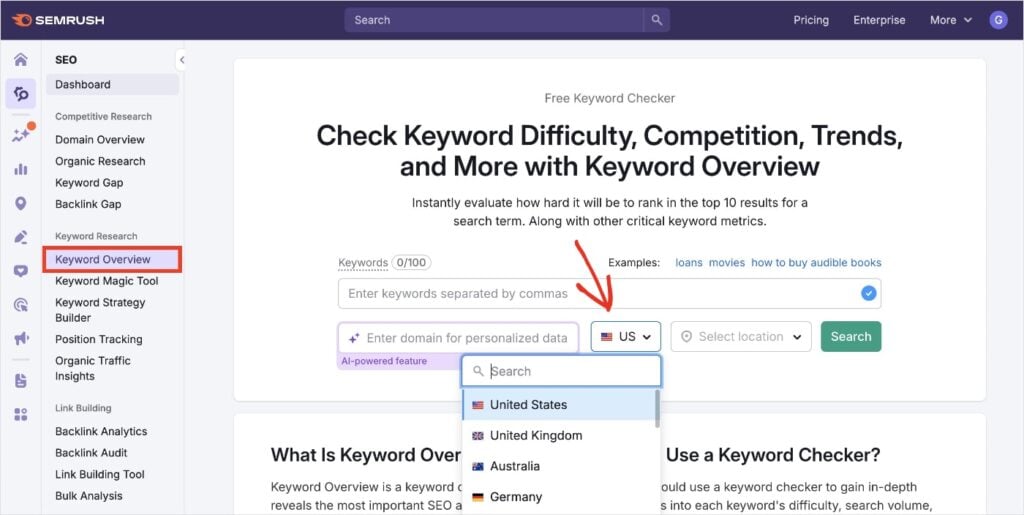
For this tutorial, I used the example we discussed earlier, using the word “jumper” in the United Kingdom.
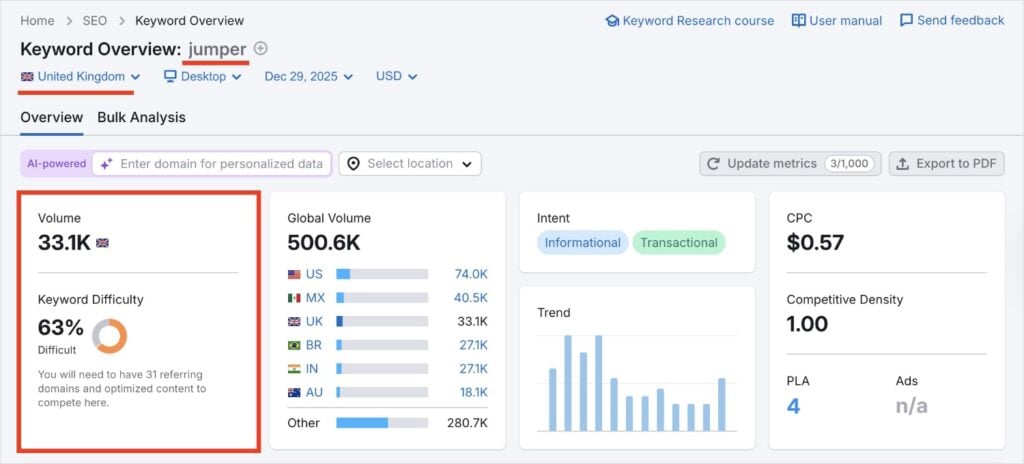
Based on this data, we can see that this keyword has high search volume, meaning we may want to target it in our content.
Now, what if you’re a WordPress user?
You’re likely familiar with the process of writing in the WordPress editor and jumping between your other website SEO tools. (I know I am.)
And let’s be real; it’s time-consuming.
That’s why I love that All in One SEO integrates Semrush directly into WordPress.
All in One SEO (AIOSEO) is the best SEO plugin for WordPress. It makes SEO easy, putting useful tools and tips right into your every day workflow.
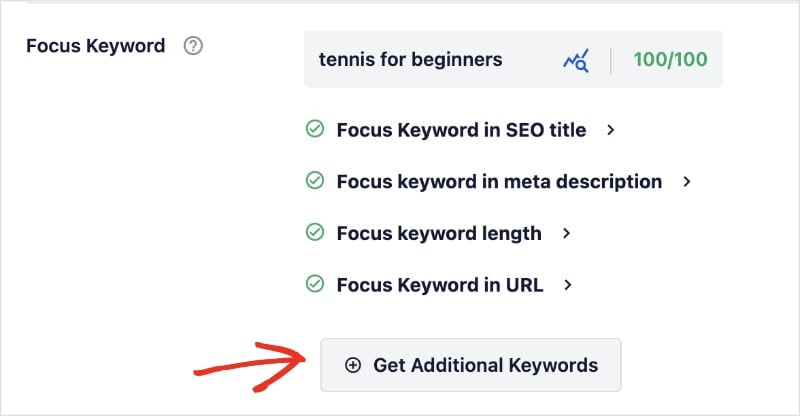
For the Semrush integration, you’ll start by adding a focus keyword to your post or page. (This is located in the AIOSEO settings below the editor.)

Once you’ve entered and added your keyword, click Get Additional Keywords.
This will open a pop-out window where you can see related keywords and their search volumes. You can also select the country for your search results.
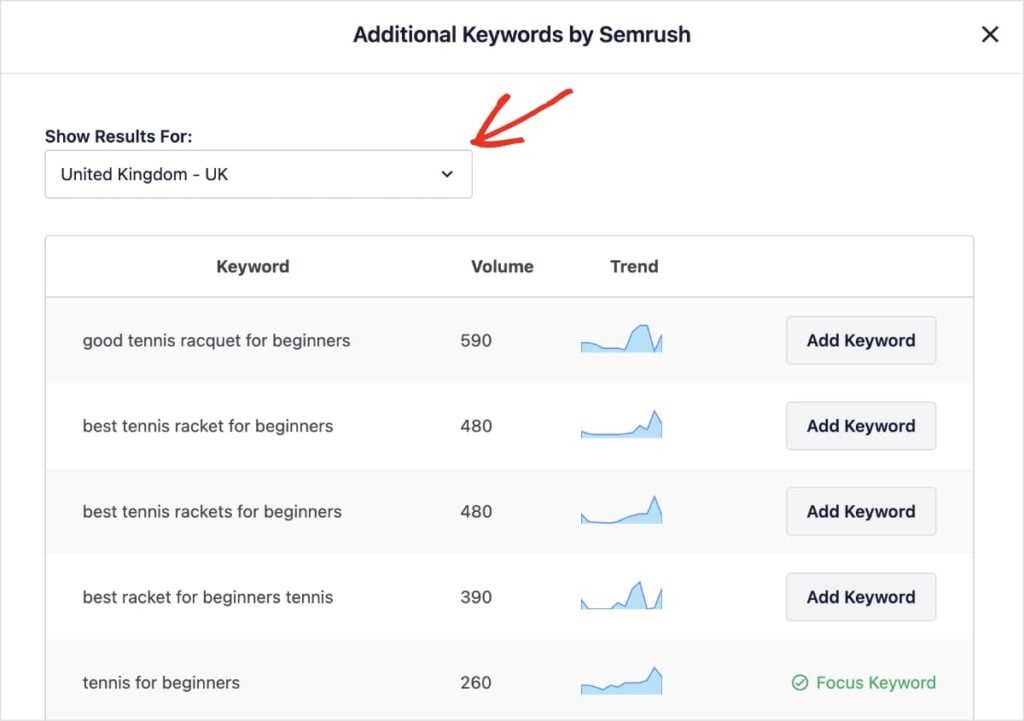
This is a huge time-saver when performing international SEO keyword research as a WordPress user.
I also like how you can click Add Keyword and optimize for any of the ideas Semrush gave you.
The TruSEO Anaylsis tool will then check your on-page optimizations for your new keyword and provide recommendations to improve your visibility in search results.
Ultimately, it’s a well-thought-out and beginner-friendly way to do international SEO right in WordPress.
Step 4: Check the Local SERPs (The “Eye Test”)
In addition to using keyword tools for international SEO, I always recommend looking at the actual Google results for that country.
Why? Because a word might have multiple meanings.
Example: If you target the word “chips” in English, are users looking for potato chips (US) or french fries (UK)?
If I do a Google search with my IP address in the US, I get the following result:

However, when I perform the same search with a VPN in the UK, I get this result:
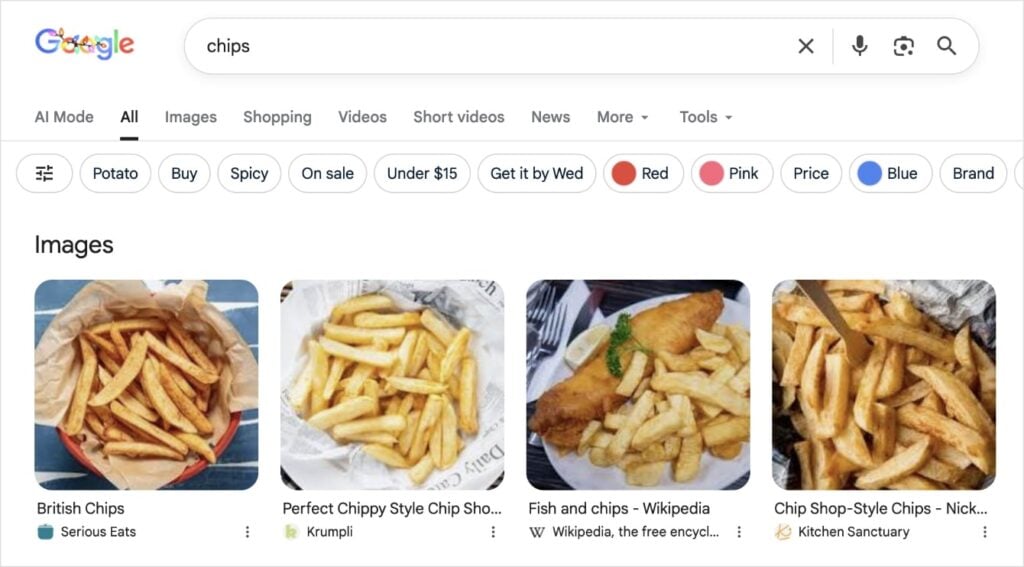
By looking at the search engine results pages (SERPs), you’ll be able to decipher the user intent for that particular country.
Action: Use a VPN to set your location to the target country, or use Google's localized search settings. Type in your keyword and look at the results.
- Are the top results showing products like yours?
- Are they showing images of what you expect?
- If the results show something completely different, do not use that keyword. You have found a “false friend.”
Finally, realize that search intent varies by culture.
In some countries, users might prefer detailed comparison guides before buying (informational intent). In others, they might just want a “Buy Now” button (transactional intent).
Don't just copy your US strategy; adapt your content format to match what the local audience prefers.
Step 5: Analyze Local Competitors
Once you've verified your keyword, don't just guess at what content to write. Look at who’s already winning in that market.
Your competitors in Germany might be completely different from your competitors in the US.
Action: Type your keyword into the local version of Google (e.g., Google.de) and identify the top 3 ranking sites.
Analyze: Open their pages. What are they doing that you aren't?
- Do they use specific local trust badges or certifications?
- Is the tone formal or casual? (e.g., German marketing is often more fact-based and formal than US marketing).
- What related sub-topics do they cover?
By analyzing the local winners, you can spot cultural expectations and content gaps that you would never find just by looking at keyword volume numbers.
Step 6: Track Your International SEO Keywords
Once you publish your content, you need to know if your efforts are working.
International SEO keyword tracking can be tricky because you can't just look at your global average. You need to see how you are ranking in specific regions.
AIOSEO makes this easier with its Search Statistics feature. It connects to Google Search Console and brings that data into WordPress.
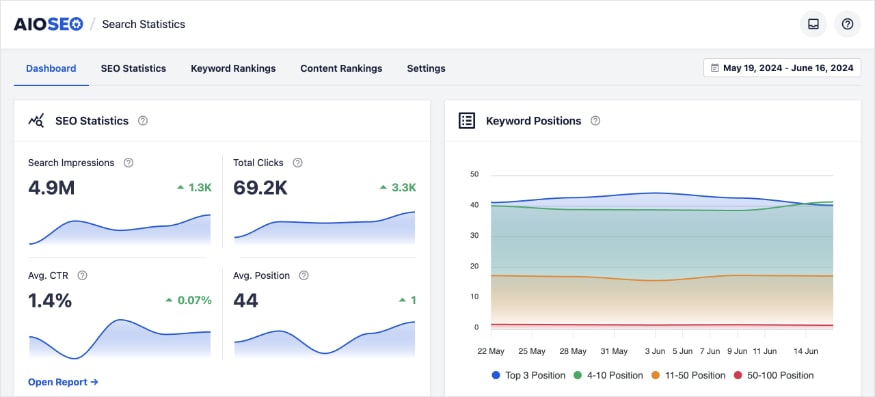
When you go to the Keyword Rankings tab, you can see exactly which queries are driving traffic to your site.
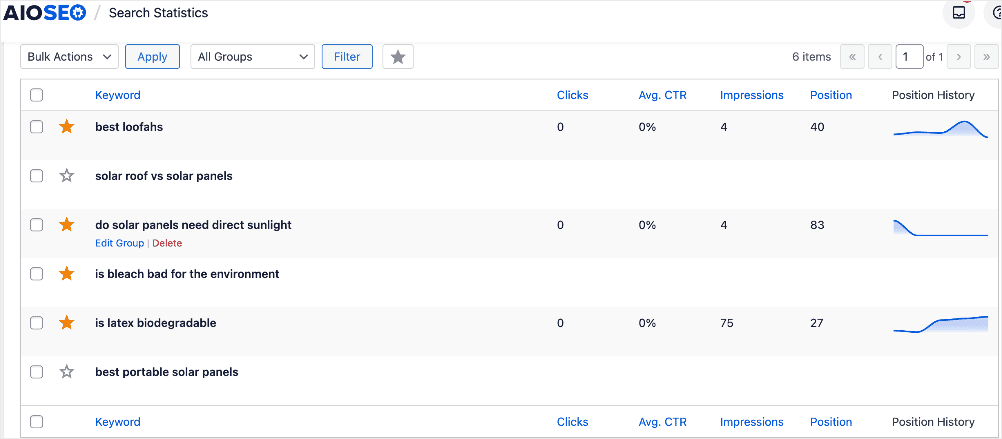
Pro Tip: To see which keywords are ranking in specific countries, visit your Google Search Console (GSC) platform. Then, navigate to the Performance report and filter by Country. This tells you if your localized keywords are actually working in the target region, or if you need to adjust your strategy.
Between Search Statistics and GSC, you’ll have all the data you need to perform hassle-free international SEO keyword tracking.
Other AIOSEO Tools for International Sites
Keyword research is just the first step. Once you start building your global site, AIOSEO has other tools to help you manage it.
RSS Sitemaps
When you launch content for a new region, you want Google to find it fast. The RSS Sitemap in AIOSEO helps search engines discover your new updates instantly, ensuring your localized pages get indexed quicker.
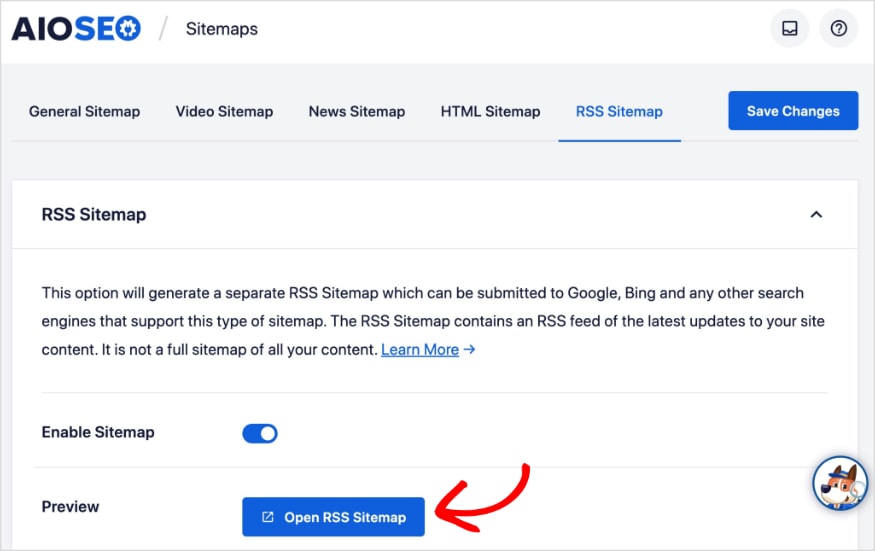
Related reading: Learn how to create an RSS sitemap in WordPress. It’s easy! AIOSEO does it for you.
Image SEO
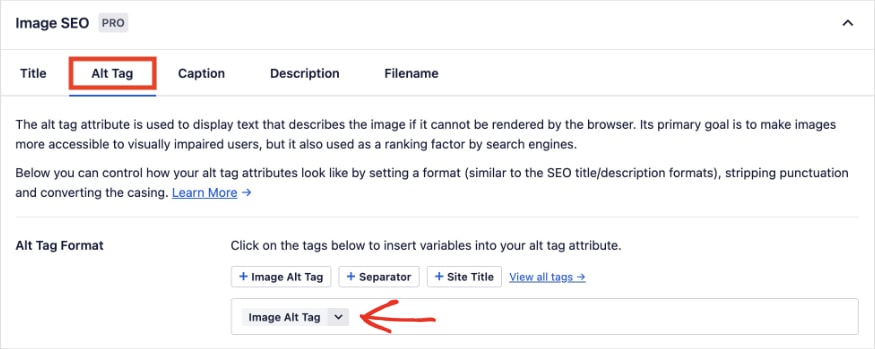
Images are a universal language, but search engines still need text to understand them. If you have a Spanish version of your site, your image alt text needs to be in Spanish too.
AIOSEO's Image SEO module allows you to easily manage and optimize your image attributes for each language version of your site.
Robots.txt Editor
Managing a multilingual site structure can be complex. AIOSEO gives you full control over your robots.txt file, allowing you to easily block or allow specific regional folders if needed.
For example, if you are still working on your German translation and it's not ready for the public, you can temporarily block Google from crawling that /de/ folder to prevent half-finished pages from showing up in search results.
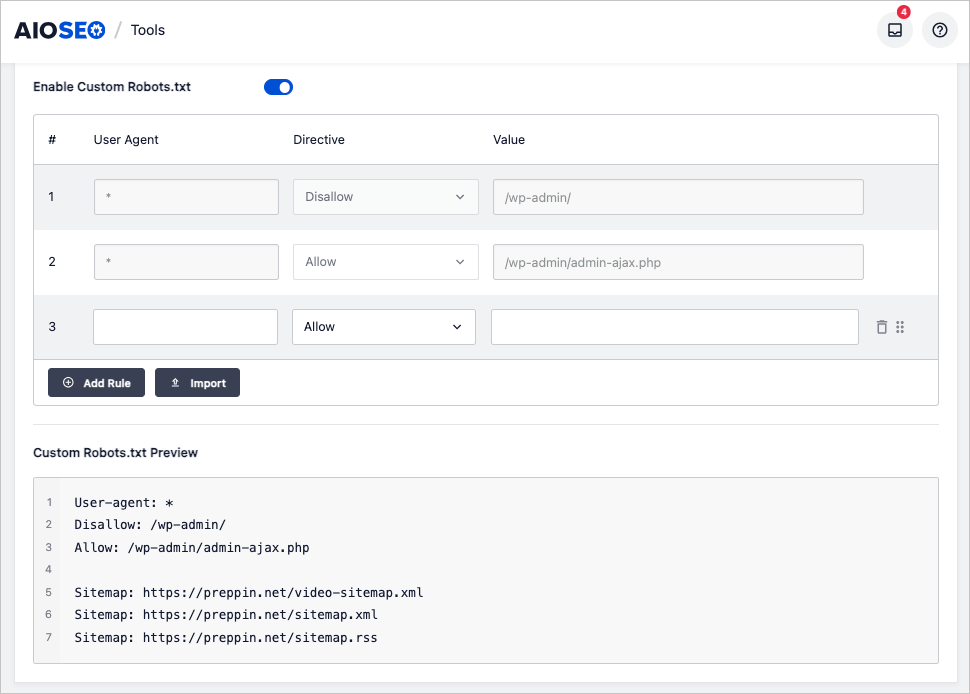
By combining these technical tools with your new keyword strategy, you build a solid foundation that helps your international content rank higher and faster.
Go Global With International SEO Keyword Research
Growing an international audience requires more than just translating your text; it's about speaking the user's language.
By following this international SEO keyword research process, you ensure that your website is visible and relevant. You also connect with users on their terms, which builds trust and drives conversions.
Now that you have your keywords, make sure search engines know which language version to show. Here are some guides for getting your international SEO just right:
- How to Set Up SEO in Different Languages and Countries
- How to Use All in One SEO in Your Language
- SEO Audit Checklist (Beginner-Friendly)
- 5 Multilingual SEO Mistakes You Want to Avoid
Ready to find the best keywords for every country?
Get started with AIOSEO and its powerful Semrush integration today!
And for even more WordPress tutorials and SEO tips, subscribe to our YouTube channel. You can also follow us on X (Twitter), LinkedIn, or Facebook to stay in the loop.
FAQs About International Keyword Research
Can I just use Google Translate for keywords?
No, you shouldn't use only Google Translate for international keyword research. Google Translate gives you a literal translation, but it often misses the cultural context, slang, and search intent. This can lead to targeting keywords that no one actually searches for in that country.
What are the best keyword tools for international SEO?
Semrush and Ahrefs are the industry leaders for global data. For WordPress users, All in One SEO is the best choice because it integrates Semrush data directly into your editor, allowing you to check search volumes while you write.
How do I track rankings in different countries?
The best free way to check keyword rankings across multiple countries is using Google Search Console. You can filter your performance report by “Country” to see exactly which keywords are driving traffic in specific regions.
Disclosure: Our content is reader-supported. This means if you click on some of our links, then we may earn a commission. We only recommend products that we believe will add value to our readers.
Want to Try AIOSEO for Free?
Enter the URL of your WordPress website to install AIOSEO Lite.

