If you manage WordPress SEO as part of a development workflow, you've probably wished at some point that you could skip the admin and just make an API call. Starting with 4.9.8, you can.
The AIOSEO REST API is now free for every plan, including Lite.
REST API now has 2 distinct uses since its original version in 4.1.9. The first is the one you likely already know: it adds SEO metadata fields to WordPress endpoints so developers building headless sites can pull title tags, meta descriptions, and schema directly into their frontend.
The second is new in 4.9.8. It exposes the Abilities layer in WordPress: 28 SEO actions
that AIOSEO MCP and WP-CLI users already have, now callable via HTTP from any language or stack. Any authenticated HTTP request can now do what an AI agent does.
Until now, these features required a Plus plan (or higher) and a separate addon install. As of this release, neither does. The addon is deprecated and merged into core, so if you've already updated, it's there.
Here's what the new AIOSEO REST API actually lets you do.
In This Article
What You Can Do via the REST API
In practice, the new AIOSEO abilities let you do things like:
- Find every post on your site missing a meta description and return them as a list
- Update SEO titles and meta descriptions in bulk across a category or content type
- Create, update, or delete redirects without touching the WordPress admin
- Pull TruSEO scores for any post to monitor SEO health in a custom dashboard
- Retrieve Search Console performance data by post or time period
- Check which posts are flagged as orphaned or missing internal links
And you're not limited to reading data. Any script or tool that connects using your credentials can make changes, the same way an AI agent does through AIOSEO MCP.
Not writing scripts yourself? AIOSEO MCP connects AI tools like Claude, Cursor, and ChatGPT directly to your site. Same abilities, no code required.
Note: Some abilities are tied to specific AIOSEO features and require the plan that includes them. Link Assistant abilities require Pro or higher, and Search Statistics abilities require Elite.
The Original Headless WordPress Use Case Still Works
If you're building a headless WordPress site, where WordPress handles the content and a separate frontend built in Next.js, Gatsby, or Astro handles the display, AIOSEO has supported this since version 4.1.9. Nothing about the setup changes in 4.9.8. Every supported endpoint returns 3 additional SEO fields when AIOSEO is active:
aioseo_headis the full SEO output for your page's<head>: title tags, meta descriptions, canonical URLs, Open Graph data, and JSON-LD schema, ready to drop in as an HTML string.aioseo_head_jsonreturns the same information in JSON format, without the HTML markup.aioseo_meta_datagives you the raw SEO fields stored in AIOSEO's database. You can read them and update them through the API.
The only thing that changed is that these fields are no longer gated behind a paid plan.
What Changed in 4.9.8
Before this release, accessing either the headless metadata fields or the abilities required a Plus plan (or higher) and a separate addon installation from the feature manager. Both are gone.
When you update to 4.9.8, everything is automatically available. No addon to activate, no plan required.
If you had the addon installed before and it's no longer showing up in the feature manager, that's expected. The functionality is already there, built into the core plugin.
Getting Started
Setup comes down to one thing: a WordPress Application Password. This isn't your login password but a separate credential you generate from your WordPress admin. You can create one by navigating to Users >> Profile >> Application Passwords. You can revoke it at any time, and it's specific to whatever tool or script you're connecting.
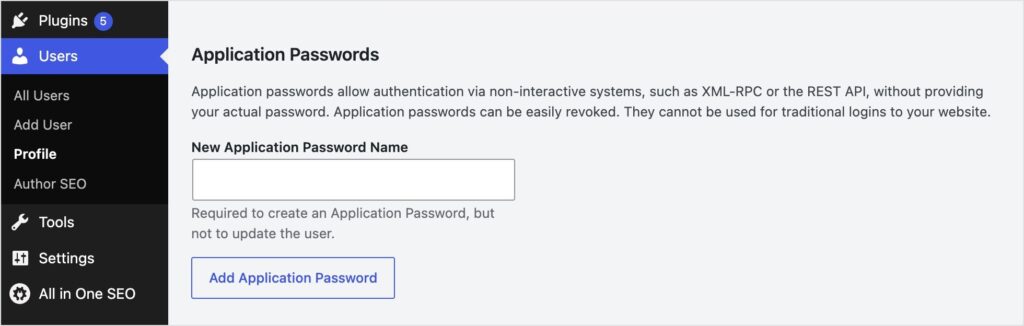
Here's a basic example to fetch SEO data for a post:
Note: These examples use JavaScript's btoa() for Base64 encoding, which works in browsers and Node.js 16+. On older Node.js versions, replace btoa('user:pass') withBuffer.from('user:pass').toString('base64').
const response = await fetch('https://yoursite.com/wp-json/wp/v2/posts/123', {
    headers: {
      Authorization: 'Basic ' + btoa('your_username:your_application_password'),
    },
  });

  const post = await response.json();
  const seoHead = post.aioseo_head;      // Full <head> SEO output as HTML
  const seoJson = post.aioseo_head_json; // Same data as JSON
To update SEO fields on a post:
await fetch('https://yoursite.com/wp-json/wp/v2/posts/123', {
    method: 'POST',
    headers: {
      Authorization: 'Basic ' + btoa('your_username:your_application_password'),
      'Content-Type': 'application/json',
    },
    body: JSON.stringify({
      aioseo_meta_data: {
        title: 'Updated SEO Title',
        description: 'Updated meta description',
      },
    }),
  });
The API works with all standard WordPress endpoints: /wp/v2/posts, /wp/v2/pages,
/wp/v2/media, /wp/v2/categories, /wp/v2/tags, and any custom post type with
REST API support enabled.
For the full ability reference and endpoint documentation, see the AIOSEO REST API developer docs.
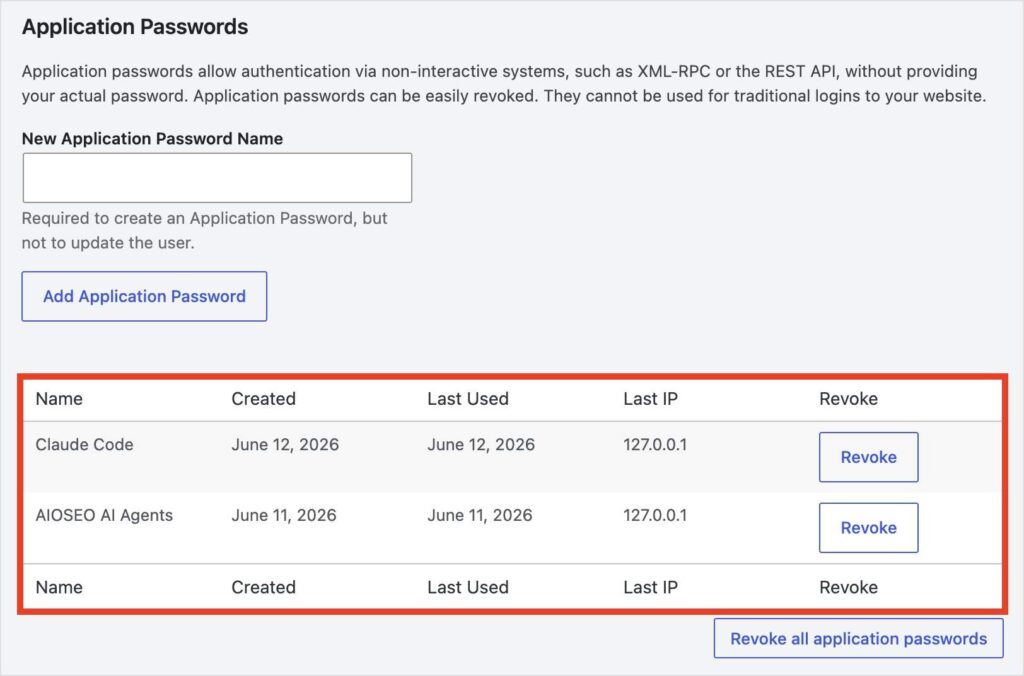
If you ever want to revoke an application password, you can do that from the same screen in your WordPress admin where you created it.
Free for All Plans, Including Lite
Starting with 4.9.8, the AIOSEO REST API is free for every AIOSEO plan, including Lite.
If you're managing SEO at scale and want more from the API, Link Assistant (Pro) and Search Statistics (Elite) are worth exploring. They add some of the most useful abilities in the list. You can compare plans here: AIOSEO pricing.
4.9.8 also includes 2 other updates:
- AIOSEO MCP: Connect AI clients like Claude, Cursor, and ChatGPT directly to your WordPress SEO.
- New AI image generation models in the AI Image Generator.
The REST API has been one of the most useful tools in AIOSEO for developers. Making it available to every plan means more people can build smarter, more automated SEO workflows, and I think it’s the right call.
Update to 4.9.8 and start building!
— Ben Rojas, President of AIOSEO
Frequently Asked Questions
What can I do with the AIOSEO REST API?
Starting with 4.9.8, the REST API gives you access to all 28 AIOSEO abilities — the same set available through MCP. You can update meta descriptions and SEO titles, manage redirects, pull TruSEO scores, retrieve Search Console data, and more, all via HTTP requests. It also supports the original headless WordPress use case: fetching full SEO head output for decoupled frontends.
Do I need a paid AIOSEO plan to use the REST API?
No. Starting with 4.9.8, the REST API is free for every AIOSEO plan, including Lite. Some abilities are tied to specific AIOSEO features, and those require the plan that includes that feature, the same as using them through any other method.
The REST API addon is no longer in my feature manager. Is something wrong?
No. That's expected. The addon has been deprecated and merged into the core plugin. The REST API is available automatically after updating to 4.9.8. No reinstallation needed.
What WordPress endpoints does the AIOSEO REST API support?
All standard WordPress REST API endpoints: /wp/v2/posts, /wp/v2/pages, /wp/v2/media, /wp/v2/categories, /wp/v2/tags, and any custom post types with REST API support enabled.
What’s the difference between AIOSEO MCP and the REST API?
Both MCP and the REST API expose the same 28 AIOSEO abilities. The difference is who uses them. MCP is for AI agents: it lets tools like Claude, Cursor, and ChatGPT take action on your site through chat. The REST API is for developers: it lets you call those same abilities from scripts, automations, and custom integrations via HTTP. Use MCP when you want your AI to handle SEO tasks. Use the REST API when you want to build something programmatic yourself.
How do I authenticate with the AIOSEO REST API?
Use a WordPress Application Password. Generate one in your WordPress admin under Users → Profile → Application Passwords, then include it in your requests. The code examples in the Getting Started section show exactly how to format it.
Disclosure: Our content is reader-supported. This means if you click on some of our links, then we may earn a commission. We only recommend products that we believe will add value to our readers.


