
When I first started optimizing content for SEO, I thought hitting the #1 spot on Google was the ultimate goal. But then I realized something: you can rank #1 and still get pushed down the page by a featured snippet.
Featured snippets are the first thing users see. They steal clicks, build massive authority, and—if you play your cards right—they're entirely within your reach.
In my 6+ years of optimizing websites, I know that winning a featured snippet has nothing to do with luck. It's about formatting your content in a specific way that Google understands.
In this guide, I’ll walk you through the exact strategy I use to get featured snippets on Google, from finding the right opportunities to the specific formatting tricks that work.
In This Article
What Is a Google Featured Snippet?
A featured snippet is a highlighted search result that appears at the top of Google’s organic results. Its purpose is to answer a user's question immediately, without them needing to click through to a website.
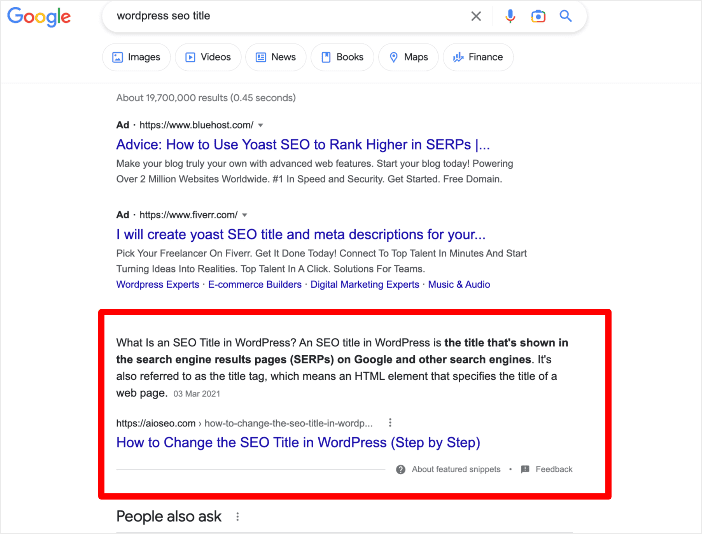
Google pulls this information from the web pages it indexes.
Why does this matter for you?
- Visibility: It’s the first thing people see.
- Authority: It positions your brand as the definitive expert.
- Traffic: While some worry that zero-click searches hurt traffic, SEO statistics show that having a featured snippet leads to a higher click-through rate (CTR) because you're the most prominent result.
Fun Fact: Many SEO professionals refer to featured snippets as “Position Zero” since they appear at the top of search engine results pages (SERPs).
AI Overviews are also referred to as the modern “Position Zero.” They're the most recent evolution of Google featured snippets, which I'll explain in a later section.
Why are Google Featured Snippets Important to SEO?
Targeting “Position Zero” is a strategic move to outmaneuver competitors. Even if your post ranks #5 on the first page, winning the featured snippet instantly vaults you to the top, above the #1 organic result.
Here's why I prioritize winning them:
1. You Steal Clicks from the #1 Spot
The #1 organic search result usually gets the majority of clicks. However, a featured snippet sits above that result. By owning the snippet, you're effectively cutting in line. This drives a significant boost in organic click-through rates (CTR).
2. It Establishes Instant Authority
When Google selects your content for the featured snippet, it's essentially telling users, “This is the best, most direct answer to your question.” This builds massive trust. Users are more likely to click on your site because Google has highlighted you as the definitive expert on the topic.
3. You Capture Voice Search Traffic
This is something many people overlook. When someone asks, “Hey Google, how do I get featured snippets?” the device doesn't read a list of ten links. It reads the featured snippet.
If you own the featured snippet, you're the only answer voice searchers hear. This is critical for future-proofing your SEO strategy.
How to Get Featured Snippets on Google
Getting a featured snippet doesn't require you to rewrite your entire website. In fact, I often find that small tweaks to existing content can make the biggest difference.
And while you could do these manually by editing code and formatting HTML, that takes forever. I prefer to use tools that automate the technical side so I can focus on the writing.
Here's the exact workflow I use to capture Position Zero using All in One SEO.
Note: It’s up to Google’s discretion whether you land the featured snippet or not. The tips presented in this article are a guide to help optimize for the featured snippet, not a guarantee you’ll get it.
Step 1: Install All In One SEO
The first step to optimizing your content is to set up a proper SEO foundation.
I use All In One SEO (AIOSEO) because it handles the specific technical requirements for featured snippets, like schema markup and block formatting, without me needing to touch a single line of code. (Yes, even after 6 years, I still don't like messing with JSON-LD or HTML.)
AIOSEO is the best WordPress SEO plugin on the market, trusted by over 3 million website owners.
Some of the plugin's most popular features are designed specifically to help you rank your content and capture featured snippets. These include:
- Schema Generator: Essential for rich results and featured snippets.
- Table of Contents Block: A secret weapon for “list” snippets.
- FAQ Block: Helps you target “People Also Ask” boxes.
- TruSEO On-Page Analysis: Ensures your content is perfectly optimized before publishing.
For step-by-step instructions, check out our AIOSEO Installation Guide.
Step 2: Check Out Your Competitors
Before I write a single word, I look at what's already winning. If a competitor has a featured snippet for my target keyword, I want to know why.
I use the AIOSEO SEO Analysis tool to analyze competitor pages. It helps me see what they're doing right—and where they're weak.
Plus, it's super easy to use.
After navigating to SEO Analysis from the All in One SEO, select the Analyze Competitor Site tab. Then, type or paste your competitor's URL into the search box and click Analyze.
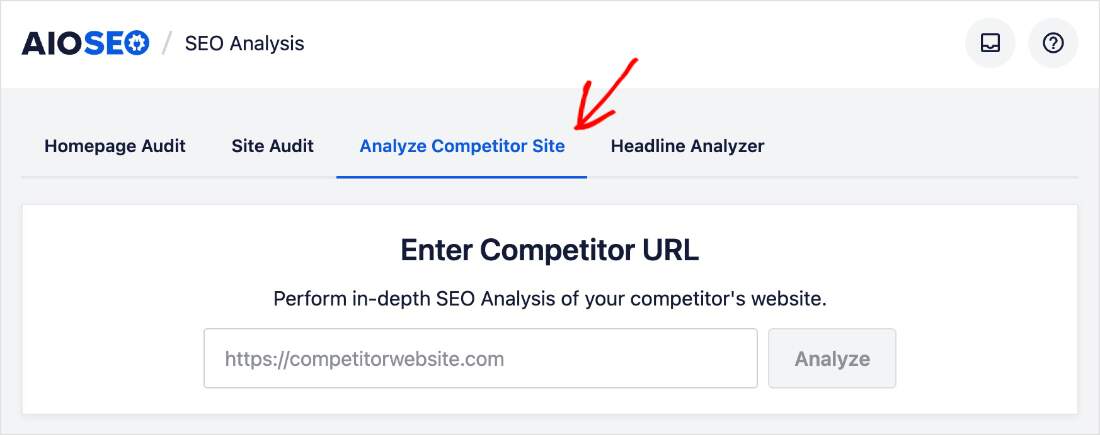
From here, you'll get a comprehensive report of your competitor's performance. AIOSEO organizes this data into the following sections: Basic SEO, Advanced SEO, and Performance SEO.
I find that this makes interpreting the data easier and helps me pinpoint what they're doing and where I can improve.
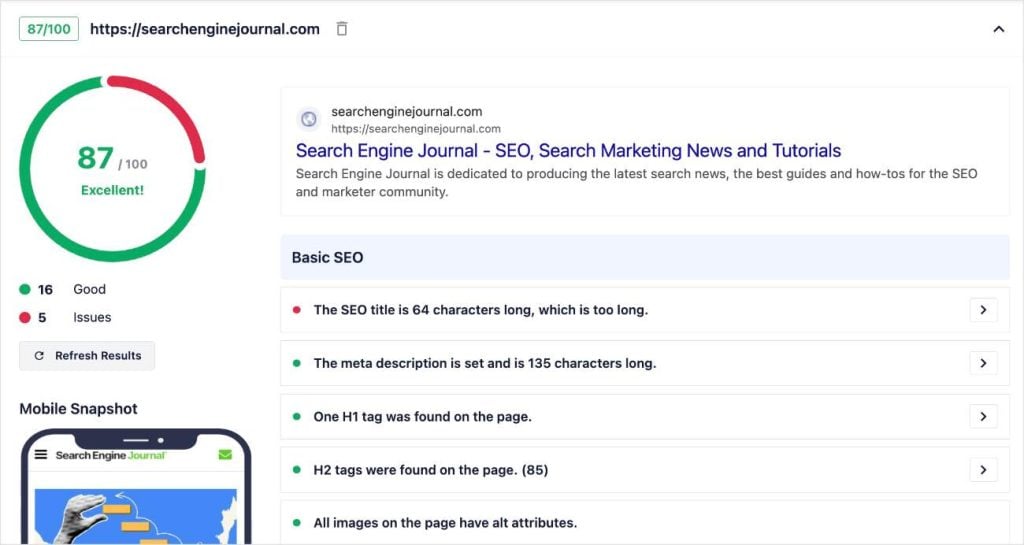
A competitor analysis will tell you what works for your competitors and help you replicate their winning SEO strategies. Here's what I recommend:
- Look for gaps: Is their answer outdated? Is it confusing?
- Look for formatting: Did they use a list? A table? A paragraph?
If they have a paragraph snippet that is 80 words long and hard to read, I know I can beat them by writing a concise, 45-word definition.
Also, if you notice that they have a very high score (80+), you may want to reconsider if this is a featured snippet you even want to target. It will be difficult to win unless you have a high domain authority and perfect optimizations.
Ultimately, it's a quick and easy way to see where the competition stands and refine your strategy.
For a deeper dive into this process, see our guide on how to do an SEO competitor analysis.
Step 3: Optimize Content Structure for Featured Snippets
Once I know what I'm up against, I structure my content to be “snippet-friendly.”
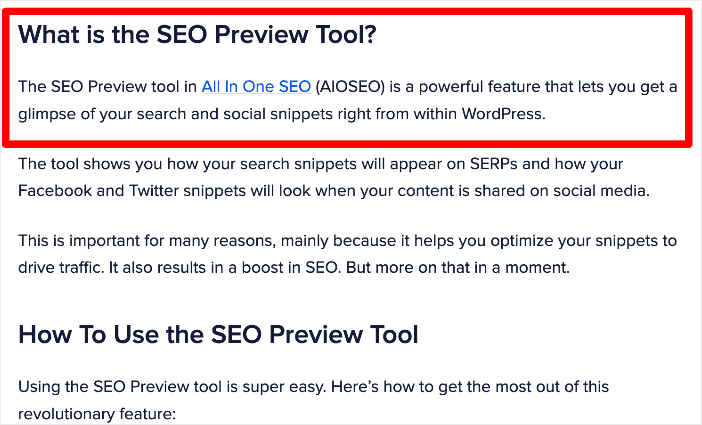
Google bots scan your headings to understand your post. To increase my chances of getting the featured snippet, I use question-based headings.
For example, instead of a heading that just says “Featured Snippets,” I will write an H2 tag that asks: “What Is a Featured Snippet?“
Immediately after that heading, I provide a direct, concise answer (about 40-60 words). This gives Google a perfect “passage” of text to pull into the featured snippet box.
Here's an example:
Other ways I optimize structure include:
- Short Paragraphs: Big walls of text scare off readers and search bots.
- Step-by-Step Formatting: I label steps clearly (Step 1, Step 2, etc.).
- Data Tables: If I have data, I compress it into a table rather than a list.
I also want to mention that if you hate making tables in WordPress as much as I do, AIOSEO has a new AI Assistant that will make them automatically for you. (It can also make pretty much anything else you want, from images to full blog posts.)
To use it, just add the AIOSEO – AI Assistant block to your post or page.

This will open a blank prompt field where you can type a description of your table (or whatever else you're requesting). For example, you might say, “Generate a table comparing the products, prices, and main features of the products discussed in the above section.”

The AI will then generate a table that you can edit, insert, or regenerate. It's fast and refreshingly accurate.
I'm also a big fan of not having to jump into a separate AI tool, which keeps me focused on my main goal: writing great content and winning that featured snippet.
Step 4: Use a Table of Contents
This is one of the most underrated strategies for winning eye-catching lists in featured snippets. And what's great about this type of search result is how much space it takes up on the SERP.
More space = more attention = more clicks.
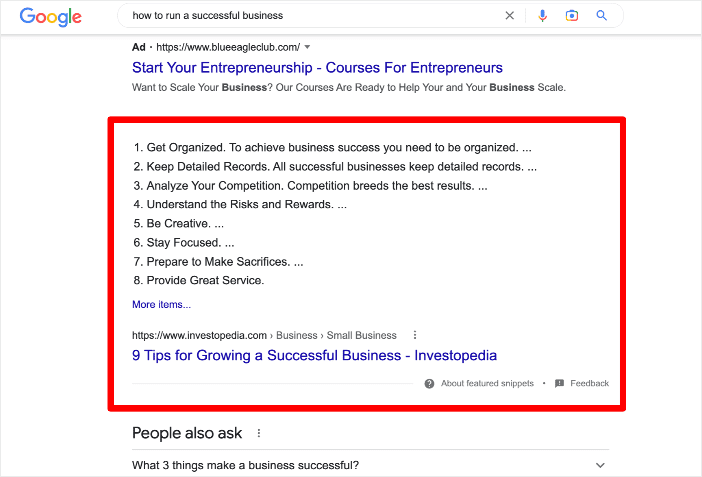
So, how does Google generate this type of featured snippet? More often than not, it uses content from a page's table of contents (ToC).
A table of contents gives search engines a map of your page. Search engines can then pull the links from your ToC and display them as a bulleted or numbered list in the search results.
Now, adding a table of contents manually in WordPress is a pain. But with AIOSEO, it’s instant. I simply add the AIOSEO Table of Contents block to the top of my post.
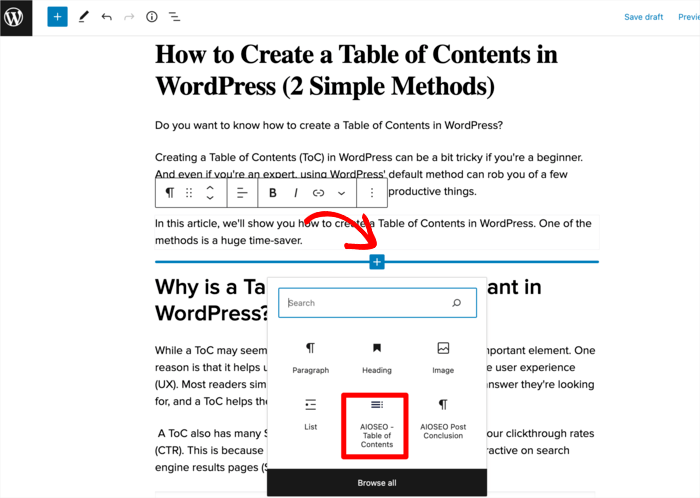
Why I love this feature:
- It automatically generates links based on my H2 and H3 headings.
- It keeps the links hyperlinked, so users can jump straight to the answer they need.
- It signals to Google exactly how my content is organized.
It's a simple method for improving the user experience and increasing your chances of landing the featured snippet for your focus keyword.
Step 5: Implement Schema Markup
Schema markup is code that helps search engines understand the category and context of your content.
For example, if you're a food blogger, recipe schema tells Google: “This is a recipe, this is the cook time, and this is the calorie count.“
To get featured snippets, I specifically use FAQ Schema and How-To Schema.
In the past, I had to research the schema type I wanted on schema.org, use Google's Structured Data Markup Help to write the code, and then run this code through a validator before adding it to my website. It was tedious and time-consuming, to say the least.
Now, I use a WordPress Schema Generator to do it all in seconds (and without coding).
Here's how it works:
Start by opening the post or page where you want to add schema. Then, scroll down to the bottom of the post and select the Schema tab from AIOSEO Settings.
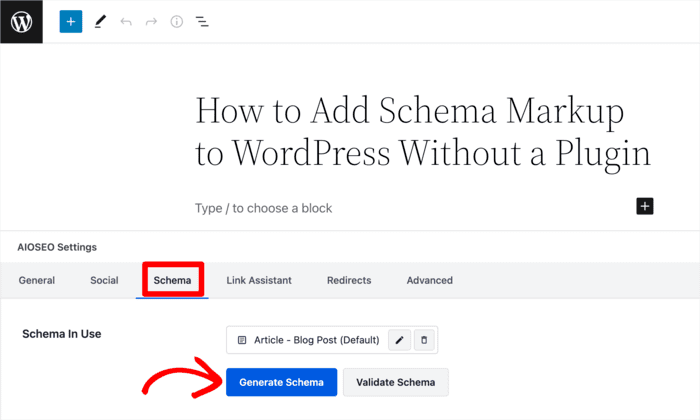
This area will show any schema types that are already on your page, but you can click Generate Schema to add a new one.
Once you've done that, AIOSEO will open its Schema Catalog, where you just locate your desired schema type and click the plus (+) button.
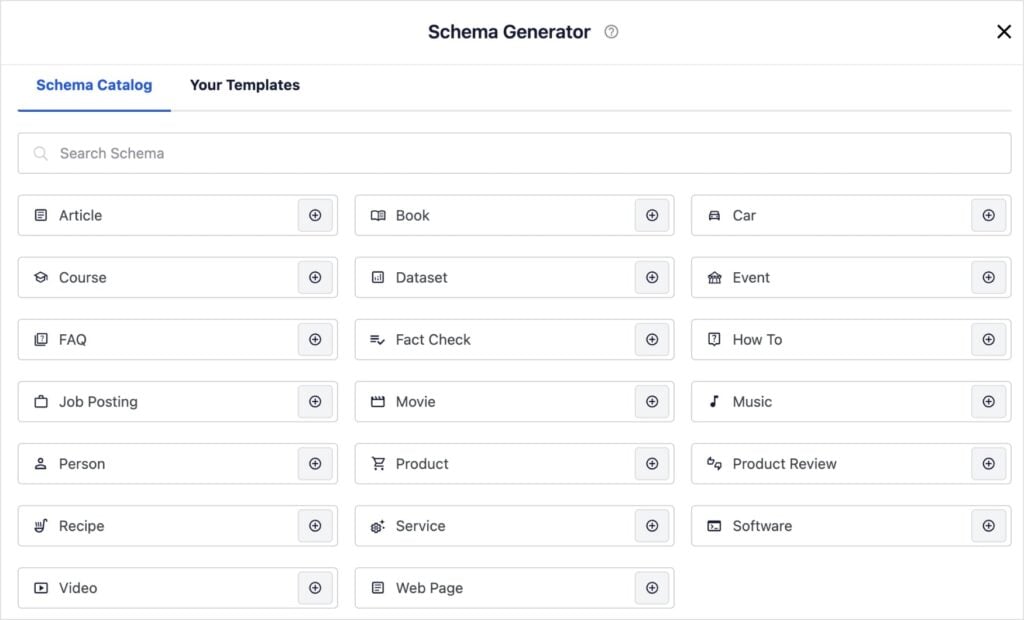
Depending on which one you've selected, AIOSEO will generate a user-friendly screen where you can add information about your content.
For example, with How-To schema, you can add a title and description for each step.
It's simple to use and makes the process of adding schema accessible to all users, including non-developers.
Once you've saved your schema, the plugin will generate the appropriate structured data behind the scenes and add it to your page.
Step 6: Focus on Direct Answers & Readability
Search engines want to show users the answer fast. If you bury the answer to “What is a featured snippet?” in the middle of a 2,000-word essay, Google will skip you.
To create the “best” content for snippets, I like to apply an Inverted Pyramid writing style:
- The Answer (Top): Provide a direct, 40-60 word answer immediately after the heading.
- The Details (Middle): Expand on the “how” and “why” with supporting evidence.
- The Context (Bottom): Add case studies, examples, or advanced tips.
Why this works: Google’s bot can easily grab that top section for the snippet box.
It's also critical that users can read your content just as easily. TruSEO helps with this by providing a readability checklist with actionable advice, such as:
- Sentence Length: Google prefers short, punchy sentences for snippets. TruSEO alerts me if my sentences are too long.
- Passive Voice: Snippets need to be direct. The plugin flags passive voice so I can switch to active verbs.
- Transition Words: These help logic flow, making it easier for the bot to understand the relationship between steps.
Here's what this checklist looks like in WordPress:
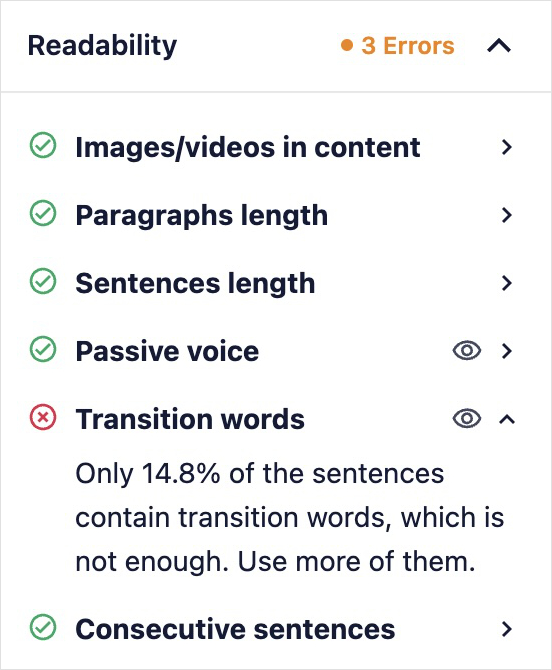
This is where I rely heavily on AIOSEO’s TruSEO On-Page Analysis. It doesn't just check for keywords; it checks for Readability.
By combining great content with the technical power of AIOSEO, I give myself the best possible chance of landing in Position Zero.
How to Track Your Featured Snippets
Once you have optimized your content, how do you know if it worked? You need to track your results.
I like to use Semrush for this part.
After entering your domain, click Organic Rankings from the Competitive Analysis menu. Then, scroll until you see the SERP Features section and locate Featured Snippets.
In this view, you'll get a total number of featured snippets you have, but you can click it to view the individual keywords.
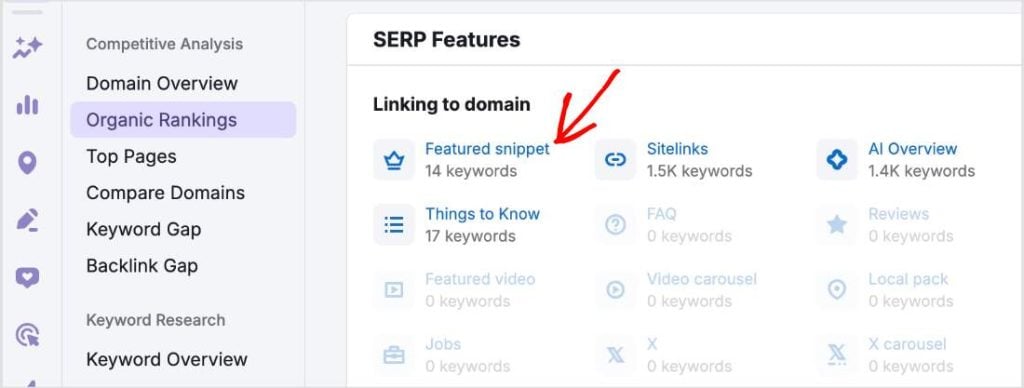
If you don't have Semrush, another good option is Google Search Console (GSC). It's one of the best free SEO tools and, even though it doesn't have a report specifically for featured snippets, it will give you an idea.
You can't just check Google manually because search results are personalized. Instead, I recommend using a tool like Google Search Console or a dedicated SEO tool (like Semrush or Ahrefs).
Here's how you can use it:
- Go to Search Results.
- Filter by your specific keyword.
- Look at your Average Position. If you see a position of “1” or extremely high CTRs, you likely have the snippet.
Now You Know How to Get Featured Snippets
Landing a featured snippet is one of the best ways to shortcut your way to the top of Google. It takes a bit of strategy, specifically regarding formatting and direct answers, but the payoff in traffic and authority is worth it.
If you found this article helpful, you may enjoy learning how to set up SEO for different languages and how to easily find and fix orphan pages in WordPress.
You can also find more WordPress tips and tutorials on our YouTube Channel. Or check us out on Twitter, LinkedIn, and Facebook to stay in the loop.
FAQs About Google Featured Snippets
How do I optimize content for featured snippets?
To optimize for featured snippets, structure your content with clear headings (H2,H3), provide concise answers (40-60 words) to specific questions, use lists and tables for data, and implement schema markup to help Google understand the context.
What are the different types of featured snippets?
There are four main types of featured snippets Google displays:
- Video Snippets: YouTube clips with specific timestamps for visual tutorials.
- Paragraph Snippets: Short text blocks (40-60 words) that answer “What is” or “Why is” questions.
- List Snippets: Numbered or bulleted lists for “How-to” steps or rankings.
- Table Snippets: Data grids for comparisons (like pricing or specs).
Can I pay to get a featured snippet?
No, you cannot pay for a featured snippet. It is an organic search feature. However, you can pay for Google Ads, which appear above the featured snippet.
Do featured snippets steal traffic?
Not necessarily. While “zero-click” searches happen, featured snippets usually attract the majority of clicks on the page because they take up the most space and prove you're the authority on the topic.
What's the difference between a rich snippet and a featured snippet?
A featured snippet appears at the top of the search results (Position Zero) and extracts text from your page. A rich snippet is a standard search result that is enhanced with extra info like star ratings, prices, or event dates, usually added via schema markup.
Want to Try AIOSEO for Free?
Enter the URL of your WordPress website to install AIOSEO Lite.

Disclosure: Our content is reader-supported. This means if you click on some of our links, then we may earn a commission. We only recommend products that we believe will add value to our readers.
