
Have you heard that E-E-A-T SEO is the key to ranking on Google, but you're not sure what that actually means for your WordPress site?
You're not alone. E-E-A-T gets mentioned everywhere in SEO circles, often alongside vague advice like “build authority” or “demonstrate expertise.” But for WordPress site owners, the real question is: what do you actually configure, and where?
In this guide, I'll cover what E-E-A-T in SEO means, clear up the biggest misconception about how it affects rankings, and walk you through every WordPress-specific step to build it, including what to do if you use AI tools to help create content.
Let's start with a quick definition.
In This Article
What Is E-E-A-T in SEO?
E-E-A-T stands for Experience, Expertise, Authoritativeness, and Trustworthiness. It's the framework Google's Search Quality Raters use to evaluate whether content is credible, helpful, and accurate. While not a direct ranking factor, pages with strong E-E-A-T signals tend to perform better for competitive, trust-dependent queries.
Here's what each signal means:
- Experience: First-hand, personal knowledge of the topic. This is the newest addition to the framework, added by Google in December 2022. It rewards content created by someone who has actually done, used, or lived the thing they're writing about.
- Expertise: Subject matter knowledge, credentials, and qualifications. Google looks for demonstrated depth on a topic, whether through formal credentials or extensive practical knowledge.
- Authoritativeness: Being recognized as a reliable source in your topic area. External citations, inbound links, and being mentioned by other credible sites all contribute to this signal.
- Trustworthiness: Accurate, transparent, and safe. Google considers this the most important of the 4 signals. It covers everything from factual accuracy to site security to clear disclosures.
Google's Search Quality Rater Guidelines first included EAT (without the first E) back in 2014. The fourth signal, Experience, was added in December 2022, largely in response to the rise of AI-generated content flooding the web.
If you ask me, adding this distinction matters because a page can be written by someone with expertise on a topic without that person ever having first-hand experience with it. And so, with this addition, Google makes it clear that it wants to see both.
Does E-E-A-T SEO Directly Affect Google Rankings?
Here's the verdict: E-E-A-T is not a direct ranking factor. There is no “E-E-A-T score” in Google's algorithm that you can optimize for, like a keyword or a page speed metric.
Google's own John Mueller has confirmed this directly that E-E-A-T itself is not a ranking factor, but the quality signals it describes are reflected in how Google's systems evaluate pages.
So why does it matter?
Because E-E-A-T is the framework Google uses to train and calibrate its ranking systems. Human quality raters evaluate pages against these criteria, and that feedback shapes how the algorithm scores content quality across the web. Pages that consistently demonstrate strong E-E-A-T signals rank better for competitive, trust-dependent queries. Pages with weak E-E-A-T signals are more likely to be flagged as unhelpful and demoted.
The practical takeaway is that you don't build E-E-A-T by targeting it like a keyword. You build it through consistent, credible authorship, a transparent site structure, and content that shows genuine, firsthand knowledge, and the rankings follow.
E-E-A-T SEO on Your WordPress Site: 4 Things Google Looks For
Google doesn't evaluate E-E-A-T in the abstract. It looks for specific signals on your site. For WordPress site owners, those signals fall into 4 categories.
1. Author Signals
The biggest question with author signals is who wrote the content, and whether Google can verify that the person has real credentials. Author signals include a bio with an expertise description, an author schema that links to verifiable social profiles, and an author archive page showing publication history on the topic. A byline with no bio and no linked profiles is a missed opportunity at best and a trust red flag at worst.
2. Site-Level Signals
Next, it looks into who runs this site? Google's quality raters actively look for an About page with organizational history, a Contact page, an Organization schema in your site settings, and linked social profiles. These tell Google that a real entity stands behind the content, and that entity is findable and accountable.
3. Content Signals
You should also be looking out for content signals and ask yourself if the content show first-hand knowledge? Google prefers original screenshots, photos, or data over stock images. First-person observations in the writing. Cited external sources for factual claims. And visible publication and last-updated dates, which tell both Google and readers that the information is current and maintained.
4. Trust Signals
Can readers trust this site? Trust signals include HTTPS, a clear privacy policy, disclosure pages for affiliate or sponsored content, and an editorial policy if you publish a high volume of content. For most WordPress sites, HTTPS and a privacy policy are table stakes. Disclosures and editorial policies matter more as your site scales.
A note on YMYL content: Medical, legal, financial, and safety content (called Your Money or Your Life topics) face the strictest E-E-A-T scrutiny because low-quality content in these categories can directly harm readers. If your site operates in these categories, see our dedicated guide to E-E-A-T for YMYL Sites for the full requirements.
How to Build E-E-A-T SEO on WordPress with AIOSEO
So, now that you know what E-E-A-T signals to look for, here are the exact steps.
Step 1: Configure Author SEO
AIOSEO's Author SEO feature handles the 3 most impactful WordPress-specific E-E-A-T signals in one place: it automatically generates Author schema for every post, creates enriched author profile pages with linked social accounts, and adds configurable author bio boxes below each piece of content.
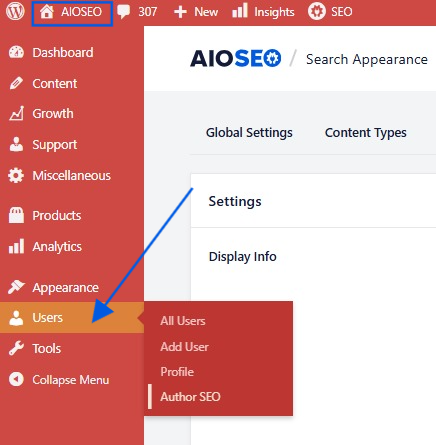
To set it up, go to All in One SEO > Users > Author SEO, then edit your author profile.
You can then use the spaces there to add an expertise description that speaks to your first-hand experience with the topics you cover, not just a generic bio. Include URLs for your LinkedIn, Twitter/X, and any other verifiable professional profiles. And don't forget to save.
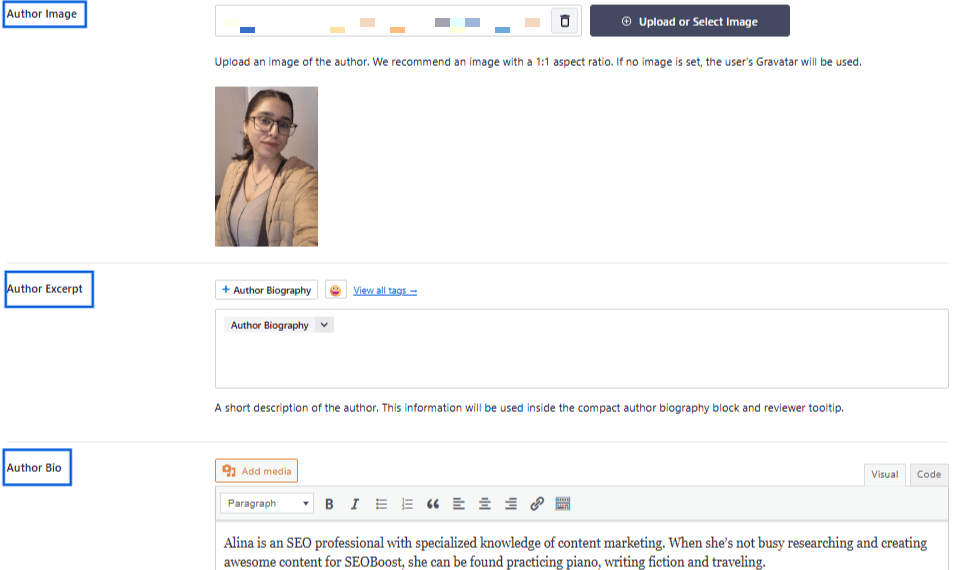
Once you update your author information, Google sees structured Author schema with linked, verifiable social profiles on every post you publish, a confirmed authorship signal with no code required.
If you run a multi-author blog, every author needs a complete profile. A byline attached to a generic “admin” account with no bio actively weakens your E-E-A-T signals. Make completing author profiles a mandatory step before any contributor publishes their first post.
Step 2: Add Organization Schema
An organization schema tells Google the entity's official name, logo, and social accounts. It's the site-level counterpart to author-level credentialing, and it's one of the highest-impact 5-minute tasks you can do for a new WordPress site.
Navigate to All in One SEO > Search Appearance > Knowledge Graph.
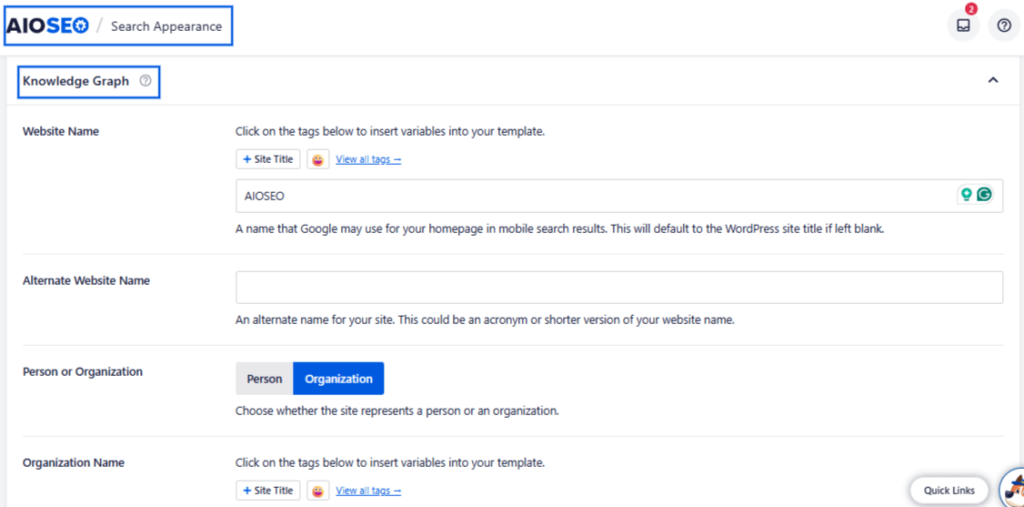
Fill in your organization name, upload your logo, and add your social profile URLs. If you run a personal blog rather than a branded site, switch the entity type to Person and fill in your individual details instead.
Step 3: Build a Credibility-First About Page
Google's quality raters actively look for your About page when evaluating site-level E-E-A-T. It's often the first place a rater goes after reading a piece of content to answer the question: who is behind this, and can I trust them?
A strong About page for E-E-A-T purposes includes:
- Who you are and what qualifies you to write about your topic area
- How long the site has been publishing and its editorial scope
- How readers can contact you
- For multi-author sites: team bios with links to individual author profile pages
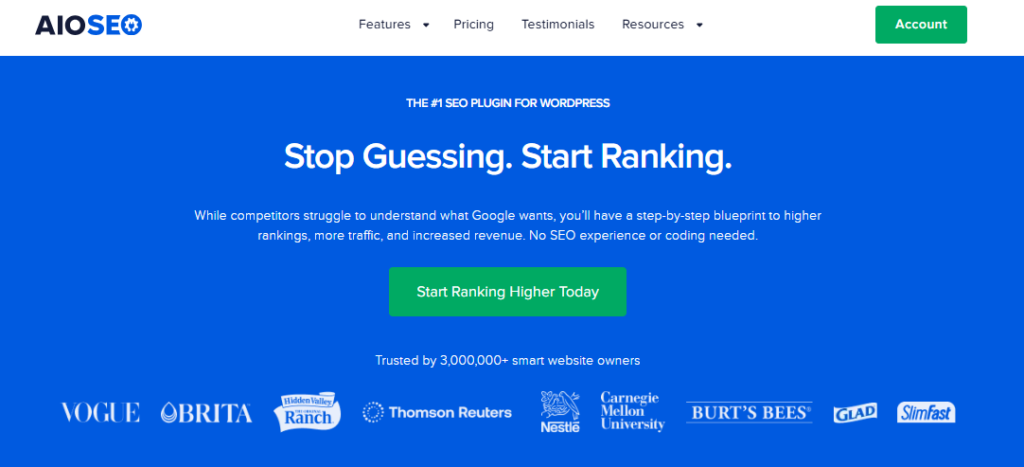
You need to make sure that your content, especially for the homepage is clear and relevant. For an additional signal, add the Author schema directly to your About page using the AIOSEO Schema Generator.
You can also open the AIOSEO meta box on a specific page, navigate to the Schema tab, and manually add a Person or Organization schema block. This links your About page entity to the same schema that Google finds in your posts.
Step 4: Add Experience Signals to Your Content
The Experience signal is where most WordPress blogs fall short, and it's the one a machine can't fake. Here's how to build it into your content process:
- Use original screenshots, photos, or test data: Stock images don't demonstrate first-hand experience. A screenshot of a tool you actually used, a photo from an event you attended, or data from a test you ran.
- Write author bios that mention hands-on credentials: “Jane covers WordPress SEO” is weaker than “Jane has managed WordPress sites for 8 years and tests every plugin she writes about.” Specificity signals experience.
- Keep the article schema active on all posts: AIOSEO generates article schema automatically for every post and includes
datePublishedanddateModifiedfields that provide verifiable freshness signals to Google, indicating when content was created and last updated. - Cite credible external sources for factual claims: Outbound links to authoritative sources (research papers, official documentation, established publications) contribute to your Authoritativeness signal.
E-E-A-T SEO and AI-Generated Content
If you use AI tools to help write content, you're asking the right question by wondering how that affects your E-E-A-T. Here's the nuanced answer.
The good news is that Google does not penalize AI-assisted content. It actually rewards content that demonstrates genuine first-hand experience, regardless of how it was drafted. So, the issue isn't the tool, but rather whether the published piece shows the kind of signals a machine can't produce on its own.
So, I'd suggest adding your own personal experience, opinion, data, and human authorship to content, especially if you're using AI to draft the piece.
Here's how you can maintain strong E-E-A-T while using AI writing tools:
- Assign every piece to a verified human author: Make sure that it's a complete AIOSEO author profile. Avoid publishing under a generic site name or faceless brand account.
- Add a substantive human editing step: Not just proofreading. A human editor should add first-person observations, replace generic examples with real ones, and layer in original screenshots or data before publishing.
- Never use AI-generated author photos or fabricated credentials: Google's quality raters check author profiles, and synthetic credentials are a serious trust violation.
Content published without visible human authorship or experience signals to Google's quality evaluation systems as generic, regardless of text quality, and is more likely to be treated as unhelpful. The fix is straightforward: make the human behind the content visible and verifiable.
For a deeper look at how Google evaluates content quality in the era of AI, see our guide on Google's helpful content guidelines.
FAQs about E-E-A-T SEO
Is SEO dead or evolving in 2026?
No, SEO is not dead. It's evolving. In 2026, SEO extends beyond traditional search engines to include AI-powered platforms like ChatGPT, Perplexity, and Google AI Overviews. Search engines are placing greater emphasis on content quality, user experience, topical authority, and trust signals rather than simple keyword optimization.
What does E-E-A-T stand for in SEO?
E-E-A-T stands for Experience, Expertise, Authoritativeness, and Trustworthiness. It's a framework Google uses to evaluate the quality and credibility of content, particularly for topics that can impact a person's health, finances, safety, or well-being. To demonstrate strong E-E-A-T, content should be created by qualified authors, include firsthand experience where relevant, cite trustworthy sources, and provide accurate, up-to-date information.
Next Steps
E-E-A-T in SEO isn't a switch you flip, but it's also not as complicated as it sounds. Most WordPress sites already have the raw ingredients: knowledgeable authors, a real organization behind the content, and genuine expertise in their subject area. The gap is usually visible. Google can't credit what it can't see.
The fastest path to making your E-E-A-T signals visible is to configure them in WordPress and with AIOSEO, you can do that pretty easily.
Ready to put your E-E-A-T signals to work? Get started with AIOSEO and configure Author SEO, Organization schema, and Article schema for your entire site in a single afternoon.
Disclosure: Our content is reader-supported. This means if you click on some of our links, then we may earn a commission. We only recommend products that we believe will add value to our readers.
Want to Try AIOSEO for Free?
Enter the URL of your WordPress website to install AIOSEO Lite.