
If you’ve noticed your traffic changing since Google launched AI Overviews, you’re probably wondering whether it’s time to opt out of AI Overviews altogether now that Google is giving site owners a way to opt out.
It’s an understandable reaction, but opting out isn’t easy, because in many cases, the issue isn’t the AI Overviews themselves. It’s whether your content is optimized to be featured in them.
So, in this guide, I’ll break down exactly what opting out means, how to do it, and whether it’s actually the right move for your website.
In This Article
What Are AI Overviews?
AI Overviews are Google’s AI-generated summaries that appear at the top of search results for certain queries. Instead of showing users only a list of links, Google uses artificial intelligence to generate a direct answer by pulling information from multiple sources across the web.
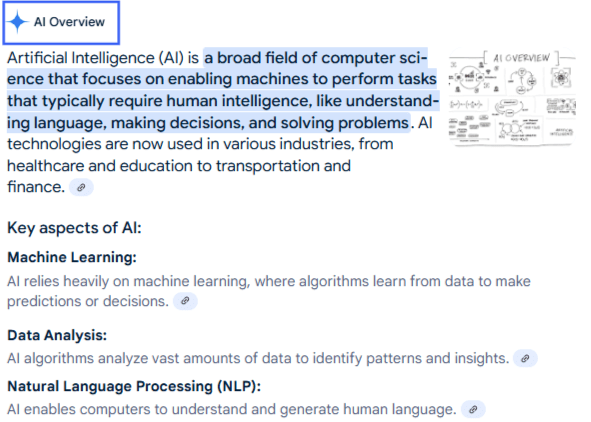
You’ll typically see AI Overviews for informational searches like:
- “How to start a vegetable garden”
- “Best foods for iron deficiency”
- “How does email marketing work?”
From Google’s perspective, the goal is simple: help users get answers faster.
But for publishers and website owners, AI Overviews have introduced a major shift in search behavior. If users can get their answer directly on the search results page, they may be less likely to click through to websites, potentially reducing organic traffic for some queries. At the same time, being featured inside an AI Overview can significantly increase brand visibility and position your website as an authoritative source.
How Do AI Overviews Work?
AI Overviews rely on large language models and retrieval systems to analyze Google’s index and generate responses in real time.
Google looks for content that is:
- Clear and easy to extract
- Well-structured
- Authoritative and trustworthy
- Supported by strong E-E-A-T signals
- Enhanced with structured data like schema markup
This is why simply ranking well is no longer enough, and content optimization is becoming increasingly important. Your content also needs to be easy for AI systems to understand and summarize.
Why Trust Me?
I’ve spent 7+ years working in SEO and content strategy, helping websites improve both traditional search visibility and, more recently, their presence in AI-powered search experiences. Over the past year, I’ve been closely tracking how AI search is evolving and how publishers are adapting their strategies. This guide combines current best practices and real-world SEO experience to help you make an informed choice.
Why Is Google Allowing Websites to Opt Out?
When Google first announced AI Overviews and other AI-powered experiences, publishers immediately raised concerns around attribution, traffic loss, and content usage.
Many website owners felt they were being forced into an unfair choice:
- Allow Google to use its content in AI experiences.
- Block Google entirely and lose traditional search visibility.
To address these concerns, Google introduced additional controls, including Google-Extended and updated snippet directives, allowing publishers to have more say in how their content is used.
So, this move serves several purposes:
1. Publisher Trust and Transparency: Google understands that AI search depends on high-quality content from publishers. Giving website owners more control helps maintain trust and encourages publishers to continue creating valuable content.
2. Regulatory Pressure: AI-generated content has attracted increasing scrutiny from regulators, publishers, and copyright organizations worldwide. Providing opt-out mechanisms demonstrates that publishers have choices regarding how their content is used.
3. Different Business Models Require Different Approaches: Not every website benefits equally from AI visibility. For instance, news publishers may prefer clicks over citations, whereas SaaS companies may value brand exposure inside AI answers. Google recognizes that there isn’t a one-size-fits-all solution, so it has introduced controls that allow publishers to make decisions based on their own business goals.
The Important Caveat: Google is not encouraging websites to opt out of AI Overviews. In fact, the company has repeatedly emphasized that AI search experiences are becoming increasingly important in how users discover information. The opt-out of AI Overviews mechanisms is primarily intended to provide flexibility and address publisher concerns.
What Does the Opt Out of AI Overviews Actually Turn Off?
Google’s new toggle lives inside Search Console, the free tool Google gives site owners to monitor how their site performs in search. When you flip it, your content stops appearing in 3 places: AI Overviews, AI Mode, and AI Overviews in Google Discover. Google has confirmed this setting is not a ranking signal, so your regular blue link rankings stay exactly where they are.
2 things surprised me here. First, the toggle does not cover the Gemini app. If someone asks Gemini directly instead of searching Google, your content can still show up there. Second, this is a different setting from ones you may already know. Here’s how they compare.
| Setting | What It Actually Does |
|---|---|
| New AI Overviews opt-out | Removes you from AI Overviews, AI Mode, and AI Overviews in Discover. Regular rankings stay the same. |
| Google-Extended (robots.txt) | Stops Google from using your content to train its AI models. Does not remove you from AI Overviews. |
| Noindex | Removes your page from Google Search entirely, including your regular rankings. |
If your real concern is AI model training rather than AI Overviews, our guide to blocking AI crawlers with the robots.txt tool covers that separate setting.
Who Can Actually Use This Right Now
Here’s the part most headlines skip: this toggle is currently available only to a small group of website owners while Google tests it before a wider rollout. It’s also site-wide only, so you cannot opt out of a single page yet.
Google has been given until March 2027 to add page-level controls. For most of us reading this, today’s real takeaway is simple: know this is coming, and start paying attention to how much of your traffic already touches AI features before you’re ever asked to make this decision.
Who Loses Clicks Either Way
This is another part that actually matters for your traffic. Research shows that, in real searches, when an AI Overview shows up, clicks to a regular search result drop from about 15% to about 8%.
So here’s the actual tradeoff: stay opted in, and Google may summarize your content in the Overview itself, sometimes without sending you a click. Or, you can opt out of AI Overviews, and Google simply builds that same Overview from a competitor’s content instead. Either way, the searcher gets an answer without visiting a website. The only real difference is whose website gets the credit.
That’s why I’d advise leaning toward staying visible.
4 Ways to Opt Out of AI Overviews
Use the nosnippet Meta Tag
The most direct way to prevent your content from appearing in AI Overviews is by adding:
<meta name="robots" content="nosnippet">This tells Google not to display text snippets from your pages.
However, this is a significant tradeoff.
By implementing nosnippet, you’re also preventing your content from appearing in:
- Featured snippets
- Standard search snippets
- Some rich search experiences
This can reduce your visibility beyond AI Overviews. And it’s usually best for sensitive content, subscription-based publishers, and sites where click-through is more valuable than visibility.
Limit Snippet Length Using max-snippet
You can also restrict how much of your content Google can use:
<meta name="robots" content="max-snippet:50">This allows some visibility while limiting extensive extraction. And it’s best for publishers looking for a middle ground rather than a complete opt-out.
Block Google-Extended
Google introduced Google-Extended, a crawler control that lets publishers decide whether their content can be used for AI training.
Example:
User-agent: Google-Extended
Disallow: /
But you should keep in mind that blocking Google-Extended does not automatically remove your site from AI Overviews. It only prevents content from being used for future model training. In my opinion, doing this is best for sites concerned about AI training but not necessarily AI search visibility.
Selective Page-Level Opt-Out
Instead of opting out sitewide, consider blocking only specific sections:
- Premium content
- Proprietary research
- High-value gated resources
This gives you more control while maintaining AI visibility elsewhere.
Should You Actually Opt Out of AI Overviews?
In most cases, I don’t recommend a complete opt-out. In fact, for most small sites and blogs, my honest answer is no. That’s because AI search isn’t going away. If anything, it’s becoming more prominent.
The better question is: How can you improve your chances of being cited instead?
Many websites experiencing declining traffic aren’t necessarily being “stolen” by AI. They’re simply not optimized for these new search experiences.
I see 2 real exceptions. If your content sits behind a paywall or subscription and a free AI summary genuinely competes with your product, opting out can make sense. And if you’re dealing with a specific reputation risk, like sensitive information you don’t want summarized out of context, that’s also a fair reason to consider it. Outside those 2 cases, my advice would be to spend time making sure your content is cited.
Use AIOSEO to Optimize Content for AI Citations
So, now that we have covered what opting out would mean, let’s look into how you can use SEO plugins like AIOSEO to optimize your content. There are a lot of great features that you can use for content optimization, but I’m mentioning 3 most important ones specifically with regard to optimizing your content for AI citations.
Schema Markup
Schema markup, the structured code that tells search engines and AI systems exactly what your content is, who wrote it, and when it was published, is one of the clearest signals we can control right now.
Using AIOSEO’s Schema Generator, you can easily implement different types of schema without touching code. Here’s how to do it:
Step 1: Open the page or post you want to optimize
In your WordPress dashboard, open the post, page, product, or other content where you want to add schema markup.
Step 2: Open the AIOSEO Schema settings
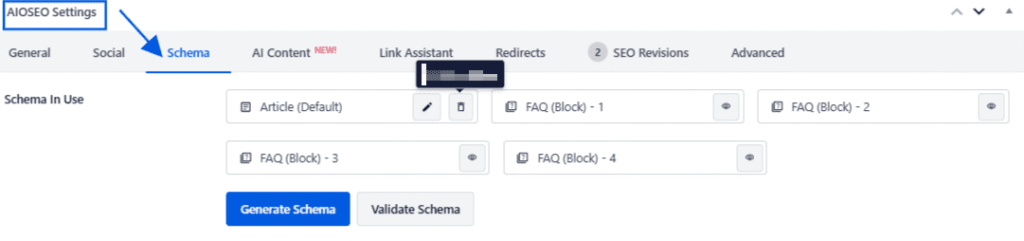
Scroll down to the AIOSEO Settings panel beneath the WordPress editor and select the Schema tab. You can also access these settings through the AIOSEO sidebar in the block editor.
Step 3: Launch the Schema Generator
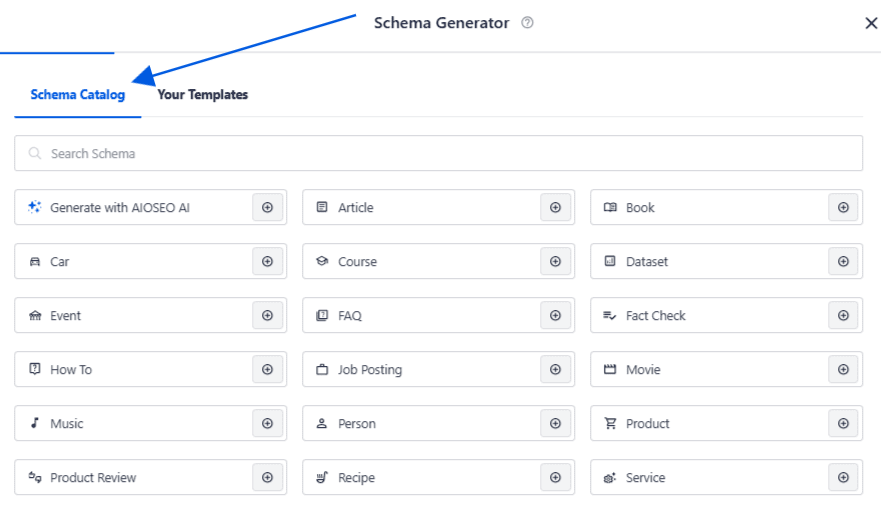
Click Generate Schema to open AIOSEO’s Schema Generator. You’ll see a catalog of the schema types available for that content.
Step 4: Choose the most relevant schema type
Select the schema that best describes the page. For example, use:
- Article schema for blog posts and news articles
- FAQ schema for pages containing frequently asked questions
- How-To schema for instructional content
- Product schema for products and ecommerce pages
- Service schema for pages describing a professional service
Click the Add Schema icon next to your chosen type. You can also add more than one relevant schema type to the same page where appropriate.
Step 5: Complete the schema fields
AIOSEO will open a form containing the details required for that schema type. The exact fields will depend on what you selected. AIOSEO can automatically pull some information from the page, including its title, SEO description, featured image, author details, categories, and tags. Review every field to ensure the information is accurate and matches what visitors see on the page.
Step 6: Add the schema to your content and save.
Once you’ve completed the fields, click Add Schema. The selected markup will then appear under Schema in Use, where you can edit or remove it later.
Click Update or Publish in WordPress to save the changes. AIOSEO will automatically generate and add the necessary JSON-LD markup behind the scenes, so you don’t need to edit your site’s code manually.
TruSEO Analysis
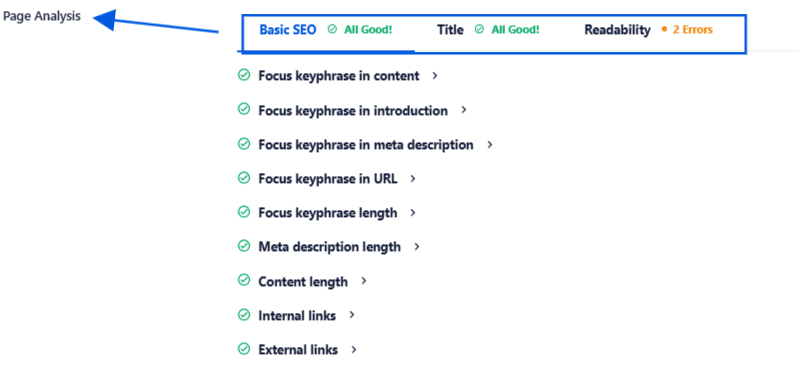
AIOSEO’s TruSEO Score also acts as a useful diagnostic tool. Many of the same elements that improve traditional SEO performance also improve AI visibility:
- Clear headings
- Question-based sections
- Proper internal linking
- Comprehensive topic coverage
- Readability
TruSEO helps identify gaps before they become visibility problems. You can access it on individual pages by scrolling down to AIOSEO settings.
Rather than opting out entirely, many publishers may benefit more from improving their content’s chances of being selected as a source.
Search Statistics
One more thing worth watching. Your Search Statistics dashboard inside AIOSEO, available on Elite plans, already pulls your Search Console impressions and clicks straight into WordPress.
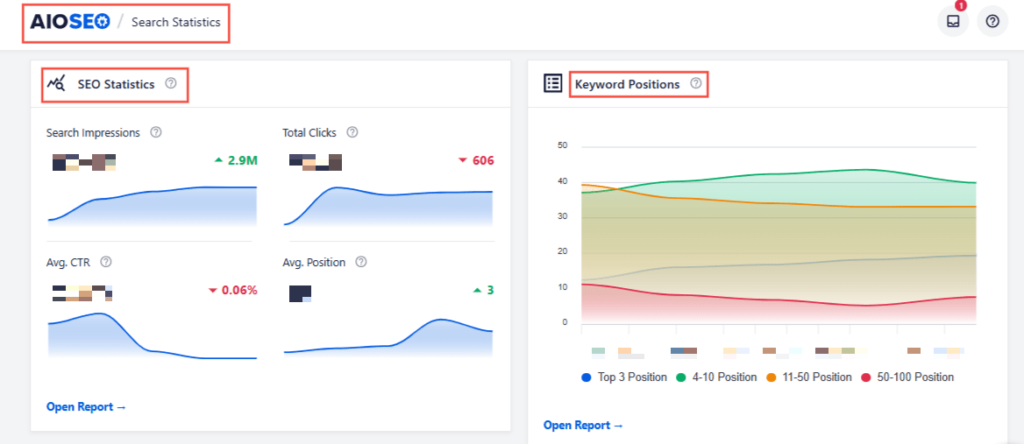
As Google expands its new AI reporting, this dashboard will help you get all your data in one place and understand how to use it for content optimization. It shows search impressions, keyword positions, and other relevant metrics to inform your content strategy.
Opt Out of AI Overviews: FAQs
What does it mean to opt out of AI Overviews?
Opting out of Google AI Overviews refers to preventing Google from using your content in AI-generated summaries. This can be done through robots directives, snippet controls, or crawler restrictions, depending on your goals.
How do I stop getting AI Overviews?
You can limit your content from appearing in AI Overviews by using the nosnippet meta tag or controlling how much content Google can display with max-snippet. However, this may also reduce your visibility in other search features.
Can I opt out of AI searches?
Yes, publishers can limit certain AI uses of their content through directives like Google-Extended, nosnippet, and robot settings. However, there is currently no single switch that removes a website from all AI-powered search experiences.
What Next?
Before you decide to opt out of AI Overviews, I’d advise you to evaluate your goals. In many cases, the answer isn’t to hide from AI search, but to adapt to it effectively. And to that end, I hope this guide was helpful.
For now, you’d benefit more from spending more time making sure your site is getting cited. If you haven’t checked your TruSEO score for schema gaps recently, that’s the 5-minute task I’d start with today. Open All in One SEO and check your TruSEO score on your most important posts, and see what it flags.
The sites that understand how these systems work today will be in a much stronger position tomorrow.
Disclosure: Our content is reader-supported. This means if you click on some of our links, then we may earn a commission. We only recommend products that we believe will add value to our readers.
Want to Try AIOSEO for Free?
Enter the URL of your WordPress website to install AIOSEO Lite.