
Have you ever searched for a topic in ChatGPT or Perplexity, or other AI search tools, only to realize your content isn’t mentioned anywhere?
As more people rely on AI search tools to find answers, I’ve noticed something interesting: ranking well in Google doesn’t necessarily mean you’ll get cited by ChatGPT, Perplexity, or Google AI Overviews. In some cases, these platforms reference websites that aren’t even in Google’s top 10 results.
That’s because AI citations are becoming a discipline in their own right, where AI search optimization focuses on making your content easy for large language models (LLMs) to discover, understand, and cite in their responses.
The good news is that you can optimize this process. Most of the optimizations I’ve implemented on WordPress sites take less than an hour, and many can be done without touching a line of code.
In this guide, I’ll show you exactly how I optimize content for ChatGPT, Perplexity, Google AI Overviews, and other AI search tools. You’ll learn how these platforms choose sources, what signals they look for, and the 5 fixes you can make today to increase your chances of being cited.
Let’s start with a quick definition.
In This Article
What Are AI Search Tools?
AI search tools are platforms that use artificial intelligence to directly answer questions rather than simply returning a list of links.
Traditional search engines like Google have historically acted as discovery tools. You enter a query, Google provides a list of results, and you decide which website to visit. AI search tools flip that experience. Instead of sending users to multiple pages, they analyze information from across the web and generate a single answer, often citing the sources they used.
Popular examples include ChatGPT Search, Perplexity, Claude, and Google AI Overviews. While each platform works differently, they all have the same goal: helping users find answers faster.
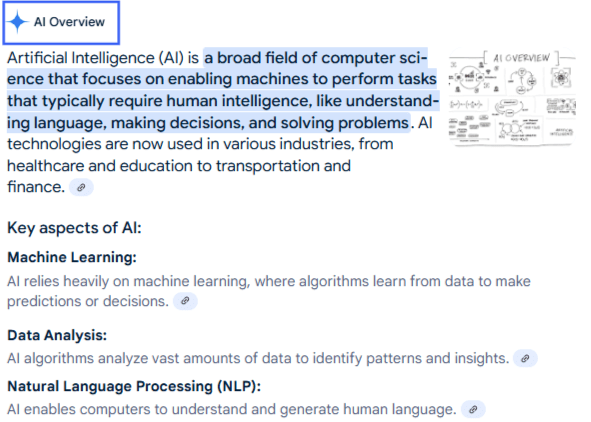
The technology behind these platforms is often powered by large language models (LLMs) and a process called retrieval-augmented generation (RAG). In simple terms, RAG allows an AI model to retrieve information from the web before generating a response. Instead of relying solely on its training data, the model can access fresh information and cite relevant sources in real time.
Why is this a game-changer?
In traditional SEO, success is usually measured by rankings, clicks, and organic traffic. With AI search, visibility increasingly depends on whether your content is selected as a source for an answer. Getting a citation on ChatGPT or Perplexity can expose your brand, even if users never perform a traditional Google search.
I’ve also noticed that AI search tools don’t always choose the highest-ranking Google result. Instead, these platforms prioritize content that is clear, trustworthy, and easy to extract. That’s why optimizing for AI search tools requires a slightly different mindset. Ranking still matters, but it’s no longer enough. You also need to create content that AI systems can easily understand, validate, and reference in their answers.
Understanding how these tools work is the first step toward consistent citation.
Why AI Search Tools Don’t Just Pull from Google Rankings
Research shows that 60% of sources cited by AI tools are not in Google’s top 10 results for the same query. These platforms aren’t just reading Google’s rankings and echoing them back. They are doing their own thing entirely.
The reason comes down to how these tools work. Most AI search platforms use a process called retrieval-augmented generation (RAG). RAG works like this: when you ask a question, the AI doesn’t just generate an answer from memory. It retrieves content from across the web, identifies the clearest and most structured answers, and uses those to build its response.
So what does it take to get picked?
Your content must be crawlable, structured, and clear enough for an AI agent to extract a clean answer. Ranking signals matter less. Extractability matters most.
How ChatGPT, Perplexity, Google, Gemini, Copilot, and Grok Choose Sources
Each platform sources its citations differently. Understanding those differences helps you prioritize where to focus first.
ChatGPT and ChatGPT Search
ChatGPT’s base model relies on training data with a knowledge cutoff. But ChatGPT Search, its web-enabled mode, uses Bing-indexed content to pull in real-time sources. This means your site needs to be indexed by both Bing and Google if you want to appear in ChatGPT Search results.
ChatGPT tends to favor authoritative domains, such as major publications, Wikipedia, and well-established industry sites. It takes longer to cite newer or smaller sites than Perplexity does. If you use Google Analytics (GA4), you can now track ChatGPT referral traffic using utm_source=chatgpt.com in your referral report, which means you can measure whether your optimizations are working.
Perplexity
Did you know that 46.7% of Perplexity’s top-cited sources come from community-style platforms like Reddit, Quora, and niche forums? This means having an active presence beyond your website, in communities where your audience asks real questions, and contributes to your Perplexity citation chances.
Essentially, Perplexity is a real-time web crawler. It indexes content quickly, often within days, if your site allows its crawler to access it. Perplexity also displays footnote citations directly in its answers, so readers can see and click through to your site.
Did you know that 46.7% of Perplexity’s top-cited sources come from community-style platforms like Reddit, Quora, and niche forums? This means having an active presence beyond your website, in communities where your audience asks real questions, and contributes to your Perplexity citation chances.
Google AI Overviews and Gemini
Google AI Overviews and the standalone Gemini app both run on Google’s Gemini model family, grounded in Google’s own search index. New content typically takes 4 to 8 weeks to surface here, compared to days for Perplexity. The signals that carry the most weight are E-E-A-T (experience, expertise, authoritativeness, and trustworthiness), structured data markup, and entity signals from Google’s Knowledge Graph.
A brand with a clean Google Knowledge Panel and consistent entity data across the web tends to appear in Gemini citations more frequently than one relying purely on rankings.
Microsoft Copilot
Microsoft Copilot is powered by GPT models and retrieves candidates from Bing’s search index. That means the path to Copilot citations has 2 gates: first, your site needs to be indexed and ranking in Bing;second, the content on that page needs to be structured clearly enough for the model to extract a clean answer. Most sites skip step one entirely because they have never verified their site in Bing Webmaster Tools.
The strategic upside is that Copilot is significantly less contested than ChatGPT or Google. Because most content teams focus exclusively on Google, the bar to rank in Bing is meaningfully lower.
Microsoft also launched an AI Performance dashboard in Bing Webmaster Tools in February 2026, which shows which of your pages are cited in Copilot responses and which queries triggered those citations. It is the only AI platform with a built-in first-party citation tracking tool.
Grok
Grok is xAI’s AI assistant, built into X (formerly Twitter) and available as a standalone app. It is one of the fastest-growing AI platforms, with usage growing from roughly 2% of the US chatbot market in January 2025 to nearly 18% by January 2026. What makes Grok distinct from every other platform on this list is its dual sourcing: it retrieves content from both the live web and real-time X posts. That means your brand’s X presence directly influences whether Grok cites you, not just your website.
Grok also weights content freshness more heavily than most other platforms. If you are not regularly updating your key pages with current data, Grok will consistently pass over your site in favor of fresher sources. The same answer-first structure, schema markup, and E-E-A-T signals that help with ChatGPT and Perplexity all carry over to Grok, but an active X presence is the one optimization that is genuinely Grok-specific.
Only 11% of domains receive citations from both ChatGPT and Perplexity. That’s because each platform requires its own optimization strategy.
5 Things to Fix on Your WordPress Site
These are the 5 highest-impact changes you can make to improve your chances of scoring a citation in AI search tools. Each one takes 30 minutes or less, and most can be done using the AIOSEO plugin.
1. Allow AI Crawlers in Your robots.txt
Before any AI platform can cite you, its crawler has to be able to access your site. Many WordPress sites have robots.txt configurations that accidentally block AI crawlers, either because of overly broad wildcard rules or outdated settings.
The major AI crawlers you need to explicitly allow are:
- GPTBot (ChatGPT and OpenAI)
- OAI-SearchBot (ChatGPT Search)
- PerplexityBot (Perplexity)
- ClaudeBot (Claude by Anthropic)
- Google-Extended (Google AI training and products)
Your robots.txt should include the following directives to allow these bots:
User-agent: GPTBot
Allow: /

User-agent: OAI-SearchBot
Allow: /

User-agent: PerplexityBot
Allow: /

User-agent: ClaudeBot
Allow: /

User-agent: Google-Extended
Allow: /
How to do this using AIOSEO MCP?
Using AIOSEO MCP, you can manage this without manually editing any files. It is a free feature available on all plans, including Lite, that lets you connect an AI agent directly to your WordPress site and give it SEO tasks from chat. Robots.txt management is one of the 28 built-in abilities. Once you are connected, you can check and update your robots.txt without opening WordPress at all.
Here is how to do it:
- Update AIOSEO to version 4.9.8 or higher and make sure you are running WordPress 6.9 or higher.
- Go to All in One SEO > AI Suite > MCP. AIOSEO will automatically register its 28 SEO abilities, including robots.txt management.
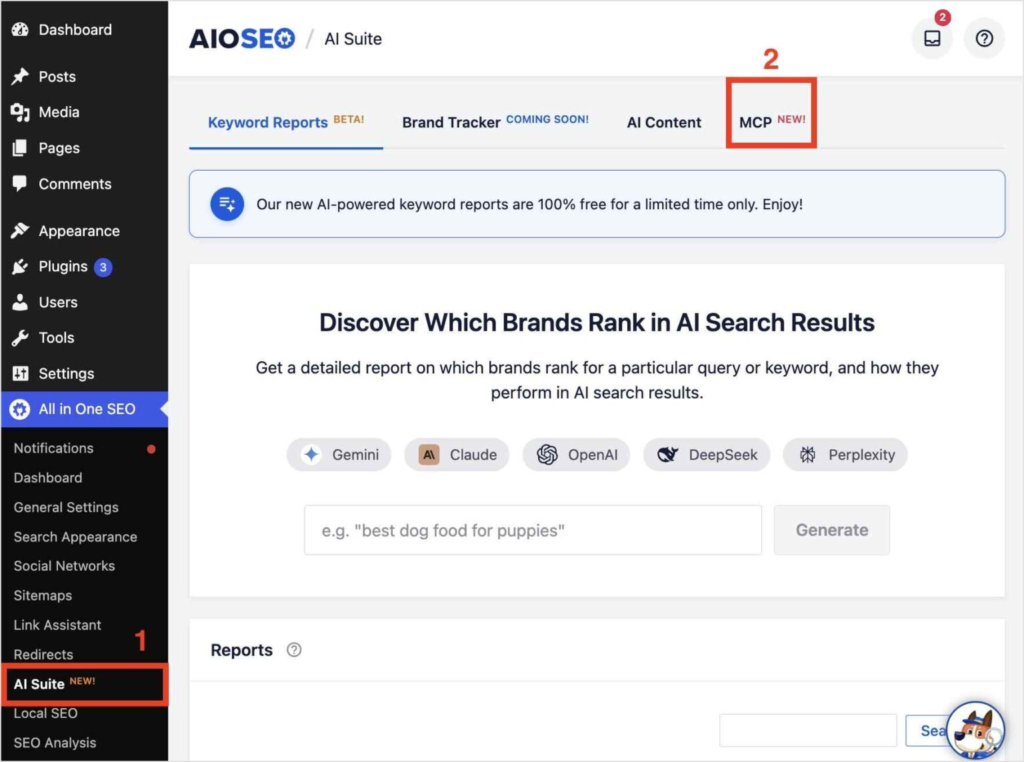
3. Click Install MCP Adapter, then Generate Application Password. Copy the password before leaving the page.
4. Select your AI client tab (Claude Code CLI, Claude Desktop, Cursor, VS Code, Gemini CLI, or ChatGPT), copy the connection snippet, and run it in your terminal or paste it into your client’s config.
5. Start a new session in your AI client. Then type a prompt like: “Check my robots.txt settings and make sure GPTBot, OAI-SearchBot, PerplexityBot, ClaudeBot, and Google-Extended are all allowed.”
Your AI will read your current robots.txt, flag any missing or misconfigured directives, and update them directly in WordPress. You can verify the result instantly in the Robots.txt Editor.
2. Generate an llms.txt File
If robots.txt tells crawlers what they can access, llms.txt tells AI agents what your site is about and what they should prioritize reading. Think of it as a sitemap built specifically for large language models (LLMs) — it lists your most important pages in a structured, readable format so AI tools know where to look first.
Here is what a basic llms.txt file looks like:
# My Site Name
> A WordPress SEO resource covering on-page optimization, schema markup, and AI search.

## Blog
- [How to Do Keyword Research](https://example.com/keyword-research/): A beginner's guide to finding keywords that rank.
- [What Is Schema Markup?](https://example.com/schema-markup/): How to add structured data to your WordPress site.
- [AI Search Optimization](https://example.com/ai-search/): How to get cited by ChatGPT and Perplexity.
There is also a companion file, llms-full.txt, that includes the full content of your key pages rather than just links. AI agents doing deep research are more likely to use llms-full.txt when deciding what to cite.
AIOSEO includes a built-in LLMs.txt Generator that automatically creates both files. You do not need to write any code.
To start, click on Sitemaps in the All in One SEO menu.
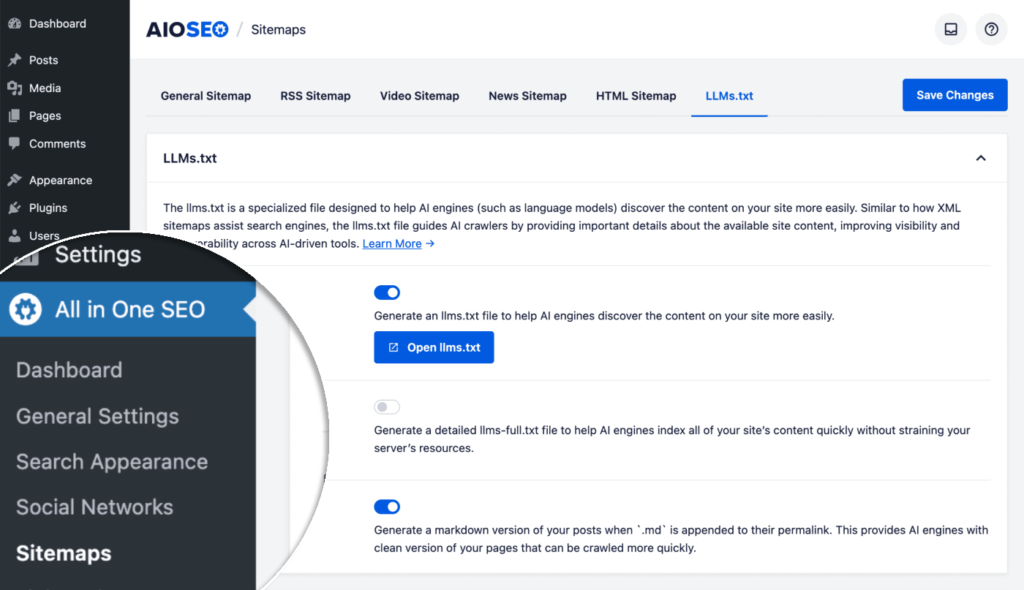
Next, click on the LLMs.txt tab.
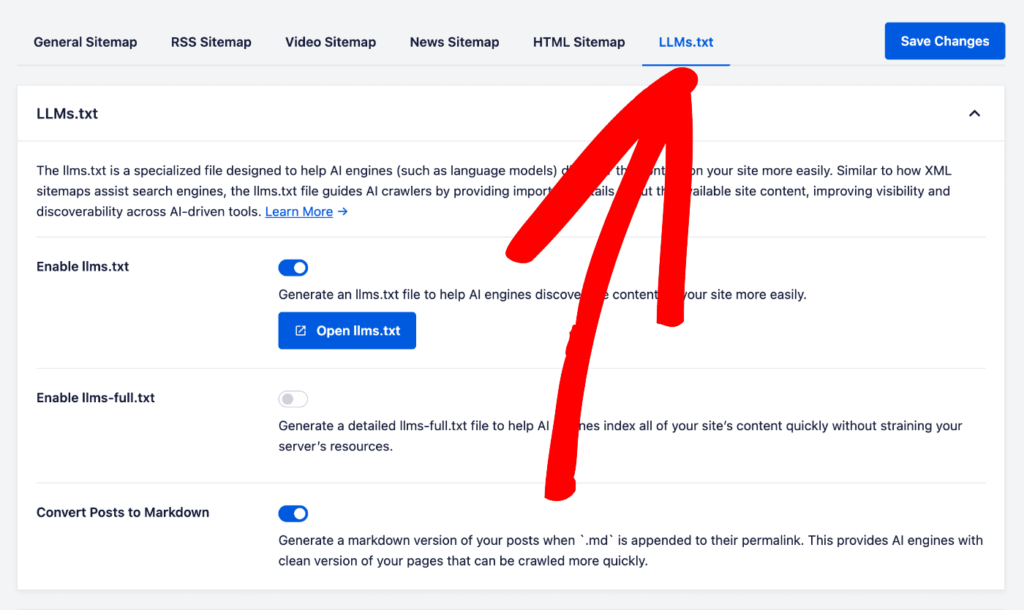
From here, you can oggle on the feature and select which post types and pages you want included. AIOSEO builds the file and keeps it up to date as you publish new content.
Want to understand the difference between the 2 file types in more detail? Read our guide on llms.txt and llms-full.txt.
3. Add FAQ and Article Schema
Structured data is one of the clearest signals you can send to AI platforms. Research shows that sites using structured data markup are cited 3.2 times more often than those without it. The FAQ schema correlates with a 28-40% higher AI citation probability, likely because it packages questions and self-contained answers in a format that AI retrieval systems are optimized to pull from.
For most blog posts, the schema markup types you want to add are:
- Article schema: Identifies the page as editorial content, signals publish date and authorship
- FAQPage schema: Wraps your FAQ section in a machine-readable format that AI tools can extract directly
- HowTo schema: Useful for step-by-step posts (like this one) where each numbered step maps to a schema action
Using AIOSEO, you can go to the Schema tab inside any post editor.
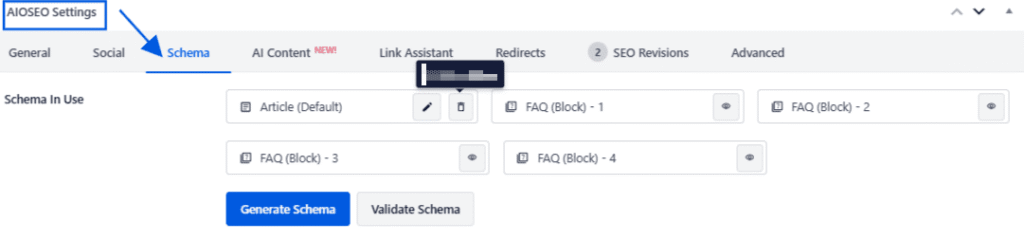
The AIOSEO Schema Generator lets you add Article, FAQPage, and HowTo schema through a visual interface, no JSON-LD knowledge required. Select the schema type, fill in the fields, and AIOSEO automatically generates and injects the correct code.
For a full walkthrough of how to set this up, see our guide on how to add schema markup in WordPress.
4. Structure Content for Extraction
AI retrieval systems do not read your article the way a human does. They scan for self-contained answers they can lift cleanly. If your content buries the point 3 paragraphs deep or relies on context from the previous section to make sense, it will likely not get extracted, even if it’s accurate and well-written.
Answer-first writing is the format that AI platforms prefer. The principle is simple: open every major section with a concise, direct answer to the question the heading implies. Keep that opening to 40 to 60 words. Then follow with supporting detail, examples, and context.
Here is a side-by-side example of the difference:
| Before (hard to extract) | After (answer-first) |
|---|---|
| Schema markup has been around for years and is used by search engines to better understand content. There are many schema types, and choosing the right one can feel overwhelming. Let us walk through why this matters for AI… | Schema markup helps AI tools cite your content by packaging your answers in a machine-readable format. Sites with structured data are cited 3.2x more often. The 2 schema types that matter most for AI citations are FAQPage and Article schema. |
The second version answers the question immediately, includes a supporting data point, and can be lifted as a standalone quote.
Other structural changes that improve extractability:
- Use question-format H2s and H3s where natural (e.g., “What Is llms.txt?” instead of “About llms.txt”)
- Write in short, discrete paragraphs rather than long blocks. AI tools extract paragraphs, not pages.
- Every section should be able to stand alone.
5. Build Consensus Signals Off Your Site
AI platforms do not simply trust a single source. They scan for consensus across multiple independent sources before confidently citing any one of them. If your site is the only one making a particular claim, it is less likely to be cited. If the same information appears on your site, in a Reddit thread, on LinkedIn, and in an industry publication, the AI treats it as more reliable.
This is why off-site presence matters for answer engine optimization (AEO), not just for traditional link building.
Practical ways to build consensus signals:
- Reddit and niche communities: Answer questions in your topic area with genuine detail. Perplexity in particular draws heavily from community platforms.
- LinkedIn: Publish posts or articles on topics you also cover on your blog. A LinkedIn post that mirrors your site’s core claim adds an independent data point.
- Industry publications and guest posts: Getting your ideas covered in respected publications increases the likelihood that AI models encountered them during training.
- Review platforms: For product-related content, a presence on G2, Capterra, or ProductHunt helps build a broader consensus around your brand.
You do not need to be everywhere. The platform that matters most depends on your niche: bloggers and affiliate publishers tend to get the most Perplexity traction from Reddit and niche forums, where readers ask real questions your content already answers. B2B and professional content creators get more mileage from LinkedIn. Start with whichever one your audience is already using.
How to Track Your Measures
AI citation tracking is still an emerging practice, but there are already reliable ways to measure whether your optimizations are paying off.
Track Referral Traffic in GA4
Both ChatGPT and Perplexity now appear as referral sources. In your GA4 referral report, look for chatgpt.com and perplexity.ai as source entries. A spike after optimizing your site is a strong signal that AI tools are beginning to surface your content.
Search Manually in ChatGPT and Perplexity
Go to each platform and search for your target topics. If your site gets cited, great. If not, note which sources are appearing and analyze what they have that yours do not. This manual check is still the most direct form of measurement available.
Check Your Server Logs for Bot Activity
If GPTBot and PerplexityBot are crawling your site, they will appear in your server access logs. Seeing increased activity from these bots after you update your robots.txt is a positive signal that your site is being indexed for AI retrieval.
Use AI Visibility Tools
AI search tools like Profound (with a free tier) and Amplitude’s AI Visibility feature are purpose-built for tracking AI citations at scale. These are worth exploring if you manage a larger site or want automated monitoring rather than manual checks.
FAQs About Getting Cited by AI Search Tools
What is the difference between AEO, GEO, and SEO?
SEO (search engine optimization) is the practice of optimizing content to rank in traditional search engines like Google. AEO (answer engine optimization) focuses specifically on getting your content extracted and cited by AI-powered answer tools like ChatGPT and Perplexity. GEO (generative engine optimization) is a broader term that covers all optimization for generative AI systems, including AI Overviews, AI chatbots, and multimodal AI search. All 3 disciplines share the same foundation: clear, structured, authoritative content. AEO and GEO layers on top of that, with AI-specific technical requirements such as llms.txt, AI crawler access, and schema markup.
How long does it take to get cited by Perplexity vs. ChatGPT?
Perplexity indexes content quickly, typically within a few days if your site allows PerplexityBot to crawl it. ChatGPT Search, which is powered by Bing, takes 1 to 3 weeks for new content to surface in responses. Google AI Overviews follow Google’s standard indexing cadence, so expect 4 to 8 weeks for newly published or significantly updated pages to appear there.
Can I pay to appear in AI search citations?
No. As of 2026, there is no paid placement option in ChatGPT, Perplexity, or Google AI Overviews. Citations in these platforms are earned, not bought. The only way to improve your citation chances is through technical setup, content structure, and authority signals, which is exactly what this guide covers.
Does schema markup guarantee AI citations?
No, schema markup does not guarantee citations. But it significantly increases your probability of being cited. Research shows that sites with structured data are cited 3.2 times more often than those without it, and that the FAQ schema specifically correlates with a 28-40% higher citation rate. Schema is one of the highest-leverage changes you can make, but it works best alongside the other optimizations covered in this guide: AI crawler access, llms.txt, answer-first writing, and off-site authority building.
What Next?
Google rankings are still important, and they always will be if you ask me, but they are no longer the only measure of whether your content is reaching people.
AI tools are becoming a primary research interface for millions of users, and most websites are invisible to them, not because of bad content, but because of a missing technical setup.
If you are not sure where to start, the llms.txt Generator is the fastest way to start. It takes under 5 minutes, requires no code, and puts your site ahead of most WordPress sites that still lack this file. Try the AIOSEO LLMs.txt Generator today.
Disclosure: Our content is reader-supported. This means if you click on some of our links, then we may earn a commission. We only recommend products that we believe will add value to our readers.
Want to Try AIOSEO for Free?
Enter the URL of your WordPress website to install AIOSEO Lite.