1-CLICK AI CONTENT OPTIMIZATION
Optimize with AI — fix your SEO score in 1 click
TruSEO tells you exactly what’s holding your content back. Optimize with AI fixes it, rewriting your title, meta description, and content in a single pass.

SEO title
rewrites

Meta description
rewrites

Headline
improvements

Readability
fixes

Spelling
corrections

Easy 1-click
revert


Everything Optimize with AI fixes in a single pass
TruSEO already tells you what’s wrong. Optimize with AI handles the fixing, rewriting multiple parts of your post at once instead of making you tackle each suggestion on your own.

SEO title rewrites
Click Optimize with AI and it rewrites your SEO title to include your focus keyword and read like something worth clicking, not just something worth indexing.
Meta description rewrites
See more than a summary: Optimize with AI turns your meta description into an actual pitch, giving searchers a real reason to click through to your site.
Headline improvements
A technically correct headline can still fall flat. Optimize with AI sharpens it for keywords and interest at once, so it earns clicks, not just impressions.
Content & readability fixes
Passive voice and run-on sentences drag your TruSEO score down. Now, AI tightens them up automatically, along with any other readability issues TruSEO flagged.
Spelling corrections
Every misspelled word gets caught and corrected in the same pass, so you’re not stuck proofreading a post you just finished optimizing.
1-click revert, zero risk
Your previous version saves as a WordPress revision before anything changes, and you can revert any single edit you don’t like without redoing the rest.
The fastest way to fix a low TruSEO score
Every minute spent manually rewriting content is a minute a competitor spends publishing. Optimize with AI closes that gap.
Why AIOSEO users optimize with 1 click instead of by hand
Most SEO plugins stop at telling you what’s wrong. Optimize with AI is the part that actually fixes it, and it’s built into every plan, not locked behind an upsell.
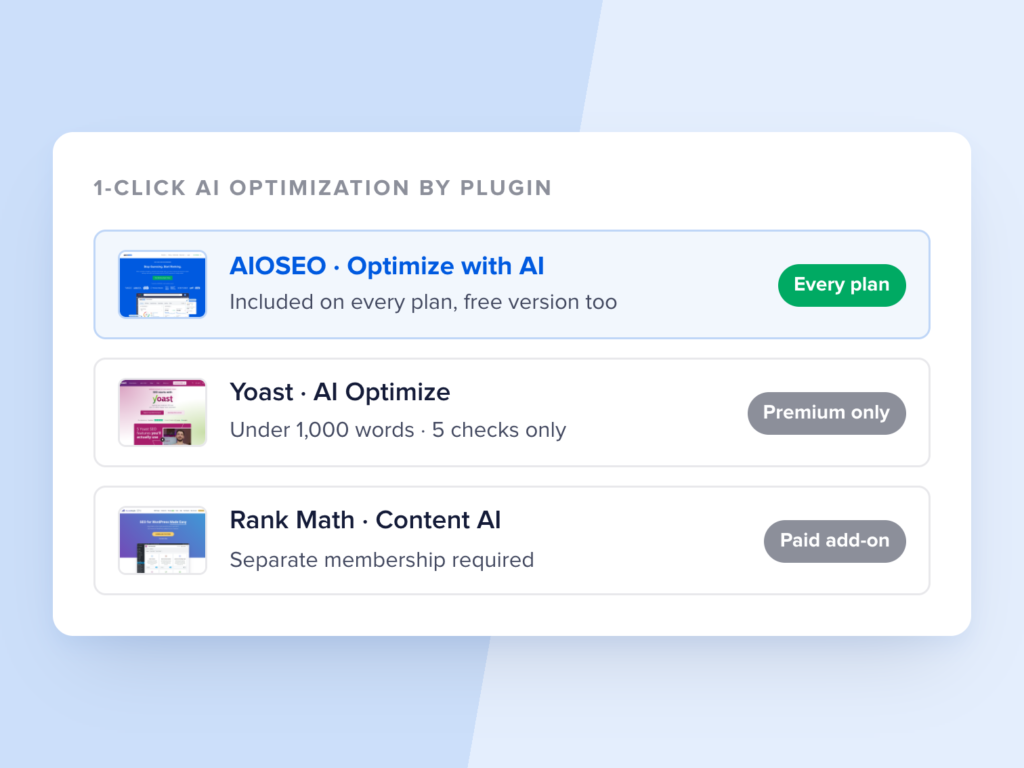
BUILT IN, NOT BOLTED ON AS A PAID ADD-ON
An AI tool competitors charge extra for
Yoast’s equivalent AI Optimize feature is Premium-only, capped at documents under 1,000 words, and limited to 5 specific checks. Rank Math’s Content AI requires a separate paid membership on top of your regular plan.
Optimize with AI comes with every AIOSEO plan, including the free version, no extra subscription required.
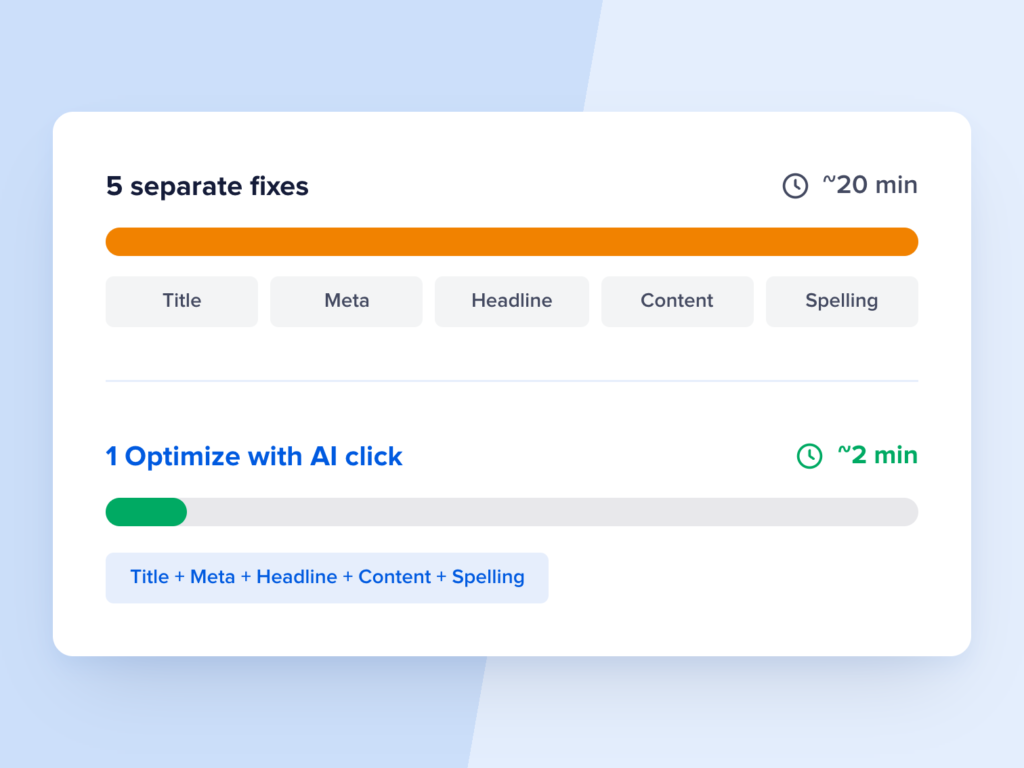
1 BUTTON, NOT 5 SEPARATE FIXES
Every fix happens in the same click
Other AI SEO tools fix 1 issue at a time, so a single post can mean 5 or more separate clicks before it’s actually done. Optimize with AI rewrites your title, meta description, headline, content, and spelling together, so what used to take 20 minutes of cleanup takes about 2.
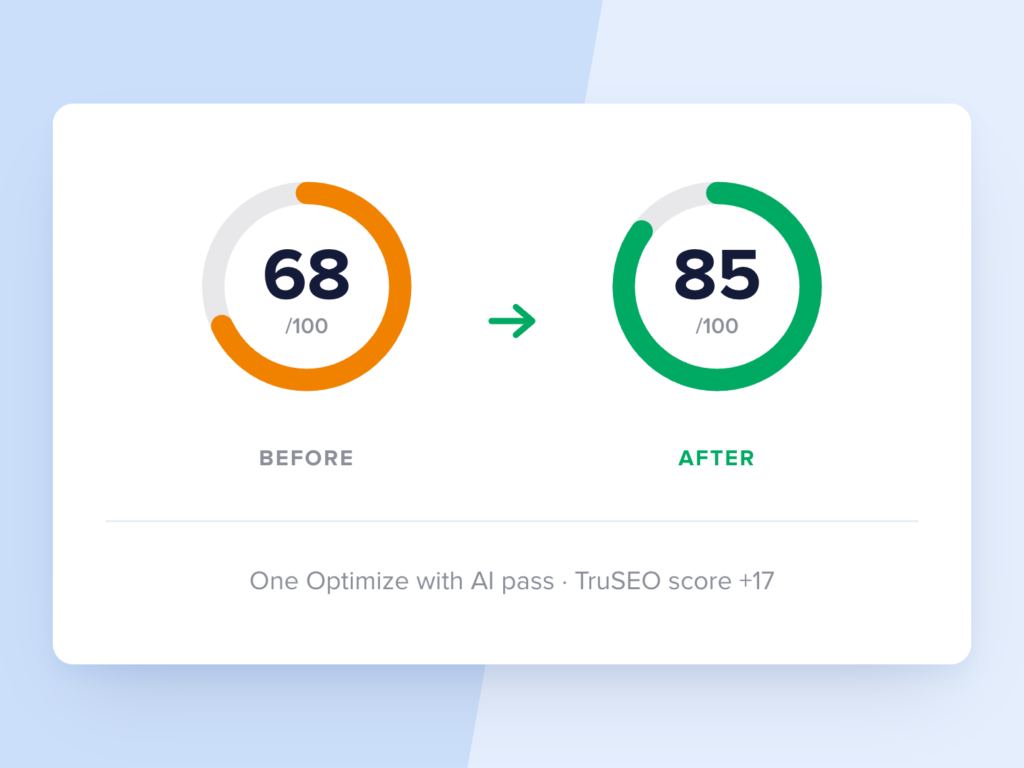
REAL SCORE MOVEMENT, NOT JUST SUGGESTIONS
A measurable jump in your SEO score
A single Optimize with AI pass can raise your TruSEO score by several points. Results vary by post, but the same 1-click action is doing the same job TruSEO used to leave for the user to finish by hand.
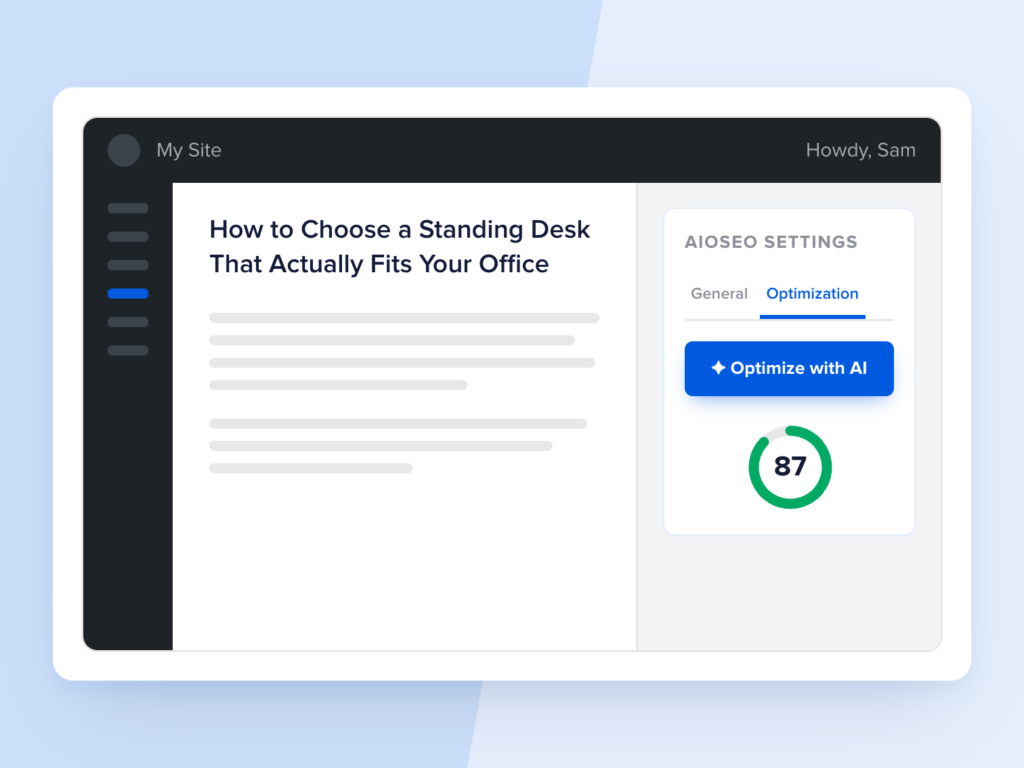
NO NEW TOOLS, NO NEW TABS
It lives where you’re already writing
Optimize with AI sits inside the Optimization tab, right in the WordPress post editor. There’s no separate app to open or export to manage, just a button next to the score that’s telling you something needs fixing.
And you don’t just have to take our word for it…
Here’s what AIOSEO users have to say
This SEO plugin is fantastic! After installing it, my site’s ranking improved, and my pages are indexing much faster.
Whether you’re a beginner or an SEO expert, AIOSEO is a game-changer. It keeps all of my sites optimized without the hassle.
I am happy with the product but, even more, I am happy with the excellent and fast support provided by the team!
Want more than Optimize with AI? Meet your complete SEO solution.
Optimize with AI handles your content, but a complete SEO strategy covers more ground than a single feature. Here’s what else you can get with AIOSEO:
Stop fixing SEO issues 1 field at a time
Optimize with AI is included on every plan, from Basic through Elite, and it’s backed by our 14-day money-back guarantee.
FAQs about Optimize with AI
Get quick answers about optimizing your WordPress site with AI. If your question isn’t listed here, then please contact us. We’re happy to help.
What is Optimize with AI, and how is it different from the Highlighter’s AI fixes?
Optimize with AI is a single button that rewrites your SEO title, meta description, headline, and content, and fixes spelling, all in 1 click. The TruSEO Highlighter is a separate feature that suggests and applies fixes 1 issue at a time as you review your content. Both draw from the same AI Credits pool, but Optimize with AI is built for a single, fast pass across your whole post.
Why does 1-click optimization matter if TruSEO already tells me what’s wrong?
Knowing what’s wrong and fixing it are 2 different jobs, and the second one is the time-consuming part. TruSEO’s real-time scoring already points out weak titles, thin meta descriptions, and readability issues. Optimize with AI removes the manual rewriting step entirely, so a low score turns into a fix instead of a to-do list.
How do I use Optimize with AI?
Open any post in the WordPress editor and go to the Optimization tab in the AIOSEO meta box. Check your TruSEO score, then click the Optimize with AI button at the top of the Content Optimization card. Confirm the action, and AIOSEO rewrites your title, meta description, headline, and content in 1 pass, showing you a report of every change with individual revert options.
What exactly does Optimize with AI rewrite?
It rewrites your SEO title to include your focus keyword and read better in search results, transforms your meta description into an actual pitch, and sharpens your headline for interest and keywords. It also cleans up passive voice, long sentences, and other readability issues TruSEO flagged, and corrects any misspelled words it finds.
Can I undo an AI optimization if I don’t like the changes?
Yes. After Optimize with AI runs, you’ll see a report of every change it made, and you can revert any single edit individually without undoing the whole pass. AIOSEO also saves your pre-optimization version as a standard WordPress revision, so you can always roll back to exactly what you had before.
How does Optimize with AI compare to Yoast’s AI Optimize or Rank Math’s Content AI?
Yoast’s AI Optimize is Premium-only, works on documents under 1,000 words, and only targets 5 specific checks like keyphrase density and sentence length. Rank Math’s Content AI requires a separate paid membership on top of your Rank Math plan. Optimize with AI rewrites your title, meta description, headline, content, and spelling together in 1 click, and it comes included with every AIOSEO plan, including the free version.
Which AIOSEO plan includes Optimize with AI?
Optimize with AI is included on every AIOSEO plan, Basic, Plus, Pro, and Elite, and it’s also available on the free Lite version. Nothing about this feature is locked behind a higher tier. You just need AI Credits to run it, which you can purchase separately.