Broken links don’t just live in your blog posts. They hide in your navigation menu, in an author’s bio, in a custom field powering your homepage hero, inside an Elementor section nobody’s touched in a year.
And the worst part is that these areas are super tricky to notice, unless you’re actively looking for broken links.
We changed that with version 1.3.1 of Broken Link Checker. Now it looks in every corner of your website, and it emails you when it finds something.
How it works
Page builder content used to be invisible to the scanner because tools like Elementor and Divi don’t store their content the way the block editor does. A plain content scan just couldn’t see it. That’s fixed now, and so are synced patterns and templates.
My favorite detail: catch a broken link inside a synced pattern once, and it’s fixed everywhere that pattern shows up on your site, not just the one place you happened to find it.
You also don’t have to turn any of this on. It’s just part of every scan starting in 1.3.1. Update the plugin, run a scan (or wait for the next automatic one), and see for yourself.
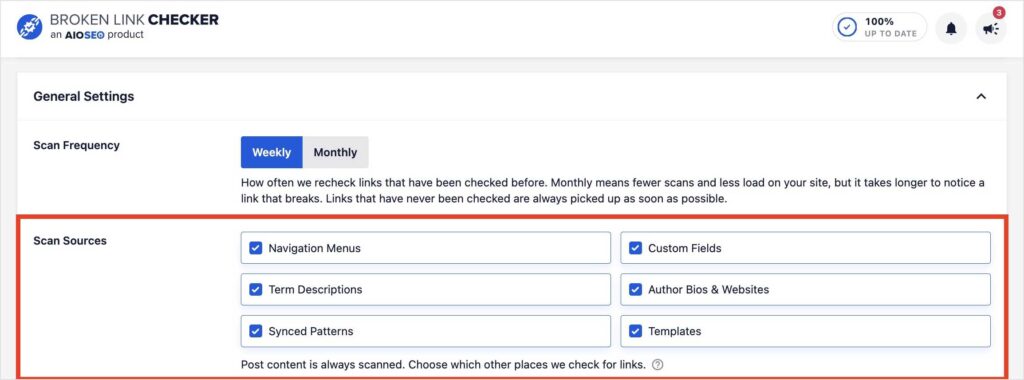
Note: You can disable specific scan sources if you want. They’re just all enabled by default. To change this, go to Broken Link Checker >> General Settings >> Scan Sources. You can then deselect any sources you don’t want to be included.
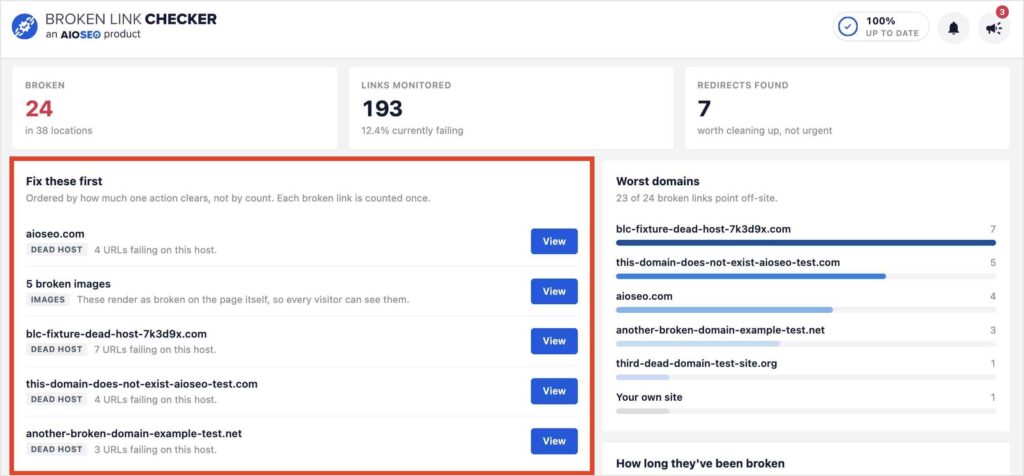
This release also includes a new BLC dashboard that shows you what to fix first and automated email reports whenever a link breaks. I rolled up everything, including some smaller performance and UI fixes, into one overview post here: Broken Link Checker 1.3.1.
I’ve wanted this fix for a while. A broken link in your nav menu does the same damage to your site as one buried in a blog post, and it deserved the same attention.
Update to Broken Link Checker 1.3.1, run a scan, and see what turns up. I’d bet it’s something you didn’t know was broken.
— Ben Rojas, President of AIOSEO
Frequently asked questions
What does Broken Link Checker scan now?
Custom fields, term descriptions, author bios and websites, navigation menus, synced patterns, templates, and content built in page builders like Elementor, Divi, SiteOrigin, and WPBakery. Previously, it only scanned posts and pages.
Do I need to turn this on?
No. Expanded scanning is part of every scan starting in version 1.3.1. Update the plugin and your next scan will include it automatically..
Is this available on my plan?
Yes, including the free version. Expanded Scanning Coverage works the same way across every Broken Link Checker plan.
Will this make scans take longer?
Scanning more of your site means more to check, but Broken Link Checker still runs scans in the background with minimal impact on site speed, the same way it always has.
What version of Broken Link Checker do I need?
You need version 1.3.1 or later. Update from your WordPress dashboard under Plugins.