Broken links are sneaky. They don’t just hide in blog posts. They can be in your navigation menu, in a custom field on a product page, in an author bio, or even inside sections created with page builders. And until now, Broken Link Checker couldn’t see most of that.
That changes with Broken Link Checker 1.3.1.
This is the biggest update yet to what the plugin can actually find. Plus, you get a new dashboard that tells you what to fix first, and email reports so you stop having to look for problems yourself.
In This Article
Broken Link Checker now scans everywhere your links hide
Broken Link Checker used to scan your posts. That’s it. If a link was broken in a custom field, a term or category description, an author bio, or your site’s navigation menu, the plugin simply never looked there, and you’d never know.
Starting in 1.3.1, Broken Link Checker now scans:
- Custom fields
- Term and category descriptions
- Author bios
- Navigation menus (one of the most common place broken links go unnoticed)
- Reusable blocks, block patterns, and Full Site Editing (FSE) templates
On top of that, the plugin now understands page builder content directly, with support for Elementor, Divi, SiteOrigin, Avada, and WPBakery.
Note: I’ve got a full breakdown of everywhere this update looks now, including how it handles page builder markup, in a dedicated post: [LINK: Expanded Scanning Coverage post].
A dashboard that tells you what to fix first
Finding more broken links is only useful if you know where to start. The new Broken Link Checker dashboard is built around that exact problem. Instead of a flat list, you get a prioritized view of what to fix first, a breakdown of which external domains are responsible for the most broken links on your site, and a look at how your broken links are distributed across your content.
If you manage a site with hundreds or thousands of links, this is the difference between staring at a spreadsheet and actually knowing where to click first.
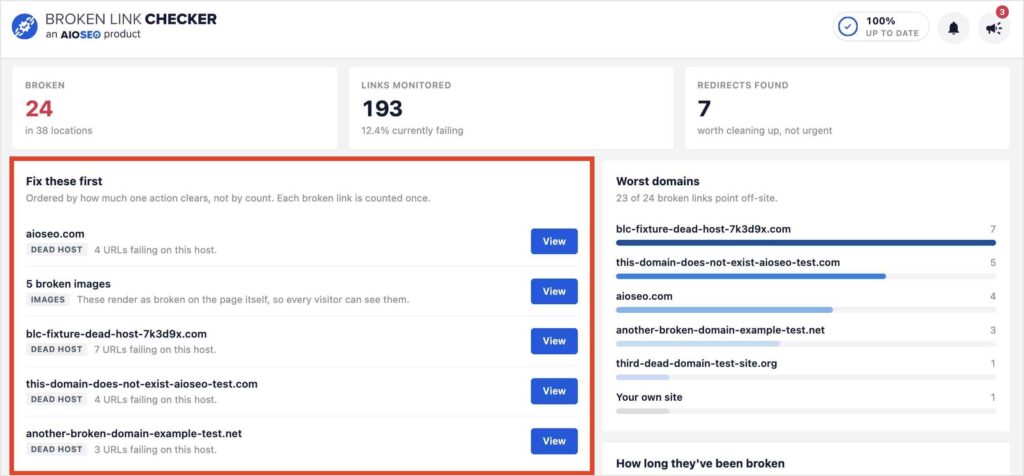
Note: More on how the new dashboard is laid out and how to read it: [LINK: New Dashboard post].
Get an email the moment a new broken link shows up
Up until now, checking for broken links meant remembering to check for broken links. That’s backwards, so we fixed it.
Broken Link Checker now sends weekly and monthly email reports whenever new broken links turn up on your site. Instead of logging in on a schedule just in case, you’ll get a notification when there’s actually something to look at.
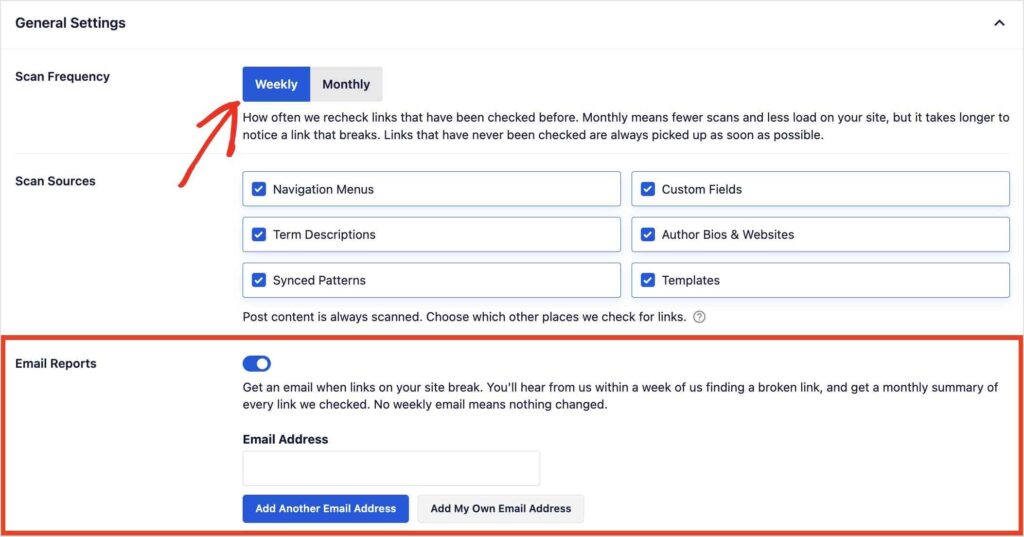
Note: Full details on how the reports work and how to set your preferred cadence: BLC email reports.
Also new in BLC 1.3.1
A few smaller updates landed in this release too:
- Monthly scan frequency: Scans were weekly-only before. Now you can switch to monthly, which puts less load on your server if you don’t need weekly checks.
- CSV export: Export your scan results to a CSV file whenever you need to share them or work with them outside the dashboard.
- New filters: Filter your results by page builder, by location on your site, or by link type (image, video, internal link, and more), so you can focus on exactly the broken links you care about.
- Newsroom, right inside Broken Link Checker: You’ll now see AIOSEO’s Newsroom updates directly in the plugin, so you don’t have to go looking for what’s new.
We also made general improvements to the UI and performance throughout the plugin. Nothing flashy on its own, just a plugin that feels a little snappier to use.
Available now on every plan
All of this is live in version 1.3.1, across every Broken Link Checker plan. If you’re already a subscriber, update your plugin and you’ll see the new BLC dashboard and expanded scanning the next time your site runs a scan.
I’ve said it before, but it’s worth repeating: broken links are one of those problems that quietly cost you traffic, rankings, and trust. And the worst part is that most site owners don’t find out until a visitor tells them. This update exists to close that gap a little further, so you find out first.
Update to Broken Link Checker 1.3.1 and let it show you what’s actually broken on your site.
Frequently asked questions
Do I need to do anything to get the expanded scanning and new dashboard?
No. Update to Broken Link Checker 1.3.1 and both are available automatically the next time your site scans.
Can I switch my scans back to weekly if I try monthly?
Yes. Scan frequency is a setting you can change at any time, weekly or monthly, whichever fits your site.
Will I get email reports automatically, or do I need to turn them on?
You can choose weekly or monthly email reports in your Broken Link Checker settings. [CONFIRM WITH DEV: on by default, or opt-in]
Which page builders does the new scanning support?
Elementor, Divi, SiteOrigin, and WPBakery are supported in 1.3.1. [CONFIRM WITH DEV: Avada support before publishing]
Do these updates work on every Broken Link Checker plan?
Yes. Broken Link Checker’s plans differ by number of sites and links scanned per month, not by feature, so everything in 1.3.1 is available whether you’re on Starter or Elite.