With Broken Link Checker, finding a broken link is easy. But knowing which one to fix first is hard, especially when BLC turns up dozens of them across your site.
Starting with version 1.3.1, you don’t have to sort through a long list and guess. Broken Link Checker now has a dashboard that puts your broken links in front of you already organized by what matters most: what to fix first, which domains are breaking on you the most, and how your broken links are actually distributed across your site.
It helps you answer:
- “Which broken link is actually hurting my rankings right now?”
- “Which external sites keep going down on me?”
- “Am I actually making progress, or just treading water?”
And the best part is that its included on every Broken Link Checker plan, including the free version.
How it works
The dashboard doesn’t run a new scan or check anything your site wasn’t already checking. It takes the same broken link data Broken Link Checker was already collecting and organizes it into a view you can actually act on, instead of one long table.
In summary: Broken Link Checker still does the scanning. The dashboard is how you make sense of what it finds.
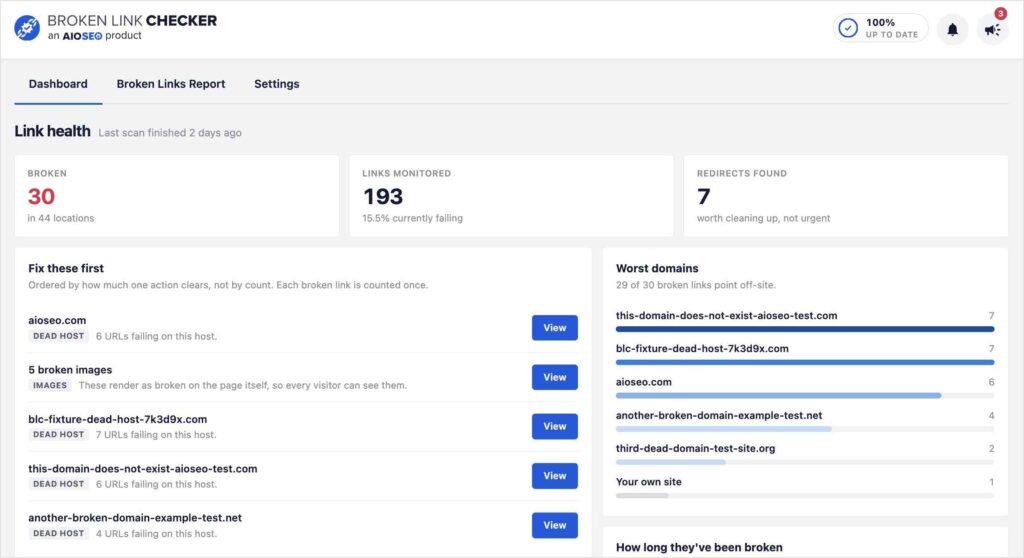
What you can do with the new dashboard
- See a prioritized view of which broken links to fix first, instead of working through your list top to bottom
- Spot your worst domains, the external sites with the most broken links pointing at your content, so you know where one fix can clean up several broken links at once
- Understand how long links have been broken across your site
- See how your broken links are distributed across your site, so you can tell whether the problem is concentrated in a few places or spread everywhere
- Jump straight from the dashboard into fixing or redirecting a link, using the same quick-fix tools you already know from Broken Link Checker
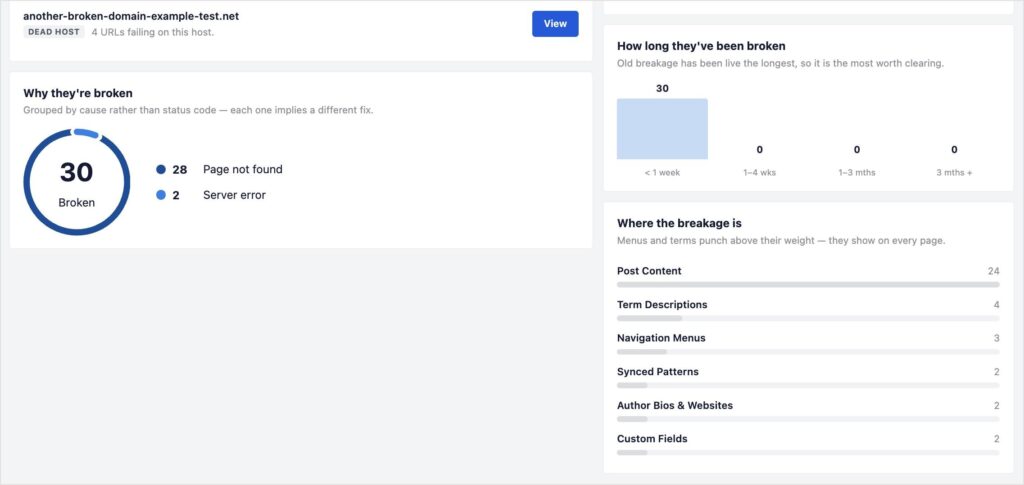
That’s the dashboard in a nutshell. No setup, no new settings to configure. It’s just there the next time you open Broken Link Checker.
Also new in BLC 1.3.1
The dashboard isn’t the only thing that changed in this release. Broken Link Checker 1.3.1 also scans a lot more of your site than before, including custom fields, navigation menus, author bios, and content built with page builders. Check out the new expanded scanning coverage to learn more.
One of my other favorite updates is that you can now receive email reports about broken links. You get a weekly email if it finds any new broken links. (No email means no new ones were found.) And you also get a monthly summary of all links checked and broken delivered straight to your inbox.
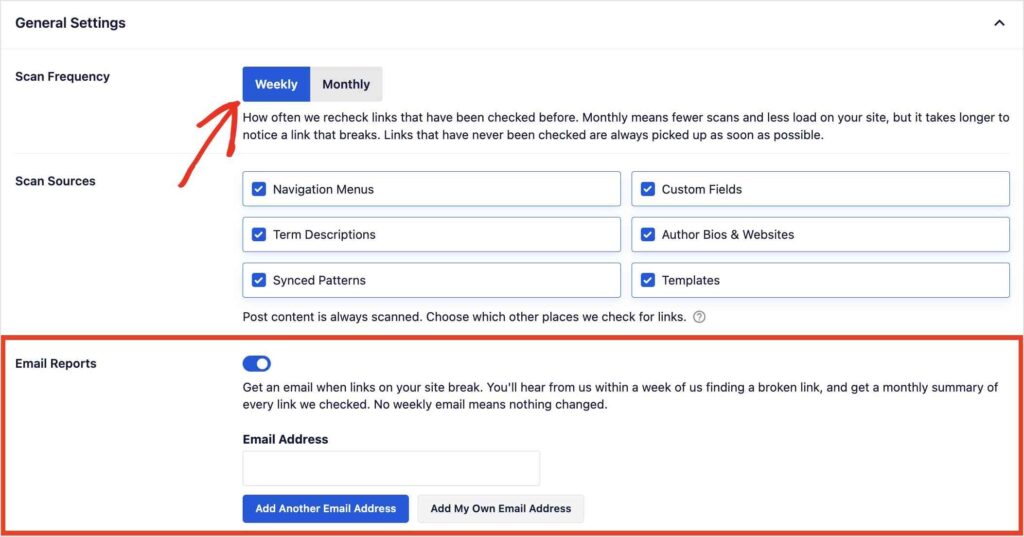
Between all of it, this is one of the bigger updates we’ve made for Broken Link Checker. Update to 1.3.1 and take a look at your dashboard. I think it’ll change how you think about cleaning up broken links, for the better.
— Ben Rojas, President of AIOSEO
P.S. If you want a full breakdown of all the changes made in 1.3.1, we’ve got you covered in this Broken Link Checker update.
Frequently asked questions
What does the new Broken Link Checker dashboard show me?
It shows you which broken links to fix first, which external domains have the most broken links pointing at your site, and how your broken links are distributed across your content.
What are “worst domains” and why do they matter?
They’re the external websites with the most links pointing to them from your site that have since gone dead. A handful of bad domains are often behind a large share of your broken links, so fixing those first clears the most ground fastest.
Do I need to set anything up to use the dashboard?
No. The dashboard uses the scan data Broken Link Checker already collects. Update to 1.3.1 and it’s there the next time you open the plugin.
Which Broken Link Checker plan includes the new dashboard?
It’s included on every plan, including the free version.