
Here’s a hard truth about your website content: almost no one is reading it word-for-word.
Decades of research have proven it: people don't read online; they scan. They're hunting for answers, and they want them fast. This fundamental behavior is why web pages should be designed for scanning rather than reading.
To keep visitors engaged and prevent them from hitting the “back” button, you need to master the art of creating scannable content.
The good news? It's a skill anyone can learn.
In this guide, I’m cutting the theory and giving you a simple checklist to transform your articles into highly scannable text that grabs and holds attention, boosting your SEO and business goals.
In This Article
- The Discovery of Scanning
- What Is Scannable Content?
- The 3 Big Benefits of Scannable Content
- The Scannable Content Checklist
- How to Create Scannable Content in 10 Steps
- 1. Write a Clear, Descriptive Title
- 2. Use the Inverted Pyramid Style
- 3. Write Short Sentences & Paragraphs
- 4. Organize Your Content With Compelling Subheadings
- 5. Use Lists to Break Down Information
- 6. Highlight Key Information With Bolding
- 7. Add Relevant Images, Videos, & Visuals
- 8. Be Concise & Use Simple Language
- 9. Ensure Your Topic is Clear from the Start
- 10. Use a Clear Call-to-Action (CTA)
- Create Scannable Content That Gets Read
- FAQs About Scannable Content
The Discovery of Scanning
Do people read digital content differently than they do printed material? Usability expert Jakob Nielsen set out to answer this question in the late 1990s.
After 4 years of studies, the Nielsen Norman Group (NNG) summarized their findings.
“People rarely read Web pages word by word; instead, they scan the page, picking out individual words and sentences.”
Subsequent research by NNG and other research groups arrived at the same conclusion.
The original study opened a new era in digital publishing. Website owners realized they needed to create content in a new way if they wanted to attract and keep readers’ attention.
One had to make content “scannable.” This type of content helps readers find what’s most relevant to their needs.
Thankfully, Nielsen’s research identified features of scannable content.
What Is Scannable Content?
Scannable content is any web page that’s structured to be easy to read and digest quickly. It's content that respects the user's time.
Instead of presenting a “wall of text,” scannable text uses specific formatting and writing techniques to guide the reader's eye to the most important information. The goal is to help a visitor quickly:
- Understand the main points of the page at a glance.
- Find the specific answer they are looking for without reading everything.
- Decide if the content is relevant to their needs.
Making your content scannable involves a few key principles:
- Breaking up large blocks of text with subheadings, images, and lists.
- Highlighting essential words and phrases with bolding or italics.
- Placing the most important information at the top of the page.
- Using as few words as possible to make your point.
When you master these techniques, you create a better user experience, which leads to higher engagement, more loyal readers, and better SEO performance.
The 3 Big Benefits of Scannable Content
Is making your content scannable worth the effort? Absolutely. In a world of short attention spans, scannable content is a competitive advantage.
Here are the 3 biggest benefits:
1. It Improves Reader Engagement
By making your content easy to scan, you're saving your readers time and effort. This makes them far more likely to stay on your page and actually consume your information.
Research by the Nielsen Norman Group has proven that scannable layouts lead to significant improvements in usability. This translates directly to a lower bounce rate and more time spent on your site—two powerful signals that tell Google your content is valuable.
2. It Boosts Your SEO
Google's #1 goal is to provide its users with the best possible answer to their questions. The principles of good scannability—clear headings, concise language, and a logical structure—are also the hallmarks of high-quality, well-organized content.
When you create scannable text, you're not just helping your users; you're making it easier for Google to understand your page. This can lead to better rankings and even help you win featured snippets.
3. It Increases Conversions
Whether your goal is to get a newsletter signup, a contact form submission, or a product sale, scannable content helps you achieve it.
When a user can quickly find the information they need and understand your core message, they are much more likely to take the action you want them to. A clear, scannable page with a prominent call-to-action will always outperform a dense wall of text.
The Scannable Content Checklist
Ready to make your content more effective? Here is your 10-point checklist for creating highly scannable text that keeps readers engaged.
- Write Compelling Subheadings: Break up your text into logical sections with clear, descriptive subheadings.
- Use the Inverted Pyramid Style: Put your most important information and key takeaways at the top.
- Write Short Paragraphs: Keep paragraphs to 2-4 sentences maximum.
- Write Short Sentences: Use simple, direct language and avoid complex sentence structures.
- Use Lists: Organize information into bulleted or numbered lists whenever possible.
- Add Relevant Images & Videos: Break up long blocks of text with visuals that support your content.
- Highlight Key Information: Use bold or italics to draw attention to the most important words and phrases.
- Be Concise: Use as few words as possible to make your point.
- Use Objective Language: Avoid promotional “marketese” and stick to clear, factual language.
- Ensure Your Topic is Clear: Start with a focus keyphrase and use it in key places like your title and intro.
Keep reading for a detailed breakdown of how to master each point (and how the right tools can help).
How to Create Scannable Content in 10 Steps
Follow these steps to improve the scannability of your content.
WordPress users will benefit from using the All in One SEO (AIOSEO) plugin because it gives you feedback as you write.
1. Write a Clear, Descriptive Title
Your title is the gateway to your content. For scannability, it must do two things instantly:
- Grab attention
- Describe what the page is about
A reader should know the topic of your page just by scanning the title. A best practice is to “front-load” your title by placing your focus keyword at the beginning. This immediately confirms to the reader that they're in the right place.
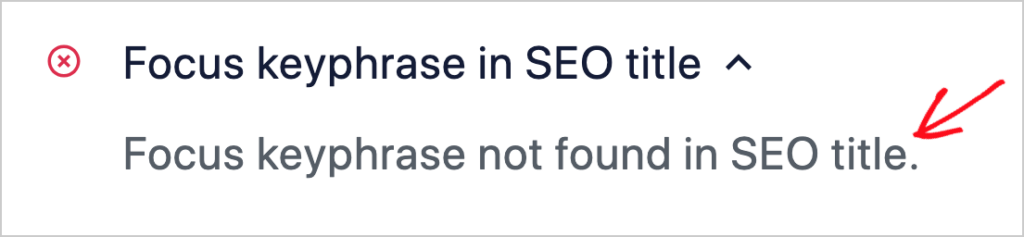
AIOSEO checks your SEO title for your primary keyword automatically.
2. Use the Inverted Pyramid Style
This is a classic journalism technique that is even more critical for online content: put your most important information first.
Readers should get the main takeaway of your article in the first few paragraphs, “above the fold” (before they have to scroll). This respects their time and gives them the core answer immediately. If they're interested, they'll keep scrolling for more detail. But if they leave, they'll still leave with the most important message.
Think of your introduction as a summary of the entire article. State your main point clearly and upfront.
Browse the Nielsen Norman Group blog to get some excellent examples of this. They use this inverted pyramid style for all of their content.
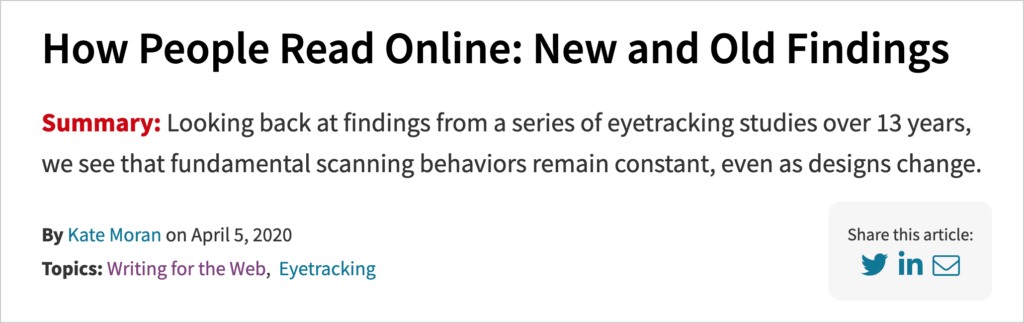
Another example is Harvard Business Review which places a short summary at the beginning of their articles.
Pro-Tip with AIOSEO: The TruSEO Analysis tool from AIOSEO helps you enforce this principle. The checklist we saw in the last step also checks for your keyword in the introduction.
3. Write Short Sentences & Paragraphs
Nothing kills scannability faster than a giant wall of text. When a reader sees a long, dense paragraph, their eyes glaze over and they are very likely to skip it entirely.
The solution is to create more white space on your page.
- Keep paragraphs to 3-4 sentences maximum. This makes your content feel less intimidating and easier to digest.
- Use short, simple sentences. Avoid complex words and jargon. The goal is clarity, not trying to sound academic. Clear, direct language is always more effective.
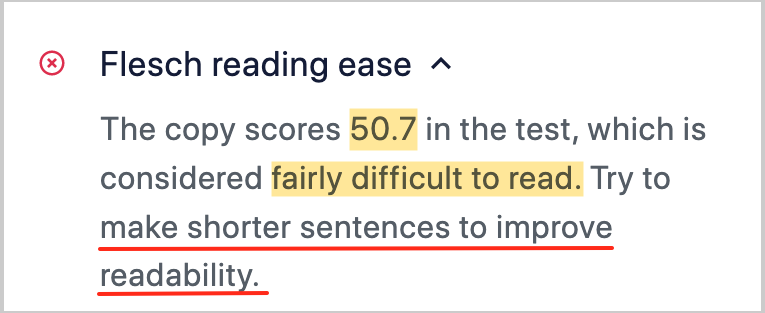
Pro-Tip with AIOSEO: The Readability analysis in the AIOSEO sidebar is your best friend here. It automatically scans your text and warns you if your sentences or paragraphs are too long. It also provides a Flesch Reading Ease score, giving you a real-time grade on how easy your content is to understand.
4. Organize Your Content With Compelling Subheadings
If your title is the gateway to your page, then subheadings are the signposts that guide readers through your content. A reader should be able to understand the entire structure and main points of your article just by scanning the H2s and H3s.
Good subheadings:
- Break up long sections of text into smaller, more manageable chunks
- Are descriptive and tell the reader what the following section is about
- Create a logical flow and hierarchy for your content
This is not just great for your readers; it's also crucial for SEO. Search engines use your subheadings to better understand the structure and key topics of your page.
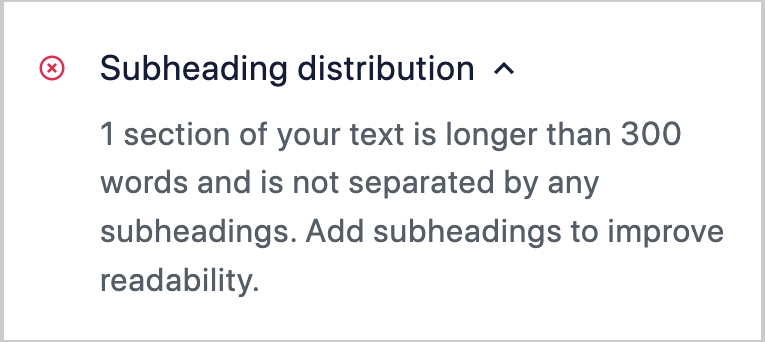
Pro-Tip with AIOSEO: TruSEO helps with this. It will alert you if you have a long block of text (more than 300 words) without a subheading, prompting you to break up your content for better scannability.
5. Use Lists to Break Down Information
Whenever you have a series of items, steps, or ideas, the best way to present them is with a list. Bulleted or numbered lists are a scanner's best friend.
They instantly signal to the reader's brain: “Here is a series of distinct points that are easy to digest.”
Use lists to:
- Outline the steps in a process (like this one!).
- Summarize key features or benefits.
- Present a collection of resources or examples.
Instead of burying important information in a dense paragraph, a simple bulleted list makes it stand out and dramatically improves comprehension.
6. Highlight Key Information With Bolding
When a reader's eyes are scanning a page, they are naturally drawn to anything that looks different from the surrounding text. This is where strategic use of bolding comes in.
Don't bold entire paragraphs. Instead, use bolding to highlight:
- Key terms you are defining
- The main takeaway or conclusion of a paragraph
- Crucial action steps you want the reader to take
By bolding the most important phrases, you create a “second layer” of content. A reader can get the entire gist of your article just by scanning the bolded text. This is an incredibly powerful technique for improving both scannability and information retention.
7. Add Relevant Images, Videos, & Visuals
A long, unbroken scroll of text is intimidating. Relevant visuals are the perfect way to break up your content, reset a reader's attention, and illustrate your points more effectively.
Good visuals to use include:
- Screenshots to show examples or illustrate steps in a process
- Infographics to present data or complex information in a scannable way
- Charts and diagrams to visualize concepts
- Relevant stock photos to add context and visual appeal
- Embedded videos to provide a different way for users to consume your content
Each visual element creates a natural stopping point for the scanning eye, making your content feel more engaging and less like a chore to read.
Pro-Tip with AIOSEO: The Readability analysis includes a specific check for images and video in content. If your article is a long block of text with no visuals, the plugin will recommend adding some to improve the user experience and the scannability of your page.
8. Be Concise & Use Simple Language
Scannable content is efficient. Every word should serve a purpose. This is a core principle of good writing, but it's especially critical for an online audience with a short attention span.
- Cut unnecessary words. Instead of “in order to,” just use “to.”
- Avoid jargon and “marketese.” As usability research has proven, readers prefer clear, objective language over promotional fluff.
- Write for a broad audience. A good rule of thumb is to aim for an 8th-grade reading level. This ensures your content is accessible and easy to understand for the widest possible audience.
The goal is not to “dumb down” your content, but to make it as clear and direct as possible.
Pro-Tip with AIOSEO: Refer to your readability score in TruSEO to determine if you should use simpler language. A high score may be too difficult for the general public to read and understand.
9. Ensure Your Topic is Clear from the Start
For a reader who is scanning, clarity is everything. They need to confirm immediately that your page is relevant to their search. If your core topic isn't obvious within the first few seconds, they will leave.
The best way to ensure clarity is to define a focus keyphrase for your article. This is the main topic you want to rank for. Once you have your keyphrase, you should place it in a few high-visibility locations:
- Your page title
- Your URL
- The first paragraph of your introduction
- At least one subheading
This practice makes your topic crystal clear to both your readers and to search engines, which is a win for scannability and SEO.
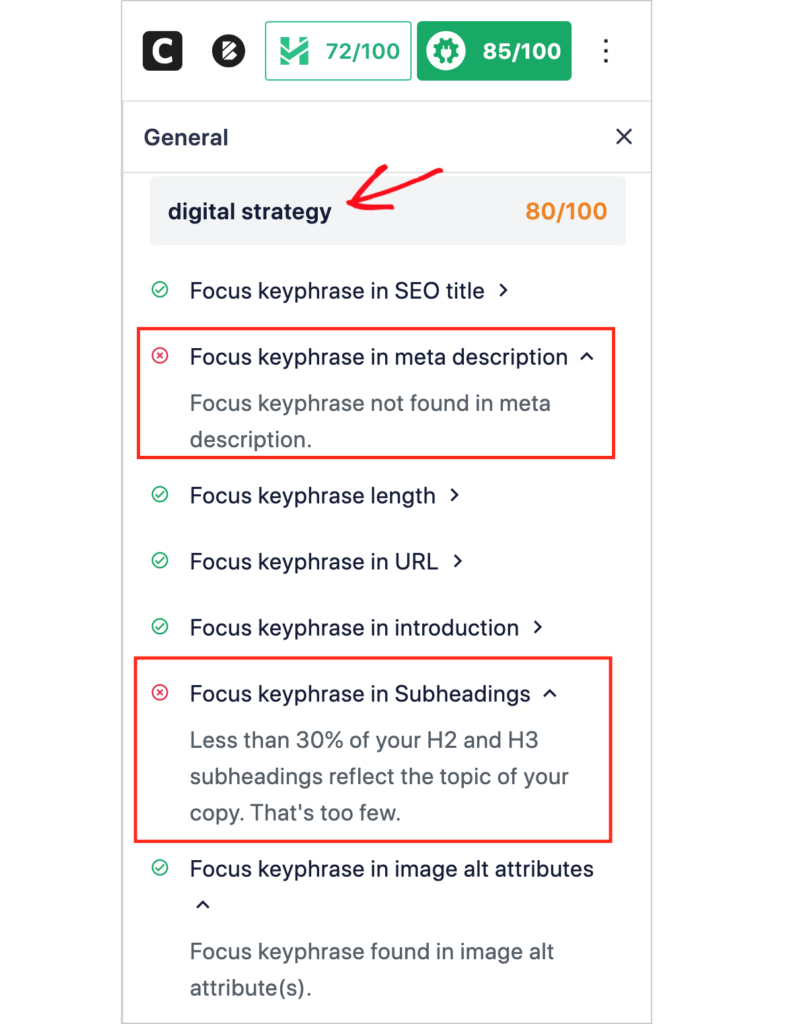
Pro-Tip with AIOSEO: TruSEO On-Page Analysis is built around this principle. When you enter your focus keyphrase, the checklist provides a real-time analysis, verifying that you've included your main topic in all the crucial places. It's the easiest way to ensure your content's purpose is clear at a glance.
10. Use a Clear Call-to-Action (CTA)
After you've created a perfectly scannable article, you need to tell your reader what to do next. A scannable page guides a user toward a specific goal, and a clear call-to-action (CTA) is the final step.
Your CTA should be:
- Visually distinct: Use a button, a styled box, or a bolded link to make it stand out.
- Action-oriented: Start with a verb like “Download,” “Subscribe,” “Learn More,” or “Get Started.”
- Placed logically: Put your CTA where the user is most likely to be ready to act, such as at the end of a section or at the conclusion of your article.
Without a clear CTA, even the most engaged reader might simply leave your site. A well-designed CTA is the perfect, scannable way to turn a reader into a subscriber or customer.
Pro-Tip: For creating highly effective, scannable CTAs, I recommend using a tool like OptinMonster. It allows you to create visually appealing popups, slide-ins, and inline forms that are designed to grab attention and convert visitors without being intrusive.
Create Scannable Content That Gets Read
Mastering scannable content isn't just another SEO trick; it's a fundamental shift in how you respect your reader's time and attention. In a world where everyone scans, the most user-friendly, scannable text wins.
You now have the complete 10-point playbook for writing scannable text. By using clear subheadings, short paragraphs, bolded text, and relevant visuals, you can transform any “wall of text” into an engaging, easy-to-navigate experience for your visitors.
And you don't have to do it alone.
A powerful tool like All in One SEO acts as your real-time scannability coach. Its built-in readability analysis and on-page checklist guide you every step of the way, making it easier than ever to create content that is both search engine friendly and reader friendly.
If you found this article helpful, go ahead and subscribe to our YouTube Channel. You’ll find lots of valuable tutorials there. You can also follow us on X (Twitter), LinkedIn, or Facebook to stay in the loop.
FAQs About Scannable Content
How do you make an article scannable?
To make an article scannable, you should focus on its formatting. The most effective techniques are using clear, descriptive subheadings to break up sections, writing short paragraphs (3-4 sentences max), using bulleted or numbered lists for series of items, and highlighting the most important phrases with bold text.
Why is scannable content important for SEO?
Scannable content is important for SEO because it directly improves the user experience. When readers can easily find the information they need, they stay on your page longer and are less likely to “bounce” back to the search results. These positive user engagement signals tell Google that your page is a high-quality answer, which can lead to higher rankings.
What is the difference between readability and scannability?
Readability is about the clarity of your writing (using simple words and short sentences). Scannability is about the formatting and presentation of your text (using subheadings, lists, and bolding). In short, readability makes your content easy to understand, while scannability makes it easy to look at and navigate quickly.
What is the best tool to check for scannability?
While there isn't one single tool for a “scannability score,” the best approach is to use a comprehensive SEO plugin like All in One SEO. Its built-in Readability analysis automatically checks for key scannability factors like short paragraphs, sentence length, and the use of subheadings, giving you a real-time guide right in your WordPress editor.
Want to Try AIOSEO for Free?
Enter the URL of your WordPress website to install AIOSEO Lite.

Disclosure: Our content is reader-supported. This means if you click on some of our links, then we may earn a commission. We only recommend products that we believe will add value to our readers.

Good stuff. I like the fact that you actually employ what you’re talking about in your article – which is what more people should DO.
Thank you for your feedback Paul. Glad you found it interesting!
so good that i joined
This has been incredibly helpful while on my blogging journey. Thank you!
Thank you for your kind comment, Marsden. I’m delighted you found it of use!