
Vuoi che più visitatori trovino il tuo sito web tramite Google e attrarre più traffico organico, ma non sai da dove iniziare?
La buona notizia è che aumentare il traffico organico non richiede un budget enorme o un team di esperti SEO. Richiede la giusta strategia, applicata con costanza.
Quindi, in questa guida, ti illustreremo 13 consigli comprovati (che ho testato personalmente) per aumentare il traffico organico sul tuo sito web, dai passaggi fondamentali che la maggior parte delle persone salta alle tattiche che stanno avendo successo nella ricerca in questo momento.
Iniziamo con una definizione.
In questo articolo
- Cos'è il Traffico Organico?
- 13 modi per aumentare il traffico organico sul tuo sito web
- 1. Esegui prima un audit SEO
- 2. Fai una ricerca approfondita delle parole chiave
- 3. Comprendi e soddisfa l'intento di ricerca
- 4. Ottimizza la tua SEO on-page
- 5. Crea contenuti di alta qualità, E-E-A-T
- 6. Ottimizza per i Featured Snippet e le Panoramiche AI
- 7. Costruisci una strategia di internal linking intelligente
- 8. Affronta la tua SEO tecnica
- 9. Costruisci backlink pertinenti
- 10. Mantieni aggiornati i tuoi contenuti esistenti
- 11. Ricerca i tuoi concorrenti
- 12. Sfrutta i social media
- 13. Utilizza l'email marketing e le notifiche push
- Come monitorare il tuo traffico organico
- Domande frequenti sul traffico organico
Cos'è il Traffico Organico?
Il traffico organico sono i visitatori che arrivano sul tuo sito web tramite risultati di motori di ricerca non a pagamento. Quando qualcuno digita una domanda su Google e clicca su un risultato che non è un annuncio a pagamento, quel clic conta come traffico organico.
È la fonte di traffico più preziosa e sostenibile per la maggior parte dei siti web. Ecco perché: il traffico a pagamento si ferma nel momento in cui smetti di pagare. Il traffico organico, se costruito correttamente, continua a fluire. Una pagina ben ottimizzata può generare visitatori costanti per mesi o addirittura anni dopo la sua pubblicazione.
Generare traffico organico sul tuo sito web dipende principalmente dalla SEO, un insieme di strategie che aiutano le tue pagine a posizionarsi più in alto nei risultati di ricerca. Più alto ti posizioni, più persone vedono e cliccano sui tuoi contenuti. Ora, vediamo esattamente come fare in modo che ciò accada.
13 modi per aumentare il traffico organico sul tuo sito web
Queste 13 tattiche sono ordinate in modo da costruire l'una sull'altra. Ti consiglio di iniziare dall'alto e procedere verso il basso per ottenere i risultati più rapidi.
1. Esegui prima un audit SEO
Prima di creare nuovi contenuti o inseguire nuove parole chiave, scopri cosa sta già frenando il tuo sito. Un audit SEO rivela i problemi tecnici, le lacune nei contenuti e le ottimizzazioni mancate che ti stanno silenziosamente costando posizionamenti e traffico in questo momento.
I problemi comuni che un audit scopre includono link interrotti, meta description mancanti, lentezza nel caricamento delle pagine, contenuti duplicati e pagine difficili da scansionare e indicizzare per i motori di ricerca. Risolvere prima questi problemi significa che ogni altra tattica in questo elenco funzionerà meglio.
Se utilizzi WordPress, la SEO Checklist di AIOSEO ti fornisce un audit dettagliato del sito direttamente nella tua dashboard. Scansiona il tuo sito, segnala i problemi e valuta la tua salute SEO generale in modo da sapere esattamente cosa correggere per primo.
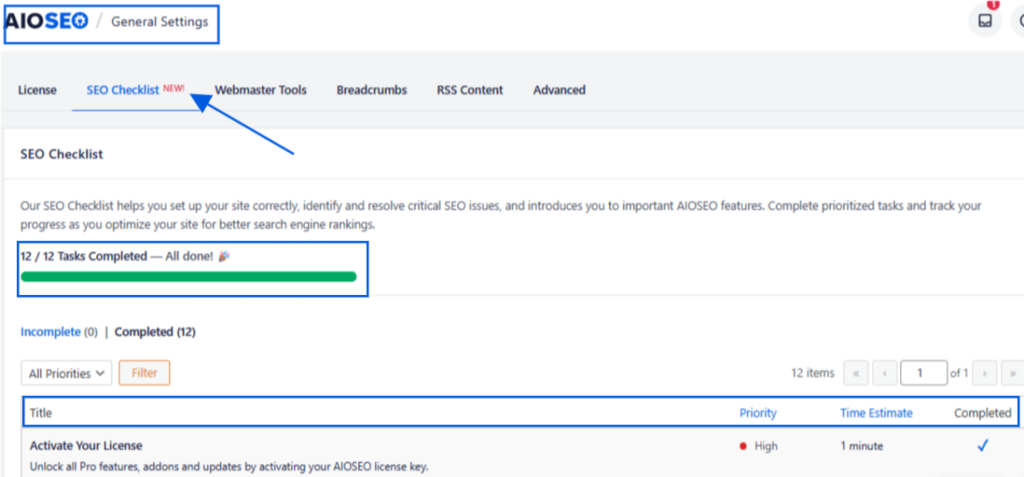
Per una guida passo passo, consulta la nostra guida su come fare un audit SEO in WordPress.
2. Fai una ricerca approfondita delle parole chiave
Le parole chiave sono le parole e le frasi che il tuo pubblico digita nei motori di ricerca quando cerca contenuti come i tuoi. Scegliere quelle giuste fa la differenza tra contenuti che si posizionano e contenuti che nessuno trova.
Per la ricerca di parole chiave a coda lunga, consiglierei di utilizzare LowFruits. Va oltre i semplici dati sul volume di ricerca e identifica le opportunità più facili per vittorie rapide.
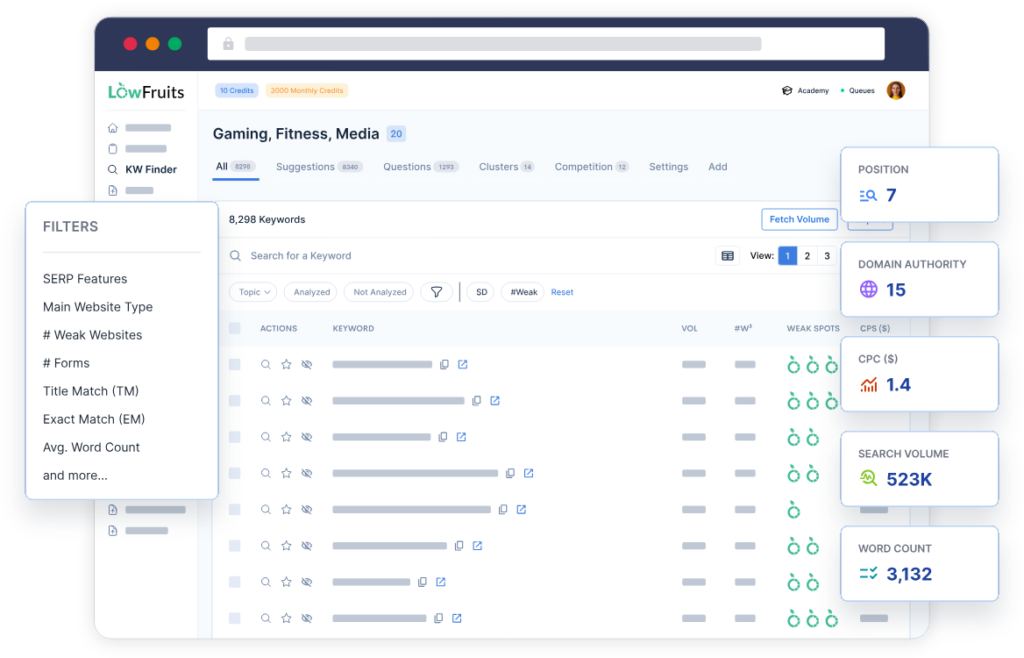
Le migliori parole chiave per la maggior parte dei proprietari di siti WordPress sono le parole chiave a coda lunga, che sono frasi più lunghe e specifiche come "come aggiungere markup schema in WordPress" invece di solo "markup schema". Le parole chiave a coda lunga hanno una concorrenza inferiore, un migliore allineamento con l'intento di ricerca e una probabilità molto più alta di posizionarsi, specialmente per i siti più recenti.
Una volta trovate le tue parole chiave target, usale in modo naturale nel tuo:
- Titolo della pagina e tag del titolo SEO
- Tag di intestazione (H1, H2, H3)
- Contenuto del corpo, specialmente le prime 100 parole
- Meta description e slug dell'URL
Per la ricerca di parole chiave a coda lunga, consiglierei di utilizzare LowFruits. Va oltre i semplici dati sul volume di ricerca e identifica le opportunità più facili per vittorie rapide.
Vuoi evitare il keyword stuffing? Dai un'occhiata al nostro elenco dei migliori controllori di densità delle parole chiave per WordPress.
3. Comprendi e soddisfa l'intento di ricerca
L'intento di ricerca è il motivo per cui un utente effettua una ricerca. La priorità assoluta di Google è far corrispondere i risultati di ricerca a ciò che gli utenti desiderano realmente. Se il tuo contenuto non è allineato con quell'intento, non si posizionerà, non importa quanto sia ben ottimizzato.
Ci sono 4 tipi principali di intento di ricerca:
- Informativo: L'utente vuole imparare qualcosa (ad es. "cos'è la SEO").
- Navigazionale: L'utente vuole raggiungere un sito web o una pagina specifica (ad es. "login AIOSEO").
- Commerciale: L'utente sta ricercando prima di effettuare un acquisto (ad es. "migliori plugin SEO per WordPress").
- Transazionale: L'utente è pronto ad acquistare o ad agire (ad es. "acquista AIOSEO Pro").
Prima di scrivere qualsiasi contenuto, cerca la tua parola chiave target e guarda cosa stanno facendo i primi 5 risultati. Sono elenchi puntati, guide "come fare" o pagine di prodotto? Quel formato ti dice cosa Google ha determinato che i ricercatori desiderano. Abbinalo e le tue possibilità di posizionamento miglioreranno in modo significativo.
Corrispondere all'intento di ricerca migliora anche il tuo tasso di clic (CTR) e riduce il tuo tasso di rimbalzo, entrambi segnali ai motori di ricerca che il tuo contenuto sta servendo al suo scopo.
4. Ottimizza la tua SEO on-page
La SEO on-page si riferisce a tutte le ottimizzazioni che apporti direttamente su una pagina per aiutarla a posizionarsi più in alto. Ciò include il tuo tag del titolo, la meta description, le intestazioni, la struttura dei contenuti, le immagini e i collegamenti interni. Ottenere questi elementi corretti su ogni pagina è uno dei modi più affidabili per migliorare i tuoi posizionamenti organici.
Ecco alcuni fattori di SEO on-page ad alto impatto su cui concentrarsi:
- Tag del titolo: Includi la tua parola chiave principale vicino all'inizio. Mantienilo sotto i 60 caratteri in modo che non venga troncato nei risultati di ricerca.
- Meta description: Scrivi un riassunto avvincente di 150-160 caratteri che includa la tua parola chiave e dia ai lettori un motivo per cliccare.
- Intestazioni: Usa la tua parola chiave principale nel tuo H1 e includi parole chiave secondarie in modo naturale nei tuoi titoli H2 e H3.
- Testo alternativo immagine: Descrivi ogni immagine con un testo alternativo pertinente in modo che i motori di ricerca possano comprendere le tue immagini.
- URL slug: Mantieni gli URL brevi e ricchi di parole chiave (ad esempio, tuosito.com/seo-on-page).
Il punteggio TruSEO Score di AIOSEO semplifica l'ottimizzazione on-page per gli utenti WordPress. Analizza i tuoi contenuti in tempo reale e ti fornisce un punteggio insieme a suggerimenti specifici e attuabili per migliorare, tutto direttamente all'interno dell'editor di WordPress.
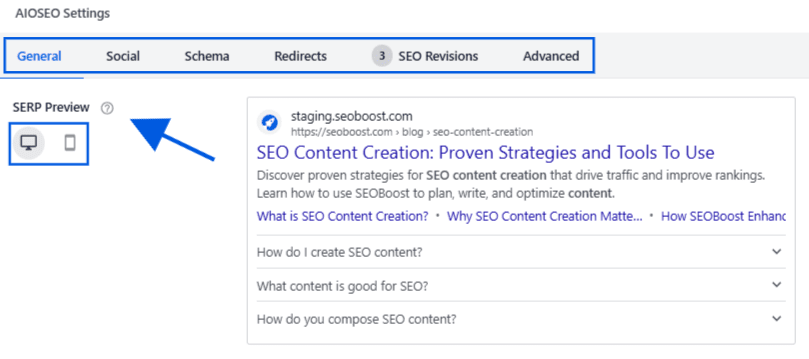
Per un'analisi più approfondita, consulta la guida completa alle migliori pratiche SEO on-page.
5. Crea contenuti di alta qualità, E-E-A-T
La qualità dei contenuti è il singolo fattore più importante del traffico organico nel tempo. I sistemi di ranking di Google sono progettati per far emergere contenuti genuinamente utili, accurati e affidabili. Questo standard è catturato nel framework E-E-A-T di Google, che sta per Experience, Expertise, Authoritativeness e Trustworthiness (Esperienza, Competenza, Autorevolezza e Affidabilità).
Creare contenuti E-E-A-T significa scrivere basandosi sull'esperienza reale, supportare le affermazioni con dati e pubblicare contenuti che servono il lettore prima di ogni altra cosa.
Ecco come si presenta in pratica:
- Scrivi basandoti sull'esperienza reale: Condividi osservazioni, risultati ed esempi di prima mano piuttosto che consigli generici. Questa è la componente "Esperienza" che Google ha aggiunto al framework.
- Supporta le tue affermazioni: Cita ricerche originali, dati o fonti autorevoli ove possibile.
- Mostra le credenziali dell'autore: Visualizza biografie degli autori che dimostrino la competenza pertinente sull'argomento trattato.
- Struttura per la leggibilità: Usa paragrafi brevi, sottotitoli ed elenchi per rendere i tuoi contenuti facili da scansionare e assimilare.
- Copri gli argomenti in modo completo: Non lasciare domande ovvie senza risposta. I contenuti completi superano i contenuti scarni in quasi tutti gli argomenti.
Se sei uno scrittore (come me) che usa WordPress per pubblicare contenuti, ti consiglio di utilizzare la funzione Author SEO di AIOSEO per creare segnali E-E-A-T direttamente nel tuo sito WordPress.
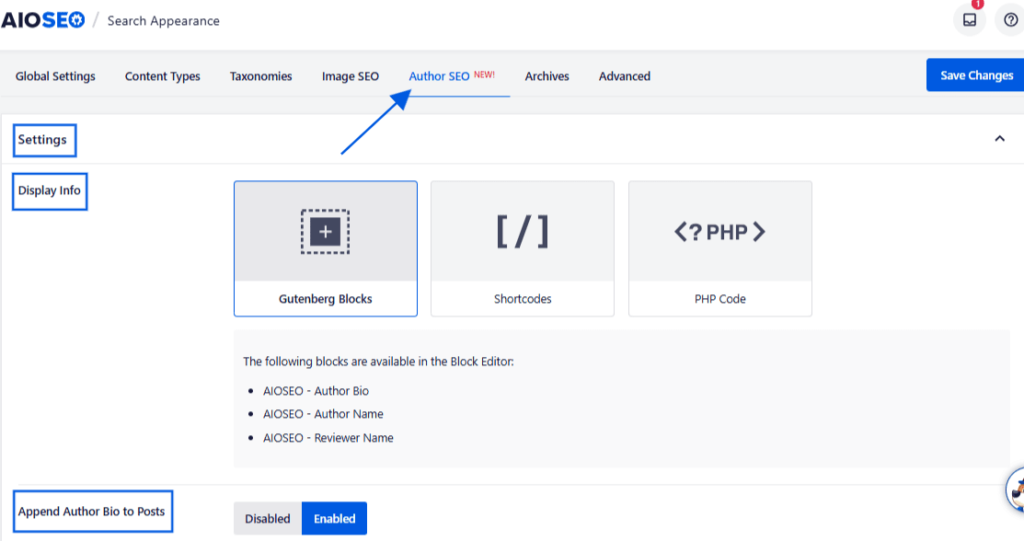
Ti consente di aggiungere profili autore strutturati, collegare profili social e credenziali, e generare il markup schema che dice a Google chi ha scritto ogni contenuto e perché è qualificato per scriverlo.
6. Ottimizza per i Featured Snippet e le Panoramiche AI
Google ora risponde a molte query direttamente in cima alla pagina dei risultati, tramite snippet in primo piano e Panoramiche AI. Queste posizioni possono generare traffico significativo verso il tuo sito, ma richiedono un approccio specifico ai contenuti per vincere.
Gli snippet in primo piano sono le caselle evidenziate che appaiono sopra i risultati organici standard. Di solito estraggono una risposta concisa e diretta da una pagina classificata. Le Panoramiche AI, i riepiloghi generati dall'IA di Google e altri strumenti funzionano in modo simile: estraggono da pagine che rispondono alle domande in modo chiaro, conciso e autorevole.
Per ottimizzare per entrambi, segui queste pratiche:
- Rispondi direttamente alle domande in cima alla pagina: Inserisci una risposta di 2-3 frasi alla domanda della tua parola chiave target entro i primi paragrafi. Non nasconderla dopo una lunga introduzione.
- Usa titoli H2 e H3 basati su domande: Titoli come “Cos'è il traffico organico?” o “Quanto tempo ci vuole per ottenere traffico organico?” segnalano a Google che i tuoi contenuti rispondono a query specifiche.
- Usa elenchi numerati e tabelle: Questi formati vengono spesso estratti negli snippet in primo piano per le query su come fare e di confronto.
- Aggiungi una sezione FAQ: Le FAQ alla fine del tuo post offrono a Google molteplici opportunità aggiuntive di snippet da una singola pagina.
L'aggiunta di markup schema ai tuoi contenuti migliora significativamente le tue possibilità di apparire nei risultati avanzati e nelle risposte generate dall'IA.
E se sei intelligente, userai il Generatore di Schema di AIOSEO per fare il lavoro manuale per te.
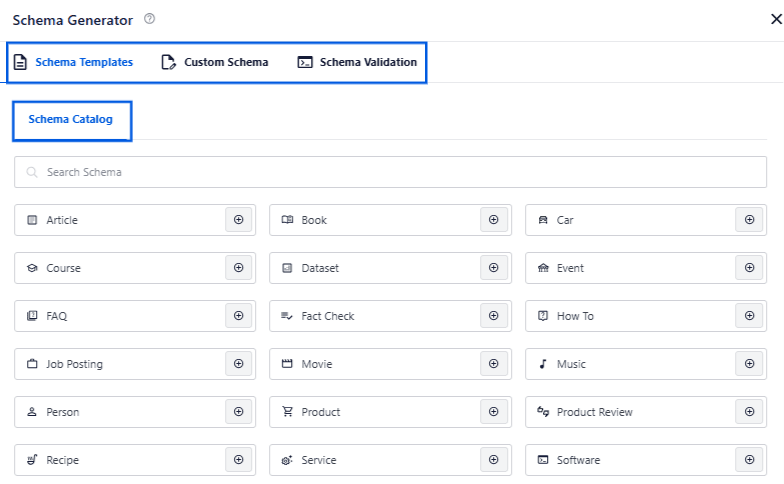
Ti consente di aggiungere schema FAQ, HowTo, Articolo e altro direttamente dal tuo editor di WordPress, senza bisogno di codifica. Per i team di contenuti o gli scrittori senza conoscenze di codifica, o che semplicemente vogliono risparmiare tempo, questo è un salvavita!
7. Costruisci una strategia di internal linking intelligente
I link interni collegano una pagina del tuo sito web a un'altra pagina dello stesso dominio. Aiutano i motori di ricerca a capire come è organizzato il tuo contenuto e quali pagine sono più importanti. Guidano anche i visitatori verso contenuti correlati, mantenendoli più a lungo sul tuo sito.
Una strategia di link interni intelligente significa collegare nuovi contenuti a pagine esistenti ad alta autorità sul tuo sito, collegare post correlati per creare cluster di argomenti e assicurarsi che nessuna pagina a cui tieni rimanga orfana senza link interni che puntano ad essa.
Per gli utenti WordPress, il Link Assistant di AIOSEO gestisce questo automaticamente.
Scansiona il tuo sito, identifica le opportunità di link interni su cui non hai ancora agito e ti consente di aggiungere link con un clic dalla dashboard, senza ricerche o modifiche manuali.
8. Affronta la tua SEO tecnica
La SEO tecnica copre tutto ciò che accade dietro le quinte del tuo sito web: quanto velocemente si carica, quanto facilmente i motori di ricerca possono scansionarlo, se funziona bene sui dispositivi mobili e altro ancora. Anche ottimi contenuti non si classificheranno in modo coerente se le tue fondamenta tecniche hanno problemi.
I fattori di SEO tecnica più importanti da affrontare sono:
- Velocità della pagina: Le pagine lente si classificano più in basso e perdono visitatori. Usa PageSpeed Insights di Google per identificare problemi specifici che rallentano il tuo sito.
- Ottimizzazione per dispositivi mobili: Google indicizza prima la versione mobile del tuo sito. Se il tuo sito non funziona bene su un telefono, il tuo posizionamento lo rifletterà.
- Core Web Vitals: Google utilizza queste metriche di performance, che misurano la velocità di caricamento, l'interattività e la stabilità visiva, come segnali di ranking. Puoi controllare i tuoi in Google Search Console.
- Sitemap XML: Una sitemap indica a Google quali pagine del tuo sito scansionare e indicizzare. AIOSEO genera e aggiorna automaticamente la tua sitemap.
- HTTPS: Un sito sicuro con un certificato SSL è un segnale di ranking di base per Google. Se il tuo sito funziona ancora su HTTP, l'aggiornamento a HTTPS dovrebbe essere una priorità immediata.
9. Costruisci backlink pertinenti
I backlink sono link da altri siti web che puntano al tuo. I motori di ricerca li trattano come voti di fiducia. Più siti autorevoli e pertinenti linkano ai tuoi contenuti, maggiore sarà l'autorità delle tue pagine e più in alto tenderanno a posizionarsi.
La parola chiave qui è “pertinente”. Un backlink da un sito rispettato nel tuo settore vale molto di più di dozzine di link da siti non correlati o di bassa qualità. La qualità batte sempre la quantità quando si tratta di link building.
Alcuni dei modi più efficaci per costruire backlink includono:
- Guest posting: Scrivi contenuti genuinamente utili per siti autorevoli nella tua nicchia. Punta a siti che attraggono un pubblico simile al tuo e hanno una solida autorità di dominio.
- Digital PR e outreach: Crea ricerche originali, studi basati sui dati o risorse uniche a cui altri siti del tuo settore vorranno fare riferimento e linkare.
- Elenco nelle directory aziendali: Fatti elencare nelle directory e nelle pagine di risorse pertinenti nella tua nicchia.
- Pagine partner: Contatta aziende o strumenti complementari con cui ti integri ed esplora opportunità di co-promozione.
10. Mantieni aggiornati i tuoi contenuti esistenti
Una delle mosse con il più alto ROI in SEO è una che la maggior parte dei proprietari di siti trascura: aggiornare ciò che hai già pubblicato. Contenuti che erano accurati e ben ottimizzati 2 anni fa potrebbero ora essere obsoleti, mancare argomenti chiave o essere superati da concorrenti che hanno pubblicato versioni più complete.
Aggiornare i contenuti esistenti è spesso più veloce che crearne di nuovi e può portare a rapidi miglioramenti nel posizionamento.
Concentra i tuoi aggiornamenti su:
- Pagine posizionate tra la 11ª e la 20ª posizione per la loro parola chiave di destinazione, poiché queste sono le più vicine alla prima pagina
- Post con statistiche obsolete, screenshot datati o riferimenti a strumenti deprecati
- Contenuti che non hanno ancora una sezione di risposta diretta o FAQ per il targeting di snippet in primo piano
- Post che si posizionano bene ma hanno un alto tasso di rimbalzo, il che potrebbe indicare una mancata corrispondenza dell'intento di ricerca
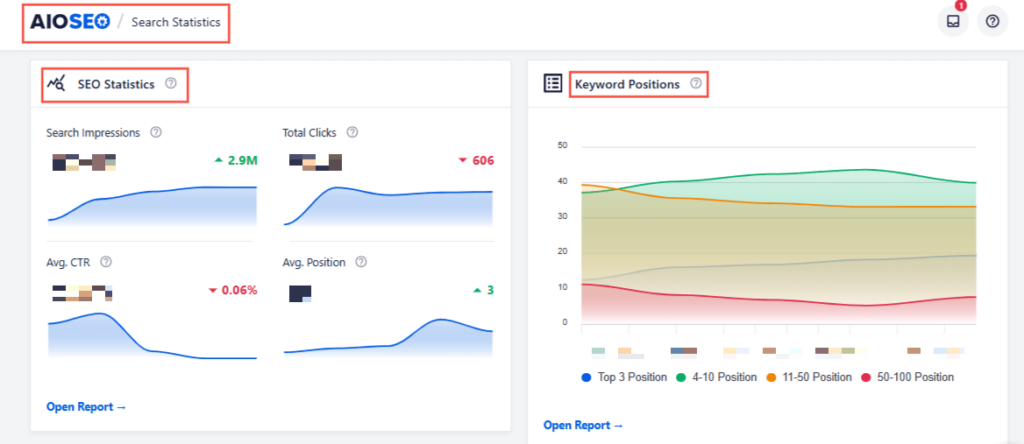
Le Statistiche di ricerca di AIOSEO ti mostrano esattamente quali delle tue pagine stanno perdendo impressioni o posizionamenti nel tempo, direttamente all'interno di WordPress. Usale per costruire un elenco prioritario di post da aggiornare prima di creare qualsiasi cosa di nuovo.
Per saperne di più su questo approccio, consulta la nostra guida all'ottimizzazione dei contenuti esistenti per la SEO.
11. Ricerca i tuoi concorrenti
I tuoi concorrenti sono una miniera d'oro di informazioni. Capire per quali parole chiave si posizionano, quali contenuti pubblicano e dove ottengono link può farti risparmiare mesi di tentativi e aiutarti a costruire una strategia di traffico più mirata.
Inizia identificando 2 tipi di concorrenti:
- Concorrenti diretti: Aziende che offrono gli stessi prodotti o servizi tuoi.
- Concorrenti di contenuti: Siti che si posizionano per le tue parole chiave di destinazione, anche se non vendono ciò che vendi tu.
Una volta che sai con chi stai competendo, cerca le lacune. Per quali parole chiave si stanno posizionando che tu non stai targettizzando? Quali argomenti trattano che tu non hai ancora affrontato? Dove stanno ottenendo backlink che potresti anche perseguire?
Puoi utilizzare lo strumento SEO Analysis di AIOSEO per eseguire un'analisi della concorrenza tra il tuo sito e quello di un concorrente direttamente nella tua dashboard di WordPress.
12. Usa i Social Media
I social media non aumenteranno direttamente il tuo posizionamento nei motori di ricerca, ma estendono la portata dei tuoi contenuti, generano traffico di riferimento al tuo sito e possono farti ottenere backlink quando i tuoi contenuti vengono condivisi con altri editori e creatori.
La chiave è utilizzare le piattaforme che il tuo pubblico frequenta realmente. Per le aziende B2B, LinkedIn è solitamente il canale più forte. Per i contenuti visivi, funzionano bene YouTube, Pinterest e Instagram. E per un pubblico più ampio, Facebook e X offrono ancora una solida copertura.
Condividere semplicemente un link al tuo post non ti porterà lontano. Per ottenere risultati migliori sui social media:
- Scrivi descrizioni accattivanti dei post: Dai ai lettori un motivo chiaro per cliccare, che si tratti di una statistica sorprendente, un consiglio utile o una domanda a cui vogliono una risposta.
- Usa hashtag pertinenti: Gli hashtag aiutano i tuoi contenuti a essere scoperti da persone che non ti seguono già.
- Interagisci con il tuo pubblico: Rispondi ai commenti e partecipa a conversazioni pertinenti. L'interazione estende la portata dei tuoi contenuti e costruisce una community.
- Riadatta i contenuti in formati nativi per la piattaforma: Trasforma una guida lunga in un post carosello, un breve video o un thread. I contenuti nativi tendono a performare meglio dei link esterni sulla maggior parte delle piattaforme.
Con l'integrazione Social Media di AIOSEO, puoi controllare esattamente come appaiono i tuoi contenuti quando vengono condivisi su Facebook, X, LinkedIn e altre piattaforme, inclusi titoli personalizzati, descrizioni e immagini Open Graph.
13. Utilizza l'email marketing e le notifiche push
Il tuo pubblico è spesso la tua fonte più rapida di traffico per nuovi contenuti. Gli iscritti via email e gli iscritti alle notifiche push ti hanno già detto che vogliono sentirti. Usa questa relazione per generare traffico immediato ogni volta che pubblichi.
Con l'email marketing, condividi i tuoi migliori nuovi post con la tua lista di iscritti. Mantieni l'email breve, inizia con il valore che il post fornisce e collega direttamente al post. Strumenti come OptinMonster rendono facile far crescere la tua lista email direttamente dal tuo sito WordPress utilizzando moduli di iscrizione, pop-up e lead magnet.
Le notifiche push funzionano in modo simile. Quando un visitatore si iscrive alle notifiche push sul tuo sito, puoi inviargli una notifica ogni volta che pubblichi nuovi contenuti, anche quando non sta navigando attivamente. Strumenti come PushEngage rendono facile impostare tutto questo senza toccare alcun codice.
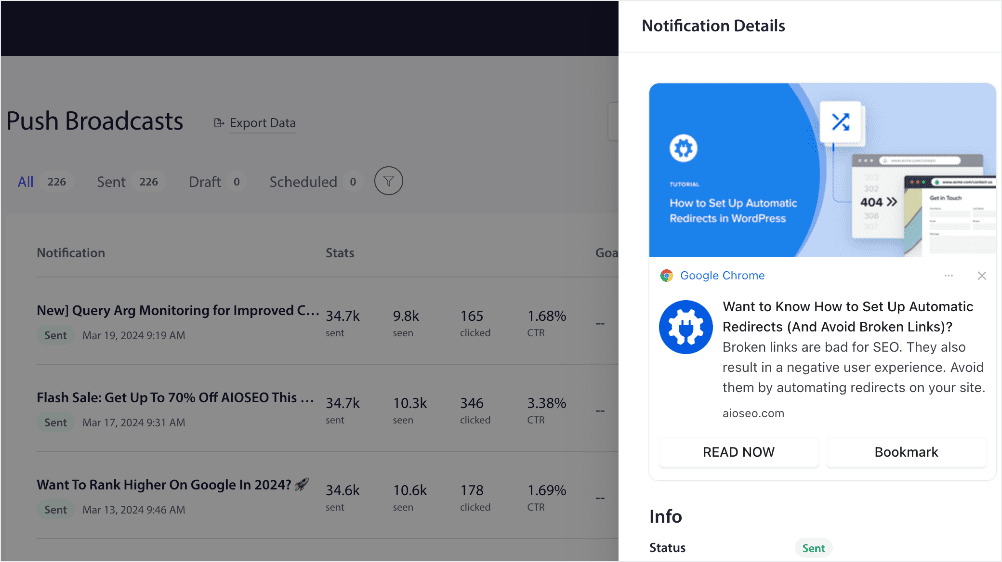
Entrambi i canali ti permettono di generare traffico alle tue condizioni, senza aspettare che Google posizioni i tuoi nuovi contenuti. Sono particolarmente preziosi nei giorni immediatamente successivi alla pubblicazione, quando un post ha più bisogno di segnali di coinvolgimento iniziali.
Come monitorare il tuo traffico organico
Ora, ecco il punto: nessuna di queste strategie migliorerà se non le misuri. Il monitoraggio del tuo traffico organico ti dice cosa funziona, cosa sta diminuendo e dove concentrare i tuoi sforzi successivamente.
I 2 strumenti più importanti per monitorare il traffico organico sono Google Search Console e Google Analytics.
Search Console ti mostra per quali parole chiave le tue pagine si posizionano, quante impressioni e clic stanno ottenendo e qual è la tua posizione media. Google Analytics ti mostra come si comporta quel traffico organico una volta arrivato, comprese le pagine che i visitatori visualizzano, quanto tempo rimangono e se convertono.
Se usi WordPress, le Statistiche di ricerca di AIOSEO portano i dati di Google Search Console direttamente nella tua dashboard di WordPress. Puoi vedere le tue parole chiave più performanti, monitorare le modifiche al posizionamento nel tempo e individuare i contenuti che stanno perdendo terreno, tutto senza lasciare WordPress.
Per monitorare le analisi insieme ai tuoi dati SEO, MonsterInsights collega Google Analytics a WordPress in pochi clic e ti fornisce report sul traffico di facile lettura direttamente nella tua dashboard.
Metriche chiave da monitorare ogni mese:
- Sessioni organiche: visite totali da risultati di ricerca non a pagamento
- Posizionamento parole chiave: modifiche di posizione per le tue parole chiave target più importanti
- Tasso di clic (CTR): percentuale di impressioni che si trasformano in clic
- Frequenza di rimbalzo e tempo sulla pagina: segnali che indicano se il tuo contenuto corrisponde a ciò che i visitatori si aspettavano
- Pagine che perdono traffico: post che necessitano di un aggiornamento prima che cadano ulteriormente
Domande frequenti sul traffico organico
Cos'è il traffico organico?
Il traffico organico si riferisce ai visitatori che arrivano sul tuo sito web tramite risultati di motori di ricerca non a pagamento. Quando qualcuno cerca una query su Google e clicca su un risultato non pubblicitario, ciò conta come una visita organica.
Il traffico organico è migliore del traffico a pagamento?
Entrambi hanno valore, ma il traffico organico ha un vantaggio chiave: non si ferma quando il budget pubblicitario si esaurisce. Una pagina ben posizionata può generare traffico costante per anni senza costi aggiuntivi. E mentre il traffico a pagamento può spesso fornire risultati rapidi, richiede un budget continuo per essere sostenuto.
E adesso?
Spero che questa guida ti abbia fornito un quadro chiaro su come aumentare il traffico organico al tuo sito web. Dall'esecuzione del tuo primo audit SEO all'ottimizzazione per le Risposte AI, ogni passo che fai si basa sul precedente. Inizia con le tattiche più vicine ai tuoi attuali posizionamenti e procedi da lì.
Per ulteriori modi per rafforzare la tua base SEO, consulta la nostra guida completa a WordPress SEO.
Pronto a mettere in pratica queste strategie? Ottieni AIOSEO gratuitamente oggi stesso e inizia a ottimizzare il tuo sito per un maggiore traffico organico direttamente all'interno di WordPress.
Divulgazione: I nostri contenuti sono supportati dai lettori. Ciò significa che se fai clic su alcuni dei nostri link, potremmo guadagnare una commissione. Raccomandiamo solo prodotti che crediamo aggiungeranno valore ai nostri lettori.
Vuoi Provare AIOSEO Gratuitamente?
Inserisci l'URL del tuo sito web WordPress per installare AIOSEO Lite.




Linee guida di marketing molto utili ed efficaci
molto bello grazie da greatgramar.com
Grazie per aver condiviso informazioni utili, per aumentare il traffico organico. Applicher ilde{A²} le conoscenze di cui sopra per aumentare il traffico verso il mio sito.
Ho cercato di aumentare il traffico organico ma non riesco a superare 100/al giorno di traffico organico da Google. Se puoi condividere maggiori informazioni in modo che io possa fare meglio. Ti ringrazio.
Grazie per aver condiviso le tue idee. Questo ilde{A¨} stato un blog meraviglioso. Qui, ho scoperto come il traffico organico aiuta nella SEO.
Ottimo articolo, spieghi molto bene. Grazie
Articolo fantastico! Ho esplorato vari modi per aumentare il traffico organico e il tuo elenco completo ilde{A¨} una miniera d'oro di idee. Apprezzo in particolare l'enfasi sui contenuti incentrati sull'utente e sulla costruzione di una forte presenza sui social media.
GRAZIE PER AVER CONDIVISO QUESTE INFORMAZIONI
ottimo articolo.
Bel articolo
Molto utile
Strategie di marketing altamente efficaci e illuminanti.