We’ve rolled out several updates and new features this year.
And we’re back with many more new features to help you take your SEO to a whole new level! Two of the most exciting ones are the SEO Revisions and Google Updates Integration.
SEO Revisions is a first-of-its-kind feature you won’t find in any plugin on the WordPress repository!
And Google Updates Integration will help you quickly bounce back when hit by a Google update.
With these new additions, AIOSEO 4.4.0 comes with many powerful features that will help you get more granular on the performance of your SEO strategies. As a result, you’ll be in a better position to make informed, data-driven decisions to help you rank higher and drive targeted traffic.
Let’s quickly dive deep and see what these changes mean for you.
SEO Revisions: More Power and Control Over Your SEO Performance
The SEO Revisions feature is a revolutionary feature many SEOs have asked for for years. And we’re proud to say we’re the first WordPress SEO plugin to bring this feature to the WordPress community.
So, why are we so excited to bring you the SEO Revisions feature?
What is SEO Revisions?
SEO Revisions is a feature that keeps track of all the SEO changes you make on your website. You can also annotate changes so you and your team can understand why you made them. This will help you better understand the impact your changes in WordPress have on your search rankings.
You can access SEO Revisions in the AIOSEO Settings below your post in the WordPress editor.

Any time you make a change, AIOSEO will keep track of:
- Changes made
- Dates when changes when made
- Number of changes made
- And more
This essential data will help you track your SEO activities and their impact on your rankings.
Note: SEO Revisions is only available on Plus, Pro, and Elite plans. Also, the number of revisions you can access depends on your AIOSEO plan.
Track SEO Performance With Ease
When you click on the SEO Revisions tab, you’ll see all the changes you’ve made to that post.

This may look like a simple feature, but its implications are huge!
For example, you can use SEO Revisions to see the impact your changes have on your SEO performance. Let’s say you change your content, metadata, schema markup, etc., and notice a dip or uptick in rankings. It’s now easier to attribute this to the changes you have made.
Plus, if your changes hurt your SEO, all it takes is a single click to revert to the version that was performing well. This will save you the headache of trying to figure out what went wrong and what to correct to get your rankings up again.
Additionally, you can compare different versions of your page to see which changes you made.

This helps you quickly see the difference between any 2 versions of your post. And if a post has dropped in rankings, you can easily restore it to the better-optimized version by clicking the Restore This Revision button.
Add Notes To Your Revisions for Better Tracking
One nifty feature you’ll love with SEO Revisions is that you can also note every change you make. Simply hover your cursor over the version you want to annotate and click the Add Note button.
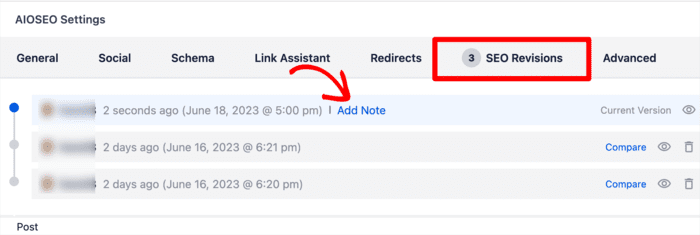
Being able to add annotations to your revisions is important as it helps you:
- Note why you made the changes in the first place
- Makes it easier to collaborate on SEO with other team members
This eliminates the need to track your changes in places like a Google Doc, spreadsheet, or other places where you keep notes on your activities.
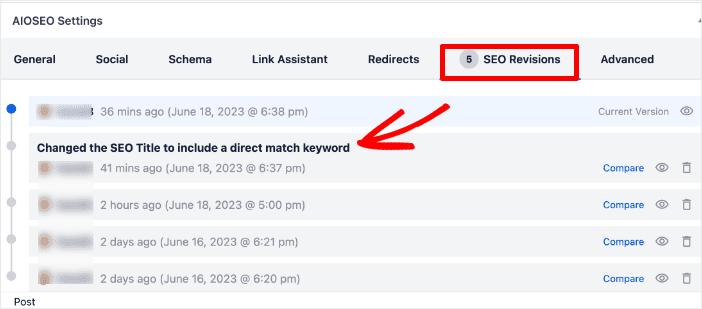
These notes will help you keep track of the reasons behind the changes you made. As a result, it becomes easier to refine your SEO strategy and know what works and what to avoid.
Keeping track of the changes you make to your posts and their impact on your SEO is a critical element in helping you improve your SEO performance. As a result, you’ll be in a better position to outrank your competitors.
Google Updates Integration
Another new feature we’re excited about is the Google Updates integration in the Search Statistics module. This feature compliments the SEO Revisions quite well, as it shows you Google’s updates in a timeline.

Keeping tabs on Google updates this way helps you see which updates affect you positively or negatively. And if you have been affected negatively, you can devise a strategy to address your shortfalls that led to your rankings dropping. All you have to do is click the Read More button, and you’ll be taken to a page explaining the update and what the search engine requires.
On a similar note, we also added a WordPress Updates integration into the Search Statistics data. You’ll find it in the post details section.
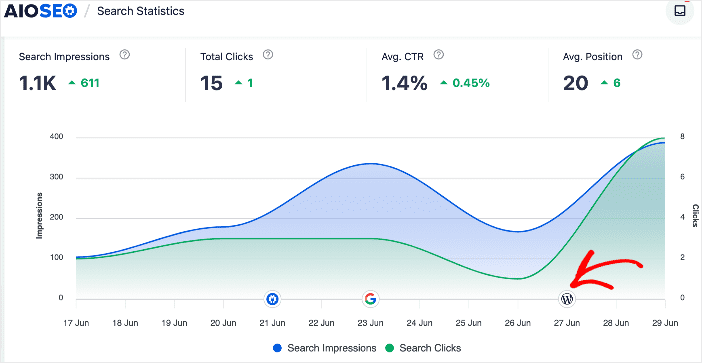
The WordPress Updates feature shows you the updates you’ve made in WordPress on a timeline.
We’ve also included AIOSEO’s SEO Revisions in the timeline to give you a holistic view of important data points impacting your rankings on search engines.
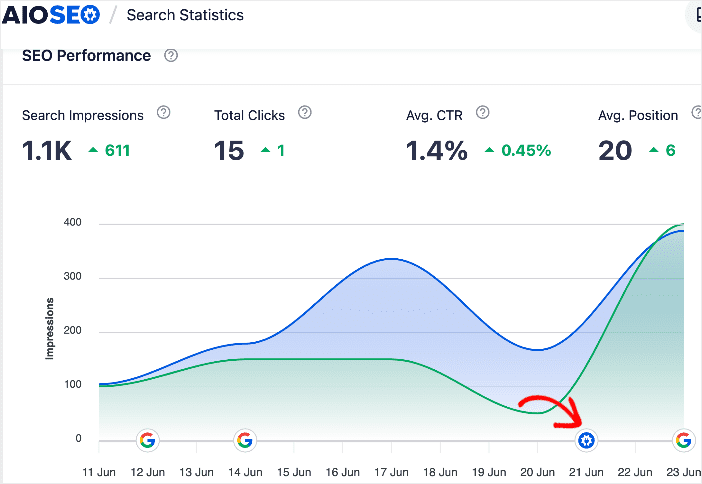
The ability to see the changes you made in WordPress and AIOSEO, plus Google’s updates and the impact these have on your rankings, is a superpower most website owners wish they had.
And AIOSEO has just given you that superpower.
With these latest additions to our plugin, understanding SEO and how to outrank your competitors has just become easier.
Update to AIOSEO 4.4.0 for SEO Revisions, Google Updates Integration, and More
Besides this significant update, we’ve made several notable improvements to many features you love. For example, we’ve refreshed our user interface, making it sleeker and more fluid. You can see all our changes in our full product changelog.
What are you waiting for?
Update your site to AIOSEO 4.4.0 to unlock these powerful new features and rank your content higher on SERPs.
And if you’re not yet using AIOSEO, make sure to install and activate the plugin today.
If you have questions about these features, please comment below or contact our customer support team. We’re always ready to help. Our commitment to making AIOSEO the easiest and best WordPress SEO plugin is only getting stronger as we continue to win together with our customers.
We’re so grateful for your continued support, feedback, and suggestions. Please keep those suggestions and feature requests coming!
We hope you enjoy using these new SEO features as much as we enjoyed creating them.
-Benjamin Rojas (President of AIOSEO).