
If you've ever Googled “how to improve SEO” and walked away more confused than when you started, welcome to the club.
Most SEO advice is written for marketers and agencies, not for the small business owner who needs to know what to actually do. (And whether it's worth your time.)
This guide is different.
Here's the SEO advice for small businesses that actually moves the needle, ranked by real-world impact, not by how advanced it sounds. I'll also tell you which popular SEO tips I think are overrated, and why following them might be slowing you down.
In This Article
Why You Should Trust Me
I've spent 7+ years creating and managing SEO content for WordPress sites that serve millions of users, including work on one of the most widely used SEO plugins in the world. The advice here comes from doing the work and tracking what actually moves rankings, not from a textbook.
The SEO Advice That Makes the Biggest Difference
Most small business owners are working on the wrong things. These three are where your time actually belongs.
1. Match Search Intent Before You Write a Single Word
This is the advice that separates pages that rank from pages that don't. And most people overlook it entirely.
Search intent is the reason behind a search. When someone Googles “best email marketing tools,” they want a comparison list, not a 3,000-word essay on what email marketing is.
Write something that doesn't match what searchers expect, and Google won't rank you, no matter how good your content is.
So how do you know what the search intent is and what you should be creating?
It's simple, just look at what's already ranking.
I Google my focus keyword and study what's on page 1. Are the top results listicles? How-to guides? Product pages? Video results? That tells me exactly what Google thinks the searcher wants, and my content needs to match that.
Let's look at an example.
If I Google “how to start a blog,” every top result is a step-by-step guide.
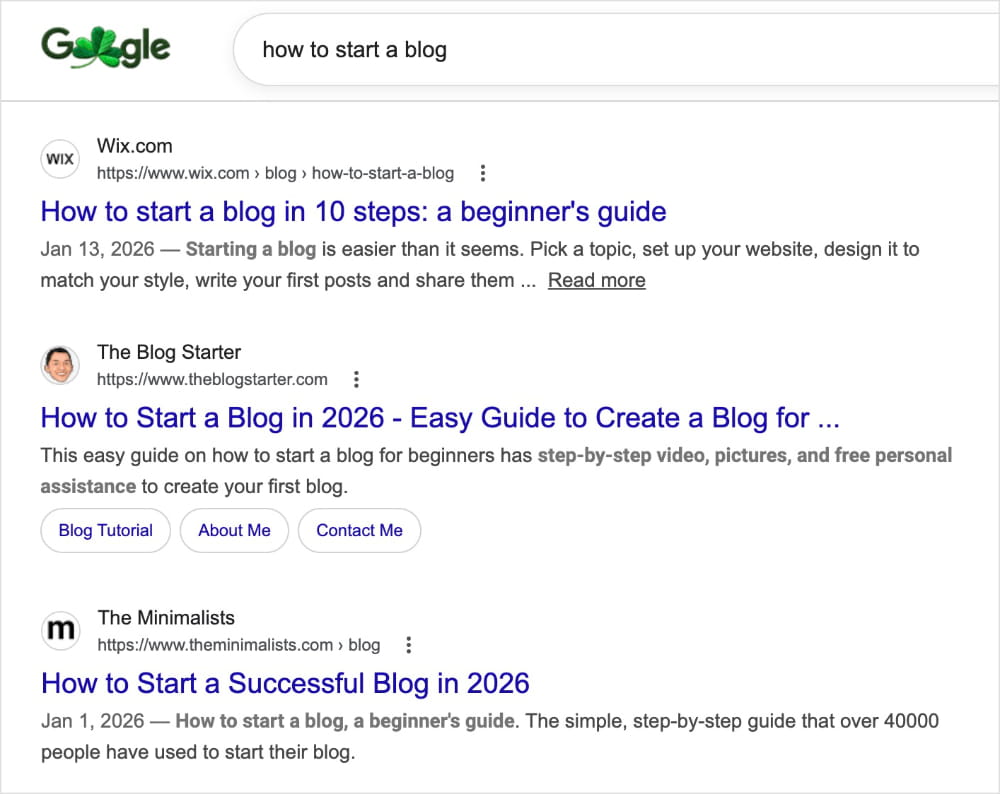
This tells us Google sees this search as a how-to query, not an opinion piece or a product roundup. Write a listicle of blogging tips instead, and you're fighting the wrong battle before you've even started.
Even after 7 years of SEO, I do this for every article I write.
Common Mistake: Writing a detailed tutorial when Google wants a quick-answer post, or publishing a blog post when the top results are all product pages. All that time and effort, when a quick Google search could have changed everything.
2. Treat On-Page SEO Like a Checklist, Not a Mystery
On-page SEO isn't complicated. It's a checklist. The problem is that people either skip steps they don't know about or overthink the ones they do.
Here's what actually matters:
- Your title tag includes your target keyword
- Your meta description is compelling, not just keyword-stuffed
- Your headings follow a logical structure (H1, H2, H3)
- Your focus keyword appears in the first 100 words
- Your images have descriptive alt text
- You're linking to related pages on your site
That's it. And here's the best part…
If you do those 6 things consistently, you're already ahead of most small business websites.
I've seen pages jump from page 3 to page 1 after nothing more than rewriting a title tag and meta description. And it's all because so many sites skip these basics that doing them well gives you a real edge.
If you're on WordPress, All in One SEO (AIOSEO) is the original WordPress SEO plugin, and the one I recommend to all my clients. It's used by over 3 million website owners and handles everything you need right inside your dashboard, including on-page SEO.
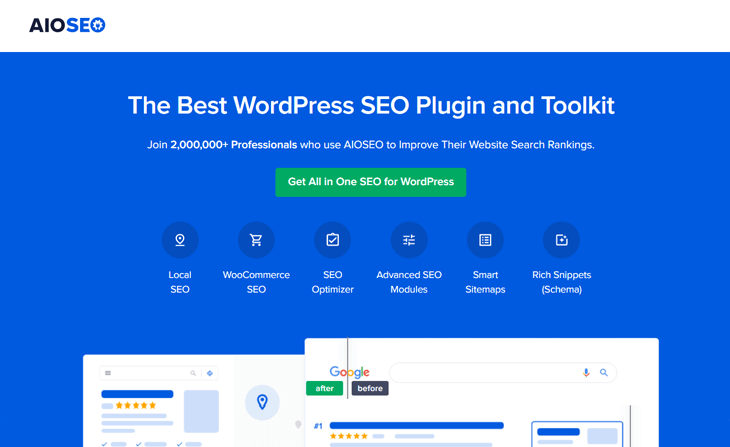
Its TruSEO On-Page Analysis scores your page against every item on this checklist and tells you exactly what's missing. It turns on-page SEO from “I think I did it right” into “I know I did.”

For a full walkthrough, check out our WordPress SEO guide.
3. Build Topic Authority, Not Just Individual Posts
Google doesn't just rank individual pages. It evaluates whether your entire site is a credible resource on a topic.
Publishing one post about “email marketing” won't make you an authority. Publishing 10 interconnected posts covering email strategy, subject lines, automation, deliverability, and list building will.
This is called topical authority, and it's one of the biggest ranking signals Google uses.
The sites that dominate competitive niches aren't the ones with the most content. They're the ones with the deepest coverage of specific topics.
How to Build Topical Authority
- Pick 3–5 core topics that are central to your business.
- Create a pillar page for each (like a comprehensive guide).
- Write supporting posts that go deeper on each subtopic.
- Link them together with internal links so Google can see the relationship.
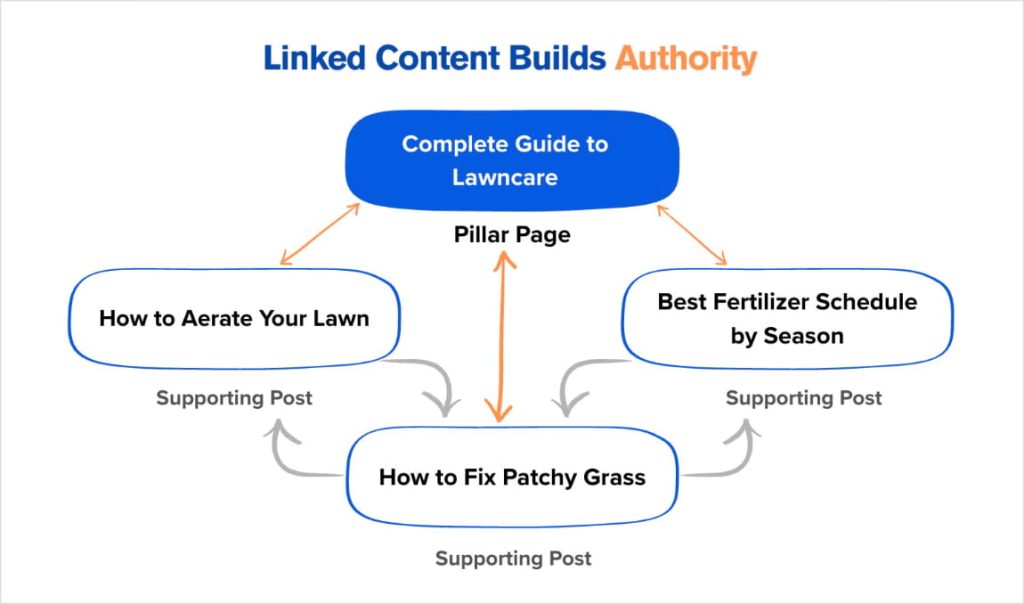
For example, if you run a landscaping business, your pillar page might be “Complete Guide to Lawn Care.” Your supporting posts could cover:
- “How to Aerate Your Lawn”
- “Best Fertilizer Schedule by Season”
- “How to Fix Patchy Grass”
Each one links back to the pillar, and the pillar links out to each supporting post. That interconnected structure tells Google you own this topic.
The catch? Most small business sites have dozens of pages that aren't linked to from anywhere else on the site, which means Google treats them as low priority.
AIOSEO's Link Assistant solves this by scanning your entire site and surfacing internal linking opportunities you've missed, so no page gets left behind.
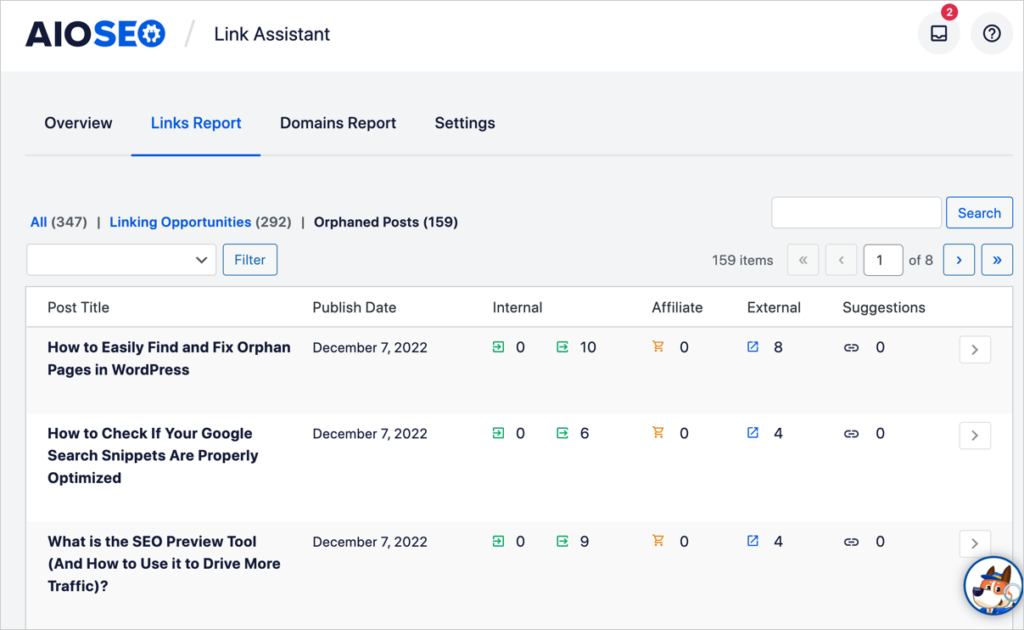
In SEO, we call pages with no internal links pointing to them “orphan pages.” You can easily view these in the Links Report of Link Assistant by selecting the Orphaned Posts tab.
SEO Advice That Matters More Than People Think
These aren't the tips people get excited about. But in my experience, skipping them is exactly why most small business sites plateau.
4. Fix Your Technical Foundation First
You can write the best content in the world, but if Google can't crawl and index your site properly, it won't rank. I've seen small business owners pour months into content only to discover that a misconfigured robots.txt file was blocking Google from their entire blog.
These are the technical basics every site needs:
- An XML sitemap submitted to Google Search Console (GSC)
- No crawl errors or broken pages blocking indexation
- HTTPS (not HTTP) across the entire site
- Fast page load times (under 3 seconds)
- A mobile-friendly design (Google uses mobile-first indexing)
None of this is glamorous. But getting it wrong silently kills your rankings, and most small business owners never check.
If you're on WordPress, AIOSEO's SEO Audit Checklist scans your entire site against these fundamentals and tells you what needs fixing and what to do. (I also love that each fix includes a link to exactly where the change needs to happen in WordPress.)
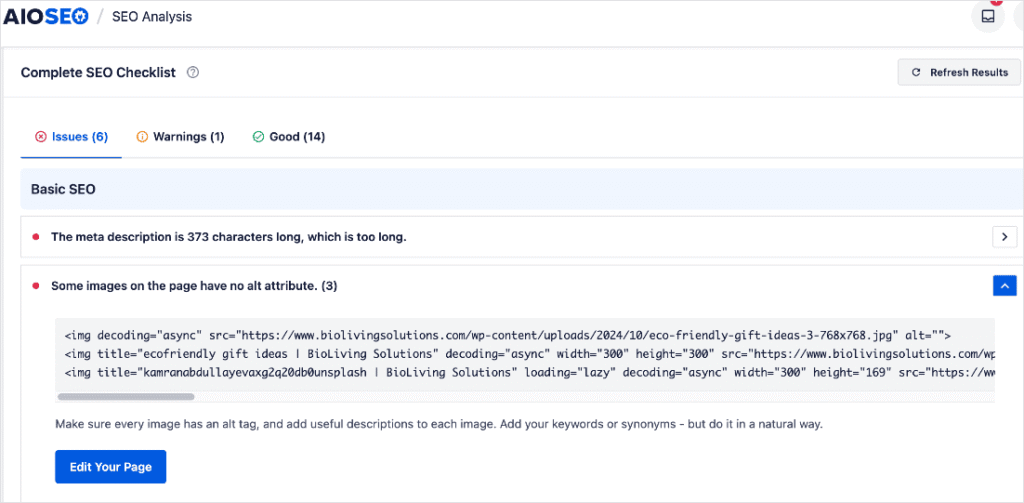
For a full deep-dive, check out our SEO Audit Guide.
5. Internal Linking Is the Most Underrated SEO Tactic
Most small business sites publish blog posts and never link to them from anywhere else on the site. Those posts sit in isolation, and Google treats them that way, low priority, rarely crawled, unlikely to rank.
Internal links do 3 things:
- They help Google discover new content.
- They distribute ranking authority across your site.
- They keep visitors moving from page to page.
It's one of the highest-ROI SEO activities you can do, and most small business owners barely touch it.
Now, the problem is that most people don't keep up with their linking strategy. (I get it, business owners have a lot going on, and links are rarely top of mind.)
That's why I rely on AIOSEO's Link Assistant. It automates your linking strategy by scanning your site and suggesting relevant internal links right in the WordPress editor.
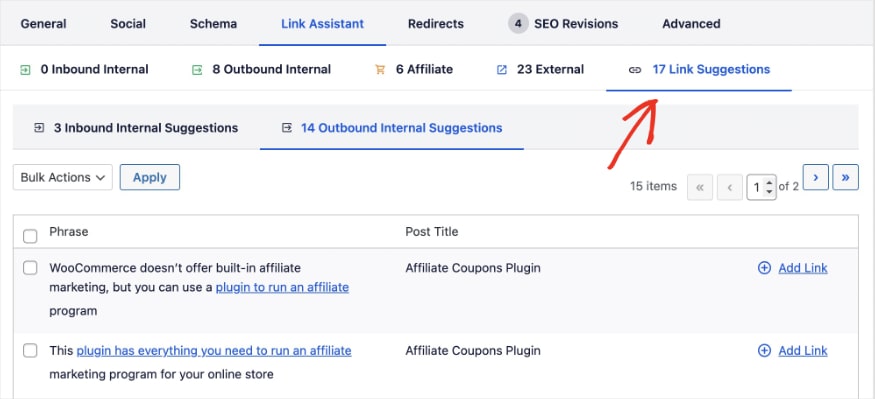
Once you spot one you'd like to include, just click “Add Link,” and it will add it to your post with relevant anchor text.
This is a huge time-saver since you no longer have to manually comb through every post you've ever published.
My Advice: Every time you publish a new post, go back to 3–5 existing posts on related topics and add a link to the new one. It takes 10 minutes and it's one of the simplest ways to lift your rankings across the board.
6. Schema Markup Gives You an Edge in Search Results
Ever notice how some search results show star ratings, FAQ dropdowns, or step-by-step instructions right on the results page?
That's schema markup at work, and it's one of the easiest ways to stand out from every other blue link on the page.
Schema is code that tells search engines exactly what your content is about. When Google understands your page is a recipe, a product review, an FAQ, or a how-to guide, it can display rich results that earn significantly more clicks than a standard result.

Most small business owners have never heard of schema. And that's exactly why it's a competitive advantage: your competitors probably aren't using it either.
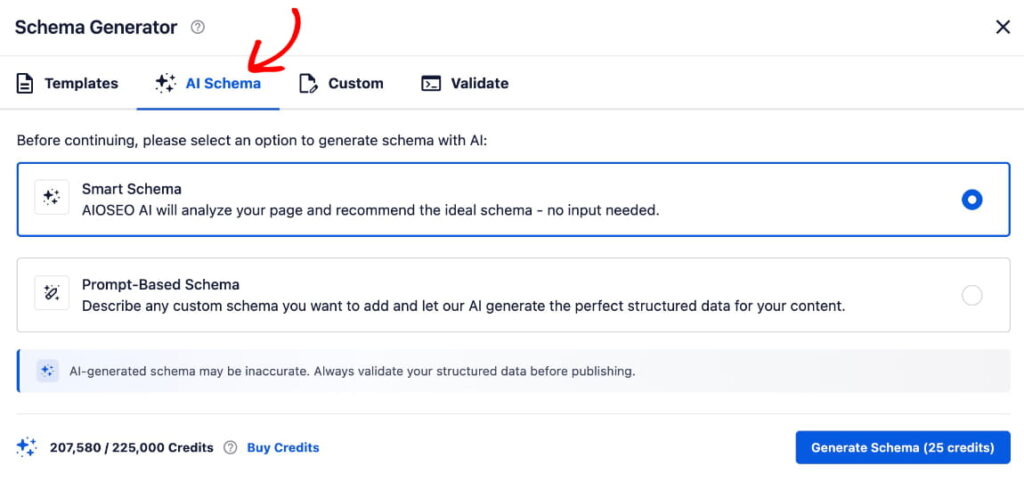
If you're on WordPress, AIOSEO's Schema Generator lets you add structured data without touching a single line of code. You pick the schema type, fill in the fields, and AIOSEO handles the rest.
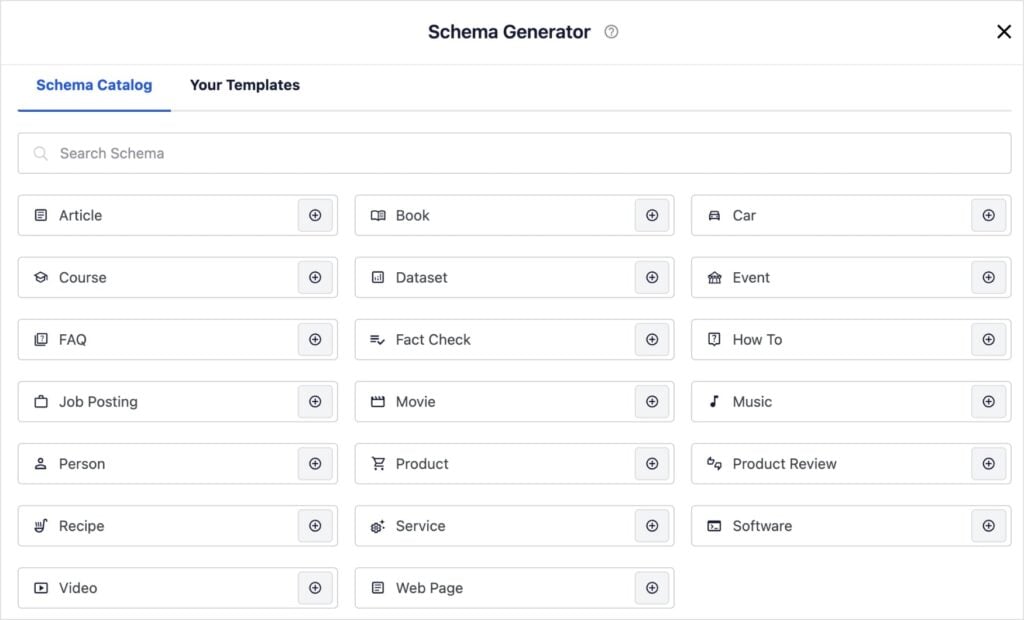
Or you can let AI do the whole thing for you. Just select the AI Schema tab and click Smart Schema and AI will analyze your content and write the best schema type for it. All you have to do is click Add.
SEO Advice That's Overrated (Or Misunderstood)
Now for the section where I'll probably get some pushback. But I've seen these pieces of “common wisdom” lead small business owners down the wrong path too many times to stay quiet.
7. “Publish More Content”
This is the advice that does the most damage when taken at face value.
Yes, you need content to rank. But publishing 8 mediocre blog posts per month doesn't beat publishing 2 great ones. Google's Helpful Content system evaluates your site as a whole.
If a large percentage of your content is thin, outdated, or unhelpful, it drags down everything — including your best pages.
I've worked with sites that saw rankings improve after deleting 20–30% of their blog posts. Less content, better content, higher rankings.
The real advice isn't “publish more.” It's “publish less, but make every piece count.” And when old content stops performing, prune it.
8. “You Need Backlinks to Rank”
Backlinks matter, and anyone who tells you otherwise is oversimplifying. Links from credible, relevant sites signal to Google that your content is trustworthy, and for competitive keywords they can make a real difference.
But for small businesses targeting local or long-tail keywords? They're rarely the thing standing between you and page 1.
I've seen sites move from page 3 to page 1 on nothing but stronger content and better internal linking, with zero new backlinks.
The bigger issue is that most small business owners think link building has to be complicated. It doesn't. Some of the easiest wins are hiding in plain sight:
- Local business directories like Yelp, Google Business Profile, and your local Chamber of Commerce
- Industry-specific directories relevant to your niche
- Local press and community sites — sponsoring an event or being featured in a local news story often comes with a link
- Supplier or partner websites — if you work with other businesses, ask if they'd list you on their site
Simple stuff, but they're real links from legitimate sources and well within reach for any small business.
Takeaway: The time most small business owners spend chasing complex link building campaigns would be better spent here first — and on optimizing the content they already have.
9. “SEO Takes 6–12 Months to Work”
This one depends entirely on what keywords you're targeting.
If you're going after “best accounting software” (massive competition, dominated by enterprise brands), yes, you're looking at months of work before you see movement. But if you're targeting specific, long-tail keywords like “best accounting software for nonprofits” or “best invoicing app for plumbers,” you can see results in weeks, not months.
The problem for most small business owners isn't patience,
it's keyword selection.
They target terms they can't realistically win, then conclude that SEO doesn't work. If you're not sure which keywords you can actually compete for, a tool like LowFruits is built specifically for this.
It identifies low-competition keywords where smaller sites can rank without a massive backlink profile or domain authority.
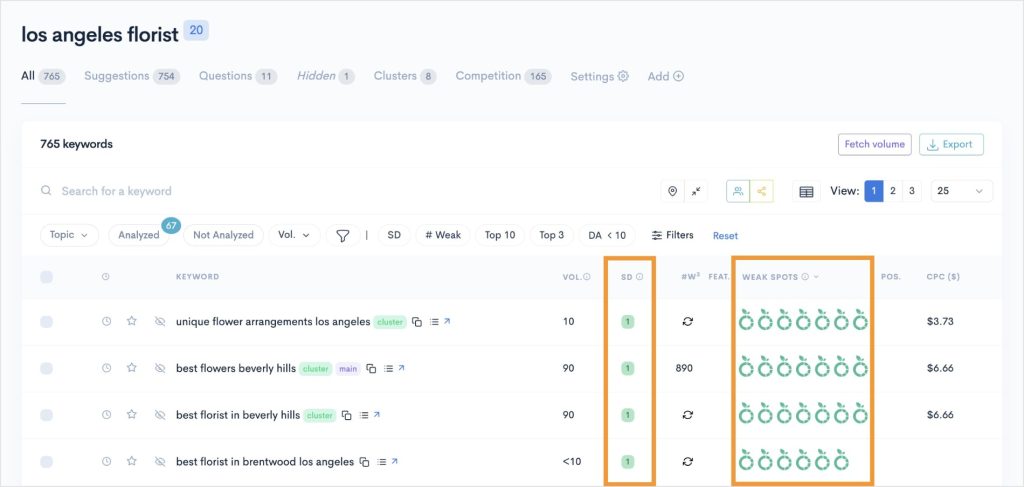
LowFruits has two unique metrics that I focus on when performing keyword research for small businesses:
- SERP Difficulty Score (SD), which tells you how hard it is to rank in the SERPs. 1 is easy, 2 is medium difficulty, and 3 is hard.
- Weak Spots are low-authority domains ranking in the top 10 positions. Each icon represents one of these domains. Meaning, the more there are, the easier it will be to rank at the top of page 1.
Using these metrics, along with search volume, help you prioritize which keywords give you the best chance of ranking.
Free SEO Advice You Can Act on Right Now
If you've done nothing else for your SEO, start here. These 7 actions cost nothing and don't require any SEO expertise.
- Set up Google Search Console. It's free, and it's the single best tool for understanding how Google sees your site. If you only do one thing on this list, do this.
- Rewrite your homepage title and meta description. Your homepage is your highest-authority page. Make sure the title tag includes your primary keyword and the meta description gives searchers a clear reason to click. It's a small change that can make a noticeable difference in click-through rates.
- Fix your broken links. Broken links frustrate visitors and signal to Google that your site isn't well maintained. Use a free tool like Broken Link Checker to find and fix them.
- Add internal links to your top 5 pages. Find your highest-traffic pages in Google Search Console and add 2–3 internal links from each one to other relevant pages on your site. Ten minutes of work, real ranking impact.
- Claim your Google Business Profile (if local). If you serve local customers, this is non-negotiable. It's free and it's how you show up in Google Maps and local search results. Check out our local SEO guide for a full walkthrough.
- Check your site speed. Run your site through Google's PageSpeed Insights. If your load time is over 3 seconds, that's hurting your rankings and your user experience. Compressing your images is usually the biggest and easiest win.
- Install a WordPress SEO plugin. If you're on WordPress and you don't have an SEO plugin, you're flying blind. My recommendation is AIOSEO because it covers all the essentials and only takes minutes to set up.
Make Your SEO Advice Actionable
The biggest mistake I see small business owners make isn't following the wrong advice. It's trying to follow all of it at once.
Here's how to figure out where to start:
- Brand new to SEO? Start with tip #1 (search intent) and tip #2 (on-page SEO). Those two alone will put you ahead of most small business sites.
- Been at it for a while but not seeing results? Jump to tip #4 (technical foundation) and the overrated section. There's a good chance you're either dealing with a technical issue you don't know about or spending time on the wrong things.
- Already doing the basics well? Focus on tip #3 (topic authority) and tip #5 (internal linking). That's where the real, sustained ranking growth happens.
If you're on WordPress, AIOSEO makes it easier to put all of this into practice, right inside your dashboard. For more strategies, check out our guide on how to boost your small business SEO and our list of SEO mistakes small businesses should avoid.
Subscribe to our YouTube Channel for more WordPress SEO tutorials. You can also follow us on X (Twitter), LinkedIn, or Facebook to stay in the loop.
SEO Advice FAQs
What is the best SEO advice for beginners?
Start with search intent and on-page SEO. Before you write any content, Google your target keyword and study what's ranking. Then create content that matches that format and make sure you've covered the on-page basics: title tag, meta description, headings, keyword placement, and internal links. Those two things alone will put you ahead of most small business websites.
Is SEO worth it for small businesses?
Absolutely, SEO is one of the most cost-effective marketing channels available. Unlike paid ads, organic traffic doesn't stop when you stop paying. The investment is time and effort upfront, but the long-term returns make it worth it, especially for small businesses that can't outspend larger competitors on advertising.
Can I do SEO myself or do I need to hire someone?
You can absolutely do SEO yourself, especially the fundamentals. On-page optimization, content creation, internal linking, and technical basics are all DIY-friendly, particularly with a tool like AIOSEO that guides you through the process. That said, hiring help makes sense in a few situations: highly competitive industries, large-scale technical issues, or when you simply don't have the time.
What's the most important SEO factor?
If I had to pick one: matching search intent. You can have perfect on-page SEO, fast site speed, and dozens of backlinks, but if your content doesn't deliver what the searcher was looking for, Google won't rank it. Intent is the foundation everything else builds on.
How do I know if my SEO is working?
Track 3 things: your keyword rankings (are you moving up for your target keywords?), your organic traffic (is it growing month over month?), and your impressions in Google Search Console (is Google showing your pages to more people?). If all 3 are trending up, your SEO is working. If they're flat or declining, something needs to change.
What SEO advice should I ignore?
Be skeptical of anyone who guarantees specific rankings, promises “secret” techniques, or tells you to prioritize quantity over quality. Also ignore advice that focuses on tactics Google has explicitly said don't matter, like meta keywords, exact-match domains, or keyword density percentages. Focus on creating genuinely useful content, optimizing the basics, and building topical authority. That's what actually moves rankings.
Disclosure: Our content is reader-supported. This means if you click on some of our links, then we may earn a commission. We only recommend products that we believe will add value to our readers.
Want to Try AIOSEO for Free?
Enter the URL of your WordPress website to install AIOSEO Lite.

