
SEO can sometimes feel like a video game. Some players try to find “cheat codes” to skip to the final level immediately, while others put in the work to build up their skills and win fair and square.
In the world of search engines, this battle is known as white hat vs. black hat SEO.
If you are new to WordPress, you might be tempted by the promise of “fast rankings” offered by shady agencies.
But be warned: those shortcuts often come with a heavy price.
In this guide, I’ll explain:
- What black hat SEO is
- Why you should avoid it
- How black hat SEO differs from white hat SEO
You'll also learn white hat SEO techniques that will help you build a profitable, traffic-generating website that stands the test of time.
In This Article
What Is Black Hat SEO? (The Dark Side)
Black Hat SEO refers to aggressive SEO tactics that focus only on search engines and usually ignore the human audience.
These tactics violate Google's Terms of Service. The goal is to “trick” the algorithm into ranking a site higher than it deserves.
Common Black Hat Tactics:
- Keyword Stuffing: Jamming the same keyword into a page an unnatural amount of times (e.g., “We sell best cheap shoes. Buy cheap shoes here. Cheap shoes for sale.”).
- Invisible Text: Hiding white text on a white background so Google sees keywords but users don't.
- Link Farming: Buying thousands of low-quality links from fake or spam websites.
- Cloaking: Showing one piece of content to Google and a completely different piece of content to human users.
The Risk: Google is smart. Eventually, they catch these tricks. When they do, they issue a manual action (penalty). This can cause your site to drop dramatically in rankings or be completely removed from Google's index.
What Is White Hat SEO? (The Sustainable Path)
White Hat SEO refers to tactics that align with Google's guidelines. The focus here is primarily on the human user while also catering to search engines.
The goal isn't to trick Google; it's to help Google understand that you have the best, most relevant content for the user’s query.
Why Choose White Hat?
- It's Safe: You never have to worry about a Google update wiping out your traffic.
- It Builds Trust: You are creating a genuine brand that helps people.
- It Lasts: While black hat results are temporary, white hat SEO techniques build authority that grows over years.
White Hat vs. Black Hat SEO: The Key Differences
Still wondering which path to take? Here’s a quick comparison of black hat vs. white hat SEO.
| Feature | White Hat SEO | Black Hat SEO |
|---|---|---|
| Focus | Human Audience | Search Engine Bots |
| Risk Level | Low (Safe) | High (Sever Penalties) |
| Longevity | Long-term, sustainable growth | Short-term spikes, then crash |
| Cost | Investment of time/effort | Fast/cheap (but costly later) |
| Example | Writing a helpful guide | Buying 1,000 spammy links |
5 White Hat Techniques You Should Use
Now that you know the difference, how do you actually do white hat SEO? It’s easier than you think, especially if you’re a WordPress user.
Here are 5 actionable techniques you can implement today to start building sustainable traffic.
Why You Should Trust Me
I’ve been working in SEO for over 6 years, and I’ve seen the aftermath of “bad” SEO. I've witnessed businesses scrambling to get their website back on Google after trying to outsmart its algorithm with black hat SEO techniques.
I don't teach tricks. I teach sustainable, proven strategies that build real businesses. I’m going to show you how to rank high without having to look over your shoulder, worrying about a Google penalty.
1. Create High-Quality, Helpful Content
This is the most important rule of white hat SEO. (It’s also the golden rule of SEO in general.)
Google wants to rank the best answer to a user's question. Your job is to create that answer.
Don't just write 300 words of fluff. Research your topic thoroughly. This includes performing keyword research and looking what’s already ranking on page 1.
When you check out the competition, ask yourself:
- How can I make my content better?
- Do I have a unique perspective to share?
- What about my on-page SEO? Is it optimized?
- Can I improve the readability of my content?
While this might sound a lot, WordPress users are in luck. The All in One SEO (AIOSEO) plugin helps you with many of these tasks automatically.
AIOSEO is the best SEO plugin for WordPress. It has over 3 million active users who trust it to improve their search rankings and win more organic traffic.
Regarding, white hat SEO techniques, the TruSEO On-Page Analysis tool is your secret weapon for creating high-quality content.
As you write in the WordPress editor, TruSEO acts like a real-time SEO guide. It analyzes your content for your focus keyword and gives you a score out of 100, along with an actionable checklist.

In addition to the on-page SEO feedback, you also get a readability checklist that makes your content easier to read.
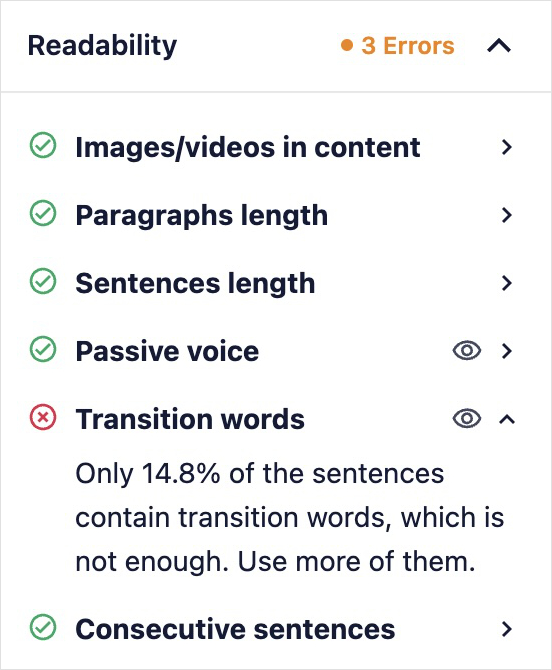
By following these prompts, you ensure your content is technically perfect and simple for humans to understand.
2. Use Your Keywords Naturally
Keywords are integral to SEO. It’s important to use relevant ones to your content so Google knows what your page is about.
This process helps search engines match your page to specific user queries. (In other words, when a user searches for the keyword you targeted, ideally, you’d show up as one of the first search results.)
Now, the thing about keywords is that you want to use them strategically. Don’t just go following black hat SEO techniques and start keyword stuffing.
Your page must sound like it was written for humans, not search engines.
Here are some key place to include your main keyword:
- Your H1
- First paragraph
- Subheadings
- SEO title
- Meta description
For the rest of the text, use synonyms and related terms that flow naturally.
AIOSEO helps you with this by checking your keyword density (how often your primary keyword appears in the text compared to the total word count).
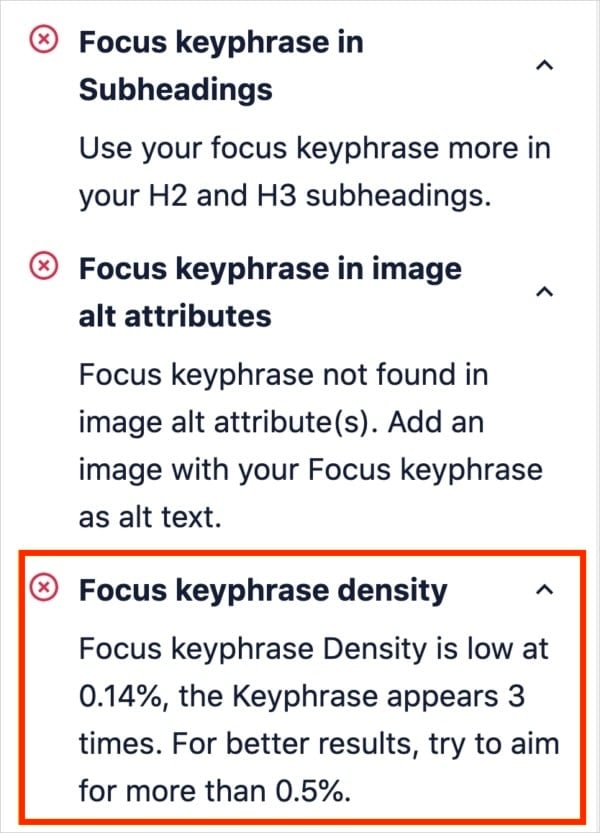
If your density is too high, you know that you need to make your text sound more natural and remove some instances of your primary keyword.
Something else that I like about AIOSEO is that you can connect it to your Semrush account.
This allows you to get related keyword ideas right inside the WordPress editor, which is great for visibility and decreasing keyword density.
To use this feature, just click “Get Additional Keywords” below your focus keyword checklist.
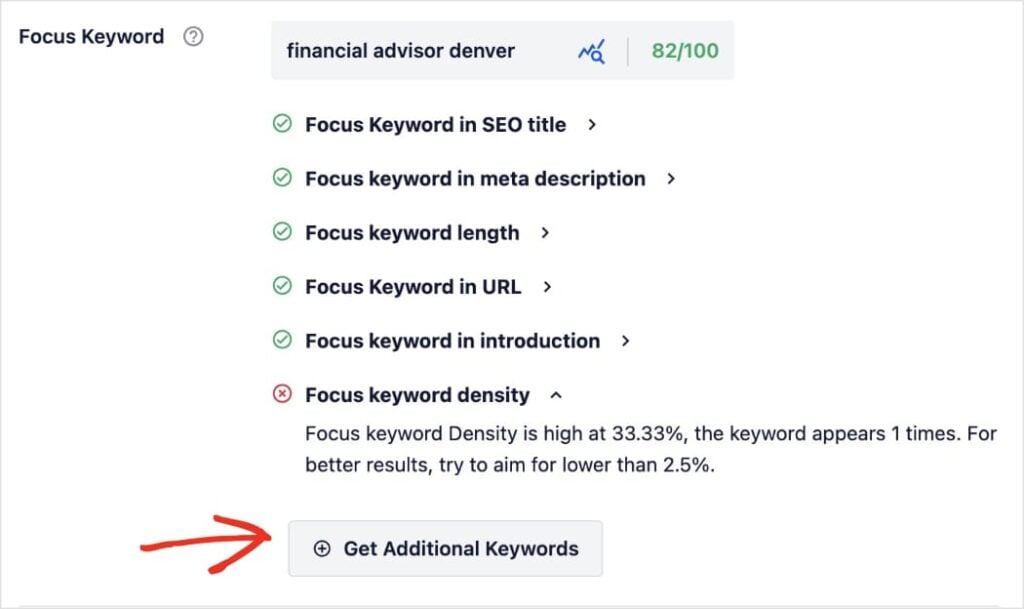
AIOSEO will fetch Semrush terms and deliver them in the editor.
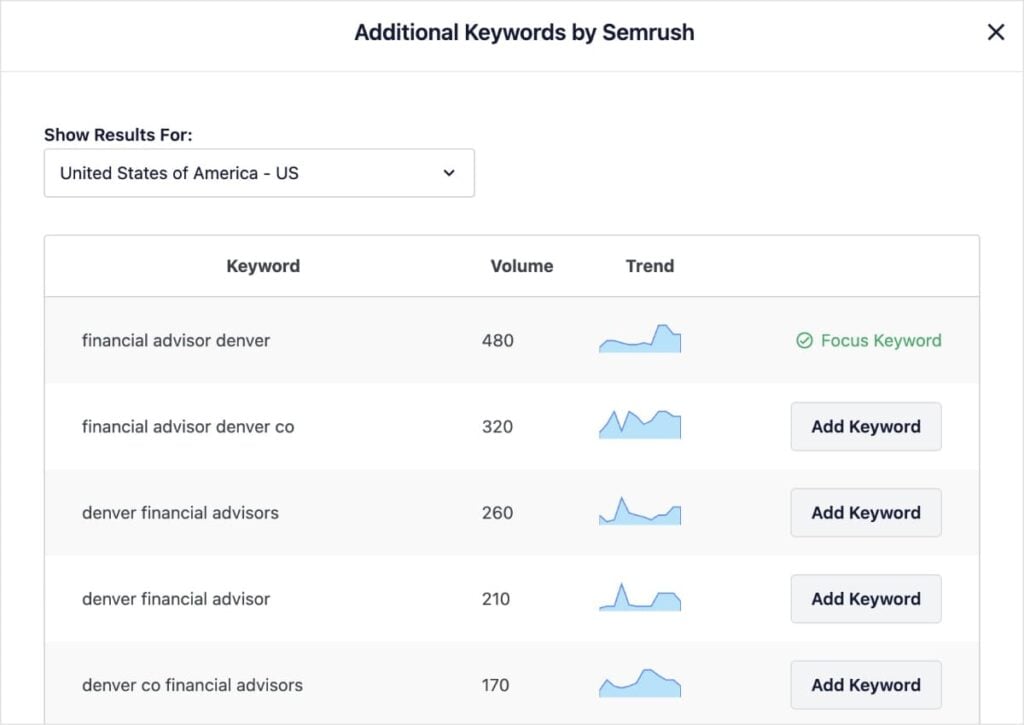
You can add any of these keywords to your post and optimize for them.
3. Build a Strong Internal Link Structure
Internal links are the roads Google uses to travel around your website.
While black hat SEO tries to buy backlinks from other sites (which is risky), white hat SEO focuses on building a strong web of internal links between their own pages.
When you link a new blog post to an older, high-authority post on your site, you pass some of that authority along. (We call this “link juice” in SEO.) This helps Google:
- Find your new content faster
- Know which pages are most important
Building these links used to be a manual, tedious process of searching through your old posts. But with AIOSEO’s Link Assistant, you can automate it safely.
When you’re working on a post or page, Link Assistant provides link suggestions right in the WordPress editor. It also comes up with anchor text, but you can edit it if you want.
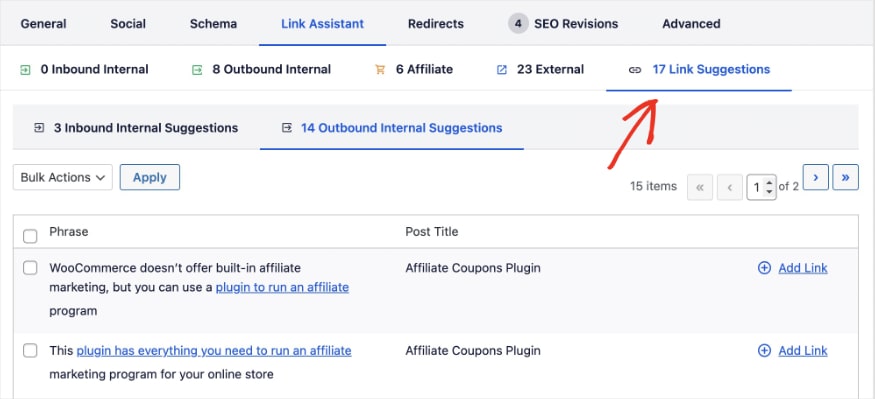
See a link you want to include in your content? Just click “Add Link,” and AIOSEO will add it to your post or page.
This method practically puts your linking on autopilot. All you have to do is click Add.
Related reading:
4. Optimize Your Technical SEO
You can have the best content in the world, but if your site takes 10 seconds to load or looks broken on a mobile phone, you won't rank.
Technical SEO is about making your site easy for Google to crawl and index.
This includes things like site speed, mobile responsiveness, and fixing broken links (404 errors).
If you aren't a developer, this can sound intimidating. (Even I still don’t love to do technical SEO audits.)
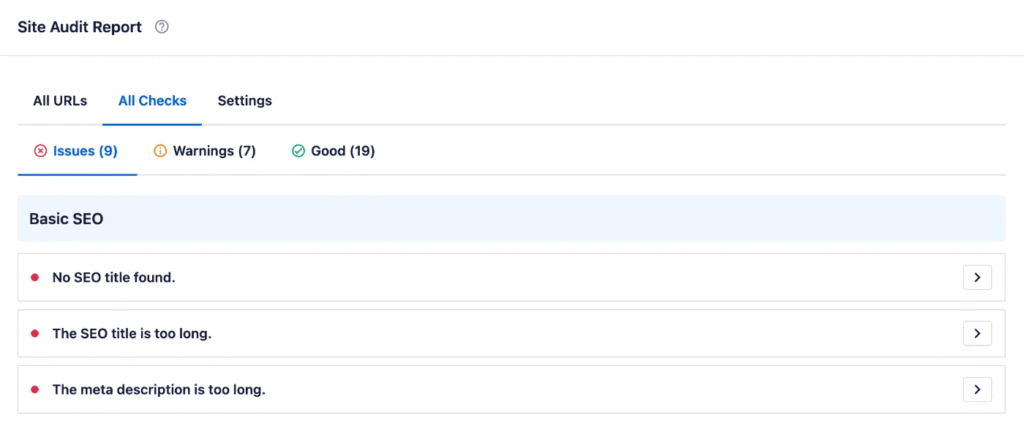
But I’ve got good news: AIOSEO makes technical SEO easy with its SEO Audit Checklist.
The tool scans your site for critical technical issues—like slow performance or missing security headers—and gives you a simple, prioritized list of what to fix.
I like how you get a Site Overview of issues when you first enter the dashboard (AIOSEO menu >> SEO Analysis >> Site Audit).
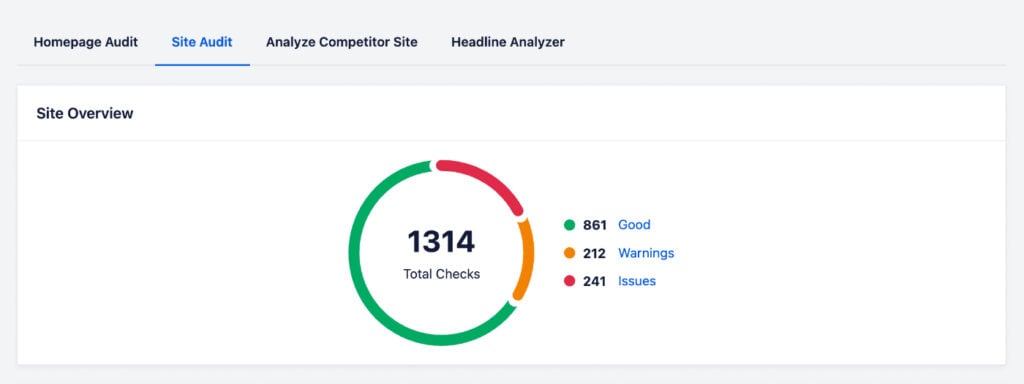
You can view a report of these issues, turning what could be a complex technical audit into a simple to-do list.
5. Use Schema Markup to “Talk” to Google
Helping Google understand your content isn't cheating. It’s smart SEO.
Schema markup is a special code that you add to your HTML to tell Google explicitly what your content is.
For example, you can tell Google, “This is a Recipe,” “This is a Product Review,” or “This is an FAQ.”
When you do this, Google can reward you with rich snippets—those eye-catching stars, photos, and prices you see in search results.

Rich snippets dramatically improve your organic click-through rate (CTR).
In fact, according to SEO statistics, rich results get 58% of all clicks, while standard results only get 41%.
So, how do you add schema markup to your site to get these enhanced search results?
In the past, you had to write complex JSON-LD code to add schema. AIOSEO eliminates that barrier with its Schema Generator.
You can pick the schema type you want from a comprehensive catalog.
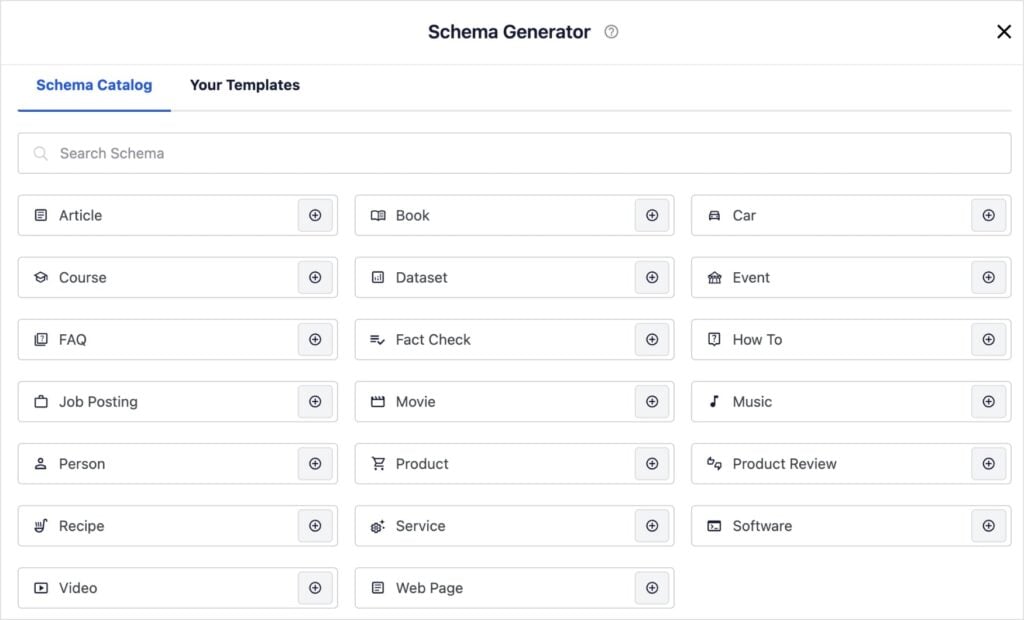
Simply scroll down to the AIOSEO settings on any post, click the “Schema” tab, and select the type of content you're writing.
Whether it's a software application, a course, or a recipe, AIOSEO will provide user-friendly fields for you to add relevant details.
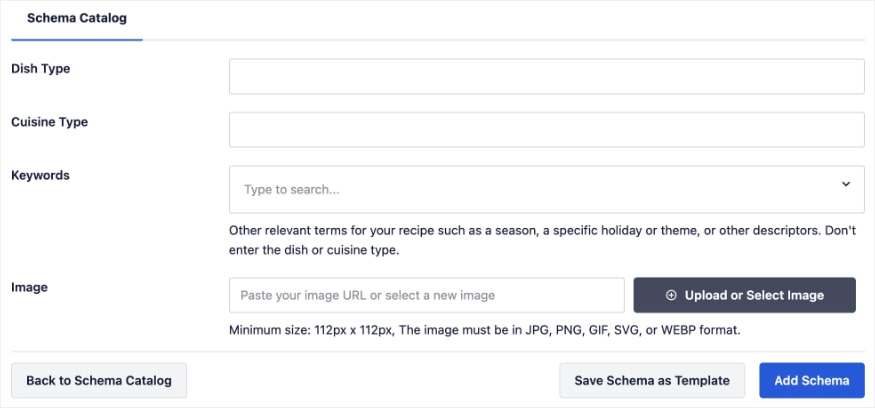
Once you’re done, click “Add Schema” and the plugin will implement correct, compliant code for you automatically.
The Winner: White Hat vs. Black Hat SEO
In the battle of white hat vs black hat SEO, there’s only one long-term winner.
Black hat SEO might give you a quick boost in rankings, but the crash is inevitable.
White hat SEO, on the other hand, builds a strong, resilient business that can weather any Google algorithm update.
By focusing on quality content and using tools like AIOSEO to handle the technical details, you can rank high and sleep soundly at night.
I also encourage you to explore SEO best practices that will set your site up for success. (Of course, they’re all white hat.) You can also use our on-page SEO checklist to improve your visibility in search results.
For more simple WordPress tutorials and keyword research tips for small business owners, subscribe to our YouTube Channel. You can also follow us on X (Twitter), LinkedIn, or Facebook to stay in the loop.
FAQs About White Hat SEO & Black Hat SEO
Is black hat SEO illegal?
Generally, no. Black hat SEO is not illegal in the sense that you will go to jail. However, it violates Google's Terms of Service. This can result in your website being banned from search results, which can effectively kill a business that relies on online traffic.
What is gray hat SEO?
Gray hat SEO sits between white and black hat. These tactics are not technically banned by Google yet but are ethically questionable and risky. Examples include buying expired domains to capture their authority or using AI to mass-produce content without human editing.
Can I recover from a black hat penalty?
Yes, you can recover from a Google penalty, but it’s difficult. You must remove all spammy content or bad links and then submit a “Reconsideration Request” to Google. It can take months or even years to regain your rankings, which is why it is much safer to use white hat SEO strategies from the start.
Is buying backlinks considered black hat SEO?
Yes. Buying backlinks is a direct violation of Google's Webmaster Guidelines and is considered a black hat tactic. Google wants links to be “votes of confidence” earned by good content, not bought. If caught, your site can be penalized or de-indexed.
How do I know if my SEO agency is using black hat SEO techniques?
Be wary of any agency that guarantees #1 rankings or promises “instant” results. These are major red flags. Also, ask them exactly what they’re doing. If they are vague about their methods or refuse to show you the links they’re building, they may be using risky black hat tactics.
Want to Try AIOSEO for Free?
Enter the URL of your WordPress website to install AIOSEO Lite.

Disclosure: Our content is reader-supported. This means if you click on some of our links, then we may earn a commission. We only recommend products that we believe will add value to our readers.
