
Here’s something that took me longer to realize than I’d like to admit: traffic doesn’t pay the bills. Revenue does.
You can bring thousands of site visitors a month and make almost nothing from them. I’ve seen it happen. And the culprit is often targeting keywords where nobody’s in a buying mindset.
That’s what commercial intent keywords solve.
They’re the searches people run when they’re close to a decision (i.e., comparing options, reading reviews, looking for the best fit). Ranking for these keywords means your content shows up at the right moment, not months before anyone’s ready to spend.
This guide covers what commercial intent keywords are, how to spot them, and how to find ones your site can actually win.
In This Article
- What Are Commercial Intent Keywords?
- Why Commercial Intent Keywords Are Worth Targeting
- Types of Commercial Intent Keywords (With Examples)
- How to Tell if a Keyword Has Commercial Intent
- How to Find Commercial Intent Keywords
- How to Optimize for Commercial Intent Keywords
- Stop Chasing Volume. Start Targeting Intent.
- Frequently Asked Questions
Why You Should Trust Me: I’ve worked in the SEO industry for 6+ years and write for All in One SEO, one of the most widely used SEO plugins for WordPress. The content strategy behind our own blog deliberately prioritizes commercial and transactional keywords, because in our experience, they generate more value per post than anything else we publish. I’m sharing what we actually do, not just what sounds good in theory.
What Are Commercial Intent Keywords?
Commercial intent keywords are search terms used by people who are actively researching a product or service before making a purchase. They’re in evaluation mode, comparing options, reading reviews, weighing up their choices.
They haven’t decided yet, but they’re close.
To put them in context, search intent typically falls into four categories:
| Intent Type | What the Searcher Wants | Example |
|---|---|---|
| Informational | To learn something | “what is schema markup” |
| Navigational | To find a specific site or page | “AIOSEO login” |
| Commercial | To research before buying | “best WordPress SEO plugins” |
| Transactional | To take action right now | “buy AIOSEO Pro” |
Commercial intent sits in the middle of the buying journey, past pure curiosity but before the final decision.
Commercial vs. Transactional Keywords
This is the distinction that confuses people most often, but it’s important to get it right.
Commercial keywords signal that someone is still deciding. They’re comparing options, reading reviews, figuring out the best fit for their situation. “Best project management software for small teams” is a commercial keyword. The searcher knows they need something, but they haven’t picked it yet.
Transactional keywords signal that the decision is made and they’re ready to act. “Sign up for Asana” or “download AIOSEO” are transactional. They just need to complete the action.
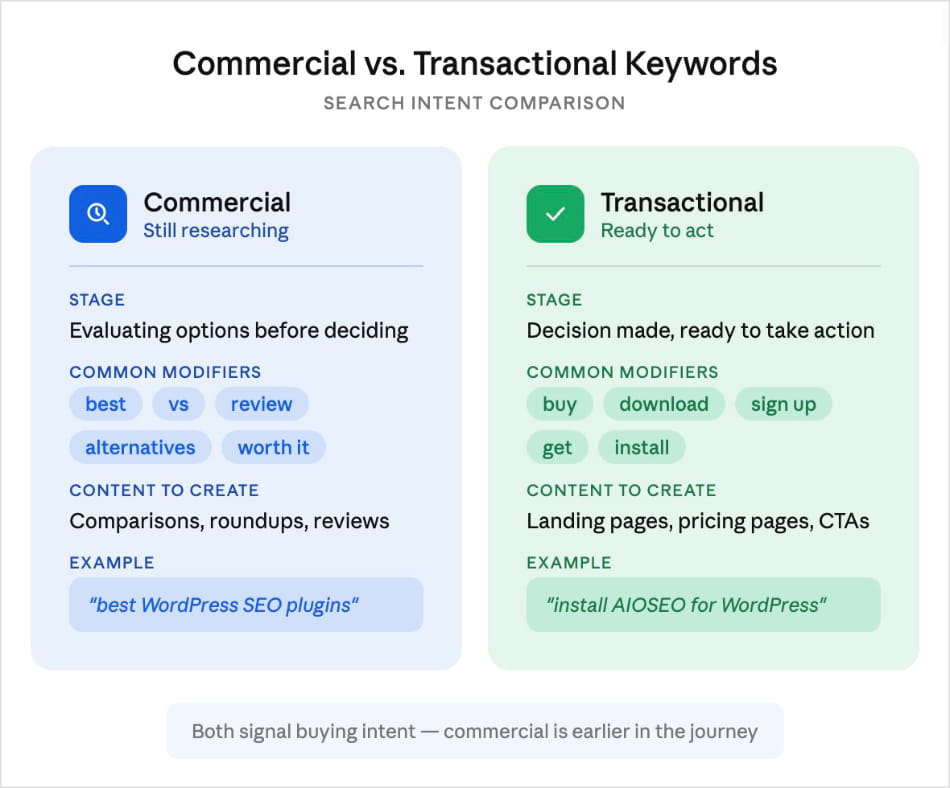
Both indicate buying intent. The difference is timing, and timing determines what kind of content actually serves the searcher.
A comparison article works for a commercial keyword. A landing page with a clear call to action works for a transactional one.
Worth Knowing: Some keywords blur the line. “AIOSEO pricing” is a good example. The searcher is close to buying but checking the numbers first. That’s commercial and transactional intent overlapping. The right content for it is a pricing page, not a blog post.
Why Commercial Intent Keywords Are Worth Targeting
When someone searches a commercial keyword, they’re already looking for a solution. Your content doesn’t have to create interest from scratch. It just needs to show up and make a convincing case.
That matters a lot for conversion rates. A post targeting the right commercial keyword can outperform a high-volume informational post by a significant margin, even with a fraction of the traffic. Yes, there are fewer visitors, but these visitors are actually weighing their options.
There’s a competitive upside here too. Transactional keywords get the most competition. Every e-commerce site and SaaS company is fighting for them. But since commercial keywords are one step earlier in the buyer journey, they often have lower keyword difficulty, meaning you can rank for them.
For smaller sites, that’s frequently the better trade-off.
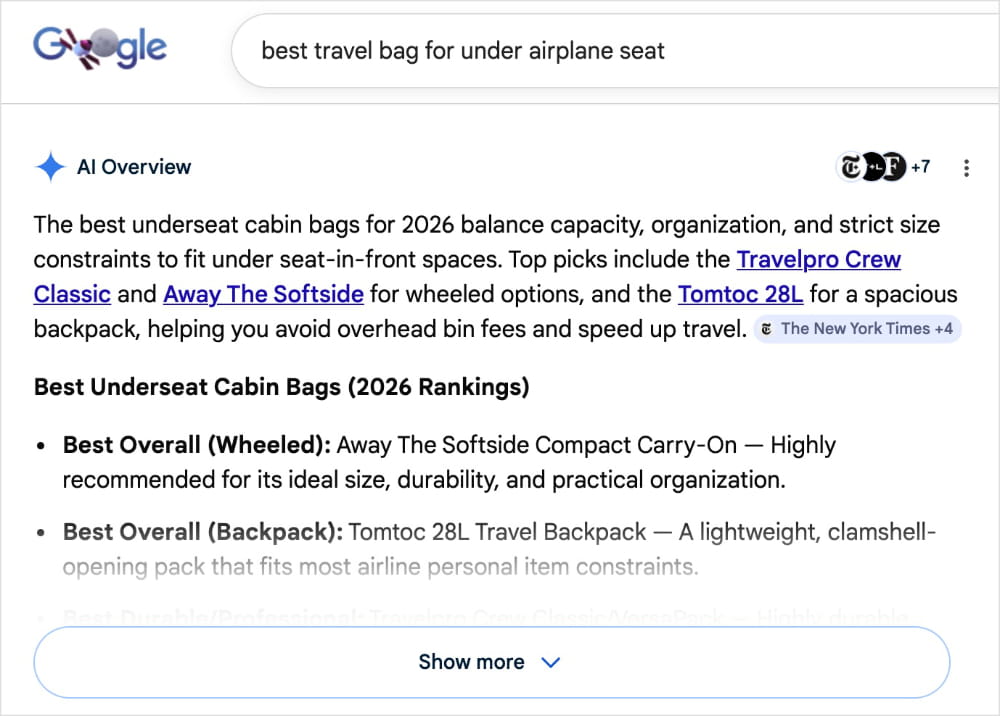
One more thing worth flagging: AI Overviews are increasingly appearing for commercial queries. And I’ll be honest, every click is harder to earn now. That makes matching your content to user intent even more important. Pages that still get clicked are the ones that give searchers exactly what they came for.
Pro Tip: If you’re choosing between two commercial keywords with similar search volume, pick the one with more specific modifiers. “Best CRM for freelancers” will convert better than “best CRM” every time. The searcher has already done part of the qualification work for you.
Types of Commercial Intent Keywords (With Examples)
Commercial intent isn’t one thing. It shows up in several distinct patterns. Once you know what to look for, you’ll start seeing commercial keyword opportunities everywhere.
| Type | What It Signals | Modifier Examples | Keyword Examples |
|---|---|---|---|
| “Best” keywords | Searcher knows the category, still choosing | best, top, leading, recommended | “best WordPress SEO plugin,” “top CRM for freelancers” |
| Comparison keywords | Narrowed to a few options, wants help deciding | vs, versus, compared to, or | “Ahrefs vs Semrush,” “Yoast vs AIOSEO” |
| Review keywords | Vetting a specific product before committing | review, reviews, rating, worth it | “AIOSEO review,” “is Semrush worth it” |
| Alternative keywords | Looking for options outside a product they know | alternative, alternatives, like, instead of | “Yoast alternatives,” “tools like Semrush” |
| Feature/use case keywords | Has a specific requirement, searching for a fit | with, for, that supports | “SEO plugin with schema markup,” “CRM for real estate agents” |
| Evaluation keywords | Asking whether something is right for them | good for, right for, should I use | “is AIOSEO good for small businesses,” “should I use Ahrefs or Moz” |
The modifiers are the signal. The moment someone adds “vs,” “best,” or “review” to a keyword, they’ve moved from curious to actively evaluating.
That’s exactly who you want to be ranking for.
How to Tell if a Keyword Has Commercial Intent
You don’t always need a tool for this. Here are 3 checks you can run in under a minute.
1. Check the SERP
Open an incognito window and search the keyword. Look at what’s ranking. Roundups, comparison articles, review posts? That’s commercial intent.
Google surfaces the format that best matches what searchers want. The results page is essentially telling you the answer.
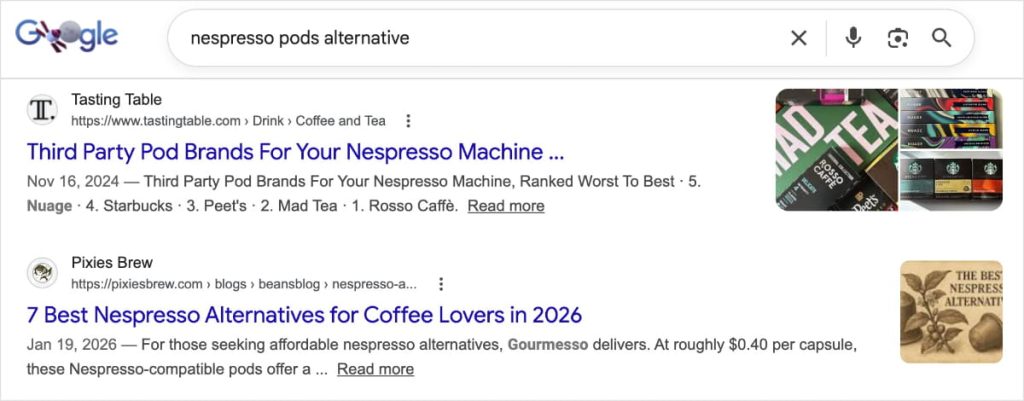
If you see a mix, some how-to guides alongside product pages and comparisons, there’s probably overlapping intent. That’s worth knowing too, because this means you have more flexibility in how you position your content.
2. Look for Paid Ads
This is one of my favorite quick checks, and it doesn’t cost anything. If a keyword has sponsored results above the organic listings, advertisers are bidding on it. Advertisers don’t waste money. They only bid on keywords where buyers are actually searching.
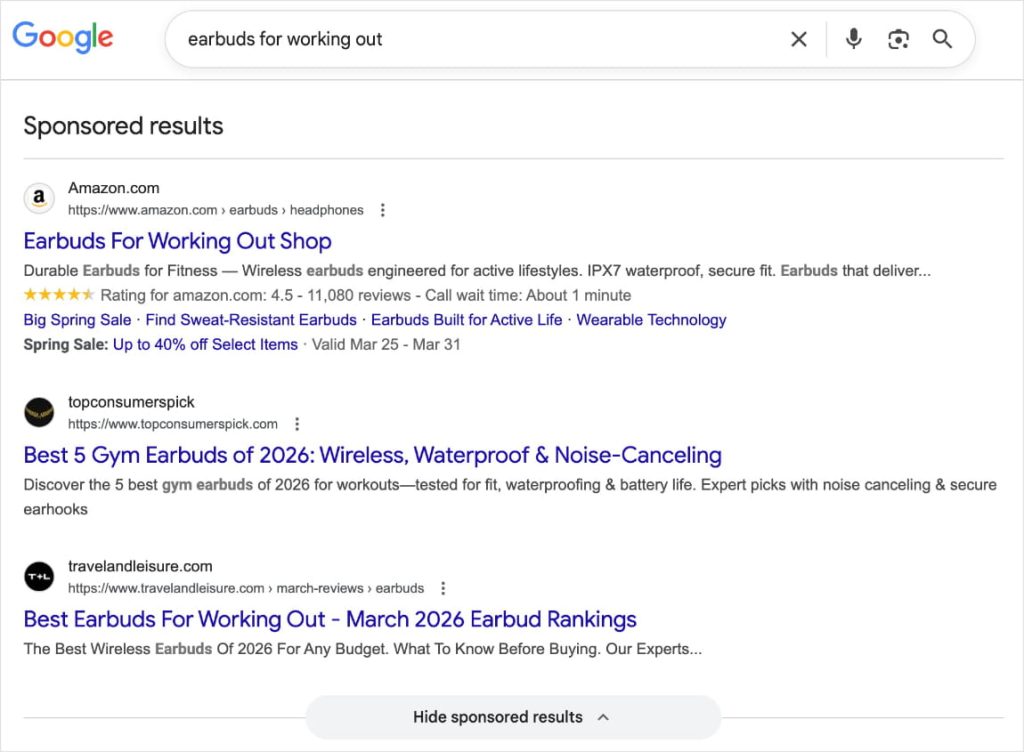
The more ads on a SERP, the stronger the buying intent signal. Three or four paid results? Almost certainly commercial or transactional. No ads at all? Probably informational.
Ten seconds. Any keyword. Any niche.
Pro Tip: The cost-per-click (CPC) data in tools like Google Keyword Planner tells a similar story. High CPC means advertisers are willing to pay a lot per click, which means those clicks convert. A commercial keyword with a high CPC is often a better target than a high-volume keyword with a low CPC.
3. Check the People Also Ask Box
The questions Google surfaces in the People Also Ask section reveal exactly how searchers are thinking about a topic. Questions like “is [item] worth it?,” “[item A] or [item B]?,” and “best [item] for [use case]?” are almost always commercial.
They reflect an audience that’s in evaluation mode, not learning mode.
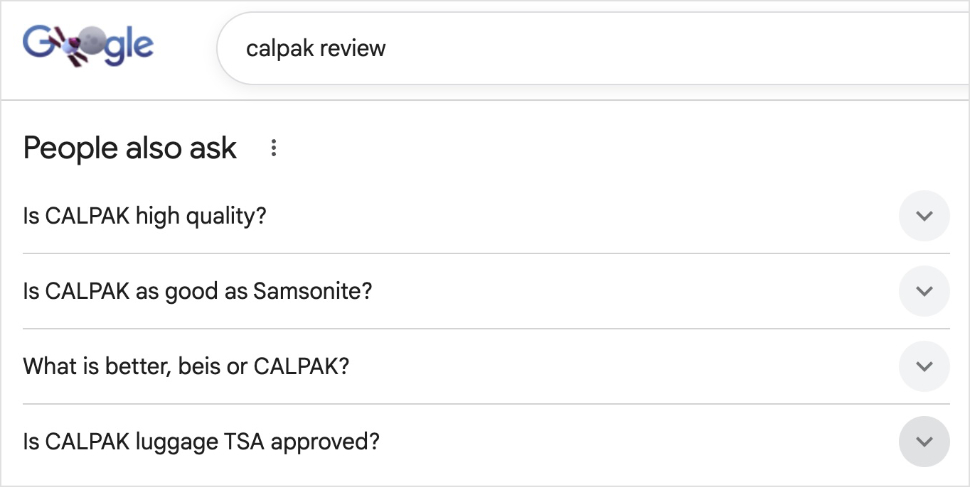
These questions are also a goldmine for content planning. Every one of them is a ready-made subheading, FAQ entry, or H3 candidate you know Google already associates with the topic.
How to Find Commercial Intent Keywords
Here’s how to actually surface commercial keywords worth targeting.
1. Start With Your Product or Service, Then Add Modifiers
This is the fastest method, and it requires zero tools. Take your core topic and attach commercial modifiers.
Say you run a coffee subscription business. “Coffee subscription” is your seed keyword. From there, add modifiers and you get:
- “best coffee subscription”
- “coffee subscription vs grocery store”
- “coffee subscription for offices”
- “coffee subscription review”
- “is a coffee subscription worth it”
That’s 5 commercial intent keywords, generated in under a minute.
This is especially useful when you’re mapping a topic cluster and want a fast read of the full landscape before pulling volume data.
2. Use a Keyword Research Tool With Intent Filtering
Once you need real volume and keyword difficulty data, it’s time to bring in a keyword research tool. Semrush and Ahrefs both classify keywords by intent and let you filter to commercial only, which is much faster than manually evaluating hundreds of results.
My personal preference? Semrush.
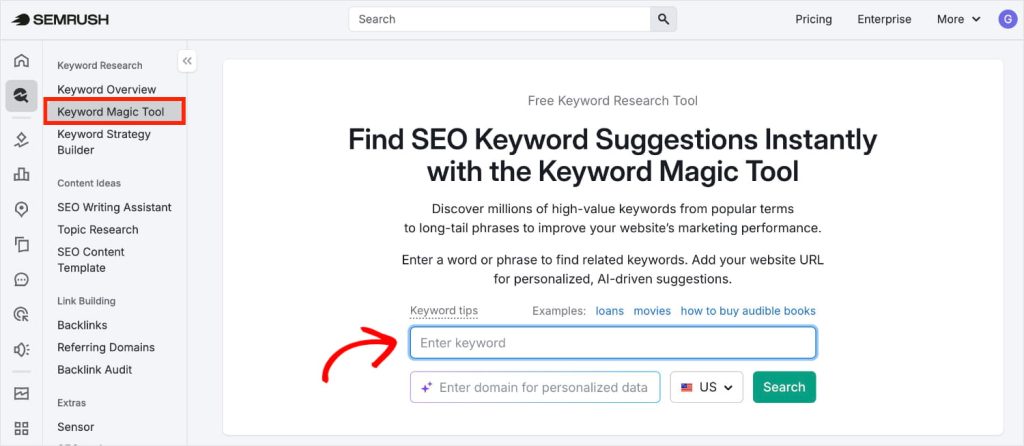
I like how simple it is to use for keyword research and the amount of data you get. To get started, navigate to the Keyword Magic Tool and enter the keyword you have in mind. Click “Search.”
Once you’ve reached your keyword report, open the Intent filter and select Commercial.
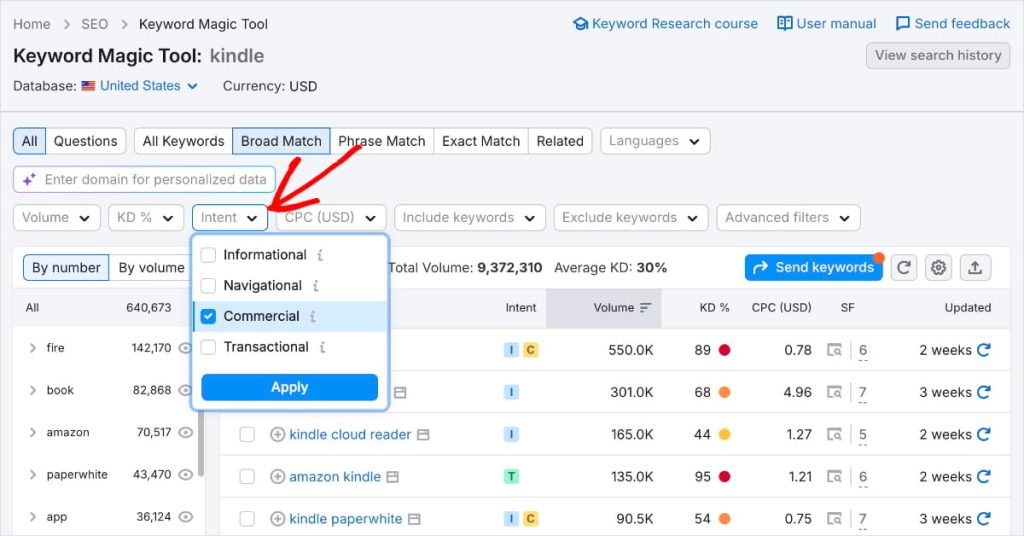
Now, your report will only contain commercial intent keywords. (Some of these will have overlapping search intent types, too.)
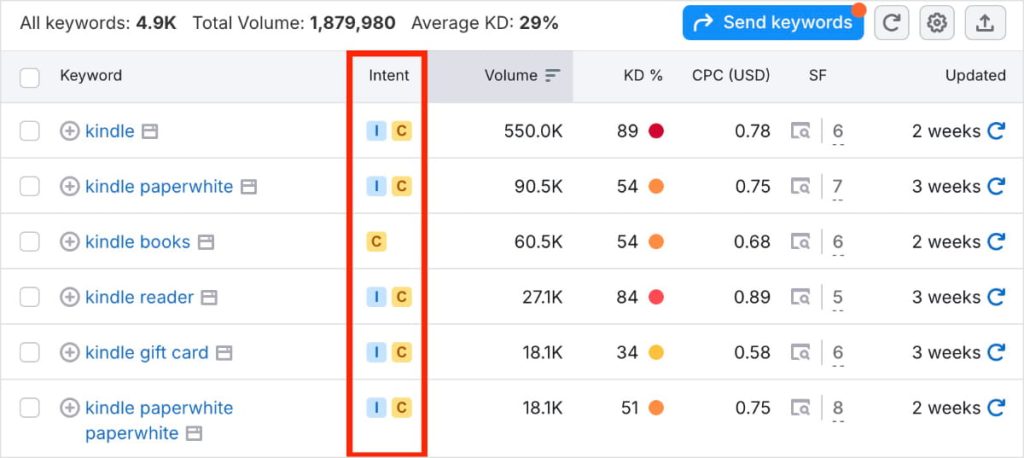
I recommend using additional filters to narrow this list even more. For example, you could set the keyword difficulty to be a maximum of 40 so you only see “easy” keywords.
After setting the difficulty, I also like to sort by search volume. This helps me prioritize which keywords to target first.
Do you have a WordPress website? All in One SEO (AIOSEO) is an SEO plugin with a built-in Semrush integration. This makes keyword research even faster. See below to learn how it works.
AIOSEO is the SEO plugin that I recommend to my clients. It has powerful, beginner-friendly tools that help you grow your rankings.
Plus, it has a Setup Wizard that takes under 10 minutes to get going. (Here’s a quick tutorial on how to do your WordPress SEO setup.)
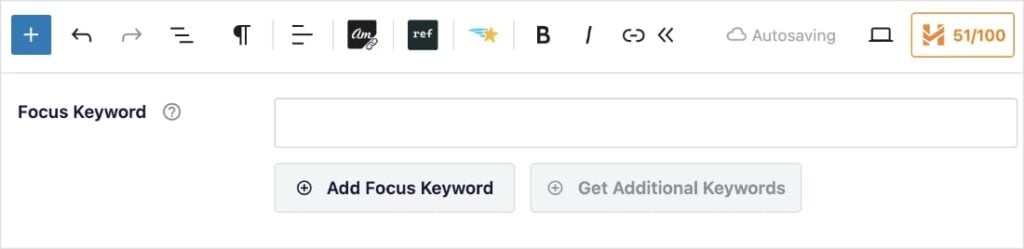
Once you’ve connected AIOSEO to Semrush, you’ll want to open the post or page you want to work on. Then, scroll to the AIOSEO settings at the bottom of the editor, and add your focus keyword. (This is the main commercial intent keyword you want to rank for.)
After it saves your keyword, click “Get Additional Keyphrases.”
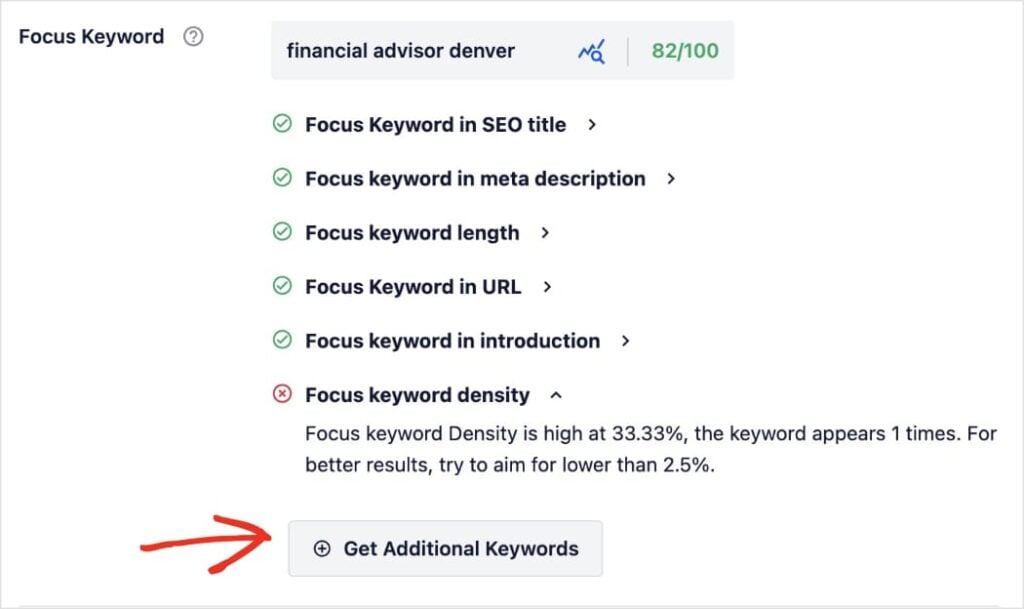
This will open a pop-out box with related keywords directly from Semrush. You’ll also get volume and trend data without leaving the WordPress editor.
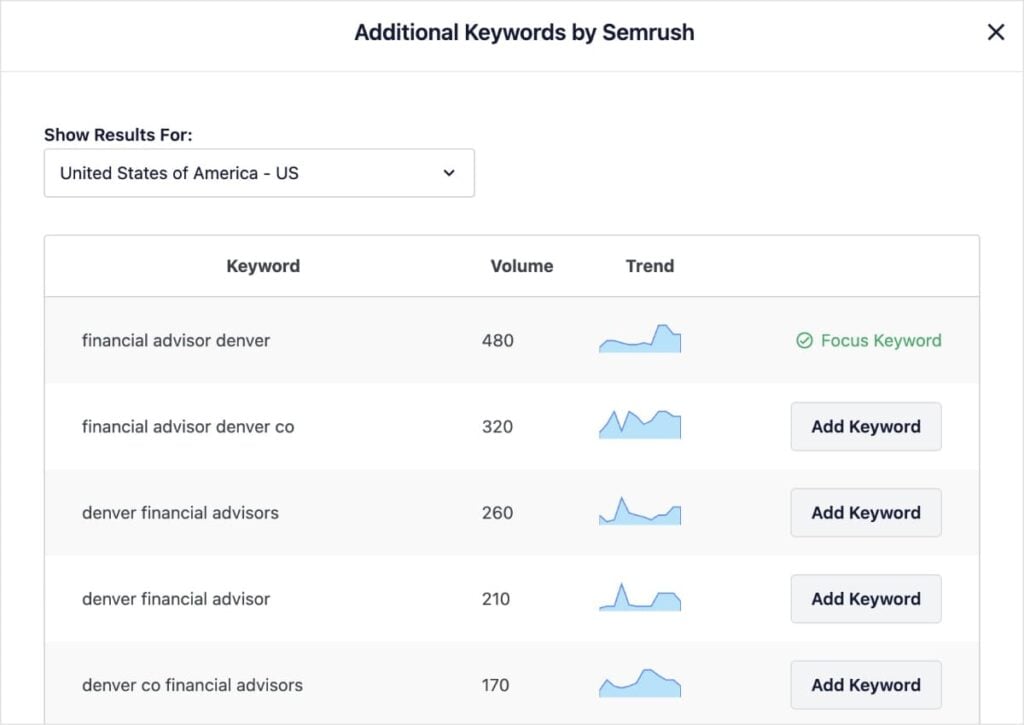
Just a heads up, intent labels aren’t shown in the panel, so you’ll still want to do a quick SERP check on anything promising. But it’s a solid way to build a working list fast, right in WordPress.
3. Find Keywords You Can Actually Rank For
Big commercial keywords are competitive. That’s why they don’t always make the best targets for small business owners or new websites. The more useful question for most sites is: which commercial keywords can I realistically win?
LowFruits is built specifically to answer that. It analyzes the SERP for each keyword and flags “Weak Spots.” These are low-authority domains ranking in top positions that a newer or smaller site could displace.
The more Weak Spots there are, the better your chances of ranking high on page 1.
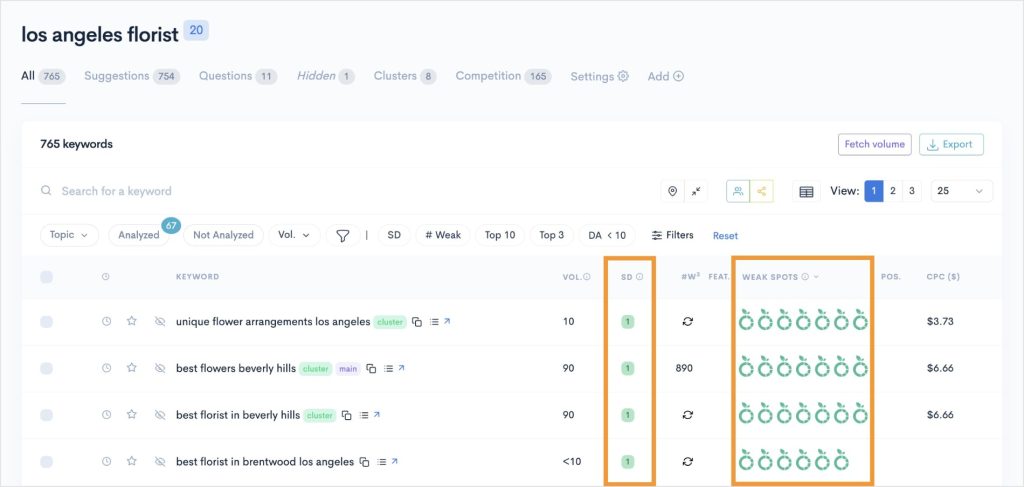
I recommend looking at the SERP Difficulty Score (SD), too, which is the LowFruits metric for keyword difficulty. When you find a keyword with a low difficulty score (1) and multiple Weak Spots, you know you have a winner.
Pro Tip: Don’t ignore commercial keywords just because they have low search volume. A keyword with 100 monthly searches and clear commercial intent will often drive more revenue than a 2,000-search informational keyword.
4. Look at Competitor Keyword Gaps
If you’re not sure where to start, look at what your competitors are ranking for that you aren’t. A keyword gap analysis filtered for commercial intent will surface these directly. It’s one of the most efficient approaches available. You’re finding keywords with proven demand that are already relevant to your space.
How to Optimize for Commercial Intent Keywords
Finding the right commercial keywords is only half the equation. Now, you need to optimize your pages to rank for them. Here’s how:
1. Match the Content Format to the Keyword
This is the most important thing to do when creating any piece of content, including commercial. Here’s a quick cheat sheet of which content format to use based on the modifier:
- “best X” keyword needs a product or service roundup
- “vs” keyword needs a head-to-head comparison
- “review” keyword needs a genuine evaluation with honest pros and cons
Publishing the wrong format for a commercial keyword is one of the most common SEO mistakes I see. Google ranks content that best satisfies intent. If everything ranking on page 1 for your target keyword is a comparison article and you publish a how-to guide, you’re fighting uphill.
Check the SERP before you write, and let what’s already working tell you what to build.
2. Optimize Your On-Page SEO
On-page optimization is where a lot of commercial keyword pages fall short, not because the content is bad, but because small gaps get missed before publish. Your focus keyword needs to appear in the right places, including:
And body copy, of course, among other things. Careful though, you don’t want to enter keyword stuffing territory where you use your keyword too much.
If you’re on WordPress, AIOSEO’s TruSEO Analysis handles this check right inside the editor. It scores your optimization in real time and flags anything that needs attention before you hit publish. You get this data in a simple, user-friendly checklist:

For commercial pages where rankings directly affect revenue, it’s worth checking every time. A few missed optimizations can mean a few positions lost, and a few positions can be a lot of traffic.
3. Add Schema Markup to Commercial Pages
Schema markup is specialized code that lives in the backend of your website. Search engines use it to understand your web pages and generate rich snippets in SERPs. This includes star ratings, review counts, pricing, shipping details, and more.
These elements appear directly in search results, leading to higher click-through rates.
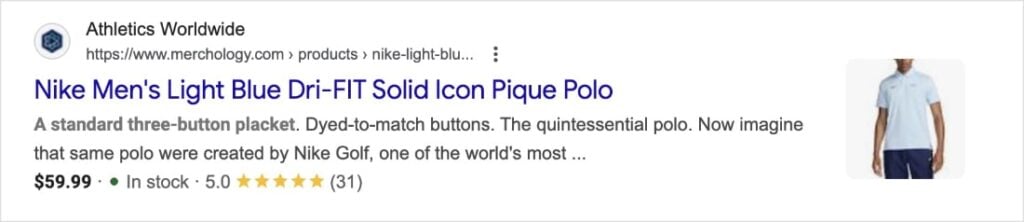
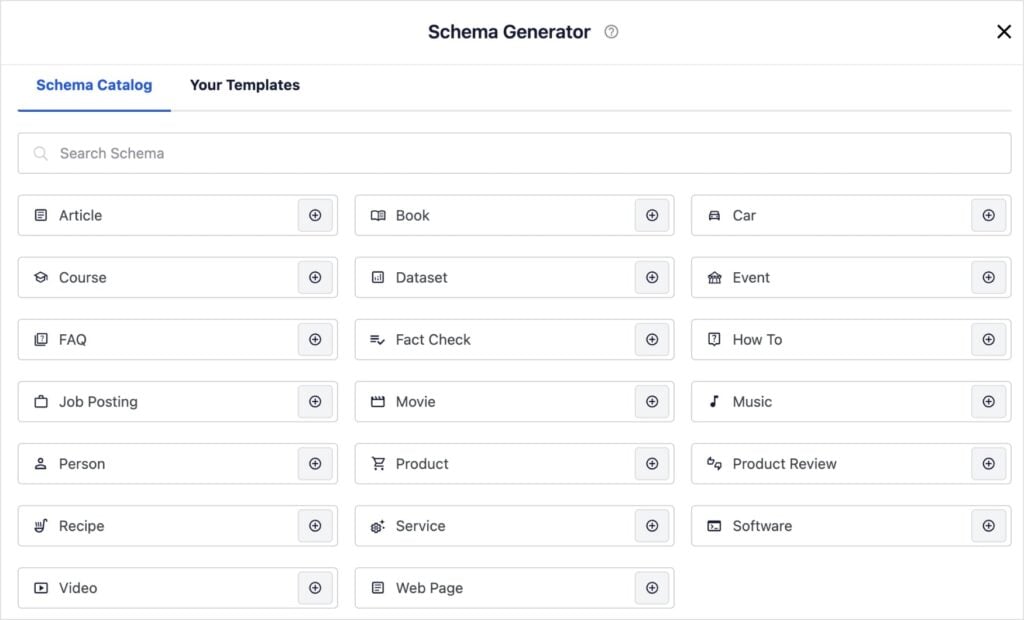
For WordPress, AIOSEO’s Schema Generator handles the technical side of schema markup without requiring any coding. Simply select the schema type, fill in the details, and AIOSEO generates and outputs the JSON-LD automatically.
4. Build Internal Links to Your Commercial Pages
Commercial keyword pages are some of the most valuable pages on your site. They’re what connects your organic traffic to your actual product or service. If they’re buried or weakly linked from the rest of your site, you’re leaving both rankings and conversions on the table.
AIOSEO’s Link Assistant scans your site and suggests relevant internal links right in the editor. It also has recommended anchor text, but you’re welcome to change it.
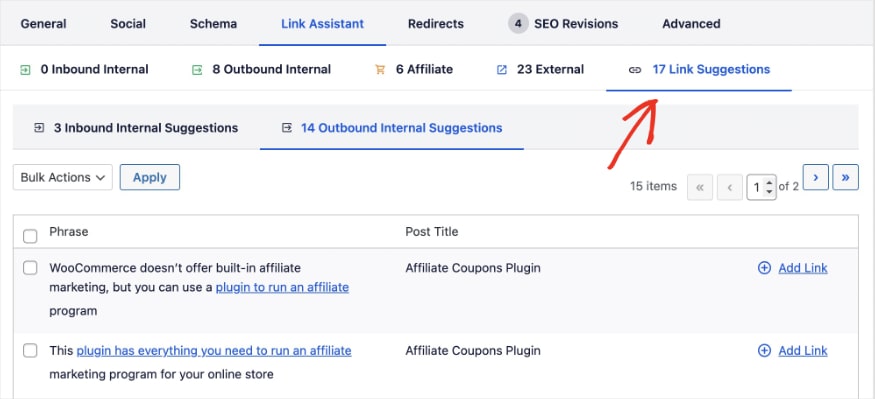
In general, the more internal links pointing to a commercial page, the stronger its rankings tend to be.
5. Track How Your Commercial Pages Perform
SEO is ongoing. That’s why it’s critical to monitor your website’s performance.
Google Search Console is free and gives you accurate organic data straight from the source. The Performance report is where you’ll find:
- Clicks
- Impressions
- Average click-through rate (CTR)
- Average position

These insights will help you determine if your commercial keywords and landing pages are performing how you hoped.
You can also bring this data straight into WordPress using AIOSEO’s Search Statistics. This integration puts your most important GSC metrics into your dashboard, so you don’t have to switch tools.
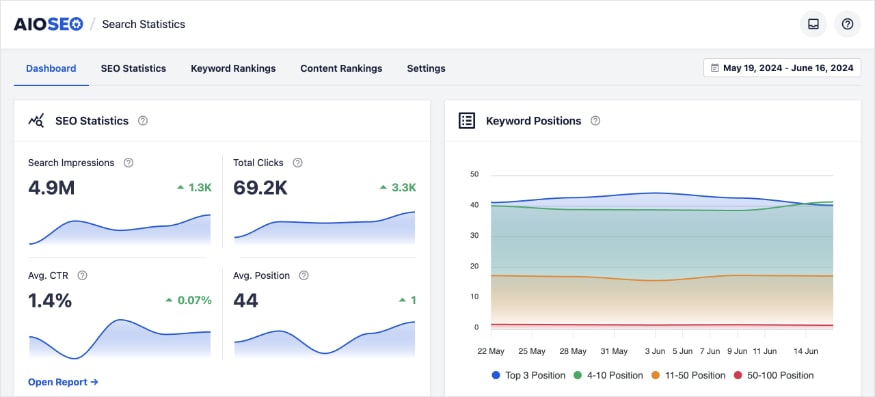
If a commercial page isn’t performing the way you’d expect, this is where you start the diagnosis.
Stop Chasing Volume. Start Targeting Intent.
Commercial intent keywords connect you with people who are already evaluating solutions. They’re not always the biggest numbers in keyword research tools, but they’re often the ones that matter most for your business.
Once you learn to recognize profitable modifiers, verify search intent, and use the right keyword tools, you’ll be well on your way to ranking for commercial keywords that actually move the needle for your business.
And if you’re doing all of this inside WordPress, AIOSEO handles the optimization side: on-page analysis, schema markup, internal linking, rank tracking, and more. Put your commercial keywords to work and get started with AIOSEO today.
Want to keep learning? Check out these related guides:
For more WordPress SEO tips, follow us on X (Twitter), Facebook, and YouTube.
Frequently Asked Questions
What are commercial intent keywords?
Commercial intent keywords are search terms used by people who are actively researching a product or service before making a purchase. These searchers are in evaluation mode: comparing features, reading reviews, and weighing their options. They’re closer to buying than someone running a purely informational search.
What’s the difference between commercial and transactional keywords?
Commercial keywords signal that a searcher is still deciding (“best WordPress SEO plugins”). Transactional keywords signal that the decision is made and the searcher is ready to act (“install AIOSEO”). Both indicate buying intent, but at different stages. Commercial content should help searchers evaluate; transactional content should make it easy for them to take action.
What are examples of commercial intent keyword modifiers?
The most common commercial modifiers are: best, top, vs, versus, review, reviews, alternative, alternatives, worth it, good for, recommended, and with [feature]. Adding any of these to a core topic keyword almost always produces commercial intent variations worth researching.
How do I find commercial intent keywords for free?
Start with Google. Search your core keyword in an incognito window and look at what’s ranking. Roundups, comparisons, and review posts signal commercial intent. Also check whether paid ads appear. Ads on a SERP are a reliable signal that buyers are searching for that keyword. The People Also Ask box will often surface evaluation questions that confirm it as well.
Do commercial intent keywords still work with AI Overviews?
Yes. AI Overviews appear for many commercial queries and do reduce clicks to some organic results. But searchers who click through past an AI Overview are often more committed. They want detail, a real comparison, or a specific recommendation that a summary can’t provide. Well-optimized commercial content still earns clicks and conversions.
Disclosure: Our content is reader-supported. This means if you click on some of our links, then we may earn a commission. We only recommend products that we believe will add value to our readers.
Want to Try AIOSEO for Free?
Enter the URL of your WordPress website to install AIOSEO Lite.

