Want to know why some pages on your site rank well while others barely get noticed? The answer lies in internal links.
A strong internal linking strategy helps search engines find and rank your content, distributes authority across your site, and keeps visitors engaged longer.
So, in this complete guide, I’ll cover everything you need to know about internal linking for SEO, from what internal links are to how to build a strategy that drives real results.
Let’s start with a definition.
In This Article
- What Are Internal Links?
- Why Are Internal Links Important for SEO?
- How to Build an Internal Linking Strategy
- How to Add Internal Links in WordPress
- Internal Linking Best Practices
- How to Audit Your Internal Links
- Common Internal Linking Mistakes to Avoid
- Frequently Asked Questions About Internal Linking
What Are Internal Links?
Internal links are hyperlinks that connect one page on your website to another page on the same domain. They help search engines crawl and index your content, pass link equity between pages, and guide visitors to related information.
A strong internal linking strategy is one of the most effective ways to improve your SEO without building a single new backlink.
Unlike backlinks, which come from other websites, internal links are entirely within your control. That makes them one of the most powerful SEO levers you have.
Search engines like Google use internal links to discover new pages, understand how your content is organized, and determine which pages are most important. If a page has no internal links pointing to it, Google might never find it.
Types of Internal Links
There are several types of internal links, and each serves a different purpose on your site. The 3 most common ones are:
- Navigational links: These appear in your site’s main menu or header and help visitors reach key sections, such as your homepage, blog, services, or products.
- Contextual links: Embedded within the body of your content. They’re the most valuable for SEO because they connect related topics in context and pass the most link equity.
- Footer and sidebar links: These appear in your site’s footer or sidebar and typically point to key pages such as your privacy policy, contact page, or recent posts.
Understanding the different types of internal links helps you use each one intentionally across your site.
Internal Links vs. External Links vs. Backlinks
Internal links, external links, and backlinks are all types of hyperlinks, but they serve different SEO purposes.
- Internal links: Connect pages on the same domain. You control all of them.
- External links: Point from your site to a domain outside your site. They help you cite sources and build credibility.
- Backlinks: Are external links from other websites pointing to yours. They build domain authority but are not in your direct control.
While backlinks are excellent for building authority and external links help establish credibility, internal links are your most controllable SEO asset. They shape how both users and search engines navigate your entire site.
Why Are Internal Links Important for SEO?
Internal linking directly impacts your ability to rank. Here’s a breakdown of the key benefits.
1. Improved Crawling and Indexing
Search engines like Google use crawlers to discover content across the web. Those crawlers follow links, including internal ones, to find and index new pages on your site.
Without internal links, a newly published page can become an orphan page, which is a page with no links pointing to it. Orphan pages are essentially invisible to search engines because crawlers have no path to find them.
But when you add internal links to new content from existing pages, you give Google a clear path to find and index it faster. This is especially important for new pages you want to rank quickly.
Pro Tip: Use AIOSEO’s Link Assistant to surface any orphan pages on your site so you can find and fix them before they cost you rankings.
2. Link Equity Distribution
Link equity, sometimes called link juice, is the SEO value that passes from one page to another through links. Think of it as authority currency. The more internal links a page receives from high-authority pages, the greater its ranking potential.
For example, if your homepage has dozens of backlinks pointing to it, you can channel some of that authority to a newer post by linking to it from your homepage. That single internal link can meaningfully lift the new post’s rankings.
By strategically distributing link equity across your site, you maximize the SEO potential of every page, not just the ones that already rank well.
3. Site Hierarchy and Topical Authority
“One of the biggest things that you can do on a website to kind of guide Google and guide visitors to the pages that you think are important.”
– Google’s Search Advocate John Mueller
Internal links help search engines understand your site structure. When you consistently link from broad topic pages to specific subtopic pages, you signal a clear hierarchy that Google can follow.
More importantly, a well-planned internal linking structure builds topical authority. When your pages form a connected network around a subject, search engines recognize you as a reliable source on that topic. That recognition translates into better rankings across your entire content cluster, not just individual posts.
4. User Experience and Engagement
Internal links aren’t just for search engines. They guide real readers to content they’ll find helpful, keeping them on your site longer and reducing your bounce rate.
A visitor reading your post on SEO basics might naturally want to learn about keyword research next. A well-placed internal link gets them there without friction. That kind of smooth navigation increases page views, session duration, and ultimately conversions.
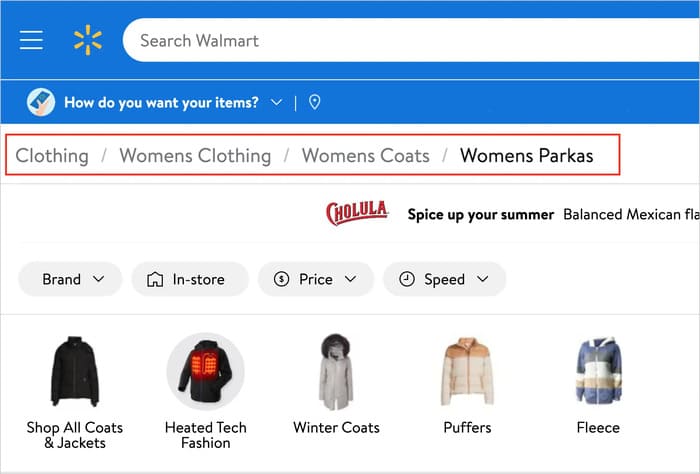
Higher engagement also sends positive signals to search engines. Pages that keep users on-site longer tend to rank better over time. Here’s a great example of breadcrumb navigation from Walmart, which uses strategic internal links to help users navigate the site effortlessly:
How to Build an Internal Linking Strategy
Dropping random internal links across your site isn’t a strategy. To see real SEO results, you need a deliberate approach.
So, here’s how to build one.
Map Your Site Architecture First
Before you start adding links, get clear on how your site is organized. A solid site architecture typically looks like this:
Homepage » Category pages » Individual posts or product pages
Each level should link to the level below it. Category pages link to their posts. Posts link to related posts within the same category. This layered structure tells Google which pages are most important and how your content relates to each other.
Pages buried too deep in your site structure, meaning they take 4 or more clicks to reach from your homepage, are harder for Google to crawl and rank. Keeping your most important pages within 3 clicks of your homepage is a good benchmark to work toward.
Identify Your Power Pages
Your power pages are the ones with the most backlinks or the highest organic traffic. They carry the most authority on your site, and they’re your best sources for passing link equity to pages you want to rank.
With AIOSEO’s Search Statistics, you can quickly see which pages are driving the most impressions and clicks directly from your WordPress dashboard. Use that data to identify your power pages, then add internal links from those pages to newer or underperforming content you want to lift in the rankings.
This process is one of the highest-ROI internal linking moves you can make. You’re not creating new content or building new backlinks. You’re simply redirecting existing authority to where it can do more work.
Build Topic Clusters With Internal Links
A topic cluster is a group of related pages that all link to each other and to a central pillar page. The pillar page covers a broad topic at a high level, and the cluster pages dive into specific subtopics in depth.
Internal links are what hold the cluster together. When all your posts on a subject link to each other, search engines see topical depth and reward the whole cluster with better rankings.
For example, if your pillar page covers SEO basics, your cluster posts might cover keyword research, on-page SEO, and link building. Each cluster post should link back to the pillar, and the pillar should link out to each cluster post. Related cluster posts should also link to each other where it makes sense.
AIOSEO’s Link Assistant makes it easy to spot gaps in your cluster linking. It shows you which pages mention a topic but don’t yet link to the relevant post, surfacing opportunities you might otherwise miss.
How Many Internal Links Per Page?
There’s no magic number. Google’s official guidance says every page you care about should have at least 1 internal link pointing to it, and that there’s no ideal number of links a page should contain.
In practice, a good rule of thumb is 3 to 5 contextual internal links per 1,000 words of content. The goal is to add links where they genuinely help the reader, not to hit a quota. If a link doesn’t add value for the user, it’s unlikely to add value for your rankings either.
The one thing to avoid is overlinking. If every other sentence contains a link, readers get fatigued, and search engines struggle to identify which links actually matter. When in doubt, ask yourself: Does this link help the reader understand or act on what they just read? If yes, add it. If not, leave it out.
How to Add Internal Links in WordPress
Adding internal links in WordPress is straightforward, especially if you use AIOSEO’s link assistant feature.
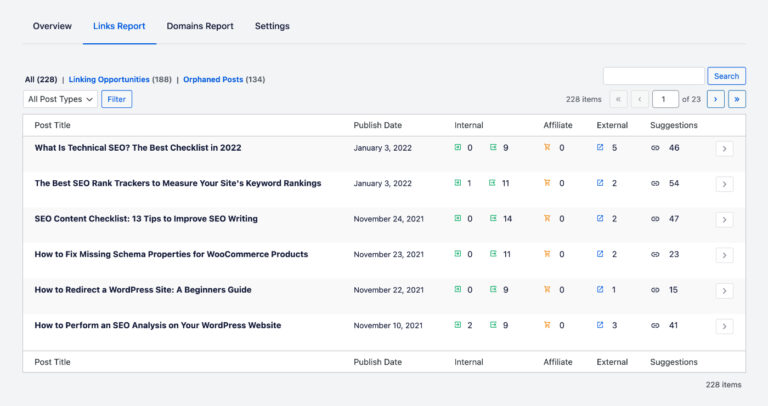
That’s because AIOSEO’s Link Assistant is built specifically to take the guesswork out of internal linking. It crawls your entire site and generates a full links report showing every link on every page, including incoming, outgoing, and orphan pages with no links.
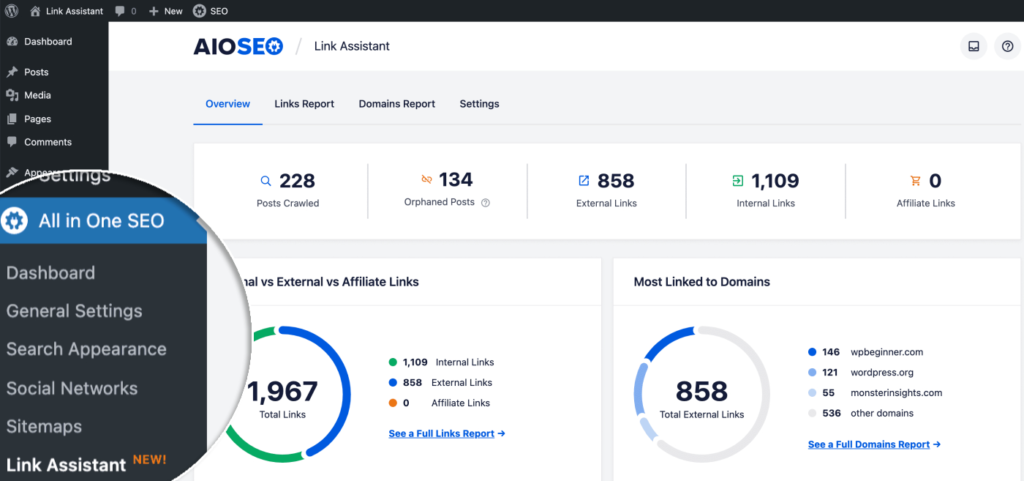
Most usefully, Link Assistant suggests internal linking opportunities you haven’t yet acted on. It analyzes your content and recommends which pages should link to each other based on relevance, complete with suggested anchor text.
To use it, go to All in One SEO » Link Assistant in your WordPress dashboard. Review the suggested links and click Add Link to connect pages with a single click, without manual editing or digging through posts.
Need a full walkthrough? Check out our step-by-step guide on how to add internal links in WordPress.
How to Find Internal Linking Opportunities Manually
If you want to find linking opportunities beyond what Link Assistant surfaces, a quick manual method works well. Use Google’s site search operator: type site:yoursite.com “topic” into Google, where “topic” is the subject of the page you want to link to. Google will return every page on your site that mentions that topic, and each result is a potential source for a new internal link.
You can also go back to older posts and scan for places where a recently published page would naturally fit as a reference.
However, I would highly recommend using the AIOSEO plugin, especially if you’re a WordPress user, to save yourself hours of manual scanning.
Internal Linking Best Practices
Following these best practices will help you get the most SEO value out of every internal link you add.
Use Descriptive Anchor Text
Anchor text is the clickable text of a link. Descriptive anchor text tells both readers and search engines what the linked page is about. Instead of “click here” or “read more,” use natural phrases that describe the destination, like “our guide to on-page SEO” or “how to add schema markup in WordPress.”

Specific keywords in anchor text signal to search engines what the linked page is about, improving its visibility in search results. Varying your anchor text across different links to the same page also prevents over-optimization, which can look spammy to Google.
Link From High-Authority Pages to New Content
When you publish new content, it starts with zero authority. One of the fastest ways to boost its ranking is to link to it from one of your established, high-traffic pages.
Identify a few of your most-linked posts using AIOSEO’s Search Statistics and look for natural places to reference your new content. That authority transfer can help your new page show up in search results much faster than it would on its own.
Keep Your Internal Links Dofollow
By default, internal links are dofollow, meaning they pass link equity to the destination page. Make sure you haven’t accidentally added a rel="nofollow" attribute to any internal links, which would stop the equity transfer entirely.
For more on the difference between link types, check out our comparison of dofollow vs. nofollow links. AIOSEO’s Link Assistant also flags any internal links with nofollow attributes in its report so you can find and correct them quickly.
Avoid Creating Orphan Pages
Every page you want to rank needs at least 1 internal link pointing to it. Pages with no internal links are hard for search engines to find and even harder to rank.
Make it a habit to link to every new post you publish from at least 1 existing related page. AIOSEO’s Link Assistant surfaces orphan pages in its links report, so you can spot and fix them without manually auditing your entire site.
Link Strategically to High-Value Pages
Your homepage and cornerstone content pages typically carry the most authority on your site. Linking from these high-value pages to important category pages and top posts signals to Google that those pages matter.

On the flip side, linking from those high-value pages to newer content helps newer pages inherit some of that authority. Both directions of this strategy strengthen your overall site structure.
How to Audit Your Internal Links
Building a strong internal linking structure isn’t a one-time task. As your site grows, you’ll accumulate broken links, orphan pages, and missed opportunities. Regular audits keep things clean and your SEO performance on track.
Find and Fix Broken Internal Links
Broken internal links hurt both user experience and SEO. When someone clicks a link that leads nowhere, they bounce. When Google’s crawler hits a dead end, it stops following that path through your site.
AIOSEO’s Broken Link Checker scans your entire site and flags any links pointing to pages that no longer exist or have changed URLs. You can review and fix them directly from the dashboard, without digging through your content post by post.
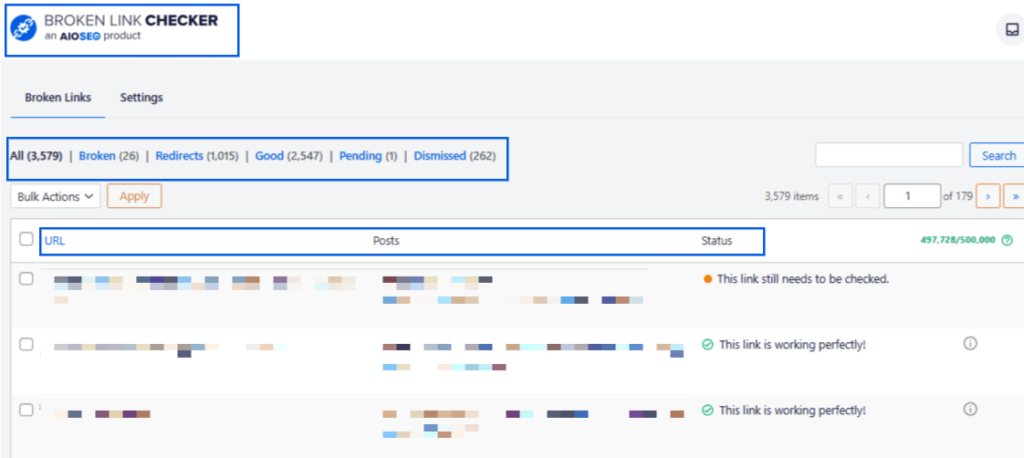
I’d recommend running a broken link audit at least once a month, especially on larger sites that publish new content frequently.
Identify and Fix Orphan Pages
Even if a page is in your XML sitemap, it still benefits from internal links. Sitemaps tell Google a page exists. Internal links tell Google that the page matters.
Run a regular orphan page check with AIOSEO’s Link Assistant to surface any pages with no internal links pointing to them. Once you’ve found them, link to each one from at least 1 topically relevant post. For a deeper dive, our guide on finding and fixing orphan pages in WordPress walks you through the full process.
Check Crawl Depth
Crawl depth is the number of clicks it takes to reach a page from your homepage. Pages buried 4 or more clicks deep are harder for Google to crawl regularly, which can hurt their rankings over time.
Aim to keep your most important pages within 3 clicks of your homepage. If you find key pages buried deep in your site, add internal links to them from higher-level pages like your homepage, category pages, or your top-performing posts. This simple fix can make a meaningful difference in how consistently Google crawls and re-ranks that content.
4 Common Internal Linking Mistakes to Avoid
Even experienced site owners make these mistakes. Here’s what to watch out for.
Overlinking
More internal links don’t always mean better SEO. When you pack too many links onto a single page, search engines struggle to identify which ones are truly important. Link equity gets diluted, and readers experience decision fatigue.
A good test: if you feel like you’re forcing a link in, you probably are. Stick to links that genuinely help the reader understand or act on what they’re reading.
Not Updating Links When Content Changes
When you delete a page or change a URL, any internal links pointing to it become broken. Those broken links send both users and search engines to dead ends and waste the link equity that was flowing to that page.
Whenever you change or remove content, use AIOSEO’s Redirection Manager to set up a redirect from the old URL to the new one. That way, your internal links stay functional and any link equity transfers cleanly to the correct destination.
Ignoring New Content
Publishing a new post and leaving it unlinked is one of the most common and costly internal linking mistakes. Without at least 1 internal link pointing to it, that new page is essentially invisible to both users and search engines.
Every time you publish something new, build linking into your workflow. Find 2 to 3 existing pages that mention the same topic and add a link to the new post from each one. This takes just a few minutes and makes a big difference in how quickly new content gets discovered and indexed.
Using Generic Anchor Text
“Click here.” “Read more.” “Learn more.” These phrases tell Google nothing about the page they link to, leaving a significant SEO signal on the table.
Always use anchor text that describes the destination page. It helps search engines understand your content relationships, and it helps readers decide whether a link is worth clicking. For example, instead of “learn more here,” use something like “how to optimize your meta descriptions” or “our guide to WordPress SEO.”
Frequently Asked Questions About Internal Links
What are internal links?
Internal links are hyperlinks that connect one page on your website to another page on the same domain. They help search engines crawl and index your content, distribute link equity between pages, and guide visitors to related information across your site.
Why are internal links important for SEO?
Internal links are important for SEO because they help search engines discover and index new pages, distribute link equity from high-authority pages to newer ones, establish your site hierarchy, and build topical authority.
How many internal links should a page have?
There’s no official magic number. However, in practice, 3 to 5 contextual internal links per 1,000 words is a solid guideline. Focus on adding links that genuinely help the reader rather than hitting a quota. If a page contains so many links that it becomes hard to read, there’s a sign you’ve gone too far.
Can I use the same anchor text for multiple internal links?
Yes, but change it as much as you can. That’s because using the exact same anchor text across many links to the same page can look over-optimized to search engines.
What Next?
I hope this guide has given you a clear picture of what internal linking is and how to use it to improve your SEO. From understanding site architecture and topic clusters to auditing for broken links and orphan pages, every improvement you make to your internal linking strategy compounds over time.
For more ways to strengthen your on-page SEO, check out our complete guide to optimizing your existing content for SEO.
Ready to put your internal linking strategy on autopilot? Try AIOSEO for free today and start finding and fixing your internal linking opportunities directly inside WordPress.
Disclosure: Our content is reader-supported. This means if you click on some of our links, then we may earn a commission. We only recommend products that we believe will add value to our readers.
Want to Try AIOSEO for Free?
Enter the URL of your WordPress website to install AIOSEO Lite.