
When you’re running an SEO agency, choosing the best SEO tool becomes about scalability, time management, and showing real ROI to your clients.
I’ve worked with dozens of plugins and platforms over the years, and I can confidently say that All In One SEO (AIOSEO) has consistently proven itself as the best SEO tool for agencies.
It’s feature-rich and built with agencies in mind. From onboarding multiple clients to generating reports that make you look like a rockstar, AIOSEO simplifies what used to be chaotic.
In this blog, I’ll walk you through why agencies specifically need SEO tools, what makes the best SEO tool, and the 9 reasons I believe AIOSEO should be your go-to platform. Plus, we’ll see how it compares to competitors like Yoast and RankMath.
Let’s start with a definition.
In This Article
- What Is an SEO Tool?
- Why Do Agencies Need an SEO Tool?
- 9 Reasons Why AIOSEO Is the Best SEO Tool for Agencies
- 1. Built for Agencies That Need to Scale SEO Fast
- 2. Manage Multiple Clients With Ease
- 3. Automated On-Page SEO Optimization
- 4. Advanced Schema Markup (Without Writing Code)
- 5. Built-in Local SEO Features
- 6. Google Search Console and Analytics Integration
- 7. AI Writing Assistant: Integration With SEOBoost
- 8. Powerful SEO Reports and Client Reporting Tools
- 9. Continuous Updates and World-Class Support
- Which Is the Best SEO Tool: AIOSEO vs. Yoast and RankMath
- FAQs About Best Agency SEO Tool
- Final Thoughts
What Is an SEO Tool?
An SEO tool is any software or plugin that helps optimize websites for search engines. Whether it’s doing keyword research, fixing technical issues, improving content for readability and relevance, or managing schema markup, a good SEO tool brings all these tasks into one organized space.
For agencies, the ideal SEO tool goes beyond basic optimization. It supports multi-site management, automation, team collaboration, and client reporting, all while keeping up with the latest SEO trends and algorithm shifts.
Why Do Agencies Need an SEO Tool?
If you’ve ever tried manually optimizing five or ten websites at once, you know it’s a logistical nightmare.
Agencies are constantly juggling:
- Different client goals
- Varying levels of SEO knowledge
- Tight deadlines
- ROI tracking and reporting
That’s why agencies need an SEO tool that scales with them, centralizes tasks, and saves time without sacrificing quality. It should also be simple enough for your team to use, from your SEO leads to junior writers.
9 Reasons Why AIOSEO Is the Best SEO Tool for Agencies
For me, AIOSEO checks all the boxes for being the best SEO tool, especially for agencies and large content teams.
Let me explain why.
1. Built for Agencies That Need to Scale SEO Fast
Why This Matters to Agencies: Time is money, and with AIOSEO, you’re not just saving time, but also unlocking the ability to take on more clients without burning out your team.
One of the biggest challenges for agencies is scaling SEO processes across multiple clients quickly. That’s where AIOSEO really shines.
With AIOSEO’s Smart Setup Wizard, you can get a brand-new client’s website SEO-ready in just a few minutes. The wizard walks you through all the essentials, such as site titles, meta descriptions, image sitemaps, schema settings, and more, so you don’t miss a thing.
It’s ideal for onboarding clients without spending hours per site.
Then there’s the Quick Edit feature, which I can’t live without.
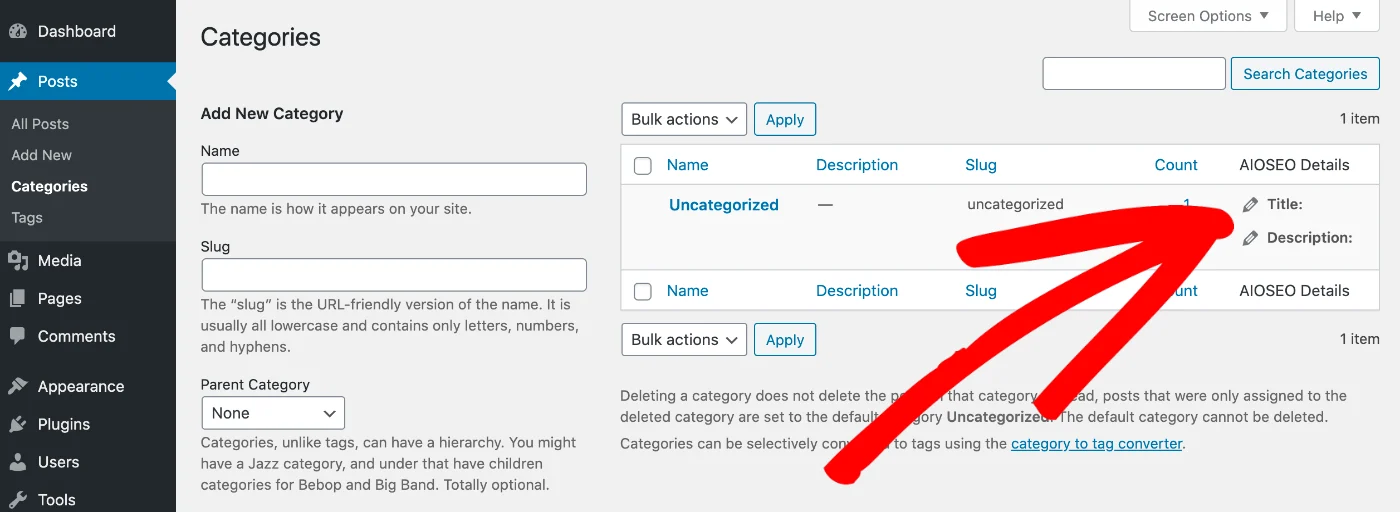
Whether you need to update meta titles for hundreds of pages or fix missing descriptions across a blog archive, AIOSEO lets you do it all in one place, without any spreadsheet exports or manual edits.
2. Manage Multiple Clients With Ease
Why This Matters to Agencies: Agency work is teamwork. AIOSEO makes it easy to delegate tasks, maintain control, and minimize back-and-forth communication, especially when managing multiple client sites.
As an agency, you don’t just manage websites. You also manage teams that include writers, developers, editors, and, sometimes, clients who want backend access. That’s why I appreciate how AIOSEO is structured to support team collaboration and client control without compromising site security.
The Access Control feature is a game-changer in this regard.
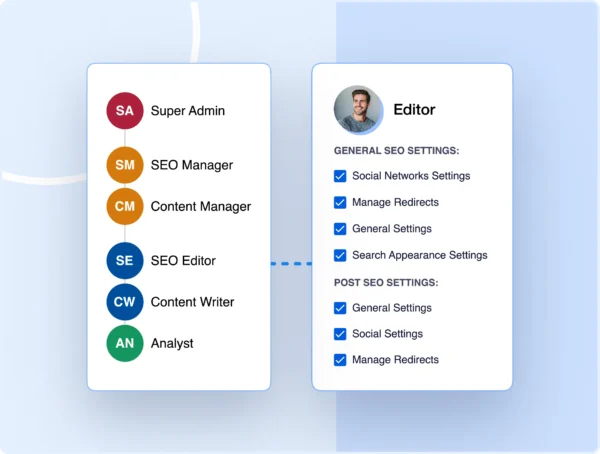
Using this tool, you can assign specific SEO roles to different users. For example, give your writers access to the Focus Keyphrase and Content Analysis tools, but not to the global settings or schema editor. This keeps everyone working in their lane while still being productive.
It also ensures that your client has access only to key resources, such as analytics or data, without disrupting the existing workflow.
And if you’re running WordPress multisite for clients, AIOSEO supports that out of the box. No need for separate plugin licenses or awkward workarounds. It’s all manageable from a single dashboard.
3. Automated On-Page SEO Optimization
Why This Matters to Agencies: With AIOSEO’s real-time analysis and scoring, you can save time, reduce human error, and help junior team members deliver work that meets professional SEO standards.
One of the most complex parts of managing SEO across multiple clients is keeping up with on-page SEO. You can’t manually check every blog post, product page, or landing page for SEO best practices, not if you’re managing more than a couple of clients. That’s exactly why you should rely on AIOSEO’s automated on-page SEO tools.
At the heart of this is the TruSEO Score, a real-time scoring system that evaluates how well-optimized a page or post is for search engines.
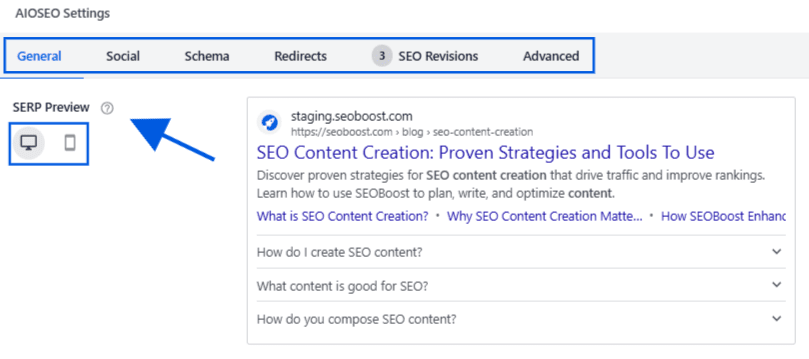
Unlike tools that show a checklist, TruSEO goes deeper. It evaluates critical elements like keyword placement, meta descriptions, outbound and internal links, content length, image SEO, and even schema markup.
Here’s how you can use it in your daily workflow:
- When your content team finishes a blog post, ask them to check the TruSEO Score to ensure the essentials are covered.
- Use the built-in Focus Keyphrase Checklist to optimize each page for the most important query.
- Use Content Analysis to see actionable recommendations (like adding headings or improving meta tags), so you don’t have to comb through each article manually.
- Check the SEO Audit Checklist to see what’s missing on a page.
And the best part? These features work inside the WordPress editor, so your team doesn’t need to leave the page or switch between tabs and tools.
You can stay in flow, which means faster turnaround and more consistent quality across all client sites.
4. Advanced Schema Markup (Without Writing Code)
Why This Matters to Agencies: Rich results lead to higher visibility and better click-through rates, enabling clients to see results faster. AIOSEO makes it easy for agencies to implement advanced structured data at scale, without developer bottlenecks or external tools.
Schema markup is a semantic language that helps search engines understand your content better. It’s one of the most underrated ways to boost SEO performance, especially when you're trying to increase click-through rates for your clients.
But let’s be honest: manually coding structured data for every blog post, product, or service page is not scalable for an agency.
That’s why AIOSEO’s Schema Generator should be one of your go-to tools.
Inside AIOSEO, you can easily select from a wide variety of schema types, including:
- Articles
- Courses
- Products
- Recipes
- Local Businesses
- FAQs
- Events
No HTML. No JSON-LD. No third-party plugins.
Just select the type of content you’re publishing, and AIOSEO handles the markup. And if you need more advanced customization (which most agencies do for high-value clients), AIOSEO lets you edit schema data directly in the UI.
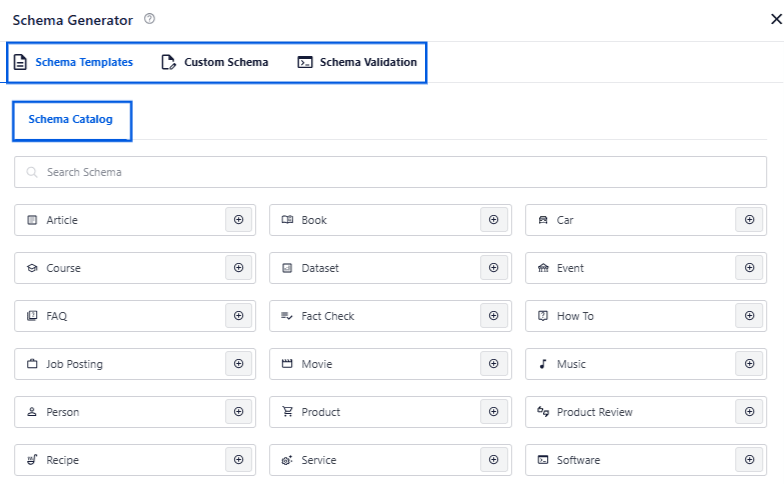
For example, if you’re publishing a blog post with FAQs at the bottom, you can add FAQ schema to increase the chance of getting rich results in the SERPs.
Or when working with a local service client, you can apply the Local Business schema with NAP details (name, address, phone number), service areas, and Google Maps integration, all from the dashboard.
Advanced users can also create custom schema markup.
The best part? You can validate all schemas directly in WordPress using Google’s Rich Results Testing Tool.
5. Built-in Local SEO Features
Why This Matters to Agencies: With AIOSEO’s local SEO tools, you can offer complete local optimization services without juggling multiple tools, and clients see results faster in map rankings, local pack features, and mobile visibility.
If you manage clients with physical locations, such as clinics, restaurants, law firms, or retail stores, you know how critical local SEO is to their success. Ranking in the Local Pack (those top 3 Google Map results) can make or break their monthly traffic and footfall.
Before I started using AIOSEO, I relied on a mix of plugins and spreadsheets to manage NAP details, Google Maps embeds, and local schema. It was a mess. But with AIOSEO’s Local SEO feature, everything changed.
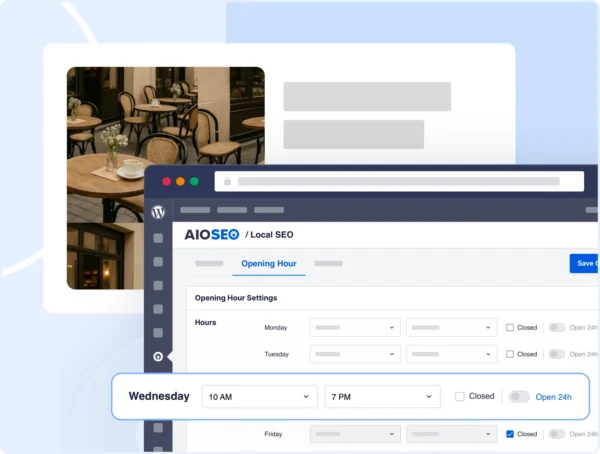
Here’s what you can do for your local clients, directly inside the plugin:
- Add multiple business locations and assign them to specific pages.
- Include opening hours, phone numbers, directions, and maps, all embedded and schema-optimized.
- Generate LocalBusiness structured data for each location automatically.
- Use built-in fields to ensure NAP consistency across the site (which is crucial for Google rankings).
I also like that AIOSEO lets you include latitude/longitude data, geo coordinates, payment types, price ranges, and other advanced info without needing a dev. This is especially useful for franchises or businesses with multiple locations.
6. Google Search Console and Analytics Integration
Why This Matters to Agencies: You get centralized access to real performance data across all your client sites, saving time, reducing tool fatigue, and helping you stay proactive with SEO fixes and improvements.
Even if you’re a data nerd, switching between dashboards can quickly become a productivity killer, especially when you’re trying to gather quick performance insights or prepare reports for a client.
AIOSEO solves this with its Google Search Console Integration.
Once connected, you can view key SEO metrics directly in the WordPress dashboard, without logging into external platforms or dealing with complicated Looker Studio reports.
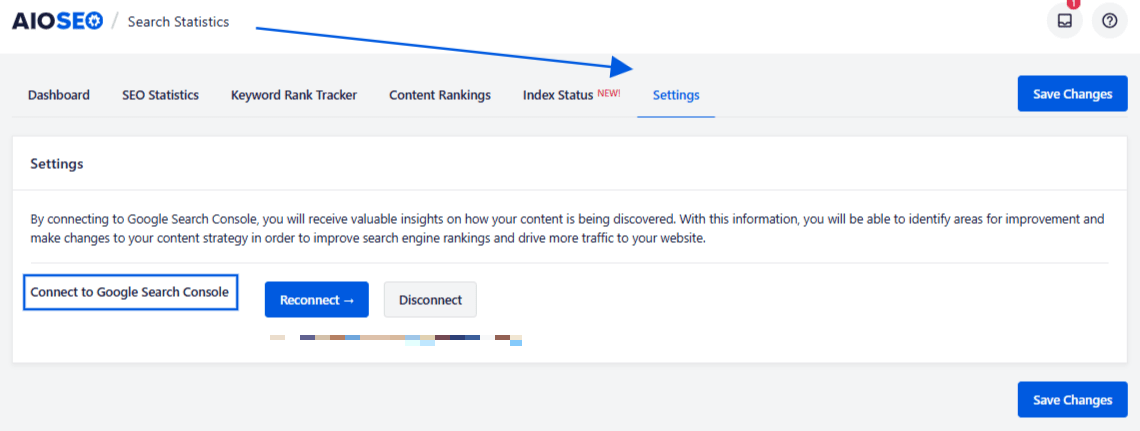
Here’s what to use this integration for:
- View top-performing keywords and indexed pages within WordPress.
- Monitor click-through rates, impressions, and average positions for each client site.
- Identify underperforming pages that need content updates or re-optimization.
And since this data is visible where your team actually works in the WordPress backend, it’s much easier to make SEO a daily habit, not just a monthly audit task.
Bonus: These insights feed directly into AIOSEO’s Search Statistics dashboard, which I’ll cover in more detail in the reporting section.
7. AI Writing Assistant: Integration With SEOBoost
Why This Matters to Agencies: You can streamline content production, reduce bottlenecks, and empower your team to create SEO-ready content faster, all within the AIOSEO and SEOBoost ecosystem.
One of the most time-consuming (and client-sensitive) parts of SEO is content creation. As an agency, you need to produce optimized content, not just for readability and conversion, but for SEO performance as well.
And that’s where AIOSEO’s AI Writing Assistant, powered by its integration with SEOBoost, has seriously raised the bar.
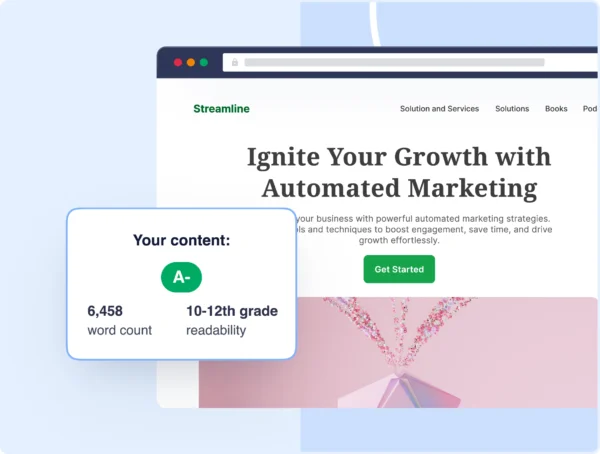
This is one of my favorite features, and here’s how it works in my workflow:
- I use SEOBoost’s Topic Reports to identify high-potential keywords and content ideas by leveraging competitor gaps.
- Then, right inside WordPress, AIOSEO’s Writing Assistant helps optimize content in real time using that data, suggesting structure, keyword use, subheadings, and even FAQ schema prompts.
- The AI assistant helps generate content briefs, outlines, and even copy variations, which is perfect for tight timelines.
- When combined with AIOSEO’s Focus Keyphrase and TruSEO Score, the assistant ensures every piece we publish is aligned with both intent and SEO best practices.
Unlike generic writing assistants, this one is SEO-native, meaning it helps generate rankings.
8. Powerful SEO Reports and Client Reporting Tools
Why This Matters to Agencies: AIOSEO helps you clearly and professionally prove your value. Clients stay happy because they see tangible SEO wins.
Let’s face it: no matter how good your work is, clients judge success by numbers. And if your reports can’t clearly show progress, your retention suffers. That’s why AIOSEO’s reporting features are such a win for agencies.
With the Search Statistics dashboard, you can:
- Get a full view of each site’s performance, including the keywords, impressions, traffic, and indexed pages.
- Track changes in SEO health across time (like schema usage, broken links, and on-page issues).
- Identify red flags like noindexed pages, missing titles, or weak meta descriptions.
When it’s time to report to clients, you can export all this data into easy-to-understand reports, complete with charts, progress metrics, and recommendations.
No third-party tools or manual work needed.
This also makes monthly reporting much more proactive. Instead of just saying “Here’s what happened,” you can say “Here’s what we fixed and what’s next.”
Bonus tip: Since most of this data comes from the native GSC integration, you can also offer live dashboards to clients, giving them visibility without overwhelming them with raw data.
9. Continuous Updates and World-Class Support
Why This Matters to Agencies: AIOSEO keeps your agency competitive, compliant, and supported at every stage of growth.
One of the biggest concerns I have when picking any plugin or tool for agency work is longevity. I need to know that the product will keep up with SEO trends, Google updates, client demands, and that support will be there when I need it.
With AIOSEO, I’ve never had to worry.
Here’s what gives me that peace of mind:
- Frequent feature updates: AIOSEO is always on top of major algorithm updates. Whether it’s Google’s shift to GA4, changes to schema standards, or Core Web Vitals becoming more important, they roll out updates that keep my clients ahead of the curve.
- New tools added regularly: Features like SEOBoost integration, AI content assistance, and advanced schema are a part of an evolving product that adapts to how we work as marketers.
- Top-tier documentation: Their knowledge base is packed with tutorials, best practices, and troubleshooting tips so that everyone can solve problems easily.
- Responsive support: If you need help, you get answers fast. With access to priority support and ticketing, you’re not stuck waiting days to solve a client-facing issue.
And unlike many SEO plugins, AIOSEO doesn’t feel like an outdated codebase trying to keep up. It’s modern, lean, and actually enjoyable to use.
Which Is the Best SEO Tool: AIOSEO vs. Yoast and RankMath
Let’s be honest: As agencies, most of you have tested multiple SEO plugins. The “big three” for WordPress SEO are usually AIOSEO, Yoast, and RankMath.
So here’s how I break down the differences and why I stand by AIOSEO as the best WordPress SEO tool for agencies.
Yoast vs. AIOSEO
Like many people, I started out using Yoast. It’s reliable and has a strong reputation, but over time, I ran into a few roadblocks.
Most essential features are locked behind expensive premium add-ons, such as schema, redirects, and local SEO.
There’s no white-label mode, which is a deal-breaker when clients log in and see another brand’s logo.
The UI feels dated and clunky, especially when managing multiple pages or performing bulk edits.
In contrast, AIOSEO offers all the essentials in its Pro version: schema, redirects, local SEO, sitemap control, and it’s fully brandable. Plus, AIOSEO’s UI is modern, fast, and actually designed with agencies in mind.
Bottom Line: Yoast is great for single-site owners. AIOSEO is better for agencies that need flexibility, scalability, and value.
RankMath vs. AIOSEO
RankMath frequently appears in SEO groups. It’s got a lot of features, many of which are free.
However, when you test it for real agency work, you quickly notice that it’s overloaded with features, which can confuse both clients and team members new to SEO.
The codebase is heavier, which can lead to minor site speed issues.
Support and documentation, in my opinion, aren’t as strong or accessible when you hit technical snags.
Some features require account creation and linking to an external dashboard, which isn’t always ideal for privacy-focused clients.
AIOSEO, by contrast, is cleaner, lighter, and easier to navigate, while still offering robust features. It also works entirely within WordPress, with better integration and fewer plugin conflicts.
Bottom Line: RankMath is powerful, but not always practical for agencies. AIOSEO strikes the right balance between usability, performance, and power.
FAQs About Best Agency SEO Tool
What is the best SEO tool for agencies?
The best SEO tool is the one that lets you scale, optimize, and report results with minimal friction. That’s why I believe AIOSEO is the best SEO tool for agencies. It covers everything from technical SEO to content analysis, local SEO, schema, and reporting, all in one intuitive dashboard built for teams.
Is AIOSEO free?
AIOSEO offers a free version that’s great for personal blogs or small websites. But for agencies, you should upgrade to AIOSEO Pro or Elite, which unlocks advanced features such as a schema generator, local SEO, a redirection manager, white-labeling, SEOBoost integration, and more. It’s worth the investment for the time it saves and the value it delivers.
Which tool is perfect for on-page SEO?
For on-page SEO, AIOSEO is one of the most complete and beginner-friendly options. With its TruSEO Score, Focus Keyphrase recommendations, Content Analysis, and SEO Audit Checklist, it guides you through optimizing every post or page without guesswork. When combined with AI assistance, it becomes a powerful engine for achieving on-page success at scale.
Final Thoughts
Running an agency means juggling multiple clients, deadlines, and deliverables, all while consistently striving to deliver results.
I’ve tried a lot of tools over the years, and what sets AIOSEO apart is that it’s built for solopreneurs and agencies alike.
From bulk SEO management and schema automation to reporting, local SEO, white-labeling, and AI integration, AIOSEO helps you scale your services and reduce overhead, without sacrificing quality.
If you’re still bouncing between Yoast, RankMath, or a stack of disconnected tools, give AIOSEO a try.
Trust me, it’s not just a plugin—it’s the best SEO tool an agency can ask for.
Want to Try AIOSEO for Free?
Enter the URL of your WordPress website to install AIOSEO Lite.

Disclosure: Our content is reader-supported. This means if you click on some of our links, then we may earn a commission. We only recommend products that we believe will add value to our readers.