
Video content is an essential part of how we communicate in today’s digital landscape. From quick social media clips to in-depth tutorials, videos capture attention and convey messages in a way that text often can't.
But simply creating great videos isn't enough; to truly reach your audience and drive results, you need to understand video search engine optimization (SEO).
Video SEO is the process of optimizing your video content to rank higher in search engine results pages (SERPs), including Google, YouTube, and other platforms.
This guide is crafted specifically for beginners, providing a clear and no-nonsense path to get your content seen. You’ll learn:
- What video SEO is and why it matters
- How to do keyword research, on-page SEO, and technical SEO for videos
- YouTube SEO strategies for increased visibility
- How to promote your video content for greater reach
Let’s dive in.
In This Article
- Chapter 1: Understanding the Basics of Video SEO
- Chapter 2: Keyword Research for Video SEO
- Chapter 3: On-Page SEO for Your Videos
- Chapter 4: Technical Video SEO
- Chapter 5: YouTube SEO Strategies
- Chapter 6: Promoting and Distributing Your Video Content
- Master Video SEO for Lasting Online Success
- FAQs About Video SEO
Chapter 1: Understanding the Basics of Video SEO
Are you motivated to work toward something when you don't understand the point or what it will achieve?
Probably not. (Me either.)
So, let's fix that and explore what video SEO is and why it matters to your online presence.
What Is Video SEO (Video Search Engine Optimization)?
Video SEO is about making your videos discoverable.
Just as you optimize your website pages for search engines, you need to optimize your video content. This involves a series of techniques that help search engines understand:
- What your video is about
- Who it's for
- how relevant it is to a user's query
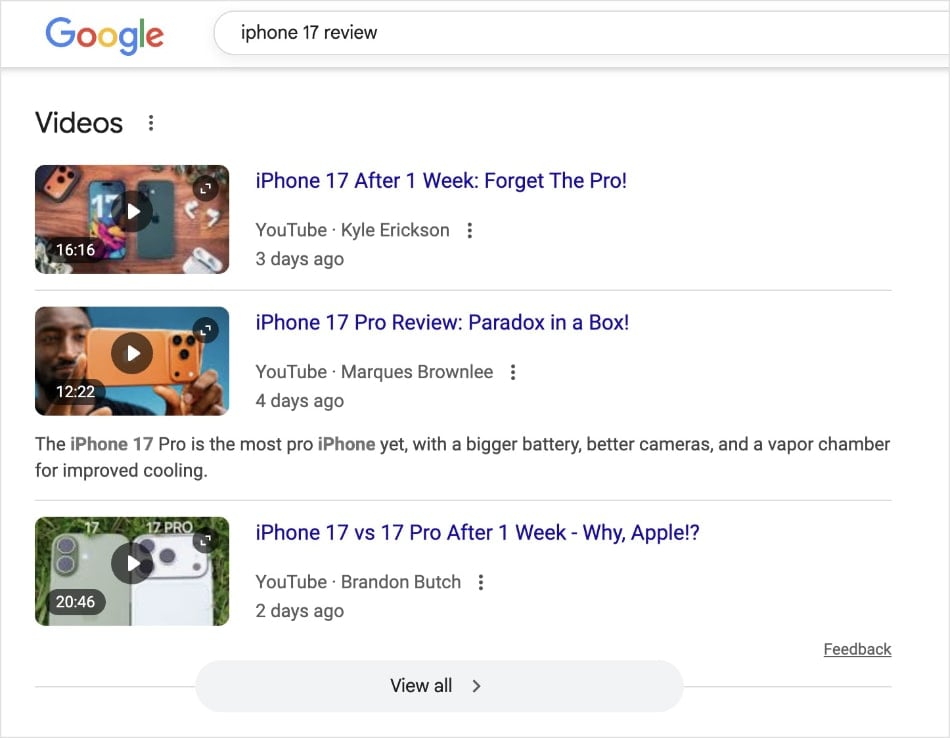
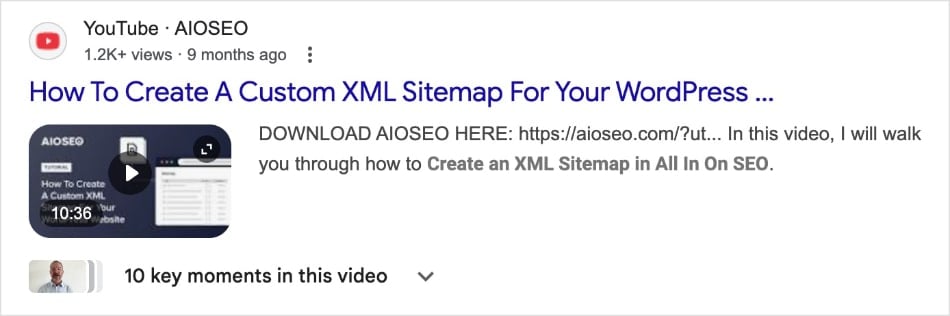
When done right, your videos can appear in various places, including Google's main search results (shown below), the dedicated video tab, Google Images, and even Google Discover.
While traditional SEO primarily focuses on text-based content, video SEO has its own unique considerations.
Search engines can't “watch” a video in the same way a human can, so they rely on various signals to understand its content.
This includes metadata, transcripts, and user engagement signals.
These elements work together to provide search engines with clarity and context for your videos, helping them rank better in search results.
Why Video Marketing and SEO Go Hand-in-Hand
Video marketing and SEO are a powerful combination. Video content is incredibly effective for:
- Engaging audiences
- Building brand awareness
- Driving conversions
And when you optimize these videos for search engines, you amplify their reach significantly.
Video SEO helps you capture traffic from both traditional web searches and YouTube, which is the world's second-largest search engine.
Ultimately, by integrating SEO video marketing into your overall digital strategy, you diversify your traffic sources and reach a broader audience.
Chapter 2: Keyword Research for Video SEO
Just like with traditional SEO, keyword research is the foundation of a successful video SEO strategy.
It's how you discover what your target audience is searching for, allowing you to create content that directly addresses their needs and questions.
Finding the Right Keywords for Your Videos
Before you can optimize your video SEO, you need to know the terms and phrases your potential viewers are using.
To do this, start by brainstorming topics related to your video content and niche.
For example, one time I was helping my brother, who’s a financial advisor, come up with topic ideas for his website. We wrote down terms like:
- Financial planning for business owners
- Business exit strategy
- Wealth management
Don’t think about it too much. Just write down anything that comes to mind that’s relevant to your business.
Once you have a list of 20-40 keyword ideas (we call these “seed keywords” in SEO), you’ll want to dive deeper into keyword research. There are a few ways you can go about this:
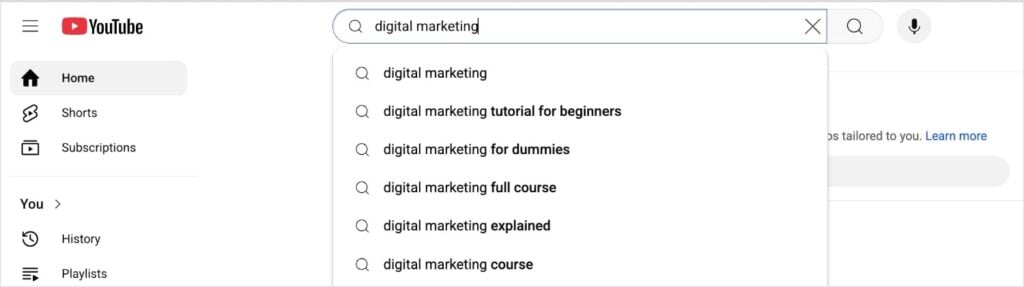
Option 1: Use YouTube Autocomplete Suggestions
Start typing your keyword into the YouTube search bar, but don’t press enter. It will generate results that start with your seed keyword.
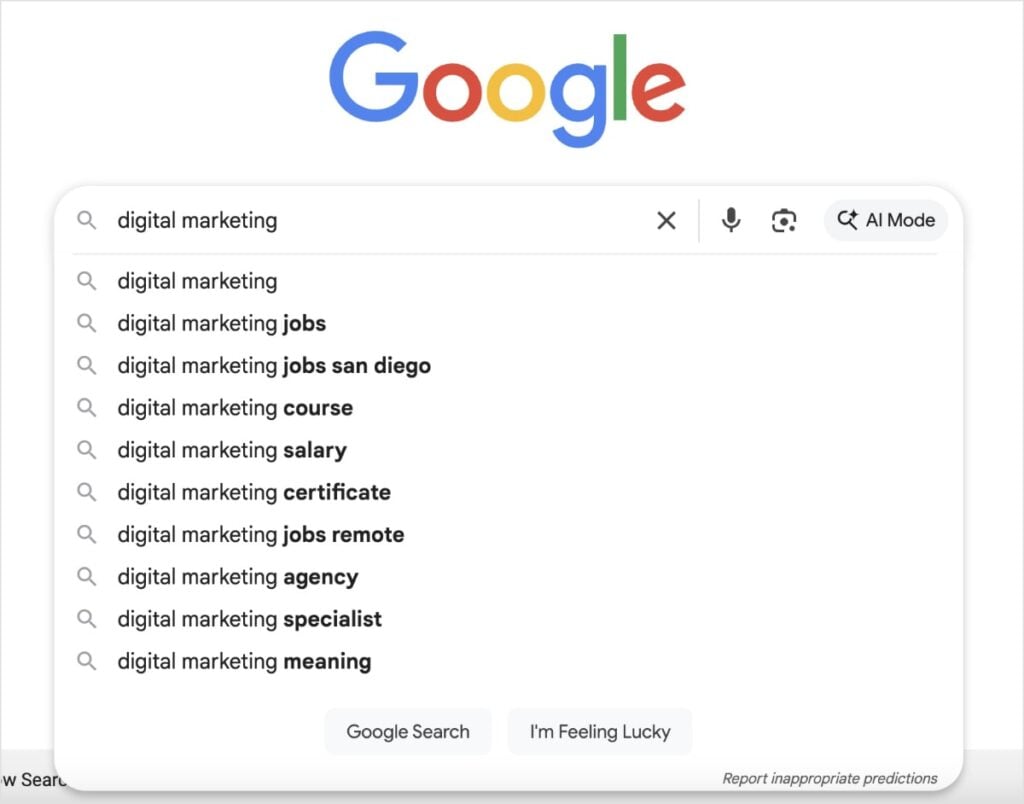
Option 2: Look at Google Search Results
Check out the SERPs for additional keyword ideas. You can use the Autocomplete feature (same process as you did in YouTube), look at People Also Ask results, and check out related searches.
Option 3: Use a Keyword Research Tool
This is the most efficient option. Keyword research tools give you tons of related keyword ideas based on a single search. You can also do bulk searches in some tools.
Semrush is ideal for when you need a lot of data and have a more well-established brand (and higher authority).
LowFruits is better when you’re a smaller business or solo content creator. It helps you find long-tail keywords, which I’ll talk about next.
For an in-depth tutorial, see our beginner’s guide on how to do keyword research.
Focus on Long-Tail Keywords
While broad, high-volume keywords are tempting, long-tail keywords are where you'll find the most engaged audience.
These are longer, more specific phrases that indicate a user is further along in their journey and looking for detailed information.
For example, instead of targeting the broad term “video SEO,” you might focus on a long-tail keyword like “how to optimize videos for Google search.”
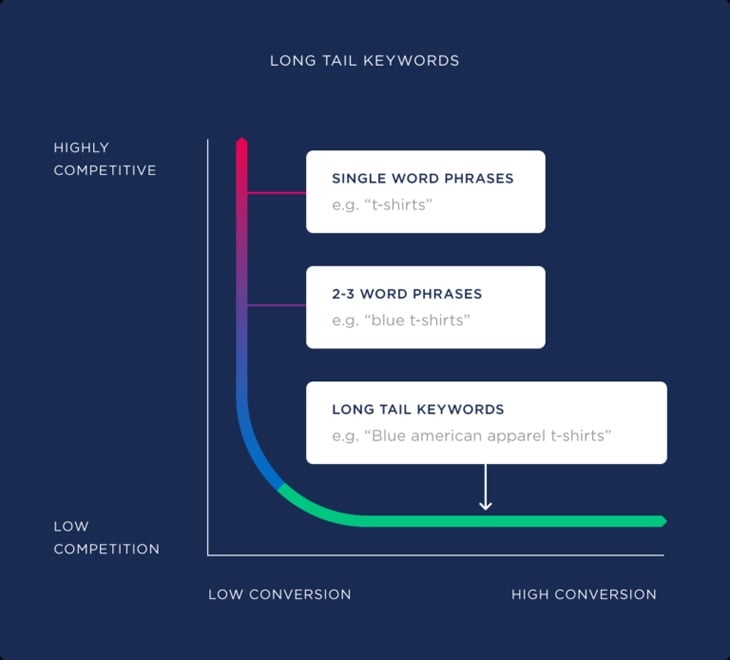
These keywords have higher conversion rates and less competition than more generic terms.
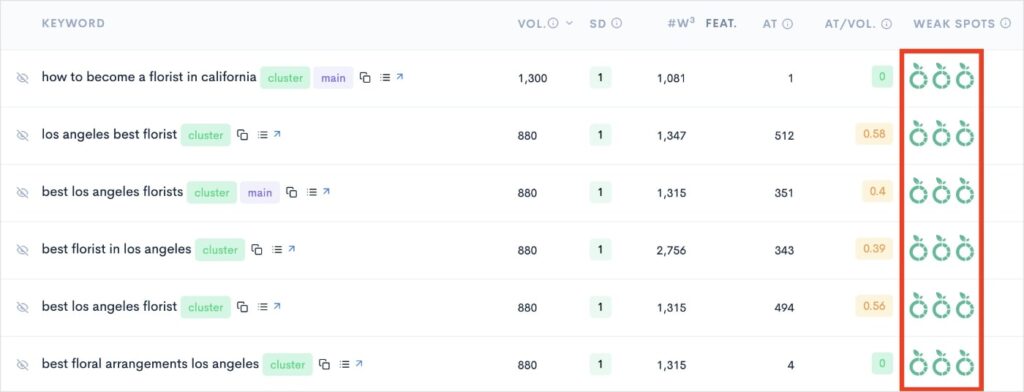
That’s also why I recommend LowFruits to small business clients. Its KWFinder tool focuses on long-tail keywords, which are easier to rank for.
It also shows Weak Spots in SERPs, which are low-authority domains ranking in the top 10 search results.
Now, if you’re a WordPress user, I’ve got a different tool recommendation for you: All in One SEO (AIOSEO).
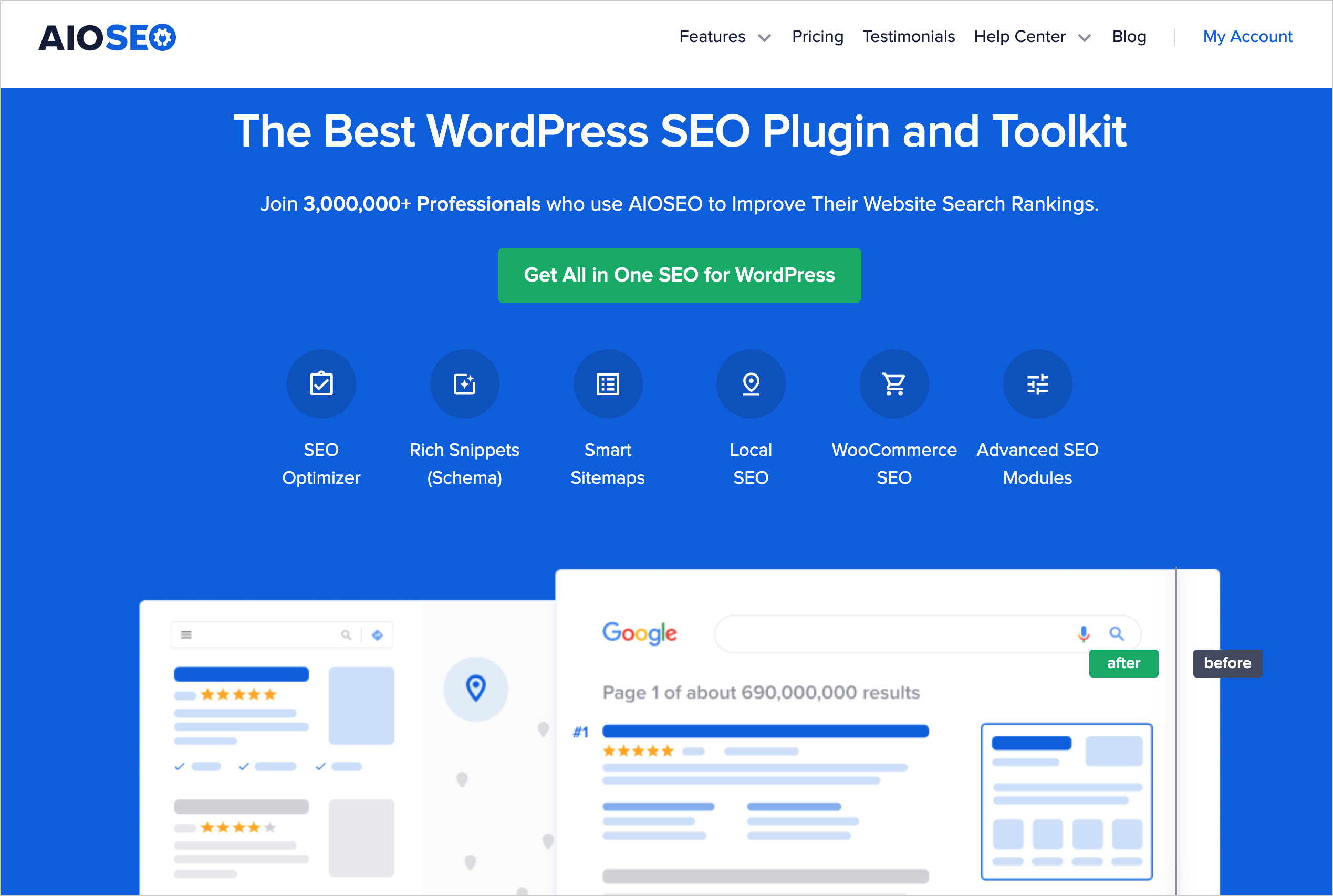
AIOSEO connects with your Semrush account to deliver keyword research results directly in the WordPress editor.
After setting your focus keyword, click Get Additional Keyphrases.
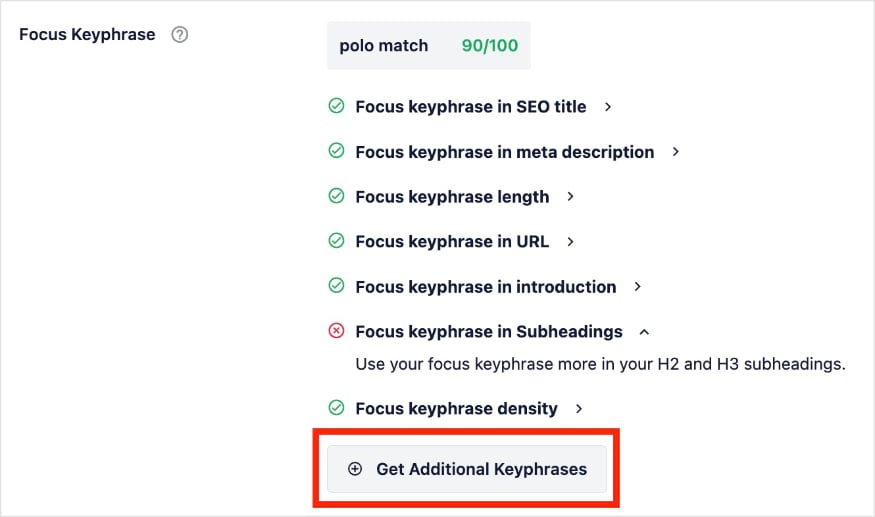
AIOSEO will fetch related keywords from Semrush and serve them to you right in your post or page:

It’s fast and easy, and it keeps you from having to jump between tools.
Chapter 3: On-Page SEO for Your Videos
Once you have your keywords, it's time to put them to work.
On-page SEO for videos involves fine-tuning various text elements of your video to make it more appealing to both search engines and viewers.
These optimizations are crucial for improving your video's visibility and click-through rate (CTR).
Crafting Compelling Video Titles
Your video title is one of the most important factors for both search engine rankings and attracting viewers.
A great title should be both informative and catchy. Start by including your primary keyword naturally, preferably at the beginning of the title.
For example, a title like “Video SEO: A Beginner's Guide to Ranking Your Videos” is clear and keyword-rich, making it effective for search engine optimization.
Remember to keep your titles concise, ideally under 60 characters, to prevent them from being cut off in search results.
Practical Exercise: Take a look at the 3 video SEO titles below. Which one would you pick?
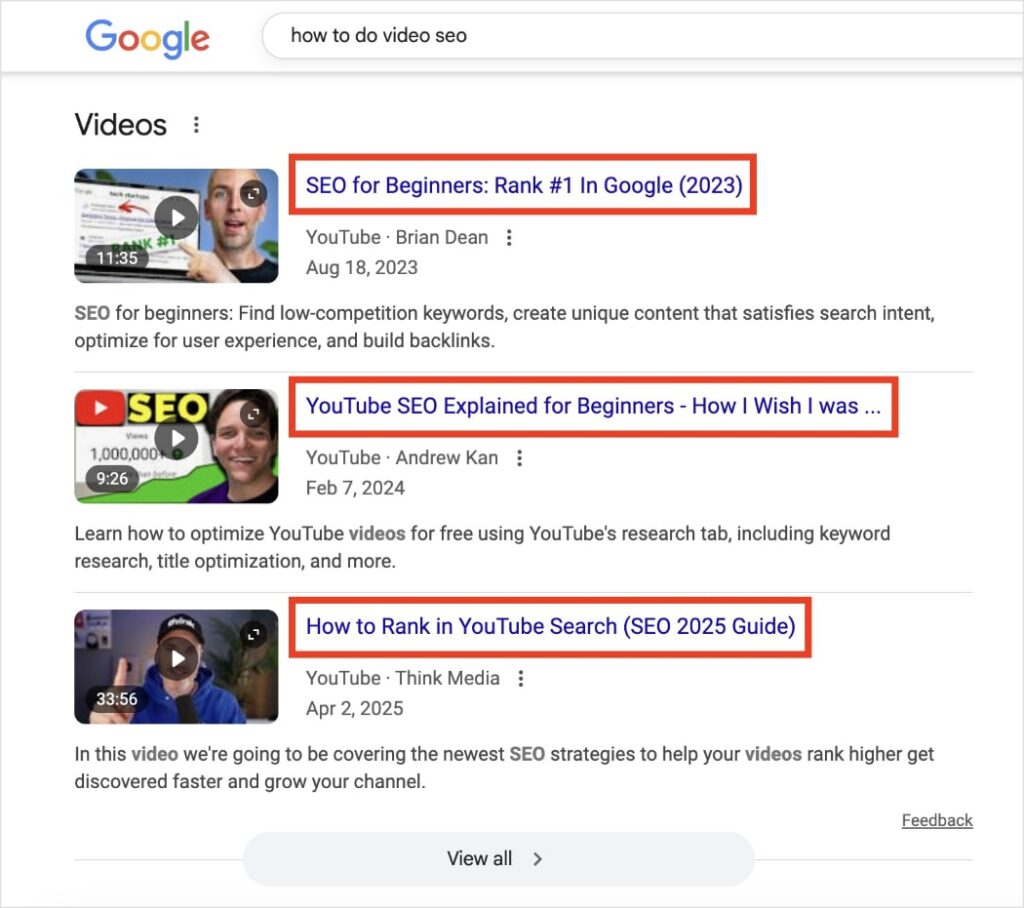
Personally, if I search “how to do video seo” in Google, I’d pick the third result. It speaks directly to video content (YouTube) and is the most recent guide (2025).
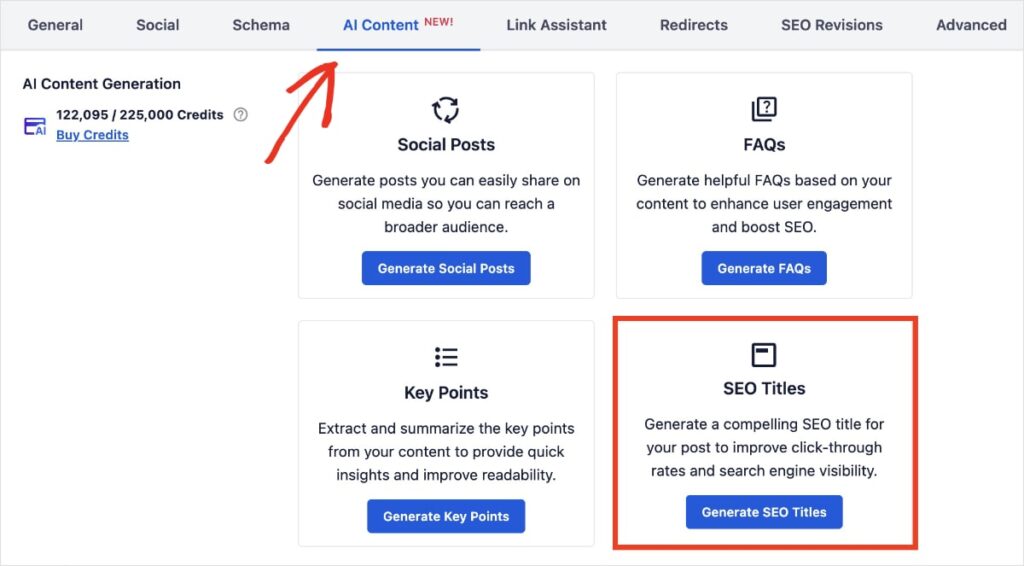
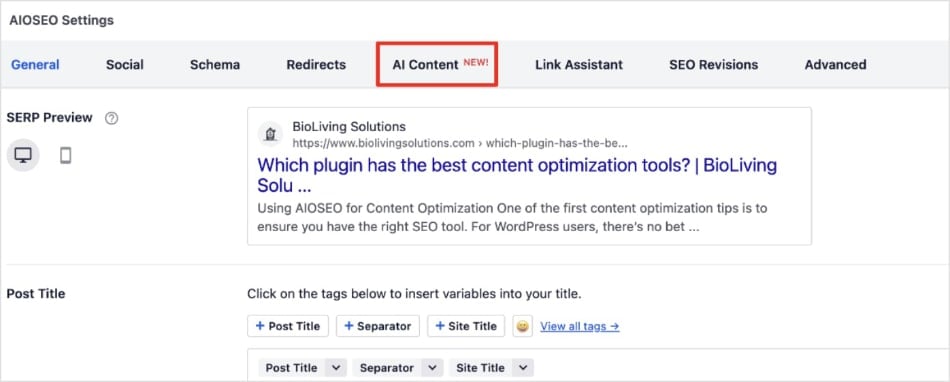
In AIOSEO, you can easily generate SEO title tags for your videos and articles. Just scroll down to the AIOSEO settings of the editor and select on the AI Content tab. Then, click Generate SEO Titles.
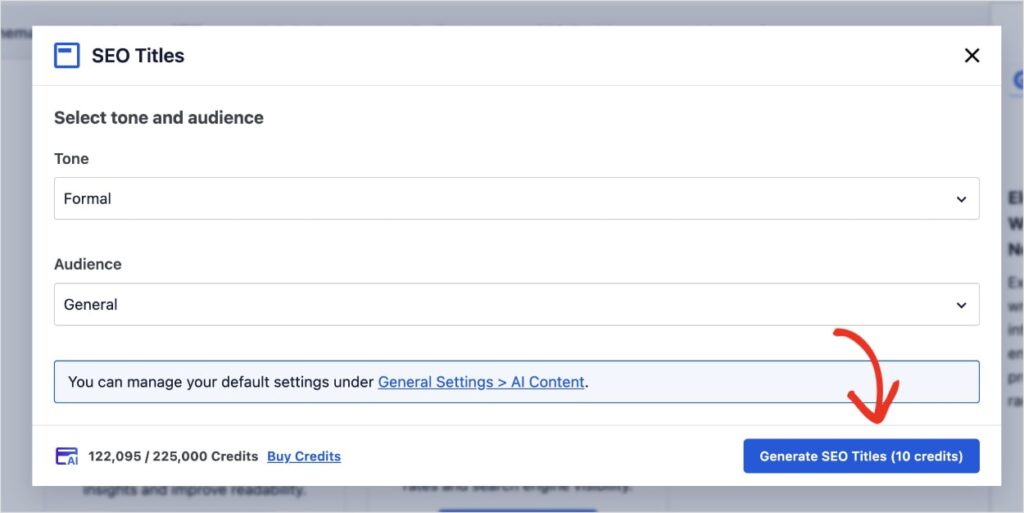
From here, the AI Content Generator will ask you to select a tone and audience. Once you've made your selections, click Generate SEO Titles.
You'll get 5 SEO title tag options. You can pick your favorite or generate more. (You can also edit the existing options.)
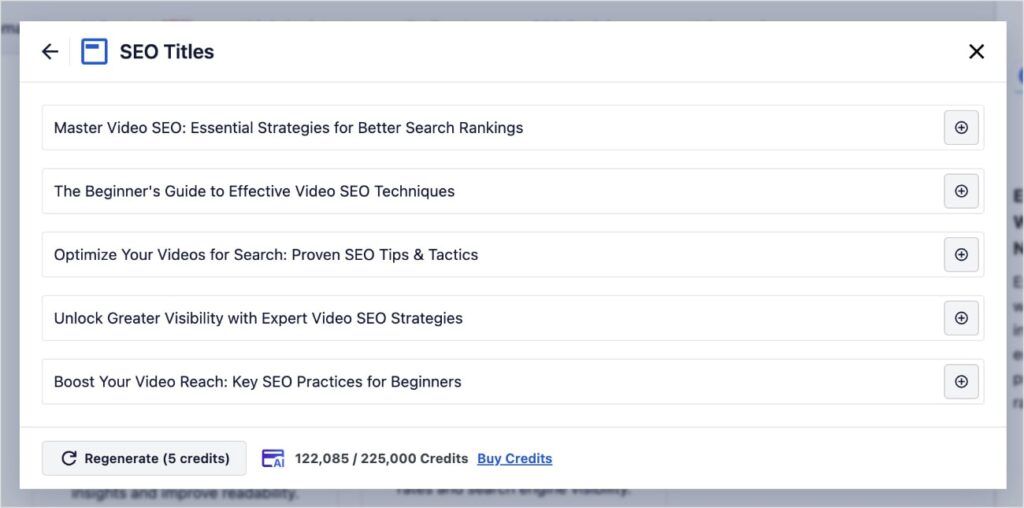
I love this feature because it allows you to create compelling titles in 1 click.
Writing Engaging Video Descriptions
Your video description is another prime opportunity to provide context to search engines and viewers.
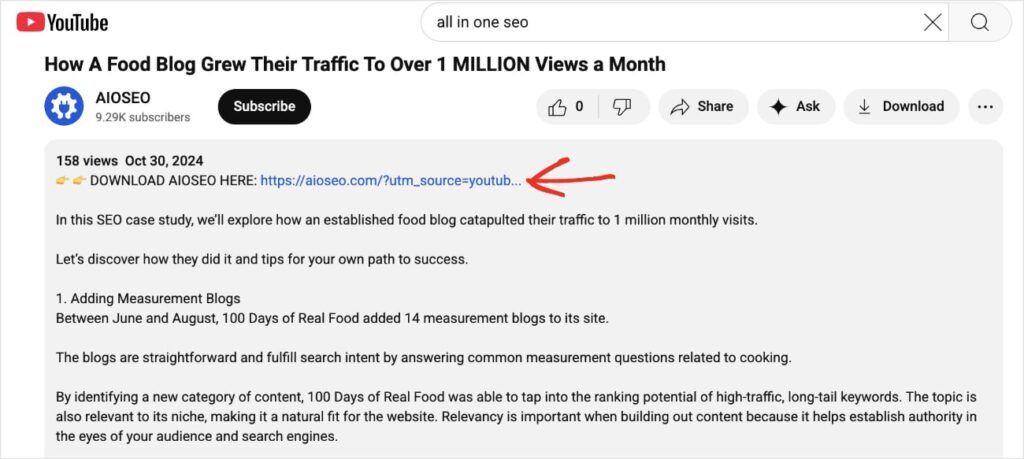
Don't be afraid to write detailed descriptions; in fact, YouTube encourages descriptions of at least 200 words. Include your primary and secondary keywords naturally throughout the description, and consider adding timestamps to help viewers navigate to specific sections of your video.
Descriptions are also a great place to include a call to action (CTA), such as a link to your website or a request to subscribe to your channel.
Here’s an example of one of our YouTube descriptions for an SEO case study:
As you’ve seen, videos can also appear in Google search results, so you’ll want a meta description for content with videos, too.
These descriptions appear in SERPs and provide additional information (and incentive) for users to click.
The good news is that AIOSEO’s Meta Description Generator writes them automatically for you.
(To do this, follow the same process we outlined for generating SEO titles. But click the generate button next to the meta description instead of the title.)
Friendly Reminder: The AIOSEO Meta Description Generator is designed to create meta descriptions for Google search results, not YouTube descriptions. You could, however, use it to inspire your longer YouTube description.
Optimizing Video Tags and Categories
Video tags help search engines and YouTube understand the topics your video covers.
Use a mix of broad and specific tags to cast a wide net.
For instance, for a video about video SEO, you might use tags like “video seo,” “youtube seo,” “search engine optimization,” and “digital marketing.”
While it's important to be thorough, avoid keyword stuffing. Aim for 10-12 relevant tags.
Also, be sure to select the most appropriate category for your video to help YouTube recommend it to the right audience.
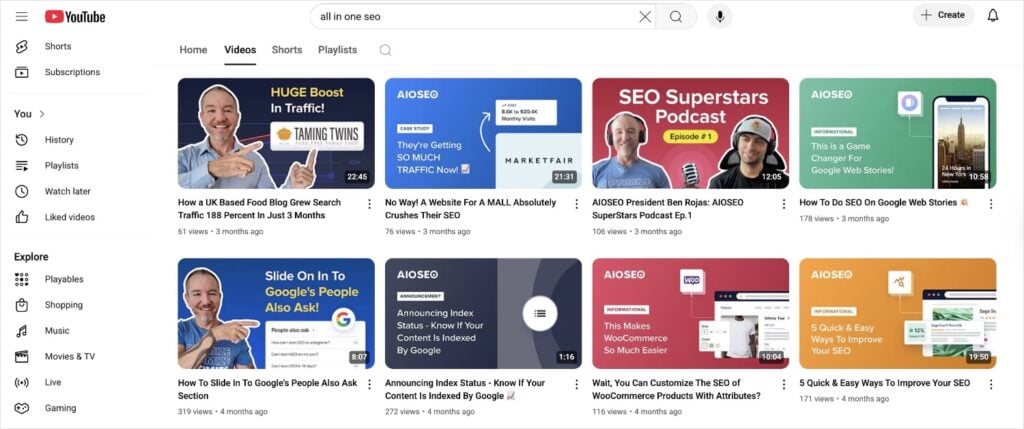
Designing Click-Worthy Video Thumbnails
Your video thumbnail is often the first thing a potential viewer sees, and a compelling thumbnail can significantly boost your CTR.
A great thumbnail should be:
- High-resolution
- Visually appealing
- Relevant to your video's content
Use contrasting colors to make it stand out, and consider including a short, catchy title or a close-up of a person's face, as faces are known to attract attention.
Your thumbnail is a key part of your SEO video marketing efforts, so don't overlook its importance.
Here are a few examples from our AIOSEO YouTube channel:
Adding Transcripts and Closed Captions
Finally, providing transcripts and closed captions for your videos is a standard video SEO best practice.
Since search engines can't watch your video, they rely on text to understand its content.
A transcript provides a word-for-word text version of your video, which Google can crawl and index.
This not only helps your video rank for more keywords but also makes your content more accessible to a wider audience, including those who are deaf or hard of hearing, or who prefer to watch videos without sound.
Chapter 4: Technical Video SEO
Beyond the visible elements of your video, there are “hidden” technical SEO aspects that help search engines understand and display your video content.
These behind-the-scenes optimizations are vital for ensuring your videos are properly discovered and indexed.
Video Structured Data (Schema Markup)
Schema markup is code that you add to your website to help search engines better understand your content. It’s a type of structured data.
For videos, implementing VideoObject schema markup is essential. This tells search engines important details about your video, such as its title, description, thumbnail URL, upload date, and duration.
When Google understands these details, your video is more likely to appear as a rich result in the SERPs, often with a prominent thumbnail, which can significantly increase visibility and CTRs.
Terrified at the idea of touching code?
I’ve been doing SEO for over 6 years, and I still don’t love messing with code.
Lucky for us, we don’t have to.
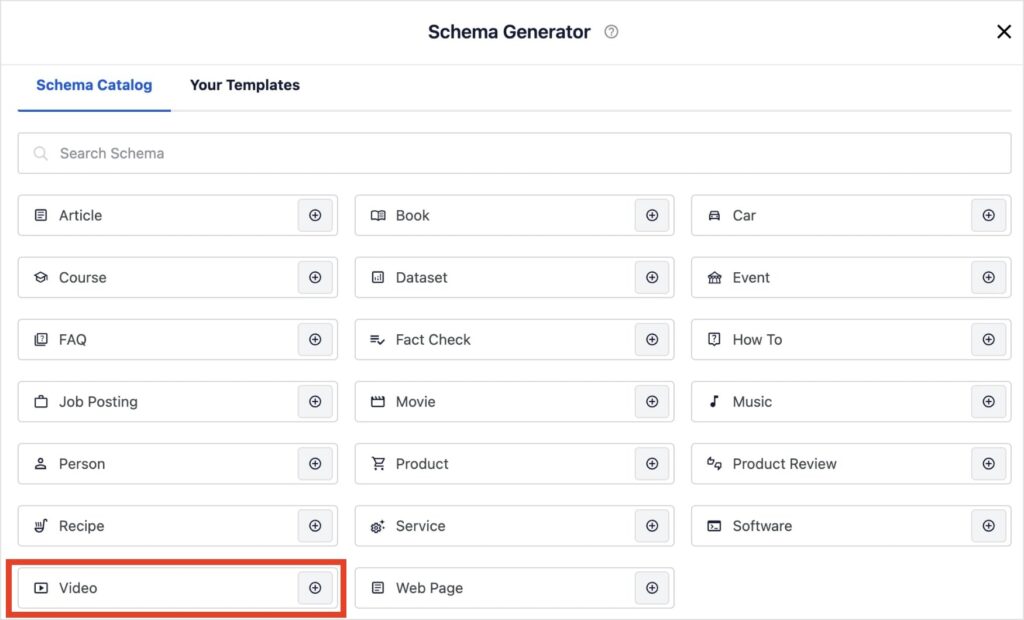
AIOSEO’s Schema Generator makes adding schema markup a breeze. All you have to do is select Video from the Schema Catalog, fill in a few user-friendly fields about your video, and save.
AIOSEO will format and implement your video schema markup automatically.
For a full walkthrough, see this tutorial on adding video schema in WordPress.
Video Sitemaps
Just as XML sitemaps help search engines crawl and index your website pages, video sitemaps guide them to your video content.
A video sitemap is an XML file that lists all the videos on your site, providing information like the video's URL, title, description, and playback page.
Submitting a video sitemap to Google Search Console ensures that Google is aware of all your video content, even those that might not be easily discovered through regular crawling.
This is a fundamental step in ensuring your videos are indexed and eligible for search results.
So, wondering how to make one?
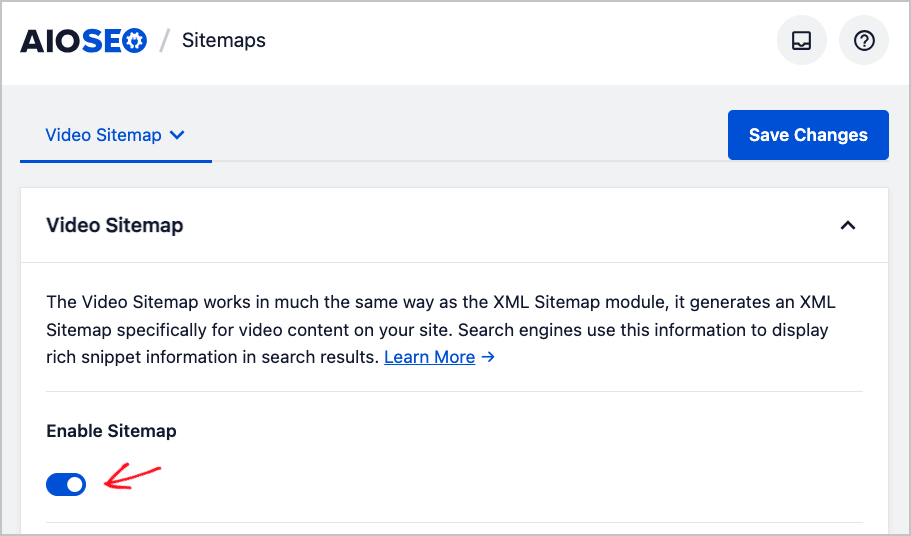
Creating a video sitemap in WordPress is super easy when you have the right tools.
With AlOSEO, all you have to do is Enable Video Sitemaps under the Sitemaps settings. And that’s it! AIOSEO will create one for you.
Embedding Videos on Your Website
Deciding where to host and how to embed your videos is another important technical consideration.
While platforms like YouTube and Vimeo are excellent for hosting, embedding these videos on your website offers significant video SEO benefits.
When you embed videos, you keep visitors on your site longer, which reduces bounce rates and signals to search engines that your content is valuable.
Ensure your embedded videos are responsive, meaning they adapt to different screen sizes, and consider implementing lazy loading to improve page speed.
If you choose to self-host, make sure your server can handle the bandwidth and that your video files are optimized for web delivery.
Pro Tip: Use page speed site tools to check your loading times. These tools monitor site speed and help you find and fix issues with little to no technical experience required.
Chapter 5: YouTube SEO Strategies
YouTube is a video hosting platform and the world's second-largest search engine.
While many of the principles of video SEO apply across platforms, YouTube has its own set of ranking factors that you need to master to succeed.
YouTube as a Search Engine
Understanding YouTube's algorithm is key to ranking your videos.
Unlike Google, which prioritizes relevance and authority across various content types, YouTube heavily emphasizes viewer satisfaction and engagement.
Key ranking factors include:
- Watch time
- Audience retention
- Engagement (likes, comments, shares, and subscriptions)
- Click-through rate
Keeping an eye on these metrics will help you understand your video performance and identify areas that need improvement.
Maximizing Watch Time and Audience Retention
To keep viewers hooked and boost your watch time, focus on creating compelling content from start to finish.
Start with a strong hook in the first 15 seconds to grab attention. Use pattern interrupts—such as quick cuts, B-roll footage, or graphics—to maintain engagement.
Scripting your videos can help you stay concise and deliver a clear message, ensuring viewers watch more of your content.
Regularly analyzing your YouTube Analytics can provide insights into where viewers drop off, allowing you to refine your content strategy.
Boosting Engagement (Likes, Comments, Shares)
Engagement signals tell YouTube that your content is valuable.
Actively encourage viewers to like, comment, and share your videos.
Respond to comments to foster a community and show that you value their feedback.
Running contests or asking questions within your video can also significantly increase interaction, further boosting your video search engine optimization efforts on the platform.
Chapter 6: Promoting and Distributing Your Video Content
Creating an optimized video is only half the battle. (Sorry!) To truly maximize its video SEO potential, you need to actively promote and distribute it across various channels.
Effective promotion ensures your video:
- Reaches a wider audience
- Generates engagement
- Earns valuable backlinks and social signals
All of these elements contribute to higher rankings.
Leveraging Social Media for Video Promotion
Social media platforms are natural homes for video content.
Share your videos across all relevant social channels, tailoring your posts to each platform's audience and format.
For example, short, punchy clips work well on TikTok and Instagram Reels, while longer-form content might be better suited for Facebook or LinkedIn.
Always include a direct link back to your video's dedicated watch page on your website or YouTube channel to drive traffic and consolidate engagement signals.
Pro Tip: Use AIOSEO’s AI Content Generator to come up with social media posts for your video content. If you’ve created a post or page on your WordPress site to promote your video content (or even just embedded a video), creating a social media post is a great way to reach more people.
To use the AI Content Generator, click on the AI Content tab under the AIOSEO Settings.
Then, select Social Posts from the list of options.
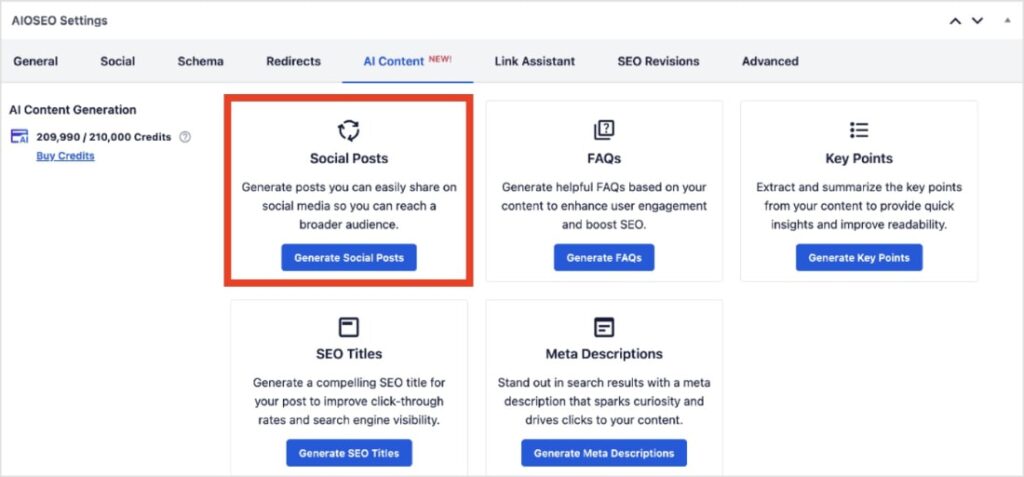
The AI Content Generator will give you social media copy for LinkedIn, X (Twitter), Facebook, and Instagram. You can also edit the text to your preferences.
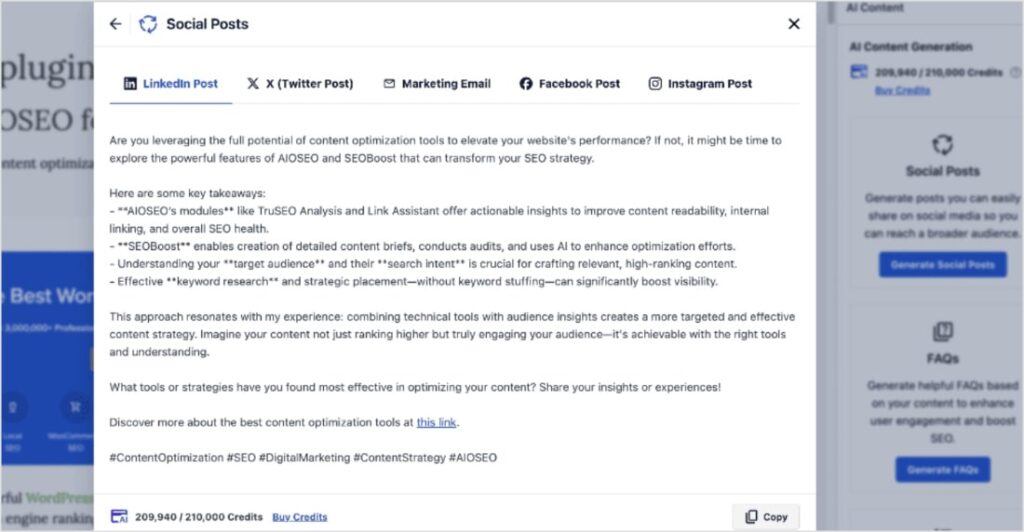
This feature has been a huge time-saver in my personal workflow. Social media copy often comes at the end of the content creation process, meaning creative juices are running low.
The AI Content Generator provides me with the copy I need to engage my audience and increase the visibility of my content.
Email Marketing and Newsletters
Your email list is a highly engaged audience that is often eager to consume your content.
Announce new video releases through your email newsletters, providing a compelling preview and a clear call to action to watch the full video. This can generate an initial surge of views and engagement, signaling to search engines that your video is valuable and relevant.
You should also consider segmenting your email list to send targeted video content to specific audience groups, further increasing relevance and engagement.
Pro TIp: The AIOSEO AI content tool can also act as an AI email generator. You’ll follow the same steps we used for social posts (AIOSEO Settings >> AI Content tab >> Social Posts), but then you’ll click the Marketing Email tab.
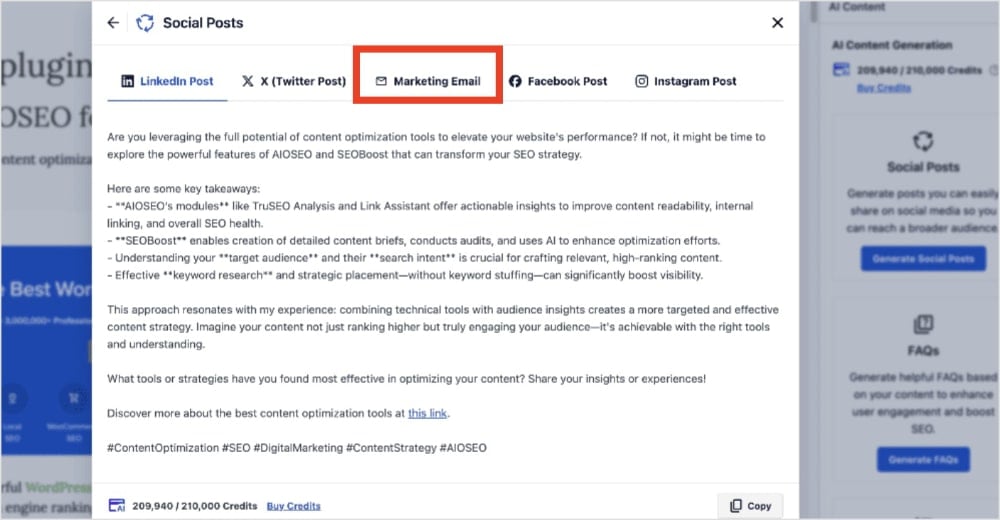
From here, AIOSEO will generate a subject line, preview text, and email body copy for your content.
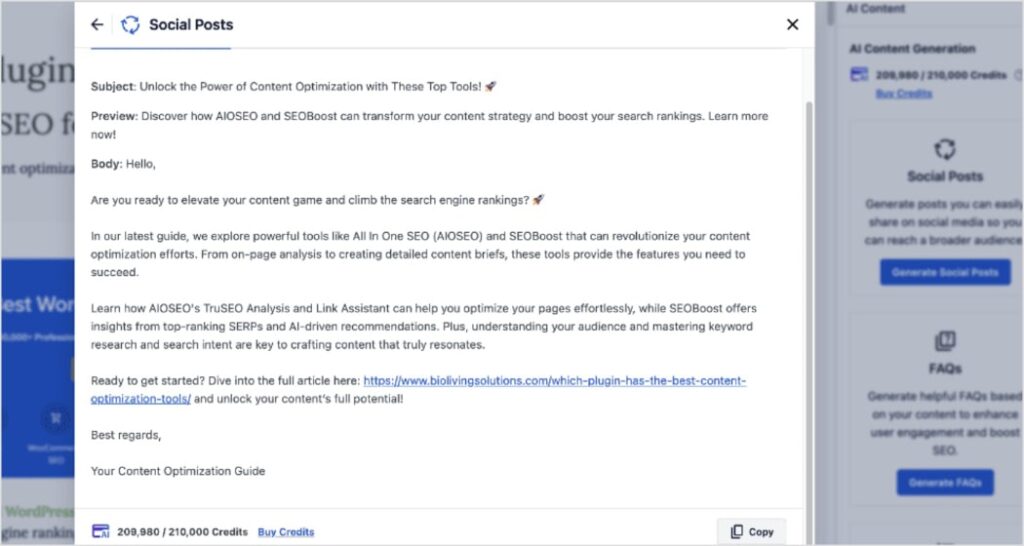
Just a heads up: You can’t get this copy from uploading a video alone to your WordPress post or page. You’ll need to have some body copy in your article because that’s what the AI Content Generator uses to create emails, socials, and FAQs.
Influencer Outreach and Collaborations
Collaborating with influencers or other content creators in your niche can significantly expand your video's reach.
When an influencer shares your video or features it in their content, it exposes your brand to their established audience.
This can lead to a substantial increase in views, subscribers, and valuable backlinks to your video content.
I highly recommend making sure that any collaborations are authentic and align with your brand values to maintain credibility. You don’t want to damage your brand reputation by working with just anybody.
Building Backlinks to Your Video Content
Just like with traditional web pages, backlinks are a critical ranking factor for video content.
When other reputable websites link to your video, it signals to search engines that your content is authoritative and trustworthy.
You should actively seek opportunities to earn backlinks by reaching out to relevant blogs, news sites, and industry publications.
You can also offer your video as a resource or embed it within guest posts.
The more high-quality backlinks your video receives, the stronger its video search engine optimization will be.
Did you know? Backlinks are considered one of the top 3 Google ranking factors. This means that any backlinks you earn for your videos can also help you rank higher in Google search results.
I also want to highlight that internal linking is also integral to a strong linking strategy.
Internal links connect one page of your website to another. All links are on the same domain, which is why they’re called “internal.”
You can use AIOSEO’s Link Assistant to identify internal linking opportunities automatically.
When you’re working on a WordPress post or page, click on the Link Assistant tab at the bottom of the editor. Then, select Link Suggestions.
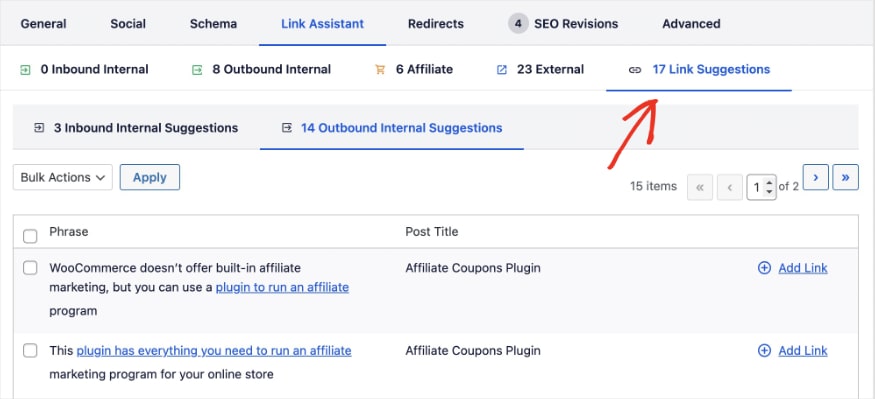
Link Assistant will provide you with inbound and outbound internal linking suggestions. This makes linking across your site a breeze.
Master Video SEO for Lasting Online Success
Video SEO is no longer an optional extra; it's a fundamental component of any successful digital marketing strategy.
By understanding and implementing the strategies outlined in this guide, you can:
- Improve your video content's visibility
- Attract a larger and more engaged audience
- Drive meaningful results for your business
Remember that consistency is key.
Regularly produce high-quality, optimized video content to create a solid foundation for your video SEO strategy. Then, analyze your performance and adapt your strategies based on what resonates with your audience.
I hope this post will help you improve your SEO video marketing. For additional video SEO resources, check out the following articles:
- How to Do WordPress Video SEO
- Video SEO Best Practices to Outrank Competitors
- Best SEO YouTube Channels to Accelerate Growth
- Best Video Sitemap Generators for WordPress
If you found this article helpful, then go ahead and subscribe to our YouTube Channel. You’ll find many more helpful tutorials there. You can also follow us on X (Twitter), LinkedIn, or Facebook to stay in the loop.
FAQs About Video SEO
What is video search engine optimization?
Video search engine optimization (SEO) is the process of optimizing your video content to rank higher in search engine results like Google and YouTube. It involves making your video and its surrounding content easier for search engines to understand, which helps them show it to the right audience.
How do I SEO my video?
To SEO your video, focus on these key steps:
- Add transcripts and captions: This provides text that search engines can crawl, enabling them to better understand your video's content.
- Perform keyword research: Find the words your audience uses to search for videos.
- Optimize metadata: Use your main keyword in the video's title and write a detailed, keyword-rich description.
- Create a high-quality thumbnail: An engaging thumbnail encourages clicks, which is a key ranking signal.
Is video good for SEO?
Yes, video content is excellent for SEO. Videos can increase the amount of time visitors spend on your page (dwell time), which signals to search engines that your content is valuable and relevant. Videos also stand out in search results with a thumbnail, leading to a higher click-through rate (CTR).
Is video SEO difficult to learn?
No, video SEO isn't difficult to learn. The basic principles are straightforward and similar to traditional SEO. The key is to consistently create high-quality, engaging content and stay updated on how search engines are evolving.
Want to Try AIOSEO for Free?
Enter the URL of your WordPress website to install AIOSEO Lite.

Disclosure: Our content is reader-supported. This means if you click on some of our links, then we may earn a commission. We only recommend products that we believe will add value to our readers.
