
Sie haben hart gearbeitet, um diesen Artikel zu ranken. Er hat monatelang, vielleicht sogar jahrelang, stetigen Traffic generiert. Dann haben Sie Ihre Analysen überprüft und die Zahlen sinken.
Sie leiden wahrscheinlich unter Content-Verfall.
Es ist der stille Killer, der für unerwartete Verluste von Website-Traffic verantwortlich ist. Während Sie damit beschäftigt sind, neue Inhalte zu erstellen, verlieren Ihre alten, leistungsstarken Artikel langsam an Relevanz, rutschen in den Rankings ab und kosten Sie Leads.
Aber keine Panik. Content-Verfall ist natürlich und vollständig umkehrbar.
In diesem Leitfaden zeige ich Ihnen genau, wie Sie eine Audit für Website-Traffic-Verlust durchführen, klare Anzeichen von Content-Verfall erkennen und eine einfache Auffrischungsstrategie anwenden, um Ihre Rankings (und Ihren Umsatz) zurückzugewinnen.
In diesem Artikel
Was ist Content-Verfall?
Content-Verfall ist der langsame, allmähliche Rückgang des organischen Traffics und der Rankings für einen bestimmten Blogbeitrag oder eine Seite.
Im Gegensatz zu einem plötzlichen Einbruch, der durch eine Google-Strafe oder einen technischen Fehler verursacht wird, tritt der Verfall über Monate hinweg auf. Es ist der natürliche Alterungsprozess von Inhalten. Wie ein Auto, das einen Ölwechsel braucht, benötigen selbst die besten Evergreen-Inhalte Wartung, um auf Höchstleistung zu laufen.
Wenn dieser „stille Killer“ unkontrolliert bleibt, untergräbt er Ihre SEO-Erfolge, zieht Ihre gesamte Website-Autorität und Ihren Umsatz nach unten.
Warum tritt Content-Verfall im Laufe der Zeit auf?
Es kann sich unfair anfühlen. Sie haben großartige Inhalte geschrieben; warum schiebt Google sie nach unten? Es ist selten eine Strafe. Es ist einfach die Art und Weise, wie sich das Internet entwickelt.
Hier sind die 4 Hauptgründe für Content-Verfall:
- Der „Frische“-Faktor: Suchintentionen ändern sich. Was Nutzer vor 2 Jahren wollten, ist heute vielleicht anders. Google priorisiert „frische“ Inhalte, die die aktuellsten Informationen, Statistiken und Trends widerspiegeln.
- Wettbewerbsgeschwindigkeit: Während Ihr Beitrag stillstand, haben Ihre Konkurrenten nicht geschlafen. Sie veröffentlichten neuere, tiefere oder visuell ansprechendere Anleitungen, die auf Ihr Fokus-Keyword abzielten, und drängten Sie langsam nach unten.
- Abnehmende Relevanz: Wenn Ihr Inhalt älter wird, veralten Ihre Beispiele, Screenshots und Daten. Dies führt zu einer schlechten Benutzererfahrung und einer höheren Absprungrate, was Google signalisiert, dass Ihre Seite nicht mehr die beste Antwort ist.
- Algorithmus-Änderungen: Suchmaschinen optimieren regelmäßig, wie sie Qualität bewerten. Ein Beitrag, der 2021 „perfekt“ war, könnte nach den Standards von 2026 als „dünn“ gelten.
Nur weil ältere Inhalte von Verfall betroffen sein können, heißt das nicht, dass sie ihren Wert verlieren müssen. Sehen wir uns als Nächstes an, wie man Inhaltsverfall erkennt und behebt.
Warum Sie mir vertrauen sollten
Ich arbeite seit über 6 Jahren im digitalen Marketing und gehöre zum Team von All in One SEO. Wir helfen über 3 Millionen Website-Besitzern täglich bei der Verwaltung ihrer SEO. Wir haben eine einzigartige Sicht darauf, wie sich Suchmaschinen entwickeln und wie Inhalte altern. Die Strategien in diesem Leitfaden sind nicht nur Theorie; es sind die genauen „Content-Wartungs“-Workflows, die wir verwenden, um unseren eigenen Blog für Tausende von Keywords auf Platz 1 zu halten.
Das 5-Minuten-Audit für Website-Traffic-Verlust
Bevor wir uns den tiefgreifenden Korrekturen widmen, haben Sie tatsächlich ein Problem? Führen Sie diesen schnellen Audit zum Verlust von Website-Traffic durch, um zu sehen, ob Inhaltsverfall die Ursache ist.
- Prüfung 1: Ist der Rückgang allmählich? Plötzliche Rückgänge bedeuten normalerweise technische Fehler oder Algorithmus-Strafen. Ein langsamer, stetiger Rückgang über 6 Monate ist das klassische Zeichen für Inhaltsverfall.
- Prüfung 2: Sind ältere Beiträge betroffen? Betrachten Sie Ihre Top-Beiträge von vor über 12 Monaten. Sind es diese, die Traffic verlieren?
- Prüfung 3: Haben Sie den Inhalt kürzlich aktualisiert? Wenn der Beitrag seit über einem Jahr nicht mehr angefasst wurde, ist er ein Hauptkandidat für Verfall.
- Prüfung 4: Hat sich die Konkurrenz verändert? Googeln Sie Ihr Ziel-Keyword. Sind die aktuellen Top-Ergebnisse neuer oder umfassender als Ihr Artikel?
Wenn Sie diese mit „Ja“ beantwortet haben, haben Sie Inhaltsverfall. Lesen Sie weiter, um mehr zu erfahren.
3 klare Anzeichen für Inhaltsverfall in Blogartikeln
Woher wissen Sie, ob ein bestimmter Artikel verfällt, bevor er seinen gesamten Traffic verliert? Sie müssen auf die folgenden spezifischen Warnzeichen achten.
Der einfachste Weg, diese Daten in WordPress anzuzeigen, ist die Verwendung von All in One SEO (AIOSEO). Sein Modul Suchstatistiken zieht Daten direkt von der Google Search Console in Ihr Dashboard, sodass diese Anzeichen unmöglich zu übersehen sind.
Bei jedem Anzeichen werde ich Ihnen sagen, welchen Bericht Sie in AIOSEO aufrufen können, um Inhaltsverfall zu erkennen. Wir werden auch detaillierter darauf eingehen, wie Sie diesen Prozess in WordPress durchführen, im nächsten Abschnitt.
Anzeichen 1: Ein langsamer Rückgang der Impressionen
Bevor Sie Klicks verlieren, verlieren Sie Sichtbarkeit. Wenn die Impressionen Ihres Artikels (die Anzahl der Male, die er in den Suchergebnissen erscheint) in den letzten 6 Monaten rückläufig sind, hat der Verfall begonnen.
AIOSEO-Bericht:Leistung von Inhalten
Anzeichen 2: Ein Rückgang der Klickrate
Sehen die Leute Ihren Artikel, entscheiden sich aber dagegen, darauf zu klicken? Das bedeutet normalerweise, dass Ihr SEO-Titel oder Ihre Meta-Beschreibung im Vergleich zu den neueren Ergebnissen darum veraltet wirkt. Eine rückläufige Klickrate (CTR) ist ein großes Warnsignal.
AIOSEO Bericht: Keyword-Rankings-Bericht
Anzeichen 3: Verlust von Rankings für bestimmte Keywords
Manchmal bleibt ein Artikel stabil, aber er fällt für ein bestimmtes, hochwertiges Keyword aus der Liste. All in One SEO kann Ihnen helfen zu sehen, welche Begriffe genau abrutschen, damit Sie sie neu optimieren können.
AIOSEO Bericht: Keyword-Rankings-Bericht
So erkennen Sie Content Decay in WordPress
Lassen Sie uns nun sehen, wie Sie Content Decay mit dem All in One SEO (AIOSEO) Plugin erkennen.
AIOSEO ist das ursprüngliche WordPress SEO-Plugin und wurde über 100 Millionen Mal heruntergeladen. Benutzer vertrauen darauf, dass es ihnen hilft, Suchergebnisseiten (Suchmaschinen-Ergebnisseiten) (SERPs) zu dominieren und ihren organischen Traffic zu erhöhen.
Eine meiner Lieblingsfunktionen ist Suchstatistiken, die Google Search Console in Ihr WordPress-Dashboard integriert. Dieses Tool wurde entwickelt, um die organische Leistung Ihrer Inhalte in der Google-Suche zu verfolgen und zu überwachen.
In Bezug auf Content Decay gibt es 2 Hauptberichte, um einen Leistungsabfall zu erkennen:
- Der Content-Performance-Bericht
- Der Keyword-Rankings-Bericht
Lassen Sie uns jeden Bericht im Detail untersuchen.
Haben Sie AIOSEO nicht? Lesen Sie unsere Anleitung zum Installieren und Aktivieren von AIOSEO.
Der Content-Performance-Bericht
Der Content-Performance-Bericht gibt Einblicke, wie Ihre Inhalte auf SERPs abschneiden. Er bietet Ihnen einen Überblick über alle Ihre Inhalte und eine detaillierte Analyse Ihrer verlierenden und gewinnenden Inhalte.
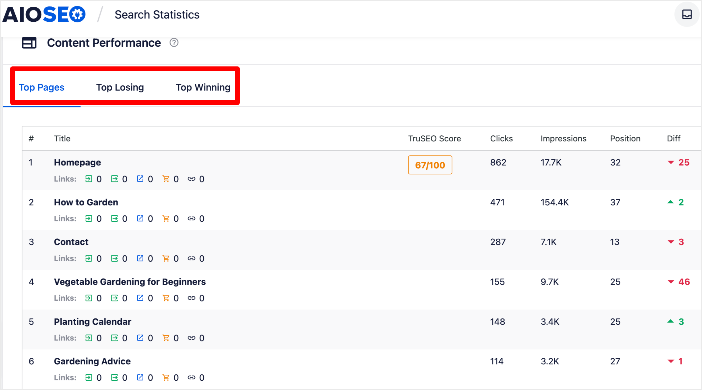
In diesem Fall möchten wir uns auf den Tab Top Verlierer konzentrieren, der die Inhalte anzeigt, die in den Rankings abrutschen.
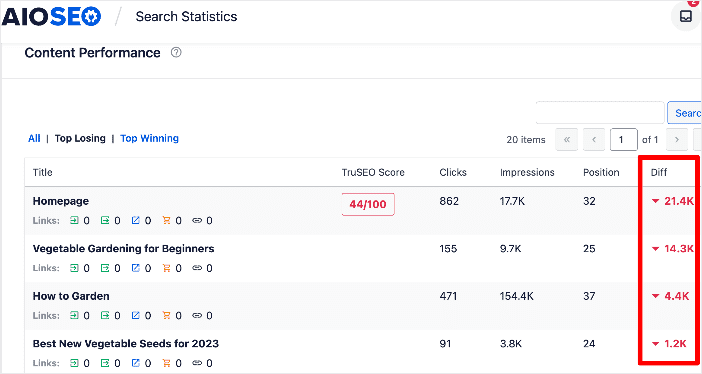
Diese Seiten sind Opfer von Content Decay.
Der Keyword-Rankings-Bericht
Der Keyword-Rankings-Bericht konzentriert sich stärker auf die Keyword-Leistung.
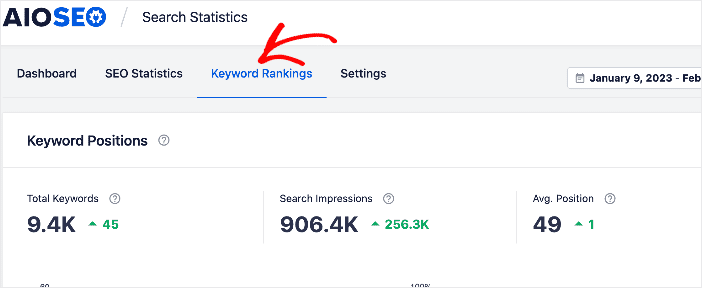
Dieser Bericht zeigt Ihnen, welche Keywords auf SERPs an Dynamik gewinnen und welche abstürzen.
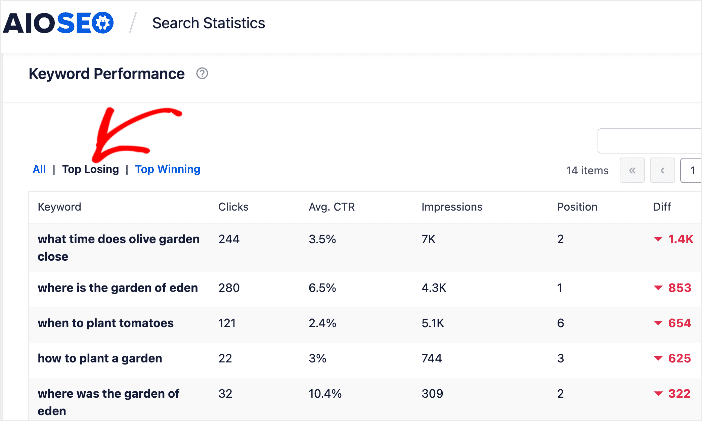
Auch hier möchten wir uns, um Content Decay zu erkennen, auf diejenigen konzentrieren, die in den Rankings zurückgehen.
Impressionen überwachen
Neben den Berichten Content Performance und Keyword Rankings können Sie auch Ihre Impressionen in den Suchstatistiken überwachen.
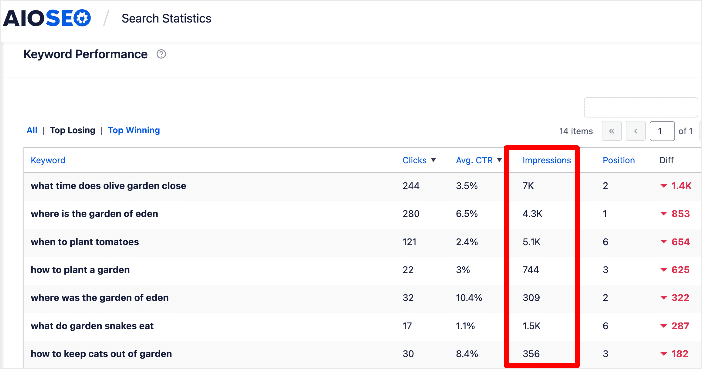
Impressionen beziehen sich auf die Anzahl der Male, die Ihr Suchergebnis von Nutzern auf SERPs gesehen wird. Ein Rückgang der Impressionen bedeutet, dass weniger Menschen Ihr Suchergebnis sehen können. Dies impliziert wiederum einen Rückgang der Rankings (ein weiteres Zeichen für Content Decay).
Auf Rückgänge der Klickraten (CTR) prüfen
Organische Klickraten (CTR) zeigen an, wie gut Ihre Inhalte in den Suchergebnissen abschneiden. Mehr Klicks = mehr Traffic = mehr Umsatz.
Sie können diese Metrik anhand der Spalte Durchschnittliche CTR überprüfen.
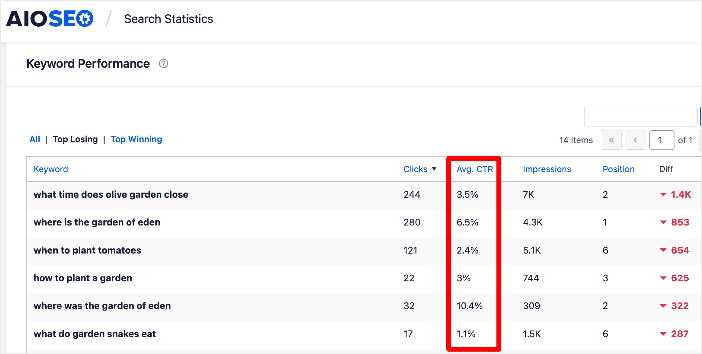
Die Überwachung Ihrer CTRs ist ein wesentlicher Aspekt von SEO und des gesamten digitalen Marketings. Ein Rückgang der CTR könnte auf eine Vielzahl von Problemen hinweisen.
Zum einen könnte dies darauf hindeuten, dass Ihr Suchergebnis nicht richtig optimiert ist. Dies ist eine einfache Lösung, indem Sie ansprechendere SEO-Titel-Tags schreiben.
Ein allmählicher Rückgang der CTR könnte jedoch darauf hindeuten, dass Ihre Inhalte verfallen und in den SERP-Positionen abrutschen. Da weniger Menschen Ihre Website in den Suchergebnissen sehen, wird es einen Rückgang der CTR geben.
So stoppen Sie Content Decay & gewinnen verlorenen Traffic zurück
Nachdem Sie nun wissen, was Content Decay ist und wie Sie ihn erkennen, wollen wir untersuchen, wie Sie ihn stoppen können. Die meisten Tipps beinhalten die Content-Optimierung auf der Seite und erfordern keinen großen Aufwand für die Implementierung.
1. Alte Inhalte auffrischen
Einer der ersten Schritte, um Content Decay zu stoppen, ist die Aktualisierung bestehender Inhalte, die älter als ein Jahr sind. Dies gilt für Marken mit einer großen Content-Bibliothek. Wenn Ihre kleiner ist, können Sie Ihre Inhalte häufiger aktualisieren.
Denken Sie daran, Suchmaschinen lieben frische Inhalte, und eine Content-Aktualisierung lässt Ihre Inhalte neu erscheinen. Einige Möglichkeiten, Inhalte zu aktualisieren, sind:
- Ändern des SEO-Titels und der Meta-Beschreibung
- Aktualisieren von Statistiken und zitierten Daten
- Aktualisieren Ihrer Bilder
- Hinzufügen eines FAQ-Bereichs
Nachdem Sie Ihre Inhalte aktualisiert haben, aktualisieren Sie das Veröffentlichungsdatum. Die Aktualisierung von veralteten Inhalten macht sie relevanter und führt zu einem besseren Engagement der heutigen Nutzer.
2. Interne Links pflegen und hinzufügen
Eine weitere einfache Möglichkeit, Content Decay zu stoppen, ist die Pflege der Links auf Ihrer Website. Dazu gehört die Beseitigung von 404-Fehlern, was Sie mit dem Broken Link Checker (BLC) von AIOSEO leicht tun können.
BLC ist ein separates Plugin, das Ihre Website nach defekten Links durchsucht. Das Ergebnis ist ein übersichtlicher, benutzerfreundlicher Bericht über alle Links auf Ihrer Website, die nicht funktionieren.

Sie können auch Weiterleitungen mit BLC oder dem Redirection Manager von AIOSEO hinzufügen, um Ihren Traffic auf gültige, aktive URLs umzuleiten.
Um mehr über diesen Prozess zu erfahren, lesen Sie unseren Artikel über das Finden und Beheben von 404-Fehlern.
Neben der Pflege Ihrer Links können Sie auch Content Decay stoppen, indem Sie strategisch interne Links zu Ihren Inhalten aufbauen. Der Link Assistant macht dies zum Kinderspiel.
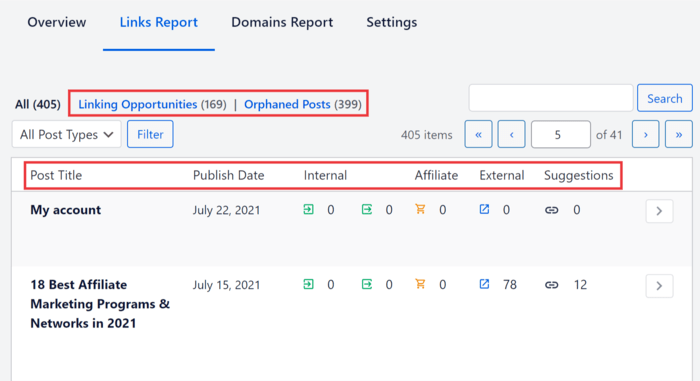
Dieses KI-gestützte Tool automatisiert den Aufbau interner Links und prüft die Links auf Ihrer Website. Das Beste daran ist, dass Sie die beteiligten Beiträge nicht einmal öffnen müssen. Sie können Links hinzufügen und den Ankertext direkt im Link Assistant Dashboard bearbeiten.
3. Beiträge für Suchintention neu optimieren
Wenn Ihre Inhalte älter werden, stellen Sie möglicherweise einen Rückgang der Klickraten (CTR) und einen Anstieg der Absprungraten fest. Dies ist ein guter Indikator dafür, dass Ihre Inhalte die Suchintention nicht erfüllen. Eine gute Möglichkeit, diesen Rückgang des Traffics und der Klickraten zu stoppen, ist die Neuoptimierung Ihres Artikels für die Suchintention.
Ich empfehle eine SERP-Analyse, um zu verstehen, welche Art von Inhalten derzeit rankt. Dies wird Ihnen helfen zu bestimmen, welche Aktualisierungen Sie an Ihren eigenen Inhalten vornehmen müssen, um sie besser an die neue Suchintention anzupassen.
Profi-Tipp: Zusätzlich zur Überprüfung der Suchintention sollten Sie auch prüfen, ob Sie das richtige Keyword anvisieren. Wenn Sie für einen Begriff ranken, für den Sie ursprünglich nicht optimiert haben, lohnt es sich zu untersuchen, warum Google Sie für diesen Begriff auswählt. Möglicherweise möchten Sie stattdessen für dieses Keyword neu optimieren, anstatt gegen den Strom eines verlorenen Keywords anzukämpfen.
4. Irrelevante Inhalte bereinigen
Content-Bereinigung ist eine weitere effektive Methode, um dem Verfall von Inhalten entgegenzuwirken. Dies ist der Prozess des Löschens veralteter, irrelevanter oder dünner Inhalte auf Ihrer Website. Diese Inhalte dienen keinem Zweck mehr und können sich langfristig negativ auf Ihre SEO auswirken.
Ein weiterer Grund, warum Content-Bereinigung wirkungsvoll ist, liegt darin, dass sie Ihnen hilft, Inhalte zu eliminieren, die auf Keywords mit geringem Wert abzielen.
P.S. Vergessen Sie bei der Bereinigung Ihrer Inhalte nicht, die gelöschten Inhalte auf andere relevante Artikel umzuleiten, um 404-Fehler zu vermeiden!
5. Inhalte konsolidieren
Content-Konsolidierung beinhaltet das Kombinieren verschiedener Inhaltsteile in einem Artikel. Google bevorzugt eine umfassende Themenabdeckung, daher ist es manchmal besser, einen längeren Inhalt zu schreiben als mehrere kleinere Artikel.
Wenn Sie Inhalte konsolidieren, sollten Sie daran denken, dass Sie Weiterleitungen vom alten Inhalt zur neuen URL implementieren müssen. Sie können dafür den Redirection Manager verwenden (keine Programmierung erforderlich).
6. Inhalte erweitern
Die Erweiterung von Inhalten ähnelt der Aktualisierung Ihrer Inhalte. In diesem Fall möchten Sie jedoch mehr Details und Tiefe zu dem Inhalt hinzufügen. Dies macht ihn für Benutzer hilfreicher und reduziert die Absprungraten.
Wenn Sie ein AIOSEO-Benutzer sind, werden die Aktualisierungen dank des IndexNow-Moduls schnell von Suchmaschinen erkannt. Dieses Tool teilt Suchmaschinen mit, wann Sie Inhalte auf Ihrer Website hinzugefügt oder aktualisiert haben, und hilft Ihnen, schneller zu ranken.
Sie sind sich nicht sicher, wo Sie mit der Erweiterung Ihrer Inhalte beginnen sollen?
Führen Sie Keyword-Recherche durch. Dies hilft Ihnen, neue Keywords zu finden, die mit Ihrem Hauptthema zusammenhängen.
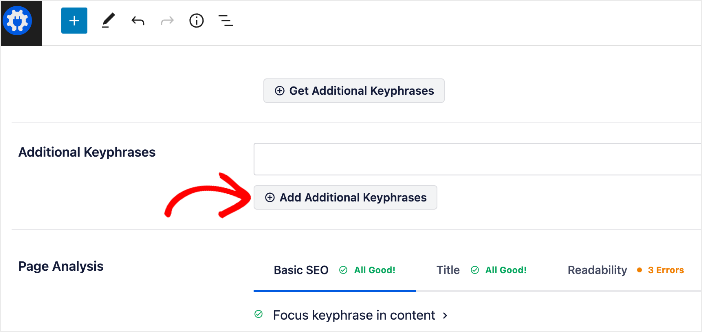
Ich mag es, wie AIOSEO mit Ihrem Semrush-Konto verbunden ist, sodass Sie Keyword-Ideen direkt im WordPress-Editor erhalten können. Nachdem Sie Ihr Fokus-Keyword festgelegt haben, klicken Sie einfach auf Zusätzliche Keyphrasen abrufen und fügen Sie dann Ihre Favoriten zum Beitrag oder zur Seite hinzu.
7. Inhalte bewerben
Wenn Sie einen gut geschriebenen Artikel haben, der jedoch vom Verfall betroffen ist, bringen Sie ihn wieder ins Rampenlicht! Sie können Ihre Inhalte neu bewerben, indem Sie sie in sozialen Medien teilen, syndizieren oder an Ihre E-Mail-Liste senden.
Sie können auch Gastbeiträge schreiben und einen Link zu Ihrem Artikel in den Gastbeiträgen einfügen. Dies führt zu mehr Backlinks und relevantem Traffic für Ihren Artikel.
Lassen Sie Ihre besten Inhalte nicht verstauben
Content-Verfall ist unvermeidlich, aber er muss nicht dauerhaft sein. Tatsächlich ist die Behebung von verfallenden Inhalten oft die ROI-stärkste Aktivität in der SEO. Es erfordert weitaus weniger Aufwand, einen alten Gewinner aufzufrischen, als einen neuen Beitrag von Grund auf neu zu ranken.
Ihr Vorgehensplan ist einfach:
- Analysieren Sie Ihren Traffic, um den langsamen Abstieg zu erkennen.
- Aktualisieren Sie die Inhalte mit neuen Daten und besseren Antworten.
- Re-optimieren Sie Ihre technische SEO und internen Links.
Und mit Tools wie All in One SEO müssen Sie nicht raten. Sie können genau sehen, welche Keywords abrutschen, und Ihre Inhalte in wenigen Minuten aktualisieren.
Ich hoffe, dieser Beitrag hat Ihnen geholfen, alles zu lernen, was Sie über Content Decay wissen müssen, insbesondere wie Sie ihn bekämpfen und Ihren verlorenen Traffic zurückgewinnen können. Möglicherweise möchten Sie auch andere Artikel auf unserem Blog lesen, wie z. B. unseren Leitfaden zur Verwendung von Suchstatistiken zur Steigerung Ihrer Rankings oder unser Tutorial zur Überwachung der Auswirkungen von Google-Algorithmus-Updates auf Ihr SEO.
Wenn Sie diesen Artikel hilfreich fanden, abonnieren Sie unseren YouTube-Kanal. Sie können uns auch auf Twitter, LinkedIn oder Facebook folgen, um auf dem Laufenden zu bleiben.
Häufig gestellte Fragen zu Content Decay
Wie oft sollte ich meine alten Inhalte aktualisieren?
Es gibt keine feste Regel, aber ein guter Anhaltspunkt ist, Ihre Top-Performing-Inhalte alle 6 bis 12 Monate zu überprüfen. Bei stark umkämpften Themen oder sich schnell ändernden Branchen (wie Technologie oder SEO) müssen Sie Inhalte möglicherweise vierteljährlich aktualisieren. Nutzen Sie Ihre Analysen als Leitfaden: Wenn der Traffic zu sinken beginnt, ist es Zeit für ein Update.
Hilft die Änderung des Veröffentlichungsdatums dem SEO?
Ja, aber nur, wenn Sie die Inhalte tatsächlich aktualisiert haben. Wenn Sie einen Beitrag erheblich überarbeiten (Statistiken aktualisieren, Abschnitte hinzufügen, die Einleitung umschreiben), sollten Sie das Datum „Veröffentlicht“ oder „Zuletzt aktualisiert“ ändern. Google behandelt dies als Signal für Aktualität, was Ihnen einen Ranking-Boost verschaffen kann. Ändern Sie das Datum nicht ohne sinnvolle Änderungen.
Sollte ich alte Inhalte löschen, die verfallen?
Nicht immer. Versuchen Sie zuerst, sie zu aktualisieren oder zu konsolidieren. Wenn ein Beitrag keinen Traffic, keine Backlinks und kein Potenzial hat, relevant zu sein, dann kann das Beschneiden (Löschen) die beste Option sein, um das Crawl-Budget zu sparen. Denken Sie immer daran, eine 301-Weiterleitung zu einer relevanten Seite einzurichten, wenn Sie Inhalte löschen.
Was ist der Unterschied zwischen Content Decay und einer Google-Strafe?
Content Decay ist ein langsamer, allmählicher Rückgang des Traffics über viele Monate. Eine Google-Strafe (oder ein Algorithmus-Treffer) verursacht normalerweise einen starken, plötzlichen Rückgang des Traffics praktisch über Nacht. Wenn Ihr Traffic einbricht, prüfen Sie auf technische Fehler oder manuelle Maßnahmen. Wenn es ein langsamer Rückgang ist, ist es wahrscheinlich Decay.
Möchten Sie AIOSEO kostenlos ausprobieren?
Geben Sie die URL Ihrer WordPress-Website ein, um AIOSEO Lite zu installieren.

Offenlegung: Unsere Inhalte werden von den Lesern unterstützt. Das bedeutet, wenn Sie auf einige unserer Links klicken, können wir eine Provision verdienen. Wir empfehlen nur Produkte, von denen wir glauben, dass sie unseren Lesern einen Mehrwert bieten.

Danke, toller Artikel. Muss das auf meine Seiten anwenden
Danke, das sind wirklich nützliche Informationen.