
Trying to choose between GPT Image 2 vs. Nano Banana 2 for your WordPress blog images?
The good news is that both models now sit side by side in AIOSEO’s AI Image Generator, so the real question isn’t which tool to sign up for – it’s which model to pick every time you need a featured image or an image for your blog.
I ran the same blog-style prompts through both models inside WordPress to see which one handles featured images, step visuals, infographic headers, and illustrations best.
In this GPT Image 2 vs. Nano Banana 2 comparison, I’ll explain my findings and let you in on a simple rule for which model to use for your WordPress blog images, so you never waste AI credits on the wrong one.
Let’s start with some quick definitions.
In This Article
- GPT Image 2 vs. Nano Banana 2: What Are They?
- How They Perform on Common Blog Image Types
- GPT Image 2 vs. Nano Banana 2: 5 Key Differences That Matter for Bloggers
- GPT Image 2 vs. Nano Banana 2: Which Model Should You Use?
- How to Switch Between Models in AIOSEO
- GPT Image 2 vs. Nano Banana 2: FAQs Answered
- Final Word
GPT Image 2 vs. Nano Banana 2: What Are They?
Before we compare results, let’s look at what each model was built to do. Knowing their strengths makes the test results much easier to read.
A quick note on names: GPT Image 2 is the model OpenAI launched as ChatGPT Images 2.0 in April 2026. Developers call it gpt-image-2. But it’s all the same model. Nano Banana 2 is Google’s Gemini 3.1 Flash Image model. It’s not the same as Nano Banana Pro, which runs on Gemini 3 Pro Image. Nano Banana 2 is the faster, lighter model, and Google says it gets close to Pro quality for most everyday tasks.
GPT Image 2: OpenAI’s Precision-First Model
GPT Image 2 is OpenAI’s newest image model. It’s the first OpenAI image model that “thinks” before it draws. It plans the layout, checks the details in your prompt, and then creates the image.
That planning step is why GPT Image 2 follows instructions so well. If you ask for 3 icons in a row with a label under each one, you’re much more likely to get exactly that.
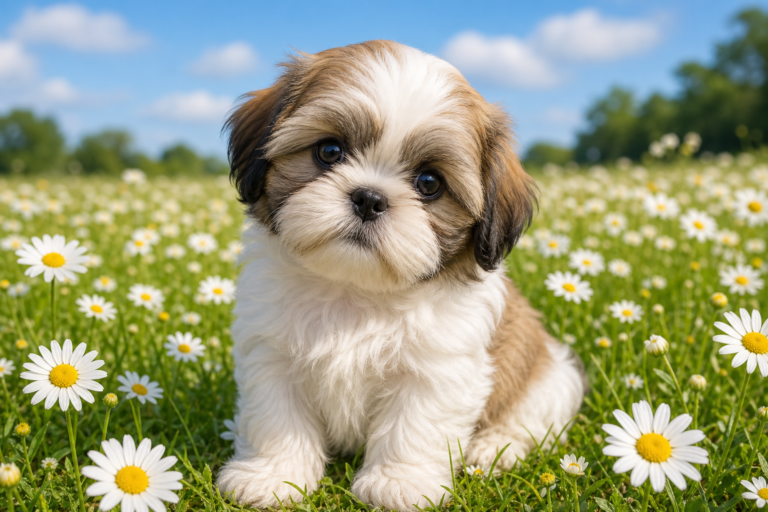
Its biggest strengths for bloggers are:
- Readable text: Headlines, labels, and captions inside the image come out clean and spelled correctly far more often than with older models.
- Accurate layouts: It places objects where you ask and keeps multi-part scenes organized.
- Sharp, detailed subjects: Product shots and close-ups look crisp and well-defined.
But in my experience, the trade-off is speed. That extra planning adds a few extra seconds to each image.
Nano Banana 2: Google’s Photorealism-First Model
Nano Banana 2 is Google’s image model from the Gemini family. Google released it in February 2026 and made it the default image model in the Gemini app.
Nano Banana 2 shines when you want an image that looks like a real photo. It handles natural light, skin tones, and textures like wood and fabric really well. It also tends to place your subject inside a full scene instead of posing it in front of a backdrop.
It’s fast, too. That makes it great when you want to try 5 versions of a hero image before picking one.
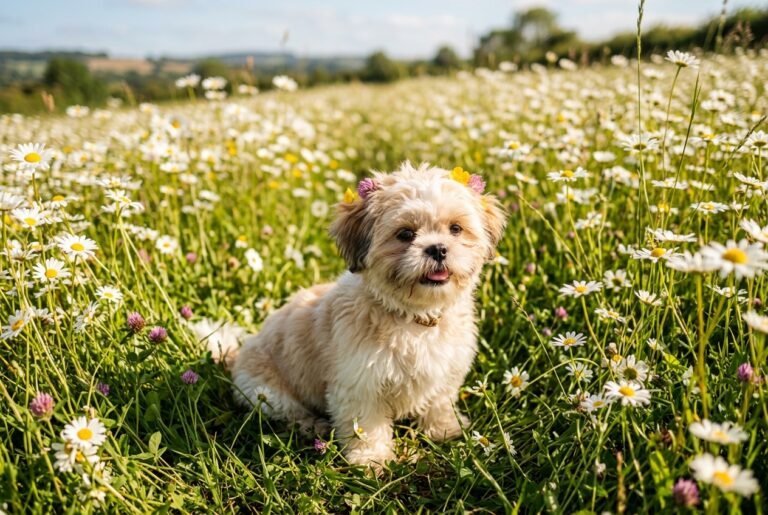
The above image was generated by Nano Banana 2 using the same prompt as GPT Image 2, but you can see the difference in interpretation. The above image is more focused, while this one is wider and draws on the background as well.
I’ve also noticed that images produced with Nano Banana 2 can include text, and short text usually looks fine. It slips more often with small or dense text, like a chart with many labels.
GPT Image 2 vs. Nano Banana 2: How They Work Inside AIOSEO
Here’s what makes this comparison different from every other one you’ll find. You don’t need an OpenAI account, a Google account, or an API key to use either model.
Both models are built into the AIOSEO AI Image Generator, which works right inside the WordPress block editor.
Here’s how it works:
- Both models live in a single model dropdown in the AI Image Generator.
- Both use AI credits from the same pool. You don’t get a separate bill for either model.
- Your image saves to your WordPress media library and drops into your post in one step.
That means you can test both models on the same prompt in under a minute, without leaving your post.
GPT Image 2 vs. Nano Banana 2: How They Perform on Common Blog Image Types
I tested the 4 image types WordPress bloggers create most often. For each test, I used the same prompt, aspect ratio, and quality setting in both models.
1. Featured Images and Blog Hero Images
Featured images are the first thing readers see in search results, on social media, and on your blog page. They need to look polished and fit the topic.
This is the prompt I used to create the images using the 2 models: “A flat-lay photo of an open laptop, a coffee mug, and a notebook on a wooden desk, for a productivity blog featured image.”

The light on the wood grain and the coffee art on the mug look like a real overhead shot.

In contrast, GPT Image 2 produced a tidier layout with every object exactly where described.
Winner: Nano Banana 2 for photo-style featured images; it’s the more natural choice, with a better shot of the table and added details you might find on someone’s work desk.
2. Tutorial Screenshots and Step-by-Step Visuals
I’d actually advise against using AI to fake screenshots of real software. If your tutorial shows a WordPress menu or a plugin setting, readers need a real screenshot to follow along.
AI images work well for the visuals around your tutorial, like a step overview graphic or a section header. But make sure that the tutorial snapshots are from the actual software.
Now, let’s compare the images I generated.
My prompt: “A clean flat illustration of a laptop screen showing a 3-step checklist labeled Step 1, Step 2, and Step 3, with a green check mark next to each step.”
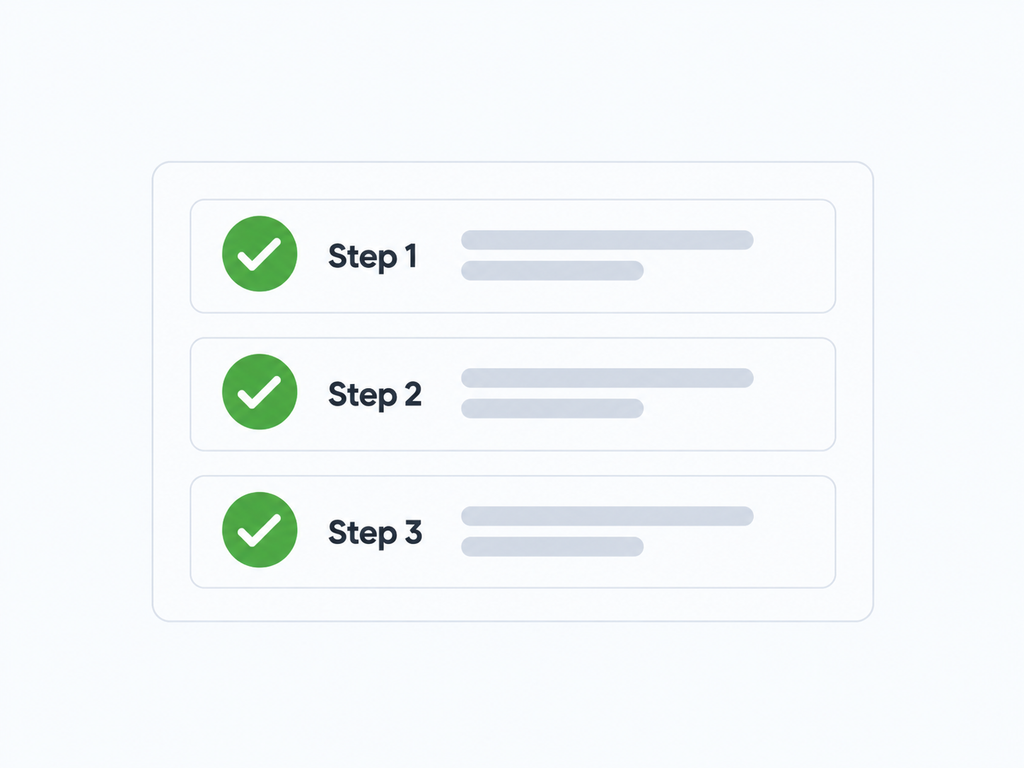
Notice how GPT Image 2 nailed the labels and kept all 3 steps evenly spaced. Whereas, in the image below generated using Nano Banana 2, there’s a nice-looking scene, but it may be more elaborate than needed.

Winner: I’d choose GPT Image 2 for this, as it presents the image more clearly, where precision matters more than realism.
3. Infographics and Data Visualization Headers
Infographic headers mix icons, numbers, and text. This is the hardest test for any image model.
My prompt: “A step-by-step infographic header: 3 steps to improve your WordPress SEO, with numbered icons and clean sans-serif labels.”
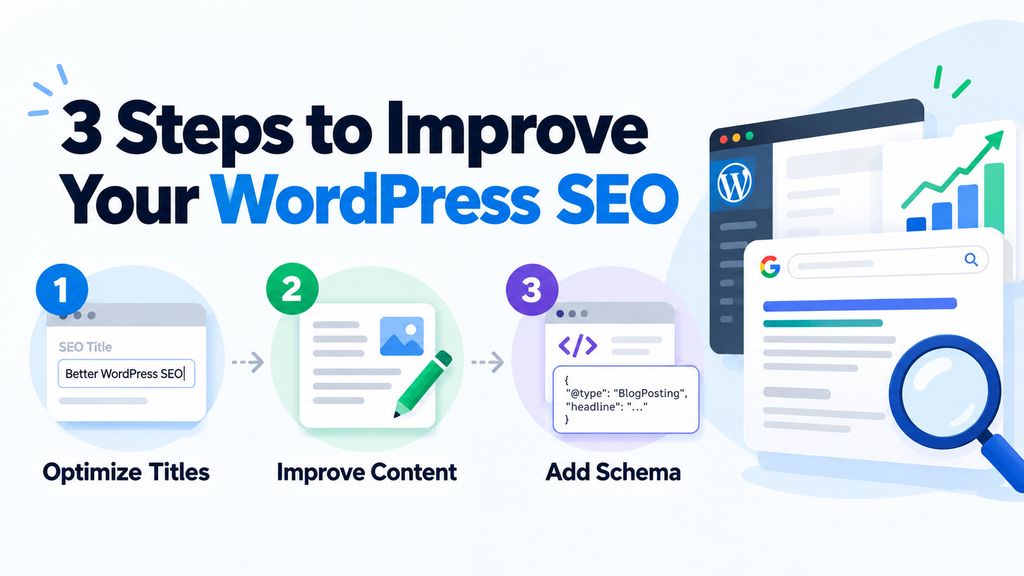
The image above, generated by GPT Image 2, is clear, clean, and well-structured.
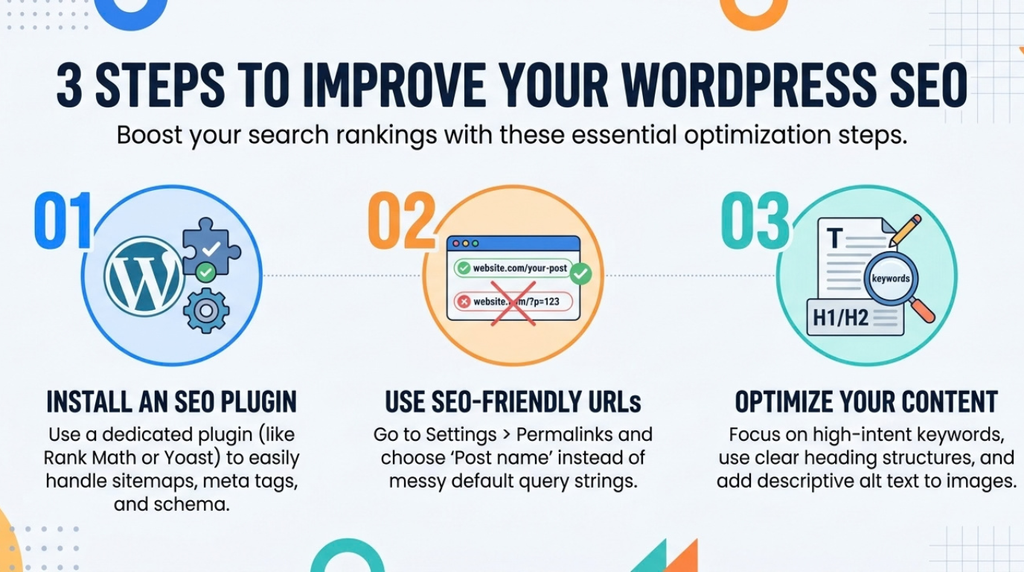
In my opinion, GPT Image 2 produced a clean header with readable labels and correct numbering. Nano Banana 2 had a nicer color palette, but some of the smaller label text and overall image quality could be better.
Winner: GPT Image 2 is the safer pick for any image where the words have to be right.
Pro Tip: Use AI for the look of an infographic, not the facts. AI models can invent numbers. If your graphic shares real data, build the chart from your actual data and use AI only for the header art.
4. Branded Graphics and Illustration-Style Visuals
Many blogs use simple illustrations instead of photos. They work well for concepts that are hard to photograph, like SEO or website speed.
Our prompt: “An illustrated icon of a magnifying glass over a webpage, flat design, pastel colors.”

This one was close. Both models created a clean flat icon. GPT Image 2 stuck more closely to a simple, true flat style, while Nano Banana 2 added soft shading and depth.

Winner: GPT Image 2, by a small margin. If you want graphics that match a set brand style every time, its tighter prompt following helps.
GPT Image 2 vs. Nano Banana 2: 5 Key Differences That Matter for Bloggers
Here’s how the 2 models compare on the 5 things that affect your blog workflow most.
1. GPT Image 2 Wins for Text Rendering: If your image includes words, choose GPT Image 2. It handles headlines, small labels, and multi-line captions more reliably. It also handles text in languages like Japanese, Hindi, and Korean better. Nano Banana 2 is fine for a short word or 2. For anything longer, expect more retries.
2. Nano Banana 2 Wins in Photorealism: For images that should look like real photos, Nano Banana 2 has the edge. Its lighting feels more natural, skin tones look more lifelike, and scenes feel less staged. That makes it a strong pick for lifestyle blogs, food blogs, travel posts, and any featured image with people.
3. Nano Banana 2 Is Usually Faster: Nano Banana 2 is built for speed, and it’s usually the quicker of the 2. GPT Image 2 spends extra time planning each image before it creates it.
4. AI Credit Cost – Same Pool, Same Settings, Same Cost: Both models draw from the same AIOSEO AI credit pool. If you use the same settings in both, they cost the same number of credits. Your settings are what change the price. Higher-quality settings use more credits than lower-quality ones. The good news is that the Generate button shows the credit cost before you click, so there are no surprises.
5. GPT Image 2 Wins in Layout and Composition: When your image has several parts that need to sit in specific spots, GPT Image 2 is more dependable. Think of a header with a title on the left and an icon on the right, or a row of 4 labeled icons. Nano Banana 2 is more likely to take creative liberties with the arrangement. Sometimes that looks great. Other times, it’s not what you asked for.
GPT Image 2 vs. Nano Banana 2: Which Model Should You Use?
I recommend making GPT Image 2 your default model for blog images. Most blog graphics include text, a structured layout, or a specific set of objects, and that’s where GPT Image 2 shines. Then switch to Nano Banana 2 whenever the image needs to feel like a real photograph.
Here’s the simple rule: if it has words or structure, use GPT Image 2. If it has people, light, or atmosphere, use Nano Banana 2.
Use GPT Image 2 When:
- Your image includes a headline, labels, or any readable text.
- You’re making an infographic header, step graphic, or comparison visual.
- You need product images where the packaging or label text must be correct.
- You want illustrations that match a consistent brand style.
- Your prompt is long and detailed, and every detail needs to show up.
Use Nano Banana 2 When:
- You want a photo-style featured image or hero image.
- Your image includes people, faces, or hands.
- Natural light and mood matter, like food, travel, or home decor posts.
- You’re creating lifestyle product shots where the product sits in a real-looking scene.
- You want to generate several quick variations before choosing one.
Both models are built into AIOSEO’s AI Image Generator. No API keys, no extra subscriptions, and no tool-switching. Free AIOSEO Lite users get 100 AI credits to try both models.
If you create blog images regularly, choose the plan that gives you the AI credits you need.
How to Switch Between Models in AIOSEO
Ready to try both? Switching models takes just a few clicks. But if you’re using the latest version, both models are already there.
First, open any post or page in the WordPress block editor. Add an Image block, or click an existing one.
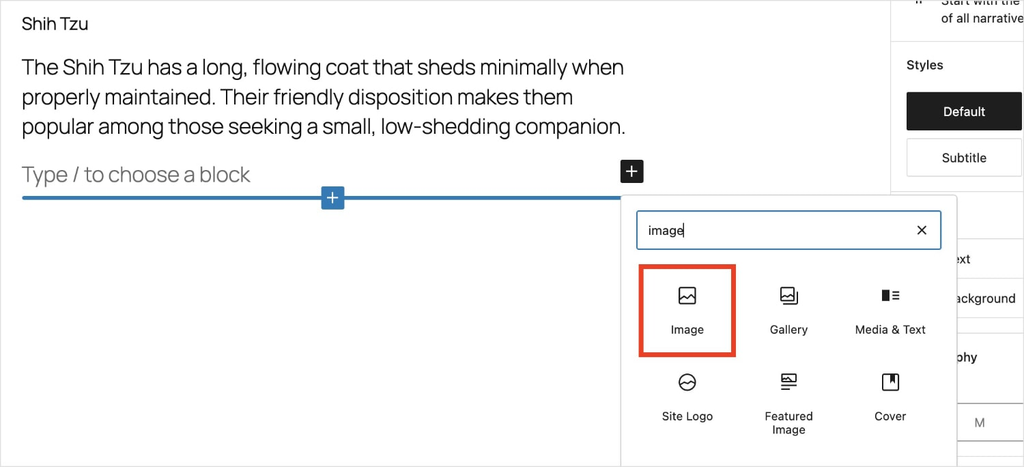
Next, click Generate with AI in the block toolbar. This opens the AI Image Generator.
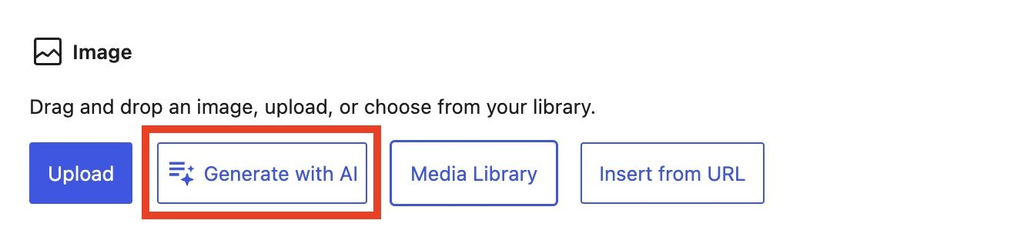
Type your prompt into the Prompt box. Then, open the model dropdown and select GPT Image 2 or Nano Banana 2.
After that, adjust the quality and aspect ratio. For most featured images, a landscape ratio works best.
Now, check the credit cost on the Generate button and click it. Once you like the result, click Insert Image. The image saves to your media library and automatically drops into your post.
Pro Tip: Not quite right? Edit your prompt and click Regenerate, or switch models and run the same prompt again. Revision history lets you go back to any earlier version.
Don’t forget to add descriptive alt text to every image you insert. It helps search engines understand your images and makes your content more accessible. Here’s our guide to writing alt text for images.
GPT Image 2 vs. Nano Banana 2: FAQs Answered
GPT Image 2 is better for images with text, labels, and structured layouts. Nano Banana 2 is better for photorealistic images with natural light and people. For most WordPress blogs, GPT Image 2 is the better default, with Nano Banana 2 as your go-to for photo-style images.
The best AI image model for blog posts depends on the image type. Use GPT Image 2 for infographic headers, step visuals, illustrations, and featured images with text. Use Nano Banana 2 for photo-style featured images and lifestyle shots. In AIOSEO, you can switch between them in the same editor with 1 click.
Yes, Nano Banana 2 can render text inside images, and it handles short text like a single word or title well. For small labels, long captions, or text-heavy graphics, GPT Image 2 is more reliable.
Use GPT Image 2 when the product label, logo, or packaging text needs to be accurate. Use Nano Banana 2 for lifestyle product shots, where the product sits in a natural-looking scene. For WooCommerce product pages, always make sure AI images match what customers will actually receive.
Final Word
In the GPT Image 2 vs. Nano Banana 2 matchup, there’s no need to pick just one. Use GPT Image 2 as your default for text, layouts, and illustrations, and switch to Nano Banana 2 when your WordPress blog images need to look like real photos.
Want to speed up the writing side of your posts, too? Check out our list of the best AI blog post generators, or learn how to use the WordPress AI Assistant to draft content right in your editor.
Not using AIOSEO yet? Get started today and create original blog images without leaving WordPress.
Disclosure: Our content is reader-supported. This means if you click on some of our links, then we may earn a commission. We only recommend products that we believe will add value to our readers.
Want to Try AIOSEO for Free?
Enter the URL of your WordPress website to install AIOSEO Lite.