
Do you take beautiful photos but rarely get inquiries from Google? Investing in photographer SEO can change your online presence.
Here’s the thing: if your photography business is nowhere to be found online, the fix usually isn’t better photos. It’s helping Google understand what you shoot, where you shoot it, and why someone should book you. That’s where photography SEO comes in.
So, in this guide, I’ll walk you through photographer SEO step by step, from picking the right keywords to optimizing hundreds of gallery images in a few clicks.
Let’s start with a quick definition.
In This Article
- What Is Photographer SEO?
- 10 Ways To Build Photography SEO For Your Business
- 1. Find the Right Keywords for Your Photography Business
- 2. Create a Page for Every Service and Location
- 3. Optimize Your Photos With AIOSEO's Image SEO Addon
- 4. Add Context to Your Gallery and Portfolio Pages
- 5. Speed Up Your Image-Heavy Website
- 6. Set Up Local SEO So Nearby Clients Find You
- 7. Answer Client Questions With a Photography Blog
- 8. Optimize for AI Search
- 9. Earn Links From Venues and Vendors
- 10. Track Your Photography SEO Results
- 1. Find the Right Keywords for Your Photography Business
- Photographer SEO: FAQs Answered
- Next Steps
What Is Photographer SEO?
Photography SEO is how you get your photography business or website to show up when people search on Google.
It’s aimed at one goal: getting found by people who want to hire you. Think of searches like “newborn photographer in Austin” or “Chicago headshot photographer.”
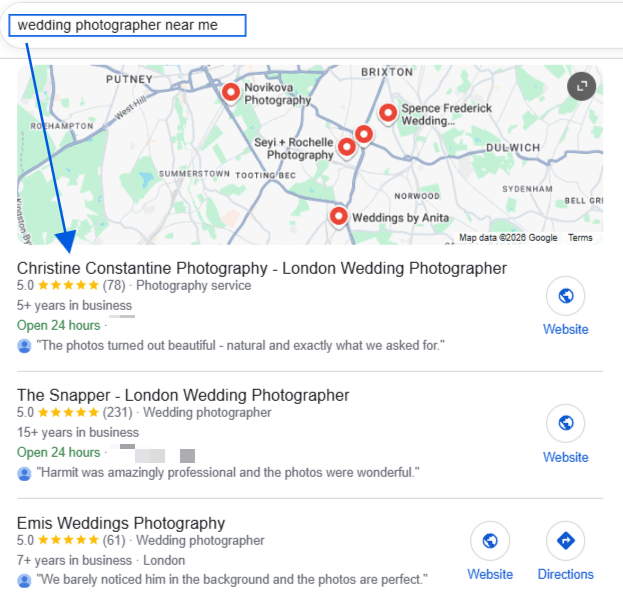
When someone types a search like that, Google shows 2 kinds of results. There’s the map pack, which is the box with a map and 3 local businesses. Below it are the regular results. A well-optimized photography business can show up in both.
Most photography websites have the same problem. They’re full of great images and almost no words. That looks clean to a visitor. But Google can’t look at a photo of a couple on a beach and know it was a wedding in San Diego. It reads text. If your gallery has no text, Google has very little to go on.
Additionally, images also make your site heavy. A gallery of 60 full-size photos can take a long time to load, and slow pages tend to rank lower and lose visitors.
But the good news is that both problems are fixable, and none of the fixes need any code.
10 Ways To Build Photography SEO For Your Business
Now that you understand what photography SEO is and why it’s important for your digital presence and business growth, let’s get to my favorite section: how to do it.
1. Find the Right Keywords for Your Photography Business
The first step to strengthening photography SEO is finding the right keywords. Your job is to figure out which phrases your future clients use.
Here are some of the most workable things you can do:
Combine Your Specialty and Your City
People rarely search for just “photographer.” They search for the type of shoot they need, plus where they live. So your best keywords usually follow this simple pattern: Specialty + photographer + city
Here are a few examples:
| Specialty | Example Keyword |
|---|---|
| Wedding | wedding photographer in Denver |
| Newborn | newborn photographer Dallas |
| Headshots | corporate headshots Chicago |
| Family | family photographer near me |
| Product | product photographer for small business |
To find more ideas, start typing your specialty into Google and look at the suggestions that pop up.
Give Every Keyword Its Own Page
Here’s a mistake I see all the time: photographer lists weddings, newborns, families, and headshots all on one services page.
But that’s not how search results work because Google ranks pages, not whole websites. A page about 4 different things doesn’t rank well for any of them, or it might end up diluting your chances to rank for multiple pages. So I’d suggest picking 1 main keyword per page and sticking to it. You can also do this by keyword mapping to plan out in advance what page should target which keywords.
2. Create a Page for Every Service and Location
Once you have your keywords, build a page for each one. If you shoot weddings and newborns, that’s at least 2 pages. If you serve 2 cities, you may want a page for each city, too.
Each service page should ideally include:
- Your main keyword in the page title and first paragraph
- A short description of what the session includes
- The areas you serve
- A small gallery of your best work for that service
- 1 or 2 client reviews
- A clear way to book or contact you
Aim for at least a few hundred words of real text. It doesn’t need to be fancy. Write it the way you’d explain your service to a client on the phone.
I’d also recommend using AIOSEO’s TruSEO feature here.
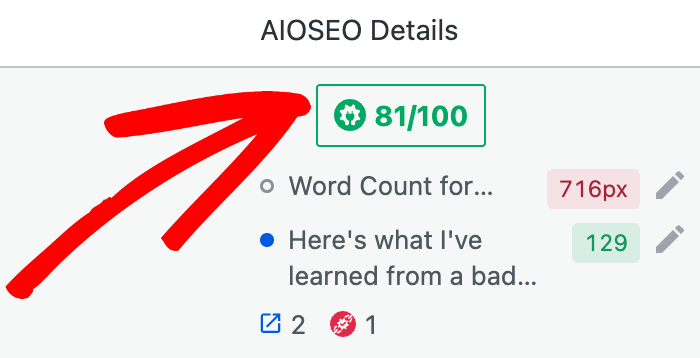
The SEO score can help you with on-page SEO. As you write, it checks your page against your focus keyword and tells you what to fix.
This is especially helpful if you don’t have any SEO experience and makes everything simpler.
3. Optimize Your Photos With AIOSEO’s Image SEO Addon
This is the part most photographers skip, and it’s where you can get ahead.
Every image on your site can carry text that helps Google. The most important piece is alt text, a short description of the image hidden in your site’s code. Screen readers read it out loud to people who can’t see the image. Google reads it to understand what the photo shows.
Adding alt text to 5 images by hand is easy. Adding it to 500 gallery images is not. That’s why we built the Image SEO add-on. It fills in your image details for you, based on rules you set once.
Note: Image SEO is available on the AIOSEO Plus plan and above. On a different plan? You can still add alt text manually in your Media Library, and the other tips in this guide still apply.
Here are the simple steps to use the add-on for image optimization:
Step 1: Activate the Image SEO Addon
From your WordPress dashboard, go to All in One SEO » Search Appearance. Then click the Image SEO tab.
Scroll down and click Activate Image SEO.
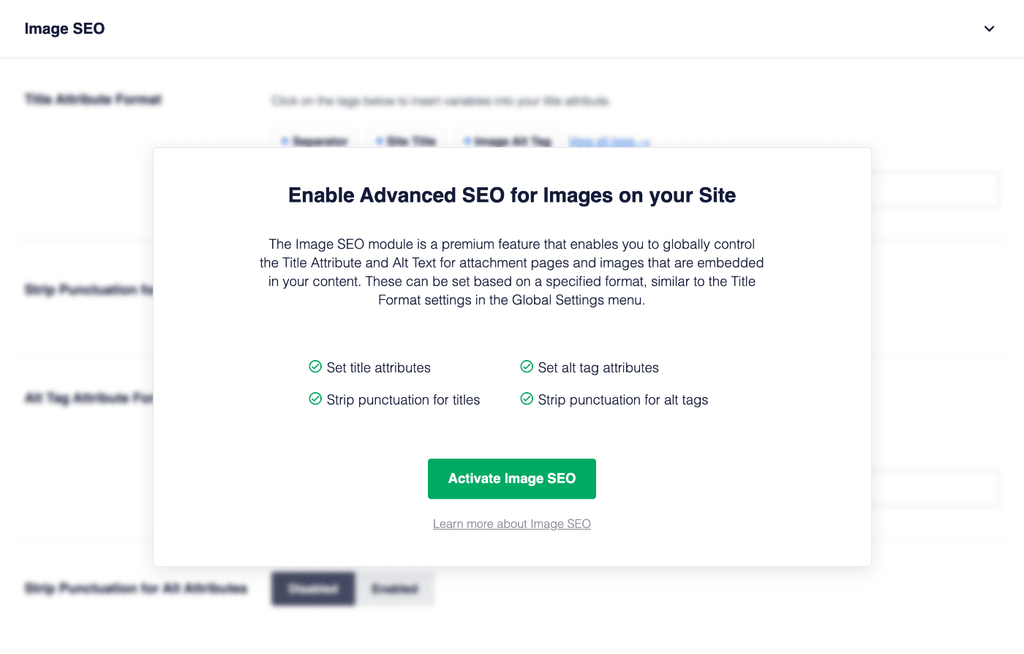
You’ll now see 5 tabs at the top: Title, Alt Tag, Caption, Description, and Filename.
Step 2: Set Your Alt Text Format
Click the Alt Tag tab. In the Alt Tag Format field, you’ll see buttons called smart tags. Each one pulls in a piece of information automatically, like the image’s own alt text or the title of the page it sits on.
For photographers, we recommend 2 smart tags: Alt Tag, which uses the alt text saved in your Media Library, followed by Post Title. That way, a photo on your “Wedding Photographer in Denver” page gets a description that mentions Denver weddings, even if you never typed one.
Click a smart tag to add it, or type the # key in the field to see the full list. You can also mix in your own words, like your business name.
Step 3: Set Titles, Captions, and Descriptions
Now repeat the same idea on the Title, Caption, and Description tabs. Each has its own format field that works the same way.
On the Caption and Description tabs, you can also turn on Autogenerate Caption on Upload and Autogenerate Description on Upload. Then every new photo you upload gets filled in right away.
Each tab also has a Casing setting. Pick Title Case or Sentence Case so everything looks tidy.
Step 4: Clean Up Camera Filenames
Most cameras name files something like DSC_0423.jpg or IMG_7781.jpg. Those names tell Google nothing.
Click the Filename tab. In the Words to Strip field, add the camera words you want removed, 1 per line. For example, DSC, IMG, and edit. AIOSEO will strip those words from your image filenames.
Our best tip is still to rename your files before you upload them. A name like denver-mountain-elopement.jpg is far more useful than a string of numbers.
Step 5: Generate Alt Text in Bulk With AI
What about the hundreds of photos already sitting in your Media Library? You don’t have to go through them one by one.
Go to Media » Library and select the images you want to update. Click the Bulk actions drop-down and choose Generate Alt Text for Images with AI. Then click Apply.
AIOSEO looks at each photo and writes a description of what’s actually in it. A dog on a beach gets described as a dog on a beach, not as “IMG_7781.”
This feature runs on AI credits, which work like prepaid tokens for AIOSEO’s AI tools. Paid AIOSEO plans include AI credits, and you can buy more credits any time. Each image uses 10 credits.
To check your balance, go to All in One SEO » General Settings and scroll down to the AI Credits section.
Step 6: Exclude Galleries You Want to Handle Yourself
Maybe you’ve already written careful alt text for your best wedding gallery. You can tell AIOSEO to leave it alone.
On the Alt Tag tab, find the Exclude Posts / Pages field. Start typing the page name and click it when it appears. To skip a whole category, use the Exclude Terms field instead.
When you’re done, click Save Changes.
Want more background on image optimization in general? Check out our full guide to WordPress image SEO.
4. Add Context to Your Gallery and Portfolio Pages
Alt text helps, but your galleries need a few sentences of their own, too.
Above or below each gallery, add a short paragraph that answers the questions a client would ask. Where was this shoot? What kind of session was it? What made it special?
For example, instead of a gallery titled “Sarah and Mike,” try “Sarah and Mike’s Fall Wedding at Red Rocks.” Then add 2 or 3 sentences about the day. Now the page can show up when a couple searches for Red Rocks wedding photos.
How many photos should a gallery have? There’s no magic number for how many photos a gallery should have, but I’d suggest picking enough to tell the story, usually 15 to 30 of your strongest shots, rather than uploading the whole session.
5. Speed Up Your Image-Heavy Website
Photographers love high-resolution files, but your website doesn’t necessarily need them.
Here are a few simple things you can do to keep your pages fast:
- Resize before uploading: Around 2,000 pixels wide is plenty for most full-screen images.
- Compress your exports: Most editing tools let you lower the file size without a visible drop in quality.
- Use a gallery plugin built for speed: Use tools like Envira Gallery that load images only as visitors scroll.
6. Set Up Local SEO So Nearby Clients Find You
Most photographers serve a local area. That makes local SEO one of the best places to spend your time. Here are some of the things you must do to set up local SEO properly:
Claim and Fill Out Your Google Business Profile
Your Google Business Profile is the free listing that shows up in the map pack. If you don’t have one, go to Google Business Profile and claim yours.
Then fill out every section. Choose the most specific category you can, like “Wedding photographer” instead of just “Photographer.” Upload fresh photos every month or so. Google likes profiles that look active.
For a full walkthrough, see our guide on how to set up your Google Business Profile.
Add Your Business Info With AIOSEO Local SEO
Your website should tell Google the same story as your profile. AIOSEO’s Local SEO feature adds your business details to your site in a format Google can read easily. It’s available on the AIOSEO Plus plan and above.
In your WordPress dashboard, go to All in One SEO » Local SEO. If you see an Activate Local SEO button, click it first. Then click through each tab and fill in your business name, address or service area, phone number, and opening hours.

Make sure these details match your Google Business Profile exactly. Even small differences, like “St.” on one and “Street” on the other, can confuse Google.
Collect and Show Client Reviews
Reviews help you rank in the map pack, and they help clients trust you. The easiest time to ask is right after you deliver the final gallery, when your client is happiest.
Send a short thank-you message with a direct link to your Google review page. Then add your favorite reviews to your service pages.
7. Answer Client Questions With a Photography Blog
Your service pages catch people ready to book. But a blog catches them earlier, while they’re still planning.
Think about the questions clients ask you over and over. Each one can become a blog post:
- What to wear for family photos
- How far in advance to book a wedding photographer
- The best spots for engagement photos in your city
- A guide to a local wedding venue you’ve shot at
Venue posts are especially useful. Couples often search for a venue name plus “wedding photos.” If you’ve shot there, you have the perfect post ready to go.
You can also use the blog pages as opportunities to capitalize on the keywords that your potential clients might be looking for.
8. Optimize for AI Search
More people now ask tools like ChatGPT and Google’s AI Overviews for recommendations, like “Who’s a good newborn photographer in Dallas?” Getting your business into those answers is called AEO, or answer engine optimization.
You don’t need a separate strategy for this. AEO builds on everything above, plus a few extra steps:
- State the facts plainly: Say clearly what you shoot, where, and for whom, near the top of each service page.
- Add an FAQ section: Add FAQs to your service pages as AI tools pull from short, direct answers.
- Keep your details consistent everywhere: From your website to your Google profile to directories, keep important information like your business name, hours, and services consistent.
- Add an llms.txt file: It gives AI tools a simple summary of your site, and you can easily generate one using AIOSEO’s LLMs.txt Generator.
9. Earn Links From Venues and Vendors
When other websites link to yours, Google sees it as a sign people trust you.
Photographers have a built-in advantage here. You work with venues, planners, florists, and other vendors all the time. After a shoot, send them a few of your best images and ask if they’ll credit you with a link. Many will say yes, because they need good photos for their own sites.
Submitting your work to wedding blogs and local magazines is another great way to earn backlinks.
10. Track Your Photography SEO Results
How do you know any of this is working? You check your data.
AIOSEO’s Search Statistics connects to Google Search Console, Google’s free tool for tracking how your site performs in search, and shows the numbers right in WordPress. Go to All in One SEO » Search Statistics to see which pages get the most clicks and which keywords bring people in.
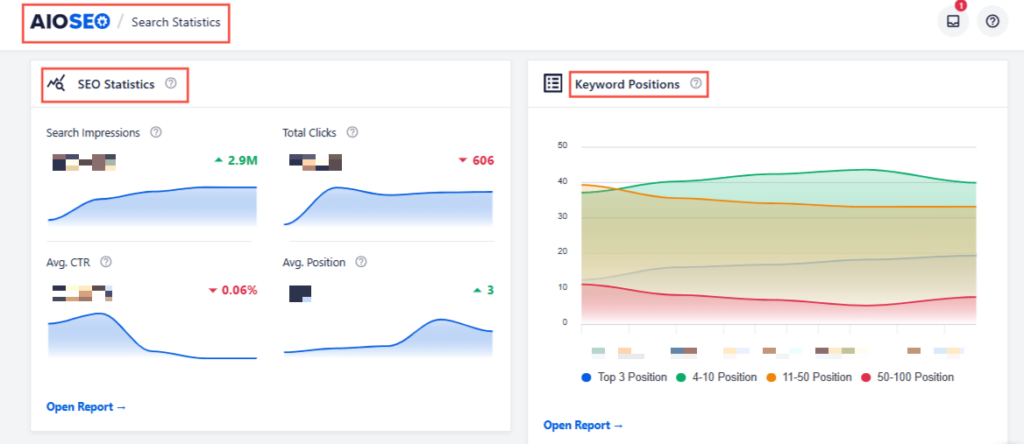
Using the Search Statistics feature, you can easily track your SEO progress. Also, keep an eye on how many inquiries come from Google. In your contact form, add a simple “How did you find us?” question.
Photographer SEO: FAQs Answered
Most sites start to see changes in 3 to 6 months. Local results can move faster, especially once your Google Business Profile is complete. SEO is slow at first, but pages that rank can bring in clients for years.
You don’t need one to rank your service pages. But a blog helps you reach clients who are still planning, and it gives you more pages that can show up on Google. Even 1 post a month makes a difference over time.
Most solo photographers can handle the basics themselves with a plugin like AIOSEO. An agency makes more sense once you’ve outgrown the basics or simply don’t have the time.
Yes. WordPress gives you full control over your pages, images, and settings. Paired with an SEO plugin, it handles everything in this guide.
Next Steps
Photographer SEO comes down to a few simple habits: target the right keywords, give every service its own page, describe your photos, and show up in local search.
If you’d like to go deeper on the local side, check out our guide to local SEO for small businesses.
Ready to optimize every photo on your site without the busywork? Get AIOSEO today if you’re not using it already, and turn on Image SEO in a few clicks.
Disclosure: Our content is reader-supported. This means if you click on some of our links, then we may earn a commission. We only recommend products that we believe will add value to our readers.
Want to Try AIOSEO for Free?
Enter the URL of your WordPress website to install AIOSEO Lite.