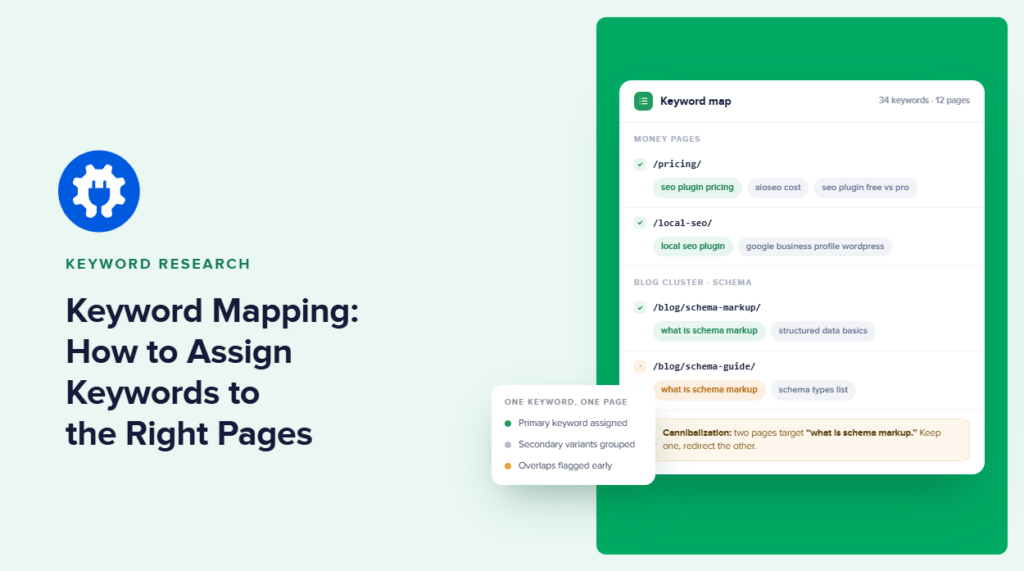

You can do excellent keyword research and still end up with the wrong pages ranking for the wrong searches if you don’t do keyword mapping.
That’s because the problem usually starts after the research is finished.
You have a spreadsheet full of promising keywords, but no clear system for deciding which page should target each one. So similar keywords get assigned to multiple posts, new content overlaps with pages you already have, and internal links are added without much thought about which page should actually be the authority on a topic.
That’s the problem keyword mapping solves by connecting keyword research to your website structure by assigning each keyword, or closely related group of keywords, to a specific URL. It gives every important page a clear search purpose before you optimize or create content.
In this guide, I’ll show you how to create a keyword map step by step, how to avoid keyword cannibalization, and how to take the map out of your spreadsheet and actually implement it on your WordPress site.
In This Article
What Is Keyword Mapping?
Keyword mapping is the process of assigning specific keywords, or small groups of related keywords, to the exact pages on your site that should rank for them. It gives every page one clear job, so you can avoid duplicate content, build a logical site structure, and help search engines and AI tools understand what each page is about.
Think of it as the step between keyword research and content creation. Keyword research might tell you what people are searching for, but keyword mapping answers the next question: Which page should rank for each search?
And you probably don’t need five separate articles to make that happen.
For example, keyword research and how to do keyword research may share the same search intent and belong to one comprehensive guide. Meanwhile, keyword research tools may deserve a separate page because someone searching for tools wants a list of products rather than a tutorial on the research process.
A simple map could look like this:
| Page | Primary Keyword | Secondary Keywords | Search Intent |
|---|---|---|---|
| Keyword Research Guide | keyword research | how to do keyword research, keyword research for SEO | Informational |
| Best Keyword Research Tools | keyword research tools | free keyword research tools | Commercial investigation |
The point isn’t to match every keyword in your spreadsheet to a unique URL. It’s to decide which searches belong together, which deserve separate pages, and which page should be your strongest result for each topic.
Once you’ve made those decisions, the keyword map becomes a blueprint for your site. It can guide which content you create, how you optimize existing pages, where you build internal links, and where you may already have pages competing for the same search intent.
Keyword Mapping vs. Keyword Research vs. Keyword Clustering
These terms are closely related, but they describe different stages of the process. So, let’s clarify them.
Keyword research is about finding the searches your audience makes. You collect potential topics and evaluate factors like relevance, search intent, and opportunity.
Keyword clustering comes next. It groups related keywords by meaning and search intent. Instead of treating every variation as a separate topic, you identify queries that could realistically be satisfied by the same page.
Keyword mapping connects those clusters to your website.
Why Keyword Mapping Is Important For Your WordPress Site?
Keyword mapping gives every important page on your site a defined role. Without a map, content may overlap. You publish a post about a promising keyword, create another around a closely related query six months later, and update an older page without realizing it already overlaps with both.
Eventually, you have several URLs trying to answer essentially the same search.
A keyword map makes those conflicts visible and easier to resolve. It also gives you a clearer framework for deciding what to publish next, which existing pages need updating, and how different pieces of content should connect.
Stops Keyword Cannibalization Before It Starts
Keyword cannibalization happens when multiple pages on your site compete for the same or very similar search intent.
Let’s say you have these three posts:
/how-to-do-keyword-research/
/keyword-research-guide/
/keyword-research-for-seo/
If all three answer the same question, Google has to determine which URL is the best result. That doesn’t automatically mean all three pages will perform badly. But you’ve created unnecessary ambiguity. You may also split backlinks, internal links, and topical signals across several URLs instead of building one authoritative resource.
A keyword map exposes the overlap.
If keyword research, how to do keyword research, and keyword research for SEO all belong to the same intent cluster, you can assign them to one page rather than creating three competing articles.
Before creating another page around a similar keyword, you can check the map first. You may discover that the better move is to update an existing page rather than publish a new one.
That makes keyword mapping useful for existing sites and new content plans.
Builds a Site Structure Search Engines and AI Tools Can Understand
A good keyword map also shows how topics relate to one another.
Suppose you have a pillar page targeting keyword research. Under it, you might map separate pages to more specific intents such as:
Keyword research
├── Keyword research tools
├── Long-tail keyword research
├── Competitor keyword research
└── Keyword research for eCommerce
Those pages shouldn’t exist as isolated articles because they’re part of a topic cluster.
The keyword map gives you the structure. Your internal links can then reinforce it by connecting supporting pages back to the pillar page and linking between related resources where it makes sense. That gives search engines more context about which page represents the broad topic and which pages handle narrower subtopics.
The same structure is becoming increasingly relevant to AI search.
AI systems may use techniques such as query fan-out, where a broader question is broken into multiple related searches or subtopics before assembling an answer. A site with clearly differentiated pages, descriptive internal links, and logical topic clusters gives machines cleaner relationships to work with.
How to Create a Keyword Map?
A keyword map can be as simple as a spreadsheet. What matters is that the document clearly connects three things: the search query, the search intent, and the URL it targets.
I recommend building the map before optimizing individual pages. That way, you’re making decisions at the site level rather than looking at each page in isolation.
Step 1: Gather Your Keywords
Start with the keyword research you’ve already done.
If you’re starting from scratch, collect keywords related to your products, services, content topics, and the problems your audience is trying to solve. You can use keyword research tools, competitor analysis, Google Search Console data, and queries your existing pages already rank for.
Step 2: Group Keywords Into Clusters by Intent
Now take the raw keyword list and start grouping queries that could reasonably be answered by the same page. The key word here is intent. It’s easy to cluster keywords because they contain similar words, but that might not be effective if the intent doesn’t match.
Consider:
keyword research
keyword research tools
Both contain “keyword research,” but each searcher wants something different. Someone searching keyword research probably wants to learn how the process works. However, someone searching keyword research tools is likely comparing software they can use to perform that process.
Those deserve different pages. Meanwhile, any variant of keyword research tools would be much closer in intent.
Step 3: Assign Each Cluster to a Page
This is where clustering becomes keyword mapping. For each cluster, decide which URL should own it. Sometimes that URL already exists.
For example, if you already have: /keyword-research/ and it matches the intent behind the keyword research cluster, map the cluster to that page. You don’t need to create /how-to-do-keyword-research/ simply because that secondary keyword exists.
If you’ve discovered strong demand around competitor keyword research but have no page that addresses it properly, your map can mark that cluster as New Page Needed.
You might end up with something like this:
| Primary Keyword | Assigned URL | Action |
|---|---|---|
| keyword research | /keyword-research/ | Optimize existing |
| keyword research tools | /best-keyword-research-tools/ | Optimize existing |
| long tail keyword research | /long-tail-keywords/ | Update existing |
| competitor keyword research | TBD | Create new |
This is one of the most useful parts of the process because your keyword map now identifies your content roadmap. You can see which pages already have a clear purpose, which need updating, where you’re missing content, and where two existing URLs may need consolidation because they target the same intent.
Step 4: Build Your Keyword Map Document
Once you’ve made those decisions, put everything into one working document. There’s no single required keyword mapping template, but I recommend tracking at least the following categories:
| Page / URL | Primary Keyword | Secondary Keywords | Search Intent | Content Status | Internal Link Targets |
|---|---|---|---|---|---|
/keyword-research/ | keyword research | how to do keyword research | Informational | Existing — update | Keyword tools, long-tail keywords |
/best-keyword-research-tools/ | keyword research tools | best keyword research tools, free keyword research tools | Commercial | Existing | Keyword research |
/long-tail-keywords/ | long tail keyword research | how to find long tail keywords | Informational | Existing — update | Keyword research |
| New page | competitor keyword research | how to find competitor keywords | Informational | To create | Keyword research |
You can add more columns as the map becomes part of your workflow. For example, a content team might track page owner, publication status, ranking position, content type, or last optimization date.
But the main purpose is to answer a few questions quickly:
- Which page owns this keyword?
- What other queries should that page cover?
- What is the search intent?
- And how should this page connect to the rest of the site?
If the map can answer those questions, it’s doing its job.
Step 5: Set Your Focus Keyword in AIOSEO
At this point, your keyword map has decided which page owns each keyword cluster. Now make sure the page reflects that decision.
This is where you move from the spreadsheet into WordPress.
Open the post or page you want to optimize and scroll to the AIOSEO Content Optimization panel. Here, you can enter the primary keyword you assigned to the page as its Focus Keyphrase.
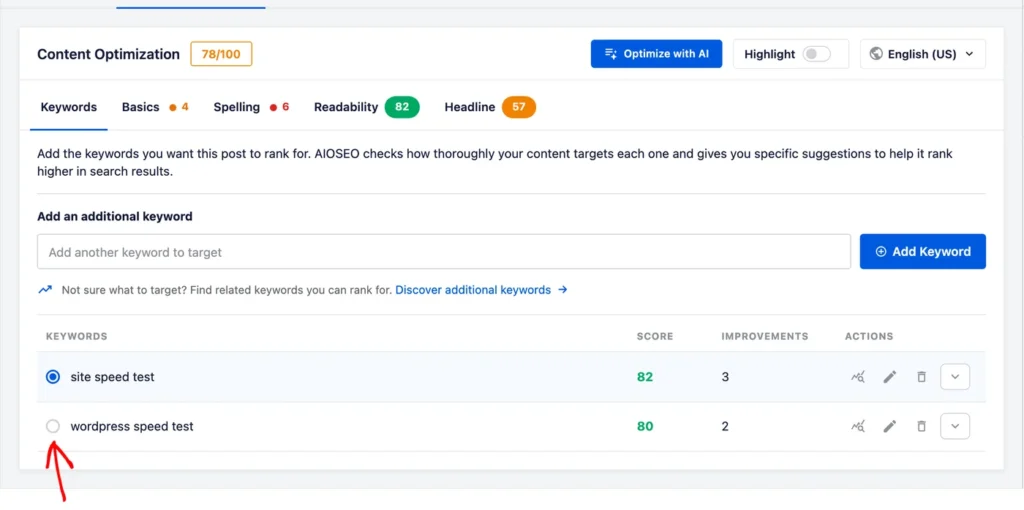
You can also add secondary or related keywords. AIOSEO’s TruSEO analysis then checks how well the page is optimized around that keyphrase and flags areas that may need attention. You can use this analysis to improve the page’s SEO score.
Step 6: Turn Your Keyword Map Into Internal Links With Link Assistant
A keyword map shouldn’t only tell you which keywords belong to which pages. It should also tell you how those pages connect.
This is where AIOSEO’s Link Assistant can help.
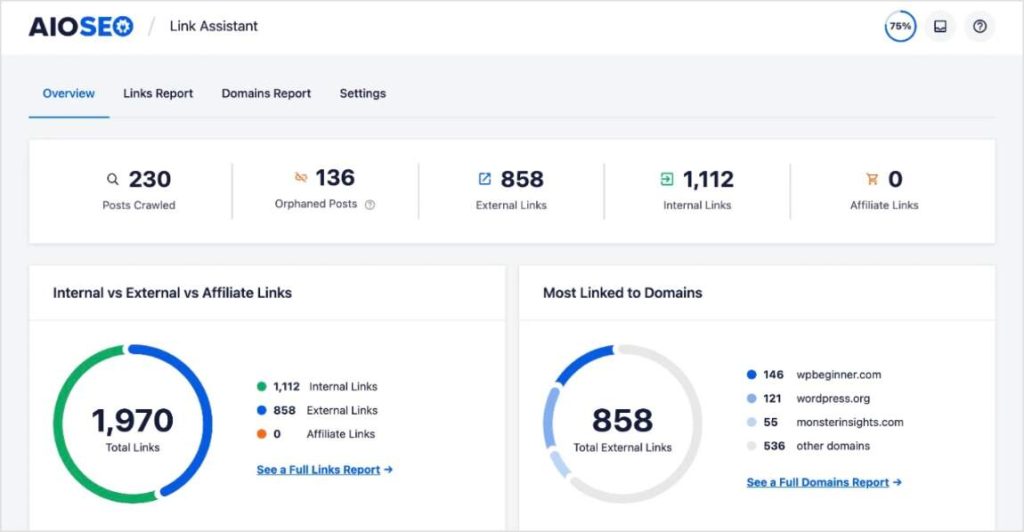
Link Assistant analyzes the links across your WordPress site and surfaces internal linking opportunities without requiring you to manually open every old post looking for places to add a link.
With Link Assistant, you can review suggested internal links and add relevant ones to your content. The goal is to turn the relationships documented in your keyword map into an internal linking structure that users and search engines can actually follow.
Does Keyword Mapping Help With AI Search?
We usually think about keyword mapping in the context of Google rankings: one search intent, one appropriate page. But AI search doesn’t always work that neatly.
When someone asks an AI tool a broad question, the system may break it down into several smaller, related searches before putting together an answer. This is often called query fan-out.
Say someone searches: How do I improve SEO for my small business website?
That one question hides quite a few questions. They might need to know about local SEO, keyword research, technical SEO, internal linking, on-page optimization, and which SEO tools are actually worth using.
If you’ve mapped content properly, you should already know which page on your site covers each subject. Your site might look something like this:
Small Business SEO
│
├── Keyword Research for Small Businesses
├── Local SEO
├── On-Page SEO
├── Internal Linking
└── Technical SEO
This is one way keyword mapping forces you to think about how your knowledge is organized across the whole site. An AI system looking for information across several parts of a question has a much cleaner site to work with when each topic has a clear home and related pages connect meaningfully.
Of course, that doesn’t mean creating a keyword map will suddenly get you cited by ChatGPT or included in an AI Overview. But it’ll definitely help you structure your content better, increasing chances for better visibility.
Keyword Mapping: FAQs Answered
Your site keeps changing, and so does search. You publish new articles, older pages start ranking for queries you didn’t originally target, priorities shift, and sometimes two pages gradually start covering more of the same ground. For most sites, reviewing the map every few months is a reasonable starting point. The important thing is that the map reflects the site you actually have, not the site you planned six months ago.
There’s no hard-and-fast number. One page might naturally target a primary keyword and ten closely related variations because they all represent essentially the same intent. So, think more about whether someone searching each of these terms would be happy landing on the same page. If the answer is yes, they probably belong in the same cluster. If not, forcing them onto one page just because they’re related won’t make the content better.
At minimum, include the page or URL, primary keyword, secondary keywords, search intent, and content status in one place. Adding an internal linking column is useful too because it forces you to think about where the page belongs within the rest of your site. As your content operation gets larger, you can add things like page owner, last updated date, rankings, or priority.
It gives each important keyword cluster an owner. That doesn’t mean two pages can never rank for similar queries. It means the overlap becomes intentional rather than accidental. And when you do find two existing pages competing for the same job, the map makes the problem much easier to spot. You can then decide whether to differentiate them, consolidate them, or make one page the clear primary resource.
Keyword clustering groups related searches together. Keyword mapping decides where those groups belong on your website. Think of clustering as organizing the research and mapping as turning that research into a site plan.
Final Thoughts
Keyword research gives you possibilities. Keyword mapping is where you start making decisions.
Without a map, it’s surprisingly easy to keep publishing content around keywords that look new in a research tool but overlap with something you’ve already written. You don’t notice the problem until you’re looking at two or three URLs competing for the same searches and wondering which one you should optimize.
A keyword map gives you a place to start. Over time, you get a clearer picture of what every important page on your site is there to do.
And whether someone finds that page through Google, an AI-generated answer, or a link from another article on your site, that’s still a pretty good foundation to build on.
Disclosure: Our content is reader-supported. This means if you click on some of our links, then we may earn a commission. We only recommend products that we believe will add value to our readers.
Want to Try AIOSEO for Free?
Enter the URL of your WordPress website to install AIOSEO Lite.