
あなたは、その記事をランク付けするために一生懸命働きました。それは数ヶ月、あるいは数年もの間、安定したトラフィックを牽引していました。それから、あなたはアナリティクスをチェックし、数字が下降していることに気づきました。
あなたはコンテンツの劣化に苦しんでいる可能性が高いです。
それは予期せぬウェブサイトのトラフィック損失の原因となるサイレントキラーです。あなたが新しいコンテンツの作成に忙しい間、あなたの古い高パフォーマンスの記事はゆっくりと関連性を失い、ランキングを落とし、リードを失っています。
しかし、パニックにならないでください。コンテンツの劣化は自然なものであり、完全に元に戻すことができます。
このガイドでは、ウェブサイトのトラフィック損失監査を実行し、コンテンツの劣化の明確な兆候を特定し、簡単な更新戦略を使用してランキング(および収益)を回復する方法を正確に説明します。
この記事では
コンテンツの劣化とは?
コンテンツの劣化とは、特定のブログ記事やページのオーガニックトラフィックとランキングが徐々に低下することです。
Googleのペナルティや技術的なエラーによる突然のドロップとは異なり、劣化は数ヶ月かけて起こります。これはコンテンツの自然な経年劣化です。オイル交換が必要な車のように、最高の常緑コンテンツでさえ、最高のパフォーマンスを維持するためにはメンテナンスが必要です。
放置すると、この「サイレントキラー」はSEOの成果を侵食し、サイト全体の権威と収益を引き下げます。
なぜコンテンツは時間とともに劣化するのか?
不公平に感じるかもしれません。素晴らしいコンテンツを書いたのに、なぜGoogleはそれを押し下げるのでしょうか?それは罰せられることはめったにありません。それは単にインターネットが進化する方法です。
コンテンツの劣化が発生する主な4つの理由を以下に示します。
- 「鮮度」要因: 検索意図が変わります。2年前にユーザーが求めていたものは、今日では異なるかもしれません。Googleは、最新の情報、統計、トレンドを反映した「新鮮な」コンテンツを優先します。
- 競合の勢い: あなたの投稿が静止している間、競合他社はそうではありませんでした。彼らはあなたのフォーカスキーワードをターゲットにした、より新しく、より深く、またはより視覚的なガイドを公開し、ゆっくりとあなたを押し下げました。
- 関連性の低下: コンテンツが古くなるにつれて、例、スクリーンショット、データが古くなります。これにより、ユーザーエクスペリエンスが悪化し、直帰率が高くなり、Googleにあなたのページがもはや最良の回答ではないことを示します。
- アルゴリズムの変更: 検索エンジンは、品質を評価する方法を定期的に調整します。2021年には「完璧」だった投稿が、2026年の基準では「薄い」と見なされる可能性があります。
古いコンテンツは劣化の影響を受ける可能性があるからといって、その価値を失わなければならないわけではありません。次にコンテンツの劣化を見つけて修正する方法を見ていきましょう。
なぜ私を信頼すべきか
私は6年以上デジタルマーケティングに携わっており、All in One SEOのチームの一員です。私たちは毎日300万以上のウェブサイトオーナーのSEO管理を支援しています。検索エンジンがどのように進化し、コンテンツがどのように古くなるかについて、私たちは独自の視点を持っています。このガイドの戦略は単なる理論ではありません。これらは、私たち自身のブログを数千のキーワードで1位にランク付けし続けるために使用している、まさに「コンテンツメンテナンス」のワークフローです。
5分間のウェブサイトトラフィック損失監査
根本的な修正に入る前に、実際に問題がありますか?コンテンツの劣化が原因かどうかを確認するために、この簡単なウェブサイトのトラフィック損失監査を実行してください。
- チェック1:減少は徐々にですか?突然の減少は通常、技術的なエラーまたはアルゴリズムのペナルティを意味します。6か月以上にわたるゆっくりとした着実な低下は、コンテンツの劣化の典型的な兆候です。
- チェック2:古い投稿に影響していますか?12か月以上前のトップ投稿を確認してください。トラフィックを失っているのはそれらですか?
- チェック3:最近コンテンツを更新しましたか?投稿が1年以上手つかずの場合、劣化の最有力候補です。
- チェック4:競合は変化しましたか?ターゲットキーワードをGoogleで検索してください。現在のトップの結果は、あなたの記事よりも新しく、または包括的ですか?
これらに「はい」と答えた場合、コンテンツの劣化があります。詳細については、読み続けてください。
ブログ記事におけるコンテンツ劣化の3つの明確な兆候
トラフィックをすべて失う前に、特定の記事が劣化しているかどうかをどのように知ることができますか?次の特定の警告サインを探す必要があります。
WordPressでこのデータを確認する最も簡単な方法は、All in One SEO(AIOSEO)を使用することです。その検索統計モジュールは、Google Search Consoleからダッシュボードに直接データをプルするため、これらの兆候を見逃すことは不可能です。
各兆候について、コンテンツの劣化を見つけるためにAIOSEOでアクセスできるレポートをお伝えします。次のセクションでは、WordPressでこのプロセスを実行する方法についても詳しく説明します。
兆候1:インプレッションの緩やかな低下
クリックを失う前に、可視性を失います。記事のインプレッション数(検索結果に表示される回数)が過去6か月で減少傾向にある場合、劣化が始まっています。
AIOSEOレポート:コンテンツパフォーマンス
兆候2:クリック率の低下
人々はあなたの記事を見ていますが、クリックしないことを選択していますか?これは通常、あなたのSEOタイトルまたはメタディスクリプションが、周囲の新しい結果と比較して時代遅れに感じられることを意味します。低下するクリック率(CTR)は、大きな警告信号です。
AIOSEOレポート:キーワードランキングレポート
兆候3:特定のキーワードでのランキング低下
時々、記事は安定していますが、特定の高価値キーワードについては圏外に落ちてしまいます。All in One SEOは、どの用語が低下しているかを正確に確認するのに役立ち、それらのために再最適化することができます。
AIOSEOレポート:キーワードランキングレポート
WordPressでコンテンツの劣化を見つける方法
次に、All in One SEO(AIOSEO)プラグインを使用してコンテンツの劣化を見つける方法を見てみましょう。
AIOSEOは、オリジナルのWordPress SEOプラグインであり、1億回以上ダウンロードされています。ユーザーは、検索エンジンの結果ページ(SERP)で優位に立ち、オーガニックトラフィックを増やすために、これを信頼しています。
私のお気に入りの機能の1つは検索統計です。これはGoogle Search ConsoleをWordPressダッシュボードに統合します。このツールは、Google検索でのコンテンツのオーガニックパフォーマンスを追跡および監視するように設計されています。
コンテンツの劣化に関して、パフォーマンスの低下を検出するための主なレポートは2つあります。
- コンテンツパフォーマンスレポート
- キーワードランキングレポート
各レポートを詳しく見ていきましょう。
AIOSEOをお持ちでないですか?AIOSEOのインストールと有効化に関するガイドをご覧ください。
コンテンツパフォーマンスレポート
コンテンツパフォーマンスレポートは、SERPでのコンテンツのパフォーマンスに関する洞察を提供します。すべてのコンテンツの概要と、失われたコンテンツと勝利したコンテンツの詳細な分析を提供します。
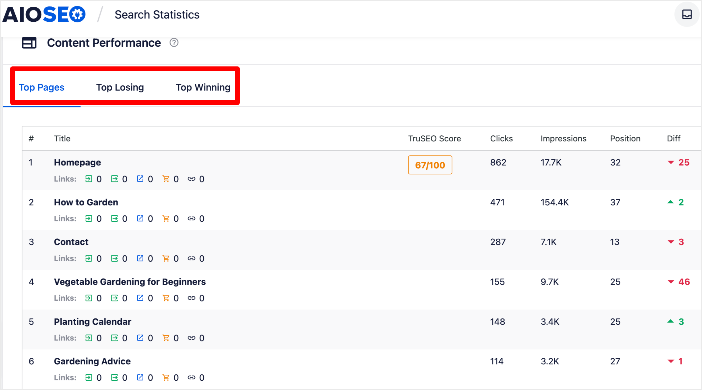
この場合、ランキングが低下しているコンテンツを示すトップロスタブに焦点を当てたいと思います。
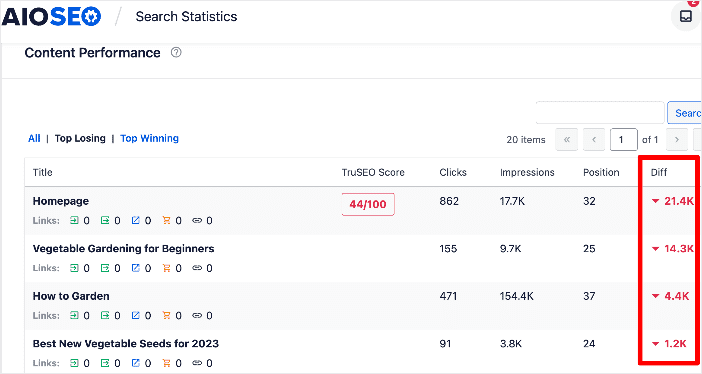
これらのページはコンテンツ劣化の犠牲者です。
キーワードランキングレポート
キーワードランキングレポートは、キーワードのパフォーマンスにより焦点を当てています。
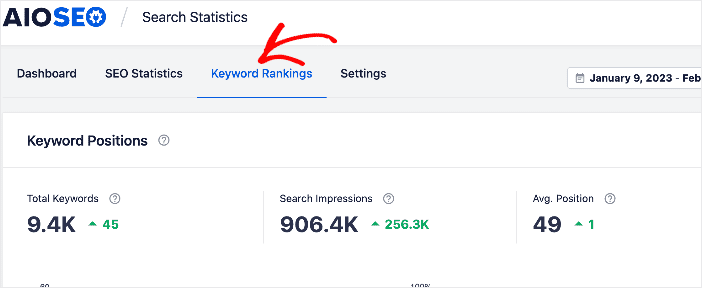
このレポートは、SERPで勢いを増しているキーワードと、急落しているキーワードを示します。
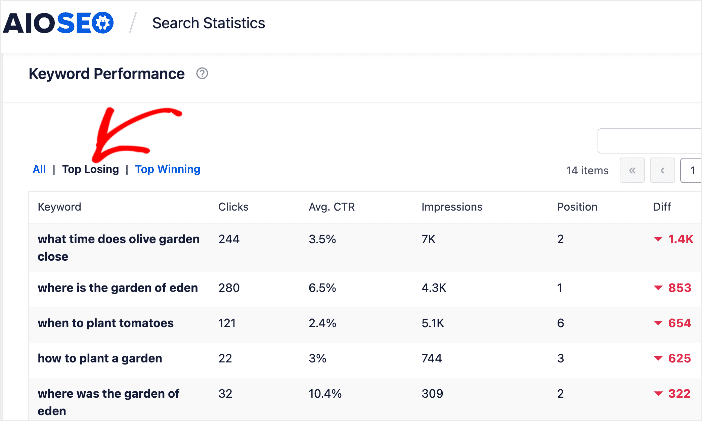
ここでも、コンテンツ劣化を検出するために、ランキングが低下しているものに焦点を当てたいと思います。
インプレッションを監視する
コンテンツパフォーマンスレポートとキーワードランキングレポートに加えて、検索統計でインプレッションを監視することもできます。
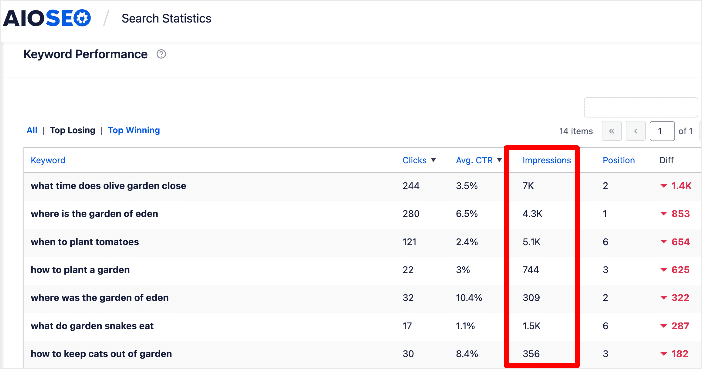
インプレッションとは、SERPでユーザーが検索リスティングを見た回数を指します。インプレッション数の減少は、検索リスティングを見ることができる人が減っていることを示します。これは、ランキングの低下(コンテンツ劣化のもう1つの兆候)を意味します。
クリック率(CTR)の低下を確認する
オーガニッククリック率(CTR)は、検索結果でのコンテンツのパフォーマンスをどの程度示しているかを示します。クリック数が多いほど、トラフィックが増え、収益が増えます。
この指標は、平均CTR列を確認することで確認できます。
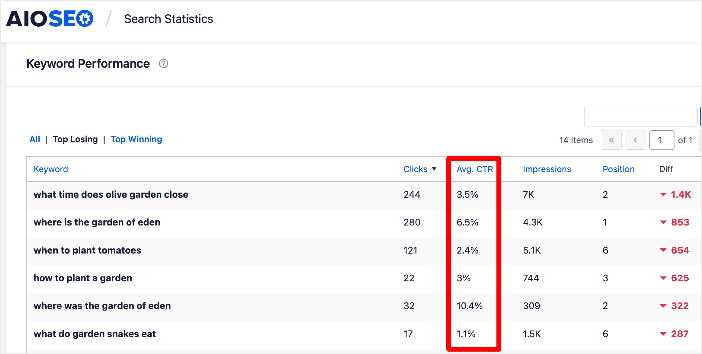
CTRを監視することは、SEOおよびデジタルマーケティング全体にとって不可欠な側面です。CTRの低下は、さまざまな問題を示している可能性があります。
1つには、検索リスティングが適切に最適化されていないことを示す可能性があります。これは、より魅力的なSEOタイトルタグを作成することで簡単に修正できます。
しかし、CTRの段階的な低下は、コンテンツが劣化し、SERPでの順位が低下していることを示している可能性があります。検索結果でウェブサイトを見る人が減っているため、CTRが低下します。
コンテンツ劣化を停止し、失われたトラフィックを回復する方法
コンテンツ劣化とは何か、そしてそれをどのように検出するかを知ったので、それを停止する方法を探りましょう。ほとんどのヒントは、オンページコンテンツ最適化に関係しており、実装にそれほど労力はかかりません。
1. 古いコンテンツを更新する
コンテンツ劣化を停止するための最初のステップの1つは、1年以上前の既存のコンテンツを更新することです。これは、コンテンツライブラリが大きいブランド向けです。ライブラリが小さい場合は、より頻繁にコンテンツを更新できます。
覚えておいてください、検索エンジンは新鮮なコンテンツを愛しています。コンテンツの更新は、コンテンツを新しく見せます。コンテンツを更新するいくつかの方法を次に示します。
- SEOタイトルとメタディスクリプションの変更
- 統計と引用されたデータの更新
- 画像の更新
- FAQセクションを追加する
コンテンツを更新したら、公開日を更新してください。陳腐化したコンテンツを更新すると、より関連性が高まり、今日のユーザーからのエンゲージメントが向上します。
2. 内部リンクを維持・追加する
コンテンツの陳腐化を停止するもう1つの簡単な方法は、サイトのリンクを維持することです。これには、404エラーを排除することが含まれます。これは、AIOSEOの壊れたリンクチェッカー(BLC)で簡単に行えます。
BLCは、サイトをクロールして壊れたリンクを見つける別のプラグインです。その結果、機能していないサイト上のすべてのリンクのクリーンでユーザーフレンドリーなレポートが得られます。

BLCまたはAIOSEOのリダイレクションマネージャーを使用してリダイレクトを追加し、トラフィックを有効なライブURLに誘導することもできます。
このプロセスについて詳しくは、404エラーの検索と修正方法に関する記事をご覧ください。
リンクの維持に加えて、コンテンツに内部リンクを戦略的に構築することによってもコンテンツの陳腐化を停止できます。リンクアシスタントはこれを簡単にします。
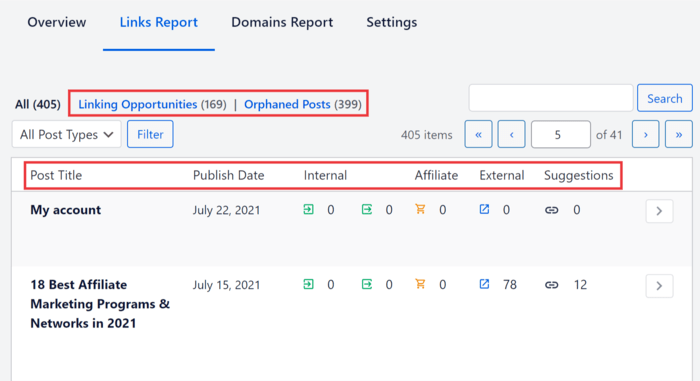
このAI搭載ツールは内部リンク構築を自動化し、サイト上のリンクを監査します。最も良い点は、関連する投稿を開く必要さえありません。リンクアシスタントダッシュボードで直接リンクを追加したり、アンカーテキストを編集したりできます。
3.検索意図に合わせて投稿を再最適化する
コンテンツが古くなると、CTRの低下や直帰率の上昇に気づくかもしれません。これは、コンテンツが検索意図を満たしていない良い兆候です。トラフィックとCTRの低下を停止する良い方法は、検索意図に合わせて記事を再最適化することです。
現在ランク付けされているコンテンツの種類を理解するために、SERP分析を実行することをお勧めします。これにより、独自のコンテンツを更新して新しい検索意図によりよく合わせるために必要な更新を決定するのに役立ちます。
プロのヒント:検索意図を確認することに加えて、適切なキーワードをターゲットにしているかどうかも検討する必要があります。元々最適化していなかった用語でランク付けされている場合は、Googleがその用語であなたを選んでいる理由を調べる価値があります。負け犬のキーワードの流れと戦う代わりに、そのキーワードで再最適化することを検討してください。
4. 無関係なコンテンツを削除する
コンテンツの整理は、コンテンツの陳腐化と戦うのに役立つもう1つの効果的な方法です。これは、サイト上の古い、関連性のない、または薄いコンテンツを削除するプロセスです。このコンテンツはもはや目的を果たさず、長期的にはSEOに悪影響を与える可能性があります。
コンテンツの整理が強力なもう1つの理由は、低価値のキーワードをターゲットにしたコンテンツを排除するのに役立つことです。
追伸:コンテンツを整理するときは、削除されたコンテンツを他の関連性の高い記事にリダイレクトすることを忘れないでください。404エラーを回避するためです!
5. コンテンツを統合する
コンテンツの統合とは、さまざまなコンテンツを1つの記事にまとめることです。Googleは包括的なトピックカバレッジを重視するため、複数の小さな記事を作成するよりも、長いコンテンツを作成する方が良い場合があります。
コンテンツを統合する際に留意すべき点は、古いコンテンツから新しいURLへのリダイレクトを実装する必要があるということです。 このタスクには(コーディング不要の)リダイレクトマネージャーを使用できます。
6. コンテンツを拡張する
コンテンツの拡張は、コンテンツの更新と似ています。ただし、この場合は、コンテンツにより詳細と深みを追加したいと考えます。これにより、ユーザーにとってより役立つものになり、直帰率が低下します。
AIOSEOユーザーの場合、IndexNowモジュールのおかげで、検索エンジンがリフレッシュをすばやく検出します。このツールは、サイトにコンテンツを追加または更新したときに検索エンジンに通知し、ランキングを向上させます。
コンテンツの拡張をどこから始めればよいかわかりませんか?
キーワード調査を行ってください。これにより、メインのトピックに関連する新しいキーワードを見つけることができます。
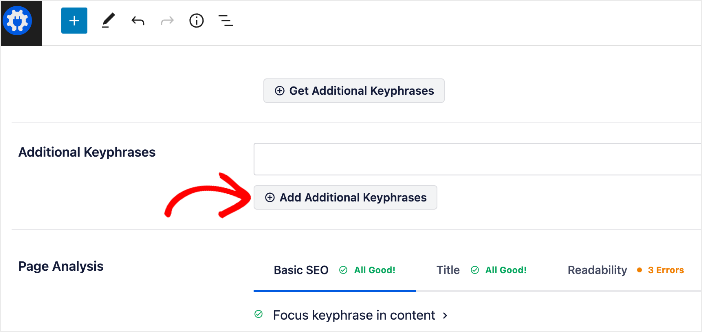
AIOSEOがSemrushアカウントと連携し、WordPressエディター内で直接キーワードのアイデアを取得できる点が気に入っています。フォーカスキーワードを設定したら、追加のキーフレーズを取得をクリックし、お気に入りを投稿またはページに追加するだけです。
7. コンテンツを宣伝する
よく書かれているのにコンテンツの劣化に苦しんでいる記事がある場合は、それを人々の前に再び提示してください!コンテンツをソーシャルメディアで共有したり、 syndicating したり、メールリストに送信したりすることで、コンテンツを再プロモーションできます。
ゲスト投稿を書いて、ゲスト投稿に記事へのリンクを含めることも検討できます。これにより、記事へのバックリンクと関連トラフィックが増加します。
最高のコンテンツを埃まみれにしないでください
コンテンツの劣化は避けられませんが、永続的である必要はありません。実際、劣化するコンテンツの修正は、SEOにおいて最もROIの高いアクティビティであることがよくあります。古い成功事例を更新する方が、新しい投稿をゼロからランク付けするよりもはるかに労力が少なくて済みます。
あなたの行動計画はシンプルです:
- トラフィックを監査して、スライドを特定します。
- 新しいデータとより良い回答でコンテンツをリフレッシュします。
- テクニカルSEOと内部リンクを再最適化します。
All in One SEOのようなツールがあれば、推測する必要はありません。どのキーワードが低下しているかを正確に確認し、数分でコンテンツを更新できます。
この投稿が、コンテンツの劣化について、特にそれを克服する方法と失われたトラフィックを取り戻す方法について知っておくべきことをすべて学ぶのに役立ったことを願っています。また、検索統計を使用してランキングを向上させる方法に関するガイドや、Googleアルゴリズムアップデートの影響を監視するチュートリアルのような、他のブログ記事も確認したい場合があります。
この記事がお役に立った場合は、YouTubeチャンネルに登録してください。また、Twitter、LinkedIn、またはFacebookでフォローして、最新情報を入手してください。
コンテンツの劣化に関するFAQ
古いコンテンツはどのくらいの頻度で更新する必要がありますか?
単一のルールはありませんが、良い目安として、最もパフォーマンスの高いコンテンツを 6〜12ヶ月ごと に監査することです。競争の激しいトピックや急速に変化する業界(テクノロジーやSEOなど)では、四半期ごとにコンテンツを更新する必要がある場合があります。分析を活用してください。トラフィックが減少し始めたら、更新の時期です。
公開日を変更するとSEOに役立ちますか?
はい、ただし実際にコンテンツを更新した場合に限ります。投稿を大幅に更新した場合(統計の更新、セクションの追加、導入部分の書き直し)、公開日または最終更新日を変更する必要があります。Googleはこれを鮮度のシグナルとして扱い、ランキングを向上させることができます。意味のある変更なしに日付を変更しないでください。
低下している古いコンテンツを削除すべきですか?
必ずしもそうではありません。まず、 更新 または 統合 を試してください。投稿にトラフィックがなく、バックリンクがなく、関連性がなくなる可能性がない場合は、クロールバジェットを節約するために 削除 するのが最善の選択肢かもしれません。コンテンツを削除するときは、必ず関連するページに301リダイレクトを設定してください。
コンテンツの低下とGoogleのペナルティの違いは何ですか?
コンテンツの低下 は、数ヶ月にわたるトラフィックのゆっくりとした段階的な低下です。Googleのペナルティ (またはアルゴリズムヒット)は、通常、一晩でトラフィックの急激な低下を引き起こします。トラフィックが急落した場合は、技術的なエラーや手動のアクションを確認してください。ゆっくりとした低下の場合は、おそらく低下でしょう。
AIOSEO を無料で試してみませんか?
AIOSEO Lite をインストールするには、WordPress ウェブサイトの URL を入力してください。

開示:当社のコンテンツは読者によってサポートされています。これは、当社のリンクの一部をクリックすると、手数料が発生する可能性があることを意味します。当社は、読者に価値をもたらすと信じる製品のみをお勧めします。

ありがとうございます、素晴らしい記事です。自分のサイトに適用する必要があります。
ありがとうございます、本当に役立つ情報です。