
A sudden drop in search traffic can leave you asking one frustrating question: Was it something I did, or did Google change something? That’s where an SEO sensor can help.
Semrush Sensor monitors volatility across Google’s search results, showing you when rankings shift more than usual. AIOSEO SEO Alerts takes a different approach. Instead of watching Google as a whole, it monitors your WordPress site for critical technical problems.
But which one is better for your WordPress website?
In this guide, I’ll explain what each tool does and where they fit into an SEO monitoring strategy.
In This Article
What Is Semrush SEO Sensor?
Semrush Sensor is an SEO monitoring tool that tracks daily volatility in Google’s search engine results pages (SERPs). It measures how Google rankings change from day to day.
Semrush monitors a fixed set of keywords and compares their search results daily. It then uses those changes to calculate a volatility score between 0 and 10. The higher the number, the more movement Semrush is seeing across the search results it monitors.
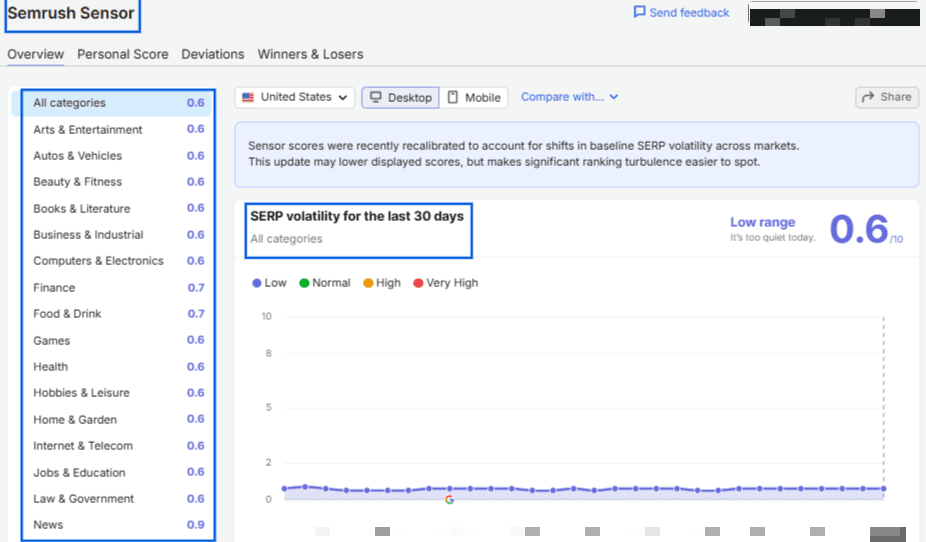
This can be useful when you suddenly notice unusual movement in your own rankings.
Imagine several of my pages lose positions on the same day. Before rewriting content or changing your SEO strategy, you could check Semrush Sensor. If volatility is unusually high across my industry at the same time, broader Google changes may be contributing to what you’re seeing.
That’s why I think of an SEO sensor as an early diagnostic signal, rather than something that tells me exactly what to fix.
How the Sensor Score Works
Here’s how to read the score:
- 0 to 2: Low volatility. Rankings are holding steady.
- 2 to 5: Normal fluctuation. Nothing unusual, just everyday movement.
- 5 to 8: High volatility. Google is probably rolling out an update.
- 8 to 10: Very high volatility. A major algorithm change is likely underway.
A high score is a signal that something is shifting somewhere on the web. It doesn’t tell you if your site is one of the ones affected.
What Semrush Sensor Can Tell You
Sensor is genuinely useful for a few things:
- Whether Google is rolling out a broad algorithm change right now
- Which categories are seeing the most ranking movement
- How a current spike compares to past updates, so you can spot patterns over time.
If you want to go deeper into how a specific update affected your traffic, check this guide on tracking the impact of Google algorithm updates on your site.
What Semrush Sensor Can’t Tell You
Sensor has real limits too:
- Whether your specific site was affected by the update
- Whether your traffic drop came from an algorithm change or a problem on your own site
- Whether a noindex tag, a broken robots.txt file, or a sitemap error is quietly hurting your rankings right now
And that last point is the real gap. While Sensor watches the entire web, it has no idea what’s happening on your homepage or any other page of your website, for that matter.
And that’s exactly where AIOSEO SEO Alerts comes in.
What Are AIOSEO SEO Alerts?
AIOSEO SEO Alerts takes the opposite approach from Sensor. Instead of tracking what Google is doing across the web, it watches your own WordPress site and tells you the moment something breaks.
SEO Alerts currently checks 3 things:
- Homepage noindex: Confirms your homepage is set to index, not noindex. A noindex tag tells search engines to leave a page out of results completely, and it’s an easy mistake to trigger without noticing, especially after a plugin update.
- Robots.txt accessibility: Confirms search engines can actually reach your robots.txt file. A broken one can block crawlers from your entire site.
- XML sitemap availability: Verifies your sitemap is loading correctly, so new posts keep getting submitted to search engines.
Picture a routine plugin update that quietly flips your homepage to noindex. Nobody thinks to check that setting again for weeks. By the time someone notices the traffic drop, you’ve been invisible to Google for over a month. SEO Alerts catches that same mistake within the hour, not weeks later.
SEO Alerts doesn’t currently check for broken links or 404 errors on individual pages. If you want that covered too, AIOSEO’s Redirection Manager tracks 404s separately and helps you fix them.
How Alerts Are Delivered
You’ll find SEO Alerts under Tools » SEO Alerts in your WordPress dashboard.
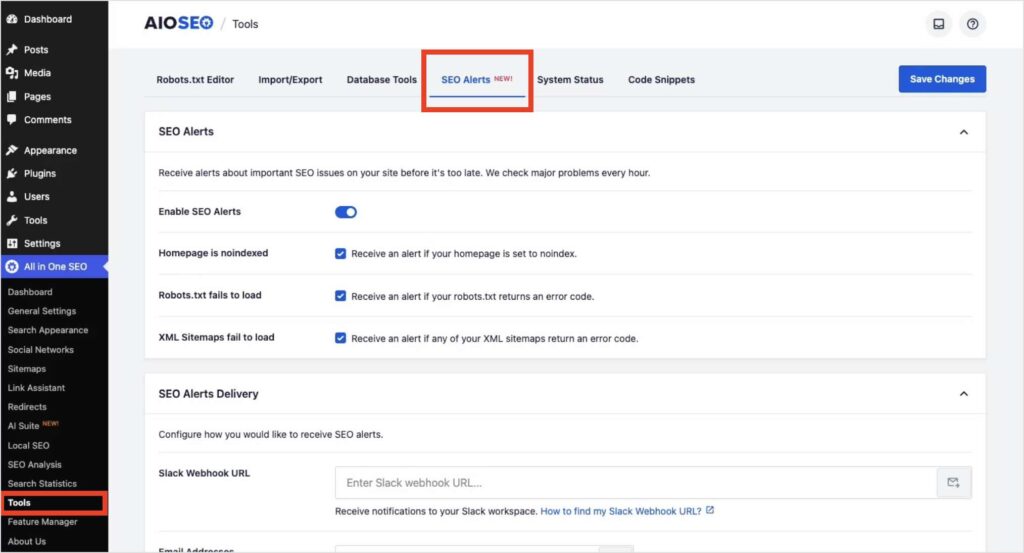
Add an email address, a Slack webhook, or both, and AIOSEO checks your site every hour. You’ll only hear from it when something actually needs your attention, so it won’t clutter your inbox.
For the full setup walkthrough, see the SEO Alerts announcement.
Which AIOSEO Plan Includes SEO Alerts?
Here’s the best part: all of the AIOSEO plans currently include SEO Alerts, including the free Lite version. There’s no upgrade required, just an update to the latest version of the plugin.
Semrush Sensor vs. AIOSEO SEO Alerts
Here’s how the 2 compare side by side:
| SEO Sensor | Semrush Sensor | AIOSEO SEO Alerts |
|---|---|---|
| Scope | Web-wide, across all Google search results | Your WordPress site only |
| What It Monitors | Algorithm volatility by category | Homepage noindex, robots.txt, and sitemap health |
| What Triggers an Alert | A spike in SERP volatility | A critical issue detected on your site |
| Cost | Free tool, but full Semrush access needs a subscription | Free on every AIOSEO plan, including Lite |
| Best For | Understanding Google’s algorithm behavior | Catching issues that hurt your specific site |
So, Which SEO Sensor Is Better?
These 2 tools solve different problems, so the honest answer is that you might want both.
If your traffic drops and you’re not sure whether Google is behind it, Semrush Sensor gives you that context fast. It tells you whether the whole web is shifting or just you.
Whereas, if you want to monitor the health of your website, SEO Alerts does a much better and efficient job at it. It automatically catches mistakes on your own site, like an accidental noindex tag after a plugin update, without you having to dig for them.
Here’s what that looks like in practice: Say your organic traffic drops 20% overnight. You’ll most likely receive an SEO Alert if there were noindex issues, robots.txt problems, or sitemap errors. It helps you focus your recovery efforts instead of guessing.
If you’re already using AIOSEO, site-level monitoring comes built in at no extra cost. Semrush Sensor is a solid complementary layer if you also want to track algorithm patterns across the web.
SEO Sensor: FAQs Answered
Semrush’s SEO Sensor measures daily volatility in Google’s search results. It analyzes ranking changes for a fixed set of keywords and generates a Sensor Score from 0 to 10, with higher scores indicating greater SERP volatility.
A high Semrush Sensor score means Google search results are experiencing greater-than-normal ranking fluctuations. Semrush classifies scores from 5–8 as high volatility and 8–10 as very high volatility. It doesn’t necessarily mean your website has been negatively affected.
It depends on what you want to monitor. For WordPress-specific technical issues, AIOSEO SEO Alerts automatically checks homepage indexability, robots.txt accessibility, and XML sitemap availability every hour. A broader tool such as Semrush Sensor is useful when you want to monitor volatility across Google search results
Yes. AIOSEO SEO Alerts can notify you through email, Slack, or both when it detects one of the critical issues it currently monitors. The feature runs its checks hourly and is available on all AIOSEO plans, including Lite.
Semrush Sensor primarily monitors changes in Google’s search results, while AIOSEO SEO Alerts monitors specific technical conditions on your WordPress site. SEO Sensor provides context around broader ranking volatility, while SEO Alerts helps you catch site-specific problems that require your attention.
Final Thoughts
An SEO sensor is useful when rankings start moving and you need to understand what’s happening beyond your own website.
Semrush Sensor gives you that broader view. Its daily volatility score can show whether Google’s results are relatively stable or experiencing significant movement. But web-wide volatility is only one side of SEO monitoring.
Your rankings can also suffer because something changed on your own site. An accidental noindex directive, an inaccessible robots.txt file, or a broken sitemap won’t necessarily cause a spike in Semrush Sensor.
That’s why I see AIOSEO SEO Alerts as a complement and a necessity to add, as it helps you monitor your WordPress site. It makes it much easier to decide whether a sudden SEO change requires immediate action or simply closer observation.
Disclosure: Our content is reader-supported. This means if you click on some of our links, then we may earn a commission. We only recommend products that we believe will add value to our readers.
Want to Try AIOSEO for Free?
Enter the URL of your WordPress website to install AIOSEO Lite.