
I switched away from Rank Math after two years of using it on client sites, and I want to walk you through exactly why, because “best Rank Math alternative” searches are usually full of affiliate roundups written by people who have either never opened the plugin's settings screen or don't know much about it.
Below is the list I wish I had when I started looking, with the plugins I actually tested, and where All in One SEO (AIOSEO) pulled ahead once I dug into the details.
So, in this guide, I'll compare the best Rank Math alternatives for WordPress, look at the features, and show you how to select the best plugin for your website.
In This Article
Why Look for a Rank Math Alternative?
Before you jump to any assumptions: there's nothing inherently wrong with using Rank Math. The better question is whether it still fits your WordPress SEO workflow.
As your site and business grow, your requirements tend to grow as well. You might start by needing only SEO titles, meta descriptions, and an XML sitemap. Later, you may want to track rankings, manage redirects, automate internal linking, implement advanced schema, optimize WooCommerce pages, monitor indexing, or establish stronger E-E-A-T signals.
That's why I recommend evaluating an SEO plugin based on the work you'll actually perform rather than comparing feature counts alone.
For me, the most useful questions are:
- Can I quickly identify and fix on-page SEO problems?
- Can I manage technical SEO without editing code?
- Does it help with internal linking and content optimization?
- Can I monitor SEO performance without constantly leaving WordPress?
- Does it support the type of site I'm running?
- Will a beginner understand what to do next when something is wrong?
Here are the 2 specific problems with Rank Math that kept coming up for me and for the site owners I talked to while researching this piece.
The Setup Is More Complex Than It Looks
Rank Math's setup wizard asks you to configure modules you probably don't understand yet. Local SEO, WooCommerce SEO, schema markup for 18 different content types, redirections, a 404 monitor. Each one is a toggle, and each toggle opens more settings. I remember spending 45 minutes on my first Rank Math install just deciding what to turn on, and I still was not confident I had it right. For a beginner, that can be incredibly overwhelming.
The Pricing Gets Expensive Fast (Especially for Multiple Sites)
Rank Math's free plan covers unlimited personal sites, which sounds great until you read the fine print: no rank tracking, no advanced schema templates, no priority client site support.
The moment you manage a site for a client, or you want to see how your keywords are actually performing in Google, you need Rank Math Pro. And Pro alone does not cover client work either. You need the Business plan for that, which runs into the hundreds of dollars a year. Most people don't see this coming when they first sign up.
You can also read the full breakdown in this Rank Math review if you want more detail on how support and pricing play out over time.
What to Look for in a Rank Math Alternative?
Before I get into the list, here is the rubric I used to evaluate each plugin. I looked at 4 things, and I scored every plugin against all 4.
- Ease of use: Can someone with no SEO background get through setup without feeling lost, and does the day-to-day writing experience stay simple once the setup is done?
- Feature depth, free versus paid: How much of the plugin's real value sits behind a paywall, and is the free tier a genuine starting point or a stripped demo meant to push an upgrade?
- Multi-site pricing: What happens to your annual cost the moment you manage 2, 5, or 10 sites instead of 1? This is where several plugins on this list quietly become expensive.
- Support quality: When something breaks on a live site, how fast does a real answer show up, and is it a fix or a canned response?
The Best Rank Math Alternatives for WordPress
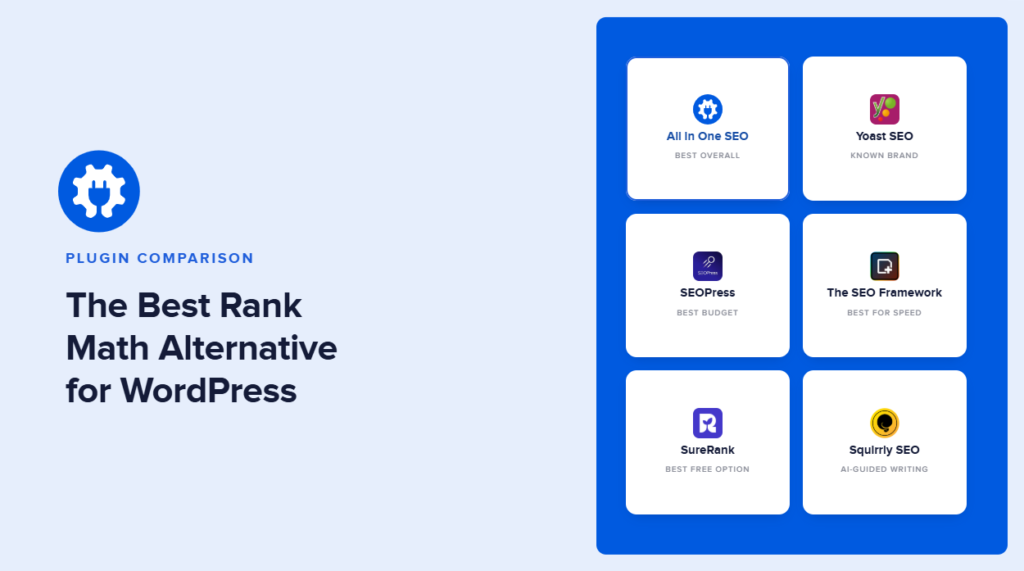
I tested all 6 of these on a live WordPress site running the same theme and roughly the same content, so I could compare setup time, interface clarity, and what each one actually does at its price point. Here is what I found, starting with the one I ended up switching to.
Quick answer: The best Rank Math alternative for most WordPress users is AIOSEO. It matches Rank Math's on-page analysis, adds a redirect manager with 19 redirect types instead of 3, and includes a one-click importer that pulls in your existing Rank Math settings so you do not start from zero. For the full picture, I've included 5 other solid alternatives, so keep reading.
1. All in One SEO (AIOSEO): Best Overall
AIOSEO is the one I recommend first for almost everyone reading this. It covers everything Rank Math does on the on-page side, and it pulls ahead in 3 specific areas that mattered to me: redirects, internal linking, and how the on-page score actually works.
Here's why AIOSEO is the best Rank Math alternative for WordPress:
1. Optimize Every Page With TruSEO
One of the first features I'd compare is the actual experience of optimizing a page. AIOSEO's TruSEO analyzes your content as you work and provides actionable recommendations, so you don't have to remember every on-page SEO best practice yourself.
You add your Focus Keyphrase, and AIOSEO evaluates important optimization signals and gives you a TruSEO score alongside a checklist of issues to address. In fact, AIOSEO has significantly expanded this workflow with TruSEO 2.0. Its current optimization tools include real-time scoring, spelling checks, readability analysis, highlighting, and AI-assisted fixes.
AIOSEO's Optimize with AI takes TruSEO a step further. Instead of only telling you that something could be improved, it can help rewrite elements including your SEO title, meta description, headline, spelling, and readability issues.
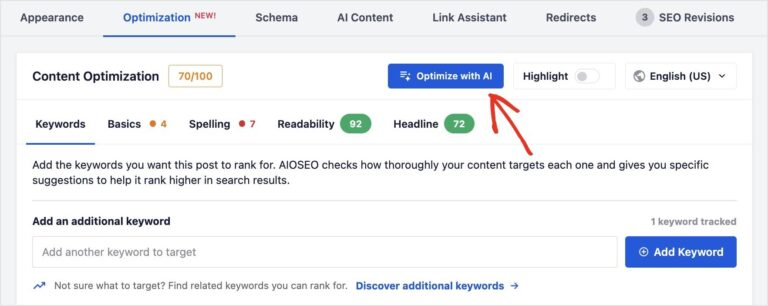
You can apply multiple improvements in a single workflow and revert changes you don't like. AIOSEO currently includes Optimize with AI across its plans, including its free version, although usage is tied to AI credits.
For someone switching SEO plugins, this matters because you're not simply replacing Rank Math's score with another score. You're getting a workflow designed to take you from problem → recommendation → fix inside WordPress.
2. Add Advanced Schema Without Writing Code
Structured data is another area I'd look at carefully when choosing a Rank Math alternative. AIOSEO includes a Schema Generator that lets you select and configure structured data through WordPress rather than manually creating JSON-LD.
Depending on your content, you can implement schema for articles, products, services, recipes, courses, FAQs, job postings, and other supported content types.

The practical benefit is that you don't need to understand Schema.org syntax to give search engines structured information about your content. Open your post or page and go to: AIOSEO Settings → Schema → Generate Schema
Select the appropriate schema type, complete the relevant fields, and add it to the page.
3. Find Internal Linking Opportunities With Link Assistant
Internal linking is simple in theory and surprisingly difficult to maintain once you have hundreds of posts. But AIOSEO's Link Assistant analyzes your site's links and identifies opportunities to connect related content.
Instead of manually searching your entire archive every time you publish something, you can use those recommendations to find relevant linking opportunities.
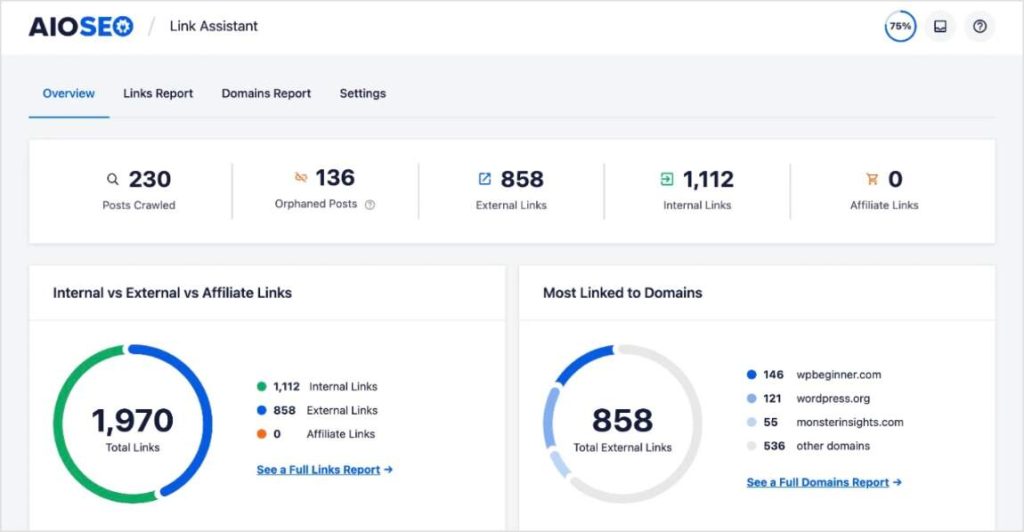
That helps SEO because internal links help search engines discover content and understand relationships between pages. But it's equally valuable for readers because good internal links give them a logical path to the next useful resource.
4. Monitor SEO Performance Inside WordPress
This is one of the strongest reasons I'd consider AIOSEO as a Rank Math alternative.
AIOSEO's Search Statistics integrates Google Search Console data into WordPress, giving you access to metrics such as clicks, impressions, CTR, keywords, and search positions without constantly switching dashboards.
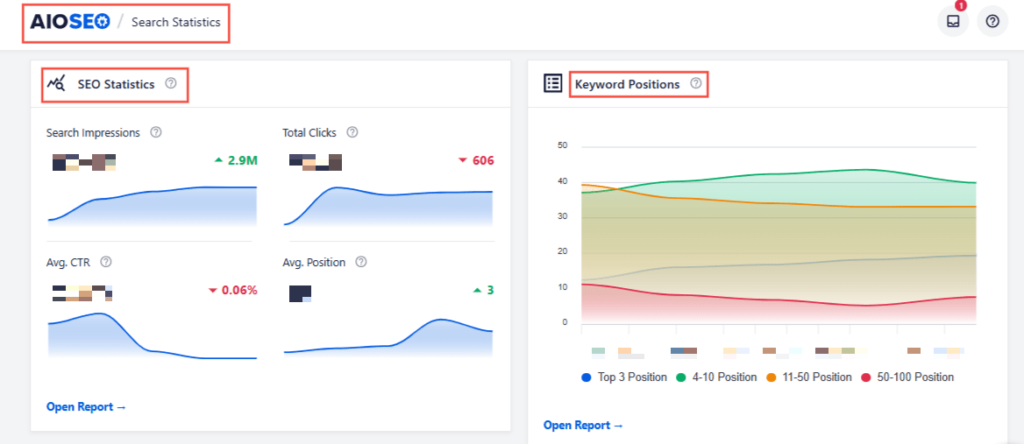
Its Keyword Rank Tracker goes further by letting you monitor specific keywords, group them, view position history, and connect tracked keywords to the pages actually ranking for them. The ranking data comes from Google Search Console, not third-party scraped estimates.
For me, this closes an important SEO loop and lets me track performance right from the WordPress dashboard.
5. Track SEO Changes With SEO Revisions
SEO doesn't stop once a page ranks. You may change a title, update content, alter metadata, or make another optimization and then notice rankings move several weeks later.
AIOSEO's SEO Revisions keeps a record of SEO changes so you can see what was modified and evaluate how those changes relate to performance.
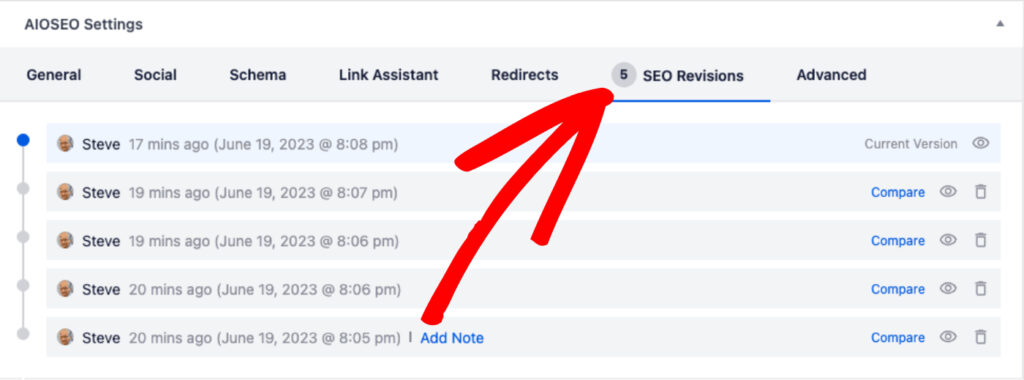
This is particularly valuable for teams and established websites where several people may be optimizing content.
Rather than wondering, “Who changed this title?” or “What did we do before the rankings dropped?”, you have a clearer history to investigate.
6. Optimize WooCommerce Stores
If you're running an online store, I'd also consider how deeply your SEO plugin works with WooCommerce. AIOSEO includes dedicated WooCommerce SEO features to optimize products and product categories.
Combined with Product schema, breadcrumbs, Image SEO, TruSEO, and taxonomy optimization, this gives ecommerce sites tools for optimizing much more than individual product descriptions.

That's important because ecommerce SEO happens across an entire architecture of categories, subcategories, and pages. And your SEO plugin needs to understand that structure rather than treating every URL like another blog post.
7. Manage Technical SEO Without Becoming a Developer
A good Rank Math alternative should also handle the less glamorous SEO work.
AIOSEO brings tools such as Smart XML Sitemaps, Redirection Manager, Robots.txt Editor, Broken Link Checker, IndexNow, Webmaster Tools, and Post Index Status into the WordPress SEO workflow. That means you can easily investigate indexing issues, manage redirects, control crawling, and generate sitemaps without manually modifying server files.
For beginners, that's a major benefit.
Advanced functionality is useful only if you understand how to use it. AIOSEO surfaces these tools through WordPress interfaces and provides actionable settings rather than requiring users to implement everything manually.
8. Strengthen E-E-A-T With Author SEO
If your site relies heavily on expert content, Author SEO is another feature I'd consider.
AIOSEO lets you add information about authors such as their expertise and professional details, then uses that information to enhance author-related structured data.
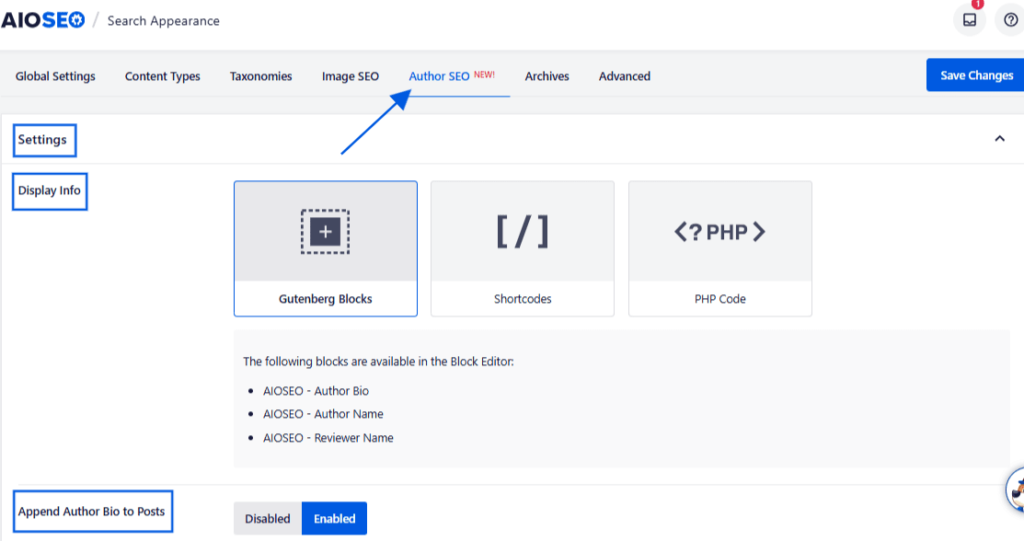
This is particularly relevant for industries where readers need to know who's behind the advice they're receiving. For example, healthcare, financial, and legal publishers shouldn't leave an expert author's qualifications buried in an unstructured paragraph, or worse, provide nothing beyond their name.
Author SEO gives site owners a more systematic way to establish those signals across WordPress.
2. Yoast SEO: Best for Beginners Who Want a Known Brand

Yoast is the plugin most WordPress users have heard of, even if they have never installed an SEO plugin before. It's the longest-running plugin on this list, and that name recognition counts for something if you want documentation, tutorials, and a huge community of people who have already solved your problem.
What surprised me when testing Yoast again after a few years away is how much more expensive Premium has gotten relative to its feature set.
Yoast Premium runs about $118.80 per year for 1 site, and that price covers only that single website. Compare that to AIOSEO's Plus plan, which covers 3 sites for roughly the same annual cost, and the math stops making sense once you manage more than 1 property.
Yoast Premium does add a redirect manager, internal linking suggestions, and a readability check, similar territory to what AIOSEO offers, but at a steeper per-site price and without AIOSEO's redirect type variety.
Where Yoast genuinely earns its reputation is documentation and community troubleshooting. Almost any error message you hit has already been answered in a forum thread or a Yoast knowledge base article, because so many people have used this plugin before you. So, if you're willing to pay a premium just to have a known brand, Yoast might be a good option.
3. SEOPress: Best Budget Option

I'd recommend using SEOPress to anyone who is price-sensitive but still wants a genuinely full feature set, not a stripped-down free tier with everything important locked away.
Its Pro plan starts at $49 a year for 1 site, jumps to $59 a year for 5 sites, and, notably, offers an unlimited sites license for $149 a year. If you run an agency with a dozen small client sites, that unlimited tier is hard to beat on price.
The feature set covers schema markup, local SEO, WooCommerce optimization, and built-in AI integration for meta descriptions, plus AI credits you can buy separately if you burn through the included allowance.
Where it falls short compared to AIOSEO is the depth of on-page guidance. Compared to SEOPress, AIOSEO's TruSEO not only recommends changes but also implements them directly if you optimize with AI.
I also noticed SEOPress's interface feels more utilitarian than polished, with more tabs and toggles and fewer visual cues about what to do next. That is a fair tradeoff for the price, but do not expect the same guided experience you get from AIOSEO or Rank Math's setup wizard.
4. The SEO Framework: Best for Speed

The SEO Framework is the lightest plugin on this list by a noticeable margin. Developers built it with an obsessive focus on not slowing your site down, and you can feel that in how snappy the settings pages are. The free version is genuinely usable long-term, covering unlimited sites with the core SEO essentials.
The tradeoff is that The SEO Framework's interface is minimal, almost to a fault. There is very little hand-holding, no big colorful score meter telling you what to fix next, just clean settings and sensible defaults. If you already know SEO, that is refreshing. But if you're still learning, you will feel a little lost without the guided checklist that Rank Math and AIOSEO both provide.
Most of its extra functionality comes through optional extensions rather than one big bundled feature set, so you install only what you need. That is great for site speed, but it means there is no built-in AI writing assistance and no redirect manager unless you add the right extension. If you want a plugin that does everything out of the box, this is not it. If you want a plugin that does less by default and stays fast because of it, this is worth testing.
5. SureRank: Best Free Option

SureRank is the newest plugin on this list, and I want to correct something I see repeated in other roundups: it is not 100% free. It has a genuinely capable free version that covers meta titles and descriptions, core schema markup, an XML sitemap, and even a basic plugin migration tool.
But the paid Pro plan, at $99 a year for up to 10 sites, gives you bulk AI fixes across your whole site, a redirection manager, and 17 advanced schema types instead of the core set.
So the free version earns its spot on this list; it is one of the more complete free tiers I tested, but do not go in expecting every feature to be free forever. If your needs stay basic, meta tags, a sitemap, simple schema, you may never need to upgrade. The moment you want redirects or bulk AI tools, you are paying.
The tradeoff for being new is that it doesn't yet have the years of community troubleshooting content, so if something unusual goes wrong, you're relying more on official support.
6. Squirrly SEO: Best for AI-Guided Writing

Squirrly SEO leans harder into AI-guided content optimization than anything else on this list. Its free plan gives you 5 AI keyword researche reports a month and 1 audit suite page, enough to get a feel for it on a single site.
The Pro plan, at $9.99 a month, covers 5 sites, 50 AI keyword researches a month, and its full 18-point Live Assistant, which checks your content against ranking factors as you type.
Squirrly is weaker at redirect handling and the technical SEO depth that Rank Math and AIOSEO both offer. It has no dedicated redirect manager, which is a real gap if your site has any history of URL changes.
How to Switch From Rank Math to AIOSEO Without Losing Your Rankings
This is the part that might worry a lot of you before you switch. You might have months or even years of SEO work sitting inside Rank Math, such as meta titles, descriptions, or redirects you set up.
So, here's how to move everything over:
Export Your Rank Math Data First
Export your existing Rank Math configuration as a backup. That means going to Rank Math SEO » Status and Tools » Import and Export and downloading the export file.
I know this sounds like an unnecessary extra step when AIOSEO has a direct importer, but I always recommend keeping a backup before switching plugins. This way, if anything looks wrong after the migration, you can check what your settings looked like before.
Use AIOSEO's One-Click Import Tool
Once AIOSEO is installed and active, its setup wizard automatically detects Rank Math and prompts you to import your data as part of the setup flow.
If you skip that prompt or install AIOSEO later, you can run the import manually by going to All in One SEO » Tools » Import/Export, selecting Rank Math from the plugin dropdown, and clicking Import.
This tool is available on every AIOSEO plan, including the free version, which matters if you want to test the migration before committing to a paid tier.
The import pulls your meta titles, meta descriptions, focus keywords, redirects, and schema markup. However, it won't pull your Rank Math analytics data or rank tracking history. Your rankings aren't affected, since those live on Google's side, not in either plugin, but your historical charts don't carry over.
Is AIOSEO the Right Rank Math Alternative for You? 🤔
AIOSEO is particularly useful if you want your on-page optimization, schema, internal linking, technical SEO, WooCommerce optimization, author signals, and search performance monitoring connected inside WordPress. It also serves different experience levels, from beginners to experienced SEOs. It currently offers a free version and several paid plans, so you can also start with the core functionality before deciding whether you need the more advanced features.
Rank Math Alternative: FAQs Answered
AIOSEO is one of the strongest Rank Math alternatives for WordPress. It combines on-page optimization, schema markup, XML sitemaps, redirects, internal linking, WooCommerce SEO, Search Statistics, Keyword Rank Tracking, and other SEO tools in one plugin.
It depends on what you need from an SEO plugin. I prefer AIOSEO when ease of use and an integrated WordPress SEO workflow are priorities. Features such as TruSEO, Optimize with AI, Link Assistant, Search Statistics, SEO Revisions, and Author SEO make it particularly useful for managing optimization beyond basic titles and metadata.
Yes, you can switch WordPress SEO plugins, but you should migrate your existing SEO settings carefully so you don't lose important metadata or configurations. After switching, check key pages, schema, sitemaps, redirects, and indexing settings before removing your previous SEO plugin.
Final Verdict
If you're looking for the best Rank Math alternative, don't base the decision purely on which plugin has more settings. Think about how you actually work.
Do you want help identifying and fixing on-page issues? Do you need advanced schema without writing code? Would automated internal linking recommendations save you time? Do you want Google Search Console performance and keyword tracking inside WordPress?
You don't have to overhaul your entire SEO strategy when switching plugins, either. Your fundamental goal remains the same: make your site easier for search engines to understand and create better experiences for the people arriving from search.
The best SEO plugin is ultimately the one that makes doing that consistently easier. And for WordPress users looking for a comprehensive, beginner-friendly alternative to Rank Math, AIOSEO is my top pick.
Disclosure: Our content is reader-supported. This means if you click on some of our links, then we may earn a commission. We only recommend products that we believe will add value to our readers.
Want to Try AIOSEO for Free?
Enter the URL of your WordPress website to install AIOSEO Lite.