If you run an eCommerce store, you’ve probably come across product attributes.
In eCommerce SEO and marketing, the smallest details can make the biggest difference. Product attributes, for instance, might seem like simple labels or filters at first glance. However, they hold immense power to improve the visibility of your online store and enhance the user experience.
But what exactly are product attributes, and how can they help you boost SEO?
Let’s dive into everything you need to know. I’ll also share actionable tips to elevate your WooCommerce store’s performance.
In This Article
What are Product Attributes?
Product attributes are specific features or characteristics that define and describe a product. These attributes provide essential details that help shoppers make informed purchase decisions. They also help search engines better understand and display your products on search engine results pages (SERPs).

Some common product attribute examples include:
- Size: Small, Medium, Large, or even numerical dimensions like 10×15 cm.
- Color: Red, Blue, or unique shades like “Ocean Green.”
- Material: Cotton, Leather, Stainless Steel.
- Brand: Nike, Samsung, or any manufacturer’s name.
As you can see, product attributes help users and search engines better understand your product. This leads to better search rankings and improved clickthrough rates.
Types of Product Attributes
Another important factor to note about product attributes is that there are different types. Below are the 3 main ones:
1. Physical Attributes
These define the tangible aspects of a product. Examples include weight, dimensions, and material. For instance, if you’re selling shoes, “Material: Genuine Leather” or “Weight: 1.2 lbs” are critical pieces of information.
2. Functional Attributes
Functional attributes highlight how a product works or what it’s compatible with. For example:
- A laptop might include “Processor: Intel i7” or “Compatibility: Windows 11.”
- A phone charger could feature “Fast Charging Support: Yes.”
3. Emotional Attributes
These tap into how a product makes the user feel. For example:
- Sustainability: A product labeled “Eco-Friendly” or “Made from 100% Recycled Materials” appeals to eco-conscious shoppers.
- Luxury Appeal: Terms like “Premium Quality” or “Handcrafted” evoke a sense of exclusivity.
Knowing which attributes apply to your product is essential for both SEO and user experience (UX). Let’s dive deeper into this in the following sections.
Why Product Attributes Matter for SEO
Product attributes do more than describe your products; they play a vital role in improving your SEO. Here’s how:
Improving Content Relevance and Visibility
When search engines crawl your site, they look for detailed, well-structured information about your products. Product attributes provide specific details that help search engines better understand your offerings. For example, “Men’s Black Leather Jacket” is more descriptive than just “Leather Jacket,” making it more likely to match user queries.
Matching User Search Intent
Most users don’t search for generic terms. Instead, they use specific search queries like “Lightweight hiking boots size 10” or “Blue ceramic coffee mug 12 oz.” Optimizing your product attributes ensures your pages rank for these long-tail keywords, attracting users who are ready to buy.
Competitive Advantage
Product attributes give your products a great opportunity to stand out. In a crowded eCommerce market, well-optimized product attributes help set your products apart from competitors. They provide a unique selling proposition that attracts high-intent customers and drives higher conversion rates.
Enhanced User Experience
Detailed product attributes provide customers with the information they need to make informed purchasing decisions. This includes details such as size, color, material, and brand, which help customers compare products effectively.
Plus, well-organized product pages with accurate attributes reduce bounce rates by ensuring visitors find what they’re looking for quickly. Lower bounce rates signal to search engines that your site offers valuable content, leading to improved rankings.
In a nutshell, proper implementation of product attributes is essential to better rankings and increased sales. With that being said, let me show you the easiest way to add product attributes in WordPress.
How to Add & Manage Product Attributes in WordPress
Adding product attributes in WordPress is super easy. One reason for that is most WordPress eCommerce stores are built on WooCommerce. And WooCommerce is one of the easiest eCommerce platforms to use.
So, how do you add product attributes in WooCommerce?
To add product attributes, go to the Products option in the WooCommerce menu and click on Attributes. This will open a window where you can create attributes for your products.
Step 1: Create Attributes
Fill in the required information, such as attribute name and color.
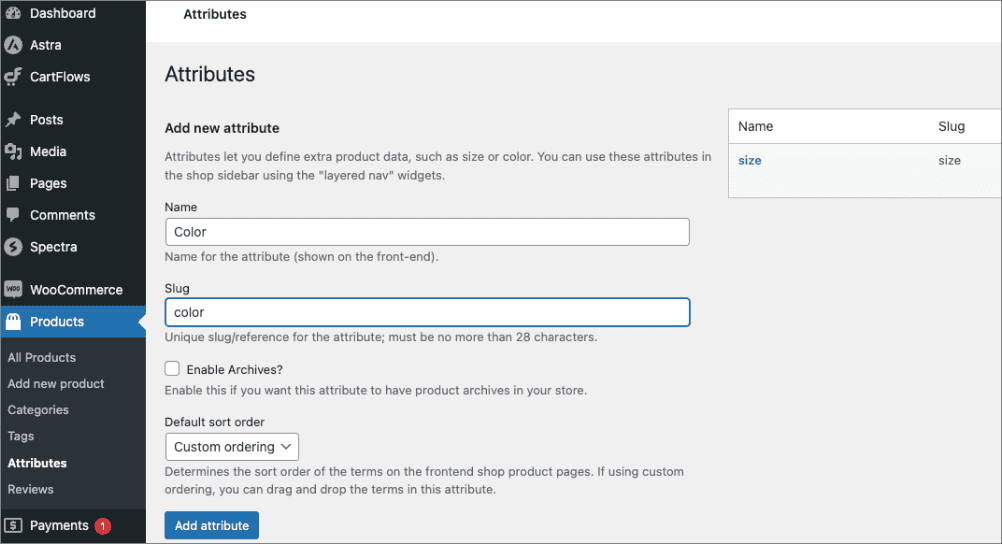
Also select Enable Archives if you want the attribute to have product archives on your store.
Once done, click Add attribute.
Step 2: Add Product Attributes to Products
Once you’ve created your product attributes, the next step is to add them to your products. To do this, open a product page and scroll down until you find the Product Data section. Here, make sure to select Variable product.

Next, click on the Attributes link and:
- Create a new attribute
- Add an existing attribute
Once done, click Save attributes.
Step 3: Managing Product Attributes
Managing product attributes on WooCommerce has traditionally been a tedious task. In times past, you had to configure SEO settings for each attribute individually. As can be expected, this is laborious and time-consuming.
Thankfully, AIOSEO’s WooCommerce product attributes feature is a game-changer.
All In One SEO (AIOSEO) is the best WordPress SEO plugin on the market and is trusted by over 3 million savvy website owners and marketers to help boost their search rankings and drive relevant traffic to their sites. This is because the plugin has many powerful features and modules designed to help you optimize your website for search engines and users.
For those in the eCommerce space, one of the loved features is the WooCommerce SEO feature. Another is the Taxonomies feature, which makes it easy to manage product attributes globally (sitewide).
This revolutionary feature can be accessed by going to the AIOSEO menu » Search Appearance » Taxonomies. Once there, scroll down to the Product Attributes section.

In this section, you can set whether you want your product attributes to be indexed and displayed in search results. You can also use tags to product attribute title and meta description format.
The biggest and most important benefit of this upgrade is that it ensures consistency across your product attributes. And because it’s a much more efficient way, it saves you lots of time while ensuring your product pages are SEO-friendly.
Export Product Attribute Data
Another time-saving feature of the WooCommerce product attributes feature is that it also allows you to export product attribute data. This can be achieved using the Export/Import tool in the Tools section of the AIOSEO menu.

This means if you’d like to replicate your product attribute settings on another store, you can do so with the click of a few buttons.
Bulk management of product attributes has never been easier!
Sitemap Support for Product Attributes
To increase the chances of your product attributes being indexed and displayed on search engines, AIOSEO includes product attributes in your XML sitemaps!
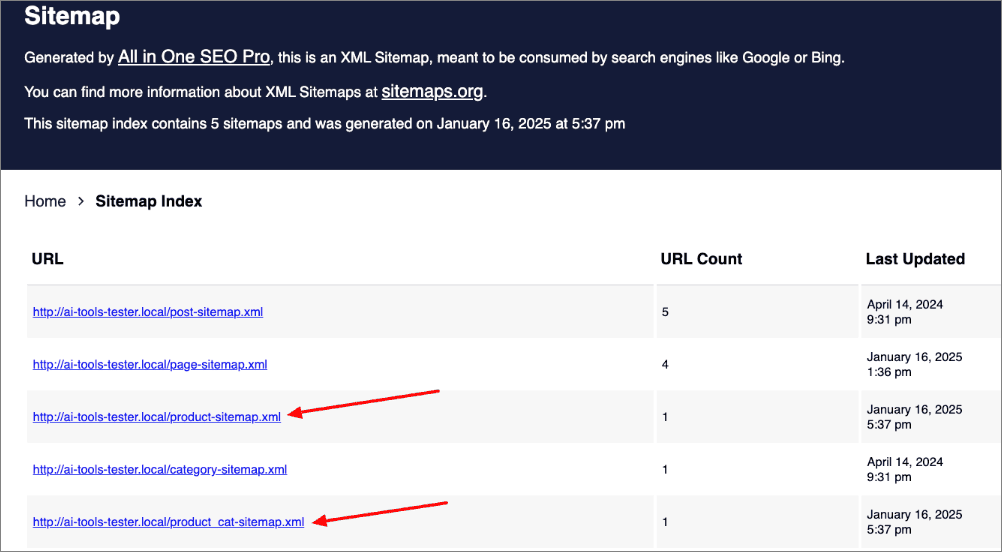
This helps search engines discover your product variations more effectively, resulting in better search visibility, more traffic, and increased sales.
Best Practices for Using Product Attributes to Boost SEO
Ready to leverage product attributes for maximum SEO impact?
Follow these best practices I’ve found to be the most impactful:
1. Optimize Attribute Keywords
Let’s talk about keywords for a second.
You wouldn’t skip keyword research for your blog posts, right?
The same rule applies to product attributes.
- Be specific: Instead of “Red,” try something more descriptive like “Cherry Red” if that aligns with popular search queries.
- Think long-tail: Incorporate longer, more precise keywords into your attribute names and metadata. For instance, “Lightweight hiking boots size 10” will attract more ready-to-buy customers than just “Hiking boots.”
Here’s the kicker: Optimized keywords in your attributes don’t just boost SEO. They also make your products look more appealing to shoppers. It’s a win-win!
You can use keyword research tools to find relevant keywords for your content. One of the best for finding low-competition keywords is LowFruits.
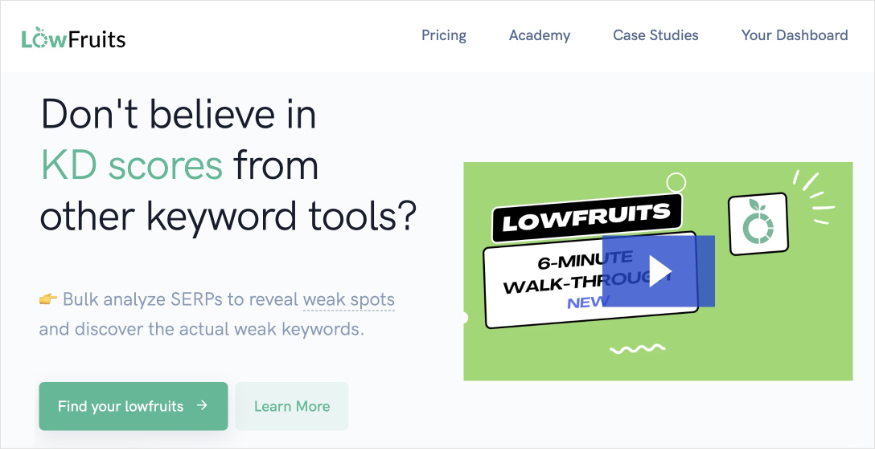
This powerful tool scrapes the SERPs to find low-competition keywords you can target to rank faster in search engines.
However, make sure the keywords you search for in this instance are suited for product attributes. For example, instead of just “area rug 5×7” you could find other keywords users enter when looking for an area rug. In this case, a good keyword would be “washable area rug 5×7”.
2. Add Schema Markup
If you’re not using schema markup (structured data) yet, you’re leaving money on the table. Schema markup gives search engines a clear map of your product’s key details. Think of it as adding a neon sign that says, “Here’s what this product is all about.”
You can use schema markup to highlight attributes like price, availability, and reviews. Here’s why it matters: schema markup can earn you rich snippets in search results. Imagine your product standing out with price tags, ratings, and availability directly on Google’s results page.
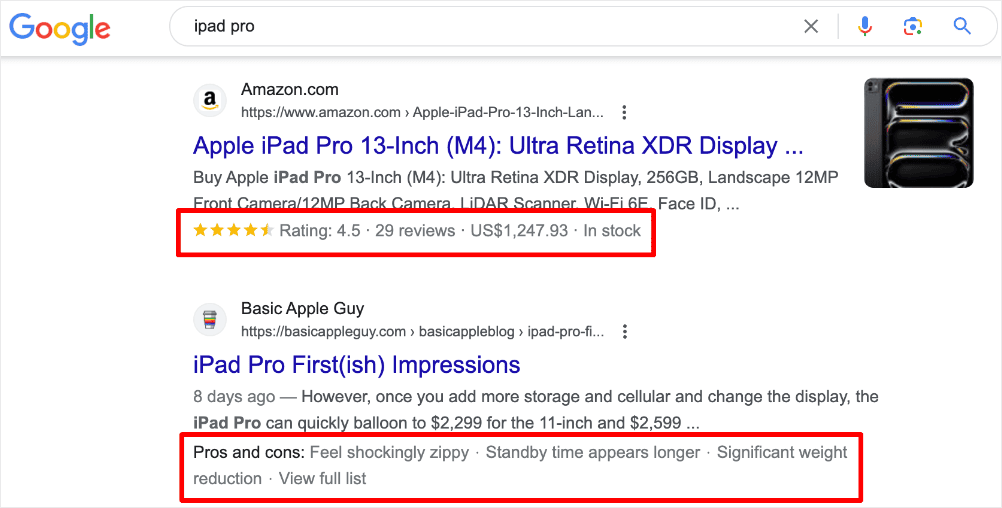
By default, WooCommerce adds schema markup to your product listing. However, this is limited. And this is where an eCommerce SEO tool like AIOSEO comes in. It helps you add different types of schema markup to your site, helping you stand out on SERPs thanks to rich snippets. Examples of the schema types you can leverage as an eCommerce store include:
All these help search engines and users better understand your products. This results in better rankings and increased sales. And don’t worry about manual coding. Tools like AIOSEO make adding structured data as easy as a few clicks.
3. Create Unique Product Descriptions
Let’s be real. Copy-pasting manufacturer descriptions is tempting, after all, it’s the quick and easy way to do it. But it’s a recipe for disaster—both for SEO and user experience.
- Avoid Duplicates: Search engines penalize duplicate content. Stand out by creating descriptions tailored to your audience.
- Highlight Benefits: Focus on the attributes that matter most to your customers. For instance, instead of saying, “Cotton T-shirt,” say, “Soft, breathable cotton T-shirt that keeps you cool on hot summer days.”
Remember, a unique description isn’t just good for rankings; it also helps convert shoppers into buyers.
4. Use Attributes for Better Filtering and Navigation
Think about the last time you used filters while shopping online.
Did it make your experience easier?
That’s the power of attribute-based filtering.
- Why It Works: Attributes like size, color, and price range allow users to narrow down their options quickly.
- SEO Bonus: Better filtering improves site structure, making it easier for search engines to crawl your pages.
Picture this: A user searching for “blue running shoes size 9” lands on your site. Your filters make it easy to find exactly what they need, boosting both satisfaction and sales.
What are Product Attributes? Your FAQs Answered
What are product attributes?
Product attributes are specific features or characteristics that define and describe a product. These attributes provide essential details that help shoppers make informed purchase decisions.
Product attributes are specific features or characteristics that define and describe a product. These attributes provide essential details that help shoppers make informed purchase decisions.
Can I add custom product attributes?
Yes! WooCommerce allows you to create custom attributes specific to your products. For instance, if you sell handmade jewelry, you could add attributes like “Gemstone Type” or “Metal Finish.”
Yes! WooCommerce allows you to create custom attributes specific to your products. For instance, if you sell handmade jewelry, you could add attributes like “Gemstone Type” or “Metal Finish.”
What is the best way to manage product attributes?
The easiest way to manage product attributes in WordPress is to use a plugin like All In One SEO (AIOSEO). It helps you globally manage product attributes, making it easier and faster to ensure your product attributes are optimized.
The easiest way to manage product attributes in WordPress is to use a plugin like All In One SEO (AIOSEO). It helps you globally manage product attributes, making it easier and faster to ensure your product attributes are optimized.
We hope this article has helped you know what product attributes are and how to add and manage them in WordPress. You may also want to check out other articles on our blog, like our ultimate WordPress SEO guide or our list of the best WooCommerce SEO plugins.
If you found this article helpful, then please subscribe to our YouTube Channel. You’ll find many more helpful tutorials there. You can also follow us on X (Twitter), LinkedIn, or Facebook to stay in the loop.
Disclosure: Our content is reader-supported. This means if you click on some of our links, then we may earn a commission. We only recommend products that we believe will add value to our readers.
Want to Try AIOSEO for Free?
Enter the URL of your WordPress website to install AIOSEO Lite.