
Looking for some homepage SEO tips to help boost rankings and drive traffic?
If your website were a house, your homepage would be the front door. It’s the first thing visitors see, and it sets the tone for everything that comes after. That’s why your homepage is the most important page for SEO.
But here’s the truth—I didn’t always know that.
When I launched my first website years ago, I thought my homepage just needed to look nice. I added a big logo, a fancy slider, and a vague headline like “Welcome to Our Website.” I thought design alone would bring results. What I didn’t realize was that I was wasting the most valuable SEO real estate I had. My site barely showed up in search, and the few visitors I got left almost immediately.
Once I started learning about homepage SEO, everything changed. I discovered that minor tweaks could drive real traffic.
By the end of this post, you’ll know the homepage SEO tips I wish I had known earlier. These are strategies you can apply right now to transform your homepage into a ranking machine.
In This Article
- What Is Homepage SEO?
- Homepage SEO Tips: The Right SEO Plugin Is Key To Success
- Homepage SEO Tips: 12 Things I Wish I Knew From the Start
- Tip 1: Audit Your Homepage First
- Tip 2: Conduct Competitor Analysis
- Tip 3: Keyword Research for Your Homepage
- Tip 4: Balance Brand Messaging With Keyword Targeting
- Tip 5: Use the Homepage as a “Ranking Hub”
- Tip 6: Prioritize the Fold Area for SEO + Conversions
- Tip 7: Include an Optimized FAQ Section on the Homepage
- Tip 8: Homepage Schema Beyond Basics
- Tip 9: Build Internal Links Around CTAs
- Tip 10: Improve Homepage Load Speed
- Tip 11: Add Social Proof and Trust Signals
- Tip 12: Don’t Neglect the Basics
- Tip 1: Audit Your Homepage First
- Homepage SEO Tips: Turning Your Homepage Into an SEO Powerhouse
- Homepage SEO Tips: Your FAQs Answered
What Is Homepage SEO?
Your homepage is your digital storefront. It’s often the first impression visitors get, and just like in real life, a clean, clear, and welcoming entrance makes all the difference.
Homepage SEO is all about optimizing your website’s front page so that:
- Search engines understand your site’s main topic.
- Visitors immediately get what you offer and why they should trust you.
It’s a mix of on-page SEO techniques, user experience design, and conversion optimization—all working together to make your homepage the most powerful page on your site.
Some common homepage SEO optimizations include:
- Write a keyword-rich but natural title tag and meta description.
- Use a clear, focused H1 headline that explains what your site is about.
- Add structured data to help search engines interpret your content.
- Improve load speed and mobile responsiveness so users stick around.
- Create smart navigation and strategic internal links that guide people to other pages.
When your homepage is optimized correctly, it works on 2 levels at the same time. First, it signals relevance and authority to search engines. Second, it convinces visitors to take the next step—whether that’s reading a blog post, signing up for your email list, or buying a product.
When your homepage is optimized, it becomes both a ranking asset and a conversion engine.
The Importance of Getting Your Homepage SEO Right
Your homepage isn’t just another page on your site. It’s the strongest page on your entire site in terms of authority. Google often gives it the most weight, and visitors use it to decide if they can trust you.
Here’s why getting it right matters:
- First impressions count: Visitors form an opinion in seconds. If your homepage is confusing or vague, they’ll bounce.
- It’s your SEO foundation: A well-optimized homepage sends ranking signals that strengthen the rest of your website.
- It builds trust: The right mix of messaging, trust signals, and content makes people want to stay and explore.
If your homepage is poorly set up, even the best service or blog pages will struggle to rank.
Homepage SEO Tips: The Right SEO Plugin Is Key To Success
The first thing I wish I had learned about homepage SEO is that having the right tools can make or break your SEO efforts. Fortunately, I discovered All in One SEO (AIOSEO) early, and it changed everything.

AIOSEO is a powerful yet easy-to-use WordPress plugin designed to help small businesses get their SEO right without needing to be experts. Because of this, the plugin is trusted by over 3 million active users. Plus, it’s always up to date with the latest industry changes, ensuring your site follows current SEO best practices.
What I appreciate about AIOSEO is that it has many features that can help you improve your homepage’s ranking on Google and other search engines. Examples of said features include:
- AI Writing Assistant: Use the power of artificial intelligence (AI) to optimize your content for better search rankings.
- Author SEO: Boost your Google E-E-A-T signals right in WordPress, giving you an edge over competitors.
- AI Content Generator: Automatically repurpose blog posts into FAQs, email copy, key points, social media posts, and more from your blog posts.
- Advanced Robots.txt Generator: Easily generate and customize your robots.txt file for better crawling and indexing.
- TruSEO Score Analysis: Quickly spot on-page SEO issues and get recommendations for fixing them.
- Next-gen Schema Generator: Generate and output any schema markup on your site without having to code.
- Link Assistant: Automate internal linking between your pages and audit your outbound links.
- SEO Preview: Get an overview of your search and social snippets and general SEO so you can improve your optimization.
- And more
Using AIOSEO helps me save hours each week and get better results faster. Instead of guessing what to optimize, I have a clear checklist and insights right in my dashboard.
If you’re starting and want to simplify your SEO, I highly recommend giving AIOSEO a try. It’s a great tool for startups looking to get their SEO on track without the headache.
For step-by-step instructions on how to install AIOSEO, check our detailed installation guide.
Homepage SEO Tips: 12 Things I Wish I Knew From the Start
Homepage SEO can feel overwhelming at first. But breaking it into clear, actionable steps makes the process much more manageable.
The tips below come from my own experience optimizing homepages—so you can skip the guesswork and focus on strategies that actually drive results.
Tip 1: Audit Your Homepage First
Before you jump into keywords or design tweaks, you need to make sure your homepage isn’t hiding problems that could tank your SEO.
Think of this as your first line of defense.
Your homepage is often the first impression both search engines and visitors get. If it’s missing key elements—or worse, if it has hidden technical issues—everything else you do will have less impact. That’s why a homepage audit is the smartest starting point.
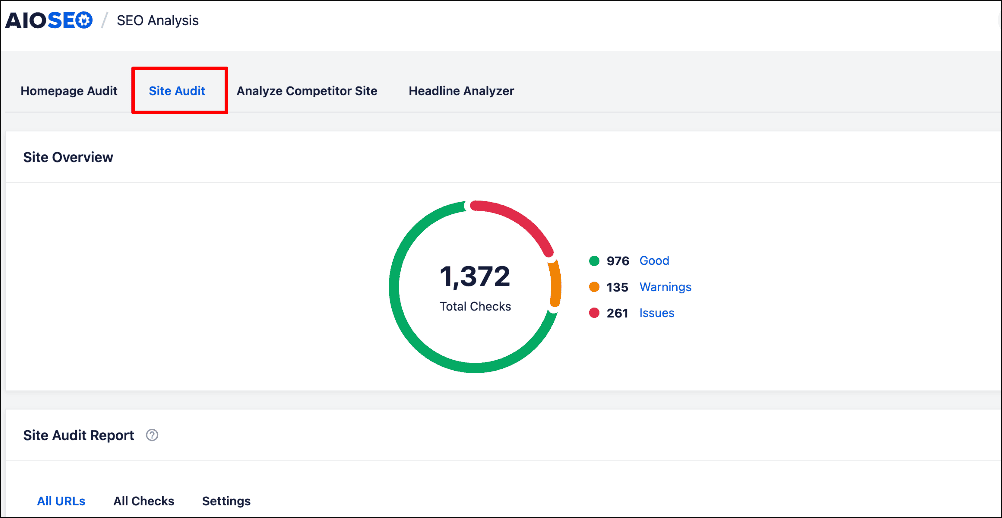
AIOSEO’s Site Audit module makes this process easy:
A proper homepage audit will check for:
Basic SEO Issues
If I got a dollar for every time I saw a homepage that missed basic SEO issues, I’d be a millionaire by now. That’s why I always advise clients to audit their homepages as a first step to optimization.
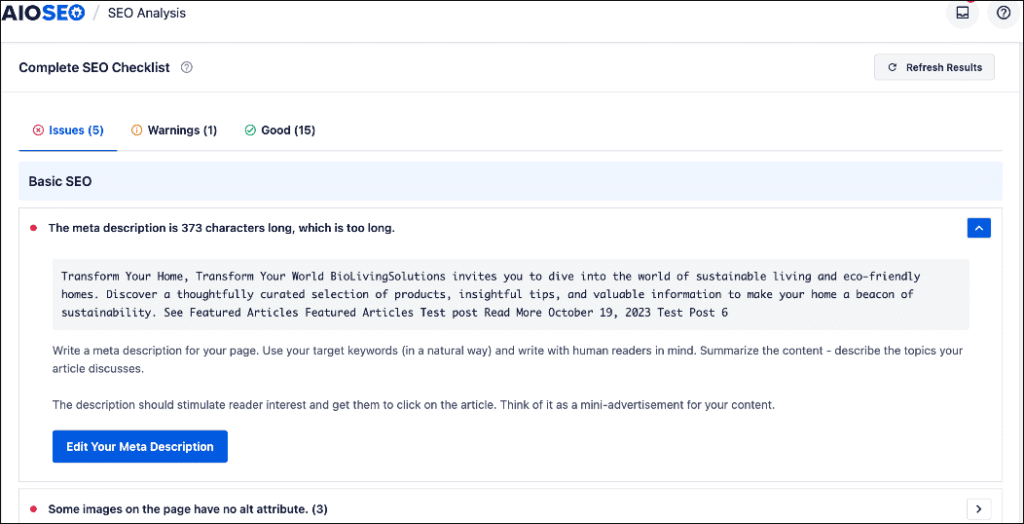
Some of the issues to check for include:
- Are your meta tags optimized?
- Do you have a clear, keyword-rich H1?
- Is your content structured logically?
Catching these issues early ensures your homepage is sending the right signals from the start.
Performance and Security Issues
Performance and security directly impact SEO because slow or unsafe sites drive users away and hurt search rankings. Search engines favor fast, secure websites, making them essential for visibility and trust.
That’s why auditing your homepage for these is essential.
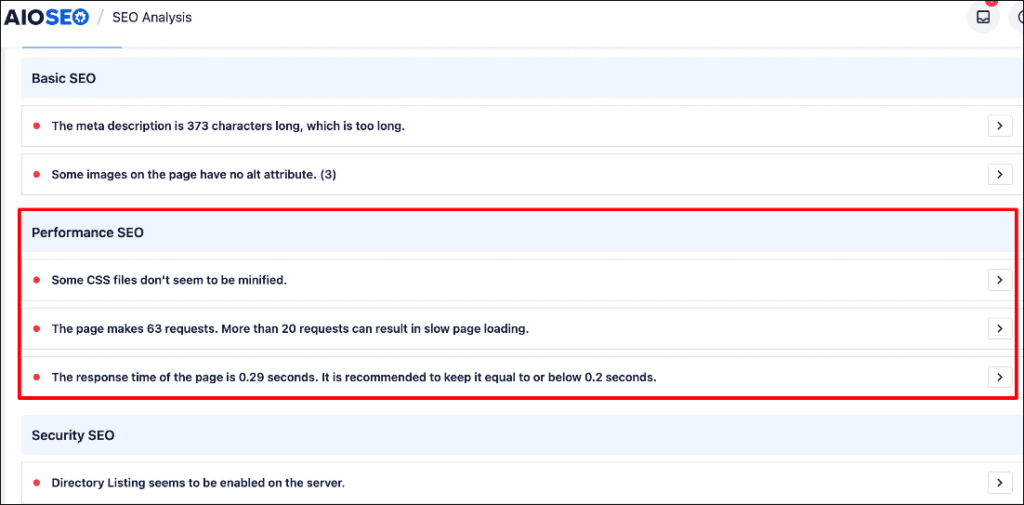
Some performance and security issues to watch out for include:
- Slow-loading images or bloated scripts can drag down rankings.
- Security gaps may reduce user trust (and Google’s).
Fixing these issues creates a faster, safer, more engaging homepage experience. The benefit is that you’ll be ensuring a solid foundation for the rest of your site. Once the audit clears, every other SEO improvement you make will perform much better.
Tip 2: Conduct Competitor Analysis
Before you write or edit a single word on your homepage, look at what’s already working for others.
Search for your target keyword (for example, “WordPress SEO plugin” if that’s your niche). Then, study the top 5–10 homepages. Pay attention to:
- Headlines: How do they introduce themselves?
- Keywords: Which phrases show up repeatedly?
- Design layout: What’s above the fold? How do they use calls to action (CTAs)?
- Content length: Are they short and simple, or more detailed?
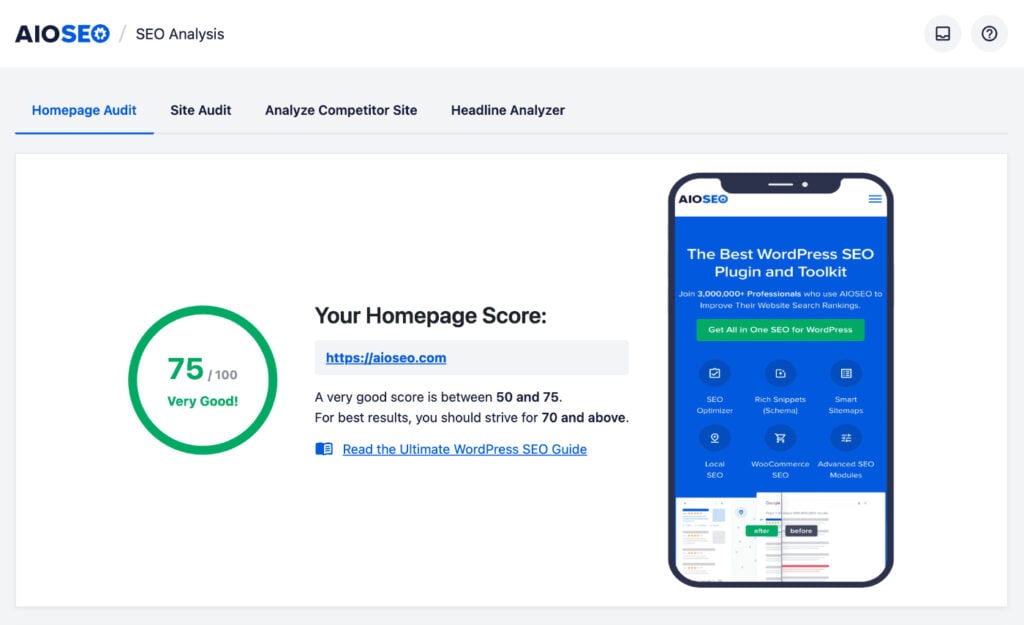
AIOSEO’s Site Audit feature is also helpful in this regard. Besides your site, it also analyzes competitor sites to give you insights into what’s working for them.
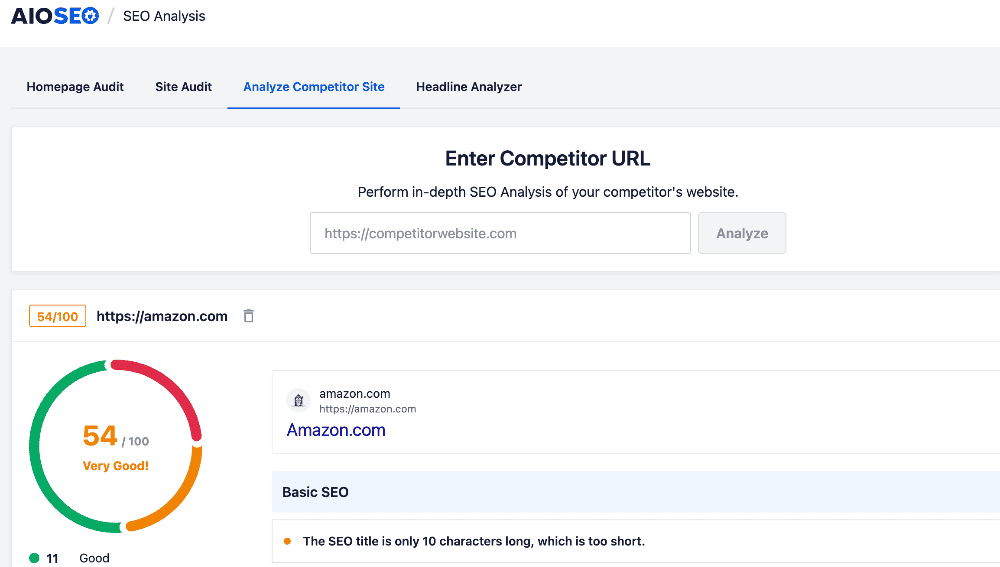
AIOSEO’s SEO Analysis scans your competitor’s site and gives you insights into their basic and advanced SEO, as well as performance and security issues.
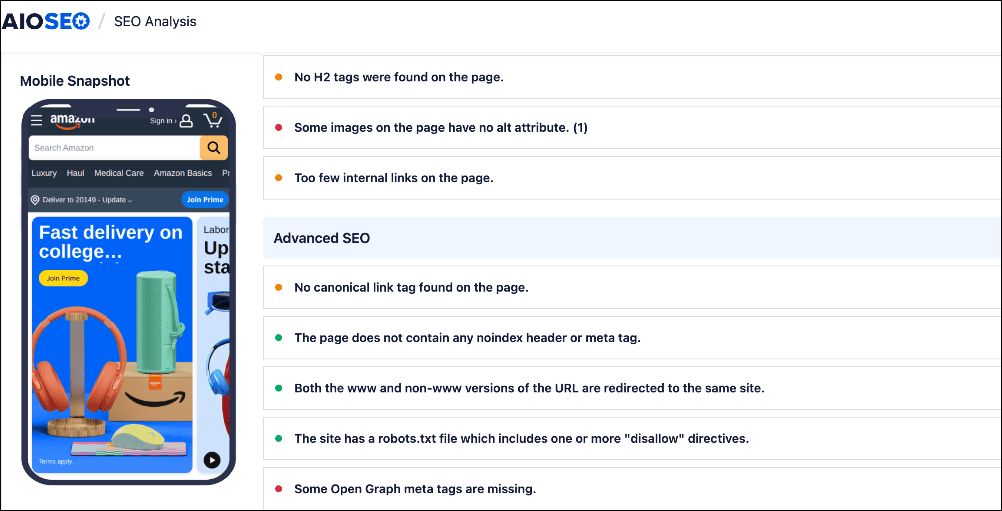
Competitor analysis doesn’t mean copying. It means identifying gaps and opportunities. For example, if many competitors ignore FAQs, adding them to your homepage can help you stand out.
For more tips, check out our guide on conducting an SEO competitor analysis.
Tip 3: Keyword Research for Your Homepage
Your homepage should target a primary keyword that represents your entire site. Without one, Google won’t know how to categorize you. Here’s how to do it:
- Choose a primary keyword that reflects your business. For a bakery, it could be “custom cakes in [city].” For a SaaS company, an example could be “project management software”
- Balance it with your brand name. Use a formula like “Affordable SEO Tools for WordPress | SiteName”
- Sprinkle in secondary keywords naturally in subheadings and homepage sections.
This way, you’ll rank for both your brand and your main service/product keyword.
Don’t worry. Finding relevant keywords isn’t hard, especially if you have a keyword research tool like LowFruits.
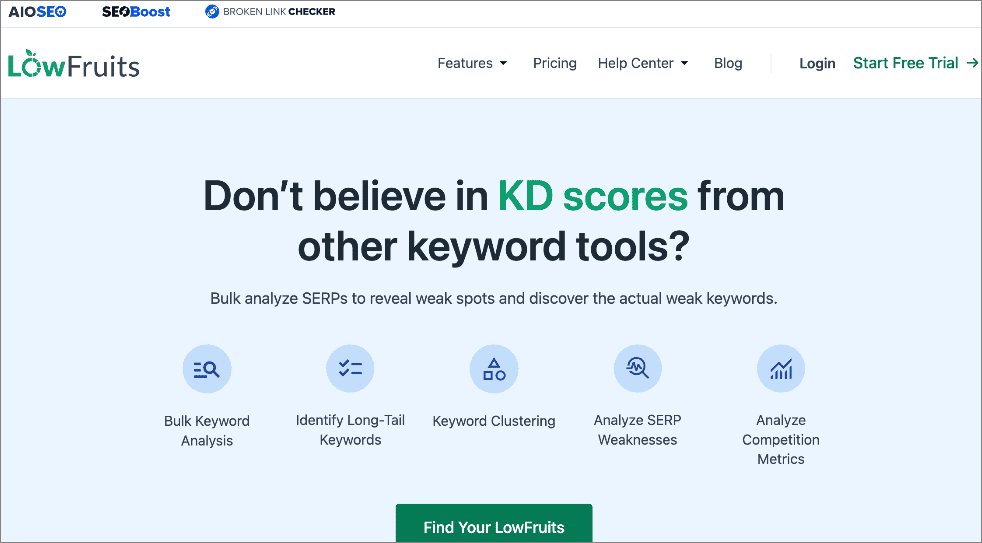
LowFruits is a keyword research tool built to uncover low-competition keywords, perfect for powering up your homepage SEO. Instead of chasing generic, high-competition terms, LowFruits helps you find keywords that can deliver quick SEO wins.
One of my favorite features is how it highlights Weak Spots on the search engine results pages (SERPs).
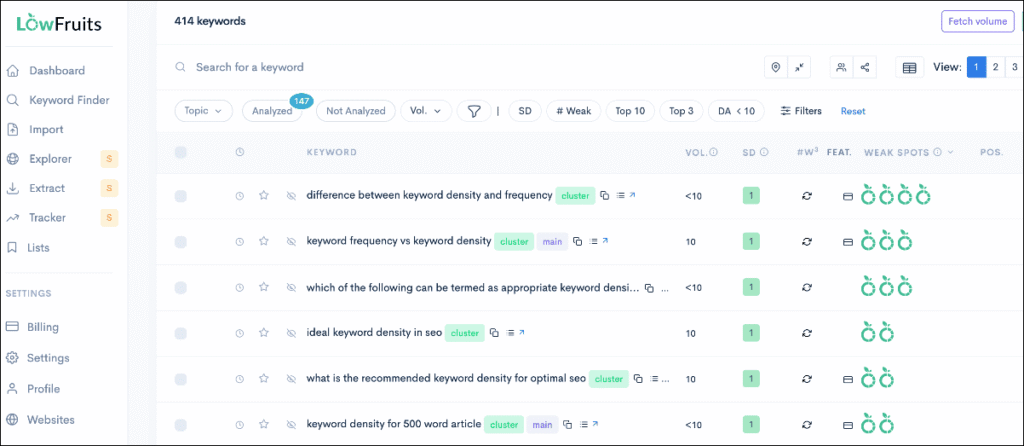
These are opportunities where your homepage (or other key landing pages) has a strong chance of ranking. Combine that with insights into search volume, keyword difficulty, and related keywords, and you have all the data you need to craft a homepage SEO strategy that actually works.
When choosing homepage keywords, think about the problems you solve and the phrases your ideal customer would type into Google. For example, if you’re a project management SaaS targeting small teams, optimizing your homepage around a long-tail keyword like “project management tool for lean teams” is far more effective than going after the overly broad “project management.”
The goal isn’t just to drive traffic. It’s to rank your homepage for the terms that lead to sign-ups, demos, and purchases. That’s how homepage SEO turns into real business growth.
Tip 4: Balance Brand Messaging With Keyword Targeting
When I first started with homepage SEO, I thought I had to either write for search engines or write for people. But that’s not true. You can (and should) do both. The key is balance. Your homepage needs to rank for the right keywords while still feeling inviting and authentic to visitors.
Start with clarity. Your H1 (the main headline on your homepage) should explain exactly what you do using your primary keyword. This is the first thing both Google and your audience will read, so don’t make it vague or confusing.
After that, bring in personality. A short tagline or subheadline can capture your brand voice and make your message more memorable. It can also show visitors why they should trust you. This way, your homepage doesn’t just attract traffic, it also builds a connection with your audience.
Here’s a simple formula you can follow:
- H1: Use your main keyword + a clear description of what you offer.
- Tagline/Subheadline: Add personality, proof, or a benefit that speaks to people.
- Avoid vague claims: Lines like “We redefine excellence” sound nice, but they don’t tell anyone what you actually do.
The takeaway? A great homepage headline isn’t just about keywords. It’s about blending search intent with human connection. When you get that balance right, your homepage becomes both discoverable and persuasive.
Tip 5: Use the Homepage as a “Ranking Hub”
One of the biggest mistakes I see is trying to make the homepage rank for every keyword.
That’s not its job.
Instead, your homepage should act like a “ranking hub.” Think of it as the main station where traffic comes in, then flows to your most important pages.
Why does this matter? Because your homepage usually earns the most backlinks and carries the most authority in Google’s eyes. By linking out to other key pages, you’re passing some of that authority to them, helping them rank higher, too.
Here are a few smart ways to do this:
- Link to your most profitable service pages. If you offer different services, highlight the ones that bring in the most revenue.
- Showcase your top products. Add featured product sections that link directly to their pages.
- Highlight valuable blog posts. Pick posts that cover big industry topics or answer common questions to boost topical authority.
For example, imagine you run a local marketing agency. Instead of trying to make your homepage rank for every service, you’d set it up like this:
- H1: “Digital Marketing Agency for Local Businesses | BrightPath Media”
- Featured Sections:
- “SEO Services” → links to your SEO page
- “Social Media Management” → links to your social media page
- “Free Marketing Tips” → links to your blog post on “How to Get More Local Customers”
- “SEO Services” → links to your SEO page
This way, your homepage sends a clear signal to Google: these are my most important pages, rank them too.
When you treat your homepage as a hub, you’re not only improving SEO, you’re also guiding visitors to the exact places you want them to go.
Tip 6: Prioritize the Fold Area for SEO + Conversions
The most important part of your homepage is the section people see before they scroll. In digital marketing, this is often called “above the fold”.
If this space is confusing, cluttered, or empty, visitors will bounce. And when people leave quickly, Google takes notice.
That’s why your above-the-fold area needs to do 3 things at once. First, it should show search engines what your site is about. Next, it should tell visitors why they should stay. Finally, it should push people toward one clear action.
To achieve this, your above-the-fold area should include:
- A clear headline with your main keyword: This signals relevance right away.
- A short subheading that explains your value: Don’t just say what you do—explain why it matters.
- One strong call-to-action (CTA):. Too many choices overwhelm visitors. Pick your main goal—like sign-ups, free trial, or booking a call.
When you get the above-the-fold area right, you improve both SEO and conversions. Search engines understand your focus, visitors trust your offer, and more people take action.
Tip 7: Include an Optimized FAQ Section on the Homepage
An FAQ section at the bottom of your homepage is one of the easiest ways to boost both SEO and user experience. It helps you capture long-tail keywords, answer visitor questions, and even win extra space in Google results.
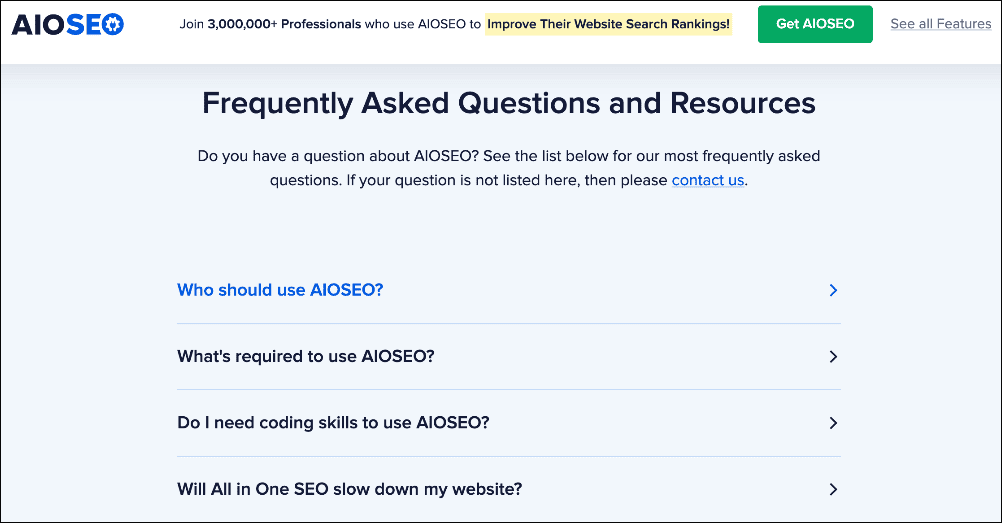
Here’s why it works:
- More keywords: By including questions like “What is homepage SEO?” or “How do I optimize a homepage title tag?”, you can naturally rank for search phrases people actually type into Google.
- Rich snippets: Adding FAQ schema means your answers may appear directly within search results, giving you more visibility and a higher chance of clicks.
- Better UX: Visitors don’t need to click around your site to find answers—they get helpful info right where they land.
When setting up your FAQ section, start with 3–5 common questions your audience asks. Keep your answers short, clear, and easy to scan. Also, make sure to use keywords naturally—don’t force them in.
Adding a section like this keeps visitors engaged, answers their biggest questions, and shows Google that your site is a valuable resource.
Check out our tutorial on adding FAQ schema to help you maximize your FAQ sections.
Tip 8: Homepage Schema Beyond Basics
Schema markup is a hidden layer of code that helps Google understand your homepage better. Think of it like giving search engines a “cheat sheet” about your brand, products, and content.
Most sites stop at organization schema, which is a good start. It tells Google who you are, your logo, and your contact info. But you can take it further and stand out even more.
Here are some powerful schema types you can add to your homepage:
- Breadcrumb: Shows your site’s hierarchy in search results, making it easier for users to navigate.
- Review: Show ratings from testimonials or product reviews show up in Google results, boosting trust.
- Local business: Highlights your address, phone number, hours, and service area so you can show up in local search and on Google Maps.
This helps search engines understand your business and makes your results more eye-catching, which can increase clicks.
Adding schema markup is easy if you have a WordPress SEO plugin like AIOSEO. It has a next-gen Schema Generator that makes it simple to add schema markup, even if you have no technical knowledge.
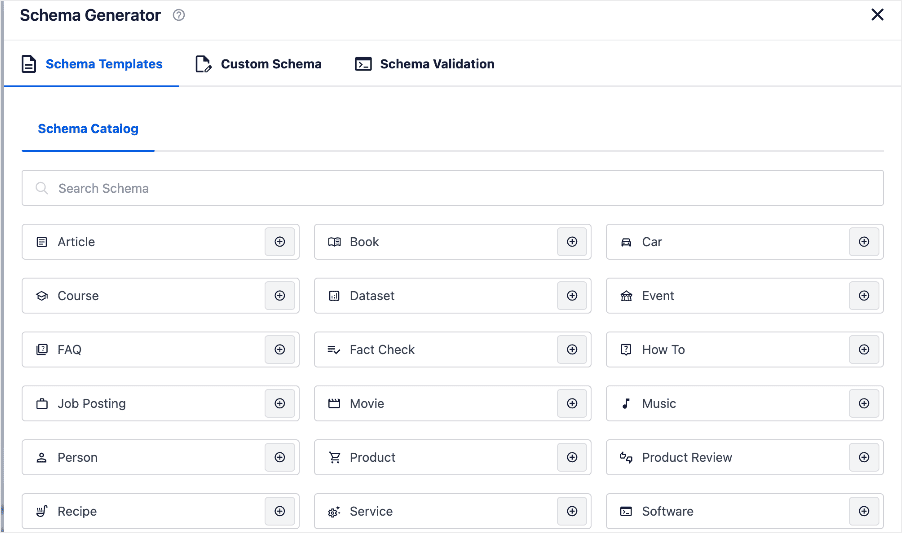
You can add many different types of schema markup using AIOSEO. And none of them require coding. While schema markup can be technical, AIOSEO makes it one of the simplest ways to boost visibility and trust right from your homepage.
For step-by-step instructions on this, check out our tutorial on implementing structured data on your site.
Tip 9: Build Internal Links Around CTAs
Links are the backbone of SEO. On your homepage, you need both internal links (pointing to pages within your site) and external links (backlinks from other sites). Done right, they not only improve rankings but also guide visitors where you want them to go.
Internal links help distribute authority across your site and make it easier for visitors to discover your most important content. For large sites, this can be time-consuming, but link building tools like AIOSEO’s Link Assistant make the process much faster by suggesting smart internal link opportunities.

For more information, check out our tutorial on building internal links in WordPress.
Backlinks are just as important. These are links from other sites pointing to your homepage. Search engines treat them as votes of confidence, signaling that your site is trustworthy and valuable. The more high-quality backlinks you earn, the stronger your homepage will rank.
When you combine smart internal linking with high-quality backlinks, your homepage becomes both a strong entry point for users and a powerful ranking hub for search engines.
Tip 10: Improve Homepage Load Speed
Your homepage is often the first impression visitors get of your site, and if it loads slowly, they may not stick around. Google also uses speed (measured through Core Web Vitals) as a ranking factor. That means a slow homepage can hurt both your SEO and your conversions.
The problem? Homepages are usually packed with large images, sliders, and scripts that drag down performance. The good news is that small tweaks can make a big difference.
To check your homepage speed, you can use page speed test tools. And if you’re an AIOSEO user, you can check your site speed in the SEO Analysis feature in the performance section.
It even shows you performance bottlenecks slowing down your homepage.
Ways to improve homepage load time:
- Compress large images: Use tools or plugins to shrink file sizes without losing quality.
- Enable caching: Caching plugins store a version of your site so it loads faster for repeat visitors.
- Minify CSS and JavaScript: Remove unnecessary code and whitespace to speed things up.
- Use a reliable hosting provider: Use a hosting provider that prioritizes speed and performance.
Check out our tutorial on improving your site’s speed for step-by-step instructions.
Even shaving just 1 second off your homepage load time can lead to higher rankings, more traffic, and more conversions.
The takeaway? Speed matters—for both Google and your visitors.
Tip 11: Add Social Proof and Trust Signals
Getting people to your homepage with SEO is only half the battle. The real challenge is convincing them to stay and take action. That’s where social proof and trust signals come in. When visitors see that others already trust your brand, they’re far more likely to do the same.
That’s why social proof and trust signals made it on this list of top homepage SEO tips.
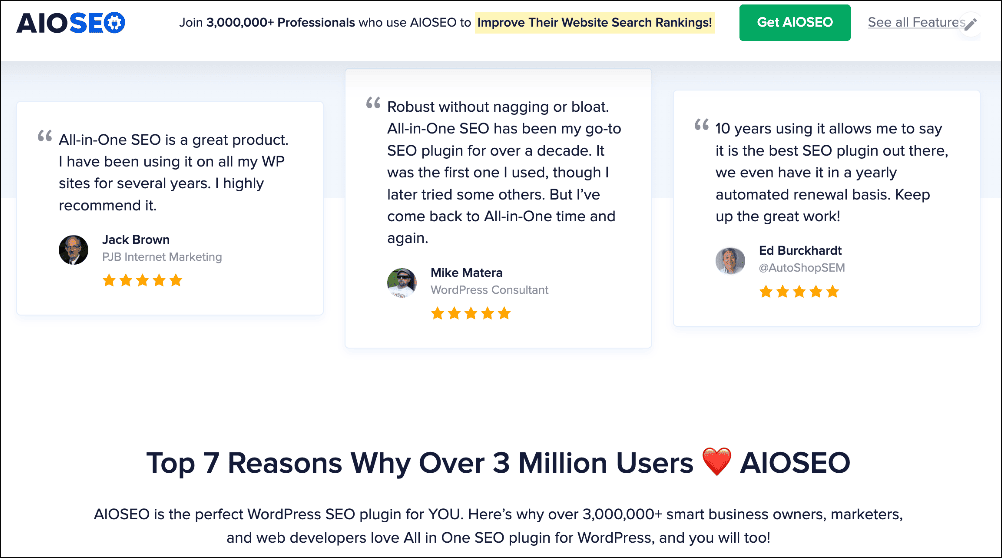
Here are some effective ways to add credibility:
- Customer testimonials with photos: Real faces make your reviews more relatable and believable.
- Review snippets: Pull in ratings from Google, Yelp, or Trustpilot to show verified feedback.
- Logos of clients or partners: A row of recognizable brands builds instant authority.
- Certifications or memberships: Industry badges (like the Better Business Bureau or professional associations) act as trust markers.
Even better, social proof supports Google’s E-E-A-T framework (Experience, Expertise, Authoritativeness, Trustworthiness):
- Experience: Testimonials and reviews show you’ve delivered real results for others.
- Expertise: Sharing case studies, data, or specialist knowledge proves you know your field.
- Authoritativeness: Featuring client logos or media mentions shows respected sources trust your brand.
- Trustworthiness: Verified ratings and certifications build credibility with both visitors and search engines.
For more information, check out our guide to E-E-A-T and YMYL.
The bottom line: SEO brings people in, but trust keeps them there. Adding social proof makes your homepage persuasive, while also reinforcing the E-E-A-T signals Google values.
Tip 12: Don’t Neglect the Basics
When it comes to homepage SEO, it’s often the simple things that hold you back. Fancy strategies won’t matter if you skip the basics. Think of these as your foundation—without them, everything else wobbles.
Here are the must-haves:
- One H1 tag only: Your homepage should have a single, clear H1. Multiple H1s confuse search engines about your main topic.
- Clean URL structure: Keep it short and simple. A clean URL is easier for Google to crawl and easier for users to remember.
- Compelling meta description: This is your sales pitch in search results. Write a short, persuasive summary that makes people want to click.
- Image alt text: Describe each image in plain language. This helps with accessibility for screen readers and gives search engines more context about your page.
These may sound small, but they make a huge difference. If you get the basics right, every other SEO initiative will perform even better.
Homepage SEO Tips: Turning Your Homepage Into an SEO Powerhouse
Your homepage is the foundation of your entire site. It tells Google what your website is about and shows visitors why they should trust you. Get it right, and everything else (your rankings, engagement, and conversions) gets easier.
The best part? You don’t need to be an SEO expert to make big improvements. By applying even a handful of these homepage SEO tips, you can:
- Climb higher in search results
- Build trust and credibility with visitors.
- Turn more clicks into customers
If I could go back, I’d start with these strategies right away. Take time to audit your homepage today and put these tips into action. Even small changes can lead to big wins over time.
Remember: your homepage isn’t just your digital front door—it’s your strongest SEO asset. Treat it that way, and you’ll set the tone for your online success.
I hope this post has helped you discover the top homepage SEO tips to boost your rankings and drive traffic to your site. You may also want to check out other articles like our ultimate guide to WordPress SEO or our list of the best SEO plugins.
If you found this article helpful, then subscribe to our YouTube Channel. You’ll find many more helpful tutorials there. You can also follow us on X (Twitter), LinkedIn, or Facebook to stay in the loop.
Homepage SEO Tips: Your FAQs Answered
What is homepage SEO?
Homepage SEO is the process of optimizing your homepage so it ranks well in search engines and makes a strong first impression. It also guides visitors to key pages on your site, helping both SEO and conversions.
Should I target my brand name or a keyword on my homepage?
Both matter. A good format is [Primary Keyword] | [Brand Name] in your title tag. That way, you target a valuable keyword for rankings while also building brand recognition and trust at the same time.
Do meta descriptions affect homepage rankings?
Meta descriptions don’t directly change rankings, but they strongly influence clicks from search results. A compelling description makes your site stand out in Google, and more clicks can indirectly improve SEO performance.
What is the best tool to help me implement these homepage SEO tips?
The easiest way to apply these strategies is with an SEO plugin like AIOSEO. It helps you optimize titles, meta descriptions, internal links, schema, and more—all from inside WordPress. Plus, tools like the Link Assistant and SEO Analyzer make homepage optimization much faster.
Disclosure: Our content is reader-supported. This means if you click on some of our links, then we may earn a commission. We only recommend products that we believe will add value to our readers.
Want to Try AIOSEO for Free?
Enter the URL of your WordPress website to install AIOSEO Lite.