
As a small business owner, you’ve probably asked this question many times: “What is technical SEO?” and why is it important, or how does one even optimize for technical SEO?
This post will answer those questions and more, helping ensure your digital marketing efforts are more effective.
In This Article
- What is Technical SEO (and Why is it Important)?
- 9 Best Technical SEO Checklist Points
- 1. Use the Right SEO Tool
- 2. Nail Your Page Experience
- 3. Check Your Website for Crawl Errors
- 4. Create a User-friendly Site Architecture
- 5. Optimize Your Robots .txt File
- 6. Create and Optimize an XML Sitemap
- 7. Create a Search Engine and User-friendly URLs
- 8. Eliminate Duplicate Content
- 9. Implement Schema Markup
- Technical SEO: Your FAQs Answered
- What Next?
What is Technical SEO (and Why is it Important)?
When you dive into the world of search engine optimization (SEO), you’ll discover that there are three main categories of SEO:
- On-page SEO: This category mainly deals with factors directly related to the content on your website
- Off-page SEO: Off-page SEO involves actions taken outside of your website yet can impact your search rankings. Examples include backlinks, social shares, and more.
Then comes technical SEO.
Technical SEO refers to optimizing the technical elements of your website and server that impact your performance and user experience. These are the two primary factors that affect how users and search engines perceive your website.
Traditionally, technical SEO refers to optimizing your website for crawlability and indexability.
- Crawling is the process by which search engines access the pages on your site.
- Indexing refers to a search engine’s ability to analyze your pages and add them to its database, called an index.
Today, however, technical SEO encompasses any technical processes that can improve search visibility. These can include, among many others:
- Site architecture
- XML sitemaps
- Site speed
- Duplicate content
- Security
- User experience
Before we get carried away, let’s back up and look at the essential components you need to get right for your technical SEO to be on point.
9 Best Technical SEO Checklist Points
Mention technical SEO, and many people feel it’s something out of their depth. However, it’s not as daunting as it sounds. Here’s a technical SEO checklist you can use to improve yours:
1. Use the Right SEO Tool
One of the first SEO tips for writing an optimized author bio is to ensure you’re using the right SEO tool. And for WordPress users, there’s no better tool than All In One SEO (AIOSEO).
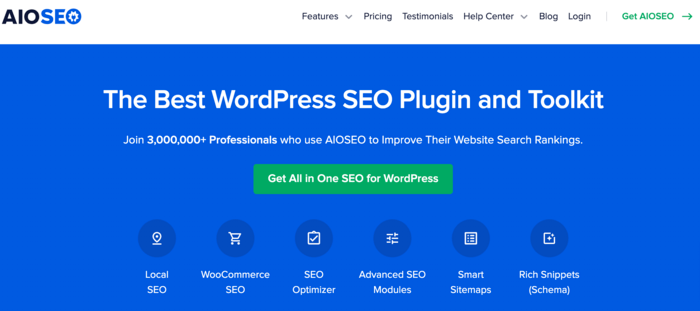
AIOSEO is a powerful yet easy-to-use SEO plugin that boasts 3+ million active installs. Millions of smart bloggers use AIOSEO to help them boost their search engine rankings and drive qualified traffic to their blogs. That’s because the plugin has many powerful features and modules designed to help you properly configure your SEO settings.
Examples of AIOSEO’s revolutionary features include:
- Cornerstone Content: Easily build topic clusters and enhance your topical authority and semantic SEO strategy.
- Author SEO: Easily demonstrate Google's E-E-A-T in WordPress.
- Search Statistics: This powerful Google Search Console integration lets you track your keyword rankings and see important SEO metrics with 1-click, and more.
- SEO Revisions: Track any changes you make to your site and see their impact on your SEO. Plus, you get to see on a timeline how Google updates affect your site.
- Advanced Robots.txt Generator: Easily generate and customize your robots.txt file for better crawling and indexing.
- TruSEO Highlighter: Makes it easy to spot on-page SEO issues and gives recommendations for fixing them.
- Next-gen Schema generator: This no-code schema generator enables users to generate and output any schema markup on your site.
- Link Assistant: Powerful internal linking tool that automates building links between pages on your site. It also gives you an audit of outbound links.
- SEO Preview: This gives you an overview of your search and social snippets and general SEO so you can improve your optimization.
- IndexNow: For fast indexing on search engines that support the IndexNow protocol (like Bing and Yandex).
- Sitemap generator: Automatically generate different types of sitemaps to notify all search engines of any updates on your site.
- And more.
AIOSEO also has many other features to help you boost your local SEO and on-page SEO. It also includes a dedicated WooCommerce SEO module for e-commerce stores.
For step-by-step instructions on installing AIOSEO, check our detailed installation guide.
2. Nail Your Page Experience
One of the first stops when looking to boost your technical SEO is to nail your page experience. That’s because page experience encompasses many other technical SEO aspects that you need to optimize.
What is page experience?
As the name suggests, page experience refers to a set of signals Google uses to measure how users perceive the experience they have when interacting with any of your web pages. These signals include:
Core Web Vitals
Core web vitals are Google’s three metrics for measuring user experience during page load. These are:
- Largest Contentful Paint (LCP): This measures a page’s load speed, and Google recommends it be within 2.5 seconds of the time the page first starts loading.
- Interaction to Next Paint (INP): INP is a web performance metric that measures a web page's responsiveness after a user interaction. A lower score is desirable.
- Cumulative Layout Shift (CLS): CLS measures a page's visual stability as it loads. Elements moving around a lot result in a high CLS. A good CLS is 0.1 or lower.
You can measure your website's core vitals in Google Search Console (GSC) under the enhancements section.
The other page experience signals include:
Mobile-friendliness
While this may sound like old news, you’ll be surprised by how many websites still lag in providing a mobile-first experience. However, with mobile devices accounting for 54.37% of the market, search engines prioritize mobile-friendly sites over those that aren't.
Security With HTTPS
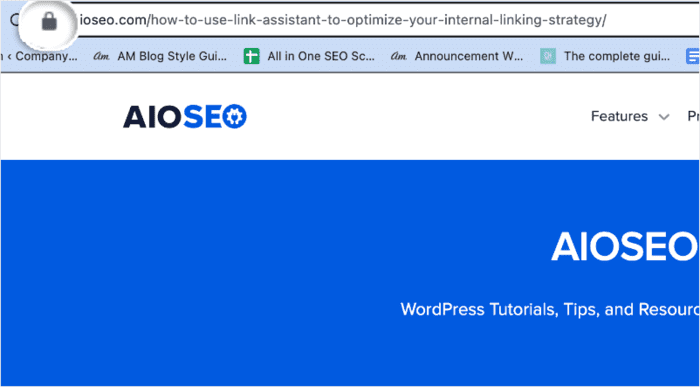
Security plays a huge role in how people experience your website. When people feel your website is secure, they interact with it more freely (and for longer). For example, the lock icon in the screenshot below indicates that the website is secure.
That’s why search engines, particularly Google, use HTTPS as one of the metrics for measuring page experience.
What’s the difference between HTTP and HTTPS?
The main difference is that HTTPS is encrypted, making it more secure. And amid the rise in cybercrime, search engines want to ensure they’re sending users to safe domains.
Intrusive Interstitial Elements
With the advent of mobile-first websites came a problem of unscrupulous webmasters and advertisers who want to manipulate the limited real estate on mobile devices by displaying full-screen pop-ups. An intrusive interstitial is any element on a page that covers most of the content, making it difficult to access.
Search engines frown on this practice as it results in a negative user experience. Remember, search engines prioritize user satisfaction above many other factors. Therefore, anything that diminishes a good experience negatively impacts your SEO.
3. Check Your Website for Crawl Errors
To know the purpose of a website, search engines “crawl” your web pages. Crawling simply means following the links from one page to another. This is why having an internal linking strategy is crucial because it helps search engines understand your website and its page hierarchy.
That’s also why you must ensure there are no crawl errors on your website. A few common factors that could lead to crawl errors include:
Broken links
Because a website is always a work in progress, there will always be broken links. Always monitor your website for these and create redirects.
You can also check out how to find and fix broken links in this article.
Redirect Chains
As much as redirects are handy, they can do more harm than good to your website if not properly handled. You can end up with redirect chains, a situation where one redirect leads to another, and another, and another, and so forth. Redirect chains can lead to serious crawl errors.
The easier it is for search engines to crawl your site, the better your chances of ranking higher.
That's why AIOSEO's Redirection Manager is an essential tool for anyone who wants to master technical SEO.
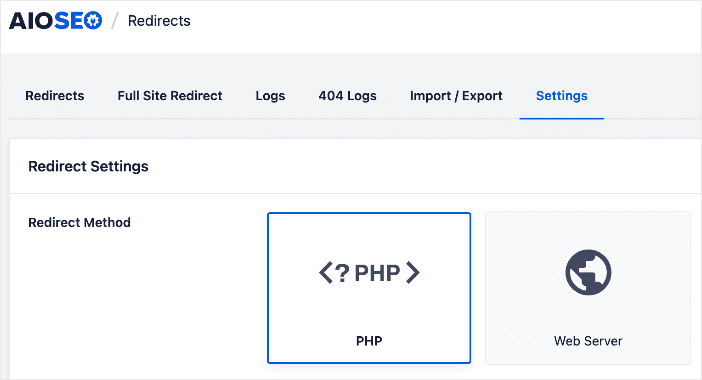
This powerful tool makes managing your redirects super easy. For example, among other things, you can:
Schedule Redirects
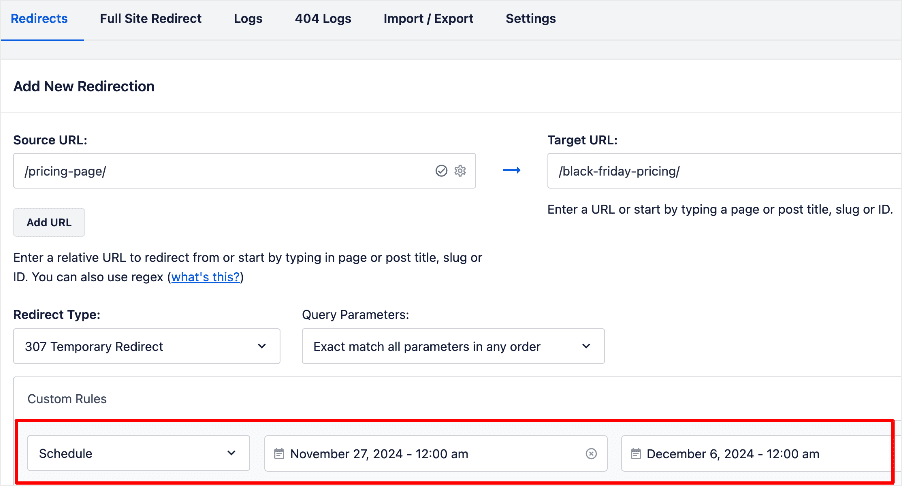
This feature works well with both temporary and permanent redirects and helps eliminate 404 errors.
Import Bulk Redirects from a CSV File
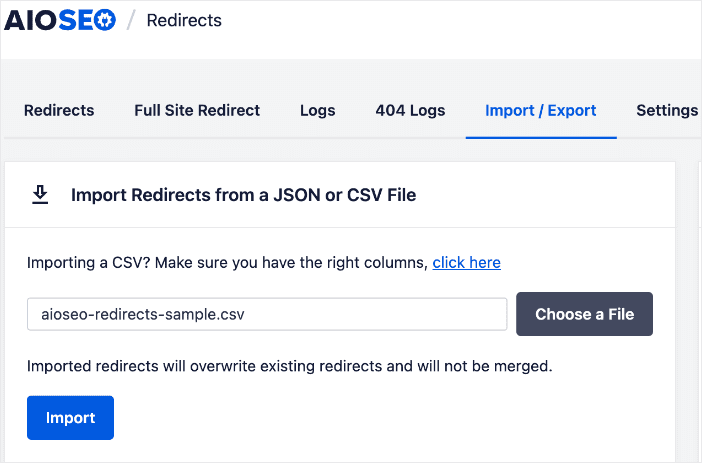
Importing bulk redirects this way is more efficient and less laborious.
The Redirection Manager also offers many other features, such as automatic redirects, a URL slug monitor that detects changes to your URLs, and more.
4. Create a User-friendly Site Architecture
Site architecture refers to how the pages on your website are organized, grouped, and linked together. Your site architecture, done well, can help users and search engines easily find what they are looking for on your site.
From a user perspective, this results in increased time on site, signaling to search engines that your site offers a positive UX and valuable content.
A few factors that can influence your site architecture include:
- Navigation menus
- Categorization
- URL structures
- Breadcrumbs
- Internal linking
Remember, search engines are all about providing users with a positive UX. On a website, one of the most significant elements that contributes to UX is the site architecture. So, make sure you optimize it for SEO.
5. Optimize Your Robots .txt File
A robots.txt file gives search engines instructions on which pages to crawl and display in search engine results.
Yes, there are some pages you’d rather not have search engines waste their time by crawling. Examples include:
- Admin pages
- Cart and checkout pages
- Login pages
- Resources like PDFs
Optimizing your robots.txt file ensures that only the important pages on your website are crawled and indexed. For large sites, optimizing the robots.txt file also helps maximize crawl budget.
Again, this is another area in which AIOSEO shines. It lets you easily manage and optimize your robots.txt file. You can find this under the “Tools” section of AIOSEO’s dashboard:
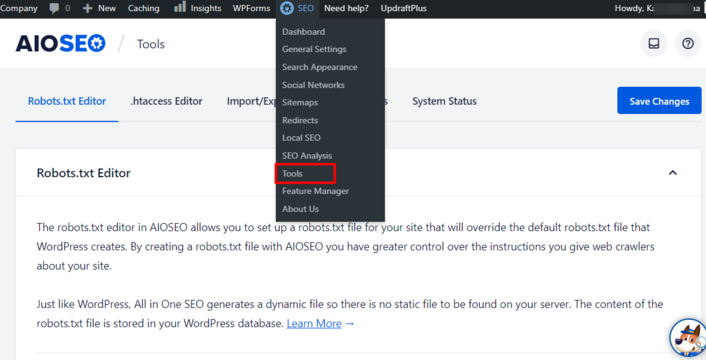
Besides automatically optimizing the default robots.txt file WordPress generates for your site, AIOSEO also allows you to edit your robots.txt file manually.
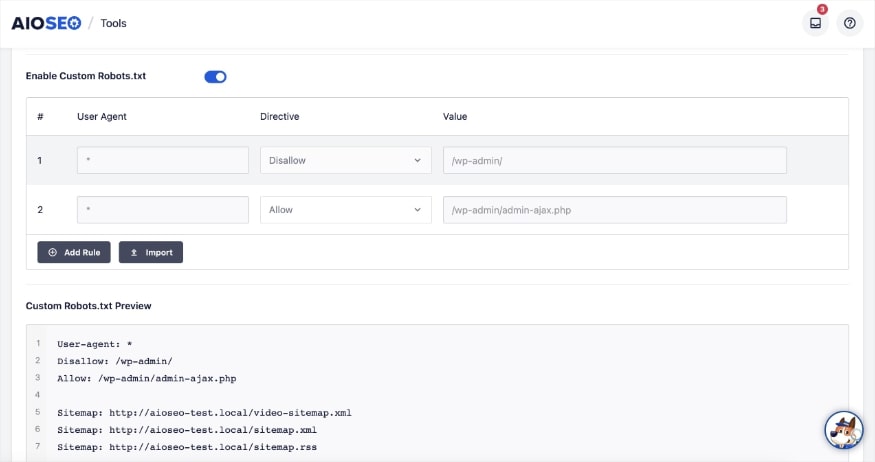
This enables you to give search engines specific instructions on how to crawl your site, allowing you to prioritize which URLs they should crawl.
You can also use AIOSEO's Robots.txt Editor to block the crawling of internal site search URLs.
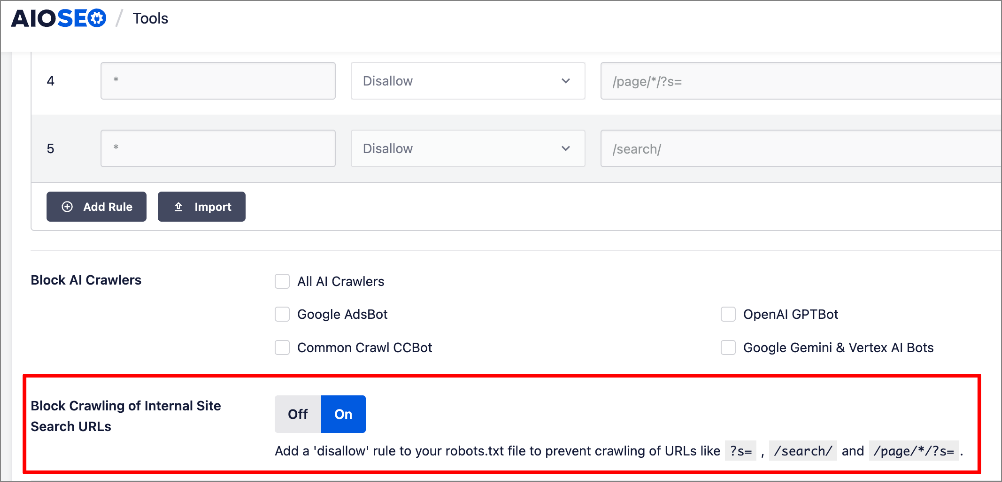
At the click of a button, you can add disavow rules that prevent the crawling of internal site search URLs. You can also use it to block unwanted AI crawlers.
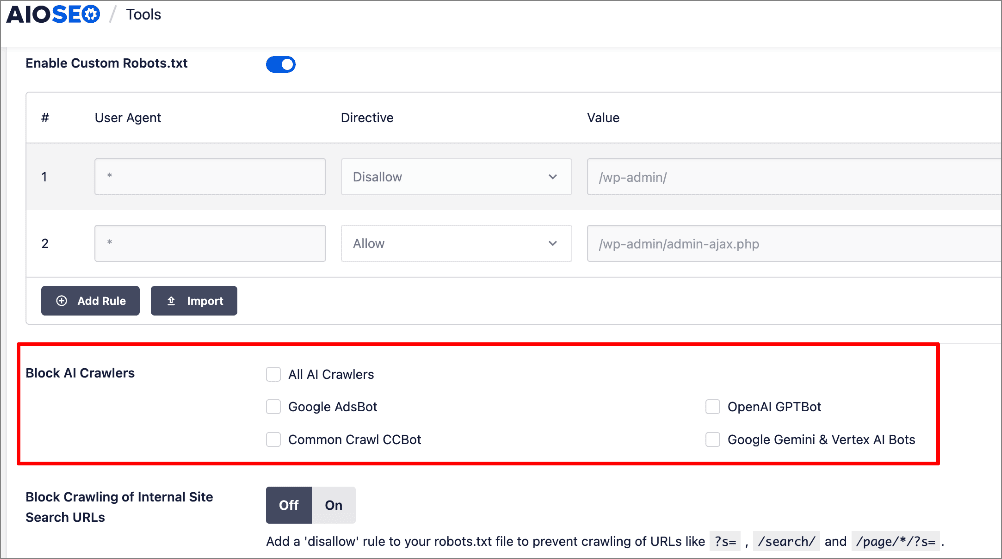
For more details, check out our ultimate guide to robots.txt files.
6. Create and Optimize an XML Sitemap
XML sitemaps are often overlooked elements of an effective technical SEO strategy. Yet, they can be powerful if executed well.
If you’re wondering, an XML sitemap is simply a blueprint of your website. It helps search engines easily find, crawl, and index your content. This helps speed up the indexing of your website's pages.
Besides making it easy for search engines to crawl your site, a sitemap also provides valuable information such as:
- The relationship between the important pages on your website.
- How often is each page on your website updated?
- When they were last updated.
Creating a sitemap is super-easy with a tool like AIOSEO. To get started creating your sitemap, all you have to do is go to the plugin’s settings and click on “Sitemaps”.
This will take you to the page where you can enable AIOSEO to generate a sitemap for your website.
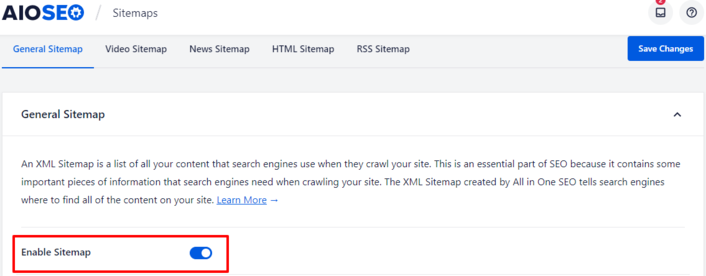
Enabling “Enable Sitemap” causes AIOSEO to automatically generate a sitemap for your website. You can even preview your sitemap by clicking on the “Open Sitemap” button.
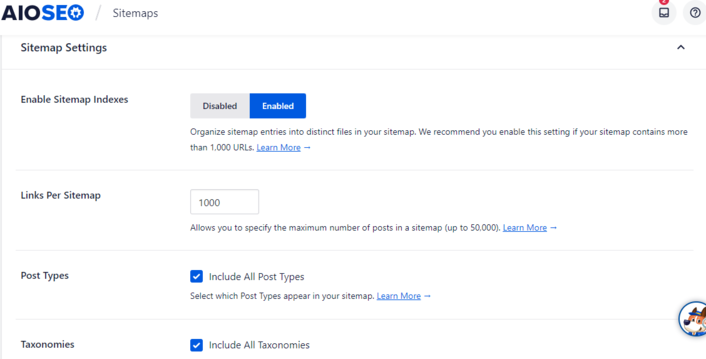
If you’re confident playing around with sitemap settings, AIOSEO gives you the flexibility to further optimize it by adjusting various settings. Examples include enabling/disabling sitemap indexes, setting the number of posts per sitemap, and much more.
Once you’ve created your sitemap, submit it to Google via Google Search Console. Also, make sure to add it to your robots.txt file.
7. Create a Search Engine and User-friendly URLs
Another item to include on your technical SEO checklist is your URL structure.
According to Google, your website’s URL structure should be as simple as possible. Your URLs should be search engine and user-friendly.
Part of that means organizing your content so that URLs are constructed logically, are easy to read, and intelligible to readers.
URLs aren’t just meant to help search engines find a page's address. They should also show readers that the page they’re clicking on will meet their search intent. To do this, use readable words that include your keyword. Avoid using the default URLs WordPress assigns, as they’re incorrigible and contain meaningless ID numbers.
So, how do you edit your URLs?
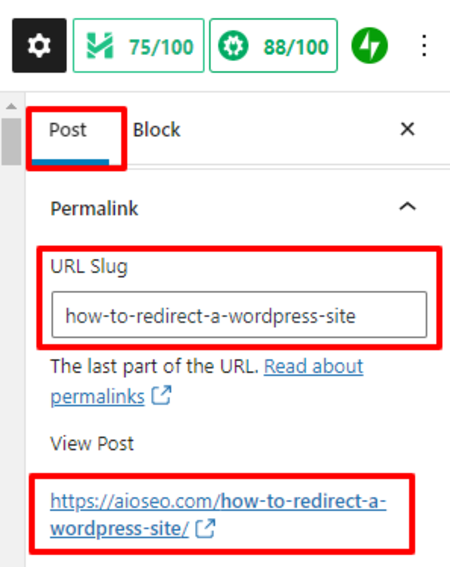
The easiest way is to use the URL slug editor in AIOSEO. Simply click on the “Post” settings and scroll down to the “Permalink” option. Next, enter the words you want to appear in your URL, including your keyword. Also, keep the URL as short as possible.
If you’ve read this far and haven’t downloaded the plugin yet, we suggest you take a moment to do so. AIOSEO is one of the best WordPress SEO plugins and can help you effortlessly tick off items on your technical SEO checklist.
8. Eliminate Duplicate Content
Duplicate content is a plague that can easily attack any website. Particularly if you run an e-commerce website that sells similar products, you’ll have to be careful with your product descriptions.
However, duplicate content is not just a problem for e-commerce stores. Every website can suffer from duplicate content.
What is duplicate content?
As the name suggests, duplicate content is content that is similar but appears on different URLs. This can be on other sites or even other pages on your website. This can mean the content, meta tags,
And if you’re wondering, duplicate content impacts SEO negatively as search engines won’t know:
- Which version to index?
- Whether to direct link metrics to one page or split them between multiple versions.
- Which version to rank for query results?
Search engines never display the same content on search engine results pages (SERPs). So, no matter how good the content is, it will struggle to rank if it’s duplicate content.
How do you deal with duplicate content?
For duplicate content on your site, one of the best ways to address it is to 301 redirect all duplicate pages to the original page.
Another excellent way to deal with duplicate content is to add a rel= canonical tag to the URL you want search engines to index. This tag tells search engines that the canonicalized URL is the original one and should be indexed.
Lastly, you can delete the duplicate pages. When you do this, however, remember to redirect the URLs to the remaining page.
9. Implement Schema Markup
For search engines to better understand your website, it needs to be structured so bots can easily crawl it. But because humans and bots don’t speak the same language, it makes it difficult to create web pages that cater to both.
That’s where schema markup comes in.
Schema markup, or structured data, is the language of search engines. It’s a collection of standardized tags you can place on your website to describe various page elements in “robot speak.”
Schema markup helps search engines better understand the content on your website, resulting in a better user experience. With schema markup implemented, search engines can display “rich results” in SERPs.
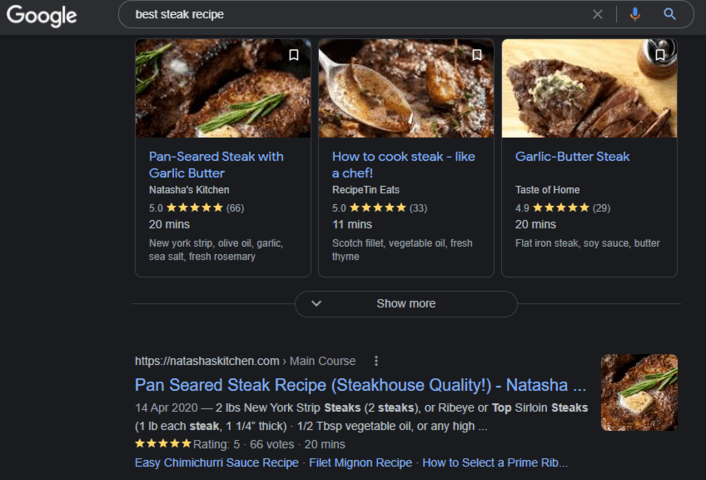
These rich results are more interactive and provide more information about your webpage, resulting in higher click-through rates.
Another advantage of adding schema markup is that it helps boost your entity SEO. In short, an entity is something unique and distinguishable enough to be searched for by name. This takes SEO to a more contextual level than the basic keyword level.
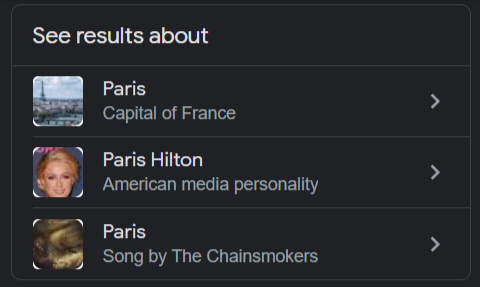
Take, for example, a person who types in “Paris” in a search engine. Search engines may not know whether the person is referring to the city or a person. Entity SEO considers the context of keywords, enabling search engines to deliver relevant results to users.
What does this have to do with schema markup?
A whole lot!
Schema markup enables search engines to associate your brand with entities in your niche, field, or industry. As a result, when a search is made concerning entities that match your brand, your chances of showing up greatly increase. In our example of searching for “Paris,” here are the entities Google recognizes.
Entity SEO is still an untapped SEO tactic. Implementing schema markup is one way to help you get it right.
So, how do you add schema markup to your pages?
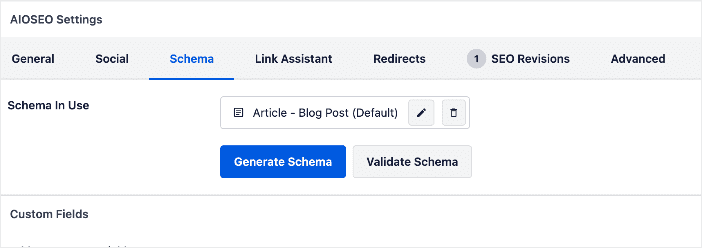
If you’re an AIOSEO user, this is pretty easy, and you don’t have to hire a developer. This is all thanks to our next-gen Schema Generator. All you have to do is go to the page you want to add schema markup to, then open the AIOSEO Settings section beneath the page. Click on the Schema tab, and you’ll be led to the page with schema markup settings:
Next, select the type of schema markup relevant to that particular page:
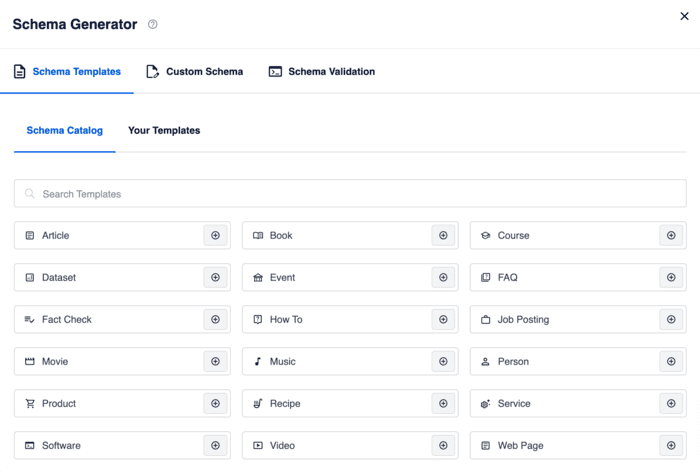
With other types of schema markup (like product schema or recipe schema), you’ll have the option to include other tags:
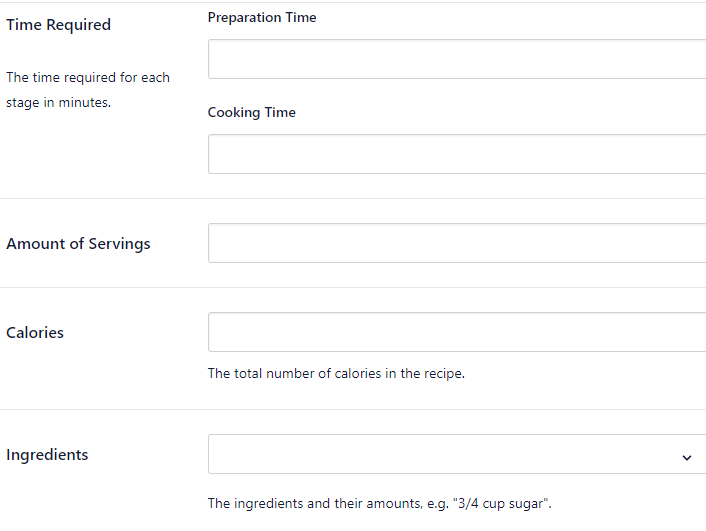
Once you’ve filled in all the relevant fields, AIOSEO will do the rest and automatically implement schema markup for you.
Technical SEO: Your FAQs Answered
What is technical SEO?
Technical SEO refers to optimizing the non-content elements of a website to improve crawlability, indexability, and ultimately improve search rankings. This includes things like site architecture, URL structure, mobile-friendliness, page speed, structured data, and more.
Why is technical SEO important?
Technical SEO ensures search engines can properly crawl, render, and index your website's content. It removes technical barriers that could prevent search engines from understanding and ranking your pages appropriately. Good technical SEO provides a solid foundation for on-page/content optimization
What Next?
No matter how amazing your content may be, ranking will be an uphill battle if your technical SEO is poor.
Using this checklist, you can lay a strong foundation for a powerful content marketing engine. With your technical SEO sorted, ranking high on SERPs will become easier.
I hope this post has helped you know what technical SEO is and how to implement it in WordPress. You may also want to check out other articles on our blog, such as our ultimate guide to WordPress SEO or how to implement a full-site redirect.
Disclosure: Our content is reader-supported. This means if you click on some of our links, then we may earn a commission. We only recommend products that we believe will add value to our readers.
Want to Try AIOSEO for Free?
Enter the URL of your WordPress website to install AIOSEO Lite.

