Choosing between Rank Math vs. Yoast isn't really about which plugin has more buttons. It is about which one fits how you work, and which one will not slow you down 6 months from now.
I tested both plugins across setup, on-page optimization, schema, pricing, and AI tools, so this guide shows you exactly where each one wins and where it falls short. So, in this Rank Math vs. Yoast comparison, I'll walk you through features, usability, pricing, and overall effectiveness so you can make an informed decision.
One quick note before we start: we make AIOSEO, a third WordPress SEO plugin. We have included our own data further down for full transparency, but this guide is primarily about helping you choose between Rank Math and Yoast.
Let's start!
In This Article
- Rank Math vs. Yoast at a Glance
- Rank Math vs. Yoast: Introducing the Contenders
- Rank Math vs. Yoast: Set Up and User Interface
- Rank Math vs. Yoast: On-Page SEO
- Author Profile Enhancements
- Rank Math vs. Yoast: AI Integration
- Rank Math vs. Yoast SEO: Technical SEO
- Rank Math vs. Yoast: Advanced Features
- Rank Math vs. Yoast: Pricing and Plans
- Rank Math vs. Yoast vs. AIOSEO: Which Is Right for You?
- Yoast vs. Rank Math Review: Your FAQs Answered
- Rank Math vs. Yoast: Which Is Worth It?
Rank Math vs. Yoast at a Glance
Before we get into the details, here is a quick side-by-side comparison of Rank Math, Yoast, and AIOSEO on the features people ask about most.
| Feature | Rank Math | Yoast SEO | AIOSEO |
|---|---|---|---|
| Free plan | Yes, feature-rich | Yes, basic | Yes, basic |
| Focus keywords, free plan | 5 per post | 1 per post | 1 per post |
| Schema types, free plan | 18 pre-defined types | Basic schema graph | Several types, more on paid plans |
| Redirect manager | Free | Premium only | Pro plan and up |
| 404 monitor | Free | Not included | Pro plan and up |
| AI features | Content AI, separate subscription | Included in Premium | AI credits are included on every paid plan |
| WooCommerce SEO | Pro plan and up | Separate add-on | Included in the Basic plan |
| Local SEO | Built into settings | Separate add-on | Plus plan and up |
| Entry paid plan | 107.88 dollars a year, unlimited personal sites | 99 dollars a year, per site | 49.50 dollars a year, 1 site |
If we go by the numbers, you can see that Rank Math packs more into its free version, whereas Yoast keeps things simple but charges per site, and AIOSEO sits in the middle on price. Now let's look at how each plugin holds up in daily use.
Rank Math vs. Yoast: Introducing the Contenders
Our two contenders are complete SEO plugins for WordPress that offer basic and advanced SEO tools and features.
Yoast SEO

Yoast SEO started out as WordPress SEO by Yoast in 2010, created by Joost de Valk. It offers a Lite (free) version, a Pro version, and several add-ons. In August of 2021, Yoast was bought by Newfold Digital, putting it in the same stable as other popular brands like Bluehost, Hostgator, Web.com, and more.
If you want to learn more, check out our in-depth look at Yoast WordPress SEO, or if you're struggling to decide between AIOSEO and Yoast SEO, check out our detailed Yoast vs AIOSEO comparison post.
For more details, check out our in-depth look at Yoast WordPress SEO.
If you're struggling to decide between AIOSEO and Yoast SEO, check out our detailed Yoast vs AIOSEO comparison post.
Rank Math
Rank Math is a relative newcomer compared to Yoast and All in One SEO, but it has quickly grown in popularity. The plugin was launched in late 2018 by the developers behind MyThemeShop. However, it was acquired by Group One in 2023.
Rank Math offers a Lite version and a Pro version.
Check out our head-to-head comparison of Rank Math and AIOSEO for a detailed comparison between these two titans.
Rank Math vs. Yoast: Set Up and User Interface
To start with any plugin, they have set up wizards to help you configure your settings. Setting up plugins isn't always simple. Here, we'll compare how Rank Math and Yoast SEO handle the initial setup.
Yoast First-Time Setup
Yoast SEO's 5-step installation wizard can get pretty overwhelming. It throws the beginner into a complicated and cluttered dashboard with more technical information than necessary when just starting out.

Yoast SEO works right out of the box with smart defaults. But you’ll want to set up a few key things. Examples include:
- Site type (blog, news, ecommerce, etc.)
- Search engine visibility
- Enable XML sitemap
- Connect Google Search Console
Rank Math First-Time Setup
Rank Math’s installation wizard is easy to follow, and you can go through it rather quickly.
Once you’ve installed and activated Rank Math, you’ll see the Dashboard with different Lite or Pro modules. Navigate to the Setup Wizard tab to start the configuration process.
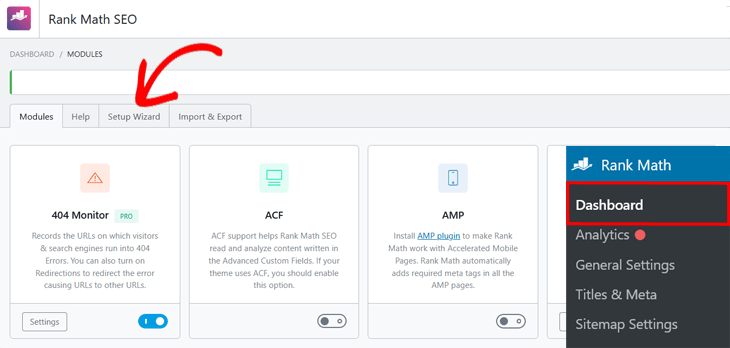
The setup wizard comes with 5 +3 configuration steps, depending on whether you’re installing the Lite (Easy) or Pro (Advanced) version of the plugin.
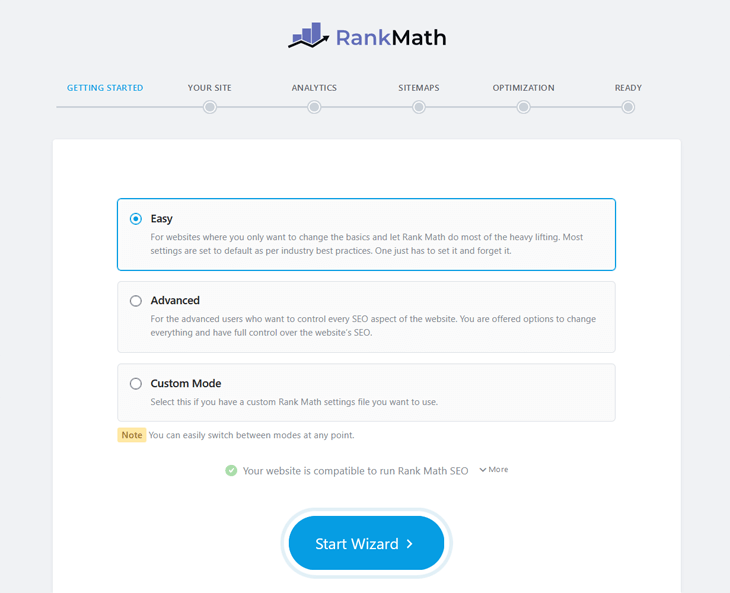
What may feel like an initial roadblock is that it asks you to connect your Google Analytics account in the second step. The Google Analytics integration is a great feature in its own right. However, most website owners who track their stats use an advanced Google Analytics plugin like MonsterInsights.
Once you’ve set up your plugin of choice, you can get into the nitty-gritty of running your SEO campaigns.
Rank Math vs. Yoast: On-Page SEO
On-page optimization is a crucial SEO factor for ranking your content in search engines, which we’ll look at for our two contenders next.
Both plugins include an easy-to-use SEO meta box to edit your SEO title tags, meta descriptions, and keywords for individual posts and pages.
Yoast's SEO Meta Box
The SEO meta box in Yoast does the job, but the interface feels a bit outdated and cramped. It appears in your post and page editing screens, usually below the main content editor or in the block editor sidebar. It allows you to optimize individual pieces of content for search engines.
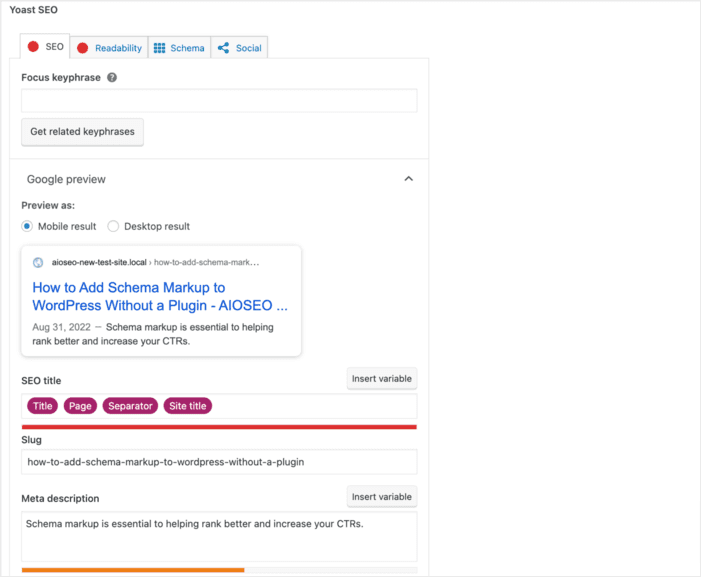
The meta box is typically divided into several tabs or sections, including:
- SEO Analysis: This is a core feature that analyzes your content in real time based on the specified focus keyword. It provides feedback using a traffic light system (green, orange, red) to indicate which parts of your content are well optimized and which need improvement.
- Readability: This tab analyzes the readability of your content using metrics like the Flesch Reading Ease score, sentence length, paragraph length, and use of transition words. It aims to help you create content that is easy for your audience to understand, which can indirectly benefit SEO.
- Snippet Preview: This section shows you a preview of how your post or page is likely to appear in Google's search results.
Also, the Lite version only has variables for the title, page, separator, and site title to optimize your title and meta description.
Rank Math SEO Meta Box
Contrary to Yoast, Rank Math’s SEO meta box is located in the WordPress block editor. This isn’t optimal since it makes it difficult to view and manage your on-page SEO.

You have to click on the Edit Snippet button to get a less cramped-up screen where you can edit the title, permalink, and meta description.
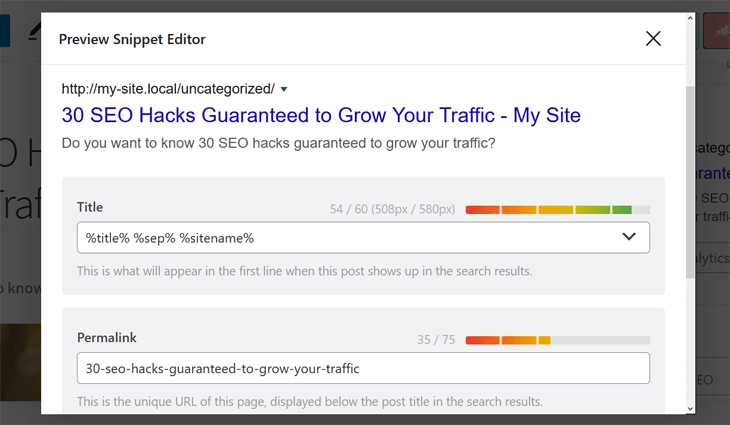
Rank Math offers 22 smart tags to help you optimize the title and description, or you can type them in manually.
Content Analysis and Optimization
The best WordPress SEO plugins come with content analysis tools to help ensure you meet all on-page SEO requirements. These are fantastic tools for content optimization.
So, in our Rank Math vs. Yoast SEO showdown, who provides the better content analysis?
Let’s briefly look at what each has to offer.
Yoast SEO Content Analysis
Yoast SEO offers a content analysis tool designed to help optimize your website's posts and pages. To access this tool, click on the Yoast plugin icon in the top right corner of your page while in editor mode.
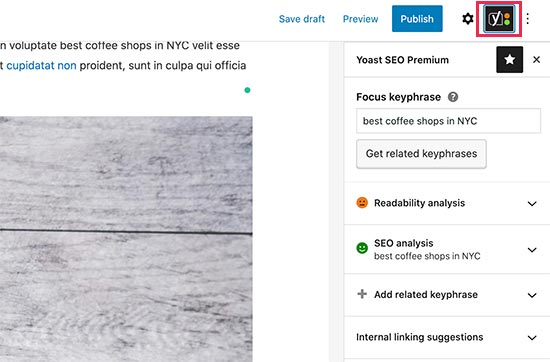
This tool provides insights to improve both readability and search engine ranking, making it a valuable resource for enhancing your content's overall performance.
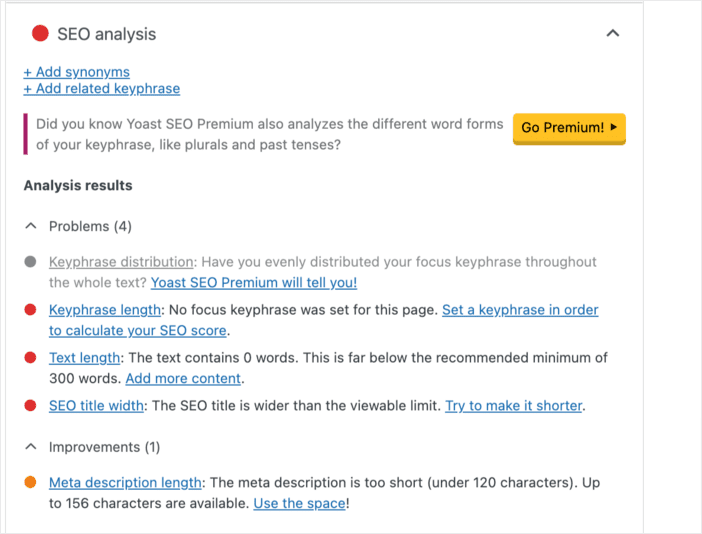
Yoast’s content analysis gives you real-time feedback as you write posts and pages. It covers SEO elements, such as readability and content optimization, and provides an overall content score. This helps you improve on-page SEO at publish time instead of editing later.
Rank Math’s Content Analysis
Rank Math does a pretty good job in this department by providing real-time analysis as you create content. This feature offers actionable suggestions to enhance your content's SEO potential, ensuring your posts and pages are optimized for better search engine performance.

Rank Math also has content and title readability analysis, which are great SEO features that help you benchmark your content against SEO best practices.

For instance, the content analysis tool checks your content's readability, multimedia usage, and more.
Author Profile Enhancements
Author SEO focuses on optimizing author profiles to enhance search engine visibility. By properly structuring author information, you can strengthen Google's E-E-A-T (Experience, Expertise, Authoritativeness, Trustworthiness) signals, which influence ranking performance.
By default, WordPress allows you to input author information to help with this. Examples include:
- Full name (for clear attribution)
- Valid email address (to verify identity)
- Website URL (linking to your professional presence)
- Biography (highlighting credentials and expertise)
- Professional profile image (for brand consistency and recognition)
However, many SEO plugins add more functionality to this, helping you enhance your author SEO.
Let’s quickly see how well Rank Math and Yoast SEO do here.
Yoast SEO’s Author Enhancements
While Yoast SEO extends WordPress’s author profile functionality, it’s still pretty basic. It enables you to add titles to author pages, prevent indexing of author archives, and disable SEO and readability analyses on author pages.

Yoast SEO also provides settings to manage and customize author archives, which are index pages listing all posts by a specific author. These settings, found under the “Search Appearance” section, allow you to control whether author archives are displayed in search results and to customize their SEO titles and meta descriptions.

Premium users can also customize how these pages appear on social media. While single-author blogs may not need them, author archives can be beneficial for multi-author sites, enhancing SEO and social media presence.
Rank Math’s Author Enhancements
Rank Math helps you add author schema markup, which helps search engines better understand your identity and credentials.

Rank Math also provides comprehensive control over author archives within its Titles and Meta settings. You can customize the SEO title and meta description for these pages, often using dynamic variables to automatically populate relevant information.
Like Yoast SEO, Rank Math allows you to choose whether to index author archives, which is crucial for multi-author blogs looking to showcase each author's work and build their E-E-A-T. Rank Math also lets you customize the author base URL.
Rank Math vs. Yoast: AI Integration
AI integrations in SEO plugins empower users with more intelligent, automated, and personalized tools, ultimately leading to more effective SEO strategies and better results in search engine rankings.
Both Rank Math and Yoast SEO have implemented artificial intelligence in their plugins.
But how do they approach it?
Yoast SEO’s AI Integration
While traditionally focused on rule-based analysis, Yoast SEO has recently embraced the power of artificial intelligence by introducing AI-powered features within its premium version.
Currently, the primary AI capabilities focus on generating SEO titles and meta descriptions.

This feature aims to streamline the often time-consuming task of crafting compelling, click-worthy search results snippets.
Another interesting AI-powered feature is Yoast AI Optimize. This feature, available in the premium plans, simplifies content optimization.

Integrated directly into the WordPress block editor, it analyzes your text and provides SEO suggestions. Specifically, it focuses on keyphrase usage, checking if the keyphrase is in the introduction, its distribution throughout the text, and its overall density.
The AI-powered recommendations are handy, and you can choose to apply or dismiss each suggestion as you write.
Rank Math’s AI Integration
One feature that makes Rank Math unique is Content AI. This is a collection of 40+ AI tools available right inside your WordPress editor. Content AI helps you with most content-related tasks, from blog post ideation to outlines to polished intros and outros.

One feature that makes Rank Math unique is Content AI. This is a collection of 40+ AI tools available right inside your WordPress editor. Content AI helps you with most content-related tasks, from blog post ideation to outlines to polished intros and outros.
If you've already published content, Rank Math’s AI can bulk-generate SEO title tags and meta descriptions, allowing you to optimize your existing pages and posts in just a few clicks.
And if you need help writing, Rank Math’s Content AI can write for you using a credit-based token system.

Reviews on this feature are mixed. Many users like having AI tools built right into the editor, but the credit-based system means costs can climb quickly, and the output for longer content often needs a heavy editing pass before it is publish-ready.

Rank Math vs. Yoast SEO: Technical SEO
Technical SEO involves optimizing the technical aspects of your website and server to enhance performance, user experience, and search engine visibility. It encompasses crawling, indexing, UX, site speed, and more.
Let’s quickly take a look at some of the technical SEO tools that Rank Math and Yoast SEO have to offer.
Schema Generators
Understanding and correctly implementing schema markup helps search engines understand your content and, increasingly, helps AI answer engines like ChatGPT, Perplexity, and Google's AI Overviews decide whether to cite your page.

One important update here: Google fully retired FAQ rich results from search on May 7, 2026, and it had already removed How-To rich results from both desktop and mobile back in 2023. FAQ and How-To schema no longer display a visible accordion or step-by-step snippet in Google, regardless of which plugin generates the markup. That does not make the schema pointless. Structured data still helps search engines, and AI answer engines parse your page, which matters more for AEO and AI citation than it does for a rich snippet that no longer exists.
Both plugins take a different approach to schema markup, particularly in their free tiers.
Yoast SEO Schema Generator
Yoast SEO takes a more foundational approach to schema markup in its free version. It uses a unified schema graph rather than a large catalog of types, which gives you a clean, consistent entity model but a narrower range of schema types without upgrading.

Yoast's approach works well for developers who want fine control over the underlying markup, but users looking for a wider range of ready-made schema types in the free version will likely find Rank Math's offering more comprehensive.
Rank Math’s Schema Generator
Rank Math includes a wide selection of schema types, even in its free version, covering 18 pre-defined types such as Article, Product, Recipe, Review, and Local Business.

The interface is straightforward, making schema markup easier to implement without requiring code changes. Rank Math also includes tools to test and validate your schema markup, ensuring it's correctly configured for search engines.
Redirection Manager and 404 Error Management
Redirection managers are essential tools designed to streamline the process of redirecting traffic from one URL to another. By using these tools, you can prevent common issues like 404 errors, ensuring that both users and search engines can access your content seamlessly.
This not only enhances the overall user experience but also plays a crucial role in optimizing your website's performance for search engines.
Yoast SEO’s Redirection Manager
Yoast SEO's Redirection Manager is a Premium-only feature. It is not included in the free version at all, and it helps you manage URL redirects and prevent broken links once you have it.

With this tool, you can create and manage:
- 301 redirects: Permanently redirect old URLs to new ones.
- 302 redirects: Temporarily move pages without losing traffic.
- 410 and 451 redirects: Let search engines know when content is no longer available or restricted.
- Regex redirects: Set up advanced pattern-based redirections.
Yoast SEO supports 5 basic redirect types once you upgrade. It does simplify handling URL changes by automatically suggesting redirects when you delete or change a page’s URL.
Rank Math’s Redirection Manager
Rank Math includes its redirect manager and 404 monitor for free, supporting 3 common status codes: 301, 302, and 307.

The redirect type selection is more limited than in some dedicated redirection plugins, but having it available for free is a real advantage over Yoast.
Breadcrumb Navigation
Breadcrumb navigation is a secondary navigation that helps users and search engines better navigate your website. It’s a great way to enhance UX and show search engines the hierarchy of your pages.

Yoast SEO’s Breadcrumb Navigation
Yoast SEO makes implementing breadcrumbs on your WordPress site a breeze. Their plugin offers a straightforward way to enable and customize these helpful navigation trails without needing to mess with any code.

You can easily adjust the appearance of your homepage, including the separator between links and the text, directly from the WordPress admin.
What's really neat is that Yoast SEO automatically adds the necessary schema markup for your breadcrumbs. This helps search engines understand your site's structure, which can be a nice boost for your SEO. Plus, they provide clear instructions and even a code snippet if your theme doesn't have built-in support, making it accessible for everyone.
Yoast SEO's breadcrumb feature is a simple yet effective way to improve your site's navigation and help both your visitors and search engines understand your content's organization. However, to get the most out of it, there’s a slight learning curve if you’re not a technical person.
Rank Math’s Breadcrumb Navigation
Adding and editing breadcrumbs in Rank Math is straightforward. Simply go to the General Settings and select the Breadcrumbs option.

You'll have multiple options to customize your breadcrumbs according to your preferences. However, for advanced users, the breadcrumb settings might seem limited, since they lack the complexity and flexibility that more sophisticated users often require.
Sitemap Generators
The core principle of SEO is ensuring that search engines can effectively crawl and index your website. Without this capability, even the most sophisticated SEO strategies will fail to deliver results.
Sitemaps play a crucial role in this process by serving as guides that help search engines navigate your site's structure and content. They not only facilitate the discovery of new and updated pages but also alert search engines to changes, leading to faster content indexing.
So, what do Rank Math’s and Yoast SEO’s sitemap generators have to offer?
Yoast SEO’s Sitemap Generator
Yoast SEO automatically generates XML sitemaps for all your post types. To keep things simple, it does not have a dedicated page to manage your XML sitemaps.
However, you can turn XML sitemaps on or off by visiting the SEO Settings » General » Site Features page. This is where you can also view your sitemaps.
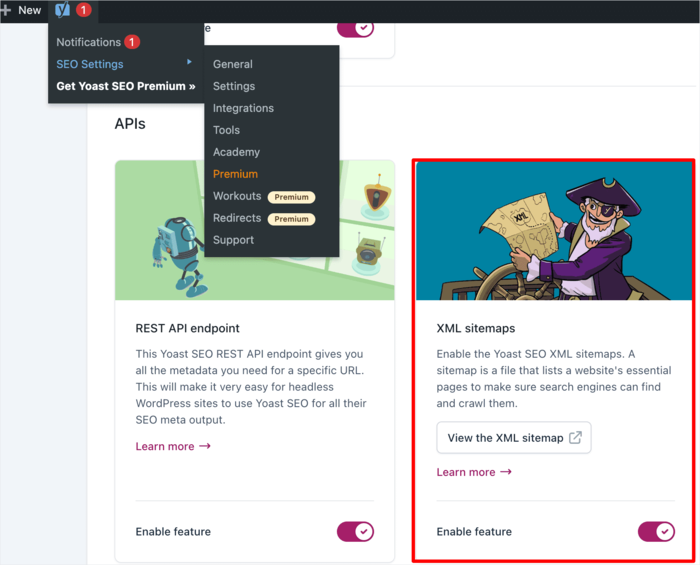
At an additional cost, Yoast SEO also offers:
- News sitemaps: For news sites to submit the latest content to Google
- Video sitemaps: Help Google find and index video content
- Local sitemaps: To improve local search visibility
Yoast's settings also do not let you include or exclude specific post types from your XML sitemap.
Rank Math’s Sitemap Generator
Rank Math's sitemap generator is capable, supporting HTML, Google News, and video sitemaps.
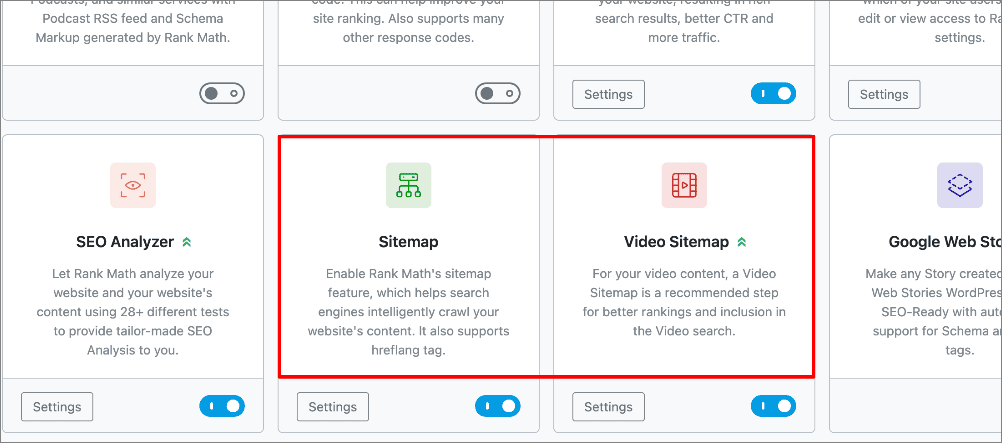
One quirk worth flagging: Rank Math spreads its sitemap settings across separate modules rather than a single central page, which can be confusing the first time you look for a specific setting.
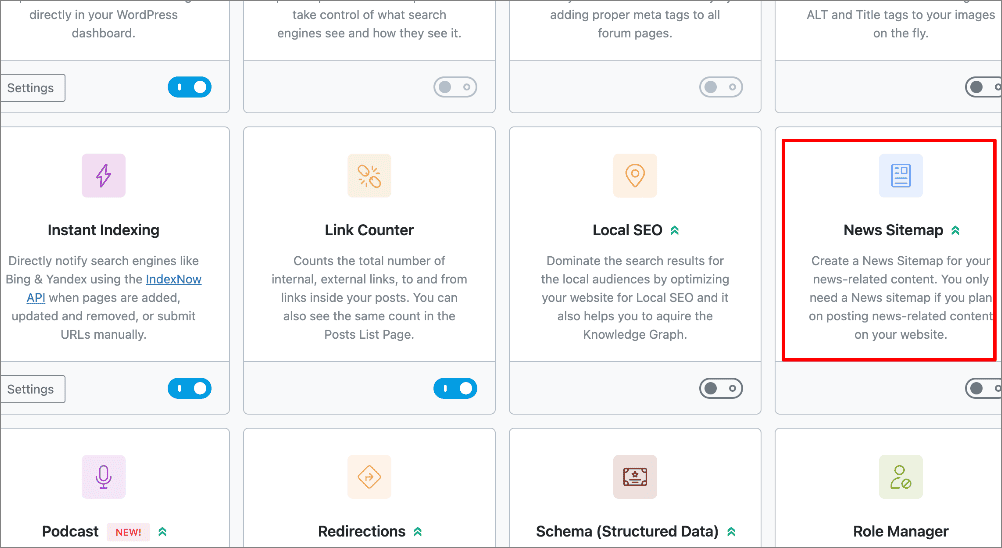
Robots.txt Editor
A robots.txt file tells search engine bots (and other web crawlers) how to crawl and index your website’s content. For example, you can add directives to tell these bots to ignore your WordPress admin pages, plugin files, and WordPress themes folder.
In essence, the robots.txt file enables you to control your crawl budget. By managing your crawl quota effectively, you can prompt search engines to index your most important content faster.
Yoast’s Robots.txt Editor
Yoast SEO makes handling your robots.txt file convenient right from your WordPress dashboard. Instead of fumbling with server files, you can create and edit your robots.txt file directly in the plugin's Tools section.
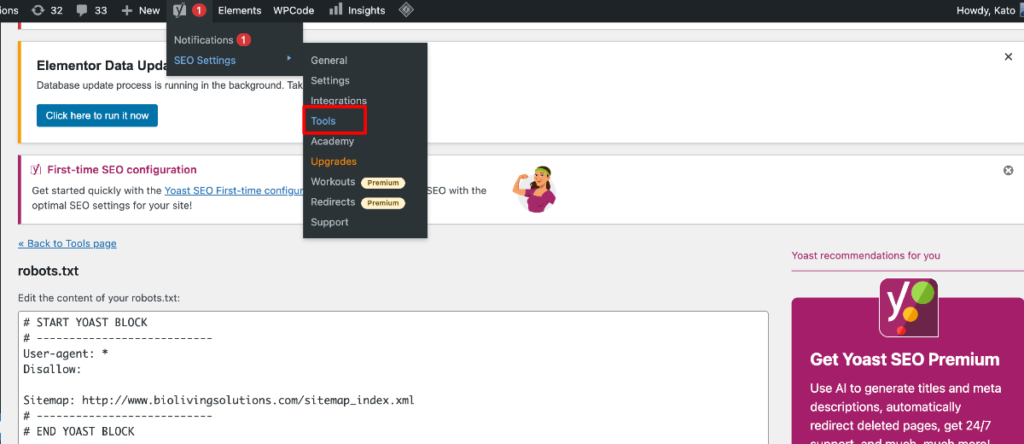
The editor sits under the File Editor menu option inside the Tools page, which is a few clicks deeper than some users expect for a tool this important.
The interface is pretty straightforward, showing you the current content of your robots.txt file (if one exists) and letting you make changes with ease. You can add directives to disallow specific folders or files, or even point to your XML sitemap.
Rank Math’s Robots.txt Editor
With Rank Math, you can create and edit your robots.txt file directly from the WordPress admin area.
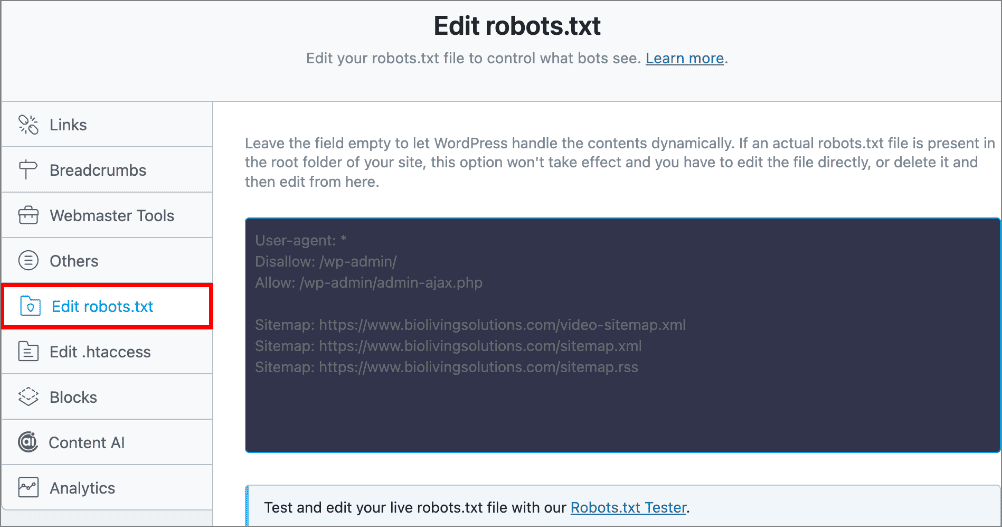
It is important to note that you will need to delete the actual robots.txt file (if any) from your website’s root folder using an FTP client if you want to use Rank Math's editor.
If you’re not comfortable with code, this editor can feel like a bigger task than it needs to be, since you'll need to know how to write or manually input crawl directives.
Rank Math vs. Yoast: Advanced Features
Advanced SEO tools offer a comprehensive suite of features that enable you to further refine your website's optimization for search engines without the need for additional plugins.
Leveraging these tools gives you a strategic edge over competitors, enhancing your site's visibility and search engine performance.
Local SEO Features
If you run a business that targets customers in a specific geographic location, you need a local SEO strategy. For example, if you run a restaurant, salon, plumbing business, or retail store, then you’d want to be found online by customers in your area.
Local SEO helps improve your chances of appearing in relevant local search results. For example, if someone searches for an “Italian restaurant” in your area, a well-optimized site increases the likelihood of appearing in their search results.

Yoast SEO’s Local SEO Features
Yoast SEO has a dedicated Local SEO plugin to help you show up in local search results. This is a separate paid add-on, not something included in the core plugin.

This add-on makes it easy to tell Google important details about your business, like your address, phone number, opening hours, and even your specific location on a map. It's all about making sure local customers can find you easily.
The plugin lets you input all your business information in a structured way that search engines love. Plus, it helps you optimize your contact page and even create a store locator if you have multiple locations. It's designed to work seamlessly with Yoast SEO, so you're getting a well-integrated solution for your local SEO needs.
Rank Math’s Local SEO Features
Rank Math offers a Local Settings section where you can enter essential business details like opening hours, address, and industry niche.

If you run a business with multiple locations, this feature ensures each venue is optimized for local searches, so all locations can rank effectively. Once configured, Rank Math automatically adds the necessary metadata, making it easier for Google to recognize your site as a local business.
WooCommerce SEO
If you run an eCommerce store, you know that organic traffic directly drives your business's sales. That’s why eCommerce SEO plays a vital role in both your lead generation and customer acquisition strategies.
By optimizing your online store for search engines, you can increase visibility, attract more targeted traffic, and ultimately boost conversions. This is why SEO should be an indispensable component of your overall business growth strategy.
Yoast SEO’s WooCommerce Integration

Yoast has a dedicated WooCommerce SEO plugin that comes separate from the core Yoast SEO plugin, and separately priced. The extension is designed to help make sure your product pages and entire shop are search engine friendly.
With the Yoast WooCommerce SEO plugin, you can optimize product titles and descriptions, ensuring they're both informative for shoppers and appealing to search engines. It also helps with product schema markup, which can help your listings stand out with prices and availability shown alongside them.
Rank Math’s WooCommerce Integration
If you run an online store, Rank Math’s WooCommerce SEO module, available on its Pro plan and up, offers tools to optimize your product pages and improve search rankings.

This module automatically removes prefixes like “product” and “shop” from your product URLs, as well as “/product-category/” from product category URLs, resulting in cleaner, more user-friendly links.
Rank Math also adds an SEO Meta Box to the WooCommerce product editor, letting you fine-tune how each product appears in search results.

Performance and Keyword Rank Tracking
Monitoring the effectiveness of your SEO efforts is a crucial element of any successful SEO campaign. This is why top-tier WordPress SEO plugins are equipped with robust performance and tracking capabilities.
These features enable you to analyze the impact of your SEO strategies, identify areas for improvement, and make data-driven decisions to optimize your content and enhance your website's search engine performance.
Yoast SEO’s Performance Tracking
Yoast SEO takes a different approach when it comes to rank tracking. Instead of integrating with Google Search Console or Google Analytics directly, Yoast partners with Wincher.

To use this feature, you'll need a separate Wincher account, since their service powers the tracking. Once connected, you can add the keywords you're targeting and see how your rankings change over time directly within your Yoast SEO interface.
It is not a built-in, free feature of Yoast SEO, but the Wincher integration is a workable way to connect your keyword strategy with your search engine rankings without leaving WordPress.
Rank Math’s Performance Tracking
Rank Math offers a couple of tools for monitoring and analyzing site performance and keyword rankings on its paid plans. Rank Math Analytics pulls SEO data from Google Search Console and Google Analytics.

The Rank Tracker inside Rank Math Analytics tracks your keyword positions on Google over time, so you can spot trends and fluctuations in your rankings.

Rank Math also provides website performance analysis, giving you data such as site speed, page load times, and mobile responsiveness.

This gives you a fairly holistic view of website health in one place, with suggested improvements alongside the data.
Rank Math vs. Yoast: Pricing and Plans
Both WordPress SEO plugins offer free plans, which include a range of valuable features to get you started. However, upgrading to a premium plan unlocks even more advanced tools and capabilities designed to enhance your SEO efforts further and boost organic search traffic.
How much will you have to part with when you settle for Rank Math or Yoast SEO?
Let’s briefly look at the pricing plans for both.
Yoast Pricing
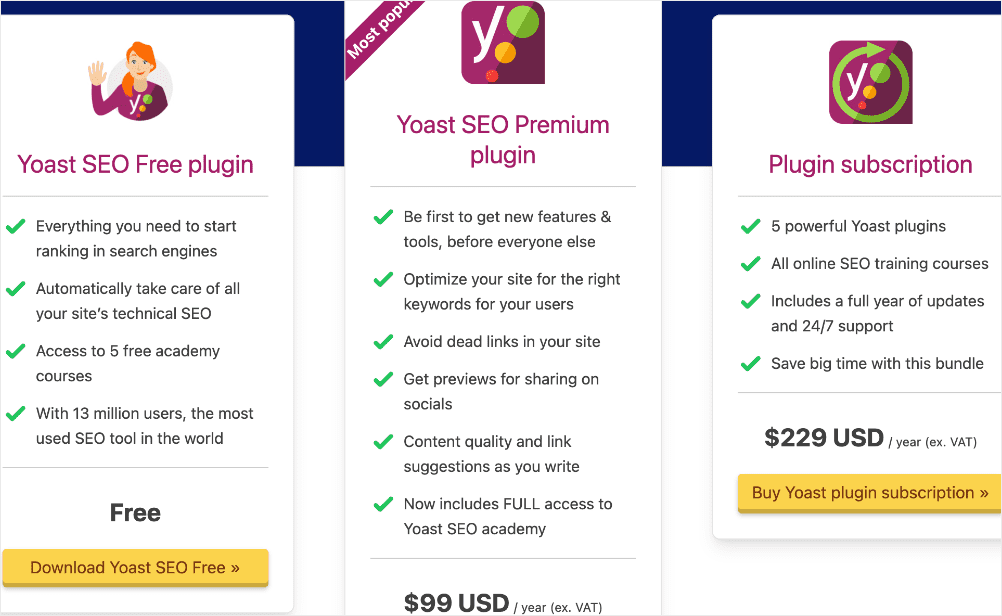
Yoast SEO Premium is priced per site at 99 dollars a year. There is no multi-site bundle at a lower per-site rate, so the cost scales directly with how many sites you manage. Managing 5 sites, for example, runs close to 500 dollars a year.
Features like Local SEO and WooCommerce SEO are separate add-ons on top of Premium, each with its own price, so a fully featured Yoast setup costs more than the base Premium price alone.
Rank Math Pricing

Rank Math Pro renews at 107.88 dollars a year and covers unlimited personal websites. Rank Math Business renews at 335.88 dollars a year for up to 200 client sites, and Rank Math Agency renews at 779.88 dollars a year for up to 750 client sites. Rank Math frequently runs first-year discounts, so the price at signup is often lower than the renewal rate shown here.
Rank Math vs. Yoast vs. AIOSEO: Which Is Right for You?
Rank Math and Yoast cover the fundamentals well, but they are not the only 2 options. We make AIOSEO, a third WordPress SEO plugin, and we have included our own data below for full transparency. This guide is primarily about helping you choose between Rank Math and Yoast, so consider this section a bonus data point rather than a hard sell.
Here is where AIOSEO tends to pull ahead of both plugins:
- Content analysis: AIOSEO's TruSEO On-Page Analysis adds secondary keyword tracking, transition word checks, and keyword density scoring on top of the basic and readability checks Rank Math and Yoast offer.
- Author SEO: AIOSEO's Author SEO module lets you add awards, spoken languages, and areas of expertise, with schema markup generated automatically, going further than either plugin's default author archive settings.
- AI tools: AIOSEO's AI Writing Assistant includes competitor research and keyword suggestions alongside title and description generation, though it requires a separate SEOBoost account.
- Schema, redirects, and breadcrumbs: AIOSEO's Schema Generator includes 19 plus preset types, its Redirection Manager supports 19 redirect types (more than either competitor), and its breadcrumb options include a Gutenberg block, widget, and PHP code for site-wide implementation.
- Sitemaps and robots.txt: AIOSEO consolidates all sitemap types, including an RSS sitemap, in one settings page and syncs automatically with Google Search Console. Its Robots.txt Editor does not require deleting an existing file via FTP first.
- Local SEO and WooCommerce: AIOSEO includes multi-location support and Google Maps embedding in its Local SEO module, and its WooCommerce SEO tools add global product attributes and Google Merchant Center Listing schema.
- Performance tracking: AIOSEO's Search Statistics dashboard tracks keyword rankings and marks major Google algorithm updates on the timeline, alongside a built-in SEO Analysis and competitor audit tool.
- Pricing: AIOSEO's paid plans start at 49.50 dollars a year for the Basic plan, covering 1 site, and scale to 99.50 dollars a year for 3 sites, 199.50 dollars a year for 10 sites, and 299.50 dollars a year for 100 sites. These are introductory first-year prices, with renewal pricing higher, though AIOSEO's per-site cost stays well below Yoast's as you add sites.

If any of that solves a specific gap you ran into with Rank Math or Yoast, it may be worth putting AIOSEO on your shortlist. Both Rank Math and Yoast users can import their existing settings into AIOSEO in 1 click during setup.
Yoast vs. Rank Math Review: Your FAQs Answered
Is Rank Math better than Yoast?
There's no single “better” plugin. Rank Math offers more features in its free version, including redirects and a wider range of schema types. Yoast is known for its readability analysis and simpler interface. The best choice depends on your specific needs.
Which is faster, Rank Math or Yoast?
Both plugins are built to be lightweight, and independent testing generally shows Rank Math has a slightly smaller impact on page load times than Yoast. On a well hosted site, the difference is usually small enough that hosting quality and image optimization matter more than which SEO plugin you pick.
Can I switch from Yoast to Rank Math without losing SEO?
Yes, with some caution. Rank Math includes a 1-click import tool that pulls in your titles, meta descriptions, focus keywords, and redirects from Yoast. The migration rarely transfers everything perfectly, so audit a sample of pages after switching, and test the move on a staging site first if your rankings are business critical.
Does Rank Math or Yoast have better free features?
Rank Math's free plan includes more, covering multiple focus keywords, a redirect manager, a 404 monitor, and 18 schema types. Yoast's free plan limits you to 1 focus keyphrase and does not include redirects at all. If free features are your main concern, Rank Math gives you more without upgrading.
Which is better for WooCommerce: Rank Math or Yoast?
Rank Math is the stronger option for WooCommerce stores, since its Pro plan bundles product schema and category optimization. Yoast requires a separate WooCommerce SEO add-on, which adds to your total cost on top of Premium.
Is Rank Math free or paid?
Rank Math offers a free version with a wide feature set, including multiple focus keywords, schema markup, and a redirect manager. Paid plans start at 107.88 dollars a year at renewal and add Content AI, keyword rank tracking, and support for more websites.
Rank Math vs. Yoast: Which Is Worth It?
Here is a quick rundown of the strengths and weaknesses of each plugin.
Rank Math:
- Strengths: Feature-rich free version, quick setup wizard, modern interface, wide schema markup selection, built-in redirection manager and 404 monitoring (free), keyword rank tracking (in paid plans).
- Weaknesses: Content AI's credit-based billing can get expensive quickly, and support response times get mixed reviews.
Yoast SEO:
- Strengths: Beginner-friendly interface, strong focus on content analysis and readability, well-established and trusted, extensive knowledge base and training resources.
- Weaknesses: More limited free version, redirects and Local SEO locked behind Premium or a separate add-on, optimization for only 1 keyword in the free version, per-site pricing that adds up fast across multiple sites.
So, which plugin fits you best?
- Choose Yoast SEO if you're a beginner who doesn't need a lot of advanced features and values strong readability guidance over free extras.
- Choose Rank Math if you want the most feature-rich free plugin, manage more than 1 site, or need free redirects and a 404 monitor without upgrading.
Key differences: Yoast leans on readability guidance and a simpler settings panel, while Rank Math offers broader free features and more predictable multi-site pricing.
Rank Math vs. Yoast SEO: Any Alternatives?
If neither plugin covers everything on your list, especially Local SEO, WooCommerce SEO, or predictable multi-site pricing, it is worth comparing AIOSEO against whichever plugin you are currently leaning toward. See the “Which Is Right for You” section above for exactly where AIOSEO tends to add the most value, or read our full AIOSEO vs. Rank Math comparison for a deeper look.
We hope this Rank Math vs. Yoast comparison helped you find the best WordPress SEO plugin for your website. Once you're done installing and activating the plugin, you may also want to check out our list of the best WooCommerce plugins or our blog post SEO checklist.
Ready to see how AIOSEO handles your site? Get started with AIOSEO and import your existing Rank Math or Yoast settings in 1 click. You can also follow us on X (Twitter), LinkedIn, or Facebook to stay in the loop.
Disclosure: Our content is reader-supported. This means if you click on some of our links, then we may earn a commission. We only recommend products that we believe will add value to our readers.
Want to Try AIOSEO for Free?
Enter the URL of your WordPress website to install AIOSEO Lite.